POINTS TO BE COVERED
 What is cloud computing?
 Secured cloud computing
 Before cloud computing how it was
 After cloud computing how it is
 Applications of cloud computing
 Usage of cloud computing
 Advantages of cloud computing
 Types of cloud computing
 Financial profits by using it
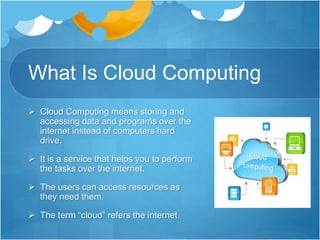
What Is Cloud Computing
 Cloud Computing means storing and
accessing data and programs over the
internet instead of computers hard
drive.
 It is a service that helps you to perform
the tasks over the internet.
 The users can access resources as
they need them.
 The term “cloud” refers the internet.
Cloud Computing:
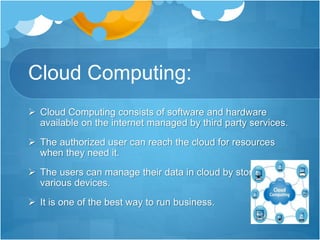
 Cloud Computing consists of software and hardware
available on the internet managed by third party services.
 The authorized user can reach the cloud for resources
when they need it.
 The users can manage their data in cloud by storing it in
various devices.
 It is one of the best way to run business.
Secured Cloud Computing
 The data stored in the cloud are accessed by the
authenticated users via passwords or tokens.
 The users just ‘plug in’ and access by the resources.
 The company or the individuals pay for not using the
system but they can pay for not using the system but
they can pay only for the computing power and
services they use.
 The online storage is safe and secured.
How do we actually work with
“cloud”?
 You just need the personal computer with internet
connection.
 You need to access to the cloud services to make use
of it.
 put what ever you want inside the cloud or make use
of serves, software’s, etc., you need.
 Disconnect it once you have done release it back to
the cloud.
 Pay for the server utilized, processing power used
and bandwidth consumed.
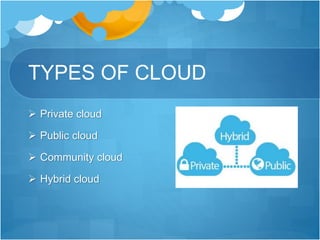
TYPES OF CLOUD
 Private cloud
 Public cloud
 Community cloud
 Hybrid cloud
Public Cloud
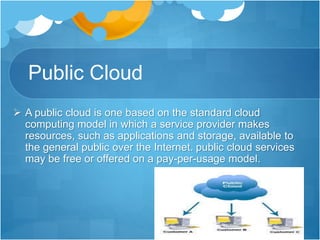
 A public cloud is one based on the standard cloud
computing model in which a service provider makes
resources, such as applications and storage, available to
the general public over the Internet. public cloud services
may be free or offered on a pay-per-usage model.
Private Cloud
 Private Cloud is a type of cloud
computing that delivers similar
advantages to public cloud. Unlike public
clouds, which deliver services to multiple
organizations, a private cloud is
dedicated to a single organization.
Community Cloud
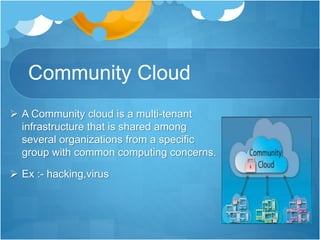
 A Community cloud is a multi-tenant
infrastructure that is shared among
several organizations from a specific
group with common computing concerns.
 Ex :- hacking,virus
Hybrid cloud
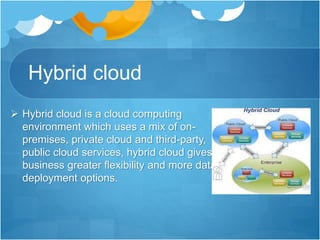
 Hybrid cloud is a cloud computing
environment which uses a mix of on-
premises, private cloud and third-party,
public cloud services, hybrid cloud gives
business greater flexibility and more data
deployment options.
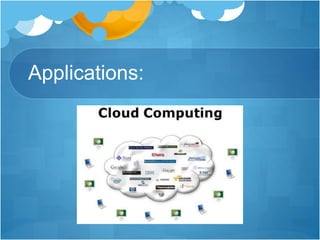
Applications:
Examples:
 Educational institutions:-
• Ability for the students to access data
anywhere, anytime, to enroll in online
classes and to participate in group
activities.
 Development:-
• It applies to areas such as banking,
agriculture, health and science.
Best example for cloud
computing:
 Electricity bill:-
 Turn on your lights and meter starts running.
Once it is switched off, meter stops.
 You will pay only for the power utilized.
 The same concept applies in the cloud
computing.
“PAY FOR WHAT YOU USE”
Top most uses of cloud
computing:
 Infrastructure as a service (IAAS) and platform as service (PAAS)
 Private cloud and hybrid cloud
 Test and development
 Big data analytics
 File storage
 Disaster recovery
 Backup
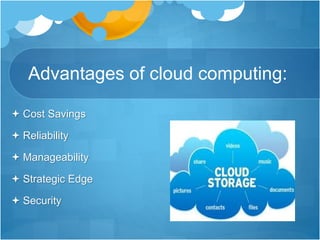
Advantages of cloud computing:
 Cost Savings
 Reliability
 Manageability
 Strategic Edge
 Security
Financial profits
Clever Use Of Hardware
Power Saver
Savings on Server Costs
Timely Payments
No Need for Reserves
Cloud computing
Cloud computing

Cloud computing

  • 2.
    POINTS TO BECOVERED  What is cloud computing?  Secured cloud computing  Before cloud computing how it was  After cloud computing how it is  Applications of cloud computing  Usage of cloud computing  Advantages of cloud computing  Types of cloud computing  Financial profits by using it
  • 3.
    What Is CloudComputing  Cloud Computing means storing and accessing data and programs over the internet instead of computers hard drive.  It is a service that helps you to perform the tasks over the internet.  The users can access resources as they need them.  The term “cloud” refers the internet.
  • 4.
    Cloud Computing:  CloudComputing consists of software and hardware available on the internet managed by third party services.  The authorized user can reach the cloud for resources when they need it.  The users can manage their data in cloud by storing it in various devices.  It is one of the best way to run business.
  • 5.
    Secured Cloud Computing The data stored in the cloud are accessed by the authenticated users via passwords or tokens.  The users just ‘plug in’ and access by the resources.  The company or the individuals pay for not using the system but they can pay for not using the system but they can pay only for the computing power and services they use.  The online storage is safe and secured.
  • 6.
    How do weactually work with “cloud”?  You just need the personal computer with internet connection.  You need to access to the cloud services to make use of it.  put what ever you want inside the cloud or make use of serves, software’s, etc., you need.  Disconnect it once you have done release it back to the cloud.  Pay for the server utilized, processing power used and bandwidth consumed.
  • 7.
    TYPES OF CLOUD Private cloud  Public cloud  Community cloud  Hybrid cloud
  • 8.
    Public Cloud  Apublic cloud is one based on the standard cloud computing model in which a service provider makes resources, such as applications and storage, available to the general public over the Internet. public cloud services may be free or offered on a pay-per-usage model.
  • 9.
    Private Cloud  PrivateCloud is a type of cloud computing that delivers similar advantages to public cloud. Unlike public clouds, which deliver services to multiple organizations, a private cloud is dedicated to a single organization.
  • 10.
    Community Cloud  ACommunity cloud is a multi-tenant infrastructure that is shared among several organizations from a specific group with common computing concerns.  Ex :- hacking,virus
  • 11.
    Hybrid cloud  Hybridcloud is a cloud computing environment which uses a mix of on- premises, private cloud and third-party, public cloud services, hybrid cloud gives business greater flexibility and more data deployment options.
  • 12.
  • 13.
    Examples:  Educational institutions:- •Ability for the students to access data anywhere, anytime, to enroll in online classes and to participate in group activities.  Development:- • It applies to areas such as banking, agriculture, health and science.
  • 14.
    Best example forcloud computing:  Electricity bill:-  Turn on your lights and meter starts running. Once it is switched off, meter stops.  You will pay only for the power utilized.  The same concept applies in the cloud computing. “PAY FOR WHAT YOU USE”
  • 15.
    Top most usesof cloud computing:  Infrastructure as a service (IAAS) and platform as service (PAAS)  Private cloud and hybrid cloud  Test and development  Big data analytics  File storage  Disaster recovery  Backup
  • 16.
    Advantages of cloudcomputing:  Cost Savings  Reliability  Manageability  Strategic Edge  Security
  • 17.
    Financial profits Clever UseOf Hardware Power Saver Savings on Server Costs Timely Payments No Need for Reserves