Institute of Engineering Technology
"What's the cloud?"
"Where is the cloud?"
"Are we in the cloud now?!"
"What's the cloud?"
"Where is the cloud?"
"Are we in the cloud now?!"
Storing and Accessing
Data and Programs over
the Internet instead of
your computer's Hard
Drive.
Salesforce.com
Appistry
Appscale
AT&T
Engine Yard
Enomaly
Go Grid
Google
Microsoft
G cloud 3
Amazon EC2
Gizmox
Storage Devices
 Block Storage Devices
Offer raw storage to the clients.
This raw storage can be partitioned to create volumes.
 File Storage Devices
Offer storage to clients in form of files, maintaining it’s own
file system.
This storage is in the form of Network Attached Storage
(NAS)
Lower Cost
Easier to Manage
Scalability
Business Contingency
Flexibility
On-Demand-Computing
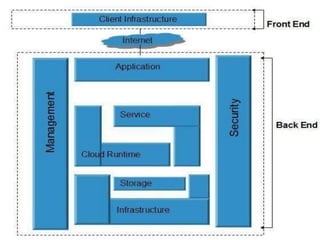
The Cloud Computing architecture comprises
of many cloud components, each of them are
loosely coupled. We can broadly divide the
cloud architecture into two parts:
Front End refers to the client part of cloud
computing system. It consists of interfaces and
applications that are required to access the cloud
computing platforms, e.g., Web Browser.
Back End refers to the cloud itself. It consists of all
the resources required to provide cloud computing
services. It comprises of huge data storage, virtual
machines, security mechanism, services,
deployment models, servers, etc.
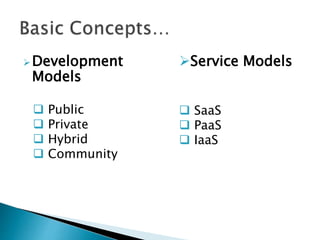
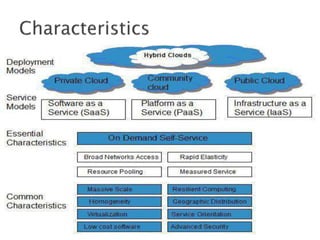
Development
Models
 Public
 Private
 Hybrid
 Community
Service Models
 SaaS
 PaaS
 IaaS
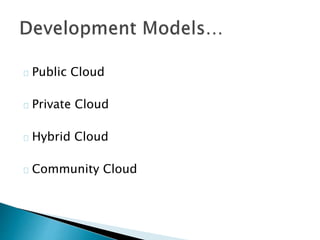
Public Cloud
Private Cloud
Hybrid Cloud
Community Cloud
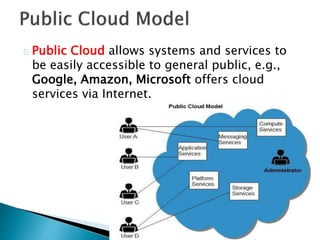
Public Cloud allows systems and services to
be easily accessible to general public, e.g.,
Google, Amazon, Microsoft offers cloud
services via Internet.
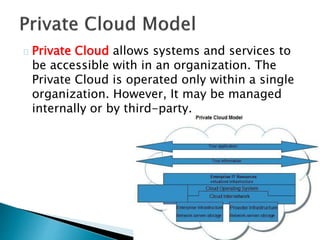
Private Cloud allows systems and services to
be accessible with in an organization. The
Private Cloud is operated only within a single
organization. However, It may be managed
internally or by third-party.
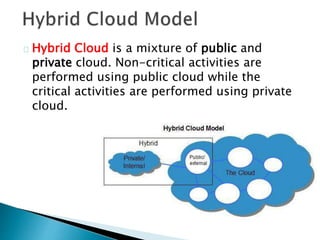
Hybrid Cloud is a mixture of public and
private cloud. Non-critical activities are
performed using public cloud while the
critical activities are performed using private
cloud.
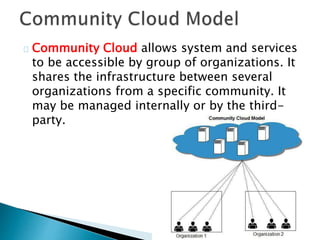
Community Cloud allows system and services
to be accessible by group of organizations. It
shares the infrastructure between several
organizations from a specific community. It
may be managed internally or by the third-
party.
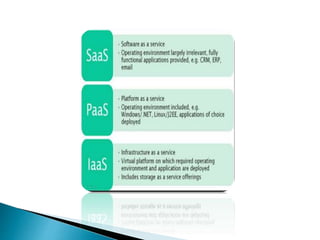
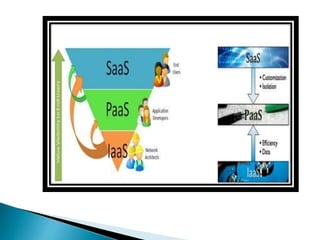
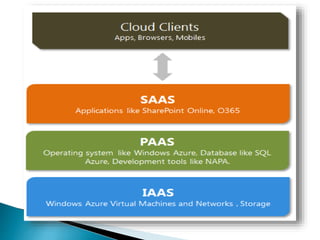
 Software as a Service (Saas)
 Platform as a service (PaaS)
 Integration/infrastructure as a Service (IaaS)
 When an organization is
considering Cloud security
it should consider both the
differences and similarities
between these three
segments of Cloud Service
Models
This particular model is focused on managing
access to applications.
For example, policy controls may dictate that a
sales person can only download particular
information from sales CRM
applications(Customer Relationship
Management).
For example, they are only permitted to
download certain leads, within certain
geographies or during local office working hours.
In effect, the security officer needs to focus on
establishing controls regarding users' access to
applications.
The primary focus of this model is on protecting
data. This is especially important in the case of
storage as a service. An important element to
consider within PaaS is the ability to plan against
the possibility of an outage from a Cloud
provider.
The security operation needs to consider
providing for the ability to load balance across
providers to ensure fail over of services in the
event of an outage. Another key consideration
should be the ability to encrypt the data whilst
stored on a third-party platform and to be aware
of the regulatory issues that may apply to data
availability in different geographies
Within this model the focus is on managing
virtual machines.
The CSOs (Chief Security Officers) priority is
to overlay a governance framework to enable
the organization to put controls in place
regarding how virtual machines are created
uncontrolled access and potential costly
wastage
Many Cloud services are accessed using
simple REST Web Services interfaces. These
are commonly called "APIs", since they are
similar in concept to the more heavyweight
C++ or Java APIs used by programmers,
though they are much easier to leverage from
a Web page or from a mobile phone, hence
their increasing ubiquity
Does not access private user data
CSOs focused on SaaS, PaaS and IaaS all the
time.
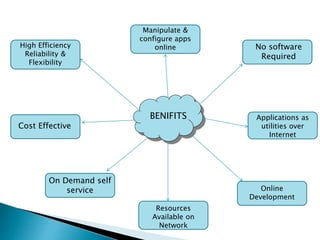
BENIFITS
High Efficiency
Reliability &
Flexibility
Manipulate &
configure apps
online
Cost Effective
No software
Required
On Demand self
service Online
Development
Resources
Available on
Network
Applications as
utilities over
Internet
Virtualization
Service-Oriented Architecture (SOA)
Grid Computing
Utility Computing
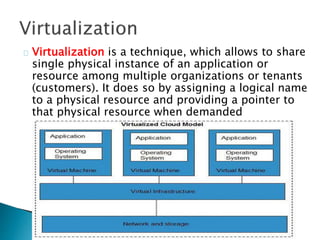
Virtualization is a technique, which allows to share
single physical instance of an application or
resource among multiple organizations or tenants
(customers). It does so by assigning a logical name
to a physical resource and providing a pointer to
that physical resource when demanded
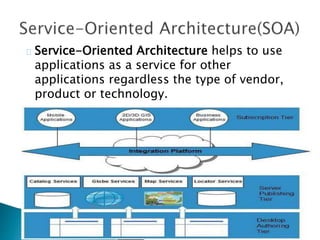
Service-Oriented Architecture helps to use
applications as a service for other
applications regardless the type of vendor,
product or technology.
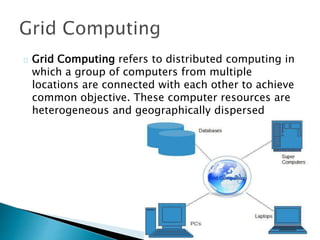
Grid Computing refers to distributed computing in
which a group of computers from multiple
locations are connected with each other to achieve
common objective. These computer resources are
heterogeneous and geographically dispersed
Utility computing is based on Pay per Use
model. It offers computational resources on
demand as a metered service.
Cloud computing, grid computing, and
managed IT services are based on the
concept of Utility computing.
Although Cloud Computing is a great innovation
in the world of computing, there also exist
downsides of cloud computing.
It is the biggest concern about cloud computing.
Since data management and infrastructure
management in cloud is provided by third-party,
it is always a risk to handover the sensitive
information to such providers.
Although the cloud computing vendors ensure
more secure password protected accounts, any
sign of security breach would result in loss of
clients and businesses.
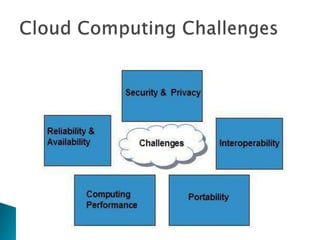
Security and Privacy of information is the
biggest challenge to cloud computing. Security
and privacy issues can be overcome by
employing encryption, security hardware and
security applications.
PORTABILITY
INTEROPERABILITY
COMPUTING PERFORMANCE
RELIABILITY AND AVAILABILITY
It is very difficult for the customers to switch
from one Cloud Service Provider (CSP) to
another. It results in dependency on a
particular CSP for service.
This risk involves the failure of isolation
mechanism that separates storage, memory,
routing between the different tenants
Encryption helps to protect data from being
compromised. It protects data that is being
transferred as well as data stored in the
cloud. Although encryption helps to protect
data from any unauthorized access, it does
not prevent from data loss.
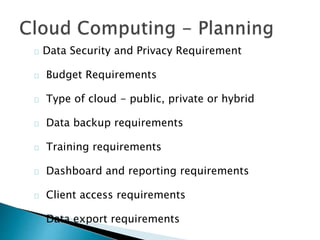
Data Security and Privacy Requirement
Budget Requirements
Type of cloud - public, private or hybrid
Data backup requirements
Training requirements
Dashboard and reporting requirements
Client access requirements
Data export requirements
Cloud computing

Cloud computing

  • 1.
  • 3.
    "What's the cloud?" "Whereis the cloud?" "Are we in the cloud now?!"
  • 5.
    "What's the cloud?" "Whereis the cloud?" "Are we in the cloud now?!"
  • 6.
    Storing and Accessing Dataand Programs over the Internet instead of your computer's Hard Drive.
  • 8.
  • 9.
    Storage Devices  BlockStorage Devices Offer raw storage to the clients. This raw storage can be partitioned to create volumes.  File Storage Devices Offer storage to clients in form of files, maintaining it’s own file system. This storage is in the form of Network Attached Storage (NAS)
  • 10.
    Lower Cost Easier toManage Scalability Business Contingency Flexibility On-Demand-Computing
  • 11.
    The Cloud Computingarchitecture comprises of many cloud components, each of them are loosely coupled. We can broadly divide the cloud architecture into two parts: Front End refers to the client part of cloud computing system. It consists of interfaces and applications that are required to access the cloud computing platforms, e.g., Web Browser. Back End refers to the cloud itself. It consists of all the resources required to provide cloud computing services. It comprises of huge data storage, virtual machines, security mechanism, services, deployment models, servers, etc.
  • 13.
    Development Models  Public  Private Hybrid  Community Service Models  SaaS  PaaS  IaaS
  • 14.
    Public Cloud Private Cloud HybridCloud Community Cloud
  • 15.
    Public Cloud allowssystems and services to be easily accessible to general public, e.g., Google, Amazon, Microsoft offers cloud services via Internet.
  • 16.
    Private Cloud allowssystems and services to be accessible with in an organization. The Private Cloud is operated only within a single organization. However, It may be managed internally or by third-party.
  • 17.
    Hybrid Cloud isa mixture of public and private cloud. Non-critical activities are performed using public cloud while the critical activities are performed using private cloud.
  • 18.
    Community Cloud allowssystem and services to be accessible by group of organizations. It shares the infrastructure between several organizations from a specific community. It may be managed internally or by the third- party.
  • 19.
     Software asa Service (Saas)  Platform as a service (PaaS)  Integration/infrastructure as a Service (IaaS)
  • 20.
     When anorganization is considering Cloud security it should consider both the differences and similarities between these three segments of Cloud Service Models
  • 21.
    This particular modelis focused on managing access to applications. For example, policy controls may dictate that a sales person can only download particular information from sales CRM applications(Customer Relationship Management). For example, they are only permitted to download certain leads, within certain geographies or during local office working hours. In effect, the security officer needs to focus on establishing controls regarding users' access to applications.
  • 22.
    The primary focusof this model is on protecting data. This is especially important in the case of storage as a service. An important element to consider within PaaS is the ability to plan against the possibility of an outage from a Cloud provider. The security operation needs to consider providing for the ability to load balance across providers to ensure fail over of services in the event of an outage. Another key consideration should be the ability to encrypt the data whilst stored on a third-party platform and to be aware of the regulatory issues that may apply to data availability in different geographies
  • 23.
    Within this modelthe focus is on managing virtual machines. The CSOs (Chief Security Officers) priority is to overlay a governance framework to enable the organization to put controls in place regarding how virtual machines are created uncontrolled access and potential costly wastage
  • 27.
    Many Cloud servicesare accessed using simple REST Web Services interfaces. These are commonly called "APIs", since they are similar in concept to the more heavyweight C++ or Java APIs used by programmers, though they are much easier to leverage from a Web page or from a mobile phone, hence their increasing ubiquity Does not access private user data
  • 28.
    CSOs focused onSaaS, PaaS and IaaS all the time.
  • 29.
    BENIFITS High Efficiency Reliability & Flexibility Manipulate& configure apps online Cost Effective No software Required On Demand self service Online Development Resources Available on Network Applications as utilities over Internet
  • 30.
  • 31.
    Virtualization is atechnique, which allows to share single physical instance of an application or resource among multiple organizations or tenants (customers). It does so by assigning a logical name to a physical resource and providing a pointer to that physical resource when demanded
  • 32.
    Service-Oriented Architecture helpsto use applications as a service for other applications regardless the type of vendor, product or technology.
  • 33.
    Grid Computing refersto distributed computing in which a group of computers from multiple locations are connected with each other to achieve common objective. These computer resources are heterogeneous and geographically dispersed
  • 34.
    Utility computing isbased on Pay per Use model. It offers computational resources on demand as a metered service. Cloud computing, grid computing, and managed IT services are based on the concept of Utility computing.
  • 35.
    Although Cloud Computingis a great innovation in the world of computing, there also exist downsides of cloud computing. It is the biggest concern about cloud computing. Since data management and infrastructure management in cloud is provided by third-party, it is always a risk to handover the sensitive information to such providers. Although the cloud computing vendors ensure more secure password protected accounts, any sign of security breach would result in loss of clients and businesses.
  • 37.
    Security and Privacyof information is the biggest challenge to cloud computing. Security and privacy issues can be overcome by employing encryption, security hardware and security applications. PORTABILITY INTEROPERABILITY COMPUTING PERFORMANCE RELIABILITY AND AVAILABILITY
  • 38.
    It is verydifficult for the customers to switch from one Cloud Service Provider (CSP) to another. It results in dependency on a particular CSP for service. This risk involves the failure of isolation mechanism that separates storage, memory, routing between the different tenants
  • 39.
    Encryption helps toprotect data from being compromised. It protects data that is being transferred as well as data stored in the cloud. Although encryption helps to protect data from any unauthorized access, it does not prevent from data loss.
  • 41.
    Data Security andPrivacy Requirement Budget Requirements Type of cloud - public, private or hybrid Data backup requirements Training requirements Dashboard and reporting requirements Client access requirements Data export requirements