Cloud Computing
-- The New Age Of Computing
Outlines
 Introduction
 What is Cloud Computing?
 Cloud Computing Services
 Cloud Storage
 Is Cloud Computing reduces E-Waste?
 Advantages
 Disadvantages
 Conclusion
Introduction
• With traditional desktop computing, we run copies of software
programs on our own computer. The documents we create are stored
on our own pc.
• With cloud computing, the software programs one use aren’t run
from one’s personal computer, but are rather stored on servers
accessed via the Internet.
What Is Cloud Computing
• Cloud computing is a type of computing that relies on sharing
computing resources rather than having local servers or
personal devices to handle applications.
• In simple Cloud computing is using the internet to access someone
else's software running on someone else's hardware in someone else's
data center.
Cloud Computing Services
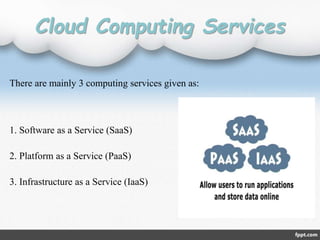
There are mainly 3 computing services given as:
1. Software as a Service (SaaS)
2. Platform as a Service (PaaS)
3. Infrastructure as a Service (IaaS)
 Defined as service-on-demand, where a provider will license software
tailored.
 In the SaaS model, cloud providers install and operate application
software in the cloud and cloud users access the software from cloud
clients.
 Examples of SaaS include: Google Apps, Microsoft Office 365, Onlive,
GT Nexus, Marketo, and TradeCard.
SaaS
PaaS
 In the PaaS model, cloud providers deliver a computing platform
typically including operating system, programming language
execution environment, database, and web server.
 Examples of PaaS include: AWS Elastic Beanstalk, Cloud Foundry,
Heroku, Force.com, EngineYard, Mendix, OpenShift, Google App
Engine, Windows Azure Cloud Services and OrangeScape
IaaS
 In the most basic cloud-service model, providers of IaaS offer
computers physical or (more often) virtual machines and other
resources. IaaS clouds often offer additional resources such as a virtual-
machine disk image library, raw (block) and file-based storage,
firewalls, load balancers, IP addresses, virtual local area networks
(VLANs), and software bundles.
 Examples of IaaS providers include: Amazon EC2, Google Compute
Engine, HP Cloud, iland, Joyent, LeaseWeb, Linode, NaviSite, Oracle
Infrastructure as a Service
Cloud Storage
• Cloud storage means "the storage of data online in the cloud," wherein
a company's data is stored in and accessible from multiple distributed
and connected resources that comprise a cloud.
• Cloud storage can provide the benefits of greater accessibility and
reliability; rapid deployment; strong protection for data
backup, archival and disaster recovery purposes.
Types of Cloud Storage
1. Public Cloud
2. Private Cloud
3. Hybrid Cloud
Types of Cloud Storage
Public Cloud
• Computing infrastructure is hosted by cloud vendor at the vendors premises.
• and can be shared by various organizations.
• E.g. : Amazon, Google, Microsoft, Sales force
Private Cloud
• The computing infrastructure is dedicated to a particular organization and not
shared with other organizations.
• more expensive and more secure when compare to public cloud.
• E.g. : HP data center, IBM, Sun, Oracle, 3tera
Hybrid Cloud
• Organizations may host critical applications on private clouds.
• where as relatively less security concerns on public cloud.
• usage of both public and private together is called hybrid cloud.
Advantages
1. Lower computer costs.
2. Improved performance.
3. Reduced software costs.
4. Improved document format compatibility.
5. Unlimited storage capacity.
6. Increased data reliability.
7. Universal document access.
8. Latest version availability
9. It reduces global warming and E waste
Disadvantages
1. Requires a constant Internet connection.
2. Does not work well with low-speed connections.
3. Features might be limited.
4. Stored data might not be secure.
5. Stored data can be lost.
• Thus cloud computing provide a super-computing power .
• This cloud of computers extends beyond a single company or
enterprise.
• The applications and data served by the cloud are available to broad
group of users, cross-enterprise and cross-platform.
Conclusion
Queries?..
Thanking You

Cloud computing

  • 1.
    Cloud Computing -- TheNew Age Of Computing
  • 2.
    Outlines  Introduction  Whatis Cloud Computing?  Cloud Computing Services  Cloud Storage  Is Cloud Computing reduces E-Waste?  Advantages  Disadvantages  Conclusion
  • 3.
    Introduction • With traditionaldesktop computing, we run copies of software programs on our own computer. The documents we create are stored on our own pc. • With cloud computing, the software programs one use aren’t run from one’s personal computer, but are rather stored on servers accessed via the Internet.
  • 4.
    What Is CloudComputing • Cloud computing is a type of computing that relies on sharing computing resources rather than having local servers or personal devices to handle applications. • In simple Cloud computing is using the internet to access someone else's software running on someone else's hardware in someone else's data center.
  • 5.
    Cloud Computing Services Thereare mainly 3 computing services given as: 1. Software as a Service (SaaS) 2. Platform as a Service (PaaS) 3. Infrastructure as a Service (IaaS)
  • 6.
     Defined asservice-on-demand, where a provider will license software tailored.  In the SaaS model, cloud providers install and operate application software in the cloud and cloud users access the software from cloud clients.  Examples of SaaS include: Google Apps, Microsoft Office 365, Onlive, GT Nexus, Marketo, and TradeCard. SaaS
  • 7.
    PaaS  In thePaaS model, cloud providers deliver a computing platform typically including operating system, programming language execution environment, database, and web server.  Examples of PaaS include: AWS Elastic Beanstalk, Cloud Foundry, Heroku, Force.com, EngineYard, Mendix, OpenShift, Google App Engine, Windows Azure Cloud Services and OrangeScape
  • 8.
    IaaS  In themost basic cloud-service model, providers of IaaS offer computers physical or (more often) virtual machines and other resources. IaaS clouds often offer additional resources such as a virtual- machine disk image library, raw (block) and file-based storage, firewalls, load balancers, IP addresses, virtual local area networks (VLANs), and software bundles.  Examples of IaaS providers include: Amazon EC2, Google Compute Engine, HP Cloud, iland, Joyent, LeaseWeb, Linode, NaviSite, Oracle Infrastructure as a Service
  • 9.
    Cloud Storage • Cloudstorage means "the storage of data online in the cloud," wherein a company's data is stored in and accessible from multiple distributed and connected resources that comprise a cloud. • Cloud storage can provide the benefits of greater accessibility and reliability; rapid deployment; strong protection for data backup, archival and disaster recovery purposes.
  • 10.
    Types of CloudStorage 1. Public Cloud 2. Private Cloud 3. Hybrid Cloud
  • 11.
    Types of CloudStorage Public Cloud • Computing infrastructure is hosted by cloud vendor at the vendors premises. • and can be shared by various organizations. • E.g. : Amazon, Google, Microsoft, Sales force Private Cloud • The computing infrastructure is dedicated to a particular organization and not shared with other organizations. • more expensive and more secure when compare to public cloud. • E.g. : HP data center, IBM, Sun, Oracle, 3tera Hybrid Cloud • Organizations may host critical applications on private clouds. • where as relatively less security concerns on public cloud. • usage of both public and private together is called hybrid cloud.
  • 12.
    Advantages 1. Lower computercosts. 2. Improved performance. 3. Reduced software costs. 4. Improved document format compatibility. 5. Unlimited storage capacity. 6. Increased data reliability. 7. Universal document access. 8. Latest version availability 9. It reduces global warming and E waste
  • 13.
    Disadvantages 1. Requires aconstant Internet connection. 2. Does not work well with low-speed connections. 3. Features might be limited. 4. Stored data might not be secure. 5. Stored data can be lost.
  • 14.
    • Thus cloudcomputing provide a super-computing power . • This cloud of computers extends beyond a single company or enterprise. • The applications and data served by the cloud are available to broad group of users, cross-enterprise and cross-platform. Conclusion
  • 15.