Cloud Computing
What is Cloud Computing?

1.

It is a general term used to describe a new class of network based computing
that takes place over the Internet.

2.

Large data centers

3.

Highly-interactive Web applications

4.

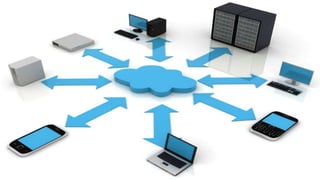
A platforms which hides the complexity and details of the underlying
infrastructure from users and applications by providing very simple graphical
interface or API

5.

In addition, the platform provides on demand services, that are always
on, anywhere, anytime and any place.
Why Should We Use Cloud Computing
Technology?



It avoids the use of hardware storage devices carrying from one place to
another.



Nowadays every individual have internet connections which makes it easier for
cloud computing.



ISP’s have provided low cost plans with better upload and download speed.



Time saving



Saves money



Less efforts
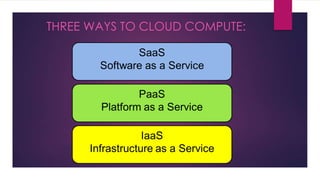
THREE WAYS TO CLOUD COMPUTE:
SaaS

Software as a Service


No hardware or software to manage



Apps are located in the cloud



Service delivered through a browser



From end user’s point of view



Software experiences are delivered through the Internet
PaaS

Platform as a Service


Platform as a Service (PaaS)



From developer’s point of view (i.e. cloud users)



Cloud providers offer an Internet-based platform to developers
who want to create services but don't want to build their own
cloud
IaaS

Infrastructure as a Service
Access to infrastructure stack:


Full OS access



Firewalls



Routers



Cloud providers build datacenters



Power, scale, hardware, networking, storage, distributed
systems, etc



Cloud users rent storage, computation, and maintenance
from cloud providers (pay-as-you-go; like utility)
SaaS

PaaS

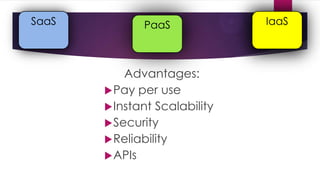
Advantages:
 Pay per use
 Instant Scalability
 Security
 Reliability
 APIs

IaaS
Themes of Cloud Service:
Public cloud
 Public cloud (off-site and remote) describes cloud computing where resources are dynamically provisioned on an
on-demand, self-service basis over the Internet, via web applications/web services, open API, from a third-party
provider who bills on a utility computing basis.

Private cloud
 A private cloud environment is often the first step for a corporation prior to adopting a public cloud initiative.
Corporations have discovered the benefits of consolidating shared services on virtualized hardware deployed from
a primary datacenter to serve local and remote users.
Hybrid cloud
 A hybrid cloud environment consists of some portion of computing resources on-site (on premise) and off-site (public
cloud). By integrating public cloud services, users can leverage cloud solutions for specific functions that are too
costly to maintain on-premise such as virtual server disaster recovery, backups and test/development
environments.
Community cloud
 A community cloud is formed when several organizations with similar requirements share common infrastructure.
Costs are spread over fewer users than a public cloud but more than a single tenant.
Advantages of Cloud Computing


Improved performance:






With few large programs hogging your computer's memory, you will see better
performance from your PC.
Computers in a cloud computing system boot and run faster because they have fewer
programs and processes loaded into memory…

Reduced software costs:


Instead of purchasing expensive software applications, you can get most of what you
need for free-ish!




most cloud computing applications today, such as the Google Docs suite.

better than paying for similar commercial software


which alone may be justification for switching to cloud applications
Conclusion:


Cloud Computing is outpacing the IT industry



Real business value can be realized by customers of all sizes



Cloud solutions are simple to acquire, don’t require long term contracts and are easier
to scale up and down as needed



Proper planning and migration services are needed to ensure a successful
implementation



Public and Private Clouds can be deployed together to leverage the best of both



Third party monitoring services ensure customer are getting the most out of their cloud
environment



Security Compliance and Monitoring is achievable with careful planning and analysis
Cloud computing

Cloud computing

  • 1.
  • 2.
    What is CloudComputing? 1. It is a general term used to describe a new class of network based computing that takes place over the Internet. 2. Large data centers 3. Highly-interactive Web applications 4. A platforms which hides the complexity and details of the underlying infrastructure from users and applications by providing very simple graphical interface or API 5. In addition, the platform provides on demand services, that are always on, anywhere, anytime and any place.
  • 4.
    Why Should WeUse Cloud Computing Technology?  It avoids the use of hardware storage devices carrying from one place to another.  Nowadays every individual have internet connections which makes it easier for cloud computing.  ISP’s have provided low cost plans with better upload and download speed.  Time saving  Saves money  Less efforts
  • 6.
    THREE WAYS TOCLOUD COMPUTE:
  • 7.
    SaaS Software as aService  No hardware or software to manage  Apps are located in the cloud  Service delivered through a browser  From end user’s point of view  Software experiences are delivered through the Internet
  • 8.
    PaaS Platform as aService  Platform as a Service (PaaS)  From developer’s point of view (i.e. cloud users)  Cloud providers offer an Internet-based platform to developers who want to create services but don't want to build their own cloud
  • 9.
    IaaS Infrastructure as aService Access to infrastructure stack:  Full OS access  Firewalls  Routers  Cloud providers build datacenters  Power, scale, hardware, networking, storage, distributed systems, etc  Cloud users rent storage, computation, and maintenance from cloud providers (pay-as-you-go; like utility)
  • 11.
    SaaS PaaS Advantages:  Pay peruse  Instant Scalability  Security  Reliability  APIs IaaS
  • 12.
    Themes of CloudService: Public cloud  Public cloud (off-site and remote) describes cloud computing where resources are dynamically provisioned on an on-demand, self-service basis over the Internet, via web applications/web services, open API, from a third-party provider who bills on a utility computing basis. Private cloud  A private cloud environment is often the first step for a corporation prior to adopting a public cloud initiative. Corporations have discovered the benefits of consolidating shared services on virtualized hardware deployed from a primary datacenter to serve local and remote users. Hybrid cloud  A hybrid cloud environment consists of some portion of computing resources on-site (on premise) and off-site (public cloud). By integrating public cloud services, users can leverage cloud solutions for specific functions that are too costly to maintain on-premise such as virtual server disaster recovery, backups and test/development environments. Community cloud  A community cloud is formed when several organizations with similar requirements share common infrastructure. Costs are spread over fewer users than a public cloud but more than a single tenant.
  • 13.
    Advantages of CloudComputing  Improved performance:    With few large programs hogging your computer's memory, you will see better performance from your PC. Computers in a cloud computing system boot and run faster because they have fewer programs and processes loaded into memory… Reduced software costs:  Instead of purchasing expensive software applications, you can get most of what you need for free-ish!   most cloud computing applications today, such as the Google Docs suite. better than paying for similar commercial software  which alone may be justification for switching to cloud applications
  • 14.
    Conclusion:  Cloud Computing isoutpacing the IT industry  Real business value can be realized by customers of all sizes  Cloud solutions are simple to acquire, don’t require long term contracts and are easier to scale up and down as needed  Proper planning and migration services are needed to ensure a successful implementation  Public and Private Clouds can be deployed together to leverage the best of both  Third party monitoring services ensure customer are getting the most out of their cloud environment  Security Compliance and Monitoring is achievable with careful planning and analysis

Editor's Notes

  • #10 Sometimes called Utility computing