Monitoring in
Big Data Platform
Author: Albert Lewandowski
•Big Data DevOps Engineer in Getindata
•Focused on infrastructure, cloud, Internet of Things and
Big Data
Who am I?
Agenda
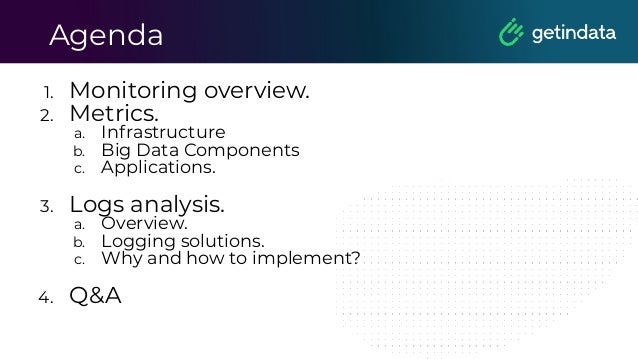
1. Monitoring overview.
2. Metrics.
a. Infrastructure
b. Big Data Components
c. Applications.
3. Logs analysis.
a. Overview.
b. Logging solutions.
c. Why and how to implement?
4. Q&A
Monitoring
Overview
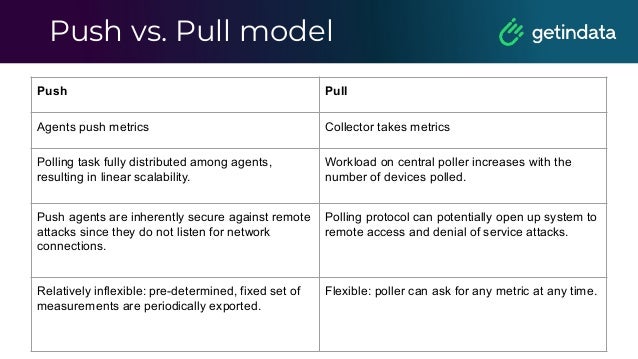
Push vs. Pull model
Push Pull
Agents push metrics Collector takes metrics
Polling task fully distributed among agents,
resulting in linear scalability.
Workload on central poller increases with the
number of devices polled.
Push agents are inherently secure against remote
attacks since they do not listen for network
connections.
Polling protocol can potentially open up system to
remote access and denial of service attacks.
Relatively inflexible: pre-determined, fixed set of
measurements are periodically exported.
Flexible: poller can ask for any metric at any time.
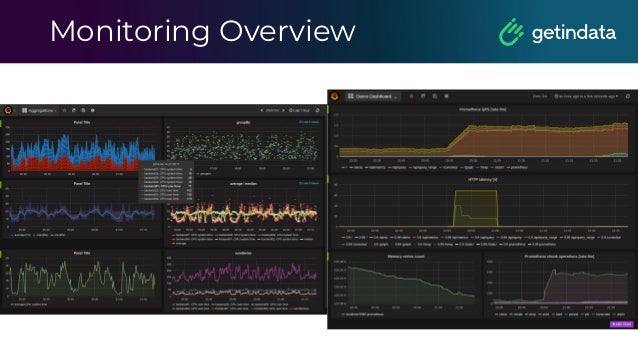
Monitoring Overview
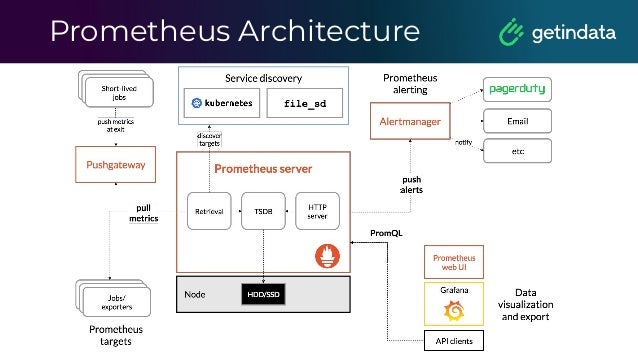
Prometheus Architecture
Prometheus is an open-source systems monitoring and alerting toolkit
originally built at SoundCloud and joined the Cloud Native
Computing Foundation in 2016 as the second hosted project,
after Kubernetes.
Components:
• server
• client libraries for instrumenting application code
• a push gateway for supporting short-lived jobs
• special-purpose exporters for services
• an AlertManager to handle alerts
Prometheus’ stories
•Use service discovery, it’s great
• Discover where Flink JM and TM expose their
metrics.
•How to provide HA?
• Think of using long-term storage like Thanos
or M3 or Cortex
•Do you need archived data?
•Monitor Prometheus even if it’s a
monitoring tool.
Service Discovery
It is used for discovering scrape targets.
We can use Kubernetes, Consul or file-based
service discovery and many others.
Prometheus Security
Remember:
■ It should not by default be possible for a target to expose data
that impersonates a different target. The honor_labels option
removes this protection, as can certain relabelling setups.
■ --web.enable-admin-api flag controls access to the
administrative HTTP API which includes functionality such as
deleting time series. This is disabled by default. If enabled,
administrative and mutating functionality will be accessible
under the /api/*/admin/ paths.
■ Any secrets stored in template files could be exfiltrated by
anyone able to configure receivers in the Alertmanager
configuration file.
Prometheus Security
Remember:
■ Prometheus and its components do not provide any
server-side authentication, authorization or encryption. If
you require this, it is recommended to use a reverse proxy.
■ As administrative and mutating endpoints are intended to
be accessed via simple tools such as cURL, there is no built
in CSRF protection.
In the future, server-side TLS support will be rolled out to the different
Prometheus projects. Those projects include Prometheus,
Alertmanager, Pushgateway and the official exporters. Authentication
of clients by TLS client certs will also be supported.
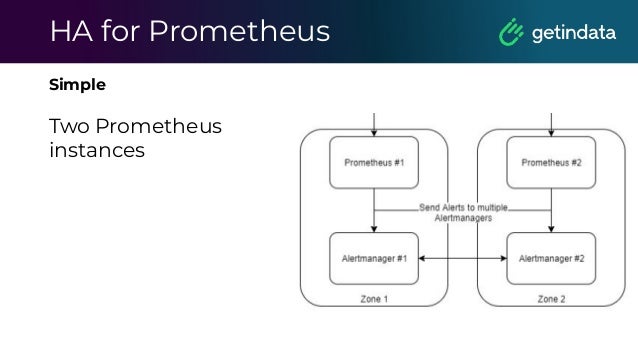
HA for Prometheus
Simple
Two Prometheus
instances
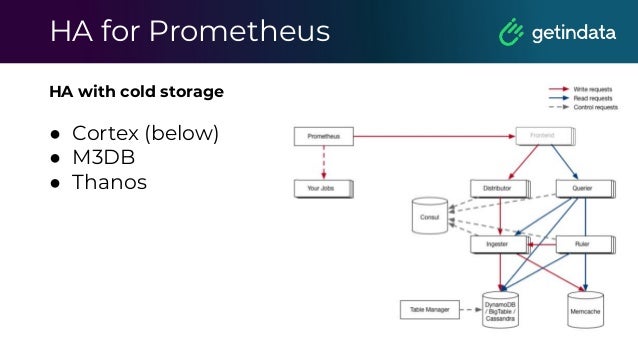
HA for Prometheus
HA with cold storage
● Cortex (below)
● M3DB
● Thanos
Monitoring
Infrastructure
Servers Monitoring
■ Using Node Exporter or any custom exporter
■ Predict disk usage
■ Send alerts in case of any issue or any dangerous
situation
Kubernetes Monitoring
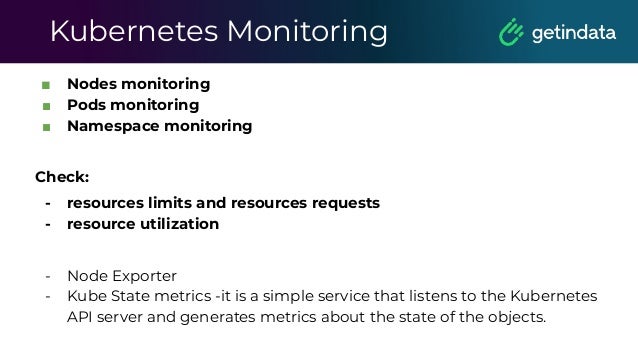
■ Nodes monitoring
■ Pods monitoring
■ Namespace monitoring
Check:
- resources limits and resources requests
- resource utilization
- Node Exporter
- Kube State metrics -it is a simple service that listens to the Kubernetes
API server and generates metrics about the state of the objects.
Monitoring
Components
Hadoop Stack Overview
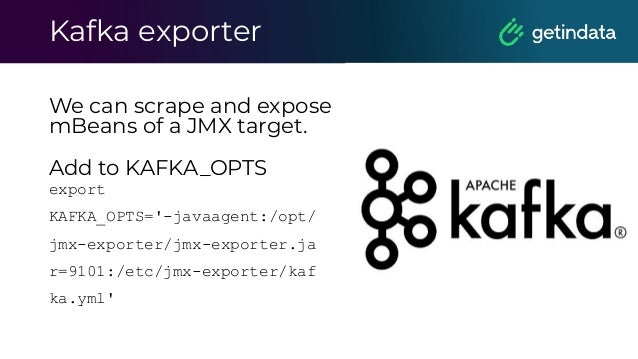
Kafka exporter
We can scrape and expose
mBeans of a JMX target.

Add to KAFKA_OPTS
export
KAFKA_OPTS='-javaagent:/opt/
jmx-exporter/jmx-exporter.ja
r=9101:/etc/jmx-exporter/kaf
ka.yml'
Kafka exporter
Metrics example:
• Number or replicas
• Under replicated partitions
• State of each broker
• JVM metrics
What about Kafka?
• Critical component in many systems
• A lot of data so any issue can cause
business loss
• What about adding more brokers?
What about Kafka?
• Keep it simple with JMX exporter.
• Monitor partitions state, number of
replicas
• You must have alerts when the number
of under replicated partitions grows fast
Monitoring
Applications
When should I use PushGateway?
• When monitoring multiple instances through a single
Pushgateway, the Pushgateway becomes both a
single point of failure and a potential bottleneck.
• You lose Prometheus's automatic instance health
monitoring via the up metric (generated on every
scrape).
• The Pushgateway never forgets series pushed to it
and will expose them to Prometheus forever unless
those series are manually deleted via the
Pushgateway's API.
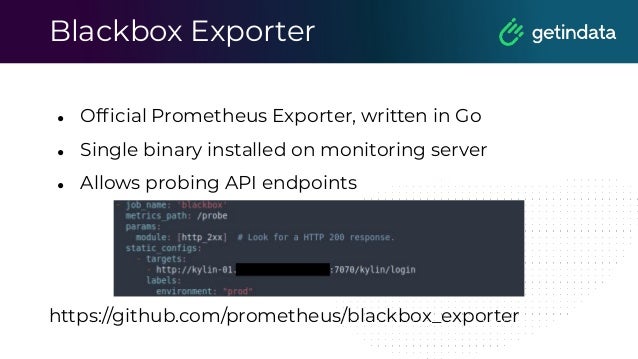
Blackbox Exporter
● Official Prometheus Exporter, written in Go
● Single binary installed on monitoring server
● Allows probing API endpoints
https://github.com/prometheus/blackbox_exporter
Airflow Exporter
● Provides metrics for Airflow:
○ dag_status
○ task_status
○ run_duration
● Simple install via pip
https://github.com/epoch8/airflow-exporter
Knox Exporter
● Provides metrics about access to WebHDFS and Hive
● Written in Java, manual installation as a service, needs
configuration file
https://github.com/marcelmay/apache-knox-exporter
NiFi
We use PrometheusReportingTask to report metrics in
Prometheus format.
It created metrics HTTP endpoint with information about
the JVM and the NiFi instance.
For flows, we need to use custom reporters like own NAR
processor that can count the number of flow files or any
different metric.
Bash Exporter
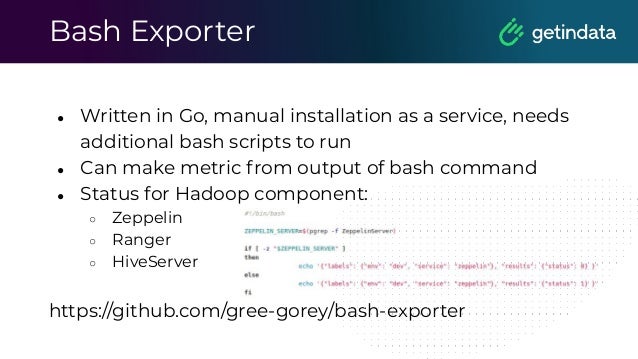
● Written in Go, manual installation as a service, needs
additional bash scripts to run
● Can make metric from output of bash command
● Status for Hadoop component:
○ Zeppelin
○ Ranger
○ HiveServer
https://github.com/gree-gorey/bash-exporter
Hive Query
● Running Hive query via crontab and writing output to
file
● Running bash exporter reading file and displaying
metrics for Prometheus
● Reading metrics in Grafana
Flink monitoring
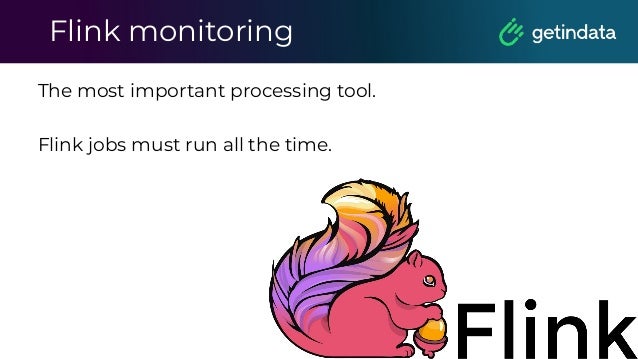
The most important processing tool.
Flink jobs must run all the time.
Flink monitoring
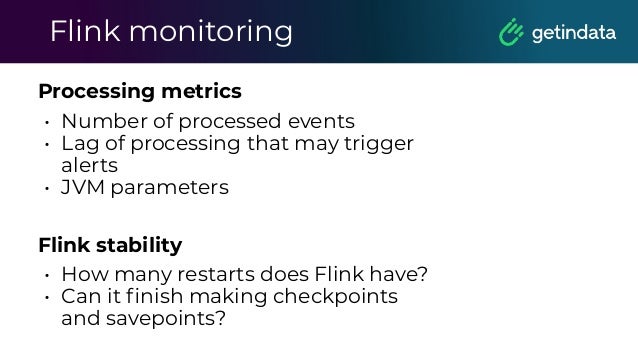
Processing metrics
• Number of processed events
• Lag of processing that may trigger
alerts
• JVM parameters
Flink stability
• How many restarts does Flink have?
• Can it finish making checkpoints
and savepoints?
Before Spark 3.0
Spark & Prometheus
What about Spark jobs?
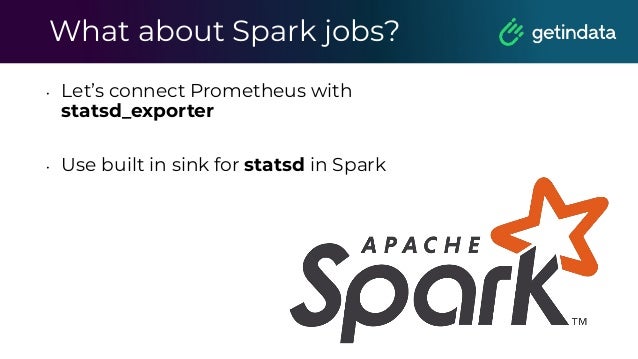
• Let’s connect Prometheus with
statsd_exporter
• Use built in sink for statsd in Spark
Spark & Prometheus
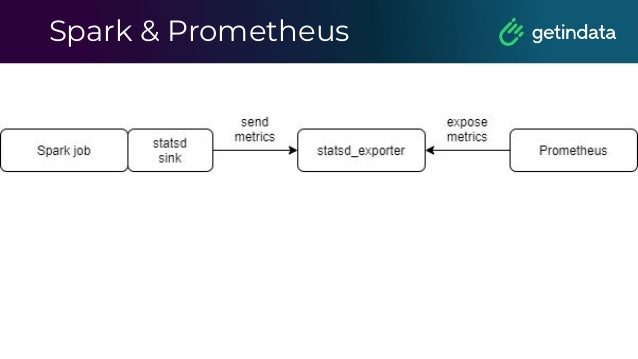
The best way to achieve stable metrics system
with right timestamp is about using statsd_sink.
These metrics can be sent to statsd_exporter
(https://github.com/prometheus/statsd_exporter)
and then can be exposed to the Prometheus.
Spark & Prometheus
The different approach based on JMX Exporter
and using Spark’s JMXSink.
The next is about using Spark’s GraphiteSink and
using Prometheus Graphite Exporter.
The last is about building custom exporter of
metrics.
From Spark 3.0
Spark & Prometheus
Spark 3.0 introduces the following resources:
- PrometheusServlet - which makes the
Master/Worker/Driver nodes expose metrics in
a Prometheus format.
- Prometheus Resource - which export metrics of
all executors at the driver.
Monitoring
Cloud
AWS
- Cloudwatch
- Cloudwatch Logs
Google Cloud
- Operations metrics
- Operations Logging
Formerly Stackdriver
Microsoft Azure
- Azure Monitor:
- Logs
- Metrics
Monitoring
Demo
Logs analysis
Overview
Logs analysis
Logging solutions
Log analytics
ELK
Elasticsearch
Elasticsearch is a distributed, open source
search and analytics engine for all types of
data, including textual, numerical,
geospatial, structured, and unstructured.
Elasticsearch is built on Apache Lucene
and was first released in 2010
Elasticsearch
Elasticsearch is a distributed, open source
search and analytics engine for all types of
data, including textual, numerical,
geospatial, structured, and unstructured.
Elasticsearch is built on Apache Lucene
and was first released in 2010
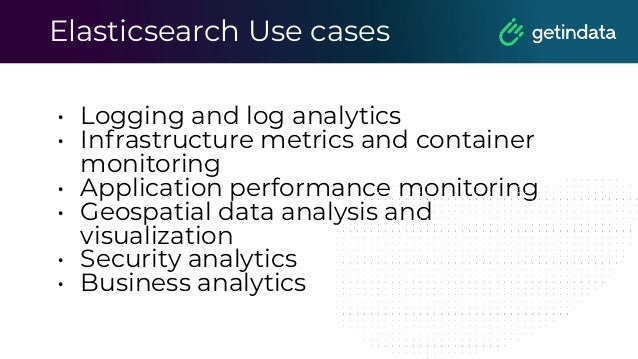
Elasticsearch Use cases
• Logging and log analytics
• Infrastructure metrics and container
monitoring
• Application performance monitoring
• Geospatial data analysis and
visualization
• Security analytics
• Business analytics
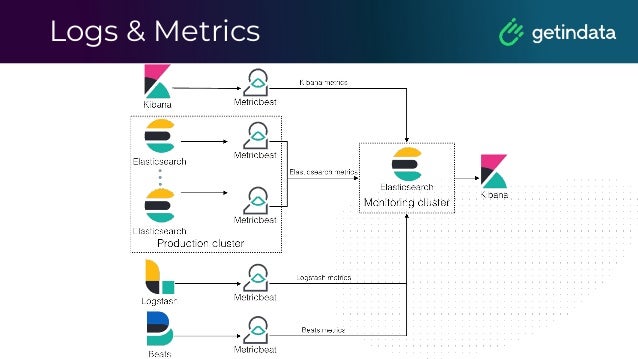
Logs & Metrics
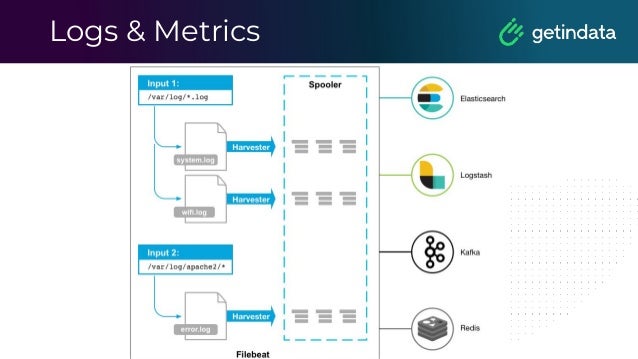
Logs & Metrics
Log analytics
Loki
Loki
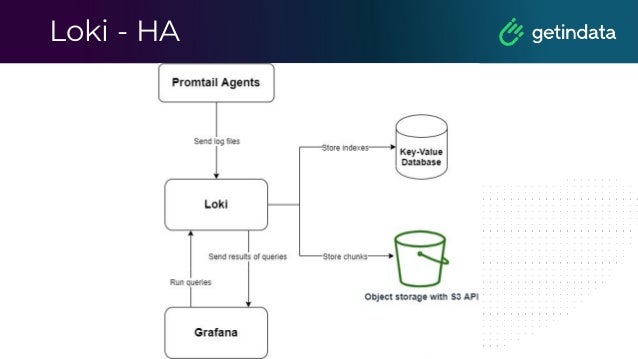
Loki is a horizontally-scalable,
highly-available, multi-tenant log
aggregation system inspired by
Prometheus. It is designed to be very cost
effective and easy to operate. It does not
index the contents of the logs, but rather a
set of labels for each log stream.
Loki Overview
Loki receives logs in separate streams, where each
stream is uniquely identified by its tenant ID
and its set of labels.
As log entries from a stream arrive, they are
GZipped as "chunks" and saved in the chunks
store.
The index stores each stream's label set and links
them to the individual chunks.
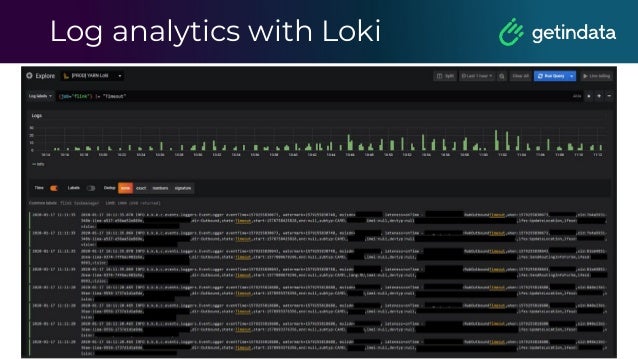
Log analytics with Loki
LogQL
This example counts all the log lines within the last
five minutes for the MySQL job.
rate( ( {job="mysql"} |= "error" !=
"timeout)[10s] ) )
It counts the entries for each log stream
count_over_time({job="mysql"}[5m])
Promtail
Promtail is an agent which ships the
contents of local logs to a private Loki
instance. It is deployed to every machine
that has applications needed to be
monitored.
Currently, Promtail can tail logs from two
sources: local log files and the systemd
journal (on AMD64 machines only).
Pipelines in Promtail
A pipeline is used to transform a single
log line, its labels, and its timestamp.
A pipeline is comprised of a set of
stages.
Loki - HA
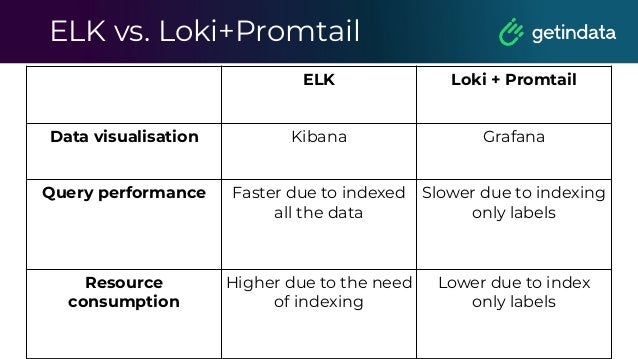
ELK vs. Loki+Promtail
ELK Loki + Promtail
Data visualisation Kibana Grafana
Query performance Faster due to indexed
all the data
Slower due to indexing
only labels
Resource
consumption
Higher due to the need
of indexing
Lower due to index
only labels
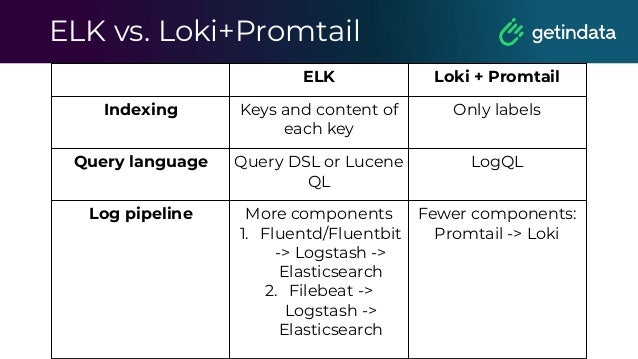
ELK vs. Loki+Promtail
ELK Loki + Promtail
Indexing Keys and content of
each key
Only labels
Query language Query DSL or Lucene
QL
LogQL
Log pipeline More components
1. Fluentd/Fluentbit
-> Logstash ->
Elasticsearch
2. Filebeat ->
Logstash ->
Elasticsearch
Fewer components:
Promtail -> Loki
Logs analysis
Why and how to implement?
Article
https://getindata.com/blog/why-log-analyti
cs-important-monitoring-system
Whitepaper
Monitoring and Observability for Data Platform
https://getindata.com/blog/white-paper-big-
data-monitoring-observability-data-platfor
m
Logs analysis
Demo
© Copyright. All rights reserved. Not to be reproduced without prior written consent.
Q&A

Monitoring in Big Data Platform - Albert Lewandowski, GetInData

  • 1.
    Monitoring in Big DataPlatform Author: Albert Lewandowski
  • 2.
    •Big Data DevOpsEngineer in Getindata •Focused on infrastructure, cloud, Internet of Things and Big Data Who am I?
  • 3.
    Agenda 1. Monitoring overview. 2.Metrics. a. Infrastructure b. Big Data Components c. Applications. 3. Logs analysis. a. Overview. b. Logging solutions. c. Why and how to implement? 4. Q&A
  • 4.
  • 5.
    Push vs. Pullmodel Push Pull Agents push metrics Collector takes metrics Polling task fully distributed among agents, resulting in linear scalability. Workload on central poller increases with the number of devices polled. Push agents are inherently secure against remote attacks since they do not listen for network connections. Polling protocol can potentially open up system to remote access and denial of service attacks. Relatively inflexible: pre-determined, fixed set of measurements are periodically exported. Flexible: poller can ask for any metric at any time.
  • 6.
  • 7.
  • 8.
    Prometheus Architecture Prometheus isan open-source systems monitoring and alerting toolkit originally built at SoundCloud and joined the Cloud Native Computing Foundation in 2016 as the second hosted project, after Kubernetes. Components: • server • client libraries for instrumenting application code • a push gateway for supporting short-lived jobs • special-purpose exporters for services • an AlertManager to handle alerts
  • 9.
    Prometheus’ stories •Use servicediscovery, it’s great • Discover where Flink JM and TM expose their metrics. •How to provide HA? • Think of using long-term storage like Thanos or M3 or Cortex •Do you need archived data? •Monitor Prometheus even if it’s a monitoring tool.
  • 10.
    Service Discovery It isused for discovering scrape targets. We can use Kubernetes, Consul or file-based service discovery and many others.
  • 11.
    Prometheus Security Remember: ■ Itshould not by default be possible for a target to expose data that impersonates a different target. The honor_labels option removes this protection, as can certain relabelling setups. ■ --web.enable-admin-api flag controls access to the administrative HTTP API which includes functionality such as deleting time series. This is disabled by default. If enabled, administrative and mutating functionality will be accessible under the /api/*/admin/ paths. ■ Any secrets stored in template files could be exfiltrated by anyone able to configure receivers in the Alertmanager configuration file.
  • 12.
    Prometheus Security Remember: ■ Prometheusand its components do not provide any server-side authentication, authorization or encryption. If you require this, it is recommended to use a reverse proxy. ■ As administrative and mutating endpoints are intended to be accessed via simple tools such as cURL, there is no built in CSRF protection. In the future, server-side TLS support will be rolled out to the different Prometheus projects. Those projects include Prometheus, Alertmanager, Pushgateway and the official exporters. Authentication of clients by TLS client certs will also be supported.
  • 13.
    HA for Prometheus Simple TwoPrometheus instances
  • 14.
    HA for Prometheus HAwith cold storage ● Cortex (below) ● M3DB ● Thanos
  • 15.
  • 16.
    Servers Monitoring ■ UsingNode Exporter or any custom exporter ■ Predict disk usage ■ Send alerts in case of any issue or any dangerous situation
  • 17.
    Kubernetes Monitoring ■ Nodesmonitoring ■ Pods monitoring ■ Namespace monitoring Check: - resources limits and resources requests - resource utilization - Node Exporter - Kube State metrics -it is a simple service that listens to the Kubernetes API server and generates metrics about the state of the objects.
  • 18.
  • 19.
  • 20.
    Kafka exporter We canscrape and expose mBeans of a JMX target. Add to KAFKA_OPTS export KAFKA_OPTS='-javaagent:/opt/ jmx-exporter/jmx-exporter.ja r=9101:/etc/jmx-exporter/kaf ka.yml'
  • 21.
    Kafka exporter Metrics example: •Number or replicas • Under replicated partitions • State of each broker • JVM metrics
  • 22.
    What about Kafka? •Critical component in many systems • A lot of data so any issue can cause business loss • What about adding more brokers?
  • 23.
    What about Kafka? •Keep it simple with JMX exporter. • Monitor partitions state, number of replicas • You must have alerts when the number of under replicated partitions grows fast
  • 24.
  • 25.
    When should Iuse PushGateway? • When monitoring multiple instances through a single Pushgateway, the Pushgateway becomes both a single point of failure and a potential bottleneck. • You lose Prometheus's automatic instance health monitoring via the up metric (generated on every scrape). • The Pushgateway never forgets series pushed to it and will expose them to Prometheus forever unless those series are manually deleted via the Pushgateway's API.
  • 26.
    Blackbox Exporter ● OfficialPrometheus Exporter, written in Go ● Single binary installed on monitoring server ● Allows probing API endpoints https://github.com/prometheus/blackbox_exporter
  • 27.
    Airflow Exporter ● Providesmetrics for Airflow: ○ dag_status ○ task_status ○ run_duration ● Simple install via pip https://github.com/epoch8/airflow-exporter
  • 28.
    Knox Exporter ● Providesmetrics about access to WebHDFS and Hive ● Written in Java, manual installation as a service, needs configuration file https://github.com/marcelmay/apache-knox-exporter
  • 29.
    NiFi We use PrometheusReportingTaskto report metrics in Prometheus format. It created metrics HTTP endpoint with information about the JVM and the NiFi instance. For flows, we need to use custom reporters like own NAR processor that can count the number of flow files or any different metric.
  • 30.
    Bash Exporter ● Writtenin Go, manual installation as a service, needs additional bash scripts to run ● Can make metric from output of bash command ● Status for Hadoop component: ○ Zeppelin ○ Ranger ○ HiveServer https://github.com/gree-gorey/bash-exporter
  • 31.
    Hive Query ● RunningHive query via crontab and writing output to file ● Running bash exporter reading file and displaying metrics for Prometheus ● Reading metrics in Grafana
  • 32.
    Flink monitoring The mostimportant processing tool. Flink jobs must run all the time.
  • 33.
    Flink monitoring Processing metrics •Number of processed events • Lag of processing that may trigger alerts • JVM parameters Flink stability • How many restarts does Flink have? • Can it finish making checkpoints and savepoints?
  • 34.
  • 35.
  • 36.
    What about Sparkjobs? • Let’s connect Prometheus with statsd_exporter • Use built in sink for statsd in Spark
  • 37.
    Spark & Prometheus Thebest way to achieve stable metrics system with right timestamp is about using statsd_sink. These metrics can be sent to statsd_exporter (https://github.com/prometheus/statsd_exporter) and then can be exposed to the Prometheus.
  • 38.
    Spark & Prometheus Thedifferent approach based on JMX Exporter and using Spark’s JMXSink. The next is about using Spark’s GraphiteSink and using Prometheus Graphite Exporter. The last is about building custom exporter of metrics.
  • 39.
  • 40.
    Spark & Prometheus Spark3.0 introduces the following resources: - PrometheusServlet - which makes the Master/Worker/Driver nodes expose metrics in a Prometheus format. - Prometheus Resource - which export metrics of all executors at the driver.
  • 41.
  • 42.
  • 43.
    Google Cloud - Operationsmetrics - Operations Logging Formerly Stackdriver
  • 44.
    Microsoft Azure - AzureMonitor: - Logs - Metrics
  • 45.
  • 46.
  • 47.
  • 48.
  • 49.
    Elasticsearch Elasticsearch is adistributed, open source search and analytics engine for all types of data, including textual, numerical, geospatial, structured, and unstructured. Elasticsearch is built on Apache Lucene and was first released in 2010
  • 50.
    Elasticsearch Elasticsearch is adistributed, open source search and analytics engine for all types of data, including textual, numerical, geospatial, structured, and unstructured. Elasticsearch is built on Apache Lucene and was first released in 2010
  • 51.
    Elasticsearch Use cases •Logging and log analytics • Infrastructure metrics and container monitoring • Application performance monitoring • Geospatial data analysis and visualization • Security analytics • Business analytics
  • 52.
  • 53.
  • 54.
  • 55.
    Loki Loki is ahorizontally-scalable, highly-available, multi-tenant log aggregation system inspired by Prometheus. It is designed to be very cost effective and easy to operate. It does not index the contents of the logs, but rather a set of labels for each log stream.
  • 56.
    Loki Overview Loki receiveslogs in separate streams, where each stream is uniquely identified by its tenant ID and its set of labels. As log entries from a stream arrive, they are GZipped as "chunks" and saved in the chunks store. The index stores each stream's label set and links them to the individual chunks.
  • 57.
  • 58.
    LogQL This example countsall the log lines within the last five minutes for the MySQL job. rate( ( {job="mysql"} |= "error" != "timeout)[10s] ) ) It counts the entries for each log stream count_over_time({job="mysql"}[5m])
  • 59.
    Promtail Promtail is anagent which ships the contents of local logs to a private Loki instance. It is deployed to every machine that has applications needed to be monitored. Currently, Promtail can tail logs from two sources: local log files and the systemd journal (on AMD64 machines only).
  • 60.
    Pipelines in Promtail Apipeline is used to transform a single log line, its labels, and its timestamp. A pipeline is comprised of a set of stages.
  • 61.
  • 62.
    ELK vs. Loki+Promtail ELKLoki + Promtail Data visualisation Kibana Grafana Query performance Faster due to indexed all the data Slower due to indexing only labels Resource consumption Higher due to the need of indexing Lower due to index only labels
  • 63.
    ELK vs. Loki+Promtail ELKLoki + Promtail Indexing Keys and content of each key Only labels Query language Query DSL or Lucene QL LogQL Log pipeline More components 1. Fluentd/Fluentbit -> Logstash -> Elasticsearch 2. Filebeat -> Logstash -> Elasticsearch Fewer components: Promtail -> Loki
  • 64.
    Logs analysis Why andhow to implement?
  • 65.
  • 67.
    Whitepaper Monitoring and Observabilityfor Data Platform https://getindata.com/blog/white-paper-big- data-monitoring-observability-data-platfor m
  • 68.
  • 69.
    © Copyright. Allrights reserved. Not to be reproduced without prior written consent. Q&A