         
                A Major Project by Rachel Donley


Committee:
        Dr. Paul Cesarini, Advisor
        Dr. Gary Benjamin
Project:
                              To Design & Develop a
                              single component of a
                              training curriculum
         On-      How-to
       the-job    Videos
       training

                                    To be delivered
            Job Aids                remotely


Why:
•High # of Help Desk Calls
•Field trainer testimonials

                                To both new & current
                                users
1. Introducing Learners to the topics

2. Viewing the videos at any time, from anywhere

3. Reviewing the videos again

4. Updated videos are live in a single upload

5. Providing targeted instruction on FAQs
Efficiency in learner’s   Help Desk calls
use of LMS
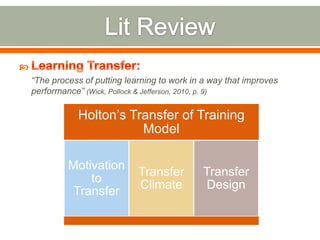
“The process of putting learning to work in a way that improves
performance” (Wick, Pollock & Jefferson, 2010, p. 9)

           Holton’s Transfer of Training
                      Model

         Motivation
                           Transfer        Transfer
             to
                           Climate          Design
          Transfer
1.   When Learning for the First Time
2.   When Wanting to Learn More
3.   When Trying to Remember and/or Apply
4.   When Things Change
5.   When Something Goes Wrong.
• Aligned…. To the business need.
• Embedded… In the workflow.
• Contextual … Access by process, roles, and
  circumstances.
• Just Enough… Support to get the job done.
• Uniform… Across business processes and
  applications.
• Integrated… With formal learning.
• Trusted… To be correct and current
Interactive video, or video where learners can select and
play segments quickly, increases learner performance and
satisfaction
For Learners:                           For Managers:
Logging in for the First Time &         Completing a Request for Access
Resolving Error Messages When
Logging In
Locating and Registering for a Course   Logging In as Restaurant & Resetting
or Track                                Restaurant password
Starting & Completing a Course or       Locating Team Members Usernames
Track                                   & Resetting Team Member Passwords
                                        Assigning a Track or Course to a
                                        Team Member
                                        Checking for Team Member Course
                                        Completion
Selection of
                 Script &     Video &
  screen
                Storyboard   Narration
 capture
               Development   Production
 software
• Draft Scripts for 3
                                October         • Complete Video
                                                                          December
  Learner Videos                                  Production
• SME Script Review     • Draft Scripts for 5   • SME Video         • Finalize Project
                          Manager Videos          Review/Approval     Paper
                        • SME Script Review
                        • Begin Video
                          Production
     September                                       November
Recommended:
                                   Outside scope of project


Acceptance of        End-user
  project by        feedback &
 committee &          use data
  Graduate
   College

Rating “3-4” on
 Instructional
                Internal Quality
     Video
                    Review
  Evaluation
  Instrument
Subject Matter Expert                       Script/Storyboarding &
                                            Screen Capture Software


                        Audio Recording Device
Voice                                        Produce
• Captured all visuals           Narration    • Placed text, arrows,            Video
  including Screen                              squares & other
  Shots, Cursor          • Captured all         markers on video.      • Exported videos into
  Movements, & User        narration audio.                              a stand alone
  Actions.                                                               format.


     Record Your
                                                      Call-Outs
       Screen
Major Project Final powerpoint

Major Project Final powerpoint

  • 1.
     A Major Project by Rachel Donley Committee: Dr. Paul Cesarini, Advisor Dr. Gary Benjamin
  • 2.
    Project: To Design & Develop a single component of a training curriculum On- How-to the-job Videos training To be delivered Job Aids remotely Why: •High # of Help Desk Calls •Field trainer testimonials To both new & current users
  • 3.
    1. Introducing Learnersto the topics 2. Viewing the videos at any time, from anywhere 3. Reviewing the videos again 4. Updated videos are live in a single upload 5. Providing targeted instruction on FAQs
  • 4.
    Efficiency in learner’s Help Desk calls use of LMS
  • 5.
    “The process ofputting learning to work in a way that improves performance” (Wick, Pollock & Jefferson, 2010, p. 9) Holton’s Transfer of Training Model Motivation Transfer Transfer to Climate Design Transfer
  • 6.
    1. When Learning for the First Time 2. When Wanting to Learn More 3. When Trying to Remember and/or Apply 4. When Things Change 5. When Something Goes Wrong.
  • 7.
    • Aligned…. Tothe business need. • Embedded… In the workflow. • Contextual … Access by process, roles, and circumstances. • Just Enough… Support to get the job done. • Uniform… Across business processes and applications. • Integrated… With formal learning. • Trusted… To be correct and current
  • 8.
    Interactive video, orvideo where learners can select and play segments quickly, increases learner performance and satisfaction
  • 9.
    For Learners: For Managers: Logging in for the First Time & Completing a Request for Access Resolving Error Messages When Logging In Locating and Registering for a Course Logging In as Restaurant & Resetting or Track Restaurant password Starting & Completing a Course or Locating Team Members Usernames Track & Resetting Team Member Passwords Assigning a Track or Course to a Team Member Checking for Team Member Course Completion
  • 10.
    Selection of Script & Video & screen Storyboard Narration capture Development Production software
  • 11.
    • Draft Scriptsfor 3 October • Complete Video December Learner Videos Production • SME Script Review • Draft Scripts for 5 • SME Video • Finalize Project Manager Videos Review/Approval Paper • SME Script Review • Begin Video Production September November
  • 12.
    Recommended: Outside scope of project Acceptance of End-user project by feedback & committee & use data Graduate College Rating “3-4” on Instructional Internal Quality Video Review Evaluation Instrument
  • 13.
    Subject Matter Expert Script/Storyboarding & Screen Capture Software Audio Recording Device
  • 16.
    Voice Produce • Captured all visuals Narration • Placed text, arrows, Video including Screen squares & other Shots, Cursor • Captured all markers on video. • Exported videos into Movements, & User narration audio. a stand alone Actions. format. Record Your Call-Outs Screen

Editor's Notes

  • #2 Hello and welcome to my Slidecast for my Major Project titled …. By Rachel Donley
  • #3 This project was to design and develop a single training component for an organization’s Learning Management System. Development of a new training curriculumwas initiated because of a high amount of training-related Help Desk calls & testimonials from field trainers indicating learners are lacking the skills necessary to function effectively inside the LMS. This project consisted of the design of eight short training videos used to compliment the overall training curriculum. The videos are termed “How-To” videos, as they provide step-by-step guidance on how to perform specific functions inside the LMS. The videos will be delivered remotely, as the organization’s learners are geographically dispersed and will need to access the training at different times. The types of learner who need these skills vary, ranging from entry level to senior manager, and high to low level of technology experience and skill.
  • #4 The goal of this project was to develop eight training videos to enhance learners’ understanding and assimilation of the training content, thereby increasing the transfer of learning into the workplace and decreasing the number of “Educate” Help Desk calls. To be truly effective, training must account for every circumstance or reason a learner may need training content. Conrad Gottfredson and Bob Mosher (2011) have defined five circumstances, or “moments” of learning need. By providing short, targeted, and remotely accessed instruction, these eight videos are able to fulfill all Five Moments of Learning need in the following ways:When learning the LMS system for the first time, learners can view the videos remotely to be introduced to these nine key functions.When wanting to learn more about one of these nine functions, learners can view the videos at any time, from any location.When trying to remember and/or apply what they’ve previously learned, learners can review the videos again.When a function inside the LMS changes, only the affected video(s) will need to be updated, and once posted, the updated video is live to the entire learner community instantly. When something goes wrong, learners have traditionally called the organization’s Help Desk. From a review of historical call data, it’s known that the majority of calls are in related to these nine LMS functions. By providing targeted instruction on these topics, the videos can be referenced as a first step, potentially reducing the amount of Help Desk calls.
  • #5 Fulfilling all five moments of learning need ensures the videos are addressing all possible circumstances in which LMS users’ have a need to learn, making the training videos more relevant and content more likely to transfer to the workplace. If successful, field trainers will observe an increased efficiency in learners’ use of the LMS system. Additionally, the organization will see a decrease in costs associated with Help Desk calls and lost productivity, as workers will spend less time seeking support for use of the LMS, complete training quicker, and return to their work sooner.
  • #6 The term “learning transfer” defines an organization’s ultimate goal of training or learning programs. Learning Transfer is “The process of putting learning to work in a way that improves performance”. In other words, training has little value if it doesn’t result in better performance on the job.Holton’s Transfer of Training Model (1996) outlines three factors that affect the transfer of learning: motivation to transfer, transfer climate, and transfer design. Motivation relates to an employee’s willingness to use the knowledge from a training program on the job, often because of ability or perceived reward. Transfer climate relates to how the organizational environment encourages or hinders the application of learned skills on the job. Transfer design relates to the structure of the training program and how closely it matches the work environment. For transfer of training to take place, all three factors must be aligned.
  • #7 To be truly effective, training must account for every circumstance of learning need. Conrad Gottfredson and Bob Mosher (2011) have defined five circumstances, or “moments” of learning need: When Learning for the First TimeWhen Wanting to Learn MoreWhen Trying to Remember and/or ApplyWhen Things ChangeWhen Something Goes Wrong. The first two moments of need are those handled by traditional, formal learning, such as classrooms or eLearning modules. The last three fall into the realm of Performance Support and include items such as Job Aids, FAQs and Social Media (Malamed, 2011).
  • #8 Performance support hits on all five moments of learning need(Paine, 2011). The term Performance Support is defined as “…putting the right information — and access to that information — into the hands of your workforce, right when they need it.” In other words, Performance Support means providing learners with the instruction or training they need at the exact moment they need to apply it on the job. There are various methods used to deliver Performance Support, but all performance support types will have certain characteristics in common, described on screen.
  • #9 Video has gained increased attention as a training medium in recent years. As an example, the Khan Academy currently delivers 3,200 video instructions online. Video is a particularly great medium for teaching how to do something. Learners can mimic motions or processes seen in a video, with the additional ability to pause, replay and skip ahead when appropriate or desired. Video also makes it possible to break up a complicated process or task into multiple, shorter videos, to allow the learner to study them one at a time (Schwartz & Hartman, 2007). In fact, prior studies have shown that interactive video, or video where learners can select and play segments quickly, increases learner performance and satisfaction (Zhang, Zhou, Briggs, Nunamaker, 2006).
  • #10 Thisproject consisted of the development of eight “How-To” videos:For Learners:Logging in for the First Time & Resolving Error Messages When Logging InLocating and Registering for a Course or TrackStarting & Completing a Course or TrackFor Managers:Completing a Request For AccessLogging In as Restaurant & Resetting Restaurant passwordLocating Team Members Usernames & Resetting Team Member PasswordsAssigning a Track or Course to a Team Member Checking for Team Member Course Completion
  • #11 To complete these eight videos, the following development steps were completed:Selection of appropriate development software. Software that allows screen capture with narrations was needed, to allow for recording of step-by-step instruction.Script and Storyboard development. With the assistance of a Subject Matter Expert, the narration scripts and step-by-step demonstration of LMS functions was written, developed, and compiled prior to video production.Video production and narration recording. This step included both the screen capture video and recording of narration voice-over, and allediting required to merge the two.
  • #12 The development process began upon SME selection and approval by the organization’s Director of Training, and was completed by late November, 2012.The initial timeline was as follows: SeptemberDraft Scripts for 3 Learner VideosSME Script ReviewOctoberDraft Scripts for 6 Manager VideosSME Script ReviewBegin Video ProductionNovemberComplete Video ProductionSME Video Review/ApprovalDecemberFinalize Project Paper
  • #13 Final success of the project was determined in three parts: Through an internal quality review within the University’s Center for Blended Learning or Center for Teaching and Learning. An average evaluation rating of “4” on the Instructional Video Evaluation Instrument. This evaluation was completed by a SME inside the organization familiar with both Instructional Design and the LMS system. Acceptance by the project committee and the College as partial fulfillment of the Masters of Education in Learning Design degree program. It is recommended that data on the number of learners using the videos and volume of Help Desk calls be obtained, as well as that user feedback be obtained on the videos through user evaluation forms. Time constraints do not permit this method of evaluation to be in the scope of this project but it will be recommended that such an evaluation take place in the organization.
  • #14 The following resources were needed for successful completion of this project:Subject Matter Expert. ASubject Matter Expert from the organization’s training and field HR department was utilized to validate and review script, storyboard, and final video content.Scripting/Storyboarding software, such as Powerpoint, for creation of the Audio script and video Storyboard. Screen capture softwareCamtasia, which was provided by the organization. Audio recording device, which was provided by the organization.
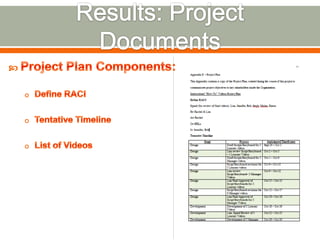
  • #15 Several documents were created during this project. The first was a Project Plan. In order to communicate the project’s objectives, timeframe, and resources needed to key stakeholders inside the organization, a project plan was drafted. This is a standard document drafted at the start of each project inside this organization. There are three main components of the Project Plan: Define RACI. RACI stands for Responsible, Accountable, Consulted, and Informed and is a method for designating the level of involvement of all interested parties in a project. Tentative Timeline. Upon SME approval of the initial timeline, it was incorporated into the project plan.List of Videos. Although not a standard part of this organization’s project plan, the primary SME and this author felt the eight video topics should be included in this document.
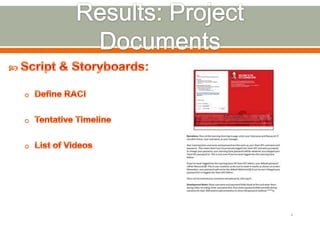
  • #16 For each of the eight videos, a separate Script/Storyboard was created. Development of this document allowed the narration and visuals in each video to be prepared and reviewed by the SME prior to recording. This extra step saves time during development, allowing all revisions to be completed at an early stage. Powerpoint’s “notes” section was used to capture narration wording and any development notes or reminders. The “slide” section of Powerpoint was used to indicate visuals, or notes to the SME if visuals were not available to this author at time of storyboard development.
  • #17 Camtasia Studio 8 was used to record and produce all videos. There were four different features inside this program used to produce these videos:Camtasia’s “Record Your Screen” was used to capture all the visuals used in these videos, including screen shots, cursor movements, and user actions. Camtasia’s “Voice Narration” feature was used to capture all the audio used in the videos. Through the use of a microphone, this feature allows the user to record narrations of any length. Camtasia’s “Call Outs” feature was used to place text, arrows, squares and other markers to be placed on top of the video. Camtasia’s “Produce Video” feature was used to make each video ready for viewing. All videos must be “produced”, or exported out of Camtasia, into a stand-alone format to be viewable outside of the Camtasia program. The export settings chosen for any video should always be determined by the final destination of the video, or where the video will be viewed from. Since these eight videos, will be viewed and housed on the Organization’s Intranet, the settings selected to produce with were provided by the Organization’s communications department.
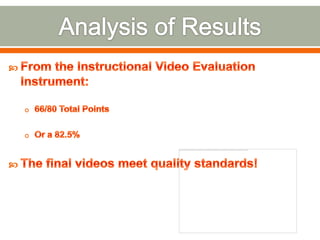
  • #18 To fulfill one part of the quality evaluation, the Instructional Video Evaluation Instrument was given to a SME within the organization, familiar with both Instructional Design and the LMS system. The total points given on this evaluation was a 66 out of 80 total points, or an 82.5%. According to the results of this evaluation, the final videos meet the intended quality standards and appear clear and easy to understand to the user. While effectiveness is not an evaluation measure in the scope of this project, the intent is that being clear and easy to understand is an important first step in being effective.
  • #19 Through completion of this project, this author has gained a few “lessons learned” or tips for completing short screen capture videos. First, use a good quality microphone be used to record narrations. Selection of a lower-quality microphone in the beginning of this project produced very low quality audio. The re-recording process with a higher-quality microphone took several extra hours of work. The second recommendation is to preview or listen to any recorded content frequently. The discovery of poor quality voice recordings would have been discovered sooner, and therefore been corrected more quickly, if the results of the recordings were reviewed immediately. Finally, audio narrations should be recorded first, and screen capture videos second, when possible. At the start of this project, all screen capture videos were recorded first, and audio second. The intent was that the narrations could be recorded as the screen capture video played, allowing the narrator to pace the narrations in sync with the video. However, it quickly became apparent that if no narrations are being recorded or playing at the same time the screen capture is being recorded, it’s nearly impossible to get the timing right. To correct this problem, the audio was recorded first, and the video recorded second. Despite these minor setbacks, all project components, including the recording and producing of the final videos, could be done by anyone with a basic knowledge of screen capture tools and audio recording, or by someone easily able to pick up on new technology. A basic understanding of video editing in a timeline is also helpful. I’d recommend the production of short, to the point how to videos to anyone with the need to convey complex or highly visual information to a beginner or intermediate audience.