Integrating Technology into Teaching III
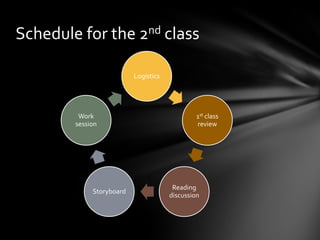
Schedule for the 2nd class

                          Logistics


         Work                                  1st class
        session                                review


                                       Reading
             Storyboard
                                      discussion
Logistics
• Submit your assignments
 •   Pre-course survey
 •   1 minute video

• Video capture problem
 •   PC users (fire wire)
 •   Mac book (SD card)
 •   Back-up plan (two Dell laptop with Adobe Premier Elements)

• Video format problem
 •   Free converting software preinstalled on two Dell laptop
 •   Will provide the link for download. (Optional)

• Tape
 •   Each group will have two tapes. The tape is reusable.
 •   Whenever record a new video, make sure it didn’t replace the old footage on tape.
1st class review
•   How to use a camera.
    (record, play, zoom, tape, import,
    upload)
•   The role of director, camera
    operator and talents
•   The final project
1st class review
Producers:                                 Video One
•   Describe how you plan and shoot your   Video Two
    video
                                           Video Three
•   Lessons learned
                                           Video Four
Audience:
•   What do you like about the video?
•   How it can be improved?
Reading discussion
Statistics from U.S. Department of Education
1. For all public schools in fall 2008, 97 percent had one or more
   instructional computers located in classrooms and 58 percent of schools
   had laptops on carts. The ratio of students to instructional computers
   with Internet access was 3.1 to 1. Technology devices other than
   computer were also widely used for instruction, the percentage of
   schools that provided such devices are: DLP and LCD projectors
   (97%), video conferencing unit (22%), interactive whiteboard
   (73%), classroom response systems (38%), and digital cameras (93%).
   (Gray, Thomas & Lewis, 2010)
2. The average reading and mathematics scores in the National Assessment
   of Educational Progress (NAEP) for American 17-year-olds in 2008 were
   not significantly different from the scores in the early 1970s. (National
   Center for Education Statistics, 2010)
Reading discussion
• Why do we promote technology integration if it doesn’t improve the
  scores? What does it mean to students? Teachers?
• How can teachers use technology in class? The new opportunities?
  Drawbacks?
• What does technology integration mean to you personally?
Storyboard
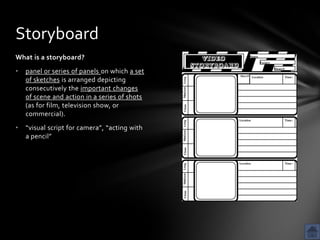
What is a storyboard?
•   panel or series of panels on which a set
    of sketches is arranged depicting
    consecutively the important changes
    of scene and action in a series of shots
    (as for film, television show, or
    commercial).
•   “visual script for camera”, “acting with
    a pencil”
Storyboard
Why should I (or my students) create storyboards for video projects?
1. great way to brainstorm ideas and communicate with group members
2. help visualize what the final product looks like
3. make the best use of time and resources (especially for this class)
4. It is easier to change the storyboard than to edit the video footage
5. avoid missed opportunities of camera shots
6. scientific method of “research, plan and implement”
Storyboard
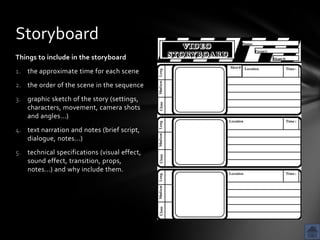
Things to include in the storyboard
1. the approximate time for each scene
2. the order of the scene in the sequence
3. graphic sketch of the story (settings,
   characters, movement, camera shots
   and angles...)
4. text narration and notes (brief script,
   dialogue, notes...)
5. technical specifications (visual effect,
   sound effect, transition, props,
   notes...) and why include them.
Storyboard
Things to consider when creating storyboards
1. Always remember that the storyboard is not the end product itself. Don’t
   waste time making the storyboard perfect. Stick
   figures, circles, boxes, and other substitutes for figures or objects are fine
   for storyboards.
2. It is important to note also that everything should be done in pencil for
   ease of editing the storyboard.
3. Every scene contained in the storyboard should somehow contribute to
   the message/purpose of the video. It the scene doesn’t contribute
   anything, omit it. (for whom? About what? Why matters?)
4. Storyboards depict major scenes. They are not a frame-by-frame
   recreation of the videotape.


         Let us see an example of storyboards created by a professional: click
Work Session
• 10-15 scenes for a 5-minute video
• Key elements to include in your storyboard
 1. a main message (what is this scene about and for?)
 2. sketch
 3. script
 4. time of the scene
 5. actors and props
 6. camera techniques (reasons)
 7. notes for editing (reasons)

Ide 401 2nd class

  • 1.
  • 2.
    Schedule for the2nd class Logistics Work 1st class session review Reading Storyboard discussion
  • 3.
    Logistics • Submit yourassignments • Pre-course survey • 1 minute video • Video capture problem • PC users (fire wire) • Mac book (SD card) • Back-up plan (two Dell laptop with Adobe Premier Elements) • Video format problem • Free converting software preinstalled on two Dell laptop • Will provide the link for download. (Optional) • Tape • Each group will have two tapes. The tape is reusable. • Whenever record a new video, make sure it didn’t replace the old footage on tape.
  • 4.
    1st class review • How to use a camera. (record, play, zoom, tape, import, upload) • The role of director, camera operator and talents • The final project
  • 5.
    1st class review Producers: Video One • Describe how you plan and shoot your Video Two video Video Three • Lessons learned Video Four Audience: • What do you like about the video? • How it can be improved?
  • 6.
    Reading discussion Statistics fromU.S. Department of Education 1. For all public schools in fall 2008, 97 percent had one or more instructional computers located in classrooms and 58 percent of schools had laptops on carts. The ratio of students to instructional computers with Internet access was 3.1 to 1. Technology devices other than computer were also widely used for instruction, the percentage of schools that provided such devices are: DLP and LCD projectors (97%), video conferencing unit (22%), interactive whiteboard (73%), classroom response systems (38%), and digital cameras (93%). (Gray, Thomas & Lewis, 2010) 2. The average reading and mathematics scores in the National Assessment of Educational Progress (NAEP) for American 17-year-olds in 2008 were not significantly different from the scores in the early 1970s. (National Center for Education Statistics, 2010)
  • 7.
    Reading discussion • Whydo we promote technology integration if it doesn’t improve the scores? What does it mean to students? Teachers? • How can teachers use technology in class? The new opportunities? Drawbacks? • What does technology integration mean to you personally?
  • 8.
    Storyboard What is astoryboard? • panel or series of panels on which a set of sketches is arranged depicting consecutively the important changes of scene and action in a series of shots (as for film, television show, or commercial). • “visual script for camera”, “acting with a pencil”
  • 9.
    Storyboard Why should I(or my students) create storyboards for video projects? 1. great way to brainstorm ideas and communicate with group members 2. help visualize what the final product looks like 3. make the best use of time and resources (especially for this class) 4. It is easier to change the storyboard than to edit the video footage 5. avoid missed opportunities of camera shots 6. scientific method of “research, plan and implement”
  • 10.
    Storyboard Things to includein the storyboard 1. the approximate time for each scene 2. the order of the scene in the sequence 3. graphic sketch of the story (settings, characters, movement, camera shots and angles...) 4. text narration and notes (brief script, dialogue, notes...) 5. technical specifications (visual effect, sound effect, transition, props, notes...) and why include them.
  • 11.
    Storyboard Things to considerwhen creating storyboards 1. Always remember that the storyboard is not the end product itself. Don’t waste time making the storyboard perfect. Stick figures, circles, boxes, and other substitutes for figures or objects are fine for storyboards. 2. It is important to note also that everything should be done in pencil for ease of editing the storyboard. 3. Every scene contained in the storyboard should somehow contribute to the message/purpose of the video. It the scene doesn’t contribute anything, omit it. (for whom? About what? Why matters?) 4. Storyboards depict major scenes. They are not a frame-by-frame recreation of the videotape. Let us see an example of storyboards created by a professional: click
  • 12.
    Work Session • 10-15scenes for a 5-minute video • Key elements to include in your storyboard 1. a main message (what is this scene about and for?) 2. sketch 3. script 4. time of the scene 5. actors and props 6. camera techniques (reasons) 7. notes for editing (reasons)

Editor's Notes

  • #4 http://format-factory.en.softonic.com/download
  • #5 Add a video about import and upload