
mPortfolios:
                                Supporting
                              Reflection in
                            ePortfolios with
                             mobile devices
University of Alaska Anchorage (retired)
  Seattle Pacific University (adjunct)
                                           Dr. Helen Barrett
    New England College (adjunct)          electronicportfolios.org
International Researcher & Consultant      Twitter: @eportfolios
 Founder, REAL ePortfolio Academy          Slideshare.net/eportfolios
Resources
• http://slideshare.net/eportfolios/
  (these slides)
• https://sites.google.com/site/mportfolios/
  (resources & links)
• http://electronicportfolios.org/
  (further information)
• https://sites.google.com/site/reflection4learni
  ng/
• Twitter hashtag: #mportfolios
Golden Circle
   What?
   How?

   Why?


           3
WHAT?
Mobile Web is becoming the
   Personal Learning Environment
      of the “Net Generation”
Learning that is…
oSocial and Participatory
oLifelong and Life Wide
oIncreasingly Self-Directed
oMotivating and Engaging
o… and Online all the time!
E-Portfolio Components
                            < Multiple Portfolios for
                              Multiple Purposes
                              -Celebrating Learning
                              -Personal Planning
                              -Transition/entry to courses
                              -Employment applications
                              -Accountability/Assessment
                            < Multiple Tools to Support
                              Processes
                              -Capturing & storing evidence
                              -Reflecting
                              -Giving & receiving feedback
                              -Planning & setting goals
                              -Collaborating
                              -Presenting to an audience
                            < Digital Repository
(Becta, 2007; JISC, 2008)
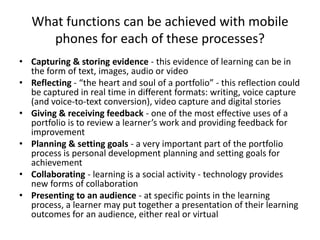
What functions can be achieved with mobile
      phones for each of these processes?
• Capturing & storing evidence - this evidence of learning can be in
  the form of text, images, audio or video
• Reflecting - “the heart and soul of a portfolio” - this reflection could
  be captured in real time in different formats: writing, voice capture
  (and voice-to-text conversion), video capture and digital stories
• Giving & receiving feedback - one of the most effective uses of a
  portfolio is to review a learner’s work and providing feedback for
  improvement
• Planning & setting goals - a very important part of the portfolio
  process is personal development planning and setting goals for
  achievement
• Collaborating - learning is a social activity - technology provides
  new forms of collaboration
• Presenting to an audience - at specific points in the learning
  process, a learner may put together a presentation of their learning
  outcomes for an audience, either real or virtual
WHY?
Help students find
their Purpose and Passion
      through Reflection &
           Goal-Setting in
 E-Portfolio Development
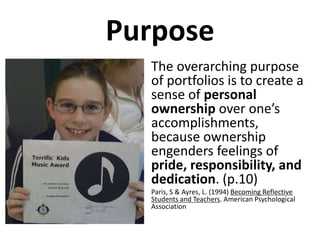
Purpose
  • The overarching purpose
    of portfolios is to create a
    sense of personal
    ownership over one’s
    accomplishments,
    because ownership
    engenders feelings of
    pride, responsibility, and
    dedication. (p.10)
  •   Paris, S & Ayres, L. (1994) Becoming Reflective
      Students and Teachers. American Psychological
      Association
Brain-Based Learning (Zull) &
Experiential Learning Model (Kolb)
Experiential Learning Model
           Lewin/Kolb with adaptations by Moon and Zull


Practice
                Have an experience


Try out what you               Reflect on the experience
have learned

                                       Metacognition
           Learn from the experience
http://www.systemswiki.org/index.php?title=Ex
periential_and_Double_Loop_Learning
Single & Double Loop Learning


                                                                               Reflecting


http://simbeckhampson.com/2010/10/12/doing-things-right-vs-doing-the-right-things-rainerfalle/
Self-Regulated Learning
    Abrami, P., et. al. (2008), Encouraging self-regulated learning through
electronic portfolios. Canadian Journal of Learning and Technology, V34(3) Fall
     2008. http://www.cjlt.ca/index.php/cjlt/article/viewArticle/507/238
Learning/Reflection Cycle


              blog

             Why?
        (double-loop learning)
Now                              What?
What?


            So What?                website
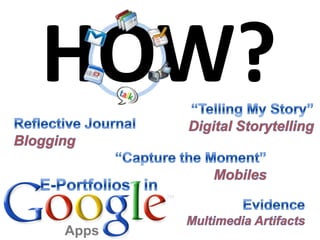
HOW?
2012 Horizon Report – Higher Ed
Time-to-adoption:
• One Year or Less
   – Mobile Apps
   – Tablet computing
• Two to Three Years
   – Game-Based Learning
   – Learning Analytics
• Four to Five Years
   – Gesture-based
     computing
   – the Internet of Things   New Media Consortium http://www.nmc.org/
Planning
           Mobile Apps + Website   Doing


     Planning & Setting Goals
   Giving & Receiving Feedback
                  Reflecting
Reflection with WordPress App
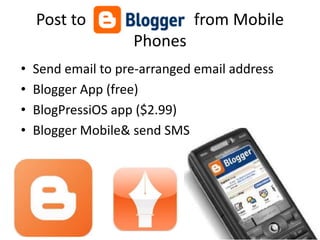
Post to                   from Mobile
                    Phones
•   Send email to pre-arranged email address
•   Blogger App (free)
•   BlogPressiOS app ($2.99)
•   Blogger Mobile& send SMS
Blogging* by eMail
                   *the act of sharing yourself

Tumblr                            Posterous
• Set up account on website       • Just email to
• Send email to:                    post@posterous.com
  myaccount.tumblr.com            • iPhone App
• iPhone App                      • Cross-post to Facebook&
• Call in your posts for audio      Twitter
  post to blog
• Cross-post to Facebook&
  Twitter
With iOS
(iPod Touch,
iPhone, iPad)

  Text
Images
 Audio
                CAPTURE THE
 Video           MOMENT
                         Doing
Capture the Moment with Mobile Phones
   • SMS messages         • Camera
     – Twitter posts        – Still
     – Facebook updates     – video
Twitter
micro-blogging


“tiny bursts of learning”
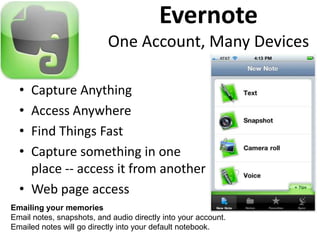
Evernote
                           One Account, Many Devices

  • Capture Anything
  • Access Anywhere
  • Find Things Fast
  • Capture something in one
    place -- access it from another
  • Web page access
Emailing your memories
Email notes, snapshots, and audio directly into your account.
Emailed notes will go directly into your default notebook.
Evernote
• All in one recording/saving to
  Evernote Account (email address)
• Grades 3-5, Trillium Charter
  School, Portland (see my blog)


 iPod Touch4 $239 &
 Lexmark Pinnacle Pro901 $199
Case Study: Grades 3-5


Trillium Charter School, Portland, OR
http://blog.helenbarrett.org/2011/06/evernote-for-intermediate-portfolios.html

iPod Touch 4
Dragon Dictation

• Voice recognition
  (not small children)
• Share in many ways
JotNot Scanner Pro ($.99)
                                • Scan Multi-
                                  page
• Send the image
                                  documents
  directly via email            • Remove
  or upload it to
  cloud storage                   Shadows &
  services including              Noise
  Evernote, Box.net,
  Dropbox, or                   • Save as PDF
  Google Docs. (not             • Email, Fax and
  with free version)
                                  Share your
                                  Scans
AudioBoo.fm

• a mobile & web
  platform that
  effortlessly allows
  you to record and
  upload audio for
  your friends, family
  or the rest of the
  world to hear.
• Also Google Voice
iPadio
•Record on mobile device

•Publish on Internet

•Get URL when published

•Embed in website (blog, wiki)
Capture       Store Online    Capture Voice
Images &
Video      Mobile Apps + Website


    Storage
   Capturing & Storing Evidence

                Google
                Drive?

Google Docs                   DropBox
Integrate file storage
with computer and
website
Hyperlink to files in
Public folder!

2 GB (to start)
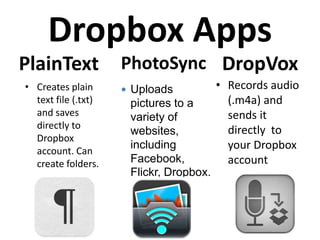
Dropbox Apps
PlainText            PhotoSync DropVox
• Creates plain       Uploads           • Records audio
  text file (.txt)    pictures to a        (.m4a) and
  and saves           variety of           sends it
  directly to                              directly to
                      websites,
  Dropbox
  account. Can
                      including            your Dropbox
  create folders.     Facebook,            account
                      Flickr, Dropbox.
Other Online Storage Apps
Microsoft Live
SkyDrive – 25GB        ZumoDrive – 2 GB   SugarSync – 2 GB


                  iOS to/from                Box.net –
                  PicasaWeb                  5-50 GB
                  (Google)
ePortfolio Tools &
Web/Blog Pages
         Collaborating
Doing     Reflecting     Reflecting
EDMODO.COM
a private social network for education
• Set up groups with students:
• Has apps for iOS and Android


• Use like Twitter (add tags)
• Looks like Facebook
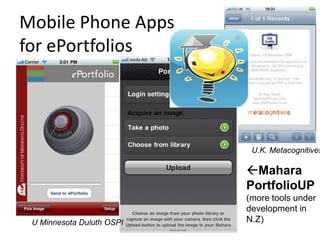
Mobile Phone Apps
for ePortfolios


                            U.K. Metacognitives

                           Mahara
                           PortfolioUP
                           (more tools under
                           development in
 U Minnesota Duluth OSPI   N.Z)
iPhone App for PebblePad (U.K.)
More PebblePad Screens
Curtin University
More Curtin University
Create Presentations          Create Videos

            Share Online

Web 2.0 Sites
  Presenting to an Audience
                 Reflecting


               Online Video Editing
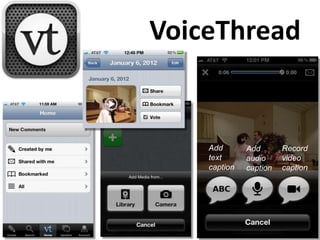
VoiceThread


    Add       Add       Record
    text      audio     video
    caption   caption   caption
Presenting to an Audience
Keynote           Google Sites        Pages
Presenting to an Audience
Prezi Viewer                       Zapd
Video Editing on iOS


                                     Videolicious - free


                Avid Studio$4.99
 iMovie $4.99


                ReelDirector $3.99
 Splice $1.99                             $.99
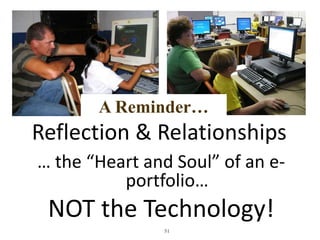
A Reminder…
Reflection & Relationships
… the “Heart and Soul” of an e-
          portfolio…
 NOT the Technology!
               51
*Reflection      REAL*

Engagement    ePortfolio
Assessment for Academy
                   for K-12
Learning          Teachers
Initial Online Courses Planned
•   Overview of Student-Centered Electronic Portfolios in K-
    12 Education (tool-neutral – focus on “Portfolio”
    Reflection Process & Feedback)
    Next facilitated classes start: April 30, July 23, Sept 17
•   Supplemental courses:
    –   Implement Electronic Portfolios with K-12 Students using
        Google Apps (Docs, Sites, Blogger, YouTube, Picasa, Digication,
        Teacher Dashboard) (Focus on “Electronic”)
    –   Implement Electronic Portfolios with K-12 Students using
        Mobile Devices (iOS, Android)
    –   Create Your Professional Portfolio (tool neutral)
My Final Wish…
• dynamic celebrations
• stories of deep learning
• across the lifespan
DR. HELEN BARRETT
@EPORTFOLIOS


Researcher & Consultant
Electronic Portfolios & Digital Storytelling for Lifelong and Life Wide Learning
Founder, REAL*ePortfolio Academy for K-12 Teachers
*Reflection, Engagement, Assessment for Learning


eportfolios@gmail.com
http://electronicportfolios.org/

http://slideshare.net/eportfolios

M portfolios poster

  • 1.
    mPortfolios: Supporting Reflection in ePortfolios with mobile devices University of Alaska Anchorage (retired) Seattle Pacific University (adjunct) Dr. Helen Barrett New England College (adjunct) electronicportfolios.org International Researcher & Consultant Twitter: @eportfolios Founder, REAL ePortfolio Academy Slideshare.net/eportfolios
  • 2.
    Resources • http://slideshare.net/eportfolios/ (these slides) • https://sites.google.com/site/mportfolios/ (resources & links) • http://electronicportfolios.org/ (further information) • https://sites.google.com/site/reflection4learni ng/ • Twitter hashtag: #mportfolios
  • 3.
    Golden Circle What? How? Why? 3
  • 4.
  • 5.
    Mobile Web isbecoming the Personal Learning Environment of the “Net Generation” Learning that is… oSocial and Participatory oLifelong and Life Wide oIncreasingly Self-Directed oMotivating and Engaging o… and Online all the time!
  • 6.
    E-Portfolio Components < Multiple Portfolios for Multiple Purposes -Celebrating Learning -Personal Planning -Transition/entry to courses -Employment applications -Accountability/Assessment < Multiple Tools to Support Processes -Capturing & storing evidence -Reflecting -Giving & receiving feedback -Planning & setting goals -Collaborating -Presenting to an audience < Digital Repository (Becta, 2007; JISC, 2008)
  • 7.
    What functions canbe achieved with mobile phones for each of these processes? • Capturing & storing evidence - this evidence of learning can be in the form of text, images, audio or video • Reflecting - “the heart and soul of a portfolio” - this reflection could be captured in real time in different formats: writing, voice capture (and voice-to-text conversion), video capture and digital stories • Giving & receiving feedback - one of the most effective uses of a portfolio is to review a learner’s work and providing feedback for improvement • Planning & setting goals - a very important part of the portfolio process is personal development planning and setting goals for achievement • Collaborating - learning is a social activity - technology provides new forms of collaboration • Presenting to an audience - at specific points in the learning process, a learner may put together a presentation of their learning outcomes for an audience, either real or virtual
  • 8.
  • 9.
    Help students find theirPurpose and Passion through Reflection & Goal-Setting in E-Portfolio Development
  • 10.
    Purpose •The overarching purpose of portfolios is to create a sense of personal ownership over one’s accomplishments, because ownership engenders feelings of pride, responsibility, and dedication. (p.10) • Paris, S & Ayres, L. (1994) Becoming Reflective Students and Teachers. American Psychological Association
  • 11.
    Brain-Based Learning (Zull)& Experiential Learning Model (Kolb)
  • 12.
    Experiential Learning Model Lewin/Kolb with adaptations by Moon and Zull Practice Have an experience Try out what you Reflect on the experience have learned Metacognition Learn from the experience
  • 13.
  • 14.
    Single & DoubleLoop Learning Reflecting http://simbeckhampson.com/2010/10/12/doing-things-right-vs-doing-the-right-things-rainerfalle/
  • 15.
    Self-Regulated Learning Abrami, P., et. al. (2008), Encouraging self-regulated learning through electronic portfolios. Canadian Journal of Learning and Technology, V34(3) Fall 2008. http://www.cjlt.ca/index.php/cjlt/article/viewArticle/507/238
  • 16.
    Learning/Reflection Cycle blog Why? (double-loop learning) Now What? What? So What? website
  • 18.
  • 19.
    2012 Horizon Report– Higher Ed Time-to-adoption: • One Year or Less – Mobile Apps – Tablet computing • Two to Three Years – Game-Based Learning – Learning Analytics • Four to Five Years – Gesture-based computing – the Internet of Things New Media Consortium http://www.nmc.org/
  • 20.
    Planning Mobile Apps + Website Doing Planning & Setting Goals Giving & Receiving Feedback Reflecting
  • 21.
  • 22.
    Post to from Mobile Phones • Send email to pre-arranged email address • Blogger App (free) • BlogPressiOS app ($2.99) • Blogger Mobile& send SMS
  • 23.
    Blogging* by eMail *the act of sharing yourself Tumblr Posterous • Set up account on website • Just email to • Send email to: post@posterous.com myaccount.tumblr.com • iPhone App • iPhone App • Cross-post to Facebook& • Call in your posts for audio Twitter post to blog • Cross-post to Facebook& Twitter
  • 24.
    With iOS (iPod Touch, iPhone,iPad) Text Images Audio CAPTURE THE Video MOMENT Doing
  • 25.
    Capture the Momentwith Mobile Phones • SMS messages • Camera – Twitter posts – Still – Facebook updates – video
  • 27.
  • 28.
    Evernote One Account, Many Devices • Capture Anything • Access Anywhere • Find Things Fast • Capture something in one place -- access it from another • Web page access Emailing your memories Email notes, snapshots, and audio directly into your account. Emailed notes will go directly into your default notebook.
  • 29.
    Evernote • All inone recording/saving to Evernote Account (email address) • Grades 3-5, Trillium Charter School, Portland (see my blog) iPod Touch4 $239 & Lexmark Pinnacle Pro901 $199
  • 30.
    Case Study: Grades3-5 Trillium Charter School, Portland, OR http://blog.helenbarrett.org/2011/06/evernote-for-intermediate-portfolios.html iPod Touch 4
  • 31.
    Dragon Dictation • Voicerecognition (not small children) • Share in many ways
  • 32.
    JotNot Scanner Pro($.99) • Scan Multi- page • Send the image documents directly via email • Remove or upload it to cloud storage Shadows & services including Noise Evernote, Box.net, Dropbox, or • Save as PDF Google Docs. (not • Email, Fax and with free version) Share your Scans
  • 33.
    AudioBoo.fm • a mobile& web platform that effortlessly allows you to record and upload audio for your friends, family or the rest of the world to hear. • Also Google Voice
  • 34.
    iPadio •Record on mobiledevice •Publish on Internet •Get URL when published •Embed in website (blog, wiki)
  • 35.
    Capture Store Online Capture Voice Images & Video Mobile Apps + Website Storage Capturing & Storing Evidence Google Drive? Google Docs DropBox
  • 36.
    Integrate file storage withcomputer and website Hyperlink to files in Public folder! 2 GB (to start)
  • 37.
    Dropbox Apps PlainText PhotoSync DropVox • Creates plain  Uploads • Records audio text file (.txt) pictures to a (.m4a) and and saves variety of sends it directly to directly to websites, Dropbox account. Can including your Dropbox create folders. Facebook, account Flickr, Dropbox.
  • 38.
    Other Online StorageApps Microsoft Live SkyDrive – 25GB ZumoDrive – 2 GB SugarSync – 2 GB iOS to/from Box.net – PicasaWeb 5-50 GB (Google)
  • 39.
    ePortfolio Tools & Web/BlogPages Collaborating Doing Reflecting Reflecting
  • 40.
    EDMODO.COM a private socialnetwork for education • Set up groups with students: • Has apps for iOS and Android • Use like Twitter (add tags) • Looks like Facebook
  • 41.
    Mobile Phone Apps forePortfolios U.K. Metacognitives Mahara PortfolioUP (more tools under development in U Minnesota Duluth OSPI N.Z)
  • 42.
    iPhone App forPebblePad (U.K.)
  • 43.
  • 44.
  • 45.
  • 46.
    Create Presentations Create Videos Share Online Web 2.0 Sites Presenting to an Audience Reflecting Online Video Editing
  • 47.
    VoiceThread Add Add Record text audio video caption caption caption
  • 48.
    Presenting to anAudience Keynote Google Sites Pages
  • 49.
    Presenting to anAudience Prezi Viewer Zapd
  • 50.
    Video Editing oniOS Videolicious - free Avid Studio$4.99 iMovie $4.99 ReelDirector $3.99 Splice $1.99 $.99
  • 51.
    A Reminder… Reflection &Relationships … the “Heart and Soul” of an e- portfolio… NOT the Technology! 51
  • 52.
    *Reflection REAL* Engagement ePortfolio Assessment for Academy for K-12 Learning Teachers
  • 53.
    Initial Online CoursesPlanned • Overview of Student-Centered Electronic Portfolios in K- 12 Education (tool-neutral – focus on “Portfolio” Reflection Process & Feedback) Next facilitated classes start: April 30, July 23, Sept 17 • Supplemental courses: – Implement Electronic Portfolios with K-12 Students using Google Apps (Docs, Sites, Blogger, YouTube, Picasa, Digication, Teacher Dashboard) (Focus on “Electronic”) – Implement Electronic Portfolios with K-12 Students using Mobile Devices (iOS, Android) – Create Your Professional Portfolio (tool neutral)
  • 54.
    My Final Wish… •dynamic celebrations • stories of deep learning • across the lifespan
  • 55.
    DR. HELEN BARRETT @EPORTFOLIOS Researcher& Consultant Electronic Portfolios & Digital Storytelling for Lifelong and Life Wide Learning Founder, REAL*ePortfolio Academy for K-12 Teachers *Reflection, Engagement, Assessment for Learning eportfolios@gmail.com http://electronicportfolios.org/ http://slideshare.net/eportfolios

Editor's Notes

  • #14 How do portfolios and reflection fit into the learning process?BEFORE - goal-setting (reflection in the future tense), DURING - immediate reflection (in the present tense), where students write (or dictate) the reason why they chose a specific artifact to include in their collectionAFTER - retrospective (in the past tense) where students look back over a collection of work and describe what they have learned and how they have changed over a period of time (in a Level 3 portfolio)
  • #19 How do we implement ePortfolios in a manner that engages students and helps achieve the purposes?
  • #21 Common Tools vs. Proprietary systems
  • #28 I’m not convinced that deep reflection can be represented in 140-160 characters of a tweet or SMS message. But this format can be an effective way to document process over time --to capture the moment-- and can later be aggregated and analyzed for deeper understanding. As a current example, the tweets that were coming out of Egypt prior to February 11 told a very compelling story of the revolution as it was happening (as curated and retweeted by PBS’s Andy Carvin [@acarvin] - an incredible service!). We have seen the power of digital media in social change; it can also be part of individual transformation through understanding oneself and showcasing achievements in reflective portfolios. “tiny bursts of learning”: http://chrisbetcher.com/2011/04/1483/
  • #29 Grade 3-5 classroom in Portland using Evernote. Scanner wirelessly emails documents to each student’s Evernote account. Use of tags, software recognizes text in scanned docs.
  • #36 Common Tools vs. Proprietary systems
  • #40 Common Tools vs. Proprietary systems
  • #47 Common Tools vs. Proprietary systems
  • #51 Using the computing power we carry in our pockets can dramatically enhance student engagement in documenting and showcasing their own learning. And with other tablets emerging in the market, we have many opportunities for research and implementation.