Apps for Learning

JISC RSC YH Summer Conference

13th June 2012

Chris Barber
The session
Apps for Learning
www.scoop.it/t/educational-apps-for-learning
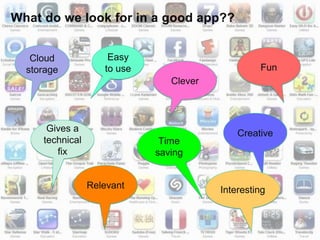
Cloud             Easy
storage           to use                        Fun
                              Clever


    Gives a                                Creative
   technical                Time
      fix                  saving


               Relevant                Interesting
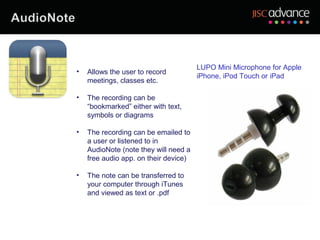
LUPO Mini Microphone for Apple
•   Allows the user to record
                                       iPhone, iPod Touch or iPad
    meetings, classes etc.

•   The recording can be
    “bookmarked” either with text,
    symbols or diagrams

•   The recording can be emailed to
    a user or listened to in
    AudioNote (note they will need a
    free audio app. on their device)

•   The note can be transferred to
    your computer through iTunes
    and viewed as text or .pdf
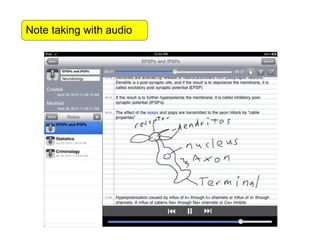
Note taking with audio
Skitch


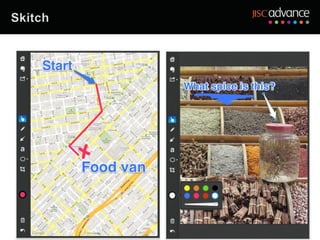
• Allows the user to annotate photos, sketches,
  screenshots etc.

• Useful for taking photos and asking questions

• Questions (e.g. where am I?) can be emailed to a
  tutor or sent via Twitter or Facebook.

• Save in EverNote for viewing later – the same
  people have developed it
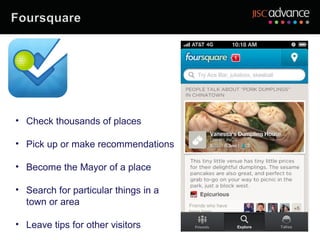
• Check thousands of places

• Pick up or make recommendations

• Become the Mayor of a place

• Search for particular things in a
  town or area

• Leave tips for other visitors
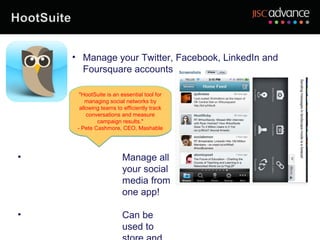
• Manage your Twitter, Facebook, LinkedIn and
      Foursquare accounts

      "HootSuite is an essential tool for
         managing social networks by
      allowing teams to efficiently track
         conversations and measure
             campaign results."
     - Pete Cashmore, CEO, Mashable


•                      Manage all
                       your social
                       media from
                       one app!

•                      Can be
                       used to
•   Find you perfect hairstyle!

                   • Use a model or take your own photo and put
                     hair on it!


• Save your picture, print it
  out and take to the
  hairdresser!!

• An example of an app with
  real vocational value!!
•   Allows the user to use genuine MS
    Office to create or edit documents

•   Works with your DropBox account
                                               •   View and edit PowerPoint slides
•   View virtually any type of file and send       in true PP mode (not as a .pdf
    via e.mail                                     emulation)

                                               •   Automatically saves documents

                                               •   View and edit documents on any
                                                   device
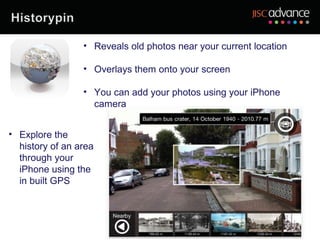
• Reveals old photos near your current location

                 • Overlays them onto your screen

                 • You can add your photos using your iPhone
                   camera


• Explore the
  history of an area
  through your
  iPhone using the
  in built GPS
• A games based
  learning app that
  supports revision for
  tests and exams

• Create quizzes
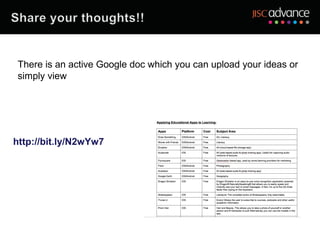
There is an active Google doc which you can upload your ideas or
 simply view


http://bit.ly/N2wYw7
Given that apps and mobile learning are here to stay
(???), can you make a brief comment on your thoughts
about whether they have a future in teaching and
learning and even….how you might use them?
Excellence in Inclusivity


                     Chris Barber
                    07966 753901
               c.p.barber@leeds.ac.uk

              http://www.jiscrsc.ac.uk/yh

Rscyh summer conf12cb

  • 1.
    Apps for Learning JISCRSC YH Summer Conference 13th June 2012 Chris Barber
  • 2.
  • 3.
  • 4.
  • 5.
    Cloud Easy storage to use Fun Clever Gives a Creative technical Time fix saving Relevant Interesting
  • 7.
    LUPO Mini Microphonefor Apple • Allows the user to record iPhone, iPod Touch or iPad meetings, classes etc. • The recording can be “bookmarked” either with text, symbols or diagrams • The recording can be emailed to a user or listened to in AudioNote (note they will need a free audio app. on their device) • The note can be transferred to your computer through iTunes and viewed as text or .pdf
  • 8.
  • 9.
    Skitch • Allows theuser to annotate photos, sketches, screenshots etc. • Useful for taking photos and asking questions • Questions (e.g. where am I?) can be emailed to a tutor or sent via Twitter or Facebook. • Save in EverNote for viewing later – the same people have developed it
  • 11.
    • Check thousandsof places • Pick up or make recommendations • Become the Mayor of a place • Search for particular things in a town or area • Leave tips for other visitors
  • 12.
    • Manage yourTwitter, Facebook, LinkedIn and Foursquare accounts "HootSuite is an essential tool for managing social networks by allowing teams to efficiently track conversations and measure campaign results." - Pete Cashmore, CEO, Mashable • Manage all your social media from one app! • Can be used to
  • 13.
    Find you perfect hairstyle! • Use a model or take your own photo and put hair on it! • Save your picture, print it out and take to the hairdresser!! • An example of an app with real vocational value!!
  • 14.
    Allows the user to use genuine MS Office to create or edit documents • Works with your DropBox account • View and edit PowerPoint slides • View virtually any type of file and send in true PP mode (not as a .pdf via e.mail emulation) • Automatically saves documents • View and edit documents on any device
  • 15.
    • Reveals oldphotos near your current location • Overlays them onto your screen • You can add your photos using your iPhone camera • Explore the history of an area through your iPhone using the in built GPS
  • 16.
    • A gamesbased learning app that supports revision for tests and exams • Create quizzes
  • 17.
    There is anactive Google doc which you can upload your ideas or simply view http://bit.ly/N2wYw7
  • 18.
    Given that appsand mobile learning are here to stay (???), can you make a brief comment on your thoughts about whether they have a future in teaching and learning and even….how you might use them?
  • 19.
    Excellence in Inclusivity Chris Barber 07966 753901 c.p.barber@leeds.ac.uk http://www.jiscrsc.ac.uk/yh

Editor's Notes

  • #2 Welcome to the session, before we start is there anybody who has any particular requirements?
  • #3 Some of you may have seen this but it is indicative of .app learning reaching some sort of maturity, we could add many more onto this now, given that the iTunes store now claims to have over 600,000 apps and Android has c.500,000 with Blackberry lagging behind at a mere 30,000. Interestingly there has been a 37% removal rate for Android apps and hardly any for Apple apps, no doubt because of their quality control system which I leave you to make a judgment on!
  • #4 What I’ve done here is pick a few apps, they’re not necessarily the best , there may be alternatives but with such a large market to go at, I have had to choose some that I feel are noteworthy. Notice the reference to Cloud Storage which an increasing number of people are turning to for their storage– there are some issues with access at some learning providers which need to be addressed but overall the potential is huge. Other areas which are becoming increasingly “interesting” include Augmented Reality and Games Based Learning – more of which in a few moments. Game based learning is an area where good apps abound. I’ve included 3 in here which are perhaps slightly contentious. I would urge you to search for the subject based apps. The market is now developing a sort of maturity in which some of the simpler, boring apps are being replaced by more effective, interesting and inclusive apps
  • #5 Just to draw your attention to a repository of websites and ideas that I’ve set up for the Conference – Scoop.it can be used to collect websites and resources and display them in a magazine-like manner. I believe that anybody (with the owner’s permission) can add to this site or indeed make their own very easily, just visit www.scoop.it
  • #6 Ok, so what do we look for in an app? There are many advantages to using these, notably that they can be loaded onto a number of devices simultaneously and the learner will, in all likelihood, have a smartphone or similar device which they can lead the apps onto. The whole area of mobile learning, learning on the go, using learner owned devices, is perhaps the greatest educational change that we will see in the next few years – to misquote this is not the beginning of the end but the end of the beginning!
  • #7 Of all the apps available, I’m just going to concentrate on these 7, for no particular reason and to give you an opportunity to look at these on the devices available and make some comment and observations on their usefulness for teaching and learning
  • #8 Meetings Dyslexic learners Visual learners
  • #11 Sending routes Asking questions from remote regions
  • #12 Could be used by learners to find and area and make comments on it e.g. fieldtrips Learners can become the Mayor of a place for visiting
  • #13 A newish app, useful for gathering and sending information to all or some of your social media
  • #14 A brilliant little app for girls!!
  • #15 Edit and produce any Office document, spreadsheet, PP etc and upload to your DropBox account
  • #20 Shipley College are using iPads to support VI learners Linkage College are testing out the use of iPads to replace bespoke devices – Tap to Talk