Building video infrastructure for
                             campus
                             NORDUnet 2012, HiOA Oslo, 2012-09-19
Ingrid Melve (CTO) and Thorleif Hallén (Video project manager), Uninett
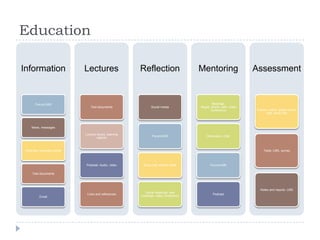
Education

Information                    Lectures                  Reflection                   Mentoring                  Assessment


        Forum/LMS                                                                             Meetings:
                                  Text documents               Social media           Skype, phone, web, video
                                                                                             conference          Exams: online, digital school
                                                                                                                      type, study hall


     News, messages

                               Lecture books, learning
                                                                Forum/LMS                 Discussion, chat
                                       objects


 Web site, university portal                                                                                         Tests: LMS, survey


                               Podcast: Audio, video      Study hall, kitchen table         Forum/LMS

      Text documents


                                                                                                                   Notes and reports: LMS
                                                           Virtual meetings: web
                                Links and references                                          Podcast
           Email                                         meetings, video conference
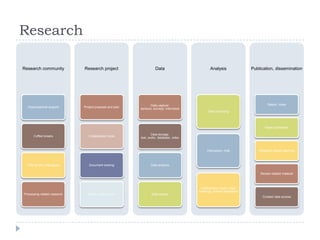
Research

Research community            Research project                      Data                        Analysis               Publication, dissemination


                                                                 Data capture:                                                  Report, notes
  Organizational support      Project proposal and plan
                                                          sensors, surveys, interviews
                                                                                               Data crunching


                                                                                                                              Paper publication

                                                                  Data storage:
      Coffee breaks              Collaboration tools
                                                          text, audio, database, video


                                                                                              Discussion, chat             Research based teaching


  Talking with colleagues        Document sharing                Data analysis

                                                                                                                           Review related material


                                                                                          Collaboration tools: video
                                                                                         meetings, shared workspace
Processing related research      Email, email, email             Data access
                                                                                                                             Curated data access
What do we need?
   Collaboration tools
       Speaking to all senses, more than text 
       Easy to use, play well with unified communication tools
       Students initiate (eCampus web meeting: students host)
   Lecture capture
       Power of the lecture
       Automated, dependable
       Sound is more important than moving pictures
   Video as a process
       Video at your fingertips: practice session, reflection
   24/7 availability
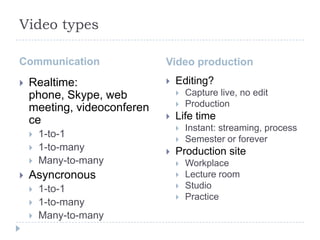
Video types

Communication                Video production
   Realtime:                   Editing?
    phone, Skype, web               Capture live, no edit
    meeting, videoconferen          Production
    ce                          Life time
                                    Instant: streaming, process
       1-to-1                      Semester or forever
       1-to-many               Production site
       Many-to-many                Workplace
   Asyncronous                     Lecture room
       1-to-1                      Studio
                                    Practice
       1-to-many
       Many-to-many
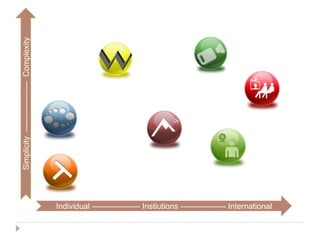
Simplicity ------------------- Complexity


                                            Individual ------------------ Instiutions ----------------- International
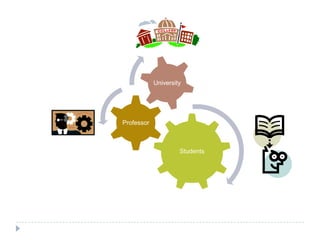
University


Professor


                     Students
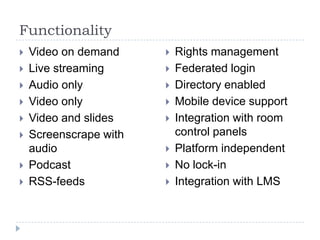
Functionality
   Video on demand        Rights management
   Live streaming         Federated login
   Audio only             Directory enabled
   Video only             Mobile device support
   Video and slides       Integration with room
   Screenscrape with       control panels
    audio                  Platform independent
   Podcast                No lock-in
   RSS-feeds              Integration with LMS
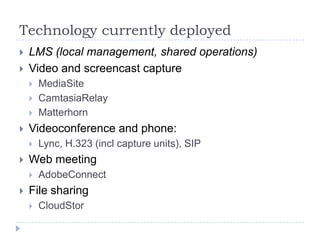
Technology currently deployed
   LMS (local management, shared operations)
   Video and screencast capture
       MediaSite
       CamtasiaRelay
       Matterhorn
   Videoconference and phone:
       Lync, H.323 (incl capture units), SIP
   Web meeting
       AdobeConnect
   File sharing
       CloudStor
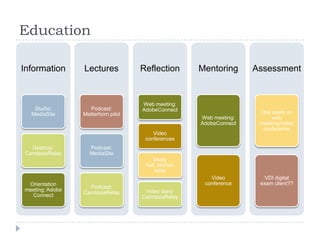
Education

Information      Lectures           Reflection       Mentoring      Assessment


                                    Web meeting:
    Studio:        Podcast:         AdobeConnect
   MediaSite     Matterhorn pilot                                    Oral exam on
                                                     Web meeting:         web
                                                     AdobeConnect    meeting/video
                                                                      conference
                                        Video
                                     conferences
   Desktop:        Podcast:
 CamtasiaRelay     MediaSite
                                        Study
                                     hall, kitchen
                                         table
                                                        Video          VDI digital
 Orientation                                          conference     exam client??
                   Podcast:
meeting: Adobe                       Video diary:
                 CamtasiaRelay
  Connect                           CamtasiaRelay
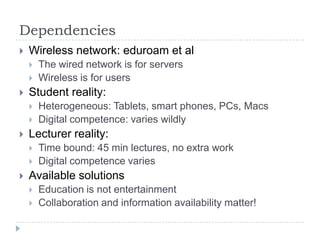
Dependencies
   Wireless network: eduroam et al
       The wired network is for servers
       Wireless is for users
   Student reality:
       Heterogeneous: Tablets, smart phones, PCs, Macs
       Digital competence: varies wildly
   Lecturer reality:
       Time bound: 45 min lectures, no extra work
       Digital competence varies
   Available solutions
       Education is not entertainment
       Collaboration and information availability matter!
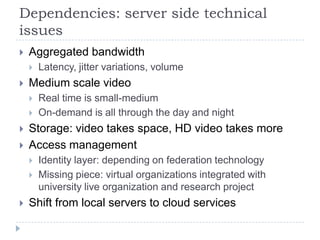
Dependencies: server side technical
issues
   Aggregated bandwidth
       Latency, jitter variations, volume
   Medium scale video
       Real time is small-medium
       On-demand is all through the day and night
   Storage: video takes space, HD video takes more
   Access management
       Identity layer: depending on federation technology
       Missing piece: virtual organizations integrated with
        university live organization and research project
   Shift from local servers to cloud services
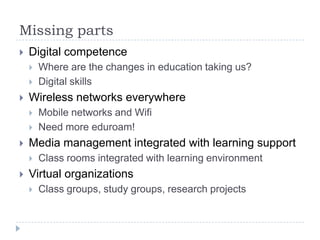
Missing parts
   Digital competence
       Where are the changes in education taking us?
       Digital skills
   Wireless networks everywhere
       Mobile networks and Wifi
       Need more eduroam!
   Media management integrated with learning support
       Class rooms integrated with learning environment
   Virtual organizations
       Class groups, study groups, research projects
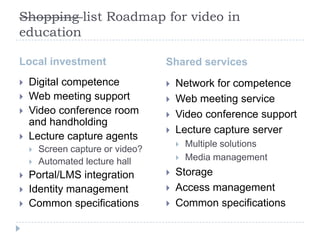
Shopping list Roadmap for video in
education

Local investment                   Shared services
   Digital competence                Network for competence
   Web meeting support               Web meeting service
   Video conference room             Video conference support
    and handholding
                                      Lecture capture server
   Lecture capture agents
                                          Multiple solutions
       Screen capture or video?
       Automated lecture hall            Media management
   Portal/LMS integration            Storage
   Identity management               Access management
   Common specifications             Common specifications

Building video infrastructure for eCampus

  • 1.
    Building video infrastructurefor campus NORDUnet 2012, HiOA Oslo, 2012-09-19 Ingrid Melve (CTO) and Thorleif Hallén (Video project manager), Uninett
  • 2.
    Education Information Lectures Reflection Mentoring Assessment Forum/LMS Meetings: Text documents Social media Skype, phone, web, video conference Exams: online, digital school type, study hall News, messages Lecture books, learning Forum/LMS Discussion, chat objects Web site, university portal Tests: LMS, survey Podcast: Audio, video Study hall, kitchen table Forum/LMS Text documents Notes and reports: LMS Virtual meetings: web Links and references Podcast Email meetings, video conference
  • 3.
    Research Research community Research project Data Analysis Publication, dissemination Data capture: Report, notes Organizational support Project proposal and plan sensors, surveys, interviews Data crunching Paper publication Data storage: Coffee breaks Collaboration tools text, audio, database, video Discussion, chat Research based teaching Talking with colleagues Document sharing Data analysis Review related material Collaboration tools: video meetings, shared workspace Processing related research Email, email, email Data access Curated data access
  • 5.
    What do weneed?  Collaboration tools  Speaking to all senses, more than text   Easy to use, play well with unified communication tools  Students initiate (eCampus web meeting: students host)  Lecture capture  Power of the lecture  Automated, dependable  Sound is more important than moving pictures  Video as a process  Video at your fingertips: practice session, reflection  24/7 availability
  • 6.
    Video types Communication Video production  Realtime:  Editing? phone, Skype, web  Capture live, no edit meeting, videoconferen  Production ce  Life time  Instant: streaming, process  1-to-1  Semester or forever  1-to-many  Production site  Many-to-many  Workplace  Asyncronous  Lecture room  1-to-1  Studio  Practice  1-to-many  Many-to-many
  • 7.
    Simplicity ------------------- Complexity Individual ------------------ Instiutions ----------------- International
  • 8.
  • 9.
    Functionality  Video on demand  Rights management  Live streaming  Federated login  Audio only  Directory enabled  Video only  Mobile device support  Video and slides  Integration with room  Screenscrape with control panels audio  Platform independent  Podcast  No lock-in  RSS-feeds  Integration with LMS
  • 10.
    Technology currently deployed  LMS (local management, shared operations)  Video and screencast capture  MediaSite  CamtasiaRelay  Matterhorn  Videoconference and phone:  Lync, H.323 (incl capture units), SIP  Web meeting  AdobeConnect  File sharing  CloudStor
  • 11.
    Education Information Lectures Reflection Mentoring Assessment Web meeting: Studio: Podcast: AdobeConnect MediaSite Matterhorn pilot Oral exam on Web meeting: web AdobeConnect meeting/video conference Video conferences Desktop: Podcast: CamtasiaRelay MediaSite Study hall, kitchen table Video VDI digital Orientation conference exam client?? Podcast: meeting: Adobe Video diary: CamtasiaRelay Connect CamtasiaRelay
  • 12.
    Dependencies  Wireless network: eduroam et al  The wired network is for servers  Wireless is for users  Student reality:  Heterogeneous: Tablets, smart phones, PCs, Macs  Digital competence: varies wildly  Lecturer reality:  Time bound: 45 min lectures, no extra work  Digital competence varies  Available solutions  Education is not entertainment  Collaboration and information availability matter!
  • 13.
    Dependencies: server sidetechnical issues  Aggregated bandwidth  Latency, jitter variations, volume  Medium scale video  Real time is small-medium  On-demand is all through the day and night  Storage: video takes space, HD video takes more  Access management  Identity layer: depending on federation technology  Missing piece: virtual organizations integrated with university live organization and research project  Shift from local servers to cloud services
  • 14.
    Missing parts  Digital competence  Where are the changes in education taking us?  Digital skills  Wireless networks everywhere  Mobile networks and Wifi  Need more eduroam!  Media management integrated with learning support  Class rooms integrated with learning environment  Virtual organizations  Class groups, study groups, research projects
  • 15.
    Shopping list Roadmapfor video in education Local investment Shared services  Digital competence  Network for competence  Web meeting support  Web meeting service  Video conference room  Video conference support and handholding  Lecture capture server  Lecture capture agents  Multiple solutions  Screen capture or video?  Automated lecture hall  Media management  Portal/LMS integration  Storage  Identity management  Access management  Common specifications  Common specifications

Editor's Notes

  • #9 Who areinvolved? The institutionalrole fortheuniversity.
  • #11 Mulig at denne skal inn på same diagram som modellen for utdanning.
  • #13 Reference ”Digital tilstand” survey of digital use and competencelevel in Norwegianhigher ed