



LOOPBACK 
ADDRESS 
PARMINDER SINGH 
ASSISTANT PROFESSOR| CHANDIGARH ENGINEERING COLLEGE,LANDRAN 
SINGH.PARMINDER06@GMAIL.COM
CONTENTS
PURPOSE 
The proclaim of this topic is to remind the Loopback addresses in networking. This 
presentation update the knowledge of network users including to testing the 
standalone machine (i.e. End user machine) and Network Layer devices (Such as 
Router , Switches). The Topic had discussed by many authors but my aim is to 
scrutinize the topic with practical layout using CISCO Packet Tracer.
LOOPBACK ADDRESS 
 Loopback address is an logical IP addressing that is nominating to only one 
endpoint. 
 The addressing is to ensuring that the network has been properly working. 
 The loopback address does not support any extra hardware. 
 The messages doesn't flow outside the network; It has been generating by only 
one machine and rerouted by the NIC (Network Interface Card);
LOOPBACK ADDRESS (CONT..) 
 The range of the Loopback addresses is 127.0.0.1 through 127.255.255.255. 
 The Loopback address test the Internet Protocol (IP)Stack Functionality. 
 The IP Stack is an implementation over computer networking protocol suite (read 
TCP/IP Stack).
COMMAND 
 The command is any type of instruction to a computer or device. 
 The “ping” command is used to verifying the Loopback address. 
 Ping uses ICMP (Internet Control Message protocol) to send messages to target 
machine for connectivity purpose. 
 If the target machine respond to the sender machine that means both machines 
connected to each other.
DEVICES 
 The number of devices have been use for checking Loopback address on the 
machines. 
 These devices can be categorized as: 
Personnel Computer (PC) 
Switch (SW) 
Router (R)
PERSONNEL COMPUTER 
 The Personnel computer (PC) is an End User device where the user performing 
number of tasks. 
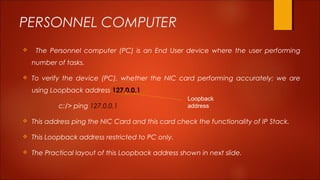
 To verify the device (PC), whether the NIC card performing accurately; we are 
using Loopback address 127.0.0.1 
c:/> ping 127.0.0.1 
Loopback 
address 
 This address ping the NIC Card and this card check the functionality of IP Stack. 
 This Loopback address restricted to PC only. 
 The Practical layout of this Loopback address shown in next slide.
PERSONNEL COMPUTER (CONT..) 
 
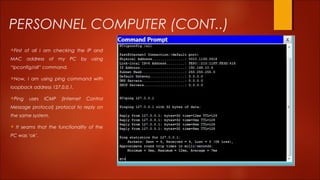
First of all I am checking the IP and 
MAC address of my PC by using 
“ipconfig/all” command. 
Now, I am using ping command with 
loopback address 127.0.0.1. 
Ping uses ICMP (Internet Control 
Message protocol) protocol to reply on 
the same system. 
 It seams that the functionality of the 
PC was ‘ok’.
PERSONNEL COMPUTER (cont..) 
 The loopback address always ping to the NIC card for verifying the IP stack 
functionality. 
 You can use Loopback address 127.9.0.2; This address does not ping to NIC card 
else it verify only IP stack functionality. 
c:/> ping 127.9.0.2 
 This address exclusively used for the reason of: 
 When NIC card not attached or missing on your PC. 
 If the NIC card not properly worked.
SWITCH 
 The Switch is Layer 2 Device that connects number of Pc’s according to the 
availability of the Ethernet ports. 
 The switch performed on MAC address; it does not verified logical addresses. 
 It performs filtering and switching only on MAC (Medium Access Control) 
addresses. 
 The Switch has unicasting feature; the sender send unicast message to the 
destination machine and destination machine unicastly reply. 
 The Switch employ MAC Table to forwards the data from one device to another.
SWITCH(CONT..) 
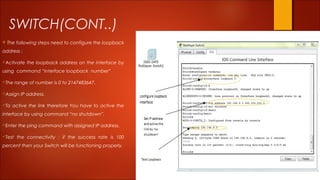
 The following steps need to configure the loopback 
address : 
Activate the loopback address on the interface by 
using command “interface loopback number” 
The range of number is 0 to 2147483647. 
Assign IP address. 
To active the link therefore You have to active the 
interface by using command “no shutdown”. 
Enter the ping command with assigned IP address. 
Test the connectivity ; if the success rate is 100 
percent then your Switch will be functioning properly.
ROUTER 
 Router is a Network Layer device that forwards packet in to the Network. 
 This Network Supposed to be either LAN, MAN or WAN. 
 The Router is also acting as a Gateway for associates two different network. 
 The Router employing ICMP (Internet Control Message Protocol) Protocol for 
communes different devices and nodes. 
 This Protocol helps the router to create routing table and configure best route path 
in between two communicating nodes. 
 Router provides quality of service (QOS) feature performance. 
 Router Extends the network as a platform for cloud computing.
ROUTER(CONT..) 
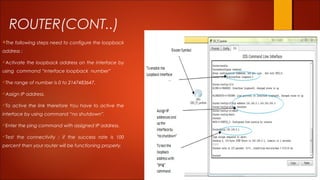
The following steps need to configure the loopback 
address : 
Activate the loopback address on the interface by 
using command “interface loopback number” 
The range of number is 0 to 2147483647. 
Assign IP address. 
To active the link therefore You have to active the 
interface by using command “no shutdown”. 
Enter the ping command with assigned IP address. 
Test the connectivity ; if the success rate is 100 
percent then your router will be functioning properly.
REFERENCES 
[1] https://www.netacad.com 
[2] www.packettracernetwork.com
Questions? 
SINGH.PARMINDER06@GMAIL.COM

Loopback address

  • 1.
    LOOPBACK ADDRESS PARMINDERSINGH ASSISTANT PROFESSOR| CHANDIGARH ENGINEERING COLLEGE,LANDRAN SINGH.PARMINDER06@GMAIL.COM
  • 2.
  • 3.
    PURPOSE The proclaimof this topic is to remind the Loopback addresses in networking. This presentation update the knowledge of network users including to testing the standalone machine (i.e. End user machine) and Network Layer devices (Such as Router , Switches). The Topic had discussed by many authors but my aim is to scrutinize the topic with practical layout using CISCO Packet Tracer.
  • 4.
    LOOPBACK ADDRESS Loopback address is an logical IP addressing that is nominating to only one endpoint.  The addressing is to ensuring that the network has been properly working.  The loopback address does not support any extra hardware.  The messages doesn't flow outside the network; It has been generating by only one machine and rerouted by the NIC (Network Interface Card);
  • 5.
    LOOPBACK ADDRESS (CONT..)  The range of the Loopback addresses is 127.0.0.1 through 127.255.255.255.  The Loopback address test the Internet Protocol (IP)Stack Functionality.  The IP Stack is an implementation over computer networking protocol suite (read TCP/IP Stack).
  • 6.
    COMMAND  Thecommand is any type of instruction to a computer or device.  The “ping” command is used to verifying the Loopback address.  Ping uses ICMP (Internet Control Message protocol) to send messages to target machine for connectivity purpose.  If the target machine respond to the sender machine that means both machines connected to each other.
  • 7.
    DEVICES  Thenumber of devices have been use for checking Loopback address on the machines.  These devices can be categorized as: Personnel Computer (PC) Switch (SW) Router (R)
  • 8.
    PERSONNEL COMPUTER The Personnel computer (PC) is an End User device where the user performing number of tasks.  To verify the device (PC), whether the NIC card performing accurately; we are using Loopback address 127.0.0.1 c:/> ping 127.0.0.1 Loopback address  This address ping the NIC Card and this card check the functionality of IP Stack.  This Loopback address restricted to PC only.  The Practical layout of this Loopback address shown in next slide.
  • 9.
    PERSONNEL COMPUTER (CONT..)  First of all I am checking the IP and MAC address of my PC by using “ipconfig/all” command. Now, I am using ping command with loopback address 127.0.0.1. Ping uses ICMP (Internet Control Message protocol) protocol to reply on the same system.  It seams that the functionality of the PC was ‘ok’.
  • 10.
    PERSONNEL COMPUTER (cont..)  The loopback address always ping to the NIC card for verifying the IP stack functionality.  You can use Loopback address 127.9.0.2; This address does not ping to NIC card else it verify only IP stack functionality. c:/> ping 127.9.0.2  This address exclusively used for the reason of:  When NIC card not attached or missing on your PC.  If the NIC card not properly worked.
  • 11.
    SWITCH  TheSwitch is Layer 2 Device that connects number of Pc’s according to the availability of the Ethernet ports.  The switch performed on MAC address; it does not verified logical addresses.  It performs filtering and switching only on MAC (Medium Access Control) addresses.  The Switch has unicasting feature; the sender send unicast message to the destination machine and destination machine unicastly reply.  The Switch employ MAC Table to forwards the data from one device to another.
  • 12.
    SWITCH(CONT..)  Thefollowing steps need to configure the loopback address : Activate the loopback address on the interface by using command “interface loopback number” The range of number is 0 to 2147483647. Assign IP address. To active the link therefore You have to active the interface by using command “no shutdown”. Enter the ping command with assigned IP address. Test the connectivity ; if the success rate is 100 percent then your Switch will be functioning properly.
  • 13.
    ROUTER  Routeris a Network Layer device that forwards packet in to the Network.  This Network Supposed to be either LAN, MAN or WAN.  The Router is also acting as a Gateway for associates two different network.  The Router employing ICMP (Internet Control Message Protocol) Protocol for communes different devices and nodes.  This Protocol helps the router to create routing table and configure best route path in between two communicating nodes.  Router provides quality of service (QOS) feature performance.  Router Extends the network as a platform for cloud computing.
  • 14.
    ROUTER(CONT..) The followingsteps need to configure the loopback address : Activate the loopback address on the interface by using command “interface loopback number” The range of number is 0 to 2147483647. Assign IP address. To active the link therefore You have to active the interface by using command “no shutdown”. Enter the ping command with assigned IP address. Test the connectivity ; if the success rate is 100 percent then your router will be functioning properly.
  • 15.
    REFERENCES [1] https://www.netacad.com [2] www.packettracernetwork.com
  • 16.