Computer Communication & Networks
Spring 2020 Semester
Department of Computer Software Engineering
Network Layer- Part-1
Readings:
1. Computer Networking: A Top-Down Approach, By: Kurose and Ross, Edition: 6th, Publisher: Pearson, ISBN: 0132856204, Year of Publication: 2012, Chapter- 4
2. TCP/IP Protocol Suite, 4th
Edition, By Behrouz F. Forouzan- Chapter-14
Week-12
Online Lecture-06
Topics Discussed in Last Lecture
1. Packet Switching/Forwarding
• Source Routing
2. Evaluation of Packing Switching Techniques
3. Examination of IP Header
4. Fragmentation & Re-assembly
5. IPAddressing
Topics Discussed in this Lecture
CLO-2: Analyze the service model of each layer in the TCP/IP protocol stack with respect to the protocols/algorithms.
Taxonomy Level: 4, PLO-2
1. Sub-nets and Subnet Masks
2. Dynamic Host Configuration Protocol (DHCP)
3. IP Forwarding
IP addressing: Revisited
Q: how are interfaces actually
connected?
A: we’ll learn about that in
chapter 5, 6.
223.1.1.1
223.1.1.4 223.1.2.9
223.1.2.2
223.1.2.1
223.1.3.2
223.1.3.1
223.1.3.27
A: wired Ethernet interfaces connected by
Ethernet switches
B: wireless WiFi interfaces connected by WiFi
base station(AP)
223.1.1.2
223.1.1.3
Network ID: 223.1.1.0 Network ID: 223.1.2.0
Network ID: 223.1.3.0
0
1
2
Forwarding Table on Router
Net ID Interface
233.1.2.0 0
233.1.1.0 1
233.1.3.0 2
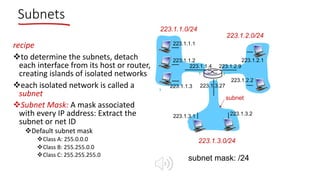
recipe
vto determine the subnets, detach
each interface from its host or router,
creating islands of isolated networks
veach isolated network is called a
subnet
vSubnet Mask: A mask associated
with every IP address: Extract the
subnet or net ID
vDefault subnet mask
vClass A: 255.0.0.0
vClass B: 255.255.0.0
vClass C: 255.255.255.0
subnet mask: /24
Subnets
223.1.1.0/24
223.1.2.0/24
223.1.3.0/24
223.1.1.1
223.1.1.3
223.1.1.4 223.1.2.9
223.1.3.2
223.1.3.1
subnet
223.1.1.2
223.1.3.27
223.1.2.2
223.1.2.1
1
1 0
2
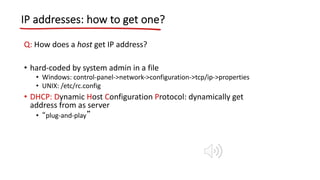
IP addresses: how to get one?
Q: How does a host get IP address?
• hard-coded by system admin in a file
• Windows: control-panel->network->configuration->tcp/ip->properties
• UNIX: /etc/rc.config
• DHCP: Dynamic Host Configuration Protocol: dynamically get
address from as server
• “plug-and-play”
DHCP: Dynamic Host Configuration Protocol
Goal: allow host to dynamically obtain its IP address from network server when it joins
network
• can renew its lease on address in use
• allows reuse of addresses (only hold address while connected/“on”)
• support for mobile users who want to join network
DHCP overview:
• host broadcasts “DHCP discover” msg
• DHCP server responds with “DHCP offer” msg
• host requests IP address: “DHCP request” msg
• DHCP server sends address: “DHCP ack” msg
DHCP client-server scenario
223.1.1.0/24
223.1.2.0/24
223.1.3.0/24
223.1.1.1
223.1.1.3
223.1.1.4 223.1.2.9
223.1.3.2
223.1.3.1
223.1.1.2
223.1.3.27
223.1.2.2
223.1.2.1
DHCP
server
arriving DHCP
client needs
address in this
network
DHCP client-server scenario – Part-2
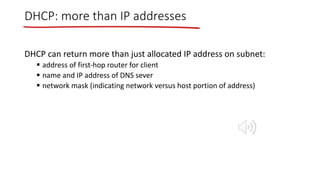
DHCP: more than IP addresses
DHCP can return more than just allocated IP address on subnet:
§ address of first-hop router for client
§ name and IP address of DNS sever
§ network mask (indicating network versus host portion of address)
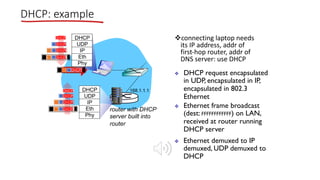
vconnecting laptop needs
its IP address, addr of
first-hop router, addr of
DNS server: use DHCP
router with DHCP
server built into
router
v DHCP request encapsulated
in UDP, encapsulated in IP,
encapsulated in 802.3
Ethernet
v Ethernet frame broadcast
(dest: FFFFFFFFFFFF) on LAN,
received at router running
DHCP server
v Ethernet demuxed to IP
demuxed, UDP demuxed to
DHCP
168.1.1.1
DHCP
UDP
IP
Eth
Phy
DHCP
DHCP
DHCP
DHCP
DHCP
DHCP
UDP
IP
Eth
Phy
DHCP
DHCP
DHCP
DHCP
DHCP
DHCP: example
• DCP server formulates DHCP
ACK containing client’s IP
address, IP address of first-
hop router for client, name
& IP address of DNS server
v encapsulation of DHCP
server, frame forwarded
to client, demuxing up to
DHCP at client
DHCP: example
router with DHCP
server built into
router
DHCP
DHCP
DHCP
DHCP
DHCP
UDP
IP
Eth
Phy
DHCP
DHCP
UDP
IP
Eth
Phy
DHCP
DHCP
DHCP
DHCP
v client now knows its IP
address, name and IP
address of DSN server, IP
address of its first-hop
router
DHCP: Wireshark
output (home LAN)
Message type: Boot Reply (2)
Hardware type: Ethernet
Hardware address length: 6
Hops: 0
Transaction ID: 0x6b3a11b7
Seconds elapsed: 0
Bootp flags: 0x0000 (Unicast)
Client IP address: 192.168.1.101 (192.168.1.101)
Your (client) IP address: 0.0.0.0 (0.0.0.0)
Next server IP address: 192.168.1.1 (192.168.1.1)
Relay agent IP address: 0.0.0.0 (0.0.0.0)
Client MAC address: Wistron_23:68:8a (00:16:d3:23:68:8a)
Server host name not given
Boot file name not given
Magic cookie: (OK)
Option: (t=53,l=1) DHCP Message Type = DHCP ACK
Option: (t=54,l=4) Server Identifier = 192.168.1.1
Option: (t=1,l=4) Subnet Mask = 255.255.255.0
Option: (t=3,l=4) Router = 192.168.1.1
Option: (6) Domain Name Server
Length: 12; Value: 445747E2445749F244574092;
IP Address: 68.87.71.226;
IP Address: 68.87.73.242;
IP Address: 68.87.64.146
Option: (t=15,l=20) Domain Name = "hsd1.ma.comcast.net."
reply
Message type: Boot Request (1)
Hardware type: Ethernet
Hardware address length: 6
Hops: 0
Transaction ID: 0x6b3a11b7
Seconds elapsed: 0
Bootp flags: 0x0000 (Unicast)
Client IP address: 0.0.0.0 (0.0.0.0)
Your (client) IP address: 0.0.0.0 (0.0.0.0)
Next server IP address: 0.0.0.0 (0.0.0.0)
Relay agent IP address: 0.0.0.0 (0.0.0.0)
Client MAC address: Wistron_23:68:8a (00:16:d3:23:68:8a)
Server host name not given
Boot file name not given
Magic cookie: (OK)
Option: (t=53,l=1) DHCP Message Type = DHCP Request
Option: (61) Client identifier
Length: 7; Value: 010016D323688A;
Hardware type: Ethernet
Client MAC address: Wistron_23:68:8a (00:16:d3:23:68:8a)
Option: (t=50,l=4) Requested IP Address = 192.168.1.101
Option: (t=12,l=5) Host Name = "nomad"
Option: (55) Parameter Request List
Length: 11; Value: 010F03062C2E2F1F21F92B
1 = Subnet Mask; 15 = Domain Name
3 = Router; 6 = Domain Name Server
44 = NetBIOS over TCP/IP Name Server
……
request
Datagram Forwarding
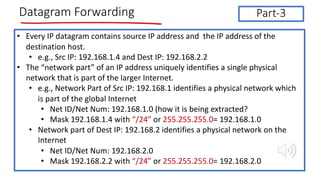
• Every IP datagram contains source IP address and the IP address of the
destination host.
• e.g., Src IP: 192.168.1.4 and Dest IP: 192.168.2.2
• The “network part” of an IP address uniquely identifies a single physical
network that is part of the larger Internet.
• e.g., Network Part of Src IP: 192.168.1 identifies a physical network which
is part of the global Internet
• Net ID/Net Num: 192.168.1.0 (how it is being extracted?
• Mask 192.168.1.4 with “/24” or 255.255.255.0= 192.168.1.0
• Network part of Dest IP: 192.168.2 identifies a physical network on the
Internet
• Net ID/Net Num: 192.168.2.0
• Mask 192.168.2.2 with “/24” or 255.255.255.0= 192.168.2.0
Part-3
Datagram Forwarding (1)
• All hosts and routers that share the same network part of their
address are connected to the same physical network
• They can communicate with each other by sending frames
over that network.
• Every physical network that is part of the Internet has at least
one router that, by definition, is also connected to at least one
other physical network or router
• This router can exchange packets with hosts or routers on
either network.
Datagram Forwarding(2)
• A datagram is sent from a source host to a destination host
• What are the possibilities for the destination host location?
• Destination can be on the same physical network (i.e., the network part of IP address of the
destination is similar to the network part of IP address of the source node)
• Example: Src IP: 192.168.2.4 and Dest IP: 192.168.2.212
• Destination can be on other physical network/sub-net (i.e, the network part of IP address of the
destination is different from the network part of IP address of the source node
• Example: Src IP: 192.168.2.4 and Dest IP: 192.168.3.212
• Any node, first tries to find out whether it is connected to the same physical network as
the destination node.
• How a node/host knows this ?
• If source and destination are on the same physical network then,
• Send the datagram directly to the destination
• You will definitely need destination MAC here to deliver it at the Data Link layer (another issue)
• Otherwise,
• Send it to the router.
• You will need router MAC address to deliver it at the link layer (another issue)
IP Forwarding-Example
223.1.1.1
223.1.1.4 223.1.2.9
223.1.2.2
223.1.2.1
223.1.3.2
223.1.3.1
223.1.3.27
223.1.1.2
223.1.1.3
Network ID: 223.1.1.0 Network ID: 223.1.2.0
Network ID: 223.1.3.0
0
1
2
Forwarding Table on Router
Net ID Net Mask Interface
223.1.2.0 255.255.255.0 0
223.1.1.0 255.255.255.0 1
223.1.3.0 255.255.255.0 2
For sending node:
Case-1: Let 223.1.1.1 wants to send
an IP packet to 223.1.1.2
• sending node finds out that they
belong to same network so send it
directly
Case-2: Let 223.1.1.1 wants to send
an IP packet to 223.1.3.1
• sending node finds out that they
don’t belong to the same network
so send it to the default
router(223.1.1.4)
IP Forwarding Example
Forwarding at the Router
• IP packet with destination IP: 223.1.3.1 arrives at
the router
• Router masks it with each entry in the forwarding
table, if a match is found then it is sent on that
interface.
• Mask with first entry in forwarding table i.e.,
255.255.255.0, result 223.1.3.0, match not found as
net ID there is 223.1.2.0
• Mask with second entry in forwarding table, i.e.,
255.255.255.0, match is not found as net ID there is
223.1.1.0
• Mask with third entry in forwarding table, i.e.,
255.255.255.0, match is found as net ID listed there
is 223.1.3.0, send it on interface 2
223.1.1.1
223.1.1.4 223.1.2.9
223.1.2.2
223.1.2.1
223.1.3.2
223.1.3.1
223.1.3.27
223.1.1.2
223.1.1.3
Network ID: 223.1.1.0 Network ID: 223.1.2.0
Network ID: 223.1.3.0
0
1
2
Forwarding Table on Router
Net ID Net Mask Interface
223.1.2.0 255.255.255.0 0
223.1.1.0 255.255.255.0 1
223.1.3.0 255.255.255.0 2
Datagram Forwarding- Example-1
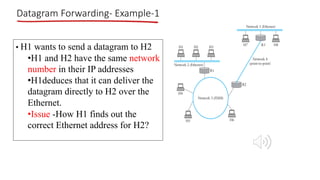
• H1 wants to send a datagram to H2
•H1 and H2 have the same network
number in their IP addresses
•H1deduces that it can deliver the
datagram directly to H2 over the
Ethernet.
•Issue -How H1 finds out the
correct Ethernet address for H2?
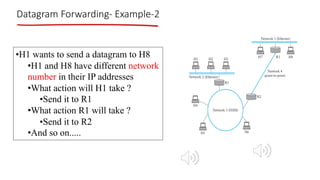
Datagram Forwarding- Example-2
•H1 wants to send a datagram to H8
•H1 and H8 have different network
number in their IP addresses
•What action will H1 take ?
•Send it to R1
•What action R1 will take ?
•Send it to R2
•And so on.....
Datagram Forwarding
Network # Netmask Next Hop/Port
18.0.0.0 255.0.0.0 1
128.32.0.0 255.255.0.0 2
0.0.0.0 0.0.0.0 3 (Default route)
dest: 18.26.10.0 mask with 255.0.0.0 matched! send to port 1
dest: 128.16.14.0 mask with 255.0.0.0 not matched
mask with 255.255.0.0 not matched
mask with 0.0.0.0 matched! send to port 3

Network Layers | Computer Communication and Networks

  • 1.
    Computer Communication &Networks Spring 2020 Semester Department of Computer Software Engineering Network Layer- Part-1 Readings: 1. Computer Networking: A Top-Down Approach, By: Kurose and Ross, Edition: 6th, Publisher: Pearson, ISBN: 0132856204, Year of Publication: 2012, Chapter- 4 2. TCP/IP Protocol Suite, 4th Edition, By Behrouz F. Forouzan- Chapter-14 Week-12 Online Lecture-06
  • 2.
    Topics Discussed inLast Lecture 1. Packet Switching/Forwarding • Source Routing 2. Evaluation of Packing Switching Techniques 3. Examination of IP Header 4. Fragmentation & Re-assembly 5. IPAddressing
  • 3.
    Topics Discussed inthis Lecture CLO-2: Analyze the service model of each layer in the TCP/IP protocol stack with respect to the protocols/algorithms. Taxonomy Level: 4, PLO-2 1. Sub-nets and Subnet Masks 2. Dynamic Host Configuration Protocol (DHCP) 3. IP Forwarding
  • 4.
    IP addressing: Revisited Q:how are interfaces actually connected? A: we’ll learn about that in chapter 5, 6. 223.1.1.1 223.1.1.4 223.1.2.9 223.1.2.2 223.1.2.1 223.1.3.2 223.1.3.1 223.1.3.27 A: wired Ethernet interfaces connected by Ethernet switches B: wireless WiFi interfaces connected by WiFi base station(AP) 223.1.1.2 223.1.1.3 Network ID: 223.1.1.0 Network ID: 223.1.2.0 Network ID: 223.1.3.0 0 1 2 Forwarding Table on Router Net ID Interface 233.1.2.0 0 233.1.1.0 1 233.1.3.0 2
  • 5.
    recipe vto determine thesubnets, detach each interface from its host or router, creating islands of isolated networks veach isolated network is called a subnet vSubnet Mask: A mask associated with every IP address: Extract the subnet or net ID vDefault subnet mask vClass A: 255.0.0.0 vClass B: 255.255.0.0 vClass C: 255.255.255.0 subnet mask: /24 Subnets 223.1.1.0/24 223.1.2.0/24 223.1.3.0/24 223.1.1.1 223.1.1.3 223.1.1.4 223.1.2.9 223.1.3.2 223.1.3.1 subnet 223.1.1.2 223.1.3.27 223.1.2.2 223.1.2.1 1 1 0 2
  • 6.
    IP addresses: howto get one? Q: How does a host get IP address? • hard-coded by system admin in a file • Windows: control-panel->network->configuration->tcp/ip->properties • UNIX: /etc/rc.config • DHCP: Dynamic Host Configuration Protocol: dynamically get address from as server • “plug-and-play”
  • 7.
    DHCP: Dynamic HostConfiguration Protocol Goal: allow host to dynamically obtain its IP address from network server when it joins network • can renew its lease on address in use • allows reuse of addresses (only hold address while connected/“on”) • support for mobile users who want to join network DHCP overview: • host broadcasts “DHCP discover” msg • DHCP server responds with “DHCP offer” msg • host requests IP address: “DHCP request” msg • DHCP server sends address: “DHCP ack” msg
  • 8.
    DHCP client-server scenario 223.1.1.0/24 223.1.2.0/24 223.1.3.0/24 223.1.1.1 223.1.1.3 223.1.1.4223.1.2.9 223.1.3.2 223.1.3.1 223.1.1.2 223.1.3.27 223.1.2.2 223.1.2.1 DHCP server arriving DHCP client needs address in this network
  • 9.
  • 10.
    DHCP: more thanIP addresses DHCP can return more than just allocated IP address on subnet: § address of first-hop router for client § name and IP address of DNS sever § network mask (indicating network versus host portion of address)
  • 11.
    vconnecting laptop needs itsIP address, addr of first-hop router, addr of DNS server: use DHCP router with DHCP server built into router v DHCP request encapsulated in UDP, encapsulated in IP, encapsulated in 802.3 Ethernet v Ethernet frame broadcast (dest: FFFFFFFFFFFF) on LAN, received at router running DHCP server v Ethernet demuxed to IP demuxed, UDP demuxed to DHCP 168.1.1.1 DHCP UDP IP Eth Phy DHCP DHCP DHCP DHCP DHCP DHCP UDP IP Eth Phy DHCP DHCP DHCP DHCP DHCP DHCP: example
  • 12.
    • DCP serverformulates DHCP ACK containing client’s IP address, IP address of first- hop router for client, name & IP address of DNS server v encapsulation of DHCP server, frame forwarded to client, demuxing up to DHCP at client DHCP: example router with DHCP server built into router DHCP DHCP DHCP DHCP DHCP UDP IP Eth Phy DHCP DHCP UDP IP Eth Phy DHCP DHCP DHCP DHCP v client now knows its IP address, name and IP address of DSN server, IP address of its first-hop router
  • 13.
    DHCP: Wireshark output (homeLAN) Message type: Boot Reply (2) Hardware type: Ethernet Hardware address length: 6 Hops: 0 Transaction ID: 0x6b3a11b7 Seconds elapsed: 0 Bootp flags: 0x0000 (Unicast) Client IP address: 192.168.1.101 (192.168.1.101) Your (client) IP address: 0.0.0.0 (0.0.0.0) Next server IP address: 192.168.1.1 (192.168.1.1) Relay agent IP address: 0.0.0.0 (0.0.0.0) Client MAC address: Wistron_23:68:8a (00:16:d3:23:68:8a) Server host name not given Boot file name not given Magic cookie: (OK) Option: (t=53,l=1) DHCP Message Type = DHCP ACK Option: (t=54,l=4) Server Identifier = 192.168.1.1 Option: (t=1,l=4) Subnet Mask = 255.255.255.0 Option: (t=3,l=4) Router = 192.168.1.1 Option: (6) Domain Name Server Length: 12; Value: 445747E2445749F244574092; IP Address: 68.87.71.226; IP Address: 68.87.73.242; IP Address: 68.87.64.146 Option: (t=15,l=20) Domain Name = "hsd1.ma.comcast.net." reply Message type: Boot Request (1) Hardware type: Ethernet Hardware address length: 6 Hops: 0 Transaction ID: 0x6b3a11b7 Seconds elapsed: 0 Bootp flags: 0x0000 (Unicast) Client IP address: 0.0.0.0 (0.0.0.0) Your (client) IP address: 0.0.0.0 (0.0.0.0) Next server IP address: 0.0.0.0 (0.0.0.0) Relay agent IP address: 0.0.0.0 (0.0.0.0) Client MAC address: Wistron_23:68:8a (00:16:d3:23:68:8a) Server host name not given Boot file name not given Magic cookie: (OK) Option: (t=53,l=1) DHCP Message Type = DHCP Request Option: (61) Client identifier Length: 7; Value: 010016D323688A; Hardware type: Ethernet Client MAC address: Wistron_23:68:8a (00:16:d3:23:68:8a) Option: (t=50,l=4) Requested IP Address = 192.168.1.101 Option: (t=12,l=5) Host Name = "nomad" Option: (55) Parameter Request List Length: 11; Value: 010F03062C2E2F1F21F92B 1 = Subnet Mask; 15 = Domain Name 3 = Router; 6 = Domain Name Server 44 = NetBIOS over TCP/IP Name Server …… request
  • 14.
    Datagram Forwarding • EveryIP datagram contains source IP address and the IP address of the destination host. • e.g., Src IP: 192.168.1.4 and Dest IP: 192.168.2.2 • The “network part” of an IP address uniquely identifies a single physical network that is part of the larger Internet. • e.g., Network Part of Src IP: 192.168.1 identifies a physical network which is part of the global Internet • Net ID/Net Num: 192.168.1.0 (how it is being extracted? • Mask 192.168.1.4 with “/24” or 255.255.255.0= 192.168.1.0 • Network part of Dest IP: 192.168.2 identifies a physical network on the Internet • Net ID/Net Num: 192.168.2.0 • Mask 192.168.2.2 with “/24” or 255.255.255.0= 192.168.2.0 Part-3
  • 15.
    Datagram Forwarding (1) •All hosts and routers that share the same network part of their address are connected to the same physical network • They can communicate with each other by sending frames over that network. • Every physical network that is part of the Internet has at least one router that, by definition, is also connected to at least one other physical network or router • This router can exchange packets with hosts or routers on either network.
  • 16.
    Datagram Forwarding(2) • Adatagram is sent from a source host to a destination host • What are the possibilities for the destination host location? • Destination can be on the same physical network (i.e., the network part of IP address of the destination is similar to the network part of IP address of the source node) • Example: Src IP: 192.168.2.4 and Dest IP: 192.168.2.212 • Destination can be on other physical network/sub-net (i.e, the network part of IP address of the destination is different from the network part of IP address of the source node • Example: Src IP: 192.168.2.4 and Dest IP: 192.168.3.212 • Any node, first tries to find out whether it is connected to the same physical network as the destination node. • How a node/host knows this ? • If source and destination are on the same physical network then, • Send the datagram directly to the destination • You will definitely need destination MAC here to deliver it at the Data Link layer (another issue) • Otherwise, • Send it to the router. • You will need router MAC address to deliver it at the link layer (another issue)
  • 17.
    IP Forwarding-Example 223.1.1.1 223.1.1.4 223.1.2.9 223.1.2.2 223.1.2.1 223.1.3.2 223.1.3.1 223.1.3.27 223.1.1.2 223.1.1.3 NetworkID: 223.1.1.0 Network ID: 223.1.2.0 Network ID: 223.1.3.0 0 1 2 Forwarding Table on Router Net ID Net Mask Interface 223.1.2.0 255.255.255.0 0 223.1.1.0 255.255.255.0 1 223.1.3.0 255.255.255.0 2 For sending node: Case-1: Let 223.1.1.1 wants to send an IP packet to 223.1.1.2 • sending node finds out that they belong to same network so send it directly Case-2: Let 223.1.1.1 wants to send an IP packet to 223.1.3.1 • sending node finds out that they don’t belong to the same network so send it to the default router(223.1.1.4)
  • 18.
    IP Forwarding Example Forwardingat the Router • IP packet with destination IP: 223.1.3.1 arrives at the router • Router masks it with each entry in the forwarding table, if a match is found then it is sent on that interface. • Mask with first entry in forwarding table i.e., 255.255.255.0, result 223.1.3.0, match not found as net ID there is 223.1.2.0 • Mask with second entry in forwarding table, i.e., 255.255.255.0, match is not found as net ID there is 223.1.1.0 • Mask with third entry in forwarding table, i.e., 255.255.255.0, match is found as net ID listed there is 223.1.3.0, send it on interface 2 223.1.1.1 223.1.1.4 223.1.2.9 223.1.2.2 223.1.2.1 223.1.3.2 223.1.3.1 223.1.3.27 223.1.1.2 223.1.1.3 Network ID: 223.1.1.0 Network ID: 223.1.2.0 Network ID: 223.1.3.0 0 1 2 Forwarding Table on Router Net ID Net Mask Interface 223.1.2.0 255.255.255.0 0 223.1.1.0 255.255.255.0 1 223.1.3.0 255.255.255.0 2
  • 19.
    Datagram Forwarding- Example-1 •H1 wants to send a datagram to H2 •H1 and H2 have the same network number in their IP addresses •H1deduces that it can deliver the datagram directly to H2 over the Ethernet. •Issue -How H1 finds out the correct Ethernet address for H2?
  • 20.
    Datagram Forwarding- Example-2 •H1wants to send a datagram to H8 •H1 and H8 have different network number in their IP addresses •What action will H1 take ? •Send it to R1 •What action R1 will take ? •Send it to R2 •And so on.....
  • 21.
    Datagram Forwarding Network #Netmask Next Hop/Port 18.0.0.0 255.0.0.0 1 128.32.0.0 255.255.0.0 2 0.0.0.0 0.0.0.0 3 (Default route) dest: 18.26.10.0 mask with 255.0.0.0 matched! send to port 1 dest: 128.16.14.0 mask with 255.0.0.0 not matched mask with 255.255.0.0 not matched mask with 0.0.0.0 matched! send to port 3