Logical Vectors and
      Strings
• TYPE as it is in Command Line :
   r=1; Chk result
  r<=.5
   ( Result is 0)
   and then at last
   r>=.5
( Result is 1)

Now Enter the Following statement :

r = 1:5;
r<=3

U get 11100 as statement is true for first 3 elements
• Vectors are compared element by element
  and the resulting vector is called as Logical
  Vector. It is one of the most power concepts in
  MATLAB.

• For eg try this :
a=1:5;
b=[0 2 3 5 6];
a==b % no semicolon (Result is :
0 1 1 0 0)
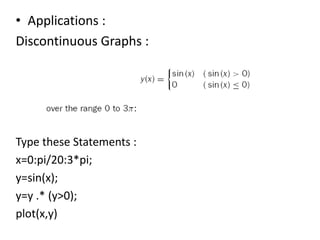
• Applications :
Discontinuous Graphs :


Type these Statements :
x=0:pi/20:3*pi;
y=sin(x);
y=y .* (y>0);
plot(x,y)
• What was the Funda ???
y>0 returns a logical vector with ones where sin(x)
  is positive as y>0 means it is checked element
  by element if it is >0 ; and if it is not then it
  returns 0.

After this we multiply by y to get the graph
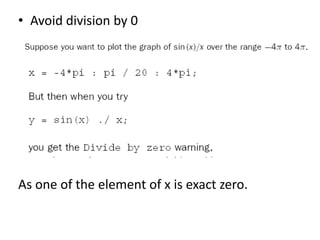
• Avoid division by 0


As one of the element of x is exact zero.
• Use Logical Vector to replace zero with eps.


What is eps?
• This MATLAB function returns the difference
  between 1.0 and the next largest number which
  can be represented in MATLAB, i.e.
  approximately 2.2e-16.
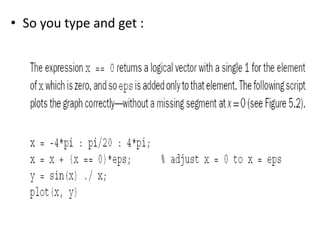
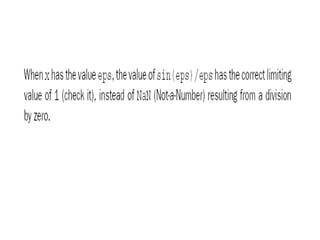
• So you type and get :
• Logical Functions :
x is a vector :
Try these statements :

x=1:5
any(x)

any(x) : returns scalar 1 in ans if any element of x
  is nonzero.
• Try for the o/p of
 x = [ 0 0]
any(x)

all(x)
Returns scalar 1 if all elements of vector x r non
   zero!
x=1:5;
all(x)
Try to get info abt all logic functions
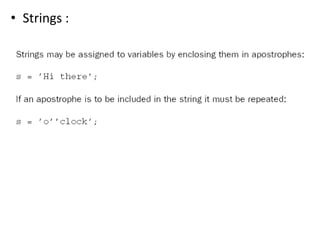
• Strings :
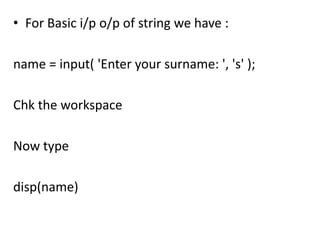
• For Basic i/p o/p of string we have :

name = input( 'Enter your surname: ', 's' );

Chk the workspace

Now type

disp(name)
Logical vectors
Logical vectors
Logical vectors

Logical vectors

  • 1.
  • 2.
    • TYPE asit is in Command Line : r=1; Chk result r<=.5 ( Result is 0) and then at last r>=.5 ( Result is 1) Now Enter the Following statement : r = 1:5; r<=3 U get 11100 as statement is true for first 3 elements
  • 3.
    • Vectors arecompared element by element and the resulting vector is called as Logical Vector. It is one of the most power concepts in MATLAB. • For eg try this : a=1:5; b=[0 2 3 5 6]; a==b % no semicolon (Result is : 0 1 1 0 0)
  • 4.
    • Applications : DiscontinuousGraphs : Type these Statements : x=0:pi/20:3*pi; y=sin(x); y=y .* (y>0); plot(x,y)
  • 5.
    • What wasthe Funda ??? y>0 returns a logical vector with ones where sin(x) is positive as y>0 means it is checked element by element if it is >0 ; and if it is not then it returns 0. After this we multiply by y to get the graph
  • 6.
    • Avoid divisionby 0 As one of the element of x is exact zero.
  • 7.
    • Use LogicalVector to replace zero with eps. What is eps? • This MATLAB function returns the difference between 1.0 and the next largest number which can be represented in MATLAB, i.e. approximately 2.2e-16.
  • 8.
    • So youtype and get :
  • 10.
    • Logical Functions: x is a vector : Try these statements : x=1:5 any(x) any(x) : returns scalar 1 in ans if any element of x is nonzero.
  • 11.
    • Try forthe o/p of x = [ 0 0] any(x) all(x) Returns scalar 1 if all elements of vector x r non zero! x=1:5; all(x) Try to get info abt all logic functions
  • 13.
  • 14.
    • For Basici/p o/p of string we have : name = input( 'Enter your surname: ', 's' ); Chk the workspace Now type disp(name)