MATLAB for
Marketing People
Toshi Takeuchi
MATLAB = MATrix LABoratory
Why should you care?
Excel is super intuitive and useful if:
● The data fits the computer screen
● You can manipulate data manually
● Your analysis is relatively simple.
Excel can be a nightmare if:
● The data is too large to fit the computer
screen or manipulate directly
● Your analysis is complex and needs
debugging
You already use matrices and
vectors in Excel
This is a matrix
● has rows and columns
This is a vector
● only one row or column
They contain numbers
● numbers are in each cell
MATLAB also has rows and columns
like Excel
Functions
Functions
Data
Data
More focus on direct
data manipulation
More focus on manipulating
data via code
MATLAB and Excel = BFF
Import data
Export data
Before we start:
MATLAB user interface
Command Window: where you type your
command and run your code
Workspace:
where your data
lives as
variables
Editor, but we don’t use it in our
example here, to keep it simple.
Command
History, but
we don’t use
it in our
example here
Files, but we
don’t use it
our example
here.
Motivating Example: Price modeling
for a new mobile app
A small scale market research was done for a
new mobile phone app that recognizes music
playing in the background Learn more
After the service was demonstrated, we asked:
“How much are you willing to pay for a monthly subscription?”
Note: this was back in 2003 or 2004, when people still paid for such apps.
Creating the sample dataset in
MATLAB
Copy and Paste this:
>> Price = [0;100;200;300];
>> Responses = [304;336;215;145];
Two vectors are now in the Workspace
Double click
Data is stored as matrices/vectors in
MATLAB
A matrix with 3 rows, 2 columns
3x2 matrix
A column vector with 3 rows, 1 column
3x1 vector
A row vector with 1 row, 3 columns
1x3 vector
Numbers inside are called “elements”
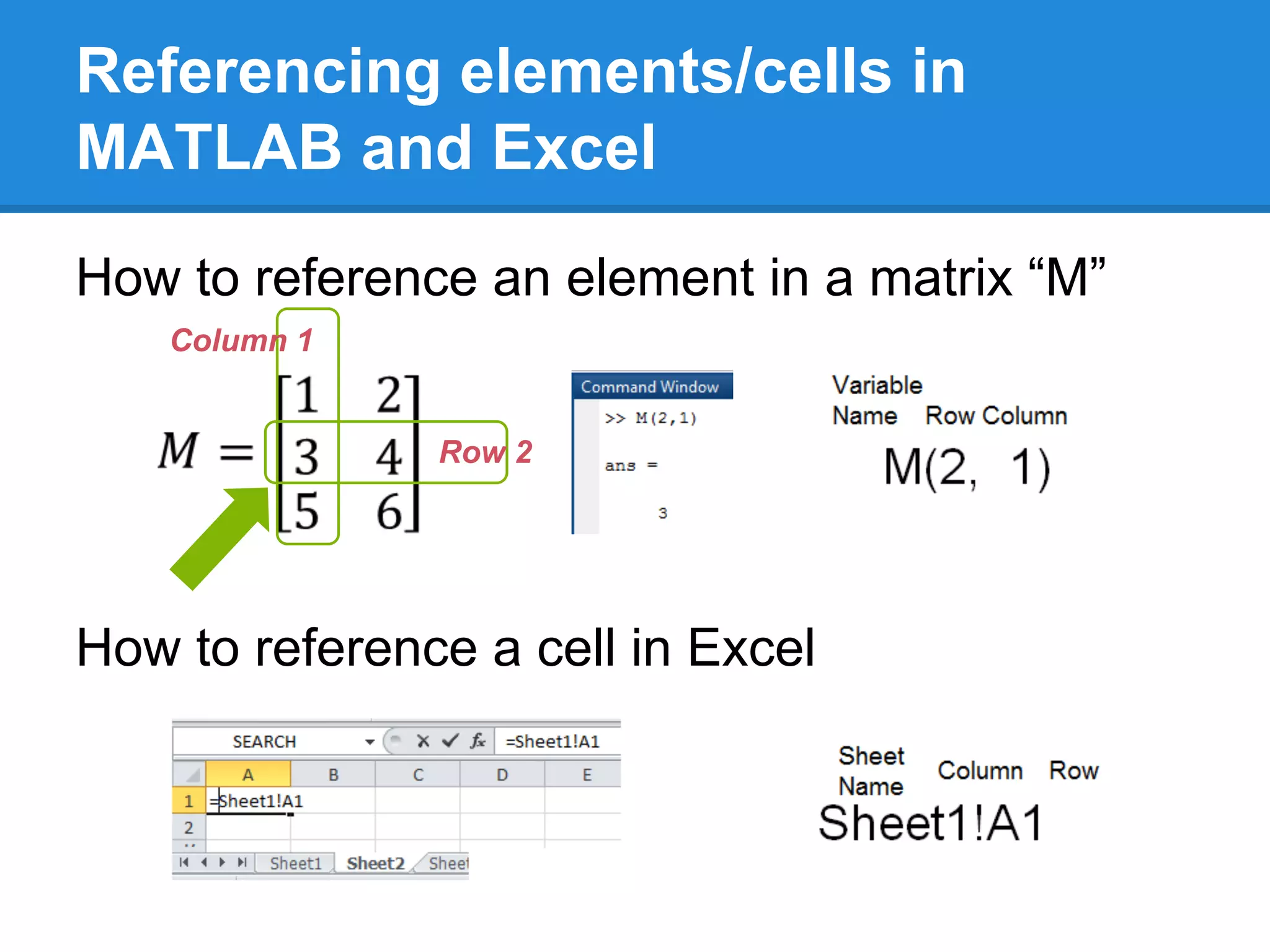
Referencing elements/cells in
MATLAB and Excel
How to reference an element in a matrix “M”
How to reference a cell in Excel
Column 1
Row 2
Referencing elements in vectors in
MATLAB
Referencing an element in column vector V1
Referencing an element in row vector V2
You only need one
index for vectors
Indexing starts
with 1 for both
matrices and
vectors
Price modeling example
Find the responses for Price=100
Hint: vectors Price and Responses share the
same indexing
Print Price
>> Price
Index into Responses
>> Responses(2)
Answer: 336
It’s the
second
element
Variable contents are printed when variable names are entered without an ending semicolon.
What functions do you use in Excel
often?
Sum, Average, Count, Max, Min?
How do you do these in MATLAB?
First, create a new matrix:
>> M = [1, 2; 3, 4; 5, 6]
● Use [ ] to start and end the matrix or vector
● Use comma or space to separate elements
● Use semicolons to start a new row
● Content will be displayed when you enter this
without an ending semicolon.
Functions in MATLAB work on
columns and rows
Sum ≈ Sum
Average ≈ Mean
By columns By rows Both
Functions in MATLAB work on
columns and rows (continued)
Max ≈ Max
Min ≈ Min
By columns By rows Both
Functions in MATLAB work on
columns and rows (continued)
Count ≈ Size
Count ≈ Numel
Both Rows Columns
All elements
● size gives you the dimensions – the number
of rows and columns for matrices
● length does the same for vectors
● numel gives you the number of elements,
regardless of dimensions
Practical Advice:
Organize your data well
As in Pivot Tables in Excel, data organization
is a key in MATLAB and many other languages.
MATLAB functions operate on columns by
default, so:
● Each column should represent one label
● Each row should represent one sample
Data Label 1 Data Label 2 Data Label ..n
Data Sample 1
Data Sample 2
Data Sample...m
Price modeling example
Find total number of responses
How large was this survey, in terms of number
of responses?
You can just sum Responses
>> sum(Responses)
Answer: 1000
So it is a fairly decent size.
Using Matrices and Vectors
Matrix Addition/Subtraction
First, create new matrices:
>> A = [3,8;1,7;1,3];
>> B = [9,4;1,7;4,8];
How do you do A+B? By adding/subtracting
corresponding elements.
Just A+B or A-B in
MATLAB
The dimensions must match between two matrices.
Matrix Scalar Multiplication
/Division
How do you do A×3 or A÷3?
By multiplying/dividing each element.
3×A? same. Also A÷3 = A×1/3 = 1/3×A
Scalar = just a number,
≠ a matrix or vector
Just A*3
or A/3 in
MATLAB
Price modeling example
Convert responses to ratios
We want to express the responses in terms of
percentages to the total: “at price = x, y% of
people were willing to pay”.
You can just divide each element by the total.
>> shares = Responses/sum(Responses)
Store the result in a
new variable “shares”
Price modeling example
Estimate the subscriber demand
Assumption: we can use cumulative sum.
● If you are willing to pay 100, you will still use
the service at 90, 80, or any lower price.
● So at 90, we get both people who are willing
to pay 100 as well as 90, and so forth.
Price Share of responses Cumulative sum
0 0.304 0.145+0.215+0.336+0.304
100 0.336 0.145+0.215+0.336
200 0.215 0.145+0.215
300 0.145 0.145
Price modeling example (continued)
Estimate the subscriber demand
How to do it in MATLAB
1. cumsum sums it in a wrong order, so flip the
vector first with flipud
>> subscribers = cumsum(flipud(shares))
2. The result is sorted in wrong order, so flipud
again.
>> subscribers =flipud(subscribers)
3. The result is now stored in subscribers
Price modeling example (continued)
Plot the subscriber demand
plot takes vectors for x-axis and y-axis, so use
Price for x-axis and subscribers for y-axis.
>> plot(Price, subscribers)
We got a nice straight
line.
Our pricing model will
be a linear equation!
Linear Equation Review
y = αx + β where α = slope, β = intercept
Example: α = -0.25, β = 1
Calculate y for x =
>> y = -0.25*x+1
Hard-coding parameter values like α and β in
your code makes it less flexible, however.
Using Matrices and Vectors
Matrix Vector Multiplication
First, create a new vector:
>> B = [2;3];
How do you do A×B? Go row by row with A:
Row 1: 3×2+8×3=6+24=30
Row 2: 1×2+7×3=2+21=23
Row 3: 1×2+3×3=2+ 9=11
It’s simple in MATLAB
Matrix Vector Multiplication
(continued)
Pay attention to the dimensions!
3x2 matrix 2x1 vector 3x1 vector
4x3 matrix 3x1 vector 4x1 vector
m x n matrix × n x 1 vector = m x 1 vector
Questions:
1. What do you get if
you multiply 5x2
matrix with 2x1
vector?
2. What happens when
you multiply 7x3
matrix with 4x1
vector?
Answers:
1.5x1 vector
2.Dimension mismatch error
“n” must match.
Linear Equation Revisited
Apply Matrix Vector Multiplication
y = αx + β where α = -0.25, β = 1
Calculate y for x = , p =
Add Intercept , then do >> y = x*p
This column
was added to
represent the
intercept
1×-0.25+1×1=0.75
2×-0.25+1×1=0.50
3×-0.25+1×1=0.25
Parameters
are now a
variable, too!
x: became 3x2 matrix
p: 2x1 matrix
● Now the dimensions match!
● Multiplying intercept by 1
doesn’t change the value
Linear Equation
How to do this in MATLAB
To add the intercept term to x:
1. ones(3,1) creates a 3x1 vector of 1’s – same
as [1;1;1]
2. Concatenate it with x using [x ones(3,1)]
3. Now you are ready to apply multiplication
>> y = [x ones(3,1)]*p
This makes the code more general and run faster.
Using Matrices and Vectors
Matrix Matrix Multiplication
First, create a new matrix:
>> B = [2,1;3,4];
How do you do A×B? Break it down to matrix
vector combinations:
First
Then
In MATLAB,
same as
before
>> A*B
Matrix Matrix Multiplication
(continued)
Pay attention to the dimensions!
3x2 matrix 2x2 vector 3x2 vector
2x3 matrix 3x2 vector 2x2 vector
m x n matrix × n x o matrix = m x o matrix
Questions:
1. What do you get if
you multiply 5x2
matrix with 2x3
vector?
2. What happens when
you multiply 5x3
matrix with 2x3
matrix?
Answers:
1.5x3 matrix
2.Dimension mismatch error
“n” must match.
Linear Equation Revisited
Apply Matrix Matrix Multiplication
y = αx + β, but now we have multiple possible
parameters.
No problem! Use matrix matrix multiplication.
P =
The code is still x*p, but it is
now really flexible :)
Intercept term added
Transpose
You now know the dimensions matter in matrix
calculations
Multiply a 3x2 matrix with another 3x2 matrix?
This won’t work, unless you can flip the second
one into 2x3 matrix.
This flipping is called “transpose”, and you will
use this trick a lot in MATLAB.
Transpose of A is AT
,or A' in MATLAB
Price modeling example
Estimate parameters from the data
You can apply linear regression to estimate the
parameters α and β, using polyfit (n=1 for
linear).
>> [p_fit, Stats] = polyfit(Price,subscribers,1)
α = -0.0029
β = 0.9854
Pricing Model: y = -0.0029x+0.9584
Price modeling example
Plot the estimate against the data
Compare the estimate to the data
>> y_fit =[Price ones(4,1)]*p_fit'
>> plot(Price,subscribers)
>> hold on
>> plot(Price,y_fit,'r')
>> hold off
The estimate fits well with the data! So our
pricing model is fairly decent.
The next step
Now you understand why you want to use
matrices and vectors for large datasets.
To actually learn how to use MATLAB, it is
easier if you watch tutorial videos.
For tutorial videos for beginners, go to
www.youtube.com/user/MATLAB
Enjoy!
Appendix I
Summary of the code used
Price modeling example
>> Price = [0;100;200;300];
>> Responses = [304;336;215;145];
>> shares = Responses/sum(Responses);
>> subscribers = cumsum(flipud(shares));
>> subscribers = flipud(subscribers);
>> plot(Price,subscribers)
>> [p_fit, Stats] = polyfit(Price,subscribers,1);
>> y_fit =[Price ones(4,1)]*p_fit';
>> hold on
>> plot(Price,y_fit,'r')
>> hold off
Appendix II
An optional assignment
Figure out the revenue-maximizing price from
this pricing model with MATLAB
Hints
Revenue curve should look
like this.
You need more data points
to plot a smooth curve
Type >> 1:10 in MATLAB and see what
happens.

Matlab for marketing people

  • 1.
  • 2.
    MATLAB = MATrixLABoratory Why should you care? Excel is super intuitive and useful if: ● The data fits the computer screen ● You can manipulate data manually ● Your analysis is relatively simple. Excel can be a nightmare if: ● The data is too large to fit the computer screen or manipulate directly ● Your analysis is complex and needs debugging
  • 3.
    You already usematrices and vectors in Excel This is a matrix ● has rows and columns This is a vector ● only one row or column They contain numbers ● numbers are in each cell
  • 4.
    MATLAB also hasrows and columns like Excel Functions Functions Data Data More focus on direct data manipulation More focus on manipulating data via code
  • 5.
    MATLAB and Excel= BFF Import data Export data
  • 6.
    Before we start: MATLABuser interface Command Window: where you type your command and run your code Workspace: where your data lives as variables Editor, but we don’t use it in our example here, to keep it simple. Command History, but we don’t use it in our example here Files, but we don’t use it our example here.
  • 7.
    Motivating Example: Pricemodeling for a new mobile app A small scale market research was done for a new mobile phone app that recognizes music playing in the background Learn more After the service was demonstrated, we asked: “How much are you willing to pay for a monthly subscription?” Note: this was back in 2003 or 2004, when people still paid for such apps.
  • 8.
    Creating the sampledataset in MATLAB Copy and Paste this: >> Price = [0;100;200;300]; >> Responses = [304;336;215;145]; Two vectors are now in the Workspace Double click
  • 9.
    Data is storedas matrices/vectors in MATLAB A matrix with 3 rows, 2 columns 3x2 matrix A column vector with 3 rows, 1 column 3x1 vector A row vector with 1 row, 3 columns 1x3 vector Numbers inside are called “elements”
  • 10.
    Referencing elements/cells in MATLABand Excel How to reference an element in a matrix “M” How to reference a cell in Excel Column 1 Row 2
  • 11.
    Referencing elements invectors in MATLAB Referencing an element in column vector V1 Referencing an element in row vector V2 You only need one index for vectors Indexing starts with 1 for both matrices and vectors
  • 12.
    Price modeling example Findthe responses for Price=100 Hint: vectors Price and Responses share the same indexing Print Price >> Price Index into Responses >> Responses(2) Answer: 336 It’s the second element Variable contents are printed when variable names are entered without an ending semicolon.
  • 13.
    What functions doyou use in Excel often? Sum, Average, Count, Max, Min? How do you do these in MATLAB? First, create a new matrix: >> M = [1, 2; 3, 4; 5, 6] ● Use [ ] to start and end the matrix or vector ● Use comma or space to separate elements ● Use semicolons to start a new row ● Content will be displayed when you enter this without an ending semicolon.
  • 14.
    Functions in MATLABwork on columns and rows Sum ≈ Sum Average ≈ Mean By columns By rows Both By columns By rows Both
  • 15.
    Functions in MATLABwork on columns and rows (continued) Max ≈ Max Min ≈ Min By columns By rows Both By columns By rows Both
  • 16.
    Functions in MATLABwork on columns and rows (continued) Count ≈ Size Count ≈ Numel Both Rows Columns All elements ● size gives you the dimensions – the number of rows and columns for matrices ● length does the same for vectors ● numel gives you the number of elements, regardless of dimensions
  • 17.
    Practical Advice: Organize yourdata well As in Pivot Tables in Excel, data organization is a key in MATLAB and many other languages. MATLAB functions operate on columns by default, so: ● Each column should represent one label ● Each row should represent one sample Data Label 1 Data Label 2 Data Label ..n Data Sample 1 Data Sample 2 Data Sample...m
  • 18.
    Price modeling example Findtotal number of responses How large was this survey, in terms of number of responses? You can just sum Responses >> sum(Responses) Answer: 1000 So it is a fairly decent size.
  • 19.
    Using Matrices andVectors Matrix Addition/Subtraction First, create new matrices: >> A = [3,8;1,7;1,3]; >> B = [9,4;1,7;4,8]; How do you do A+B? By adding/subtracting corresponding elements. Just A+B or A-B in MATLAB The dimensions must match between two matrices.
  • 20.
    Matrix Scalar Multiplication /Division Howdo you do A×3 or A÷3? By multiplying/dividing each element. 3×A? same. Also A÷3 = A×1/3 = 1/3×A Scalar = just a number, ≠ a matrix or vector Just A*3 or A/3 in MATLAB
  • 21.
    Price modeling example Convertresponses to ratios We want to express the responses in terms of percentages to the total: “at price = x, y% of people were willing to pay”. You can just divide each element by the total. >> shares = Responses/sum(Responses) Store the result in a new variable “shares”
  • 22.
    Price modeling example Estimatethe subscriber demand Assumption: we can use cumulative sum. ● If you are willing to pay 100, you will still use the service at 90, 80, or any lower price. ● So at 90, we get both people who are willing to pay 100 as well as 90, and so forth. Price Share of responses Cumulative sum 0 0.304 0.145+0.215+0.336+0.304 100 0.336 0.145+0.215+0.336 200 0.215 0.145+0.215 300 0.145 0.145
  • 23.
    Price modeling example(continued) Estimate the subscriber demand How to do it in MATLAB 1. cumsum sums it in a wrong order, so flip the vector first with flipud >> subscribers = cumsum(flipud(shares)) 2. The result is sorted in wrong order, so flipud again. >> subscribers =flipud(subscribers) 3. The result is now stored in subscribers
  • 24.
    Price modeling example(continued) Plot the subscriber demand plot takes vectors for x-axis and y-axis, so use Price for x-axis and subscribers for y-axis. >> plot(Price, subscribers) We got a nice straight line. Our pricing model will be a linear equation!
  • 25.
    Linear Equation Review y= αx + β where α = slope, β = intercept Example: α = -0.25, β = 1 Calculate y for x = >> y = -0.25*x+1 Hard-coding parameter values like α and β in your code makes it less flexible, however.
  • 26.
    Using Matrices andVectors Matrix Vector Multiplication First, create a new vector: >> B = [2;3]; How do you do A×B? Go row by row with A: Row 1: 3×2+8×3=6+24=30 Row 2: 1×2+7×3=2+21=23 Row 3: 1×2+3×3=2+ 9=11 It’s simple in MATLAB
  • 27.
    Matrix Vector Multiplication (continued) Payattention to the dimensions! 3x2 matrix 2x1 vector 3x1 vector 4x3 matrix 3x1 vector 4x1 vector m x n matrix × n x 1 vector = m x 1 vector Questions: 1. What do you get if you multiply 5x2 matrix with 2x1 vector? 2. What happens when you multiply 7x3 matrix with 4x1 vector? Answers: 1.5x1 vector 2.Dimension mismatch error “n” must match.
  • 28.
    Linear Equation Revisited ApplyMatrix Vector Multiplication y = αx + β where α = -0.25, β = 1 Calculate y for x = , p = Add Intercept , then do >> y = x*p This column was added to represent the intercept 1×-0.25+1×1=0.75 2×-0.25+1×1=0.50 3×-0.25+1×1=0.25 Parameters are now a variable, too! x: became 3x2 matrix p: 2x1 matrix ● Now the dimensions match! ● Multiplying intercept by 1 doesn’t change the value
  • 29.
    Linear Equation How todo this in MATLAB To add the intercept term to x: 1. ones(3,1) creates a 3x1 vector of 1’s – same as [1;1;1] 2. Concatenate it with x using [x ones(3,1)] 3. Now you are ready to apply multiplication >> y = [x ones(3,1)]*p This makes the code more general and run faster.
  • 30.
    Using Matrices andVectors Matrix Matrix Multiplication First, create a new matrix: >> B = [2,1;3,4]; How do you do A×B? Break it down to matrix vector combinations: First Then In MATLAB, same as before >> A*B
  • 31.
    Matrix Matrix Multiplication (continued) Payattention to the dimensions! 3x2 matrix 2x2 vector 3x2 vector 2x3 matrix 3x2 vector 2x2 vector m x n matrix × n x o matrix = m x o matrix Questions: 1. What do you get if you multiply 5x2 matrix with 2x3 vector? 2. What happens when you multiply 5x3 matrix with 2x3 matrix? Answers: 1.5x3 matrix 2.Dimension mismatch error “n” must match.
  • 32.
    Linear Equation Revisited ApplyMatrix Matrix Multiplication y = αx + β, but now we have multiple possible parameters. No problem! Use matrix matrix multiplication. P = The code is still x*p, but it is now really flexible :) Intercept term added
  • 33.
    Transpose You now knowthe dimensions matter in matrix calculations Multiply a 3x2 matrix with another 3x2 matrix? This won’t work, unless you can flip the second one into 2x3 matrix. This flipping is called “transpose”, and you will use this trick a lot in MATLAB. Transpose of A is AT ,or A' in MATLAB
  • 34.
    Price modeling example Estimateparameters from the data You can apply linear regression to estimate the parameters α and β, using polyfit (n=1 for linear). >> [p_fit, Stats] = polyfit(Price,subscribers,1) α = -0.0029 β = 0.9854 Pricing Model: y = -0.0029x+0.9584
  • 35.
    Price modeling example Plotthe estimate against the data Compare the estimate to the data >> y_fit =[Price ones(4,1)]*p_fit' >> plot(Price,subscribers) >> hold on >> plot(Price,y_fit,'r') >> hold off The estimate fits well with the data! So our pricing model is fairly decent.
  • 36.
    The next step Nowyou understand why you want to use matrices and vectors for large datasets. To actually learn how to use MATLAB, it is easier if you watch tutorial videos. For tutorial videos for beginners, go to www.youtube.com/user/MATLAB Enjoy!
  • 37.
    Appendix I Summary ofthe code used Price modeling example >> Price = [0;100;200;300]; >> Responses = [304;336;215;145]; >> shares = Responses/sum(Responses); >> subscribers = cumsum(flipud(shares)); >> subscribers = flipud(subscribers); >> plot(Price,subscribers) >> [p_fit, Stats] = polyfit(Price,subscribers,1); >> y_fit =[Price ones(4,1)]*p_fit'; >> hold on >> plot(Price,y_fit,'r') >> hold off
  • 38.
    Appendix II An optionalassignment Figure out the revenue-maximizing price from this pricing model with MATLAB Hints Revenue curve should look like this. You need more data points to plot a smooth curve Type >> 1:10 in MATLAB and see what happens.