MATLAB ASHOKA BAIRWA
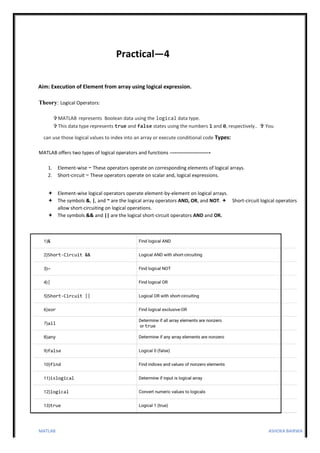
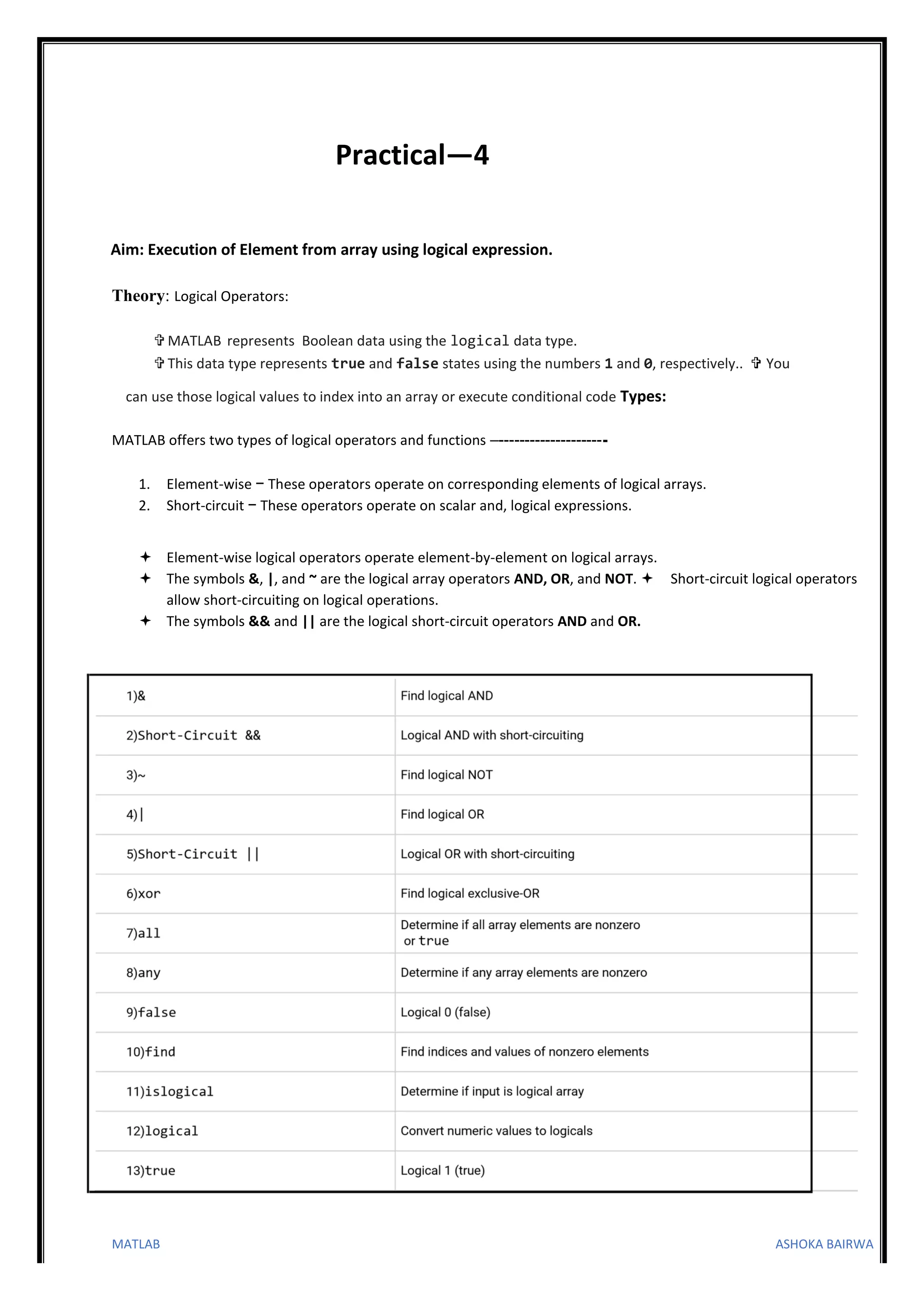
Practical—4
Aim: Execution of Element from array using logical expression.
Theory: Logical Operators:
 MATLAB represents Boolean data using the logical data type.
 This data type represents true and false states using the numbers 1 and 0, respectively..  You
can use those logical values to index into an array or execute conditional code Types:
MATLAB offers two types of logical operators and functions –---------------------
1. Element-wise − These operators operate on corresponding elements of logical arrays.
2. Short-circuit − These operators operate on scalar and, logical expressions.
 Element-wise logical operators operate element-by-element on logical arrays.
 The symbols &, |, and ~ are the logical array operators AND, OR, and NOT.  Short-circuit logical operators
allow short-circuiting on logical operations.
 The symbols && and || are the logical short-circuit operators AND and OR.
MATLAB ASHOKA BAIRWA
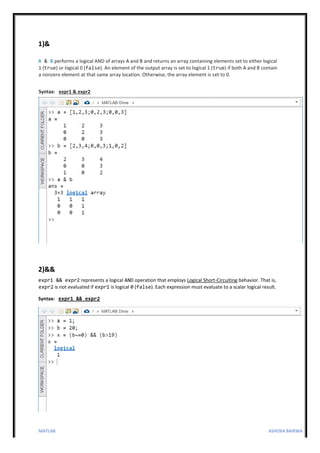
1)&
A & B performs a logical AND of arrays A and B and returns an array containing elements set to either logical
1 (true) or logical 0 (false). An element of the output array is set to logical 1 (true) if both A and B contain
a nonzero element at that same array location. Otherwise, the array element is set to 0.
Syntax: expr1 & expr2
2)&&
expr1 && expr2 represents a logical AND operation that employs Logical Short-Circuiting behavior. That is,
expr2 is not evaluated if expr1 is logical 0 (false). Each expression must evaluate to a scalar logical result.
Syntax: expr1 && expr2
MATLAB ASHOKA BAIRWA
3)~
~A returns a logical array of the same size as A. The array contains logical 1 (true) values where A is zero and
logical 0 (false) values where A is nonzero.
not(A) is an alternate way to execute ~A, but is rarely used. It enables operator overloading for classes
Syntax: ~A
not(A)
4)|
A | B performs a logical OR of arrays A and B and returns an array containing elements set to either logical
1 (true) or logical 0 (false). An element of the output array is set to logical 1 (true) if either A or B
contain a nonzero element at that same array location. Otherwise, the array element is set to 0.
Syntax: A | B
or(A,B)
MATLAB ASHOKA BAIRWA
5)||
expr1 || expr2 represents a logical OR operation that employs Logical Short-Circuiting behavior. That is,
expr2 is not evaluated if expr1 is logical 1 (true). Each expression must evaluate to a scalar logical result.
Syntax: expr1 || expr2
6)XOR
C = xor(A,B) performs a logical exclusive-OR of arrays A and B and returns an array containing elements set
to either logical 1 (true) or logical 0 (false). An element of the output array is set to logical 1 (true) if A or B,
but not both, contains a nonzero element at that same array location. Otherwise, the array element is set to 0.
Syntax: C = xor(A,B)
MATLAB ASHOKA BAIRWA
7)ALL
Determine if all array elements are nonzero or true
Syntax: B = all(A)
B = all(A,'all')
B = all(A,dim)
B = all(A,vecdim)
B = all(A) tests along the first array dimension of A whose size does not equal 1, and determines if the
elements are all nonzero or logical 1 (true). In practice, all is a natural extension of the logical AND operator.
• If A is a vector, then all(A) returns logical 1 (true) if all the elements are nonzero and returns
logical 0 (false) if one or more elements are zero.
• If A is a nonempty matrix, then all(A) treats the columns of A as vectors and returns a row
vector of logical 1s and 0s.
• If A is an empty 0-by-0 matrix, then all(A) returns logical 1 (true).
• If A is a multidimensional array, then all(A) acts along the first array dimension whose size does
not equal 1 and returns an array of logical values. The size of this dimension becomes 1, while the
sizes of all other dimensions remain the same.
B = all(A,'all') tests over all elements of A. This syntax is valid for MATLAB® versions R2018b and later.
B = all(A,dim) tests elements along dimension dim. The dim input is a positive integer scalar.
B = all(A,vecdim) tests elements based on the dimensions specified in the vector vecdim.
For example, if A is a matrix, then all(A,[1 2]) tests over all elements in A, since every element of a matrix is
contained in the array slice defined by dimensions 1 and 2.
MATLAB ASHOKA BAIRWA
8)ANY
Determine if any array elements are nonzero
Syntax: B = any(A)
B = any(A,'all')
B = any(A,dim)
B = any(A,vecdim)
B = any(A) tests along the first array dimension of A whose size does not equal 1, and determines if any
element is a nonzero number or logical 1 (true). In practice, any is a natural extension of the logical OR
operator.
• If A is a vector, then B = any(A) returns logical 1 (true) if any of the elements of A is a nonzero
number or is logical 1, and returns logical 0 (false) if all the elements are zero.
• If A is a nonempty, nonvector matrix, then B = any(A) treats the columns of A as vectors,
returning a row vector of logical 1s and 0s.
• If A is an empty 0-by-0 matrix, any(A) returns logical 0 (false).
• If A is a multidimensional array, any(A) acts along the first array dimension whose size does not
equal 1 and returns an array of logical values. The size of this dimension becomes 1, while the sizes
of all other dimensions remain the same.
B = any(A,'all') tests over all elements of A. This syntax is valid for MATLAB® versions R2018b and later.
B = any(A,dim) tests elements along dimension dim. The dim input is a positive integer scalar.
B = any(A,vecdim) tests elements based on the dimensions specified in the vector vecdim.
For example, if A is a matrix, then any(A,[1 2]) tests over all elements in A, since every element of a matrix
is contained in the array slice defined by dimensions 1 and 2.
MATLAB ASHOKA BAIRWA
9)FALSE
Logical 0 (false)
Syntax: false
F = false(n)
F = false(sz)
F = false(sz1,...,szN)
F = false(___,'like',p)
false is shorthand for the logical value 0. F =
false(n) is an n-by-n array of logical zeros.
F = false(sz) is an array of logical zeros where the size vector, sz, defines size(F). For example,
false([2 3]) returns a 2-by-3 array of logical zeros.
F = false(sz1,...,szN) is a sz1-by-...-by-szN array of logical zeros where sz1,...,szN indicates
the size of each dimension. For example, false(2,3) returns a 2-by-3 array of logical zeros.
F = false(___,'like',p) returns an array of logical zeros of the same sparsity as the logical variable p
using any of the previous size syntaxes.
MATLAB ASHOKA BAIRWA
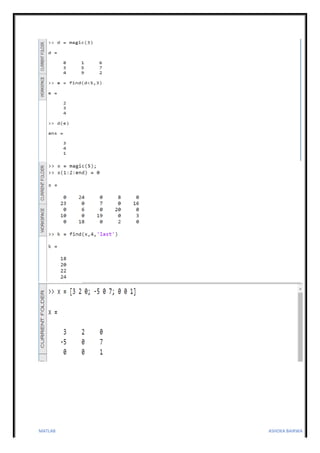
10)FIND
Find indices and values of nonzero elements
Syntax: k = find(X)
k = find(X,n) k =
find(X,n,direction)
[row,col] = find(___)
[row,col,v] = find(___)
k = find(X) returns a vector containing the linear indices of each nonzero element in array X.
• If X is a vector, then find returns a vector with the same orientation as X.
• If X is a multidimensional array, then find returns a column vector of the linear indices of the
result.
k = find(X,n) returns the first n indices corresponding to the nonzero elements in X.
k = find(X,n,direction), where direction is 'last', finds the last n indices corresponding to
nonzero elements in X. The default for direction is 'first', which finds the first n indices corresponding
to nonzero elements.
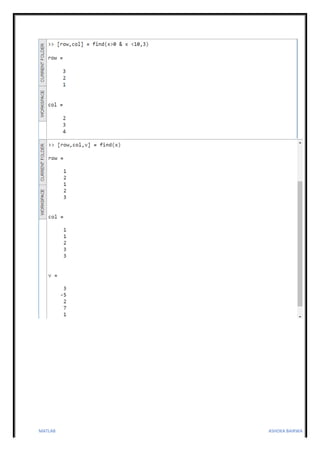
[row,col] = find(___) returns the row and column subscripts of each nonzero element in array X
using any of the input arguments in previous syntaxes.
[row,col,v] = find(___) also returns vector v, which contains the nonzero elements of X.
MATLAB ASHOKA BAIRWA
11)ISLOGICAL
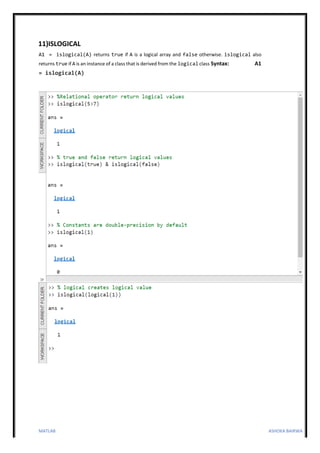
A1 = islogical(A) returns true if A is a logical array and false otherwise. islogical also
returns true if A is an instance of a class that is derived from the logical class Syntax: A1
= islogical(A)
MATLAB ASHOKA BAIRWA
12)LOGICAL
Convert numeric values to logicals
L = logical(A) converts A into an array of logical values. Any nonzero element of A is converted to logical 1
(true) and zeros are converted to logical 0 (false). Complex values and NaNs cannot be converted to logical
values and result in a conversion error.
Syntax: L = logical(A)
Find the modulus, mod(A,2), and convert it to a logical array for indexing.
The array has logical 1 (true) values where A is odd.
Use L as a logical index to pick out the odd elements of A.
MATLAB ASHOKA BAIRWA
13)TRUE
true(n) is much faster and more memory efficient than logical(true(n)). Logical 1
(true)
Syntax: true
T = true(n)
T = true(sz)
T = true(sz1,...,szN)
T = true(___,'like',p)
true is shorthand for the logical value 1. T =
true(n) is an n-by-n matrix of logical ones.
T = true(sz) is an array of logical ones where the size vector, sz, defines size(T). For example,
true([2 3]) returns a 2-by-3 array of logical ones.
T = true(sz1,...,szN) is a sz1-by-...-by-szN array of logical ones where sz1,...,szN indicates the
size of each dimension. For example, true(2,3) returns a 2-by-3 array of logical ones.
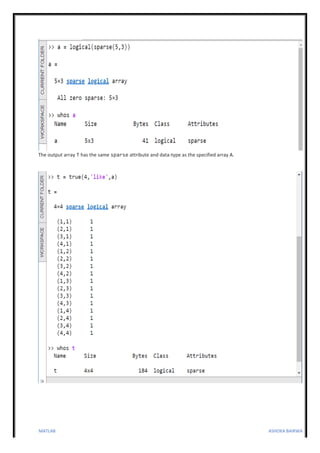
T = true(___,'like',p) returns an array of logical ones of the same sparsity as the logical variable p using
any of the previous size syntaxes.
MATLAB ASHOKA BAIRWA
The output array T has the same sparse attribute and data-type as the specified array A.

Matlab practical ---4.pdf

  • 1.
    MATLAB ASHOKA BAIRWA Practical—4 Aim:Execution of Element from array using logical expression. Theory: Logical Operators:  MATLAB represents Boolean data using the logical data type.  This data type represents true and false states using the numbers 1 and 0, respectively..  You can use those logical values to index into an array or execute conditional code Types: MATLAB offers two types of logical operators and functions –--------------------- 1. Element-wise − These operators operate on corresponding elements of logical arrays. 2. Short-circuit − These operators operate on scalar and, logical expressions.  Element-wise logical operators operate element-by-element on logical arrays.  The symbols &, |, and ~ are the logical array operators AND, OR, and NOT.  Short-circuit logical operators allow short-circuiting on logical operations.  The symbols && and || are the logical short-circuit operators AND and OR.
  • 2.
    MATLAB ASHOKA BAIRWA 1)& A& B performs a logical AND of arrays A and B and returns an array containing elements set to either logical 1 (true) or logical 0 (false). An element of the output array is set to logical 1 (true) if both A and B contain a nonzero element at that same array location. Otherwise, the array element is set to 0. Syntax: expr1 & expr2 2)&& expr1 && expr2 represents a logical AND operation that employs Logical Short-Circuiting behavior. That is, expr2 is not evaluated if expr1 is logical 0 (false). Each expression must evaluate to a scalar logical result. Syntax: expr1 && expr2
  • 3.
    MATLAB ASHOKA BAIRWA 3)~ ~Areturns a logical array of the same size as A. The array contains logical 1 (true) values where A is zero and logical 0 (false) values where A is nonzero. not(A) is an alternate way to execute ~A, but is rarely used. It enables operator overloading for classes Syntax: ~A not(A) 4)| A | B performs a logical OR of arrays A and B and returns an array containing elements set to either logical 1 (true) or logical 0 (false). An element of the output array is set to logical 1 (true) if either A or B contain a nonzero element at that same array location. Otherwise, the array element is set to 0. Syntax: A | B or(A,B)
  • 4.
    MATLAB ASHOKA BAIRWA 5)|| expr1|| expr2 represents a logical OR operation that employs Logical Short-Circuiting behavior. That is, expr2 is not evaluated if expr1 is logical 1 (true). Each expression must evaluate to a scalar logical result. Syntax: expr1 || expr2 6)XOR C = xor(A,B) performs a logical exclusive-OR of arrays A and B and returns an array containing elements set to either logical 1 (true) or logical 0 (false). An element of the output array is set to logical 1 (true) if A or B, but not both, contains a nonzero element at that same array location. Otherwise, the array element is set to 0. Syntax: C = xor(A,B)
  • 5.
    MATLAB ASHOKA BAIRWA 7)ALL Determineif all array elements are nonzero or true Syntax: B = all(A) B = all(A,'all') B = all(A,dim) B = all(A,vecdim) B = all(A) tests along the first array dimension of A whose size does not equal 1, and determines if the elements are all nonzero or logical 1 (true). In practice, all is a natural extension of the logical AND operator. • If A is a vector, then all(A) returns logical 1 (true) if all the elements are nonzero and returns logical 0 (false) if one or more elements are zero. • If A is a nonempty matrix, then all(A) treats the columns of A as vectors and returns a row vector of logical 1s and 0s. • If A is an empty 0-by-0 matrix, then all(A) returns logical 1 (true). • If A is a multidimensional array, then all(A) acts along the first array dimension whose size does not equal 1 and returns an array of logical values. The size of this dimension becomes 1, while the sizes of all other dimensions remain the same. B = all(A,'all') tests over all elements of A. This syntax is valid for MATLAB® versions R2018b and later. B = all(A,dim) tests elements along dimension dim. The dim input is a positive integer scalar. B = all(A,vecdim) tests elements based on the dimensions specified in the vector vecdim. For example, if A is a matrix, then all(A,[1 2]) tests over all elements in A, since every element of a matrix is contained in the array slice defined by dimensions 1 and 2.
  • 6.
    MATLAB ASHOKA BAIRWA 8)ANY Determineif any array elements are nonzero Syntax: B = any(A) B = any(A,'all') B = any(A,dim) B = any(A,vecdim) B = any(A) tests along the first array dimension of A whose size does not equal 1, and determines if any element is a nonzero number or logical 1 (true). In practice, any is a natural extension of the logical OR operator. • If A is a vector, then B = any(A) returns logical 1 (true) if any of the elements of A is a nonzero number or is logical 1, and returns logical 0 (false) if all the elements are zero. • If A is a nonempty, nonvector matrix, then B = any(A) treats the columns of A as vectors, returning a row vector of logical 1s and 0s. • If A is an empty 0-by-0 matrix, any(A) returns logical 0 (false). • If A is a multidimensional array, any(A) acts along the first array dimension whose size does not equal 1 and returns an array of logical values. The size of this dimension becomes 1, while the sizes of all other dimensions remain the same. B = any(A,'all') tests over all elements of A. This syntax is valid for MATLAB® versions R2018b and later. B = any(A,dim) tests elements along dimension dim. The dim input is a positive integer scalar. B = any(A,vecdim) tests elements based on the dimensions specified in the vector vecdim. For example, if A is a matrix, then any(A,[1 2]) tests over all elements in A, since every element of a matrix is contained in the array slice defined by dimensions 1 and 2.
  • 7.
    MATLAB ASHOKA BAIRWA 9)FALSE Logical0 (false) Syntax: false F = false(n) F = false(sz) F = false(sz1,...,szN) F = false(___,'like',p) false is shorthand for the logical value 0. F = false(n) is an n-by-n array of logical zeros. F = false(sz) is an array of logical zeros where the size vector, sz, defines size(F). For example, false([2 3]) returns a 2-by-3 array of logical zeros. F = false(sz1,...,szN) is a sz1-by-...-by-szN array of logical zeros where sz1,...,szN indicates the size of each dimension. For example, false(2,3) returns a 2-by-3 array of logical zeros. F = false(___,'like',p) returns an array of logical zeros of the same sparsity as the logical variable p using any of the previous size syntaxes.
  • 8.
    MATLAB ASHOKA BAIRWA 10)FIND Findindices and values of nonzero elements Syntax: k = find(X) k = find(X,n) k = find(X,n,direction) [row,col] = find(___) [row,col,v] = find(___) k = find(X) returns a vector containing the linear indices of each nonzero element in array X. • If X is a vector, then find returns a vector with the same orientation as X. • If X is a multidimensional array, then find returns a column vector of the linear indices of the result. k = find(X,n) returns the first n indices corresponding to the nonzero elements in X. k = find(X,n,direction), where direction is 'last', finds the last n indices corresponding to nonzero elements in X. The default for direction is 'first', which finds the first n indices corresponding to nonzero elements. [row,col] = find(___) returns the row and column subscripts of each nonzero element in array X using any of the input arguments in previous syntaxes. [row,col,v] = find(___) also returns vector v, which contains the nonzero elements of X.
  • 9.
  • 10.
  • 11.
    MATLAB ASHOKA BAIRWA 11)ISLOGICAL A1= islogical(A) returns true if A is a logical array and false otherwise. islogical also returns true if A is an instance of a class that is derived from the logical class Syntax: A1 = islogical(A)
  • 12.
    MATLAB ASHOKA BAIRWA 12)LOGICAL Convertnumeric values to logicals L = logical(A) converts A into an array of logical values. Any nonzero element of A is converted to logical 1 (true) and zeros are converted to logical 0 (false). Complex values and NaNs cannot be converted to logical values and result in a conversion error. Syntax: L = logical(A) Find the modulus, mod(A,2), and convert it to a logical array for indexing. The array has logical 1 (true) values where A is odd. Use L as a logical index to pick out the odd elements of A.
  • 13.
    MATLAB ASHOKA BAIRWA 13)TRUE true(n)is much faster and more memory efficient than logical(true(n)). Logical 1 (true) Syntax: true T = true(n) T = true(sz) T = true(sz1,...,szN) T = true(___,'like',p) true is shorthand for the logical value 1. T = true(n) is an n-by-n matrix of logical ones. T = true(sz) is an array of logical ones where the size vector, sz, defines size(T). For example, true([2 3]) returns a 2-by-3 array of logical ones. T = true(sz1,...,szN) is a sz1-by-...-by-szN array of logical ones where sz1,...,szN indicates the size of each dimension. For example, true(2,3) returns a 2-by-3 array of logical ones. T = true(___,'like',p) returns an array of logical ones of the same sparsity as the logical variable p using any of the previous size syntaxes.
  • 14.
    MATLAB ASHOKA BAIRWA Theoutput array T has the same sparse attribute and data-type as the specified array A.