

-11-15
2013

Brown Bag
Guess what’s the topic? :D
I’m introducing you how to build a….
T OF
SOR
Build [a lie]
[Set up] a Linux OS
Let’s look at some terms
● Distributions (Distros)
● Package Managers
Distros
● Red Hat / Fedora
● Debian / Ubuntu / Mint
● and mooooooooore...
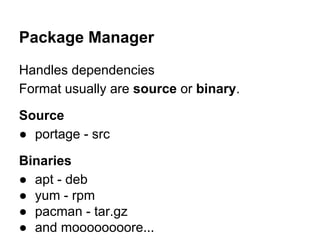
Package Manager
Handles dependencies
Format usually are source or binary.
Source
● portage - src
Binaries
● apt - deb
● yum - rpm
● pacman - tar.gz
● and moooooooore...
Build [a lie]
[Set up] a Linux OS
scratch
from
Benefits?
What’s the benefits of setting up a linux OS
from scratch?
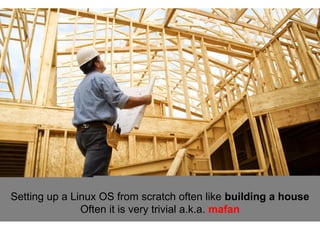
Setting up a Linux OS from scratch often like building a house
Often it is very trivial a.k.a. mafan
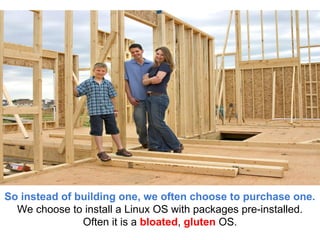
So instead of building one, we often choose to purchase one.
We choose to install a Linux OS with packages pre-installed.
Often it is a bloated, gluten OS.
So.. How ah?
[Set up] a Linux OS from scratch
i

eps +/n 10 st
A simple, lightweight distribution
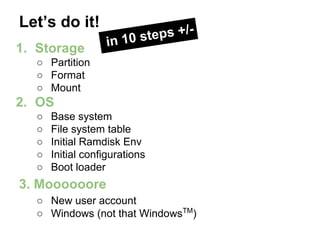
Let’s do it!
1. Storage

ps +/n 10 ste
i

○ Partition
○ Format
○ Mount

2. OS
○
○
○
○
○

Base system
File system table
Initial Ramdisk Env
Initial configurations
Boot loader

3. Moooooore
○ New user account
○ Windows (not that WindowsTM)
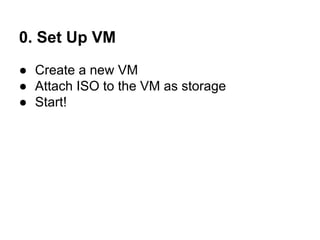
0. Set Up VM
● Create a new VM
● Attach ISO to the VM as storage
● Start!
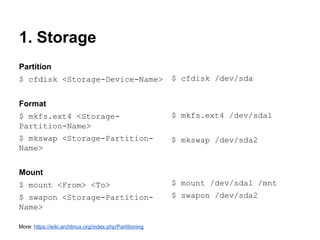
1. Storage
Partition
$ cfdisk <Storage-Device-Name>

$ cfdisk /dev/sda

Format
$ mkfs.ext4 <StoragePartition-Name>

$ mkfs.ext4 /dev/sda1

$ mkswap <Storage-PartitionName>

$ mkswap /dev/sda2

Mount
$ mount <From> <To>

$ mount /dev/sda1 /mnt

$ swapon <Storage-PartitionName>

$ swapon /dev/sda2

More: https://wiki.archlinux.org/index.php/Partitioning
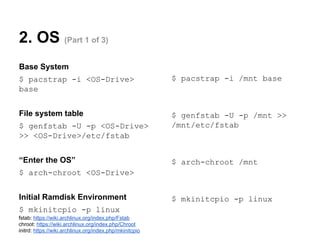
2. OS (Part 1 of 3)
Base System
$ pacstrap -i <OS-Drive>
base

$ pacstrap -i /mnt base

File system table

$ genfstab -U -p /mnt >>
/mnt/etc/fstab

$ genfstab -U -p <OS-Drive>
>> <OS-Drive>/etc/fstab
“Enter the OS”

$ arch-chroot /mnt

$ arch-chroot <OS-Drive>
Initial Ramdisk Environment
$ mkinitcpio -p linux
fstab: https://wiki.archlinux.org/index.php/Fstab
chroot: https://wiki.archlinux.org/index.php/Chroot
initrd: https://wiki.archlinux.org/index.php/mkinitcpio

$ mkinitcpio -p linux
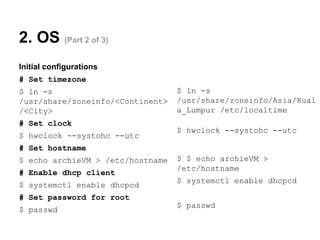
2. OS (Part 2 of 3)
Initial configurations
# Set timezone
$ ln -s
/usr/share/zoneinfo/<Continent>
/<City>

$ ln -s
/usr/share/zoneinfo/Asia/Kual
a_Lumpur /etc/localtime

# Set clock
$ hwclock --systohc --utc

$ hwclock --systohc --utc

# Set hostname
$ echo archieVM > /etc/hostname
# Enable dhcp client
$ systemctl enable dhcpcd

$ $ echo archieVM >
/etc/hostname
$ systemctl enable dhcpcd

# Set password for root
$ passwd

$ passwd
2. OS (Part 3 of 3)
Boot loader
$ pacman -S <package>

$ pacman -S grub

$ grub-install -target=<architecture> --recheck
<Storage-Device-Name>

$ grub-install -target=i386-pc --recheck
/dev/sda

$ grub-mkconfig -o <grub-configlocation>

$ grub-mkconfig -o
/boot/grub/grub.cfg

Restart!
$ exit

$ exit

$ reboot

$ reboot

fstab: https://wiki.archlinux.org/index.php/Fstab
initrd: https://wiki.archlinux.org/index.php/mkinitcpio
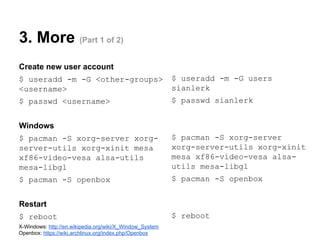
3. More (Part 1 of 2)
Create new user account
$ useradd -m -G <other-groups>
<username>

$ useradd -m -G users
sianlerk

$ passwd <username>

$ passwd sianlerk

Windows
$ pacman -S xorg-server xorgserver-utils xorg-xinit mesa
xf86-video-vesa alsa-utils
mesa-libgl

$ pacman -S xorg-server
xorg-server-utils xorg-xinit
mesa xf86-video-vesa alsautils mesa-libgl

$ pacman -S openbox

$ pacman -S openbox

Restart
$ reboot
X-Windows: http://en.wikipedia.org/wiki/X_Window_System
Openbox: https://wiki.archlinux.org/index.php/Openbox

$ reboot
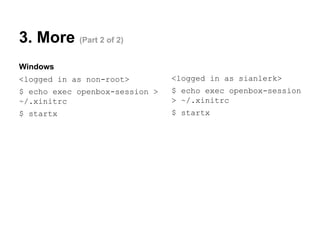
3. More (Part 2 of 2)
Windows
<logged in as non-root>

<logged in as sianlerk>

$ echo exec openbox-session >
~/.xinitrc

$ echo exec openbox-session
> ~/.xinitrc

$ startx

$ startx

Install Archlinux in 10 Steps (Sort of) :)

  • 1.
  • 2.
    I’m introducing youhow to build a….
  • 3.
  • 4.
    Build [a lie] [Setup] a Linux OS
  • 5.
    Let’s look atsome terms ● Distributions (Distros) ● Package Managers
  • 6.
    Distros ● Red Hat/ Fedora ● Debian / Ubuntu / Mint ● and mooooooooore...
  • 7.
    Package Manager Handles dependencies Formatusually are source or binary. Source ● portage - src Binaries ● apt - deb ● yum - rpm ● pacman - tar.gz ● and moooooooore...
  • 8.
    Build [a lie] [Setup] a Linux OS scratch from
  • 9.
    Benefits? What’s the benefitsof setting up a linux OS from scratch?
  • 10.
    Setting up aLinux OS from scratch often like building a house Often it is very trivial a.k.a. mafan
  • 11.
    So instead ofbuilding one, we often choose to purchase one. We choose to install a Linux OS with packages pre-installed. Often it is a bloated, gluten OS.
  • 12.
    So.. How ah? [Setup] a Linux OS from scratch i eps +/n 10 st
  • 13.
  • 14.
    Let’s do it! 1.Storage ps +/n 10 ste i ○ Partition ○ Format ○ Mount 2. OS ○ ○ ○ ○ ○ Base system File system table Initial Ramdisk Env Initial configurations Boot loader 3. Moooooore ○ New user account ○ Windows (not that WindowsTM)
  • 15.
    0. Set UpVM ● Create a new VM ● Attach ISO to the VM as storage ● Start!
  • 16.
    1. Storage Partition $ cfdisk<Storage-Device-Name> $ cfdisk /dev/sda Format $ mkfs.ext4 <StoragePartition-Name> $ mkfs.ext4 /dev/sda1 $ mkswap <Storage-PartitionName> $ mkswap /dev/sda2 Mount $ mount <From> <To> $ mount /dev/sda1 /mnt $ swapon <Storage-PartitionName> $ swapon /dev/sda2 More: https://wiki.archlinux.org/index.php/Partitioning
  • 17.
    2. OS (Part1 of 3) Base System $ pacstrap -i <OS-Drive> base $ pacstrap -i /mnt base File system table $ genfstab -U -p /mnt >> /mnt/etc/fstab $ genfstab -U -p <OS-Drive> >> <OS-Drive>/etc/fstab “Enter the OS” $ arch-chroot /mnt $ arch-chroot <OS-Drive> Initial Ramdisk Environment $ mkinitcpio -p linux fstab: https://wiki.archlinux.org/index.php/Fstab chroot: https://wiki.archlinux.org/index.php/Chroot initrd: https://wiki.archlinux.org/index.php/mkinitcpio $ mkinitcpio -p linux
  • 18.
    2. OS (Part2 of 3) Initial configurations # Set timezone $ ln -s /usr/share/zoneinfo/<Continent> /<City> $ ln -s /usr/share/zoneinfo/Asia/Kual a_Lumpur /etc/localtime # Set clock $ hwclock --systohc --utc $ hwclock --systohc --utc # Set hostname $ echo archieVM > /etc/hostname # Enable dhcp client $ systemctl enable dhcpcd $ $ echo archieVM > /etc/hostname $ systemctl enable dhcpcd # Set password for root $ passwd $ passwd
  • 19.
    2. OS (Part3 of 3) Boot loader $ pacman -S <package> $ pacman -S grub $ grub-install -target=<architecture> --recheck <Storage-Device-Name> $ grub-install -target=i386-pc --recheck /dev/sda $ grub-mkconfig -o <grub-configlocation> $ grub-mkconfig -o /boot/grub/grub.cfg Restart! $ exit $ exit $ reboot $ reboot fstab: https://wiki.archlinux.org/index.php/Fstab initrd: https://wiki.archlinux.org/index.php/mkinitcpio
  • 20.
    3. More (Part1 of 2) Create new user account $ useradd -m -G <other-groups> <username> $ useradd -m -G users sianlerk $ passwd <username> $ passwd sianlerk Windows $ pacman -S xorg-server xorgserver-utils xorg-xinit mesa xf86-video-vesa alsa-utils mesa-libgl $ pacman -S xorg-server xorg-server-utils xorg-xinit mesa xf86-video-vesa alsautils mesa-libgl $ pacman -S openbox $ pacman -S openbox Restart $ reboot X-Windows: http://en.wikipedia.org/wiki/X_Window_System Openbox: https://wiki.archlinux.org/index.php/Openbox $ reboot
  • 21.
    3. More (Part2 of 2) Windows <logged in as non-root> <logged in as sianlerk> $ echo exec openbox-session > ~/.xinitrc $ echo exec openbox-session > ~/.xinitrc $ startx $ startx