1
Buddhika Siddhisena
Co-Founder & CTO
THINKCube Systems
Member of LKLUG
Virtualization
The future of computing
2
What is Virtualization
?
3
What is Virtualization – Short
● Simple term word for a simple idea
● Run multiple “Operating System” instances
(Virtual Machines) on one physical computer
● Virtualize the same OS or different OSes
● Encapsulates a series of buzz words – Hypervisor,
Para virtualization, Virtual Machine, Emulation,
Simulation
4
WHAT is Virtualization Technology
●
Virtualization Technology (VT) is an old technology that
has been revitalized recently, thanks to faster processor
increase in processing power.
● Virtualization is often achieved by either totally or
partially emulating the processor, BIOS and other
hardware devices.
● Emulating a completely different processor architecture
is much slower since CPU instructions need to be
emulated, compared to a native emulation.
● Guest OS is unaware of the emulation and is led to
believe that it has the resources of the entire machine
under its control.
5
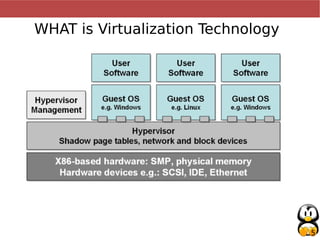
WHAT is Virtualization Technology
6
Some popular Emulators
● Qemu is an FOSS x86/x86_64,ARM,PowePC etc. CPU emulator.
● Kvm is an extended version of Qemu to support hardware virtualization
● Bochs is an x86/x86_64 emulator that is FOSS
● Mac-on-Linux is a PPC emulator which uses native cpu emulation
● UML (User Mode Linux) enables a Linux kernel to run inside another
Linux system as a user space application.
● PearPC is an Open Source PPC G4 emulator.
● VirtualBox is now Open Source
●VMWare a commercial, free for personal user, x86 emulator that uses
native cpu emulation
7
Why Virtualize?
8
Why Virtualize - Simply
Save Money $$$
9
WHY Virtualize (Advantages)
●
Better utilization of hardware. Today on an
average, Servers run at less that 15% utilization.
● Better scalability. Dynamic scalability.
● Better maintainability. Lesser down time.
● Better fault tolerance.
● Better deployment / roll out. ISP now provide
virtual root hosting within minutes.
10
Who uses Virtualization
?
11
● Amazon EC2
, Google AppEngine (Cloud
Computing)
● Data Centers
● Hosting Providers - Virtual Server
● NOC
● Desktop Users
● You and Me
12
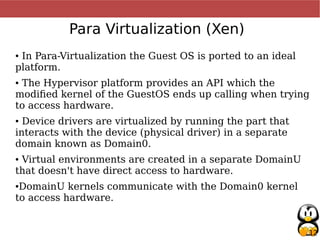
Para Virtualization (Xen)
● In Para-Virtualization the Guest OS is ported to an ideal
platform.
● The Hypervisor platform provides an API which the
modified kernel of the GuestOS ends up calling when trying
to access hardware.
● Device drivers are virtualized by running the part that
interacts with the device (physical driver) in a separate
domain known as Domain0.
● Virtual environments are created in a separate DomainU
that doesn't have direct access to hardware.
●DomainU kernels communicate with the Domain0 kernel
to access hardware.
13
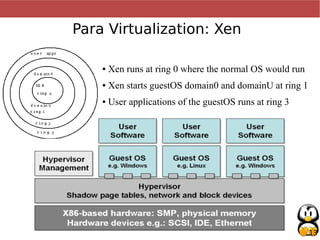
Para Virtualization: Xen
● Xen runs at ring 0 where the normal OS would run
● Xen starts guestOS domain0 and domainU at ring 1
● User applications of the guestOS runs at ring 3
14
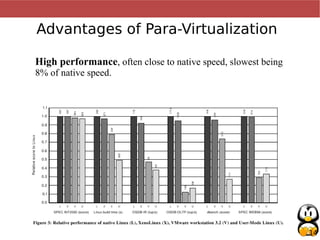
Advantages of Para-Virtualization
High performance, often close to native speed, slowest being
8% of native speed.
15
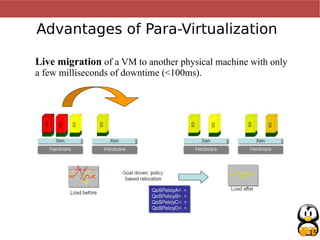
Advantages of Para-Virtualization
Live migration of a VM to another physical machine with only
a few milliseconds of downtime (<100ms).
16
Disadvantages of Para-Virtualization
● Guest OS should be modified to support the Para-Virtualization
platform. Fortunately this only requires the kernel to be ported to
the platform and the applications can remain untouched. Not a
problem for an Free/Open Source OS. Now with direct hardware
support using Intel's VT / AMD's Pacific.
● Currently X-windows only works at on Domain0 and fails at other
domains as it requires access to the video card hardware. It is still
possible to run X applications that is within a DomainU VM by
using a remote desktop app such as VNC. Again not a problem with
VT technlogies.
17
Enter FULL virtualization
(Hardware virtualization)
Intel (Intel-VT) and AMD (AMD-V) now
fully support virtualization at a hardware
level
Linux Kernel officially supports Full VT via
kvm
18
Software virtualization
(multi-tenant virtualization)
More cost effective and scalable
Modify Application to support multiple
instances
Security is the applications responsibility
19
Thank You
Use the force, read the source!

Virtualization, The future of computing (archived)

  • 1.
    1 Buddhika Siddhisena Co-Founder &CTO THINKCube Systems Member of LKLUG Virtualization The future of computing
  • 2.
  • 3.
    3 What is Virtualization– Short ● Simple term word for a simple idea ● Run multiple “Operating System” instances (Virtual Machines) on one physical computer ● Virtualize the same OS or different OSes ● Encapsulates a series of buzz words – Hypervisor, Para virtualization, Virtual Machine, Emulation, Simulation
  • 4.
    4 WHAT is VirtualizationTechnology ● Virtualization Technology (VT) is an old technology that has been revitalized recently, thanks to faster processor increase in processing power. ● Virtualization is often achieved by either totally or partially emulating the processor, BIOS and other hardware devices. ● Emulating a completely different processor architecture is much slower since CPU instructions need to be emulated, compared to a native emulation. ● Guest OS is unaware of the emulation and is led to believe that it has the resources of the entire machine under its control.
  • 5.
  • 6.
    6 Some popular Emulators ●Qemu is an FOSS x86/x86_64,ARM,PowePC etc. CPU emulator. ● Kvm is an extended version of Qemu to support hardware virtualization ● Bochs is an x86/x86_64 emulator that is FOSS ● Mac-on-Linux is a PPC emulator which uses native cpu emulation ● UML (User Mode Linux) enables a Linux kernel to run inside another Linux system as a user space application. ● PearPC is an Open Source PPC G4 emulator. ● VirtualBox is now Open Source ●VMWare a commercial, free for personal user, x86 emulator that uses native cpu emulation
  • 7.
  • 8.
    8 Why Virtualize -Simply Save Money $$$
  • 9.
    9 WHY Virtualize (Advantages) ● Betterutilization of hardware. Today on an average, Servers run at less that 15% utilization. ● Better scalability. Dynamic scalability. ● Better maintainability. Lesser down time. ● Better fault tolerance. ● Better deployment / roll out. ISP now provide virtual root hosting within minutes.
  • 10.
  • 11.
    11 ● Amazon EC2 ,Google AppEngine (Cloud Computing) ● Data Centers ● Hosting Providers - Virtual Server ● NOC ● Desktop Users ● You and Me
  • 12.
    12 Para Virtualization (Xen) ●In Para-Virtualization the Guest OS is ported to an ideal platform. ● The Hypervisor platform provides an API which the modified kernel of the GuestOS ends up calling when trying to access hardware. ● Device drivers are virtualized by running the part that interacts with the device (physical driver) in a separate domain known as Domain0. ● Virtual environments are created in a separate DomainU that doesn't have direct access to hardware. ●DomainU kernels communicate with the Domain0 kernel to access hardware.
  • 13.
    13 Para Virtualization: Xen ●Xen runs at ring 0 where the normal OS would run ● Xen starts guestOS domain0 and domainU at ring 1 ● User applications of the guestOS runs at ring 3
  • 14.
    14 Advantages of Para-Virtualization Highperformance, often close to native speed, slowest being 8% of native speed.
  • 15.
    15 Advantages of Para-Virtualization Livemigration of a VM to another physical machine with only a few milliseconds of downtime (<100ms).
  • 16.
    16 Disadvantages of Para-Virtualization ●Guest OS should be modified to support the Para-Virtualization platform. Fortunately this only requires the kernel to be ported to the platform and the applications can remain untouched. Not a problem for an Free/Open Source OS. Now with direct hardware support using Intel's VT / AMD's Pacific. ● Currently X-windows only works at on Domain0 and fails at other domains as it requires access to the video card hardware. It is still possible to run X applications that is within a DomainU VM by using a remote desktop app such as VNC. Again not a problem with VT technlogies.
  • 17.
    17 Enter FULL virtualization (Hardwarevirtualization) Intel (Intel-VT) and AMD (AMD-V) now fully support virtualization at a hardware level Linux Kernel officially supports Full VT via kvm
  • 18.
    18 Software virtualization (multi-tenant virtualization) Morecost effective and scalable Modify Application to support multiple instances Security is the applications responsibility
  • 19.
    19 Thank You Use theforce, read the source!