LINUX OPERATING
SYSTEM
Amar Jukuntla
Content
Introduction
Linux File System
Linux Directory Tree
Absolute Vs Relative Path
Introduction
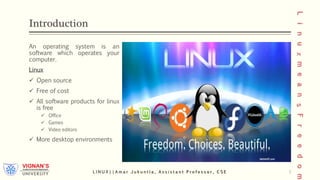
An operating system is an
software which operates your
computer.
Linux
 Open source
 Free of cost
 All software products for linux
is free
 Office
 Games
 Video editors
 More desktop environments
L I N U X | | A m a r J u k u n t l a , A s s i s t a n t P r o f e s s o r , C S E 3
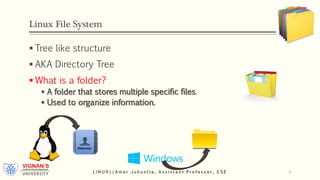
Linux File System
 Tree like structure
 AKA Directory Tree
 What is a folder?
 A folder that stores multiple specific files.
 Used to organize information.
L I N U X | | A m a r J u k u n t l a , A s s i s t a n t P r o f e s s o r , C S E 4
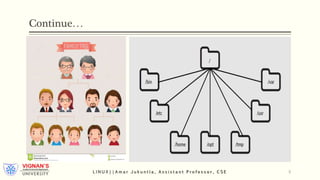
The Directory Tree
• Pretty much similar to a family tree.
• Each directory of file has exactly one
parent.
L I N U X | | A m a r J u k u n t l a , A s s i s t a n t P r o f e s s o r , C S E 5
Continue…
L I N U X | | A m a r J u k u n t l a , A s s i s t a n t P r o f e s s o r , C S E 6
L I N U X | | A m a r J u k u n t l a , A s s i s t a n t P r o f e s s o r , C S E 7
binary Directory(/bin)
• Bin directory which stands for binary.
• This directory contains executable programs and commands that can
be used by all the users present in the system.
• Opt is an another directory.
• Opt stands for optional.
• This directory contains commercial software products, not installed by your system.
/opt Directory
L I N U X | | A m a r J u k u n t l a , A s s i s t a n t P r o f e s s o r , C S E 8
home Directory(/home)
• It contains all folders like desktop, documents.
• A user can store any thing in home directory.
• tmp is an another directory.
• tmp stands for temporary files.
• Many programs use this to create lock files and for temporary storage of data. Do not remove
files from this directory unless you know exactly what you are doing!
/tmp Directory
/sbin Directory
• System commands live here.
• /sbin is a standard subdirectory of the root directory in Linux and other Unix-like operating systems that
contains executable (i.e., ready to run) programs.
• They are mostly administrative tools, that should be made available only to the root (i.e., administrative) user.
L I N U X | | A m a r J u k u n t l a , A s s i s t a n t P r o f e s s o r , C S E 9
var Directory(/var)
• Var stands for variable data.
• It contains variable data. Data that frequently changes over time.
• It includes look files, mails etc…
• It holds all configuration files for the system.
/etc Directory
/lib Directory
• It holds all library files like windows. Example: DLL files in windows
L I N U X | | A m a r J u k u n t l a , A s s i s t a n t P r o f e s s o r , C S E 10
Continue…
• Linux is a multi user environment.
• Which means that, multiple users can use system
simultaneously.
• Each user given a directory under home directory.
• So a user can store any thing in home directory.
• Current directory is represented with single dot (.)
• Parent directory represented with double dot.(..)
L I N U X | | A m a r J u k u n t l a , A s s i s t a n t P r o f e s s o r , C S E 11
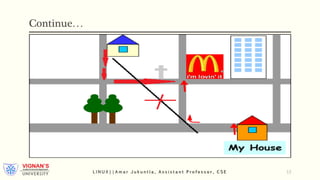
Absolute vs Relative paths
• An absolute path begins with the root directory and follows
the follows the directory tree branch by branch until desired
directory or file is completed.
• Example: /home/amar/documents/phone.txt
• A relative path starts with the current working directory.
• Example: ./documents/phone.txt
L I N U X | | A m a r J u k u n t l a , A s s i s t a n t P r o f e s s o r , C S E 12
Continue…
L I N U X | | A m a r J u k u n t l a , A s s i s t a n t P r o f e s s o r , C S E 13
Recap
 Operating System is a collection of different types of programs.
 An operating system is an software which operates your computer.
 LINUX is a open source operating system, free of cost.
 Linux  Directory, Windows Folder.
 Directory is a tree like structure.
 Absolute path is starts from origin, relative path starts from current directory.
L I N U X | | A m a r J u k u n t l a , A s s i s t a n t P r o f e s s o r , C S E 14
Next Session
 Different types of Files in LINUX
 System Calls
 Intermediate File Management
L I N U X | | A m a r J u k u n t l a , A s s i s t a n t P r o f e s s o r , C S E 15

Linux Directory System: Introduction

  • 1.
  • 2.
    Content Introduction Linux File System LinuxDirectory Tree Absolute Vs Relative Path
  • 3.
    Introduction An operating systemis an software which operates your computer. Linux  Open source  Free of cost  All software products for linux is free  Office  Games  Video editors  More desktop environments L I N U X | | A m a r J u k u n t l a , A s s i s t a n t P r o f e s s o r , C S E 3
  • 4.
    Linux File System Tree like structure  AKA Directory Tree  What is a folder?  A folder that stores multiple specific files.  Used to organize information. L I N U X | | A m a r J u k u n t l a , A s s i s t a n t P r o f e s s o r , C S E 4
  • 5.
    The Directory Tree •Pretty much similar to a family tree. • Each directory of file has exactly one parent. L I N U X | | A m a r J u k u n t l a , A s s i s t a n t P r o f e s s o r , C S E 5
  • 6.
    Continue… L I NU X | | A m a r J u k u n t l a , A s s i s t a n t P r o f e s s o r , C S E 6
  • 7.
    L I NU X | | A m a r J u k u n t l a , A s s i s t a n t P r o f e s s o r , C S E 7
  • 8.
    binary Directory(/bin) • Bindirectory which stands for binary. • This directory contains executable programs and commands that can be used by all the users present in the system. • Opt is an another directory. • Opt stands for optional. • This directory contains commercial software products, not installed by your system. /opt Directory L I N U X | | A m a r J u k u n t l a , A s s i s t a n t P r o f e s s o r , C S E 8
  • 9.
    home Directory(/home) • Itcontains all folders like desktop, documents. • A user can store any thing in home directory. • tmp is an another directory. • tmp stands for temporary files. • Many programs use this to create lock files and for temporary storage of data. Do not remove files from this directory unless you know exactly what you are doing! /tmp Directory /sbin Directory • System commands live here. • /sbin is a standard subdirectory of the root directory in Linux and other Unix-like operating systems that contains executable (i.e., ready to run) programs. • They are mostly administrative tools, that should be made available only to the root (i.e., administrative) user. L I N U X | | A m a r J u k u n t l a , A s s i s t a n t P r o f e s s o r , C S E 9
  • 10.
    var Directory(/var) • Varstands for variable data. • It contains variable data. Data that frequently changes over time. • It includes look files, mails etc… • It holds all configuration files for the system. /etc Directory /lib Directory • It holds all library files like windows. Example: DLL files in windows L I N U X | | A m a r J u k u n t l a , A s s i s t a n t P r o f e s s o r , C S E 10
  • 11.
    Continue… • Linux isa multi user environment. • Which means that, multiple users can use system simultaneously. • Each user given a directory under home directory. • So a user can store any thing in home directory. • Current directory is represented with single dot (.) • Parent directory represented with double dot.(..) L I N U X | | A m a r J u k u n t l a , A s s i s t a n t P r o f e s s o r , C S E 11
  • 12.
    Absolute vs Relativepaths • An absolute path begins with the root directory and follows the follows the directory tree branch by branch until desired directory or file is completed. • Example: /home/amar/documents/phone.txt • A relative path starts with the current working directory. • Example: ./documents/phone.txt L I N U X | | A m a r J u k u n t l a , A s s i s t a n t P r o f e s s o r , C S E 12
  • 13.
    Continue… L I NU X | | A m a r J u k u n t l a , A s s i s t a n t P r o f e s s o r , C S E 13
  • 14.
    Recap  Operating Systemis a collection of different types of programs.  An operating system is an software which operates your computer.  LINUX is a open source operating system, free of cost.  Linux  Directory, Windows Folder.  Directory is a tree like structure.  Absolute path is starts from origin, relative path starts from current directory. L I N U X | | A m a r J u k u n t l a , A s s i s t a n t P r o f e s s o r , C S E 14
  • 15.
    Next Session  Differenttypes of Files in LINUX  System Calls  Intermediate File Management L I N U X | | A m a r J u k u n t l a , A s s i s t a n t P r o f e s s o r , C S E 15