Linux for Digital Forensics
Overview
• Introduction to OS and file Systems
• Virtual file system
• File structure
• Path and path variable
• Linux commands
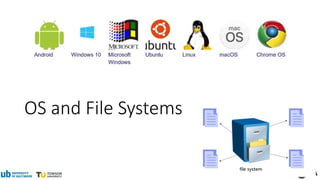
OS and File Systems
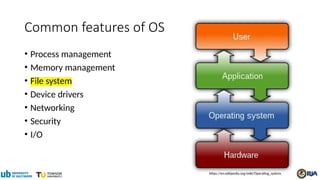
Common features of OS
• Process management
• Memory management
• File system
• Device drivers
• Networking
• Security
• I/O
https://en.wikipedia.org/wiki/Operating_system
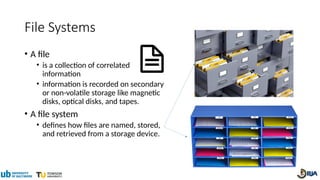
File Systems
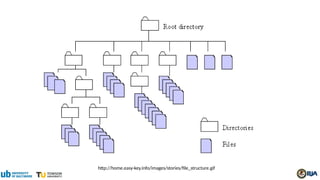
• A file
• is a collection of correlated
information
• information is recorded on secondary
or non-volatile storage like magnetic
disks, optical disks, and tapes.
• A file system
• defines how files are named, stored,
and retrieved from a storage device.
http://home.easy-key.info/images/stories/file_structure.gif
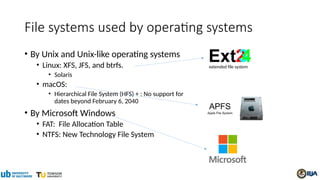
File systems used by operating systems
• By Unix and Unix-like operating systems
• Linux: XFS, JFS, and btrfs.
• Solaris
• macOS:
• Hierarchical File System (HFS) + : No support for
dates beyond February 6, 2040
• By Microsoft Windows
• FAT: File Allocation Table
• NTFS: New Technology File System
extended file system
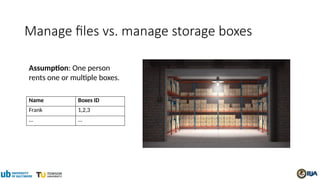
Assumption: One person
rents one or multiple boxes.
Manage files vs. manage storage boxes
Name Boxes ID
Frank 1,2,3
… …
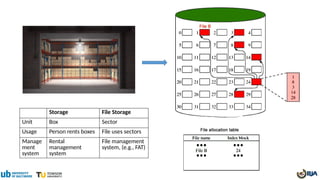
Storage File Storage
Unit Box Sector
Usage Person rents boxes File uses sectors
Manage
ment
system
Rental
management
system
File management
system, (e.g., FAT)
Virtual file system (VFS)
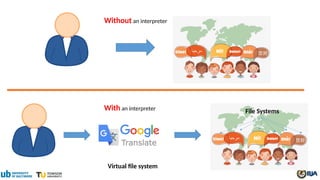
Without an interpreter
With an interpreter File Systems
Virtual file system
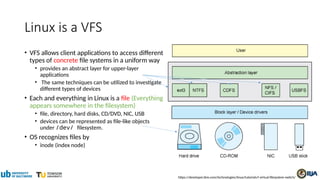
Linux is a VFS
• VFS allows client applications to access different
types of concrete file systems in a uniform way
• provides an abstract layer for upper-layer
applications
• The same techniques can be utilized to investigate
different types of devices
• Each and everything in Linux is a file (Everything
appears somewhere in the filesystem)
• file, directory, hard disks, CD/DVD, NIC, USB
• devices can be represented as file-like objects
under /dev/ filesystem.
• OS recognizes files by
• inode (index node)
https://developer.ibm.com/technologies/linux/tutorials/l-virtual-filesystem-switch/
Linux for digital forensics- Good and Bad
• Pro
• widely support for many file systems (Virtual file system)
• advanced and powerful tools available
• free and open-source
• compile source code
• flexibility
• Con
• learning curve, e.g., no graphic interface
• trustworthiness of open-source tools
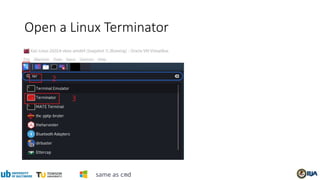
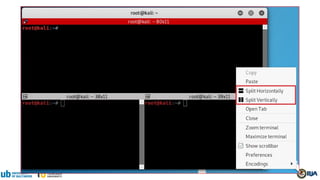
Open a Linux Terminator
same as cmd
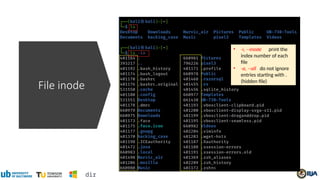
File inode
• -i, --inode print the
index number of each
file
• -a, --all do not ignore
entries starting with .
(hidden file)
dir
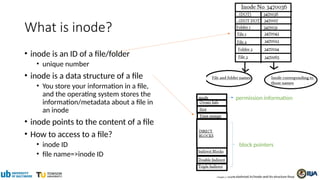
What is inode?
• inode is an ID of a file/folder
• unique number
• inode is a data structure of a file
• You store your information in a file,
and the operating system stores the
information/metadata about a file in
an inode
• inode points to the content of a file
• How to access to a file?
• inode ID
• file name=>inode ID
https://www.slashroot.in/inode-and-its-structure-linux
permission information
block pointers
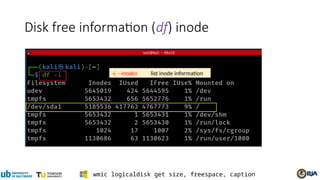
Disk free information (df) inode
-i, --inodes list inode information
wmic logicaldisk get size, freespace, caption
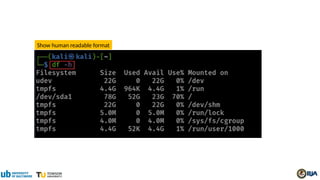
Show human readable format
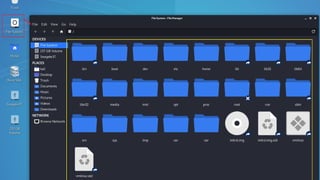
File Structure
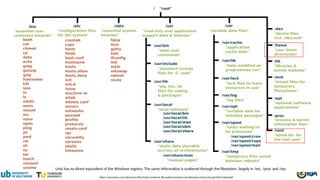
https://www.linux.com/sites/lcom/files/styles/rendered_file/public/standard-unix-filesystem-hierarchy.png?itok=CVqmyk6P
Unix has no direct equivalent of the Windows registry. The same information is scattered through the filesystem, largely in /etc, /proc and /sys.
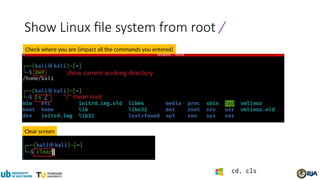
Show Linux file system from root /
Clear screen
Check where you are (impact all the commands you entered)
cd, cls
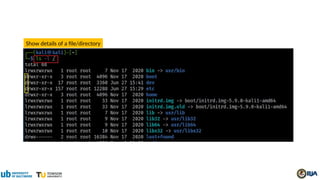
Show details of a file/directory
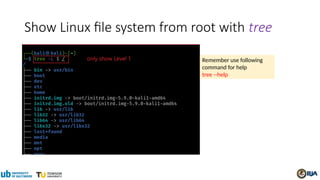
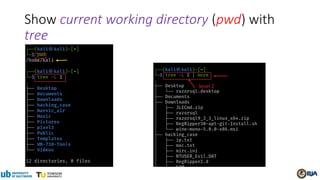
Show Linux file system from root with tree
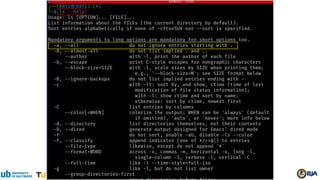
Remember use following
command for help
tree --help
Show current working directory (pwd) with
tree
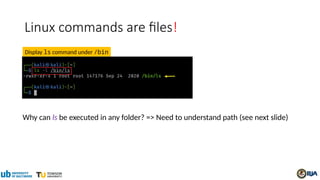
Linux commands are files!
Why can ls be executed in any folder? => Need to understand path (see next slide)
Display ls command under /bin
Path and Path variable
What is path in a file system?
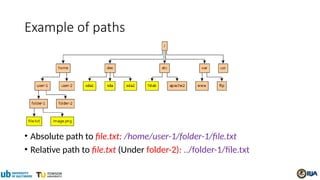
• A path is a hierarchical representation of the location (address) of a
file or directory within the file system's directory structure.
• A path describes the route or sequence of directories (folders) you
must navigate through to reach a specific file or directory.
• Paths are used to uniquely identify and access files and directories on
a computer or storage device.
Example of paths
• Absolute path to file.txt: /home/user-1/folder-1/file.txt
• Relative path to file.txt (Under folder-2): ../folder-1/file.txt
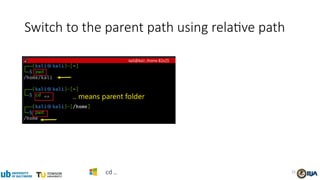
Switch to the parent path using relative path
32
cd ..
Path variable ($PATH)
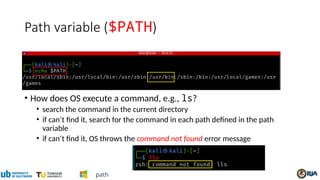
• How does OS execute a command, e.g., ls?
• search the command in the current directory
• if can’t find it, search for the command in each path defined in the path
variable
• if can’t find it, OS throws the command not found error message
path
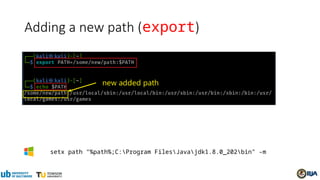
Adding a new path (export)
setx path "%path%;C:Program FilesJavajdk1.8.0_202bin" -m
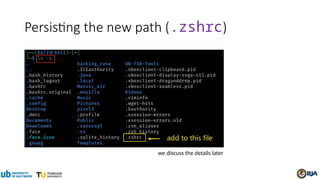
Persisting the new path (.zshrc)
we discuss the details later
Create folders and files
36
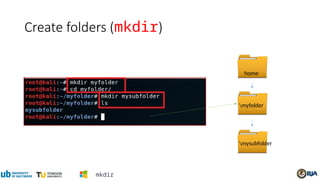
Create folders (mkdir)
myfolder
mysubfolder
home
mkdir
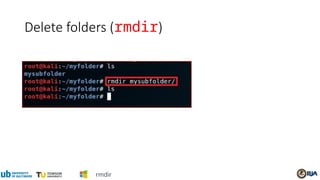
Delete folders (rmdir)
rmdir
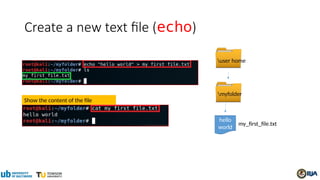
Create a new text file (echo)
hello
world
my_first_file.txt
myfolder
user home
Show the content of the file
40
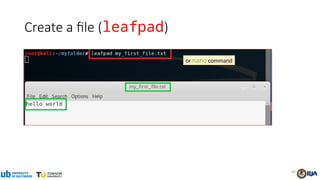
Create a file (leafpad)
or nano command
41
File Copy & Deletion
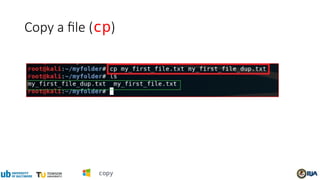
Copy a file (cp)
copy
43
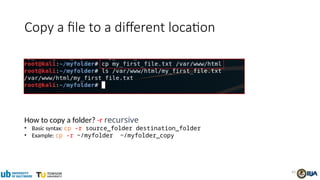
Copy a file to a different location
How to copy a folder? -r recursive
• Basic syntax: cp -r source_folder destination_folder
• Example: cp -r ~/myfolder ~/myfolder_copy
44
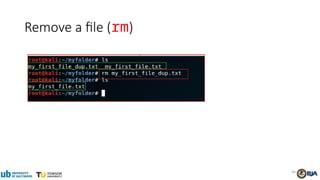
Remove a file (rm)
45
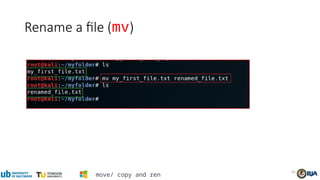
Rename a file (mv)
move/ copy and ren
Search for information
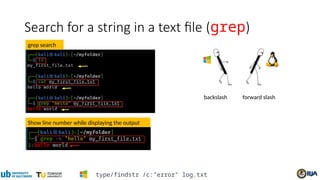
Search for a string in a text file (grep)
Show line number while displaying the output
grep search
forward slash
backslash
type/findstr /c:"error" log.txt
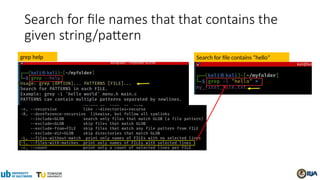
Search for file names that that contains the
given string/pattern
grep help Search for file contains “hello”
Networking
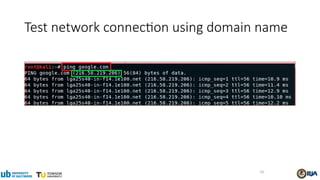
Test network connection using domain name
50
51
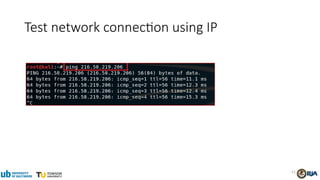
Test network connection using IP
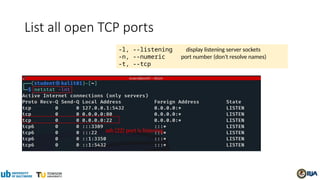
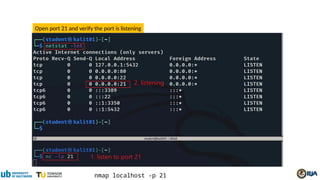
List all open TCP ports
-l, --listening display listening server sockets
-n, --numeric port number (don't resolve names)
-t, --tcp
ssh (22) port is listening
Open port 21 and verify the port is listening
nmap localhost -p 21
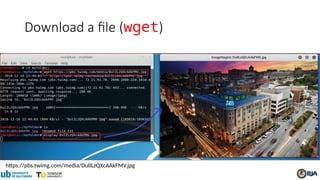
https://pbs.twimg.com/media/DulILzQXcAAkFMV.jpg
Download a file (wget)
Create a script file
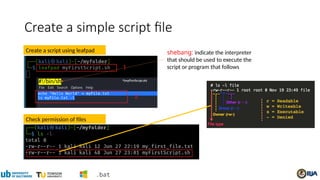
Create a simple script file
Check permission of files
Create a script using leafpad
#!/bin/sh
.bat
shebang: indicate the interpreter
that should be used to execute the
script or program that follows
57
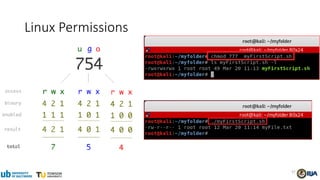
Linux Permissions
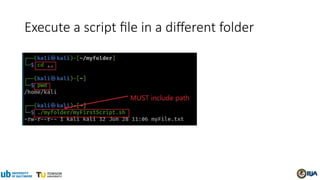
Execute a script file in a different folder
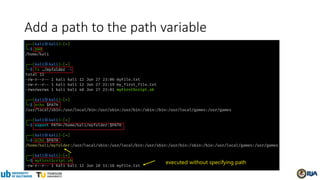
Add a path to the path variable
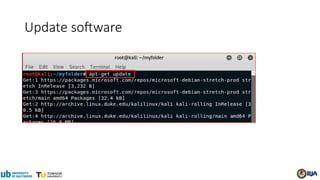
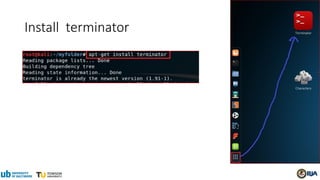
Update/Install software
(optional)
Update software
Install terminator
63
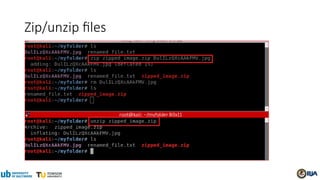
Zip/unzip files
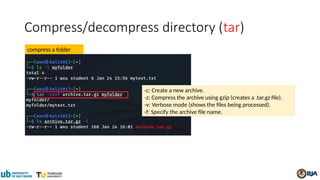
Compress/decompress directory (tar)
compress a folder
-c: Create a new archive.
-z: Compress the archive using gzip (creates a .tar.gz file).
-v: Verbose mode (shows the files being processed).
-f: Specify the archive file name.
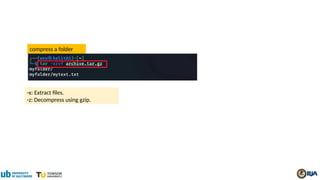
compress a folder
-x: Extract files.
-z: Decompress using gzip.
Linux_command_line_tutorial for begineers.pptx

Linux_command_line_tutorial for begineers.pptx

  • 1.
  • 2.
    Overview • Introduction toOS and file Systems • Virtual file system • File structure • Path and path variable • Linux commands
  • 3.
    OS and FileSystems
  • 5.
    Common features ofOS • Process management • Memory management • File system • Device drivers • Networking • Security • I/O https://en.wikipedia.org/wiki/Operating_system
  • 6.
    File Systems • Afile • is a collection of correlated information • information is recorded on secondary or non-volatile storage like magnetic disks, optical disks, and tapes. • A file system • defines how files are named, stored, and retrieved from a storage device.
  • 7.
  • 8.
    File systems usedby operating systems • By Unix and Unix-like operating systems • Linux: XFS, JFS, and btrfs. • Solaris • macOS: • Hierarchical File System (HFS) + : No support for dates beyond February 6, 2040 • By Microsoft Windows • FAT: File Allocation Table • NTFS: New Technology File System extended file system
  • 9.
    Assumption: One person rentsone or multiple boxes. Manage files vs. manage storage boxes Name Boxes ID Frank 1,2,3 … …
  • 10.
    Storage File Storage UnitBox Sector Usage Person rents boxes File uses sectors Manage ment system Rental management system File management system, (e.g., FAT)
  • 11.
  • 12.
    Without an interpreter Withan interpreter File Systems Virtual file system
  • 13.
    Linux is aVFS • VFS allows client applications to access different types of concrete file systems in a uniform way • provides an abstract layer for upper-layer applications • The same techniques can be utilized to investigate different types of devices • Each and everything in Linux is a file (Everything appears somewhere in the filesystem) • file, directory, hard disks, CD/DVD, NIC, USB • devices can be represented as file-like objects under /dev/ filesystem. • OS recognizes files by • inode (index node) https://developer.ibm.com/technologies/linux/tutorials/l-virtual-filesystem-switch/
  • 14.
    Linux for digitalforensics- Good and Bad • Pro • widely support for many file systems (Virtual file system) • advanced and powerful tools available • free and open-source • compile source code • flexibility • Con • learning curve, e.g., no graphic interface • trustworthiness of open-source tools
  • 15.
    Open a LinuxTerminator same as cmd
  • 16.
    File inode • -i,--inode print the index number of each file • -a, --all do not ignore entries starting with . (hidden file) dir
  • 17.
    What is inode? •inode is an ID of a file/folder • unique number • inode is a data structure of a file • You store your information in a file, and the operating system stores the information/metadata about a file in an inode • inode points to the content of a file • How to access to a file? • inode ID • file name=>inode ID https://www.slashroot.in/inode-and-its-structure-linux permission information block pointers
  • 19.
    Disk free information(df) inode -i, --inodes list inode information wmic logicaldisk get size, freespace, caption
  • 20.
  • 21.
  • 22.
    https://www.linux.com/sites/lcom/files/styles/rendered_file/public/standard-unix-filesystem-hierarchy.png?itok=CVqmyk6P Unix has nodirect equivalent of the Windows registry. The same information is scattered through the filesystem, largely in /etc, /proc and /sys.
  • 24.
    Show Linux filesystem from root / Clear screen Check where you are (impact all the commands you entered) cd, cls
  • 25.
    Show details ofa file/directory
  • 26.
    Show Linux filesystem from root with tree Remember use following command for help tree --help
  • 27.
    Show current workingdirectory (pwd) with tree
  • 28.
    Linux commands arefiles! Why can ls be executed in any folder? => Need to understand path (see next slide) Display ls command under /bin
  • 29.
    Path and Pathvariable
  • 30.
    What is pathin a file system? • A path is a hierarchical representation of the location (address) of a file or directory within the file system's directory structure. • A path describes the route or sequence of directories (folders) you must navigate through to reach a specific file or directory. • Paths are used to uniquely identify and access files and directories on a computer or storage device.
  • 31.
    Example of paths •Absolute path to file.txt: /home/user-1/folder-1/file.txt • Relative path to file.txt (Under folder-2): ../folder-1/file.txt
  • 32.
    Switch to theparent path using relative path 32 cd ..
  • 33.
    Path variable ($PATH) •How does OS execute a command, e.g., ls? • search the command in the current directory • if can’t find it, search for the command in each path defined in the path variable • if can’t find it, OS throws the command not found error message path
  • 34.
    Adding a newpath (export) setx path "%path%;C:Program FilesJavajdk1.8.0_202bin" -m
  • 35.
    Persisting the newpath (.zshrc) we discuss the details later
  • 36.
  • 37.
  • 38.
  • 39.
    Create a newtext file (echo) hello world my_first_file.txt myfolder user home Show the content of the file
  • 40.
    40 Create a file(leafpad) or nano command
  • 41.
  • 42.
    Copy a file(cp) copy
  • 43.
    43 Copy a fileto a different location How to copy a folder? -r recursive • Basic syntax: cp -r source_folder destination_folder • Example: cp -r ~/myfolder ~/myfolder_copy
  • 44.
  • 45.
    45 Rename a file(mv) move/ copy and ren
  • 46.
  • 47.
    Search for astring in a text file (grep) Show line number while displaying the output grep search forward slash backslash type/findstr /c:"error" log.txt
  • 48.
    Search for filenames that that contains the given string/pattern grep help Search for file contains “hello”
  • 49.
  • 50.
    Test network connectionusing domain name 50
  • 51.
  • 52.
    List all openTCP ports -l, --listening display listening server sockets -n, --numeric port number (don't resolve names) -t, --tcp ssh (22) port is listening
  • 53.
    Open port 21and verify the port is listening nmap localhost -p 21
  • 54.
  • 55.
  • 56.
    Create a simplescript file Check permission of files Create a script using leafpad #!/bin/sh .bat shebang: indicate the interpreter that should be used to execute the script or program that follows
  • 57.
  • 58.
    Execute a scriptfile in a different folder
  • 59.
    Add a pathto the path variable
  • 60.
  • 61.
  • 62.
  • 63.
  • 64.
  • 65.
    Compress/decompress directory (tar) compressa folder -c: Create a new archive. -z: Compress the archive using gzip (creates a .tar.gz file). -v: Verbose mode (shows the files being processed). -f: Specify the archive file name.
  • 66.
    compress a folder -x:Extract files. -z: Decompress using gzip.

Editor's Notes

  • #9 https://www.geeksforgeeks.org/file-systems-in-operating-system/
  • #10 https://www.geeksforgeeks.org/file-systems-in-operating-system/
  • #13 The "Everything is a file" phrase defines the architecture of the operating system. It means that everything in the system from processes, files, directories, sockets, pipes, ... is represented by a file descriptor abstracted over the virtual filesystem layer in the kernel Devices can be represented as file-like object under /dev/ filesystem. Unix has no direct equivalent of the Windows registry. The same information is scattered through the filesystem, largely in /etc, /proc and /sys.
  • #19 Windows cmd: wmic logicaldisk get size, freespace, caption
  • #24 cd
  • #33 In Windows path
  • #34 export PATH=/some/new/path:$PATH In Windows setx path "%path%;C:\Program Files\Java\jdk1.8.0_202\bin" -m
  • #47 cat my_first_file.txt grep "hello" my_first_file.txt https://sites.cs.ucsb.edu/~pconrad/topics/BackslashVsForwardSlash/
  • #53 nmap localhost -p 21
  • #56 #!/bin/sh echo "Hello World" > myFile.txt ls myFile.txt -l
  • #59 export PATH=/home/kali/myfolder:$PATH