Booting Sequence Of Linux
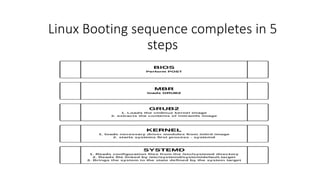
Linux Booting sequence completes in 5
steps
BIOS Initialization
 When the machine is power on. The system firmware runs
POST.
 Firmware Are of two type
 UEFI (Unified Extensible Firmware Interface)
 BIOS (Basic Input Output System)
 POST stands for Power on self test. It is a 2 volt signal use to
test hardware devices connected into machine.
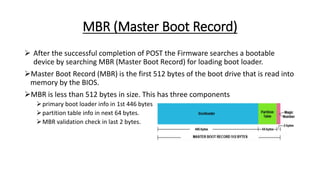
MBR (Master Boot Record)
 After the successful completion of POST the Firmware searches a bootable
device by searching MBR (Master Boot Record) for loading boot loader.
Master Boot Record (MBR) is the first 512 bytes of the boot drive that is read into
memory by the BIOS.
MBR is less than 512 bytes in size. This has three components
primary boot loader info in 1st 446 bytes.
partition table info in next 64 bytes.
MBR validation check in last 2 bytes.
Bootloader
Boot Loader is a program which contains the information about the
operating system.
The default bootloader program used on RHEL 7 is GRUB 2. GRUB stands
for GRand Unified Bootloader. GRUB 2 replaces the older GRUB
bootloader also called as legacy GRUB. The GRUB 2 configuration file is
/boot/grub2/grub.cfg. This file can configure by using grub2-mkconfig
command. This command executes the scripts from /etc/grub.d/ folder.
GRUB 2 menu-configuration settings are taken from /etc/default/grub
when generating grub.cfg.
GRUB2 searches the compressed kernel image file also called as vmlinuz in
the /boot directory.
Kernel Initialization
 Bootloader loads the vmlinuz kernel image file into memory and extracts the contents of the
initramfs image file into a temporary, memory-based file system (tmpfs).
 The initial RAM disk (initrd) is an initial root file system that is mounted before the real root file
system.
 Initramfs contains the information of kernel modules.
 The job of the initial RAM file system is to preload the block device modules, such as for IDE, SCSI, or
RAID, so that the root file system, on which those modules normally reside, can then be accessed
and mounted.
 Then the kernel initializes all the hardware for which it can find the drivers in the initramfs, then
executes /sbin/init from the initramfs as PID 1 in Redhat 7 the initramfs contains a working copy of
systemd as /sbin/init, as well as a udev daemons.
 The initramfs is bound to the kernel and the kernel mounts this initramfs as part of a two-stage boot
process.
 The dracut utility creates initramfs whenever a new kernel is installed.
 Use the lsinitrd command to view the contents of the image created by Dracut. /etc/dracut.conf
Systemd
The systemd instance from the initramfs all units for the initrd.target
and mounting the actual root file system on /sysroot.
Configured using: /etc/fstab
The kernel root file system is switched from the initramfs root file
system to the system root file system mounted on /sysroot.systemd.
Systemd looks for the default target, either passed in from the kernel
command line or configured on the system.
Configured using: etc/systemd/system/default.target ,/etc/systemd/system/

Linux booting sequence

  • 1.
  • 2.
    Linux Booting sequencecompletes in 5 steps
  • 3.
    BIOS Initialization  Whenthe machine is power on. The system firmware runs POST.  Firmware Are of two type  UEFI (Unified Extensible Firmware Interface)  BIOS (Basic Input Output System)  POST stands for Power on self test. It is a 2 volt signal use to test hardware devices connected into machine.
  • 4.
    MBR (Master BootRecord)  After the successful completion of POST the Firmware searches a bootable device by searching MBR (Master Boot Record) for loading boot loader. Master Boot Record (MBR) is the first 512 bytes of the boot drive that is read into memory by the BIOS. MBR is less than 512 bytes in size. This has three components primary boot loader info in 1st 446 bytes. partition table info in next 64 bytes. MBR validation check in last 2 bytes.
  • 5.
    Bootloader Boot Loader isa program which contains the information about the operating system. The default bootloader program used on RHEL 7 is GRUB 2. GRUB stands for GRand Unified Bootloader. GRUB 2 replaces the older GRUB bootloader also called as legacy GRUB. The GRUB 2 configuration file is /boot/grub2/grub.cfg. This file can configure by using grub2-mkconfig command. This command executes the scripts from /etc/grub.d/ folder. GRUB 2 menu-configuration settings are taken from /etc/default/grub when generating grub.cfg. GRUB2 searches the compressed kernel image file also called as vmlinuz in the /boot directory.
  • 6.
    Kernel Initialization  Bootloaderloads the vmlinuz kernel image file into memory and extracts the contents of the initramfs image file into a temporary, memory-based file system (tmpfs).  The initial RAM disk (initrd) is an initial root file system that is mounted before the real root file system.  Initramfs contains the information of kernel modules.  The job of the initial RAM file system is to preload the block device modules, such as for IDE, SCSI, or RAID, so that the root file system, on which those modules normally reside, can then be accessed and mounted.  Then the kernel initializes all the hardware for which it can find the drivers in the initramfs, then executes /sbin/init from the initramfs as PID 1 in Redhat 7 the initramfs contains a working copy of systemd as /sbin/init, as well as a udev daemons.  The initramfs is bound to the kernel and the kernel mounts this initramfs as part of a two-stage boot process.  The dracut utility creates initramfs whenever a new kernel is installed.  Use the lsinitrd command to view the contents of the image created by Dracut. /etc/dracut.conf
  • 7.
    Systemd The systemd instancefrom the initramfs all units for the initrd.target and mounting the actual root file system on /sysroot. Configured using: /etc/fstab The kernel root file system is switched from the initramfs root file system to the system root file system mounted on /sysroot.systemd. Systemd looks for the default target, either passed in from the kernel command line or configured on the system. Configured using: etc/systemd/system/default.target ,/etc/systemd/system/