2010
Henry Badenhorst
Freelance Trainer for Learnthings
Africa
10/21/2010
Training Report
Basic ICT integration
training on behalf of
MTN
2 | P a g e
CONTENTS
Introduction ……………………… 3
Attendance ……………………… 4
Project Purpose/ outcome ……………………… 5-6
Project objectives and outputs ……………………… 6
Contact details and Hardware Checklist ……………7
Methodology ……………………… 8
Conclusions & Feedback ……………………… 9
Recommendations ….………………….... 10
Gallery ……………………….. 11
3 | P a g e
Project:
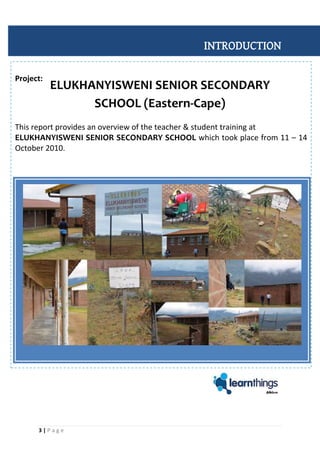
This report provides an overview of the teacher & student training at
ELUKHANYISWENI SENIOR SECONDARY SCHOOL which took place from 11 – 14
October 2010.
INTRODUCTION
ELUKHANYISWENI SENIOR SECONDARY
SCHOOL (Eastern-Cape)
4 | P a g e
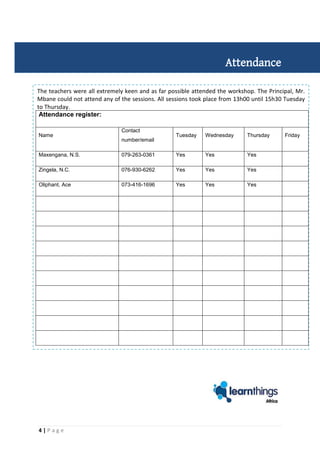
The teachers were all extremely keen and as far possible attended the workshop. The Principal, Mr.
Mbane could not attend any of the sessions. All sessions took place from 13h00 until 15h30 Tuesday
to Thursday.
Attendance
Attendance register:
Name
Contact
number/email
Tuesday Wednesday Thursday Friday
Maxengana, N.S. 079-263-0361 Yes Yes Yes
Zingela, N.C. 076-930-6262 Yes Yes Yes
Oliphant, Ace 073-416-1696 Yes Yes Yes
5 | P a g e
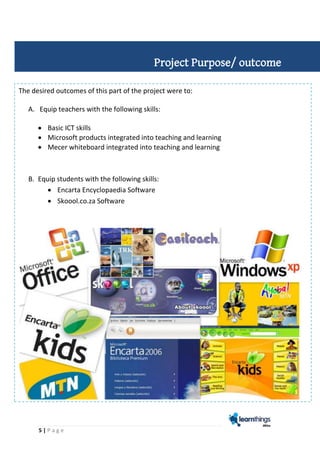
The desired outcomes of this part of the project were to:
A. Equip teachers with the following skills:
 Basic ICT skills
 Microsoft products integrated into teaching and learning
 Mecer whiteboard integrated into teaching and learning
B. Equip students with the following skills:
 Encarta Encyclopaedia Software
 Skoool.co.za Software
Project Purpose/ outcome
6 | P a g e
DAY Content and activities
planned
Actual content
and activities
covered
Comments
Tuesday
morning
Learners to visit the computer lab, and
familiarise themselves with the location and
navigation to
digital resources..
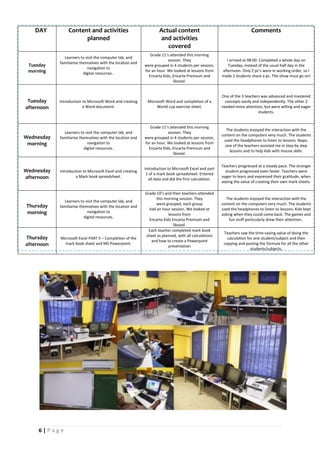
Grade 11’s attended this morning
session. They
were grouped in 4 students per session,
for an hour. We looked at lessons from
Encarta Kids, Encarta Premium and
Skoool.
I arrived at 08:00. Completed a whole day on
Tuesday, instead of the usual half day in the
afternoon. Only 2 pc’s were in working order, so I
made 2 students share a pc. The show must go on!
Tuesday
afternoon
Introduction to Microsoft Word and creating
a Word document.
Microsoft Word and completion of a
World cup exercise sheet.
One of the 3 teachers was advanced and mastered
concepts easily and independently. The other 2
needed more attention, but were willing and eager
students.
Wednesday
morning
Learners to visit the computer lab, and
familiarise themselves with the location and
navigation to
digital resources.
Grade 11’s attended this morning
session. They
were grouped in 4 students per session,
for an hour. We looked at lessons from
Encarta Kids, Encarta Premium and
Skoool.
The students enjoyed the interaction with the
content on the computers very much. The students
used the headphones to listen to lessons. Napo,
one of the teachers assisted me in step by step
lessons and to help kids with mouse skills.
Wednesday
afternoon
Introduction to Microsoft Excel and creating
a Mark book spreadsheet.
Introduction to Microsoft Excel and part
1 of a mark book spreadsheet. Entered
all data and did the first calculation.
Teachers progressed at a steady pace. The stronger
student progressed even faster. Teachers were
eager to learn and expressed their gratitude, when
seeing the value of creating their own mark sheets.
Thursday
morning
Learners to visit the computer lab, and
familiarise themselves with the location and
navigation to
digital resources.
Grade 10’s and their teachers attended
this morning session. They
were grouped, each group
had an hour session. We looked at
lessons from
Encarta Kids Encarta Premium and
Skoool.
The students enjoyed the interaction with the
content on the computers very much. The students
used the headphones to listen to lessons. Kids kept
asking when they could come back. The games and
fun stuff particularly drew their attention..
Thursday
afternoon
Microsoft Excel PART II – Completion of the
mark book sheet and MS Powerpoint.
Each teacher completed mark book
sheet as planned, with all calculations
and how to create a Powerpoint
presentation
Teachers saw the time-saving value of doing the
calculation for one student/subject and then
copying and pasting the formula for all the other
students/subjects.
7 | P a g e
ELUKHANYISWENI S.S. SCHOOL (Msobomvu location: Eastern Cape)
Elukhanyisweni Senior Secondary School
P.O. Box 617
Alice
5700
E-mail: nzingela@gmail.com
Contact person: Mr. S.W. Mbane (Principal) – 083-719-7683
Lab conditions: HARDWARE CHECKLIST
COLLATERAL QUANTITY OBSERVATIONS
Computers (incl. mouse and keyboard) 21
Only two pc’s were working, due to electrical
problems, that could not be fixed.
Printer 0 Not one present in the lab
Printer/Fax/Scanner 1 Not connected
Smart boards 1
Since data projector was out of order, it could
not be tested.
Air conditioners 1 working
Data Projectors 1
Blew a fuse, due to electrical short. Problem
was reported to Eric of MTN.
Webcams 0 None
Server 1
Anti virus software 21
Installed on all working PC’s, but could not be
updated
Programmes Skoool and Encarta
Speakers None
Remote (Educator piece) 0
Never received by school, nor any whiteboard
pens.
Speaker mouth 0
Headphones 21
Could only test 2 for the 2 working pc’s, but
teachers said they were working before
TV Not working
DSTV Software installed, but could not connect.
Table finishes yes
Contact details and Hardware checklist
8 | P a g e
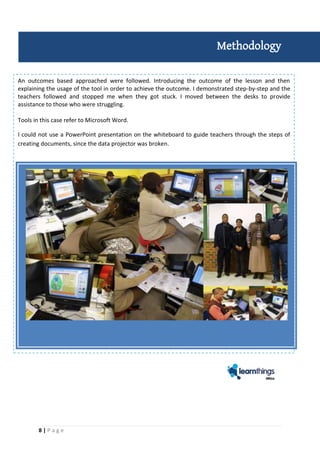
An outcomes based approached were followed. Introducing the outcome of the lesson and then
explaining the usage of the tool in order to achieve the outcome. I demonstrated step-by-step and the
teachers followed and stopped me when they got stuck. I moved between the desks to provide
assistance to those who were struggling.
Tools in this case refer to Microsoft Word.
I could not use a PowerPoint presentation on the whiteboard to guide teachers through the steps of
creating documents, since the data projector was broken.
Methodology
9 | P a g e
THE TEACHERS:
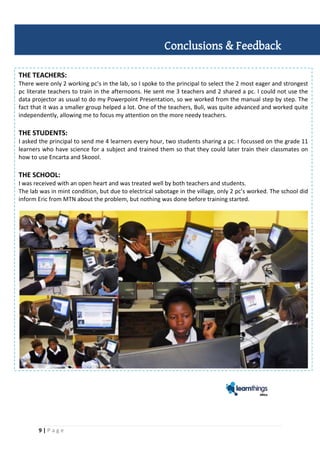
There were only 2 working pc’s in the lab, so I spoke to the principal to select the 2 most eager and strongest
pc literate teachers to train in the afternoons. He sent me 3 teachers and 2 shared a pc. I could not use the
data projector as usual to do my Powerpoint Presentation, so we worked from the manual step by step. The
fact that it was a smaller group helped a lot. One of the teachers, Buli, was quite advanced and worked quite
independently, allowing me to focus my attention on the more needy teachers.
THE STUDENTS:
I asked the principal to send me 4 learners every hour, two students sharing a pc. I focussed on the grade 11
learners who have science for a subject and trained them so that they could later train their classmates on
how to use Encarta and Skoool.
THE SCHOOL:
I was received with an open heart and was treated well by both teachers and students.
The lab was in mint condition, but due to electrical sabotage in the village, only 2 pc’s worked. The school did
inform Eric from MTN about the problem, but nothing was done before training started.
Conclusions & Feedback
10 | P a g e
1. Identification of different levels in computer literacy in both teachers and students prior to
commencement of the workshop.
2. Teachers and students must be taught about the dangers of viruses and must be educated on how to
properly scab USB devices before opening on the PC.
3. Connection of the internet needs to be sorted out so that DSTV and the internet can be accessed.
4. More emphasis on Excel since most teachers struggles more with it than with Word. PowerPoint
should be secondary to Excel and Word.
5. The Workshop sessions for teachers should be held within school hours. Rural school teachers are
dependent on lifts and can only stay until 15:30.
6. Regular access to the lab for students with assignments or projects. Those students should be given
preferential treatment above other students who just want to play.
7. Technicians should make sure everything is working before they sign off the lab. They should
furthermore show at least one teacher how to do basic operations of equipment.
Recommendations
11 | P a g e
GALLERY

LEARNTHINGS REPORT_Elukhanyisweni_11-14Oct2010

  • 1.
    2010 Henry Badenhorst Freelance Trainerfor Learnthings Africa 10/21/2010 Training Report Basic ICT integration training on behalf of MTN
  • 2.
    2 | Pa g e CONTENTS Introduction ……………………… 3 Attendance ……………………… 4 Project Purpose/ outcome ……………………… 5-6 Project objectives and outputs ……………………… 6 Contact details and Hardware Checklist ……………7 Methodology ……………………… 8 Conclusions & Feedback ……………………… 9 Recommendations ….………………….... 10 Gallery ……………………….. 11
  • 3.
    3 | Pa g e Project: This report provides an overview of the teacher & student training at ELUKHANYISWENI SENIOR SECONDARY SCHOOL which took place from 11 – 14 October 2010. INTRODUCTION ELUKHANYISWENI SENIOR SECONDARY SCHOOL (Eastern-Cape)
  • 4.
    4 | Pa g e The teachers were all extremely keen and as far possible attended the workshop. The Principal, Mr. Mbane could not attend any of the sessions. All sessions took place from 13h00 until 15h30 Tuesday to Thursday. Attendance Attendance register: Name Contact number/email Tuesday Wednesday Thursday Friday Maxengana, N.S. 079-263-0361 Yes Yes Yes Zingela, N.C. 076-930-6262 Yes Yes Yes Oliphant, Ace 073-416-1696 Yes Yes Yes
  • 5.
    5 | Pa g e The desired outcomes of this part of the project were to: A. Equip teachers with the following skills:  Basic ICT skills  Microsoft products integrated into teaching and learning  Mecer whiteboard integrated into teaching and learning B. Equip students with the following skills:  Encarta Encyclopaedia Software  Skoool.co.za Software Project Purpose/ outcome
  • 6.
    6 | Pa g e DAY Content and activities planned Actual content and activities covered Comments Tuesday morning Learners to visit the computer lab, and familiarise themselves with the location and navigation to digital resources.. Grade 11’s attended this morning session. They were grouped in 4 students per session, for an hour. We looked at lessons from Encarta Kids, Encarta Premium and Skoool. I arrived at 08:00. Completed a whole day on Tuesday, instead of the usual half day in the afternoon. Only 2 pc’s were in working order, so I made 2 students share a pc. The show must go on! Tuesday afternoon Introduction to Microsoft Word and creating a Word document. Microsoft Word and completion of a World cup exercise sheet. One of the 3 teachers was advanced and mastered concepts easily and independently. The other 2 needed more attention, but were willing and eager students. Wednesday morning Learners to visit the computer lab, and familiarise themselves with the location and navigation to digital resources. Grade 11’s attended this morning session. They were grouped in 4 students per session, for an hour. We looked at lessons from Encarta Kids, Encarta Premium and Skoool. The students enjoyed the interaction with the content on the computers very much. The students used the headphones to listen to lessons. Napo, one of the teachers assisted me in step by step lessons and to help kids with mouse skills. Wednesday afternoon Introduction to Microsoft Excel and creating a Mark book spreadsheet. Introduction to Microsoft Excel and part 1 of a mark book spreadsheet. Entered all data and did the first calculation. Teachers progressed at a steady pace. The stronger student progressed even faster. Teachers were eager to learn and expressed their gratitude, when seeing the value of creating their own mark sheets. Thursday morning Learners to visit the computer lab, and familiarise themselves with the location and navigation to digital resources. Grade 10’s and their teachers attended this morning session. They were grouped, each group had an hour session. We looked at lessons from Encarta Kids Encarta Premium and Skoool. The students enjoyed the interaction with the content on the computers very much. The students used the headphones to listen to lessons. Kids kept asking when they could come back. The games and fun stuff particularly drew their attention.. Thursday afternoon Microsoft Excel PART II – Completion of the mark book sheet and MS Powerpoint. Each teacher completed mark book sheet as planned, with all calculations and how to create a Powerpoint presentation Teachers saw the time-saving value of doing the calculation for one student/subject and then copying and pasting the formula for all the other students/subjects.
  • 7.
    7 | Pa g e ELUKHANYISWENI S.S. SCHOOL (Msobomvu location: Eastern Cape) Elukhanyisweni Senior Secondary School P.O. Box 617 Alice 5700 E-mail: nzingela@gmail.com Contact person: Mr. S.W. Mbane (Principal) – 083-719-7683 Lab conditions: HARDWARE CHECKLIST COLLATERAL QUANTITY OBSERVATIONS Computers (incl. mouse and keyboard) 21 Only two pc’s were working, due to electrical problems, that could not be fixed. Printer 0 Not one present in the lab Printer/Fax/Scanner 1 Not connected Smart boards 1 Since data projector was out of order, it could not be tested. Air conditioners 1 working Data Projectors 1 Blew a fuse, due to electrical short. Problem was reported to Eric of MTN. Webcams 0 None Server 1 Anti virus software 21 Installed on all working PC’s, but could not be updated Programmes Skoool and Encarta Speakers None Remote (Educator piece) 0 Never received by school, nor any whiteboard pens. Speaker mouth 0 Headphones 21 Could only test 2 for the 2 working pc’s, but teachers said they were working before TV Not working DSTV Software installed, but could not connect. Table finishes yes Contact details and Hardware checklist
  • 8.
    8 | Pa g e An outcomes based approached were followed. Introducing the outcome of the lesson and then explaining the usage of the tool in order to achieve the outcome. I demonstrated step-by-step and the teachers followed and stopped me when they got stuck. I moved between the desks to provide assistance to those who were struggling. Tools in this case refer to Microsoft Word. I could not use a PowerPoint presentation on the whiteboard to guide teachers through the steps of creating documents, since the data projector was broken. Methodology
  • 9.
    9 | Pa g e THE TEACHERS: There were only 2 working pc’s in the lab, so I spoke to the principal to select the 2 most eager and strongest pc literate teachers to train in the afternoons. He sent me 3 teachers and 2 shared a pc. I could not use the data projector as usual to do my Powerpoint Presentation, so we worked from the manual step by step. The fact that it was a smaller group helped a lot. One of the teachers, Buli, was quite advanced and worked quite independently, allowing me to focus my attention on the more needy teachers. THE STUDENTS: I asked the principal to send me 4 learners every hour, two students sharing a pc. I focussed on the grade 11 learners who have science for a subject and trained them so that they could later train their classmates on how to use Encarta and Skoool. THE SCHOOL: I was received with an open heart and was treated well by both teachers and students. The lab was in mint condition, but due to electrical sabotage in the village, only 2 pc’s worked. The school did inform Eric from MTN about the problem, but nothing was done before training started. Conclusions & Feedback
  • 10.
    10 | Pa g e 1. Identification of different levels in computer literacy in both teachers and students prior to commencement of the workshop. 2. Teachers and students must be taught about the dangers of viruses and must be educated on how to properly scab USB devices before opening on the PC. 3. Connection of the internet needs to be sorted out so that DSTV and the internet can be accessed. 4. More emphasis on Excel since most teachers struggles more with it than with Word. PowerPoint should be secondary to Excel and Word. 5. The Workshop sessions for teachers should be held within school hours. Rural school teachers are dependent on lifts and can only stay until 15:30. 6. Regular access to the lab for students with assignments or projects. Those students should be given preferential treatment above other students who just want to play. 7. Technicians should make sure everything is working before they sign off the lab. They should furthermore show at least one teacher how to do basic operations of equipment. Recommendations
  • 11.
    11 | Pa g e GALLERY