I/O STREAMS
2
Streams
 A stream is a sequence of bytes that flows
from a source to a destination.
 In a program, we read information from an
input stream and write information to an output
stream.
 A program can manage multiple streams at a
time.
 The java.io package contains many classes
that allow us to define various streams with
specific characteristics
3
I/O Stream Categories
 The classes in the I/O package divide input and
output streams into other categories
 An I/O stream is either a
 character stream, which deals with text data
 byte stream, which deals with byte data
 An I/O stream is also either a
 data stream, which acts as either a source or
destination
 processing stream, which alters or manages
information in the stream
4
I/O Stream Categories
Character
Streams
Byte
Streams
Data
Streams
Processing
Streams
Input Streams
Output Streams
5
Character vs. Byte Streams
 A character stream manages 16-bit Unicode
characters
 A byte stream manages 8-bit bytes of raw
binary data
 A program must determine how to interpret and use
the bytes in a byte stream
 Typically they are used to read and write sounds and
images
6
Character vs. Byte Streams
 The InputStream and OutputStream classes
(and their descendants) represent byte
streams
 The Reader and Writer classes (and their
descendants) represent character streams
7
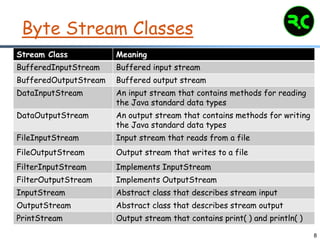
Byte Stream Classes
 Byte streams are defined by using two class
hierarchies.
 At the top are two abstract classes:
 InputStream and
 OutputStream.
 Each of these abstract classes has several
concrete subclasses that handle the
differences among various devices, such as disk
files, network connections, and even memory
buffers.
8
Byte Stream Classes
Stream Class Meaning
BufferedInputStream Buffered input stream
BufferedOutputStream Buffered output stream
DataInputStream An input stream that contains methods for reading
the Java standard data types
DataOutputStream An output stream that contains methods for writing
the Java standard data types
FileInputStream Input stream that reads from a file
FileOutputStream Output stream that writes to a file
FilterInputStream Implements InputStream
FilterOutputStream Implements OutputStream
InputStream Abstract class that describes stream input
OutputStream Abstract class that describes stream output
PrintStream Output stream that contains print( ) and println( )
9
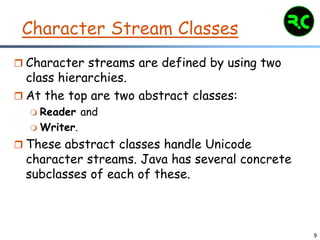
Character Stream Classes
 Character streams are defined by using two
class hierarchies.
 At the top are two abstract classes:
 Reader and
 Writer.
 These abstract classes handle Unicode
character streams. Java has several concrete
subclasses of each of these.
10
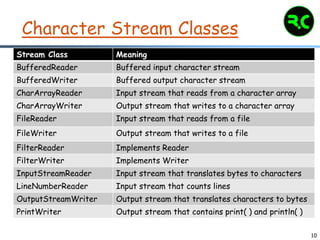
Character Stream Classes
Stream Class Meaning
BufferedReader Buffered input character stream
BufferedWriter Buffered output character stream
CharArrayReader Input stream that reads from a character array
CharArrayWriter Output stream that writes to a character array
FileReader Input stream that reads from a file
FileWriter Output stream that writes to a file
FilterReader Implements Reader
FilterWriter Implements Writer
InputStreamReader Input stream that translates bytes to characters
LineNumberReader Input stream that counts lines
OutputStreamWriter Output stream that translates characters to bytes
PrintWriter Output stream that contains print( ) and println( )
11
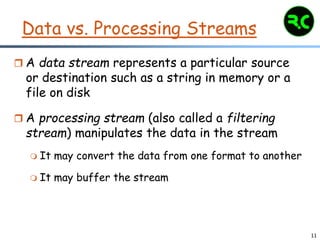
Data vs. Processing Streams
 A data stream represents a particular source
or destination such as a string in memory or a
file on disk
 A processing stream (also called a filtering
stream) manipulates the data in the stream
 It may convert the data from one format to another
 It may buffer the stream
12
I/O class hierarchy
o class java.lang.Object
o class java.io.InputStream
o class java.io.ByteArrayInputStream
o class java.io.FileInputStream
o class java.io.FilterInputStream
o class java.io.OutputStream
o class java.io.ByteArrayOutputStream
o class java.io.FileOutputStream
o class java.io.FilterOutputStream
o class java.io.Reader
o class java.io.BufferedReader
o …
o class java.io.InputStreamReader
o class java.io.Writer
o class java.io.BufferedWriter
o …
o class java.io.OutputStreamWriter
13
Predefined Streams
 System is a class defined in java.lang package,
which encapsulates several aspects of the run-
time environment.
 System also contains three predefined stream
variables:
 in,
 out, and
 err.
 These fields are declared as public, static, and
final within System.
14
Sources of data streams
 There are three standard I/O streams:
 standard input – defined by System.in
 standard output – defined by System.out
 standard error – defined by System.err
 We use System.out when we execute println
statements
 System.in is declared to be a generic
InputStream reference, and therefore usually
must be mapped to a more useful stream with
specific characteristics
 FileInputStream and FileReader are
classes whose constructors open a file for
reading
15
Processing streams
 Processing classes have constructors that take
InputSteams as input and produce
InputStreams with added functionality.
 BufferedReader, and BufferedWriter allow you
to write bigger chunks of text to a stream.
 Buffering is a way of combining multiple reads or
writes into a single action. It is a good idea when
working with text.
 Examples: readLine() in BufferedReader and
newLine() in BufferedWriter.
16
Reading Console Input
 In Java 1.0, the only way to perform console
input was to use a byte stream.
 Today, using a byte stream to read console
input is still acceptable.
 However, for commercial applications, the
preferred method of reading console input is to
use a character-oriented stream.
 This makes your program easier to
internationalize and maintain.
17
Reading Console Input
 In Java, console input is accomplished by
reading from System.in.
 To obtain a character-based stream that is
attached to the console, wrap System.in in a
BufferedReader object.
 A commonly used constructor is shown here:
BufferedReader(Reader inputReader)
 Here, inputReader is the stream that is linked
to the instance of BufferedReader that is
being created.
18
Reading Console Input
 Reader is an abstract class. One of its
concrete subclasses is InputStreamReader,
which converts bytes to characters.
 To obtain an InputStreamReader object that is
linked to System.in, use the following
constructor:
InputStreamReader(InputStream inputStream)
19
Reading Console Input
 Example:
BufferedReader br = new BufferedReader(new
InputStreamReader(System.in));
 After this statement executes, br is a
character-based stream that is linked to the
console through System.in.
20
Reading Characters
 To read a character from a BufferedReader,
use read( ). The version of read( ) that we will
be using is:
int read( ) throws IOException
 Each time that read( ) is called, it reads a
character from the input stream and returns it
as an integer value. It returns –1 when the end
of the stream is encountered.
 As you can see, it can throw an IOException.
21
Reading Characters
 Example:
BRRead.java
22
Reading Strings
 To read a string from the keyboard, use the
version of readLine( ) that is a member of the
BufferedReader class.
 Its general form is shown here:
String readLine( ) throws IOException
 It returns a String object.
23
Reading Strings
 Example:
BRReadLines.java
24
Reading Lines
 The next example creates a tiny text editor.
 It creates an array of String objects and then
reads in lines of text, storing each line in the
array.
 It will read up to 100 lines or until you enter
"stop."
 It uses a BufferedReader to read from the
console.
TinyEdit.java
25
Writing Console Output
 Console output is most easily accomplished with
print( ) and println( ).
 These methods are defined by the class
PrintStream (which is the type of object
referenced by System.out).
 Even though System.out is a byte stream, using it
for simple program output is still acceptable.
 Because PrintStream is an output stream derived
from OutputStream, it also implements the low-
level method write( ).
 Thus, write( ) can be used to write to the console.
26
Writing Console Output
 The simplest form of write( ) defined by
PrintStream is shown here:
void write(int byteval)
 This method writes the byte specified by
byteval. Although byteval is declared as an
integer, only the low-order eight bits are
written.
 Here is a short example that uses write( ) to
output the character "A" followed by a newline
to the screen:
WriteDemo.java
27
Writing Console Output
Warning:
You will not often use write( ) to perform
console output (although doing so might be
useful in some situations) because print( )
and println( ) are substantially easier to
use.
28
PrintWriter Class
 Although using System.out to write to the
console is acceptable, its use is probably best
for debugging purposes or for sample programs.
 For real-world programs, the recommended
method of writing to the console when using
Java is through a PrintWriter stream.
 PrintWriter defines several constructors. The
one we will use is shown here:
PrintWriter(OutputStream outputStream,
boolean flushingOn)
29
PrintWriter Class
 Here, outputStream is an object of type
OutputStream, and flushingOn controls
whether Java flushes the output stream every
time a println( ) method (among others) is
called.
 If flushingOn is true, flushing automatically
takes place.
 If false, flushing is not automatic.
30
PrintWriter Class
 PrintWriter supports the print( ) and println( )
methods.
 Thus, you can use these methods in the same way
as you used them with System.out.
 If an argument is not a simple type, the
PrintWriter methods call the object’s toString( )
method and then display the result.
 To write to the console by using a PrintWriter,
specify System.out for the output stream and
automatic flushing.
31
PrintWriter Class
Syntax:
PrintWriter pw = new
PrintWriter(System.out, true);
Example:
PrintWriterDemo.java
32
Reading and Writing Files
 Java provides a number of classes and methods
that allow you to read and write files.
 Two of the most often-used stream classes are
 FileInputStream and
 FileOutputStream
 which create byte streams linked to files.
 To open a file, you simply create an object of
one of these classes, specifying the name of
the file as an argument to the constructor.
33
Reading and Writing Files
 Although both classes support additional
constructors, the following are the forms that we
will be using:
FileInputStream(String fileName) throws
FileNotFoundException
FileOutputStream(String fileName) throws
FileNotFoundException
 Here, fileName specifies the name of the file
that you want to open.
34
Reading and Writing Files
 When you create an input stream, if the file does
not exist, then FileNotFoundException is thrown.
 For output streams, if the file cannot be opened
or created, then FileNotFoundException is
thrown.
 FileNotFoundException is a subclass of
IOException.
 When an output file is opened, any preexisting
file by the same name is destroyed.
35
Closing a File
 When you are done with a file, you must close it.
This is done by calling the close( ) method, which
is implemented by both FileInputStream and
FileOutputStream. It is shown here:
void close( ) throws IOException
 Closing a file releases the system resources
allocated to the file, allowing them to be used by
another file.
 Failure to close a file can result in “memory leaks”
because of unused resources remaining allocated.
36
Reading a File
 To read from a file, you can use a version of
read( ) that is defined within FileInputStream.
 The one that we will use is shown here:
int read( ) throws IOException
 Each time that it is called, it reads a single byte
from the file and returns the byte as an integer
value.
 read( ) returns –1 when the end of the file is
encountered. It can throw an IOException.
37
Reading a File
 The following program uses read( ) to input and
display the contents of a file that contains ASCII
text.
 The name of the file is specified as a command-
line argument.
ShowFile.java
38
Writing to a File
 To write to a file, you can use the write( )
method defined by FileOutputStream. Its
simplest form is shown here:
void write(int byteval) throws IOException
 This method writes the byte specified by byteval
to the file. Although byteval is declared as an
integer, only the low-order eight bits are written
to the file.
 If an error occurs during writing, an IOException
is thrown.
FileWritingDemo.java
39
Writing to a File
CopyFile.java
40
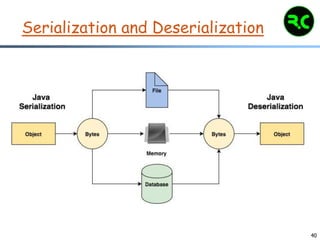
Serialization and Deserialization
41
Serialization and Deserialization
 Serialization is a mechanism of converting the
state of an object into a byte stream.
 Deserialization is the reverse process where the
byte stream is used to recreate the actual Java
object in memory.
 This mechanism is used to persist the object.
 The byte stream created is platform independent.
 So, the object serialized on one platform can be
deserialized on a different platform.
42
Serialization and Deserialization
 To make a Java object serializable we implement
the java.io.Serializable interface.
 The ObjectOutputStream class contains
writeObject() method for serializing an Object.
public final void writeObject(Object obj) throws
IOException
 The ObjectInputStream class contains
readObject() method for deserializing an object.
public final Object readObject() throws
IOException, ClassNotFoundException
43
Serialization and Deserialization
SerialDemo.java
44
FileWriter and FileReader
 Java FileWriter and FileReader classes are used
to write and read data from text files (they are
Character Stream classes).
 It is recommended not to use the
FileInputStream and FileOutputStream classes if
you have to read and write any textual
information as these are Byte stream classes.
45
FileWriter
FileWriter is useful to create a file writing
characters into it.
FileWriter is meant for writing streams of
characters. For writing streams of raw
bytes, consider using a FileOutputStream.
FileWriter creates the output file , if it is
not present already.
FileWriter (String fileName)
FileWriter (String fileName, Boolean append)
46
FileWriter
public void write (int c) throws
IOException
public void write (char [] stir) throws
IOException
public void write(String str)throws
IOException
public void write(String str,int off,int
len)throws IOException
public void flush() throws IOException
47
FileWriter
FileWriterDemo.java
48
FileReader
FileReader is useful to read data in the
form of characters from a ‘text’ file.
This class inherit from InputStreamReader
Class.
FileReader is meant for reading streams of
characters.
For reading streams of raw bytes, consider
using a FileInputStream.
FileReader(String fileName)
49
FileReader
public int read () throws IOException
public int read(char[] cbuff) throws
IOException
public abstract int read(char[] buff, int
off, int len) throws IOException
public void close() throws IOException
public long skip(long n) throws
IOException
50
FileReader
FileReaderDemo.java

I/O Streams

  • 1.
  • 2.
    2 Streams  A streamis a sequence of bytes that flows from a source to a destination.  In a program, we read information from an input stream and write information to an output stream.  A program can manage multiple streams at a time.  The java.io package contains many classes that allow us to define various streams with specific characteristics
  • 3.
    3 I/O Stream Categories The classes in the I/O package divide input and output streams into other categories  An I/O stream is either a  character stream, which deals with text data  byte stream, which deals with byte data  An I/O stream is also either a  data stream, which acts as either a source or destination  processing stream, which alters or manages information in the stream
  • 4.
  • 5.
    5 Character vs. ByteStreams  A character stream manages 16-bit Unicode characters  A byte stream manages 8-bit bytes of raw binary data  A program must determine how to interpret and use the bytes in a byte stream  Typically they are used to read and write sounds and images
  • 6.
    6 Character vs. ByteStreams  The InputStream and OutputStream classes (and their descendants) represent byte streams  The Reader and Writer classes (and their descendants) represent character streams
  • 7.
    7 Byte Stream Classes Byte streams are defined by using two class hierarchies.  At the top are two abstract classes:  InputStream and  OutputStream.  Each of these abstract classes has several concrete subclasses that handle the differences among various devices, such as disk files, network connections, and even memory buffers.
  • 8.
    8 Byte Stream Classes StreamClass Meaning BufferedInputStream Buffered input stream BufferedOutputStream Buffered output stream DataInputStream An input stream that contains methods for reading the Java standard data types DataOutputStream An output stream that contains methods for writing the Java standard data types FileInputStream Input stream that reads from a file FileOutputStream Output stream that writes to a file FilterInputStream Implements InputStream FilterOutputStream Implements OutputStream InputStream Abstract class that describes stream input OutputStream Abstract class that describes stream output PrintStream Output stream that contains print( ) and println( )
  • 9.
    9 Character Stream Classes Character streams are defined by using two class hierarchies.  At the top are two abstract classes:  Reader and  Writer.  These abstract classes handle Unicode character streams. Java has several concrete subclasses of each of these.
  • 10.
    10 Character Stream Classes StreamClass Meaning BufferedReader Buffered input character stream BufferedWriter Buffered output character stream CharArrayReader Input stream that reads from a character array CharArrayWriter Output stream that writes to a character array FileReader Input stream that reads from a file FileWriter Output stream that writes to a file FilterReader Implements Reader FilterWriter Implements Writer InputStreamReader Input stream that translates bytes to characters LineNumberReader Input stream that counts lines OutputStreamWriter Output stream that translates characters to bytes PrintWriter Output stream that contains print( ) and println( )
  • 11.
    11 Data vs. ProcessingStreams  A data stream represents a particular source or destination such as a string in memory or a file on disk  A processing stream (also called a filtering stream) manipulates the data in the stream  It may convert the data from one format to another  It may buffer the stream
  • 12.
    12 I/O class hierarchy oclass java.lang.Object o class java.io.InputStream o class java.io.ByteArrayInputStream o class java.io.FileInputStream o class java.io.FilterInputStream o class java.io.OutputStream o class java.io.ByteArrayOutputStream o class java.io.FileOutputStream o class java.io.FilterOutputStream o class java.io.Reader o class java.io.BufferedReader o … o class java.io.InputStreamReader o class java.io.Writer o class java.io.BufferedWriter o … o class java.io.OutputStreamWriter
  • 13.
    13 Predefined Streams  Systemis a class defined in java.lang package, which encapsulates several aspects of the run- time environment.  System also contains three predefined stream variables:  in,  out, and  err.  These fields are declared as public, static, and final within System.
  • 14.
    14 Sources of datastreams  There are three standard I/O streams:  standard input – defined by System.in  standard output – defined by System.out  standard error – defined by System.err  We use System.out when we execute println statements  System.in is declared to be a generic InputStream reference, and therefore usually must be mapped to a more useful stream with specific characteristics  FileInputStream and FileReader are classes whose constructors open a file for reading
  • 15.
    15 Processing streams  Processingclasses have constructors that take InputSteams as input and produce InputStreams with added functionality.  BufferedReader, and BufferedWriter allow you to write bigger chunks of text to a stream.  Buffering is a way of combining multiple reads or writes into a single action. It is a good idea when working with text.  Examples: readLine() in BufferedReader and newLine() in BufferedWriter.
  • 16.
    16 Reading Console Input In Java 1.0, the only way to perform console input was to use a byte stream.  Today, using a byte stream to read console input is still acceptable.  However, for commercial applications, the preferred method of reading console input is to use a character-oriented stream.  This makes your program easier to internationalize and maintain.
  • 17.
    17 Reading Console Input In Java, console input is accomplished by reading from System.in.  To obtain a character-based stream that is attached to the console, wrap System.in in a BufferedReader object.  A commonly used constructor is shown here: BufferedReader(Reader inputReader)  Here, inputReader is the stream that is linked to the instance of BufferedReader that is being created.
  • 18.
    18 Reading Console Input Reader is an abstract class. One of its concrete subclasses is InputStreamReader, which converts bytes to characters.  To obtain an InputStreamReader object that is linked to System.in, use the following constructor: InputStreamReader(InputStream inputStream)
  • 19.
    19 Reading Console Input Example: BufferedReader br = new BufferedReader(new InputStreamReader(System.in));  After this statement executes, br is a character-based stream that is linked to the console through System.in.
  • 20.
    20 Reading Characters  Toread a character from a BufferedReader, use read( ). The version of read( ) that we will be using is: int read( ) throws IOException  Each time that read( ) is called, it reads a character from the input stream and returns it as an integer value. It returns –1 when the end of the stream is encountered.  As you can see, it can throw an IOException.
  • 21.
  • 22.
    22 Reading Strings  Toread a string from the keyboard, use the version of readLine( ) that is a member of the BufferedReader class.  Its general form is shown here: String readLine( ) throws IOException  It returns a String object.
  • 23.
  • 24.
    24 Reading Lines  Thenext example creates a tiny text editor.  It creates an array of String objects and then reads in lines of text, storing each line in the array.  It will read up to 100 lines or until you enter "stop."  It uses a BufferedReader to read from the console. TinyEdit.java
  • 25.
    25 Writing Console Output Console output is most easily accomplished with print( ) and println( ).  These methods are defined by the class PrintStream (which is the type of object referenced by System.out).  Even though System.out is a byte stream, using it for simple program output is still acceptable.  Because PrintStream is an output stream derived from OutputStream, it also implements the low- level method write( ).  Thus, write( ) can be used to write to the console.
  • 26.
    26 Writing Console Output The simplest form of write( ) defined by PrintStream is shown here: void write(int byteval)  This method writes the byte specified by byteval. Although byteval is declared as an integer, only the low-order eight bits are written.  Here is a short example that uses write( ) to output the character "A" followed by a newline to the screen: WriteDemo.java
  • 27.
    27 Writing Console Output Warning: Youwill not often use write( ) to perform console output (although doing so might be useful in some situations) because print( ) and println( ) are substantially easier to use.
  • 28.
    28 PrintWriter Class  Althoughusing System.out to write to the console is acceptable, its use is probably best for debugging purposes or for sample programs.  For real-world programs, the recommended method of writing to the console when using Java is through a PrintWriter stream.  PrintWriter defines several constructors. The one we will use is shown here: PrintWriter(OutputStream outputStream, boolean flushingOn)
  • 29.
    29 PrintWriter Class  Here,outputStream is an object of type OutputStream, and flushingOn controls whether Java flushes the output stream every time a println( ) method (among others) is called.  If flushingOn is true, flushing automatically takes place.  If false, flushing is not automatic.
  • 30.
    30 PrintWriter Class  PrintWritersupports the print( ) and println( ) methods.  Thus, you can use these methods in the same way as you used them with System.out.  If an argument is not a simple type, the PrintWriter methods call the object’s toString( ) method and then display the result.  To write to the console by using a PrintWriter, specify System.out for the output stream and automatic flushing.
  • 31.
    31 PrintWriter Class Syntax: PrintWriter pw= new PrintWriter(System.out, true); Example: PrintWriterDemo.java
  • 32.
    32 Reading and WritingFiles  Java provides a number of classes and methods that allow you to read and write files.  Two of the most often-used stream classes are  FileInputStream and  FileOutputStream  which create byte streams linked to files.  To open a file, you simply create an object of one of these classes, specifying the name of the file as an argument to the constructor.
  • 33.
    33 Reading and WritingFiles  Although both classes support additional constructors, the following are the forms that we will be using: FileInputStream(String fileName) throws FileNotFoundException FileOutputStream(String fileName) throws FileNotFoundException  Here, fileName specifies the name of the file that you want to open.
  • 34.
    34 Reading and WritingFiles  When you create an input stream, if the file does not exist, then FileNotFoundException is thrown.  For output streams, if the file cannot be opened or created, then FileNotFoundException is thrown.  FileNotFoundException is a subclass of IOException.  When an output file is opened, any preexisting file by the same name is destroyed.
  • 35.
    35 Closing a File When you are done with a file, you must close it. This is done by calling the close( ) method, which is implemented by both FileInputStream and FileOutputStream. It is shown here: void close( ) throws IOException  Closing a file releases the system resources allocated to the file, allowing them to be used by another file.  Failure to close a file can result in “memory leaks” because of unused resources remaining allocated.
  • 36.
    36 Reading a File To read from a file, you can use a version of read( ) that is defined within FileInputStream.  The one that we will use is shown here: int read( ) throws IOException  Each time that it is called, it reads a single byte from the file and returns the byte as an integer value.  read( ) returns –1 when the end of the file is encountered. It can throw an IOException.
  • 37.
    37 Reading a File The following program uses read( ) to input and display the contents of a file that contains ASCII text.  The name of the file is specified as a command- line argument. ShowFile.java
  • 38.
    38 Writing to aFile  To write to a file, you can use the write( ) method defined by FileOutputStream. Its simplest form is shown here: void write(int byteval) throws IOException  This method writes the byte specified by byteval to the file. Although byteval is declared as an integer, only the low-order eight bits are written to the file.  If an error occurs during writing, an IOException is thrown. FileWritingDemo.java
  • 39.
    39 Writing to aFile CopyFile.java
  • 40.
  • 41.
    41 Serialization and Deserialization Serialization is a mechanism of converting the state of an object into a byte stream.  Deserialization is the reverse process where the byte stream is used to recreate the actual Java object in memory.  This mechanism is used to persist the object.  The byte stream created is platform independent.  So, the object serialized on one platform can be deserialized on a different platform.
  • 42.
    42 Serialization and Deserialization To make a Java object serializable we implement the java.io.Serializable interface.  The ObjectOutputStream class contains writeObject() method for serializing an Object. public final void writeObject(Object obj) throws IOException  The ObjectInputStream class contains readObject() method for deserializing an object. public final Object readObject() throws IOException, ClassNotFoundException
  • 43.
  • 44.
    44 FileWriter and FileReader Java FileWriter and FileReader classes are used to write and read data from text files (they are Character Stream classes).  It is recommended not to use the FileInputStream and FileOutputStream classes if you have to read and write any textual information as these are Byte stream classes.
  • 45.
    45 FileWriter FileWriter is usefulto create a file writing characters into it. FileWriter is meant for writing streams of characters. For writing streams of raw bytes, consider using a FileOutputStream. FileWriter creates the output file , if it is not present already. FileWriter (String fileName) FileWriter (String fileName, Boolean append)
  • 46.
    46 FileWriter public void write(int c) throws IOException public void write (char [] stir) throws IOException public void write(String str)throws IOException public void write(String str,int off,int len)throws IOException public void flush() throws IOException
  • 47.
  • 48.
    48 FileReader FileReader is usefulto read data in the form of characters from a ‘text’ file. This class inherit from InputStreamReader Class. FileReader is meant for reading streams of characters. For reading streams of raw bytes, consider using a FileInputStream. FileReader(String fileName)
  • 49.
    49 FileReader public int read() throws IOException public int read(char[] cbuff) throws IOException public abstract int read(char[] buff, int off, int len) throws IOException public void close() throws IOException public long skip(long n) throws IOException
  • 50.