Write and WriteLine Methods
// Namespace Declaration
using System;
// Program start class
class InteractiveWelcome
{
// Main begins program execution.
public static void Main()
{
// Write to console/get input
Console.Write("What is your name?: ");
Console.Write("Hello, {0}! ", Console.ReadLine());
Console.WriteLine("Welcome to the C# Station Tutorial!");
}
}
Output:
>What is your Name? <type your name here> [Enter Key]
>Hello, <your name here>! Welcome to the C# Station Tutorial!
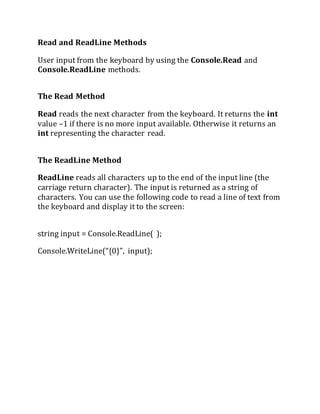
Read and ReadLine Methods
User input from the keyboard by using the Console.Read and
Console.ReadLine methods.
The Read Method
Read reads the next character from the keyboard. It returns the int
value –1 if there is no more input available. Otherwise it returns an
int representing the character read.
The ReadLine Method
ReadLine reads all characters up to the end of the input line (the
carriage return character). The input is returned as a string of
characters. You can use the following code to read a line of text from
the keyboard and display it to the screen:
string input = Console.ReadLine( );
Console.WriteLine(“{0}”, input);
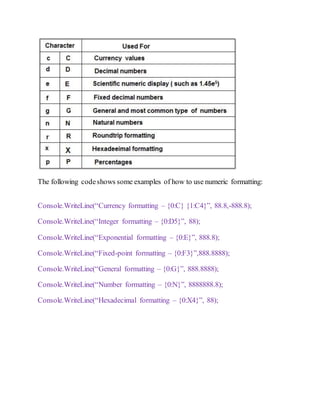
The following codeshows some examples of how to use numeric formatting:
Console.WriteLine(“Currency formatting – {0:C} {1:C4}”, 88.8,-888.8);
Console.WriteLine(“Integer formatting – {0:D5}”, 88);
Console.WriteLine(“Exponential formatting – {0:E}”, 888.8);
Console.WriteLine(“Fixed-point formatting – {0:F3}”,888.8888);
Console.WriteLine(“General formatting – {0:G}”, 888.8888);
Console.WriteLine(“Number formatting – {0:N}”, 8888888.8);
Console.WriteLine(“Hexadecimal formatting – {0:X4}”, 88);
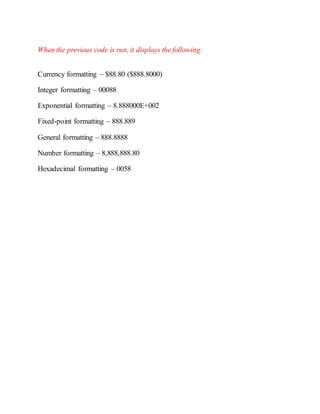
When the previous code is run, it displays the following:
Currency formatting – $88.80 ($888.8000)
Integer formatting – 00088
Exponential formatting – 8.888000E+002
Fixed-point formatting – 888.889
General formatting – 888.8888
Number formatting – 8,888,888.80
Hexadecimal formatting – 0058
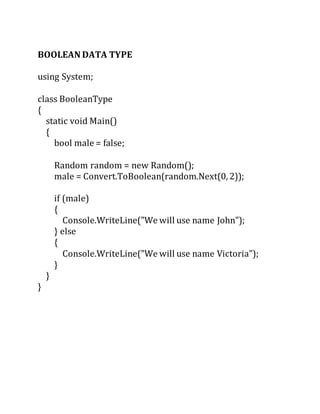
BOOLEAN DATA TYPE
using System;
class BooleanType
{
static void Main()
{
bool male = false;
Random random = new Random();
male = Convert.ToBoolean(random.Next(0, 2));
if (male)
{
Console.WriteLine("We will use name John");
} else
{
Console.WriteLine("We will use name Victoria");
}
}
}
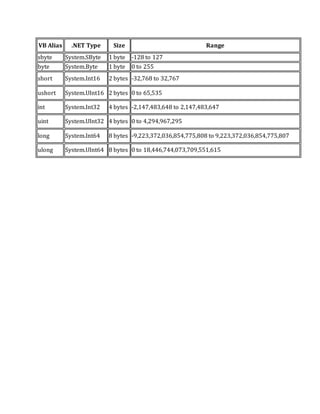
VB Alias .NET Type Size Range
sbyte System.SByte 1 byte -128 to 127
byte System.Byte 1 byte 0 to 255
short System.Int16 2 bytes -32,768 to 32,767
ushort System.UInt16 2 bytes 0 to 65,535
int System.Int32 4 bytes -2,147,483,648 to 2,147,483,647
uint System.UInt32 4 bytes 0 to 4,294,967,295
long System.Int64 8 bytes -9,223,372,036,854,775,808 to 9,223,372,036,854,775,807
ulong System.UInt64 8 bytes 0 to 18,446,744,073,709,551,615
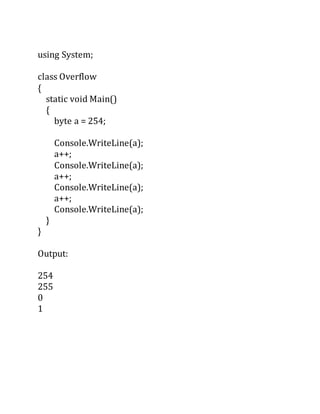
using System;
class Overflow
{
static void Main()
{
byte a = 254;
Console.WriteLine(a);
a++;
Console.WriteLine(a);
a++;
Console.WriteLine(a);
a++;
Console.WriteLine(a);
}
}
Output:
254
255
0
1
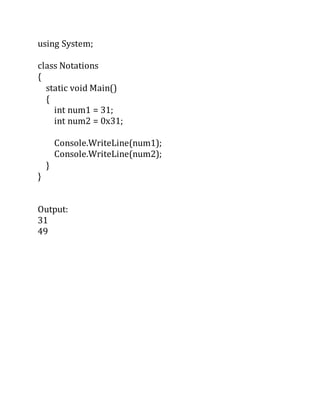
using System;
class Notations
{
static void Main()
{
int num1 = 31;
int num2 = 0x31;
Console.WriteLine(num1);
Console.WriteLine(num2);
}
}
Output:
31
49
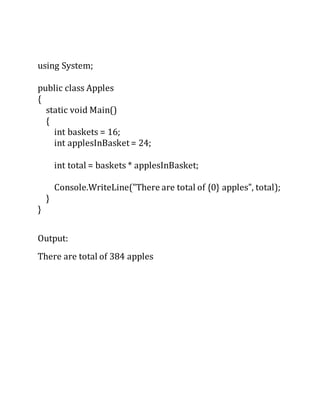
using System;
public class Apples
{
static void Main()
{
int baskets = 16;
int applesInBasket = 24;
int total = baskets * applesInBasket;
Console.WriteLine("There are total of {0} apples", total);
}
}
Output:
There are total of 384 apples
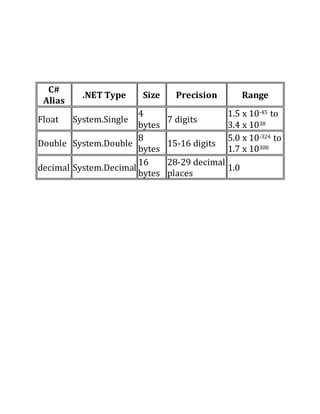
C#
Alias
.NET Type Size Precision Range
Float System.Single
4
bytes
7 digits
1.5 x 10-45 to
3.4 x 1038
Double System.Double
8
bytes
15-16 digits
5.0 x 10-324 to
1.7 x 10308
decimal System.Decimal
16
bytes
28-29 decimal
places
1.0
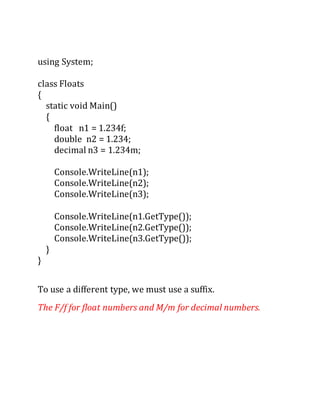
using System;
class Floats
{
static void Main()
{
float n1 = 1.234f;
double n2 = 1.234;
decimal n3 = 1.234m;
Console.WriteLine(n1);
Console.WriteLine(n2);
Console.WriteLine(n3);
Console.WriteLine(n1.GetType());
Console.WriteLine(n2.GetType());
Console.WriteLine(n3.GetType());
}
}
To use a different type, we must use a suffix.
The F/f for float numbers and M/m for decimal numbers.
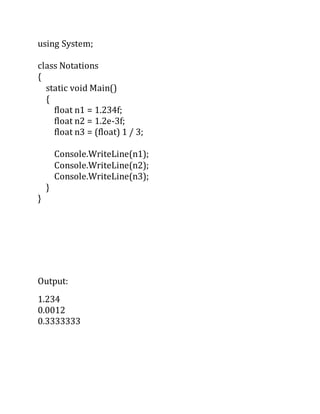
using System;
class Notations
{
static void Main()
{
float n1 = 1.234f;
float n2 = 1.2e-3f;
float n3 = (float) 1 / 3;
Console.WriteLine(n1);
Console.WriteLine(n2);
Console.WriteLine(n3);
}
}
Output:
1.234
0.0012
0.3333333
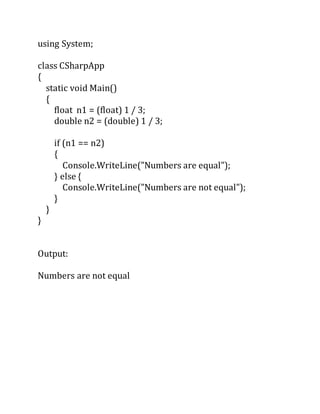
using System;
class CSharpApp
{
static void Main()
{
float n1 = (float) 1 / 3;
double n2 = (double) 1 / 3;
if (n1 == n2)
{
Console.WriteLine("Numbers are equal");
} else {
Console.WriteLine("Numbers are not equal");
}
}
}
Output:
Numbers are not equal
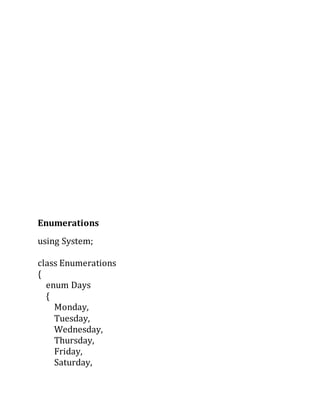
Enumerations
using System;
class Enumerations
{
enum Days
{
Monday,
Tuesday,
Wednesday,
Thursday,
Friday,
Saturday,
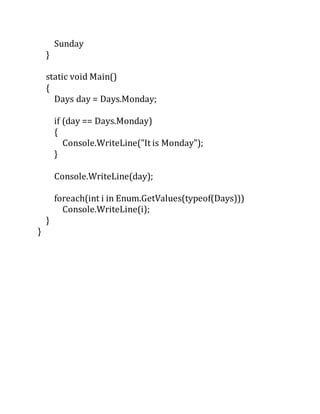
Sunday
}
static void Main()
{
Days day = Days.Monday;
if (day == Days.Monday)
{
Console.WriteLine("It is Monday");
}
Console.WriteLine(day);
foreach(int i in Enum.GetValues(typeof(Days)))
Console.WriteLine(i);
}
}
ARRAYS
using System;
class ArrayExample
{
static void Main()
{
int[] numbers = new int[5];
numbers[0] = 3;
numbers[1] = 2;
numbers[2] = 1;
numbers[3] = 5;
numbers[4] = 6;
int len = numbers.Length;
for (int i=0; i<len; i++)
{
Console.WriteLine(numbers[i]);
}
}
}

Write and write line methods

  • 1.
    Write and WriteLineMethods // Namespace Declaration using System; // Program start class class InteractiveWelcome { // Main begins program execution. public static void Main() { // Write to console/get input Console.Write("What is your name?: "); Console.Write("Hello, {0}! ", Console.ReadLine()); Console.WriteLine("Welcome to the C# Station Tutorial!"); } } Output: >What is your Name? <type your name here> [Enter Key] >Hello, <your name here>! Welcome to the C# Station Tutorial!
  • 2.
    Read and ReadLineMethods User input from the keyboard by using the Console.Read and Console.ReadLine methods. The Read Method Read reads the next character from the keyboard. It returns the int value –1 if there is no more input available. Otherwise it returns an int representing the character read. The ReadLine Method ReadLine reads all characters up to the end of the input line (the carriage return character). The input is returned as a string of characters. You can use the following code to read a line of text from the keyboard and display it to the screen: string input = Console.ReadLine( ); Console.WriteLine(“{0}”, input);
  • 3.
    The following codeshowssome examples of how to use numeric formatting: Console.WriteLine(“Currency formatting – {0:C} {1:C4}”, 88.8,-888.8); Console.WriteLine(“Integer formatting – {0:D5}”, 88); Console.WriteLine(“Exponential formatting – {0:E}”, 888.8); Console.WriteLine(“Fixed-point formatting – {0:F3}”,888.8888); Console.WriteLine(“General formatting – {0:G}”, 888.8888); Console.WriteLine(“Number formatting – {0:N}”, 8888888.8); Console.WriteLine(“Hexadecimal formatting – {0:X4}”, 88);
  • 4.
    When the previouscode is run, it displays the following: Currency formatting – $88.80 ($888.8000) Integer formatting – 00088 Exponential formatting – 8.888000E+002 Fixed-point formatting – 888.889 General formatting – 888.8888 Number formatting – 8,888,888.80 Hexadecimal formatting – 0058
  • 5.
    BOOLEAN DATA TYPE usingSystem; class BooleanType { static void Main() { bool male = false; Random random = new Random(); male = Convert.ToBoolean(random.Next(0, 2)); if (male) { Console.WriteLine("We will use name John"); } else { Console.WriteLine("We will use name Victoria"); } } }
  • 6.
    VB Alias .NETType Size Range sbyte System.SByte 1 byte -128 to 127 byte System.Byte 1 byte 0 to 255 short System.Int16 2 bytes -32,768 to 32,767 ushort System.UInt16 2 bytes 0 to 65,535 int System.Int32 4 bytes -2,147,483,648 to 2,147,483,647 uint System.UInt32 4 bytes 0 to 4,294,967,295 long System.Int64 8 bytes -9,223,372,036,854,775,808 to 9,223,372,036,854,775,807 ulong System.UInt64 8 bytes 0 to 18,446,744,073,709,551,615
  • 7.
    using System; class Overflow { staticvoid Main() { byte a = 254; Console.WriteLine(a); a++; Console.WriteLine(a); a++; Console.WriteLine(a); a++; Console.WriteLine(a); } } Output: 254 255 0 1
  • 8.
    using System; class Notations { staticvoid Main() { int num1 = 31; int num2 = 0x31; Console.WriteLine(num1); Console.WriteLine(num2); } } Output: 31 49
  • 9.
    using System; public classApples { static void Main() { int baskets = 16; int applesInBasket = 24; int total = baskets * applesInBasket; Console.WriteLine("There are total of {0} apples", total); } } Output: There are total of 384 apples
  • 10.
    C# Alias .NET Type SizePrecision Range Float System.Single 4 bytes 7 digits 1.5 x 10-45 to 3.4 x 1038 Double System.Double 8 bytes 15-16 digits 5.0 x 10-324 to 1.7 x 10308 decimal System.Decimal 16 bytes 28-29 decimal places 1.0
  • 11.
    using System; class Floats { staticvoid Main() { float n1 = 1.234f; double n2 = 1.234; decimal n3 = 1.234m; Console.WriteLine(n1); Console.WriteLine(n2); Console.WriteLine(n3); Console.WriteLine(n1.GetType()); Console.WriteLine(n2.GetType()); Console.WriteLine(n3.GetType()); } } To use a different type, we must use a suffix. The F/f for float numbers and M/m for decimal numbers.
  • 12.
    using System; class Notations { staticvoid Main() { float n1 = 1.234f; float n2 = 1.2e-3f; float n3 = (float) 1 / 3; Console.WriteLine(n1); Console.WriteLine(n2); Console.WriteLine(n3); } } Output: 1.234 0.0012 0.3333333
  • 13.
    using System; class CSharpApp { staticvoid Main() { float n1 = (float) 1 / 3; double n2 = (double) 1 / 3; if (n1 == n2) { Console.WriteLine("Numbers are equal"); } else { Console.WriteLine("Numbers are not equal"); } } } Output: Numbers are not equal
  • 14.
    Enumerations using System; class Enumerations { enumDays { Monday, Tuesday, Wednesday, Thursday, Friday, Saturday,
  • 15.
    Sunday } static void Main() { Daysday = Days.Monday; if (day == Days.Monday) { Console.WriteLine("It is Monday"); } Console.WriteLine(day); foreach(int i in Enum.GetValues(typeof(Days))) Console.WriteLine(i); } }
  • 16.
    ARRAYS using System; class ArrayExample { staticvoid Main() { int[] numbers = new int[5]; numbers[0] = 3; numbers[1] = 2; numbers[2] = 1; numbers[3] = 5; numbers[4] = 6; int len = numbers.Length; for (int i=0; i<len; i++) {
  • 17.