Presented By:
Arif Ullah(2630)
Presented To:
Sir Fasee Ullah
ABASYN UNIVERSITY PESHAWAR
• Buffer :
• Introduction
• Stream
• Input & output buffered
• Example
• Scanner:
• Introduction
• Scanner class
• Methods
• Example
 The Java.io.BufferedReade class reads text from a character-input stream,
buffering characters so as to provide for the efficient reading of characters,
arrays, and lines. Following are the important points about Buffered
Reader:
 The buffer size may be specified, or the default size may be used.
 Each read request made of a Reader causes a corresponding read request
to be made of the underlying character or byte stream.
 A stream is a sequence of data. In Java a stream is composed of bytes. It's
called a stream because it's like a stream of water that continues to flow.
 Three streams are created for us automatically:
 1) System.out: standard output stream
 2) System.in: standard input stream
 3) System.err: standard error
 Input and Output in Java
Input and Output (I/O) is used to process the input
and produce the output based on the input. Java uses
the concept of stream to make I/O operations fast.
java.io package contains all the classes required for
input and output operations.
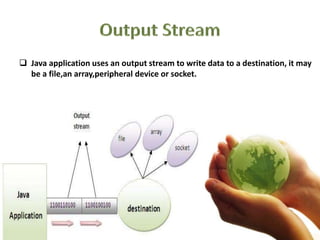
 Java application uses an output stream to write data to a destination, it may
be a file,an array,peripheral device or socket.
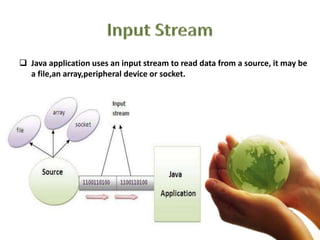
 Java application uses an input stream to read data from a source, it may be
a file,an array,peripheral device or socket.
 BufferedOutputStream used an internal buffer. It adds more efficiency than
to write data directly into a stream. So, it makes the performance fast.
 In the following example, we are writing the textual information in the Buffered
Output Stream object which is connected to the File Output Stream object. The
flush() flushes the data of one stream and send it into another. It is required if you
have connected the one stream with another.
• import java.io.*;
• class Test{
• public static void main(String args[])
• throws Exception{
• FileOutputStream fout=new FileOutputStream("f1.txt");
• BufferedOutputStream bout=new BufferedOutputStream(fout);
•
• String s="Sachin is my favourite player";
• byte b[]=s.getBytes();
• bout.write(b);
•
• bout.flush();
• bout.close();
• System.out.println("success");
• }
• }
• import java.io.*;
• class SimpleRead{
• public static void main(String args[]){
• try{
• FileInputStream fin=new FileInputStream("f1.txt");
• BufferedInputStream bin=new BufferedInputStream(fin);
• int i;
• while((i=bin.read())!=-1)
• System.out.println((char)i);
•
• fin.close();
• }
• catch(Exception e){system.out.println(e);}
• }
• }
• Output:Sachin is my favourite player
•
• Output:Sachin is my favourite player
 There are various ways to read input from the keyboard, the
java.util.Scanner class is one of them. The Scanner class breaks the
input into tokens using a delimiter which is whitespace bydefault. It
provides many methods to read and parse various primitive values.
 Allows the user to input the values of various types.
 Defined within a package java.util.
 import java.util.Scanner;
Creating scanner object
 Scanner sc = new Scanner(System.in);
 nextInt():
• receives the next token from scanner object which can be expressed as an
integer and stored in integer type
 nextFloat():
• receives the next token from scanner object which can be expressed as an
floating and stored in float type
 nextDouble():
• receives the next token from scanner object which can be expressed as an
double and stored in double type
 nextLine():
• receives the next line of the string
• package scanner;
• import java.util.Scanner;
• public class scannerDemo {
• void sum(int a, float b){
• double result=a+b;
• System.out.println("the sum is = "+result);
• }
• public static void main(String[] args){
• Scanner scanner=new Scanner(System.in);
• System.out.println("input integer value:");
• int num1=scanner.nextInt();
• System.out.println("input double value:");
• float num2=scanner.nextFloat();
• scannerDemo scannerDemo=new
scannerDemo();
• scannerDemo.sum(num1, num2);
• }
• }
• http://www.tutorialspoint.com/java/io/java_io_bufferedreader.htm
• http://www.slideshare.net/sonibabu/scanner-classes
• https://www.facebook.com/javatpoint
• http://www.javatpoint.com/cloud-computing-tutorial
Buffer and scanner

Buffer and scanner

  • 1.
    Presented By: Arif Ullah(2630) PresentedTo: Sir Fasee Ullah ABASYN UNIVERSITY PESHAWAR
  • 2.
    • Buffer : •Introduction • Stream • Input & output buffered • Example • Scanner: • Introduction • Scanner class • Methods • Example
  • 3.
     The Java.io.BufferedReadeclass reads text from a character-input stream, buffering characters so as to provide for the efficient reading of characters, arrays, and lines. Following are the important points about Buffered Reader:  The buffer size may be specified, or the default size may be used.  Each read request made of a Reader causes a corresponding read request to be made of the underlying character or byte stream.
  • 4.
     A streamis a sequence of data. In Java a stream is composed of bytes. It's called a stream because it's like a stream of water that continues to flow.  Three streams are created for us automatically:  1) System.out: standard output stream  2) System.in: standard input stream  3) System.err: standard error  Input and Output in Java Input and Output (I/O) is used to process the input and produce the output based on the input. Java uses the concept of stream to make I/O operations fast. java.io package contains all the classes required for input and output operations.
  • 5.
     Java applicationuses an output stream to write data to a destination, it may be a file,an array,peripheral device or socket.
  • 6.
     Java applicationuses an input stream to read data from a source, it may be a file,an array,peripheral device or socket.
  • 7.
     BufferedOutputStream usedan internal buffer. It adds more efficiency than to write data directly into a stream. So, it makes the performance fast.  In the following example, we are writing the textual information in the Buffered Output Stream object which is connected to the File Output Stream object. The flush() flushes the data of one stream and send it into another. It is required if you have connected the one stream with another.
  • 8.
    • import java.io.*; •class Test{ • public static void main(String args[]) • throws Exception{ • FileOutputStream fout=new FileOutputStream("f1.txt"); • BufferedOutputStream bout=new BufferedOutputStream(fout); • • String s="Sachin is my favourite player"; • byte b[]=s.getBytes(); • bout.write(b); • • bout.flush(); • bout.close(); • System.out.println("success"); • } • }
  • 9.
    • import java.io.*; •class SimpleRead{ • public static void main(String args[]){ • try{ • FileInputStream fin=new FileInputStream("f1.txt"); • BufferedInputStream bin=new BufferedInputStream(fin); • int i; • while((i=bin.read())!=-1) • System.out.println((char)i); • • fin.close(); • } • catch(Exception e){system.out.println(e);} • } • } • Output:Sachin is my favourite player • • Output:Sachin is my favourite player
  • 10.
     There arevarious ways to read input from the keyboard, the java.util.Scanner class is one of them. The Scanner class breaks the input into tokens using a delimiter which is whitespace bydefault. It provides many methods to read and parse various primitive values.  Allows the user to input the values of various types.  Defined within a package java.util.
  • 11.
     import java.util.Scanner; Creatingscanner object  Scanner sc = new Scanner(System.in);
  • 12.
     nextInt(): • receivesthe next token from scanner object which can be expressed as an integer and stored in integer type  nextFloat(): • receives the next token from scanner object which can be expressed as an floating and stored in float type
  • 13.
     nextDouble(): • receivesthe next token from scanner object which can be expressed as an double and stored in double type  nextLine(): • receives the next line of the string
  • 14.
    • package scanner; •import java.util.Scanner; • public class scannerDemo { • void sum(int a, float b){ • double result=a+b; • System.out.println("the sum is = "+result); • } • public static void main(String[] args){ • Scanner scanner=new Scanner(System.in); • System.out.println("input integer value:"); • int num1=scanner.nextInt(); • System.out.println("input double value:"); • float num2=scanner.nextFloat(); • scannerDemo scannerDemo=new scannerDemo(); • scannerDemo.sum(num1, num2); • } • }
  • 15.
    • http://www.tutorialspoint.com/java/io/java_io_bufferedreader.htm • http://www.slideshare.net/sonibabu/scanner-classes •https://www.facebook.com/javatpoint • http://www.javatpoint.com/cloud-computing-tutorial