JAVA IO
Presented By: Utsab Neupane
What is I/O?
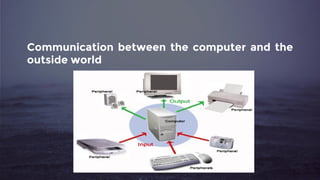
Communication between the computer and the
outside world
Why Should We Care?
1. An essential part of most programs
2. Computers spend a lot of time performing nothing
but I/O operations
3. Very complicated business to deal with
4. Ranks No.1 in the performance killer list
Different Types of I/O?
1. Console I/O
2. Keyboard I/O
3. File I/O
4. Network I/O
5. …and possibly more
How Does Java Support
I/O?
1. The Java I/O API
a. The java.io package
b. Since JDK 1.0
c. Extensible
Stream
➢ an abstraction that either produces or consumes
information.
➢ linked to a physical device by the Java I/O system.
➢ All streams behave in the same manner, even if the
actual physical devices to which they are linked differ.
➢ Clean way to deal with i/o without having every part of
your code understand the difference between a
keyboard and a network.
1. Stream provides a sort of abstraction.
2. Recall System.out and System.in
3. System.in object of InputStream
4. System.out and System.err is object of
PrintStream class.
(Will be described later)
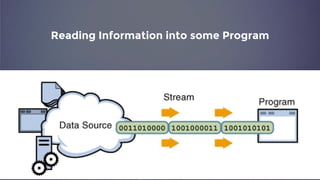
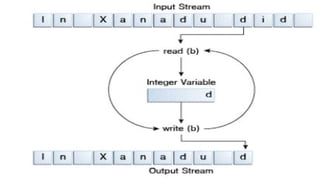
Reading Information into some Program
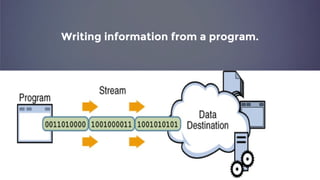
Writing information from a program.
Types of Stream
1. Byte Stream
2. Character Stream
Byte Stream
perform input and output of 8-bit bytes
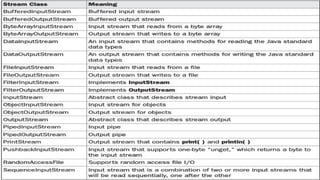
Defined by using two Class
Hierarchy
Two abstract Classes
1. InputStream
2. OutputStream
Points To Remember
1. Always Close Streams
a. helps to avoid serious resource leaks
2. When not to use Byte Stream
a. represents a kind of low-level I/O that you should avoid
b. usually with the keyboard as the source and the monitor as the
destination which contains character data
c. Byte streams should only be used for the most primitive I/O.
So,Why talk about byte
streams?
Because all other
stream types are built
on byte streams.
Character Stream
perform input and output of character
(Wrapper class for Byte Stream)
1. Provides convenient means for handling input
and output of character.
2. Use Unicode
3. In some cases more efficient than byte stream
1. For most applications, I/O with character streams is no more
complicated than I/O with byte streams.
2. Input and output done with stream classes automatically
translates to and from the local character set.
3. A program that uses character streams in place of byte
streams automatically adapts to the local character set and
is ready for internationalization — all without extra effort by
the programmer.
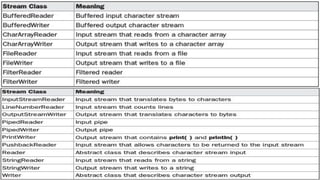
Defined by using two Class
Hierarchy
Two abstract Classes
1. Reader
2. Writer
Notice any Difference?
1. CopyCharacters is very similar to CopyBytes.
2. most important difference is that
CopyCharacters uses FileReader and
FileWriter for input and output in place of
FileInputStream and FileOutputStream.
3. Notice that both CopyBytes and
CopyCharacters use an int variable to read to
and write from.
However,
1. In CopyCharacters, the int variable holds a
character value in its last 16 bits.
2. In CopyBytes, the int variable holds a byte
value in its last 8 bits.
Buffered Streams
1. Most of the examples we've seen so far use
unbuffered I/O.
2. Each read or write request is handled directly by the
underlying OS.
3. Make a program much less efficient, since each
such request often triggers disk access, network
activity, or some other operation that is relatively
expensive
1. To reduce this kind of overhead, the Java platform
implements buffered I/O streams.
2. Buffered input streams read data from a memory
area known as a buffer; the native input API is called
only when the buffer is empty.
3. Similarly, buffered output streams write data to a
buffer, and the native output API is called only when
the buffer is full.
A program can convert
an unbuffered stream
into a buffered stream
using the wrapping
idiom
So How to achieve that ?
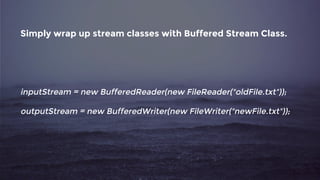
Simply wrap up stream classes with Buffered Stream Class.
inputStream = new BufferedReader(new FileReader("oldFile.txt"));
outputStream = new BufferedWriter(new FileWriter("newFile.txt"));
Four Buffered Stream Classes to wrap
unbuffered streams:
1. BufferedInputStream
2. BufferedOutputStream
3. BufferedReader
4. BufferedWriter
File
1. File class is provided by java.io package.
2. An abstract representation of file and
directory pathnames.
3. Note File object is not for reading / writing
files.
4. Used for obtaining information associated
with file like permission, time and date, path.
1. Directory too is treated as file and have
additional method list() to list the filename in
directory.
public File(String pathname)
public File(String parent, String child)
public File(File parent, String child)
public File(URI uri)
File class methods
1. To Get Paths
a. getAbsolutePath(),getPath(), getParent(), getCanonicalPath()
2. To Check Files
a. isFile(), isDirectory(), exists()
3. To Get File Properties
a. getName(), length(), isAbsolute(), lastModified(), isHidden()
4. To Get File Permissions
a. canRead(), can Write(), canExecute()
5. To Know Storage information
a. getFreeSpace(), getUsableSpace(), getTotalSpace()
6. Utility Functions
➢ Boolean createNewFile() //created new File
➢ Boolean renameTo(File nf); // renames the file and returns
true if success
➢ Boolean delete(); //deletes the file represented by path of
file (also delete directory if its empty)
➢ Boolean setLastModified(long ms) //sets timestamp(Jan 1,
1970 UTC as a start time)
➢ Boolean setReadOnly() //to mark file as readable (also
can be done writable, and executable.)
Serialization
A mechanism where an object can be
represented as a sequence of bytes.
Includes the object's data as well as information
about the object's type and the types of data
stored in the object.
With deserialization the type information and
bytes that represent the object and its data can
be used to recreate the object in memory.
the entire process is JVM independent.
(means an object can be serialized on one
platform and deserialized on an entirely different
platform.)
1. ObjectInputStream
2. ObjectOutputStream
Noticed Something in Output?
The value of SSN value is 0.
What happened? Anything missed?
The value of the SSN field was 11122333 when the
object was serialized, but because the field is
transient.
So,this value was not sent to the output stream.
Serialization Issues
1.Performance
2. Hard to keep track of changed object
(For more information : http://programmers.stackexchange.
com/questions/191269/java-serialization-advantages-and-
disadvantages-use-or-avoid)
Compression
1. Gives you a brief overview of data
compression
2. Describes the java.util.zip package
3. Shows how to use this package to compress
and decompress data
4. Shows how to compress and decompress
serialized objects to save disk space
5. Shows how to compress and decompress
data on the fly to improve the performance of
client/server applications
Console Class
1. used to get input from console
2. provides methods to read text and password
Properties class
1. contains key and value pair both as a string
2. used to get property value based on the
property key
3. subclass of Hashtable
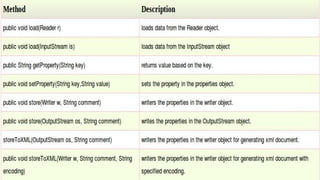
4. provides methods to get data from properties
file and store data into properties file
5. Moreover, can be used to get properties of
system
1. The problem with the Properties class is that
it makes assumptions about where user
preferences should be stored
2. The basic assumption is that the file system
would be used to store this information but
this raises several issues
Where in the file system should this
data be stored?
In the application directory, perhaps?
What if the user did not have write
access to that directory?
What if the user was running on a
network computer?
Preferences
Introduced in Java 1.4
1. allow for the easy storage of user preferences
without the developer having to worry about
where this information will be stored
2. API determines the appropriate place
3. For example, when running an application in
Windows, the preferences will be stored in
the Windows registry.
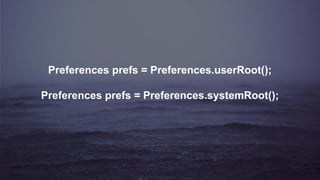
Preferences prefs = Preferences.userRoot();
Preferences prefs = Preferences.systemRoot();
References
1. http://docs.oracle.
com/javase/7/docs/api/java/io/package-summary.html
2. https://docs.oracle.com/javase/tutorial/essential/io/
3. https://docs.oracle.
com/javase/tutorial/jndi/objects/serial.html
4. http://docs.oracle.
com/javase/7/docs/api/java/io/Console.html
5. http://www.oracle.
com/technetwork/articles/java/compress-1565076.html
Exercise
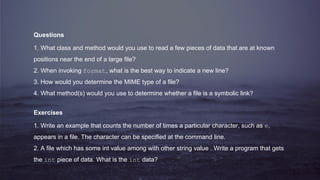
Questions
1. What class and method would you use to read a few pieces of data that are at known
positions near the end of a large file?
2. When invoking format, what is the best way to indicate a new line?
3. How would you determine the MIME type of a file?
4. What method(s) would you use to determine whether a file is a symbolic link?
Exercises
1. Write an example that counts the number of times a particular character, such as e,
appears in a file. The character can be specified at the command line.
2. A file which has some int value among with other string value . Write a program that gets
the int piece of data. What is the int data?
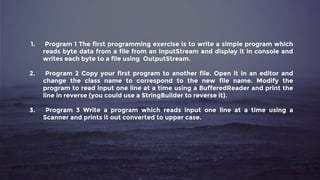
1. Program 1 The first programming exercise is to write a simple program which
reads byte data from a file from an InputStream and display it in console and
writes each byte to a file using OutputStream.
2. Program 2 Copy your first program to another file. Open it in an editor and
change the class name to correspond to the new file name. Modify the
program to read input one line at a time using a BufferedReader and print the
line in reverse (you could use a StringBuilder to reverse it).
3. Program 3 Write a program which reads input one line at a time using a
Scanner and prints it out converted to upper case.
Thank You!!

Java IO

  • 1.
    JAVA IO Presented By:Utsab Neupane
  • 2.
  • 3.
    Communication between thecomputer and the outside world
  • 4.
  • 5.
    1. An essentialpart of most programs 2. Computers spend a lot of time performing nothing but I/O operations 3. Very complicated business to deal with 4. Ranks No.1 in the performance killer list
  • 6.
  • 7.
    1. Console I/O 2.Keyboard I/O 3. File I/O 4. Network I/O 5. …and possibly more
  • 8.
    How Does JavaSupport I/O?
  • 9.
    1. The JavaI/O API a. The java.io package b. Since JDK 1.0 c. Extensible
  • 10.
  • 12.
    ➢ an abstractionthat either produces or consumes information. ➢ linked to a physical device by the Java I/O system. ➢ All streams behave in the same manner, even if the actual physical devices to which they are linked differ. ➢ Clean way to deal with i/o without having every part of your code understand the difference between a keyboard and a network.
  • 13.
    1. Stream providesa sort of abstraction. 2. Recall System.out and System.in 3. System.in object of InputStream 4. System.out and System.err is object of PrintStream class. (Will be described later)
  • 14.
  • 15.
  • 16.
  • 17.
    1. Byte Stream 2.Character Stream
  • 18.
    Byte Stream perform inputand output of 8-bit bytes
  • 19.
    Defined by usingtwo Class Hierarchy Two abstract Classes 1. InputStream 2. OutputStream
  • 22.
  • 23.
    1. Always CloseStreams a. helps to avoid serious resource leaks 2. When not to use Byte Stream a. represents a kind of low-level I/O that you should avoid b. usually with the keyboard as the source and the monitor as the destination which contains character data c. Byte streams should only be used for the most primitive I/O.
  • 24.
    So,Why talk aboutbyte streams?
  • 25.
    Because all other streamtypes are built on byte streams.
  • 26.
    Character Stream perform inputand output of character (Wrapper class for Byte Stream)
  • 27.
    1. Provides convenientmeans for handling input and output of character. 2. Use Unicode 3. In some cases more efficient than byte stream
  • 28.
    1. For mostapplications, I/O with character streams is no more complicated than I/O with byte streams. 2. Input and output done with stream classes automatically translates to and from the local character set. 3. A program that uses character streams in place of byte streams automatically adapts to the local character set and is ready for internationalization — all without extra effort by the programmer.
  • 29.
    Defined by usingtwo Class Hierarchy Two abstract Classes 1. Reader 2. Writer
  • 31.
  • 32.
    1. CopyCharacters isvery similar to CopyBytes. 2. most important difference is that CopyCharacters uses FileReader and FileWriter for input and output in place of FileInputStream and FileOutputStream. 3. Notice that both CopyBytes and CopyCharacters use an int variable to read to and write from.
  • 33.
    However, 1. In CopyCharacters,the int variable holds a character value in its last 16 bits. 2. In CopyBytes, the int variable holds a byte value in its last 8 bits.
  • 34.
  • 35.
    1. Most ofthe examples we've seen so far use unbuffered I/O. 2. Each read or write request is handled directly by the underlying OS. 3. Make a program much less efficient, since each such request often triggers disk access, network activity, or some other operation that is relatively expensive
  • 36.
    1. To reducethis kind of overhead, the Java platform implements buffered I/O streams. 2. Buffered input streams read data from a memory area known as a buffer; the native input API is called only when the buffer is empty. 3. Similarly, buffered output streams write data to a buffer, and the native output API is called only when the buffer is full.
  • 37.
    A program canconvert an unbuffered stream into a buffered stream using the wrapping idiom
  • 38.
    So How toachieve that ?
  • 39.
    Simply wrap upstream classes with Buffered Stream Class. inputStream = new BufferedReader(new FileReader("oldFile.txt")); outputStream = new BufferedWriter(new FileWriter("newFile.txt"));
  • 40.
    Four Buffered StreamClasses to wrap unbuffered streams: 1. BufferedInputStream 2. BufferedOutputStream 3. BufferedReader 4. BufferedWriter
  • 41.
  • 42.
    1. File classis provided by java.io package. 2. An abstract representation of file and directory pathnames. 3. Note File object is not for reading / writing files. 4. Used for obtaining information associated with file like permission, time and date, path.
  • 43.
    1. Directory toois treated as file and have additional method list() to list the filename in directory. public File(String pathname) public File(String parent, String child) public File(File parent, String child) public File(URI uri)
  • 44.
  • 45.
    1. To GetPaths a. getAbsolutePath(),getPath(), getParent(), getCanonicalPath() 2. To Check Files a. isFile(), isDirectory(), exists() 3. To Get File Properties a. getName(), length(), isAbsolute(), lastModified(), isHidden() 4. To Get File Permissions a. canRead(), can Write(), canExecute() 5. To Know Storage information a. getFreeSpace(), getUsableSpace(), getTotalSpace()
  • 46.
    6. Utility Functions ➢Boolean createNewFile() //created new File ➢ Boolean renameTo(File nf); // renames the file and returns true if success ➢ Boolean delete(); //deletes the file represented by path of file (also delete directory if its empty) ➢ Boolean setLastModified(long ms) //sets timestamp(Jan 1, 1970 UTC as a start time) ➢ Boolean setReadOnly() //to mark file as readable (also can be done writable, and executable.)
  • 47.
  • 48.
    A mechanism wherean object can be represented as a sequence of bytes. Includes the object's data as well as information about the object's type and the types of data stored in the object.
  • 49.
    With deserialization thetype information and bytes that represent the object and its data can be used to recreate the object in memory. the entire process is JVM independent. (means an object can be serialized on one platform and deserialized on an entirely different platform.)
  • 50.
  • 51.
  • 52.
    The value ofSSN value is 0. What happened? Anything missed?
  • 53.
    The value ofthe SSN field was 11122333 when the object was serialized, but because the field is transient. So,this value was not sent to the output stream.
  • 54.
  • 55.
    1.Performance 2. Hard tokeep track of changed object (For more information : http://programmers.stackexchange. com/questions/191269/java-serialization-advantages-and- disadvantages-use-or-avoid)
  • 56.
  • 57.
    1. Gives youa brief overview of data compression 2. Describes the java.util.zip package 3. Shows how to use this package to compress and decompress data 4. Shows how to compress and decompress serialized objects to save disk space 5. Shows how to compress and decompress data on the fly to improve the performance of client/server applications
  • 58.
  • 59.
    1. used toget input from console 2. provides methods to read text and password
  • 60.
  • 61.
    1. contains keyand value pair both as a string 2. used to get property value based on the property key 3. subclass of Hashtable 4. provides methods to get data from properties file and store data into properties file 5. Moreover, can be used to get properties of system
  • 63.
    1. The problemwith the Properties class is that it makes assumptions about where user preferences should be stored 2. The basic assumption is that the file system would be used to store this information but this raises several issues
  • 64.
    Where in thefile system should this data be stored?
  • 65.
    In the applicationdirectory, perhaps?
  • 66.
    What if theuser did not have write access to that directory?
  • 67.
    What if theuser was running on a network computer?
  • 68.
  • 69.
    1. allow forthe easy storage of user preferences without the developer having to worry about where this information will be stored 2. API determines the appropriate place 3. For example, when running an application in Windows, the preferences will be stored in the Windows registry.
  • 70.
    Preferences prefs =Preferences.userRoot(); Preferences prefs = Preferences.systemRoot();
  • 71.
  • 72.
    1. http://docs.oracle. com/javase/7/docs/api/java/io/package-summary.html 2. https://docs.oracle.com/javase/tutorial/essential/io/ 3.https://docs.oracle. com/javase/tutorial/jndi/objects/serial.html 4. http://docs.oracle. com/javase/7/docs/api/java/io/Console.html 5. http://www.oracle. com/technetwork/articles/java/compress-1565076.html
  • 73.
  • 74.
    Questions 1. What classand method would you use to read a few pieces of data that are at known positions near the end of a large file? 2. When invoking format, what is the best way to indicate a new line? 3. How would you determine the MIME type of a file? 4. What method(s) would you use to determine whether a file is a symbolic link? Exercises 1. Write an example that counts the number of times a particular character, such as e, appears in a file. The character can be specified at the command line. 2. A file which has some int value among with other string value . Write a program that gets the int piece of data. What is the int data?

  • 75.
    1. Program 1The first programming exercise is to write a simple program which reads byte data from a file from an InputStream and display it in console and writes each byte to a file using OutputStream. 2. Program 2 Copy your first program to another file. Open it in an editor and change the class name to correspond to the new file name. Modify the program to read input one line at a time using a BufferedReader and print the line in reverse (you could use a StringBuilder to reverse it). 3. Program 3 Write a program which reads input one line at a time using a Scanner and prints it out converted to upper case.

  • 76.