Using I/O
• Java program performs I/O through
streams.
• A stream is an abstraction that either
produces or consumes information.
• A stream is linked to physical device by
java I/O system.
• Java implements streams within class
hierarchies defined in the java.io package.
Byte streams and character
streams
• Java defines two types of streams i.e. byte
streams and character stream
• Byte streams handles input and output of
bytes. Eg: used when reading or writing
binary data.
• Character stream handles input and
output of character.
• Character streams are efficient than byte
streams.
Byte stream classes
• Defined by two class hierarchies
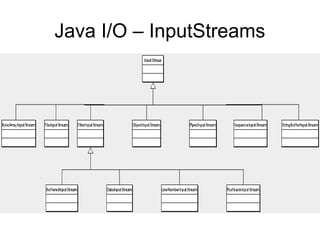
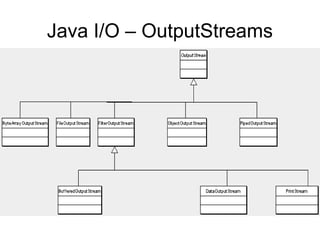
• Top level classes : InputStream and
OutputStream
• InputStream defines the charecterstics
common to byte input streams.
• OutputStream defines the charecterstics
common to byte output streams.
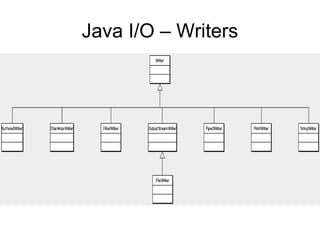
Java I/O – InputStreams
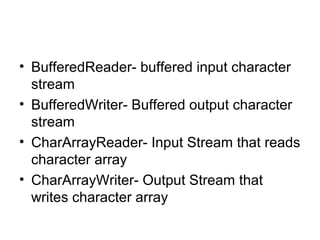
Java I/O – OutputStreams
Byte stream classes
• BufferedInputStream-
• BufferedOutputStream-
• ByteArrayInputStream- input stream that
reads from a byte array
• ByteArrayOutputStream-Output stream
that writes a byte array
• DataInputStream- an input stream that
contains methods for reading the java
standard data type.
• DataOutputStream- an Output stream that
contains methods for writing the java
standard data type.
• FileInputStream-Input stream that reads a
file
• FileOutputStream-Output stream that
writes a file
• FilterInputStream- implements InputStream
• FilterOutputStream- implements OutputStream
• InputStream- abstract class that describes
stream input
• ObjectInputStream- input stream for objects
• ObjectOutputStream- output stream for objects
• OutputStream - abstract class that describes
stream output
• PipedInputStream- Input pipe
• PipedOutputStream- Output pipe
• PrintStream –Output stream that contains print()
and println()
• PushbackInputStream – Input stream that allows
bytes to be returned to the stream.
• SequenceInputStream- input stream that is a
combination of two or more input streams that
will read sequentially one after the other.
Character stream classes
• Defined using two class heirachies topped
by two abstract classes :
• Reader and writer
• Reader is used for input
• Writer is used for output
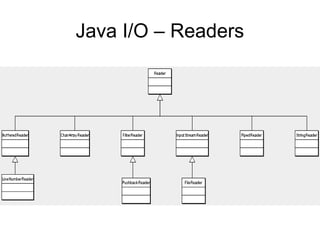
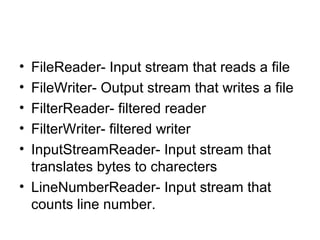
Java I/O – Readers
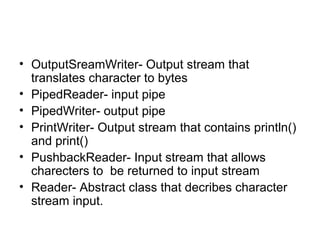
Java I/O – Writers
• BufferedReader- buffered input character
stream
• BufferedWriter- Buffered output character
stream
• CharArrayReader- Input Stream that reads
character array
• CharArrayWriter- Output Stream that
writes character array
• FileReader- Input stream that reads a file
• FileWriter- Output stream that writes a file
• FilterReader- filtered reader
• FilterWriter- filtered writer
• InputStreamReader- Input stream that
translates bytes to charecters
• LineNumberReader- Input stream that
counts line number.
• OutputSreamWriter- Output stream that
translates character to bytes
• PipedReader- input pipe
• PipedWriter- output pipe
• PrintWriter- Output stream that contains println()
and print()
• PushbackReader- Input stream that allows
charecters to be returned to input stream
• Reader- Abstract class that decribes character
stream input.
• StringReader- Input stream that reads
from a string
• StringWriter- Output stream that writes to
a string
• Writer- Abstract class that describes
character stream output.
The Predefined Streams
• Java automatically imports a package
called java.lang package
• It defines a class called System.
• It contains three predefined stream
variables called in , out and err
• These fields are defined as public, final
and static within System
• Means that they can be used by any other
part of the program
• System.out refers to standard output
stream by default it is console.
• System.in refers to standard input by
default keyboard
• System.err refers to error stream, by
default it is console.
• System.in is an object of InputStream
• System.out and System.err are objects of
type PrintStream
Methods defined by
InputStream
Method Description
int avaiable() Returns the number of bytes of input currently
available for reading
void close() Close the input source
void mark(int numbytes) Places a mark at the current point in the input stream
that will remain valid until numBytes bytes are read.
boolean
marksupported()
Returns true if mark() / reset() are supported by the
invoking stream.
int read() Returns an integer representation of the next
available byte of input.
-1 is returned when end of the stream is
encountered.
int read(byte buffer[]) Attempts to read up to buffer.length bytes into buffer
and returns the actual number of bytes that were
successfully read
int read(byte buffer[],int
offset,int numbytes)
Attempts to read the
numBytes bytes into buffer
starting at buffer[offset],
returning the number of
bytes successfully read.
void reset() Resets the input pointer to
the previously set mark
long skip(long
numbytes)
Ignores numBytes bytes of
input, returning the number
of bytes actually ignored.
Methods of OutputStream
Method Desccription
void close() Closes the output stream
void flush() Causes an output that has been buffered
to be sent to its destination
void write(int b ) Writes a single byte to an output stream
void write(byte
buffer[])
Writes a complete array of bytes to an
output stream
void write(byte
buffer[],int
offset,int
numBytes)
Writes a subrange of numBytes from
array buffer beginning at buffer[offset]
Reading Console Input
• Byte or character oriented streams
• Preferred method to read console input is
to use a character oriented stream
• Reason
– makes program easier to internationalize
– easier to maintain.
• System.in is an instance of InputStream
• InputStream defines only one method called read()
which reads byte
• Three versions of read() exists
• int read() throws IOException
• int read(byte data[])throws IOException
• int read(byte data[], int start,int max) throws IOException
• Reading from System.in,pressing Enter generates end of
stream condition
• int read() throws IOException
– Reads a single character from keyboard, returns -1 if it reaches
end of stream
• int read(byte data[])throws IOException
– Reads bytes from input stream and puts them into data until
either array is full , the end of stream is encountered or error
occurs.
• int read(byte data[], int start,int max) throws IOException
– Reads input into data beginning at the location specified by start,
upto max bytes are stored.
– It returns number of byte read or -1 when end of stream is
reached.
import java.io.*;
class ReadBytes{
public static void main(String args[]) throws IOException{
byte data[]=new byte[10];
System.out.println("Enter the charecters:");
System.in.read(data);
System.out.println("You entered:");
for(int i=0;i<=data.length;i++)
System.out.println((char)data[i]);
}//end of main
}//end of class
Writing console output
• print() and println() are used for writing to console
• Defined in PrintStream class
• PrintStream is an output stream derived from
OutputStream it also implements the low-level method
called write()
• void write(int byteVal);
• This method writes the byte specified by byteval to the
file
• There are two more functions, printf and format which
allows us to write a formatted output into the console.
class WriteDemo{
public static void main(String args[])
{
int b;
b='X';
System.out.write(b);
System.out.write('n');
}//end of main
}//end of class

Using Input Output

  • 1.
  • 2.
    • Java programperforms I/O through streams. • A stream is an abstraction that either produces or consumes information. • A stream is linked to physical device by java I/O system. • Java implements streams within class hierarchies defined in the java.io package.
  • 3.
    Byte streams andcharacter streams • Java defines two types of streams i.e. byte streams and character stream • Byte streams handles input and output of bytes. Eg: used when reading or writing binary data. • Character stream handles input and output of character. • Character streams are efficient than byte streams.
  • 4.
    Byte stream classes •Defined by two class hierarchies • Top level classes : InputStream and OutputStream • InputStream defines the charecterstics common to byte input streams. • OutputStream defines the charecterstics common to byte output streams.
  • 5.
    Java I/O –InputStreams
  • 6.
    Java I/O –OutputStreams
  • 7.
    Byte stream classes •BufferedInputStream- • BufferedOutputStream- • ByteArrayInputStream- input stream that reads from a byte array • ByteArrayOutputStream-Output stream that writes a byte array • DataInputStream- an input stream that contains methods for reading the java standard data type.
  • 8.
    • DataOutputStream- anOutput stream that contains methods for writing the java standard data type. • FileInputStream-Input stream that reads a file • FileOutputStream-Output stream that writes a file
  • 9.
    • FilterInputStream- implementsInputStream • FilterOutputStream- implements OutputStream • InputStream- abstract class that describes stream input • ObjectInputStream- input stream for objects • ObjectOutputStream- output stream for objects • OutputStream - abstract class that describes stream output
  • 10.
    • PipedInputStream- Inputpipe • PipedOutputStream- Output pipe • PrintStream –Output stream that contains print() and println() • PushbackInputStream – Input stream that allows bytes to be returned to the stream. • SequenceInputStream- input stream that is a combination of two or more input streams that will read sequentially one after the other.
  • 11.
    Character stream classes •Defined using two class heirachies topped by two abstract classes : • Reader and writer • Reader is used for input • Writer is used for output
  • 12.
    Java I/O –Readers
  • 13.
    Java I/O –Writers
  • 14.
    • BufferedReader- bufferedinput character stream • BufferedWriter- Buffered output character stream • CharArrayReader- Input Stream that reads character array • CharArrayWriter- Output Stream that writes character array
  • 15.
    • FileReader- Inputstream that reads a file • FileWriter- Output stream that writes a file • FilterReader- filtered reader • FilterWriter- filtered writer • InputStreamReader- Input stream that translates bytes to charecters • LineNumberReader- Input stream that counts line number.
  • 16.
    • OutputSreamWriter- Outputstream that translates character to bytes • PipedReader- input pipe • PipedWriter- output pipe • PrintWriter- Output stream that contains println() and print() • PushbackReader- Input stream that allows charecters to be returned to input stream • Reader- Abstract class that decribes character stream input.
  • 17.
    • StringReader- Inputstream that reads from a string • StringWriter- Output stream that writes to a string • Writer- Abstract class that describes character stream output.
  • 18.
    The Predefined Streams •Java automatically imports a package called java.lang package • It defines a class called System. • It contains three predefined stream variables called in , out and err • These fields are defined as public, final and static within System • Means that they can be used by any other part of the program
  • 19.
    • System.out refersto standard output stream by default it is console. • System.in refers to standard input by default keyboard • System.err refers to error stream, by default it is console. • System.in is an object of InputStream • System.out and System.err are objects of type PrintStream
  • 20.
    Methods defined by InputStream MethodDescription int avaiable() Returns the number of bytes of input currently available for reading void close() Close the input source void mark(int numbytes) Places a mark at the current point in the input stream that will remain valid until numBytes bytes are read. boolean marksupported() Returns true if mark() / reset() are supported by the invoking stream. int read() Returns an integer representation of the next available byte of input. -1 is returned when end of the stream is encountered. int read(byte buffer[]) Attempts to read up to buffer.length bytes into buffer and returns the actual number of bytes that were successfully read
  • 21.
    int read(byte buffer[],int offset,intnumbytes) Attempts to read the numBytes bytes into buffer starting at buffer[offset], returning the number of bytes successfully read. void reset() Resets the input pointer to the previously set mark long skip(long numbytes) Ignores numBytes bytes of input, returning the number of bytes actually ignored.
  • 22.
    Methods of OutputStream MethodDesccription void close() Closes the output stream void flush() Causes an output that has been buffered to be sent to its destination void write(int b ) Writes a single byte to an output stream void write(byte buffer[]) Writes a complete array of bytes to an output stream void write(byte buffer[],int offset,int numBytes) Writes a subrange of numBytes from array buffer beginning at buffer[offset]
  • 23.
    Reading Console Input •Byte or character oriented streams • Preferred method to read console input is to use a character oriented stream • Reason – makes program easier to internationalize – easier to maintain.
  • 24.
    • System.in isan instance of InputStream • InputStream defines only one method called read() which reads byte • Three versions of read() exists • int read() throws IOException • int read(byte data[])throws IOException • int read(byte data[], int start,int max) throws IOException • Reading from System.in,pressing Enter generates end of stream condition
  • 25.
    • int read()throws IOException – Reads a single character from keyboard, returns -1 if it reaches end of stream • int read(byte data[])throws IOException – Reads bytes from input stream and puts them into data until either array is full , the end of stream is encountered or error occurs. • int read(byte data[], int start,int max) throws IOException – Reads input into data beginning at the location specified by start, upto max bytes are stored. – It returns number of byte read or -1 when end of stream is reached.
  • 26.
    import java.io.*; class ReadBytes{ publicstatic void main(String args[]) throws IOException{ byte data[]=new byte[10]; System.out.println("Enter the charecters:"); System.in.read(data); System.out.println("You entered:"); for(int i=0;i<=data.length;i++) System.out.println((char)data[i]); }//end of main }//end of class
  • 27.
    Writing console output •print() and println() are used for writing to console • Defined in PrintStream class • PrintStream is an output stream derived from OutputStream it also implements the low-level method called write() • void write(int byteVal); • This method writes the byte specified by byteval to the file • There are two more functions, printf and format which allows us to write a formatted output into the console.
  • 28.
    class WriteDemo{ public staticvoid main(String args[]) { int b; b='X'; System.out.write(b); System.out.write('n'); }//end of main }//end of class