Active Directory
PREPARED HAMEDA HURMAT
Describe objects found in Active
Describe the role of a directory service
Used of Active directory
Verifying the File System
Directory Work with forests, trees, and domains
Understanding the functionality of Domain and Forest Functionality
New to know Active Directory
Learn about Read-Only Domain Controllers
Active Directory Prerequisites
Install Active Directory
The Role of a Directory Service
A network directory service stores information about a computer
network and offers features for retrieving and managing that
information.
Generally considered to be an administrative tool, but users make use
of directory services to find resources
Directory services provide a centralized management tool, but due to
complexity, requires careful planning prior to setup
Windows Active Directory
Active Directory offers the following features:
Hierarchical organization
Centralized but distributed database
Scalability
Security
Flexibility
Policy-based administration
Verifying the File System
When you’re planning your Active Directory deployment, the file system that the
operating system uses is an important concern for two reasons.
The file system can provide the ultimate level of security for all the information
stored on the server itself. Second, it is responsible for managing and tracking all of
this data. The Windows Server 2016 platform supports three file systems:
■ File Allocation Table 32 (FAT32)
■ Windows NT File System (NTFS)
■ Resilient File System (ReFS)
Although ReFS was new to Windows Server 2012, NTFS has been around for many
years, and NTFS in Windows Server 2016 has been improved for better
performance. you could choose between FAT32, NTFS, and ReFS
Understanding Domain and Forest Functionality
Windows Server 2016 Active Directory uses a concept called domain and forest
functionality. The functional level that you choose during the Active Directory
installation determines which features your domain can use.
Domain Functional Level
Windows Server 2016 will support the following domain functional levels:
■ Windows Server 2008
■ Windows Server 2008 R2
■ Windows Server 2012
■ Windows Server 2012 R2
■ Windows Server 2016
function level you use depends on the domain controllers you have installed on
your network. This is an important fact to remember. You can use any version of
Windows Server as long as those servers are member servers only. You can only use
Domain Controllers as low as your function level.
Forest Functionality
Windows Server 2016 forest functionality applies to all of
the domains in a forest. All domains have to be upgraded
to Windows Server 2016 before the forest can be
upgraded to Windows Server 2016.
There are five levels of forest functionality:
■■ Windows Server 2008
■■ Windows Server 2008 R2
■■ Windows Server 2012
■■ Windows Server 2012 R2
■■ Windows Server 2016
Planning the Domain Structure
■ The DNS name of the domain
■ The computer name or the NetBIOS name of the server (which will be used by
previous versions of Windows to access server resources)
■ In which domain function level the domain will operate
■ Whether other DNS servers are available on the network
■ What type of and how many DNS servers are available on the network
DNS is a requirement of Active Directory. You can install DNS during the Active
Directory installation.
■ If this domain controller will join an existing domain, you should know the name
of that domain. You will also either require a password for a member of the
Enterprise Administrators group for that domain or have someone with those
permissions create a domain account before promotion.
■ You should know whether the new domain will join an existing tree and, if so, the
name of the tree it will join.
■ You should know the name of a forest to which this domain will connect (if
applicable).
New to Active Directory
As with any new version of Windows Server, Microsoft has made some
improvements to Active Directory. The following changes have been made
to Windows Server 2016 Active Directory:
Privileged Access Management Privileged access management (PAM)
allows you to alleviate security concerns about the Active Directory
environment. Some of these security issues include credential theft
techniques (pass-the-hash & spear phishing) along with other types of
similar attacks.
Azure AD Join Azure Active Directory Join allows you to setup an Office 365
based Azure network and then easily join your end-users systems to that
domain.
Microsoft Passport Microsoft Passport allows your users to setup a key-
based authentication that allows your users to authenticate by using more
than just their password (biometrics or PIN numbers). Your users would
then log on to their systems using a biometric or PIN number that is linked
to a certificate or an asymmetrical key pair.
Read-Only Domain Controllers
Windows Server 2016 supports another type of domain controller
called the read-only domain controller (RODC).
This is a full copy of the Active Directory database without the ability to
write to Active Directory. The RODC gives an organization the ability to
install a domain controller in a location (onsite or offsite) where security
is a concern.
RODCs need to get their Active Directory database from another
domain controller. If there are no domain controllers setup yet for a
domain, RODCs will not be available (the option will be greyed out).
Implementing an RODC is the same as adding another domain
controller to a domain. The installation is exactly the same except that
when you get to the screen to choose Domain Controller options, you
check the box for RODC. Again, this is ONLY available if there are other
domain controllers already in the domain.
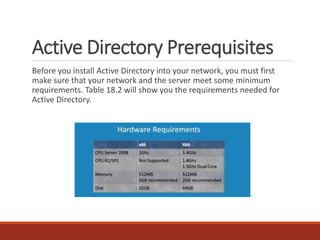
Active Directory Prerequisites
Before you install Active Directory into your network, you must first
make sure that your network and the server meet some minimum
requirements. Table 18.2 will show you the requirements needed for
Active Directory.
Thank you

Active Directory

  • 1.
  • 2.
    Describe objects foundin Active Describe the role of a directory service Used of Active directory Verifying the File System Directory Work with forests, trees, and domains Understanding the functionality of Domain and Forest Functionality New to know Active Directory Learn about Read-Only Domain Controllers Active Directory Prerequisites Install Active Directory
  • 3.
    The Role ofa Directory Service A network directory service stores information about a computer network and offers features for retrieving and managing that information. Generally considered to be an administrative tool, but users make use of directory services to find resources Directory services provide a centralized management tool, but due to complexity, requires careful planning prior to setup
  • 4.
    Windows Active Directory ActiveDirectory offers the following features: Hierarchical organization Centralized but distributed database Scalability Security Flexibility Policy-based administration
  • 5.
    Verifying the FileSystem When you’re planning your Active Directory deployment, the file system that the operating system uses is an important concern for two reasons. The file system can provide the ultimate level of security for all the information stored on the server itself. Second, it is responsible for managing and tracking all of this data. The Windows Server 2016 platform supports three file systems: ■ File Allocation Table 32 (FAT32) ■ Windows NT File System (NTFS) ■ Resilient File System (ReFS) Although ReFS was new to Windows Server 2012, NTFS has been around for many years, and NTFS in Windows Server 2016 has been improved for better performance. you could choose between FAT32, NTFS, and ReFS
  • 6.
    Understanding Domain andForest Functionality Windows Server 2016 Active Directory uses a concept called domain and forest functionality. The functional level that you choose during the Active Directory installation determines which features your domain can use. Domain Functional Level Windows Server 2016 will support the following domain functional levels: ■ Windows Server 2008 ■ Windows Server 2008 R2 ■ Windows Server 2012 ■ Windows Server 2012 R2 ■ Windows Server 2016 function level you use depends on the domain controllers you have installed on your network. This is an important fact to remember. You can use any version of Windows Server as long as those servers are member servers only. You can only use Domain Controllers as low as your function level.
  • 7.
    Forest Functionality Windows Server2016 forest functionality applies to all of the domains in a forest. All domains have to be upgraded to Windows Server 2016 before the forest can be upgraded to Windows Server 2016. There are five levels of forest functionality: ■■ Windows Server 2008 ■■ Windows Server 2008 R2 ■■ Windows Server 2012 ■■ Windows Server 2012 R2 ■■ Windows Server 2016
  • 8.
    Planning the DomainStructure ■ The DNS name of the domain ■ The computer name or the NetBIOS name of the server (which will be used by previous versions of Windows to access server resources) ■ In which domain function level the domain will operate ■ Whether other DNS servers are available on the network ■ What type of and how many DNS servers are available on the network DNS is a requirement of Active Directory. You can install DNS during the Active Directory installation. ■ If this domain controller will join an existing domain, you should know the name of that domain. You will also either require a password for a member of the Enterprise Administrators group for that domain or have someone with those permissions create a domain account before promotion. ■ You should know whether the new domain will join an existing tree and, if so, the name of the tree it will join. ■ You should know the name of a forest to which this domain will connect (if applicable).
  • 9.
    New to ActiveDirectory As with any new version of Windows Server, Microsoft has made some improvements to Active Directory. The following changes have been made to Windows Server 2016 Active Directory: Privileged Access Management Privileged access management (PAM) allows you to alleviate security concerns about the Active Directory environment. Some of these security issues include credential theft techniques (pass-the-hash & spear phishing) along with other types of similar attacks. Azure AD Join Azure Active Directory Join allows you to setup an Office 365 based Azure network and then easily join your end-users systems to that domain. Microsoft Passport Microsoft Passport allows your users to setup a key- based authentication that allows your users to authenticate by using more than just their password (biometrics or PIN numbers). Your users would then log on to their systems using a biometric or PIN number that is linked to a certificate or an asymmetrical key pair.
  • 10.
    Read-Only Domain Controllers WindowsServer 2016 supports another type of domain controller called the read-only domain controller (RODC). This is a full copy of the Active Directory database without the ability to write to Active Directory. The RODC gives an organization the ability to install a domain controller in a location (onsite or offsite) where security is a concern. RODCs need to get their Active Directory database from another domain controller. If there are no domain controllers setup yet for a domain, RODCs will not be available (the option will be greyed out). Implementing an RODC is the same as adding another domain controller to a domain. The installation is exactly the same except that when you get to the screen to choose Domain Controller options, you check the box for RODC. Again, this is ONLY available if there are other domain controllers already in the domain.
  • 11.
    Active Directory Prerequisites Beforeyou install Active Directory into your network, you must first make sure that your network and the server meet some minimum requirements. Table 18.2 will show you the requirements needed for Active Directory.
  • 13.