Interfacing Keyboard and LCD Displays
(Lecture-14)
R S Ananda Murthy
Associate Professor
Department of Electrical & Electronics Engineering,
Sri Jayachamarajendra College of Engineering,
Mysore 570 006
R S Ananda Murthy Interfacing Keyboard and LCD Displays
Linear Arrangement of Keys
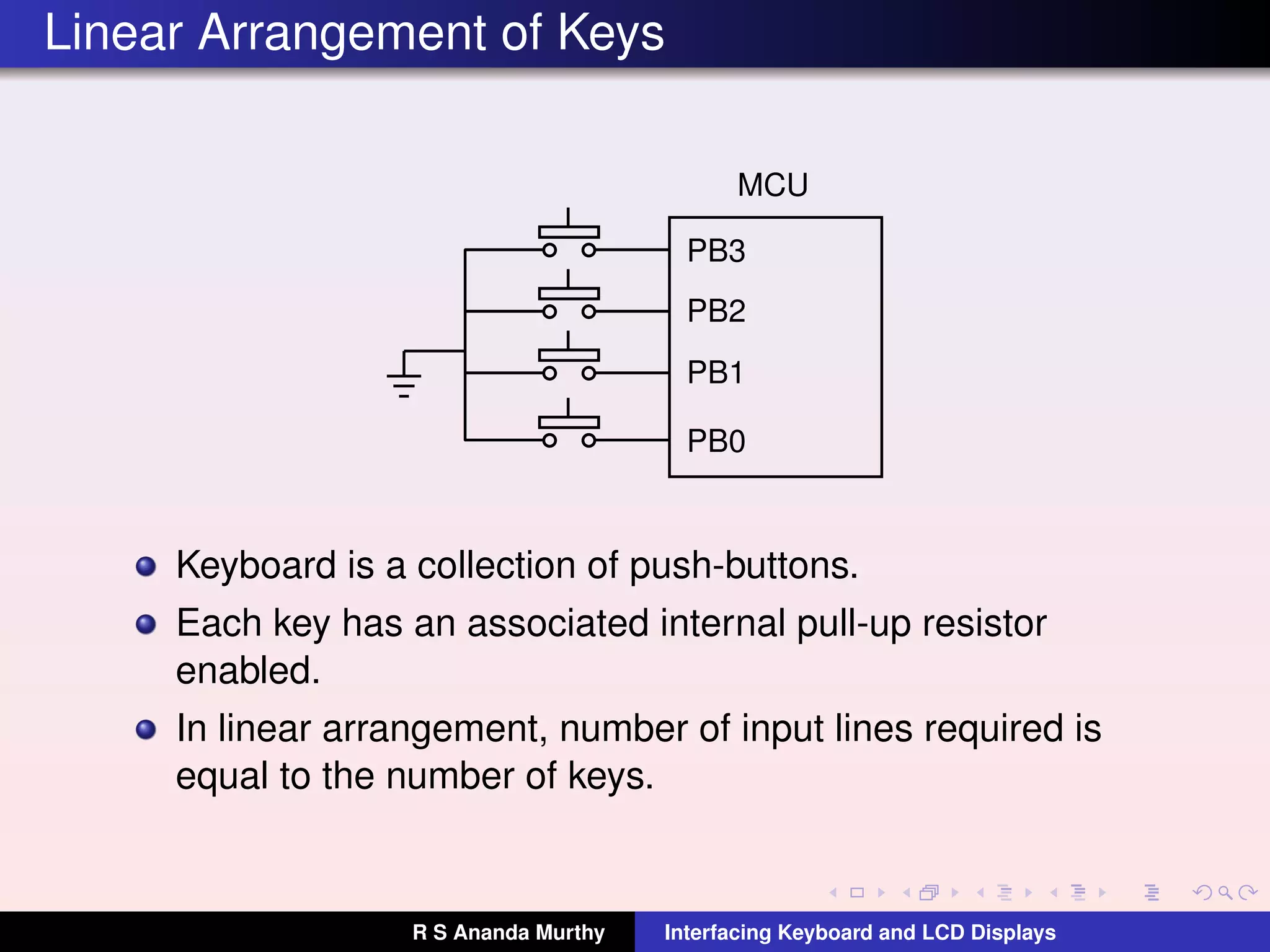
MCU
PB0
PB1
PB2
PB3
Keyboard is a collection of push-buttons.
Each key has an associated internal pull-up resistor
enabled.
In linear arrangement, number of input lines required is
equal to the number of keys.
R S Ananda Murthy Interfacing Keyboard and LCD Displays
Matrix Arrangement of Keys
When large number of keys are to be interfaced, linear
arrangement is not preferred since the number of input
lines required will be more.
In matrix arrangement, a key is connected between a row
and a column.
If there are R rows and C columns, then, the maximum
number of keys in the matrix could be N = R ×C and the
number of lines required for interfacing would be R +C and
not N.
R S Ananda Murthy Interfacing Keyboard and LCD Displays
Matrix Arrangement of Keys
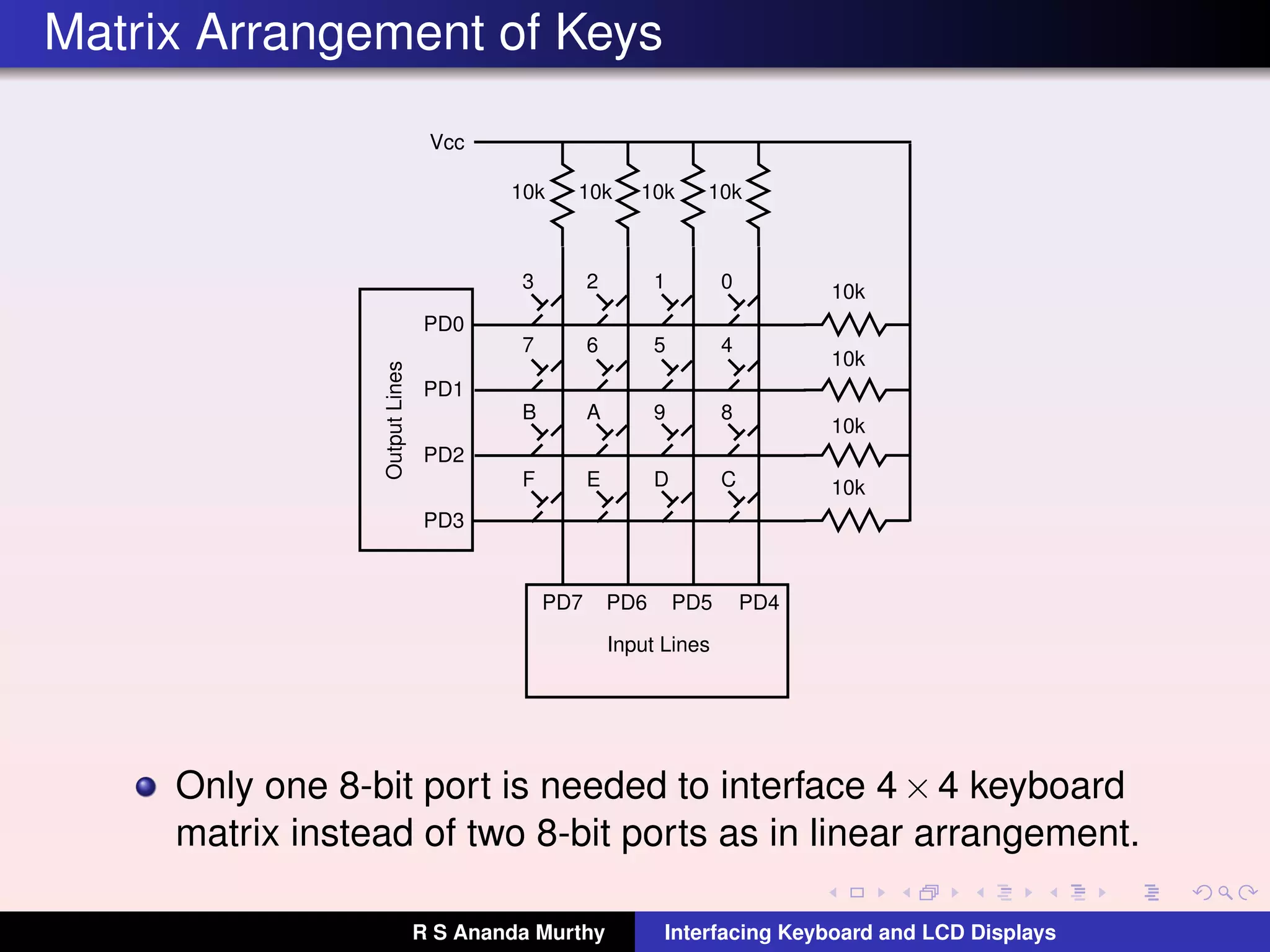
0123
4567
89AB
CDEF
10k 10k 10k 10k
10k
10k
10k
10k
PD4PD5PD6PD7
Input Lines
PD3
PD2
PD1
PD0
OutputLines
Vcc
Only one 8-bit port is needed to interface 4×4 keyboard
matrix instead of two 8-bit ports as in linear arrangement.
R S Ananda Murthy Interfacing Keyboard and LCD Displays
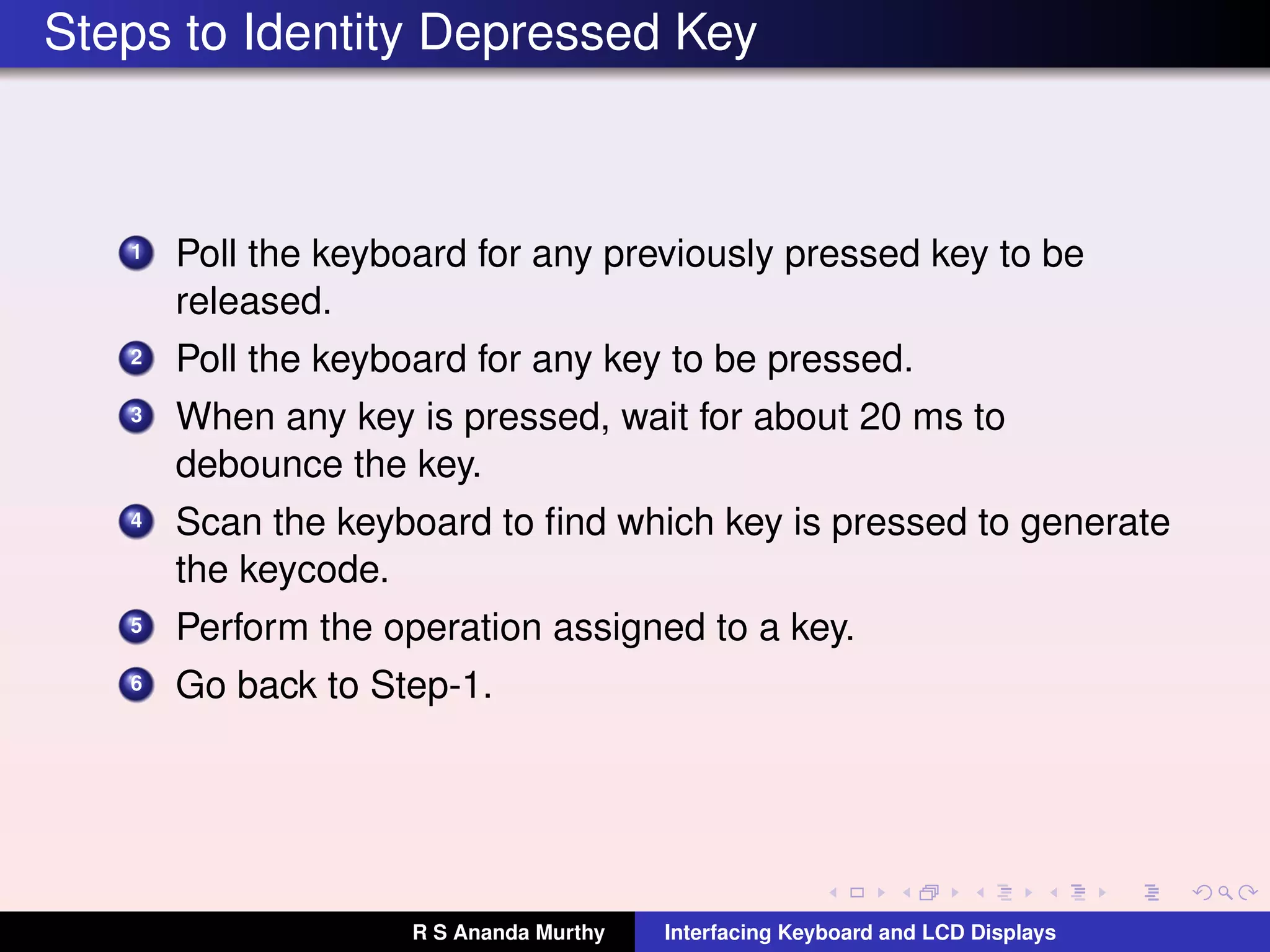
Steps to Identity Depressed Key
1 Poll the keyboard for any previously pressed key to be
released.
2 Poll the keyboard for any key to be pressed.
3 When any key is pressed, wait for about 20 ms to
debounce the key.
4 Scan the keyboard to find which key is pressed to generate
the keycode.
5 Perform the operation assigned to a key.
6 Go back to Step-1.
R S Ananda Murthy Interfacing Keyboard and LCD Displays
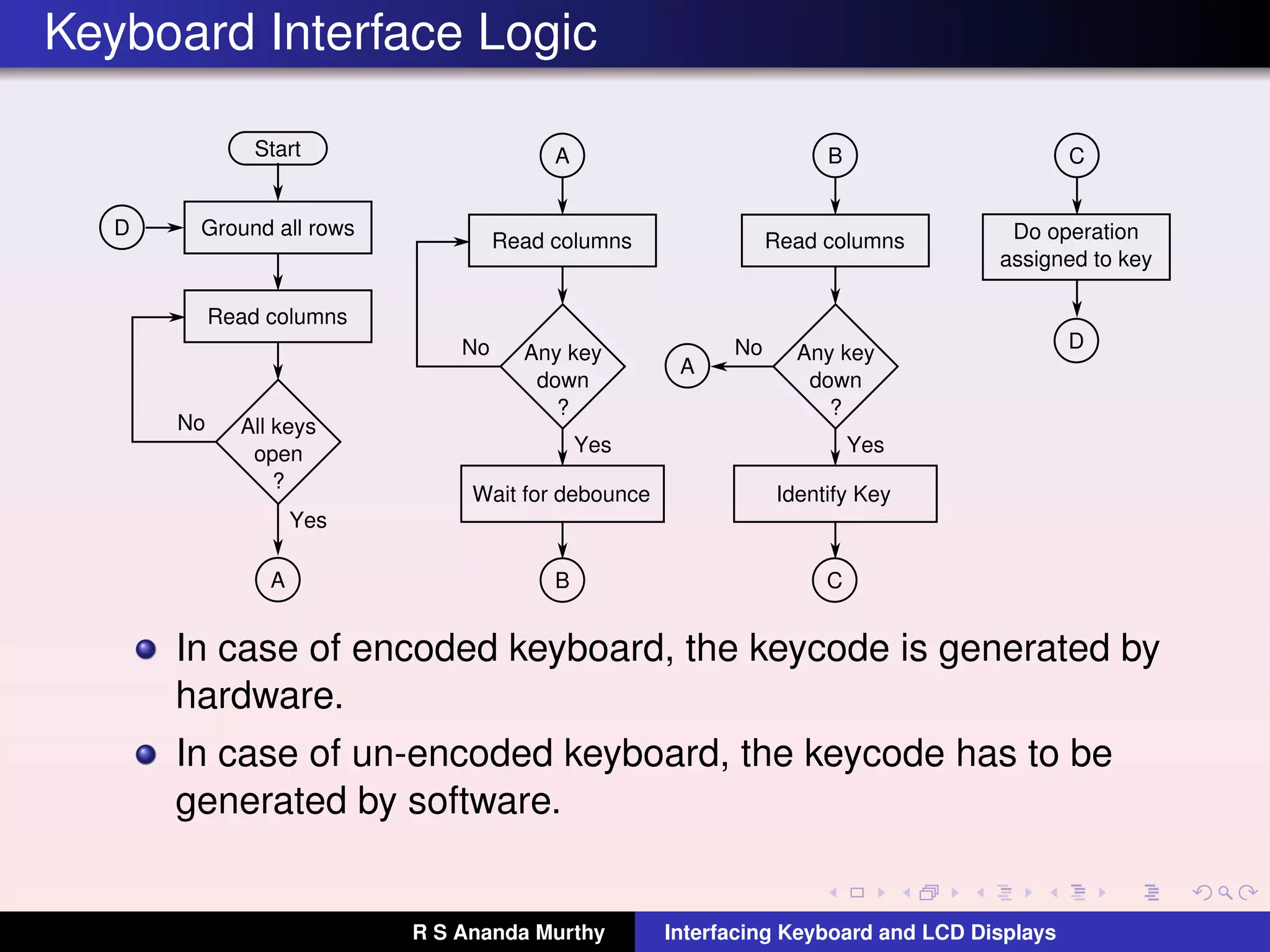
Keyboard Interface Logic
Start
Ground all rows
Read columns
All keys
open
?
No
Yes
A
A
Read columns
Any key
down
?
No
Yes
Wait for debounce
B
B
Read columns
Any key
down
?
No
Yes
A
C
Identify Key
C
Do operation
assigned to key
D
D
In case of encoded keyboard, the keycode is generated by
hardware.
In case of un-encoded keyboard, the keycode has to be
generated by software.
R S Ananda Murthy Interfacing Keyboard and LCD Displays
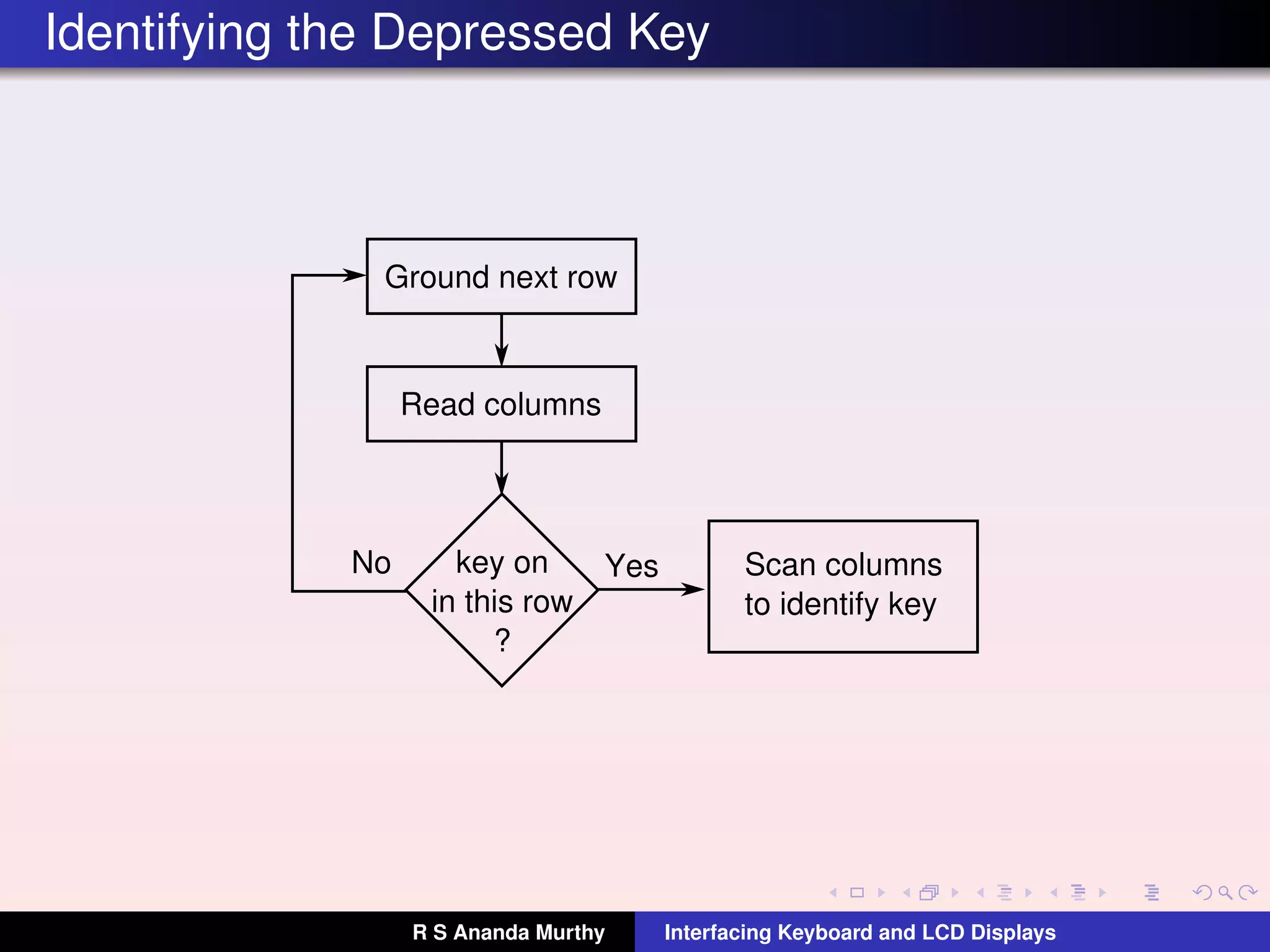
Identifying the Depressed Key
Ground next row
Read columns
key on
in this row
?
No Yes Scan columns
to identify key
R S Ananda Murthy Interfacing Keyboard and LCD Displays
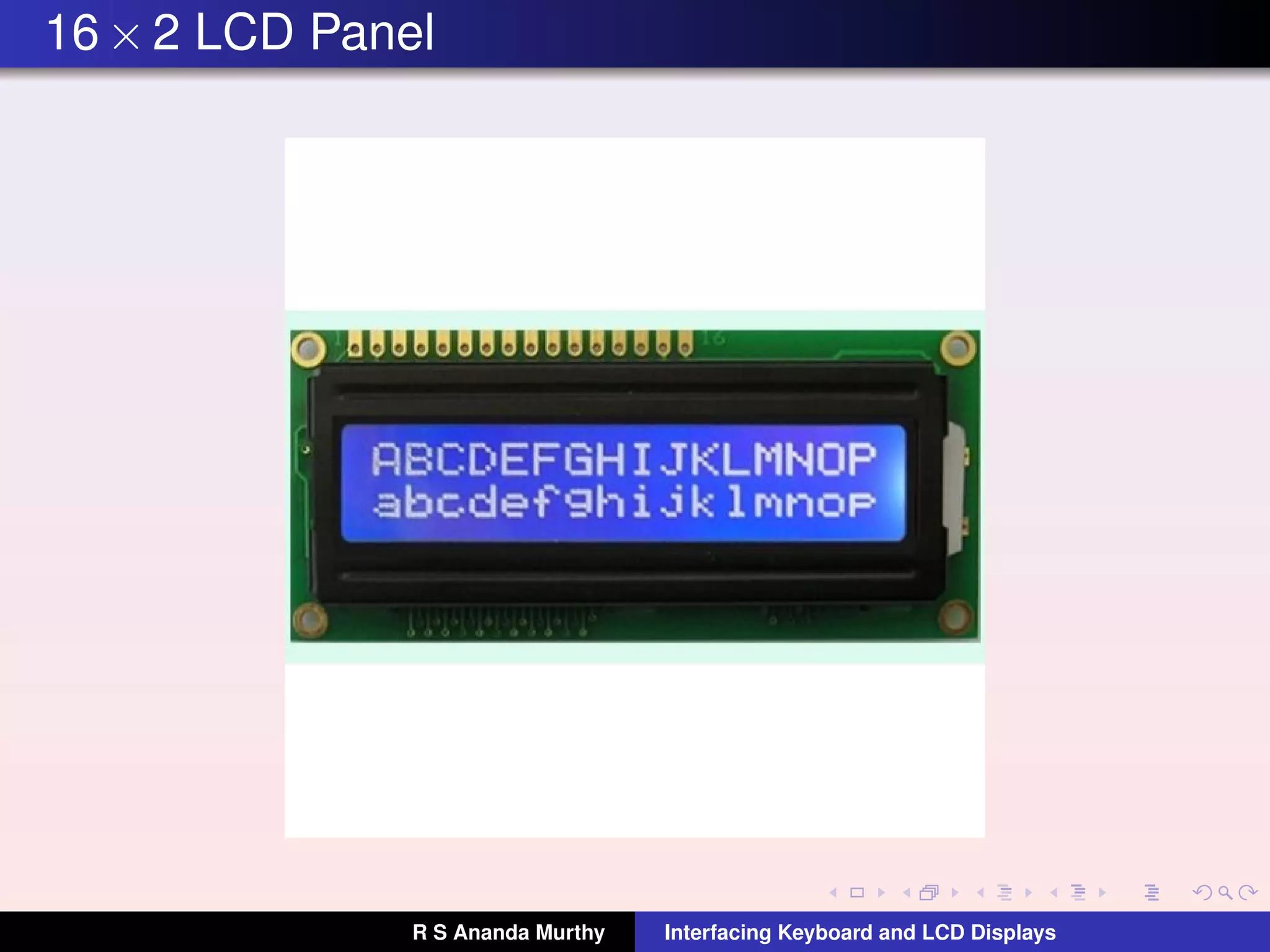
16×2 LCD Panel
R S Ananda Murthy Interfacing Keyboard and LCD Displays
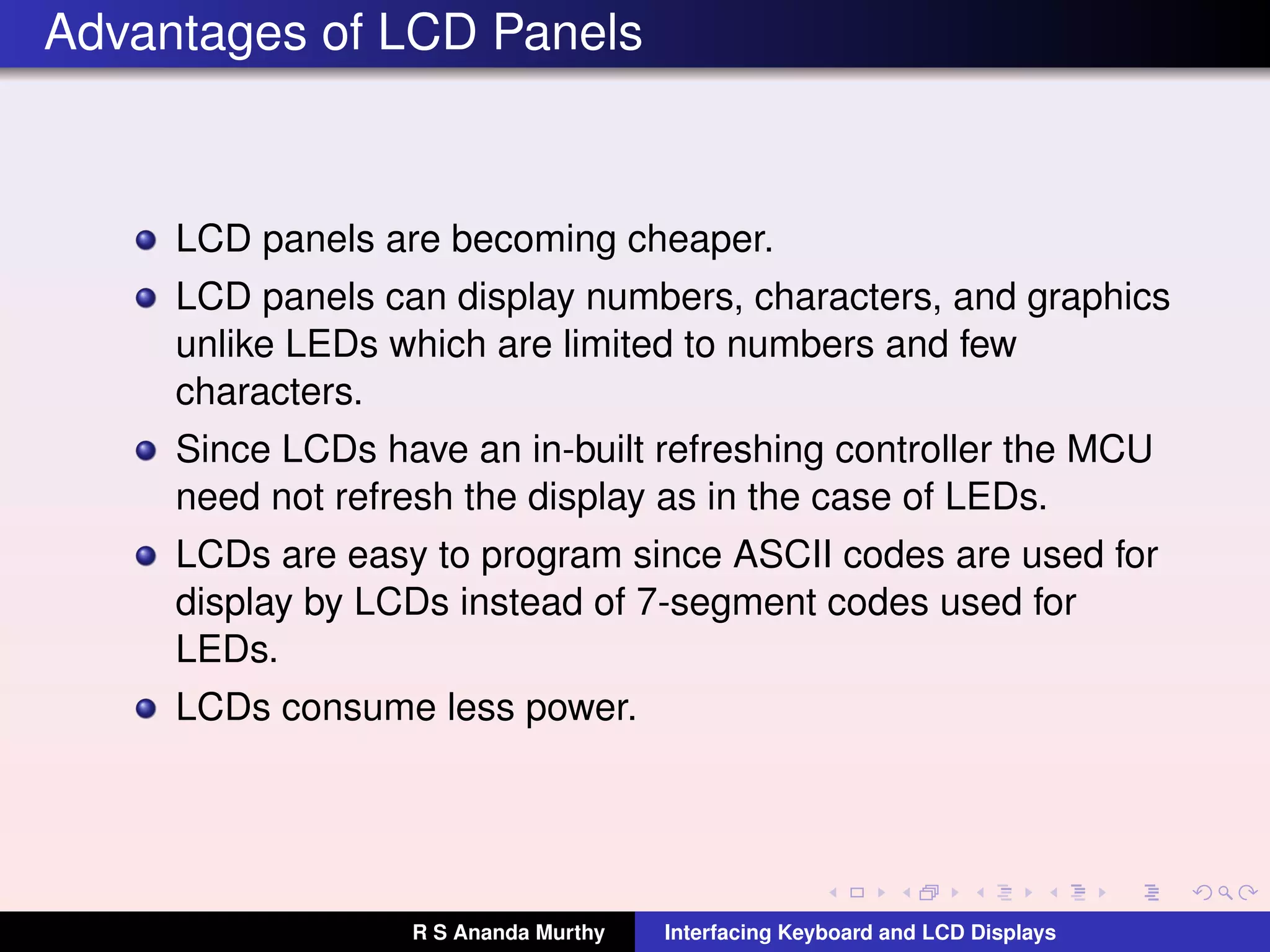
Advantages of LCD Panels
LCD panels are becoming cheaper.
LCD panels can display numbers, characters, and graphics
unlike LEDs which are limited to numbers and few
characters.
Since LCDs have an in-built refreshing controller the MCU
need not refresh the display as in the case of LEDs.
LCDs are easy to program since ASCII codes are used for
display by LCDs instead of 7-segment codes used for
LEDs.
LCDs consume less power.
R S Ananda Murthy Interfacing Keyboard and LCD Displays
LCD Pin Descriptions
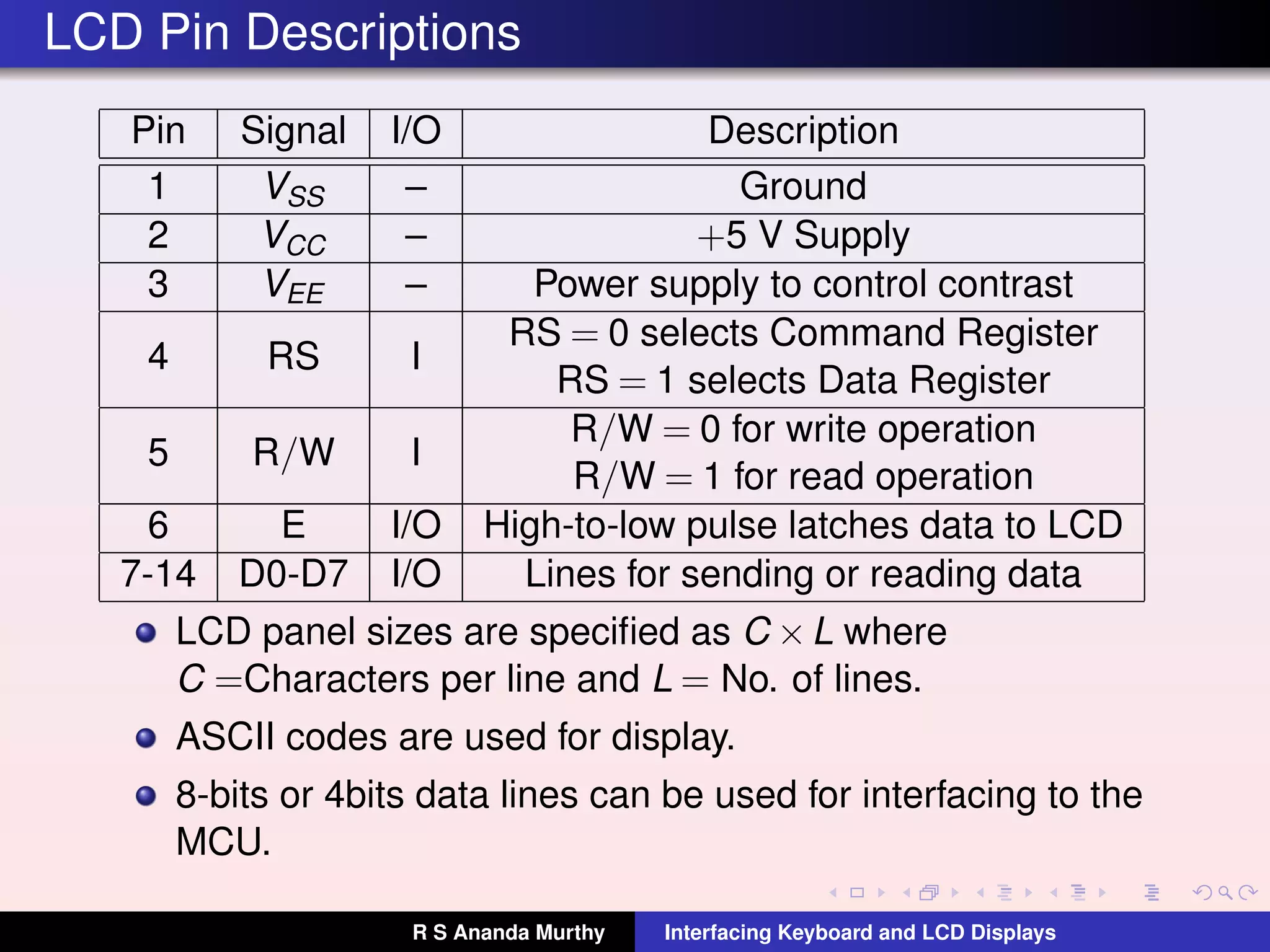
Pin Signal I/O Description
1 VSS – Ground
2 VCC – +5 V Supply
3 VEE – Power supply to control contrast
4 RS I
RS = 0 selects Command Register
RS = 1 selects Data Register
5 R/W I
R/W = 0 for write operation
R/W = 1 for read operation
6 E I/O High-to-low pulse latches data to LCD
7-14 D0-D7 I/O Lines for sending or reading data
LCD panel sizes are specified as C ×L where
C =Characters per line and L = No. of lines.
ASCII codes are used for display.
8-bits or 4bits data lines can be used for interfacing to the
MCU.
R S Ananda Murthy Interfacing Keyboard and LCD Displays
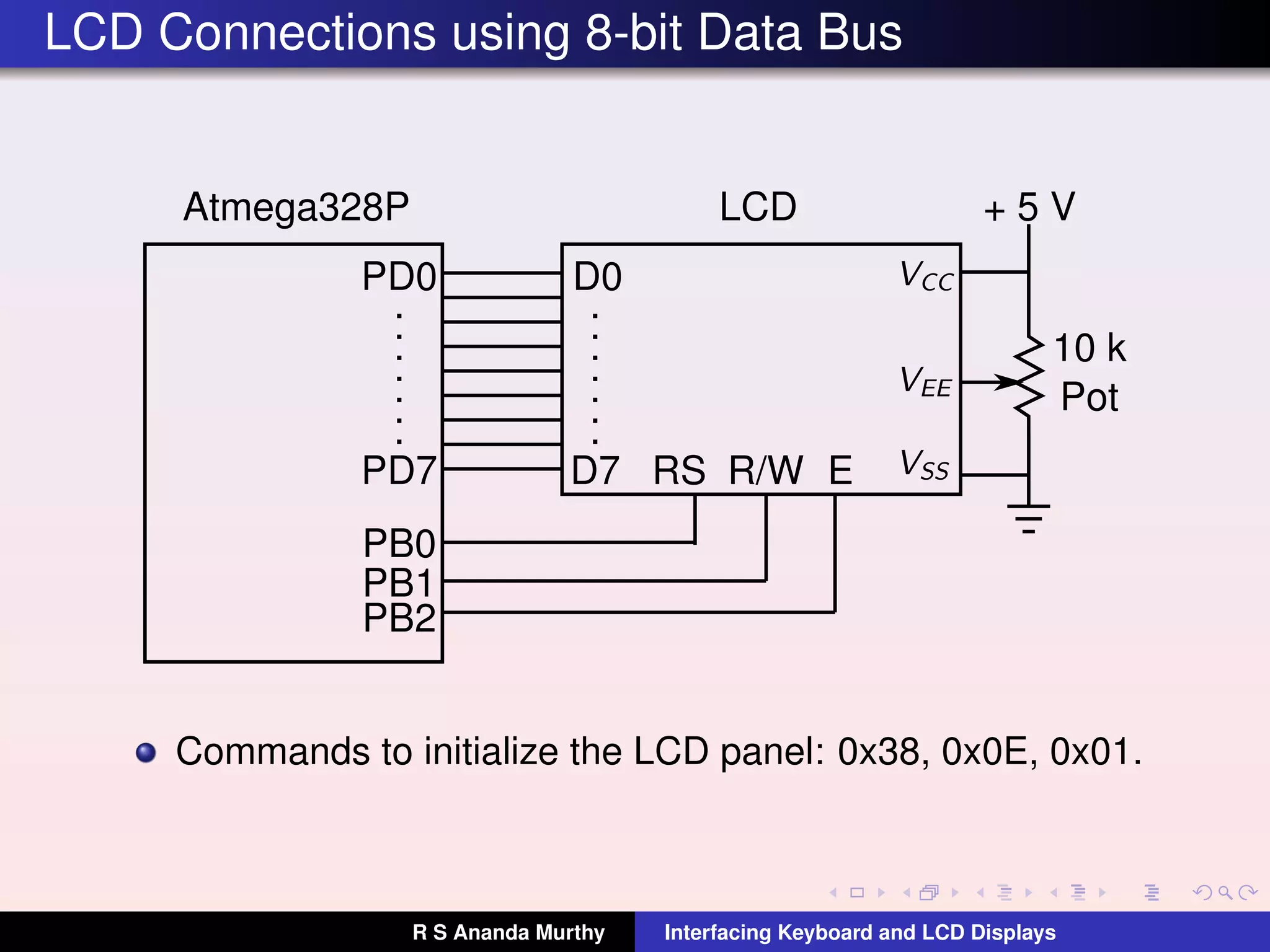
LCD Connections using 8-bit Data Bus
10 k
Pot
PD0
PD7
.
.
.
.
.
.
.
Atmega328P LCD
D0
.
.
.
.
.
.
.
D7
PB0
PB1
PB2
RS R/W E
+ 5 V
Commands to initialize the LCD panel: 0x38, 0x0E, 0x01.
R S Ananda Murthy Interfacing Keyboard and LCD Displays
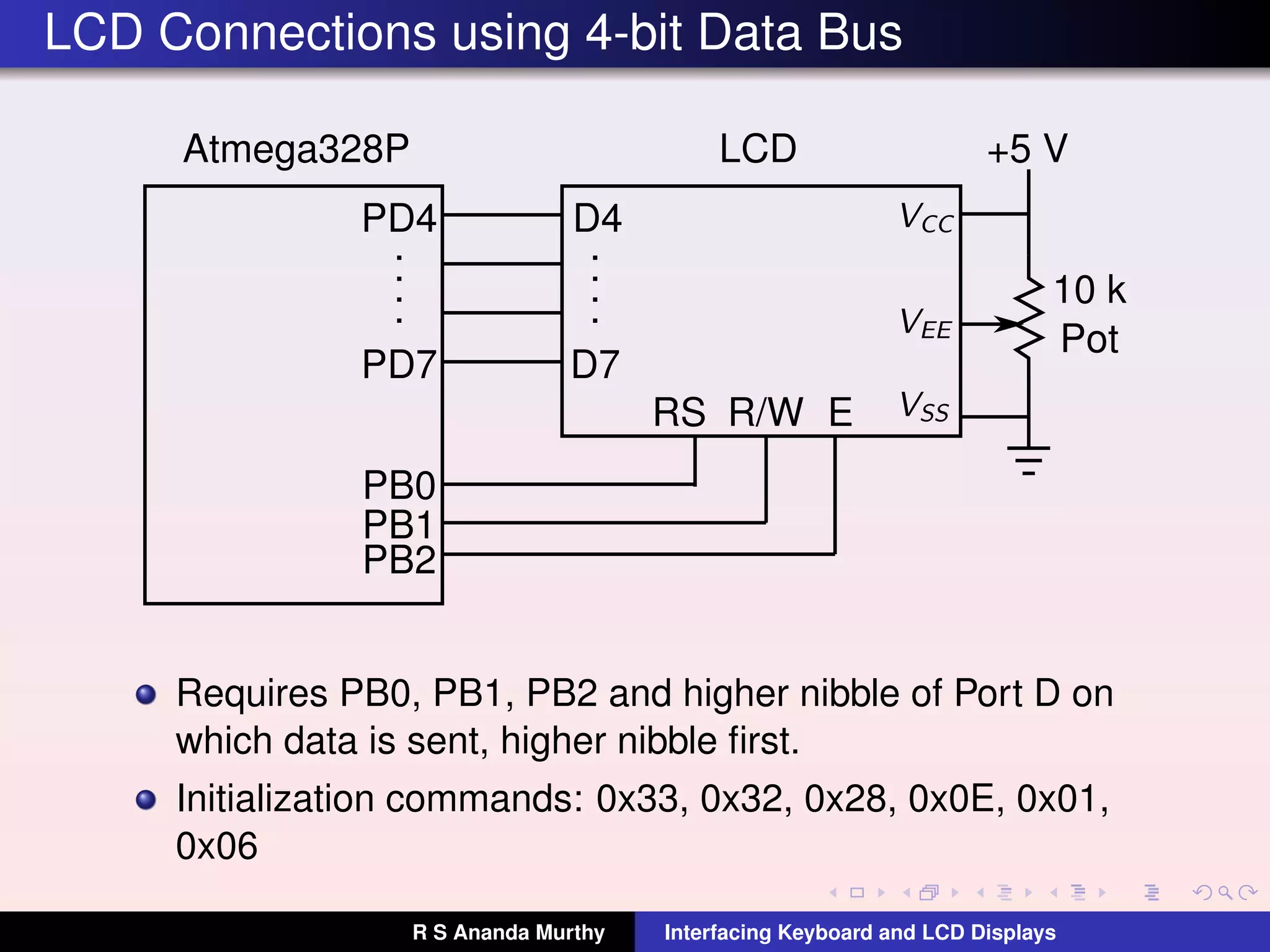
LCD Connections using 4-bit Data Bus
10 k
Pot
PD4
PD7
.
.
.
.
Atmega328P LCD
D4
.
.
.
.
D7
PB0
PB1
PB2
RS R/W E
+5 V
Requires PB0, PB1, PB2 and higher nibble of Port D on
which data is sent, higher nibble first.
Initialization commands: 0x33, 0x32, 0x28, 0x0E, 0x01,
0x06
R S Ananda Murthy Interfacing Keyboard and LCD Displays
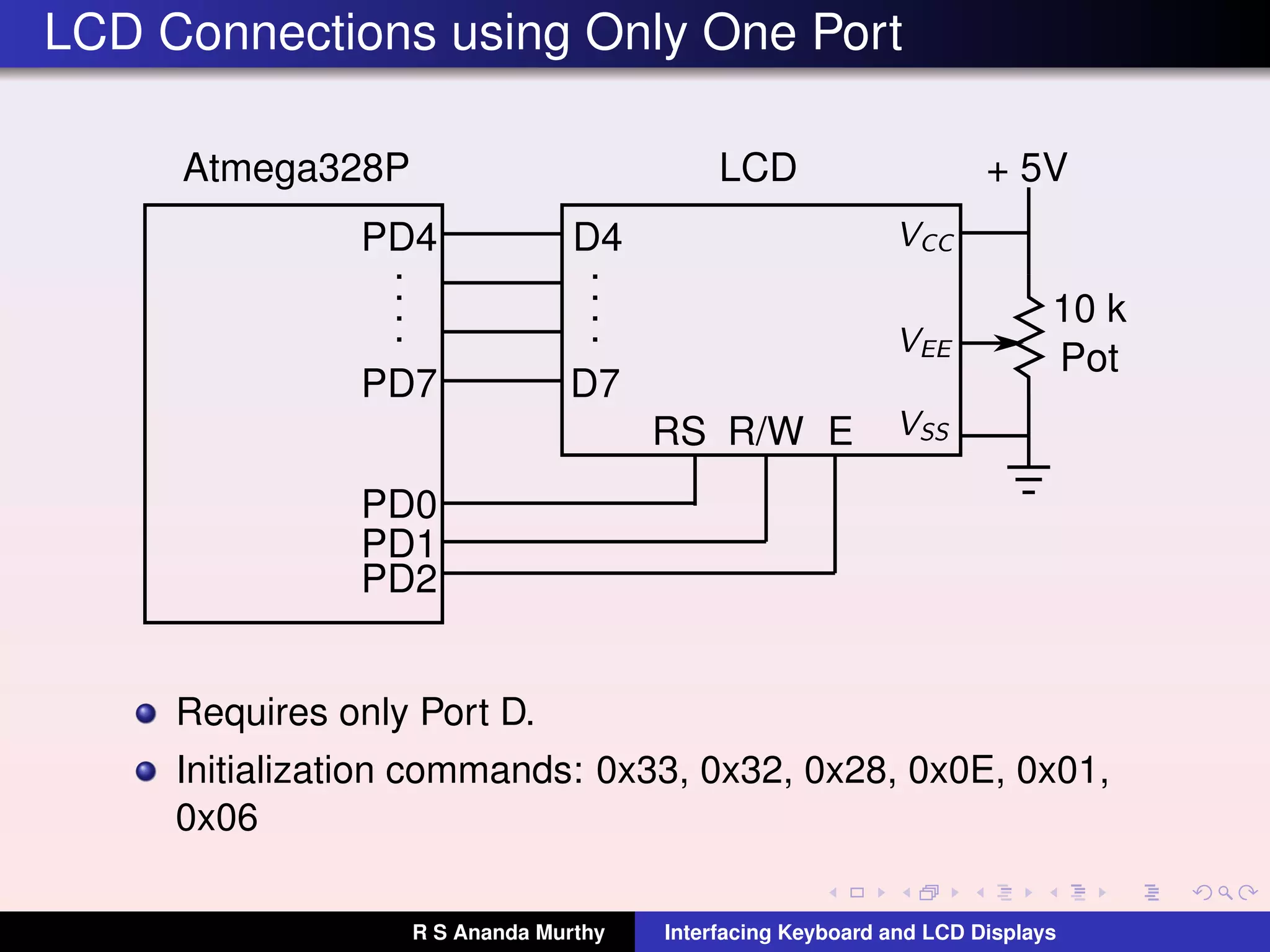
LCD Connections using Only One Port
10 k
Pot
PD4
PD7
.
.
.
.
Atmega328P LCD
D4
.
.
.
.
D7
PD0
PD1
PD2
RS R/W E
+ 5V
Requires only Port D.
Initialization commands: 0x33, 0x32, 0x28, 0x0E, 0x01,
0x06
R S Ananda Murthy Interfacing Keyboard and LCD Displays
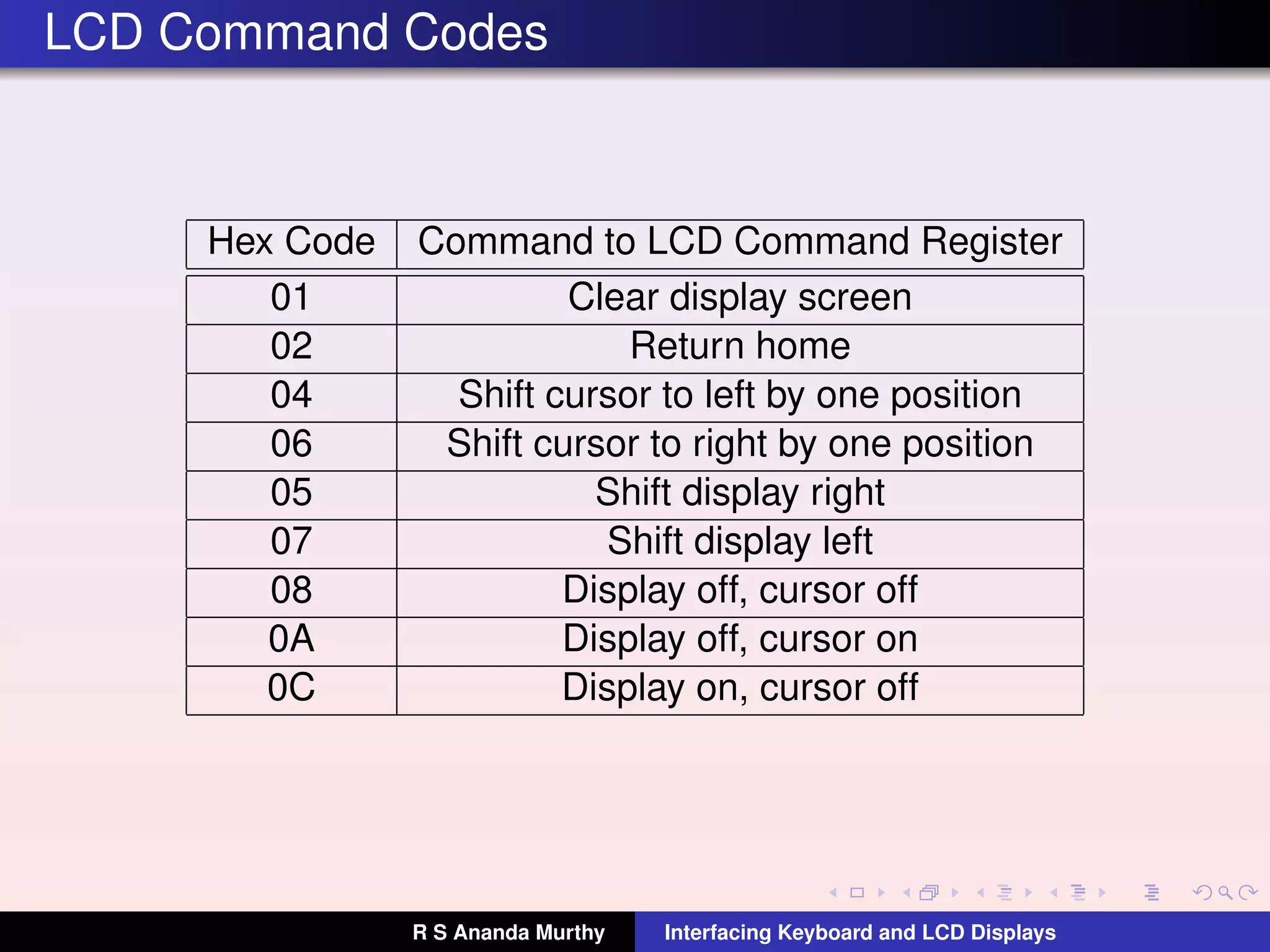
LCD Command Codes
Hex Code Command to LCD Command Register
01 Clear display screen
02 Return home
04 Shift cursor to left by one position
06 Shift cursor to right by one position
05 Shift display right
07 Shift display left
08 Display off, cursor off
0A Display off, cursor on
0C Display on, cursor off
R S Ananda Murthy Interfacing Keyboard and LCD Displays
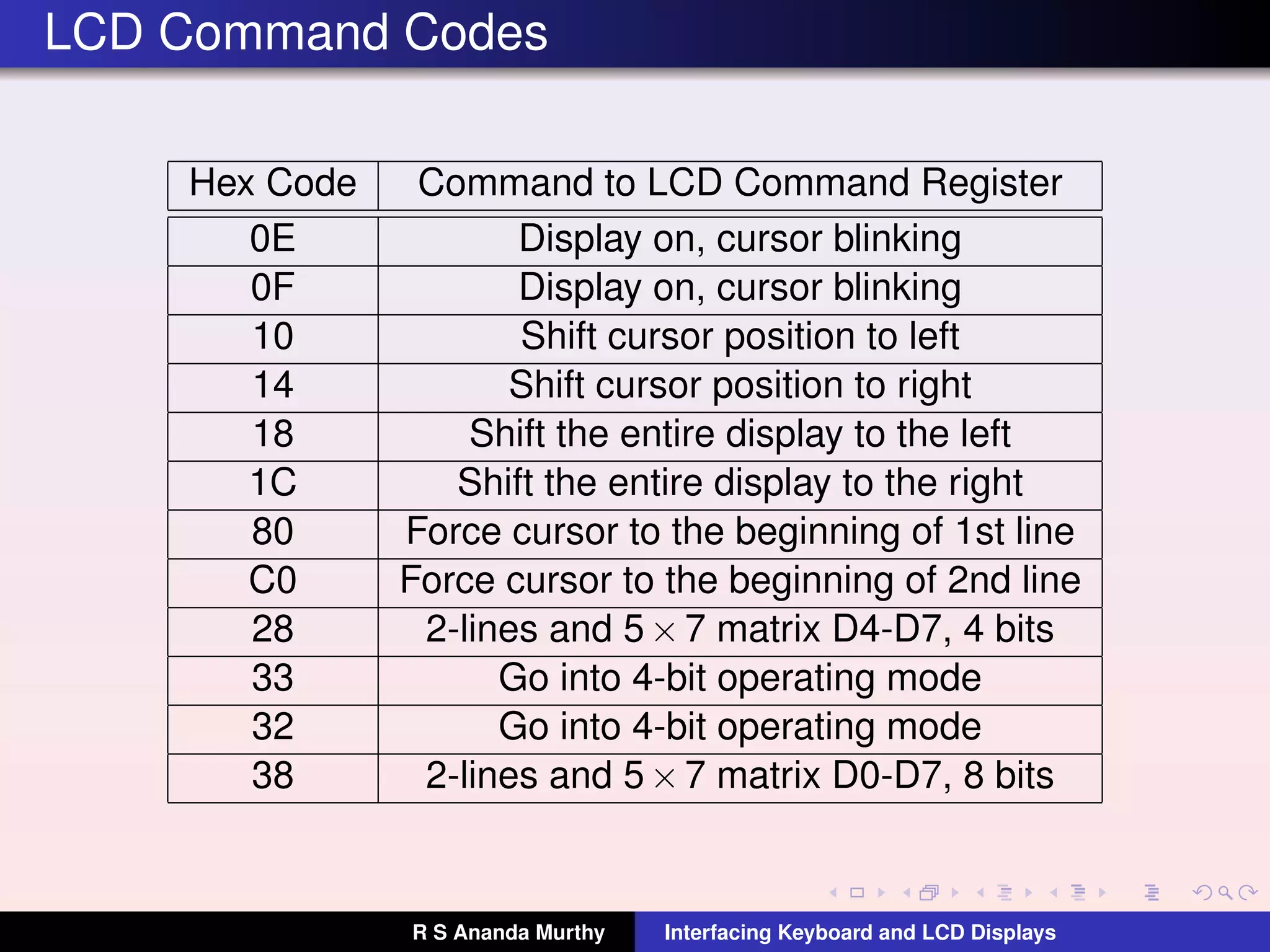
LCD Command Codes
Hex Code Command to LCD Command Register
0E Display on, cursor blinking
0F Display on, cursor blinking
10 Shift cursor position to left
14 Shift cursor position to right
18 Shift the entire display to the left
1C Shift the entire display to the right
80 Force cursor to the beginning of 1st line
C0 Force cursor to the beginning of 2nd line
28 2-lines and 5×7 matrix D4-D7, 4 bits
33 Go into 4-bit operating mode
32 Go into 4-bit operating mode
38 2-lines and 5×7 matrix D0-D7, 8 bits
R S Ananda Murthy Interfacing Keyboard and LCD Displays
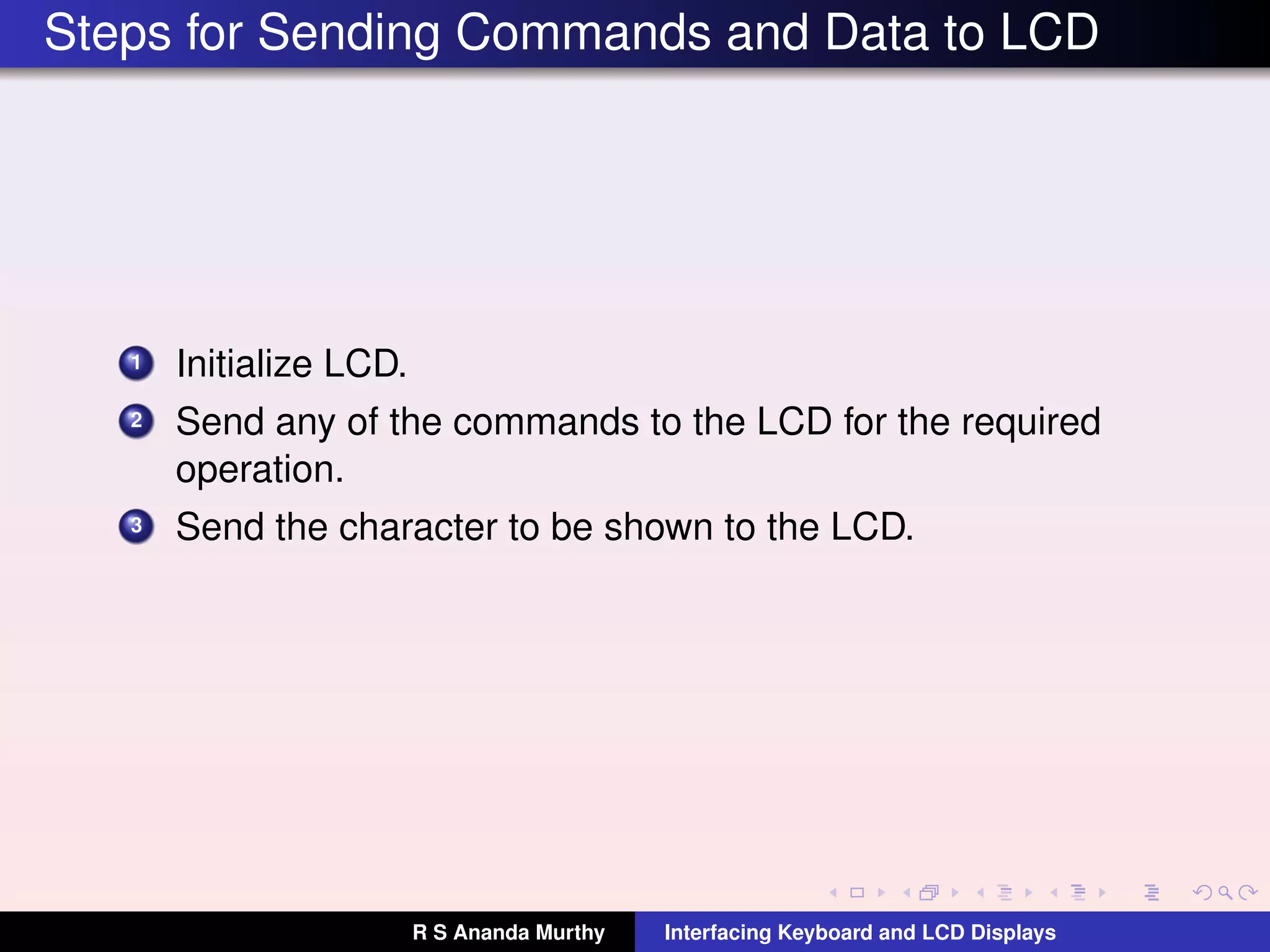
Steps for Sending Commands and Data to LCD
1 Initialize LCD.
2 Send any of the commands to the LCD for the required
operation.
3 Send the character to be shown to the LCD.
R S Ananda Murthy Interfacing Keyboard and LCD Displays
Initializing the LCD Panel
1 After power-on, wait for about 15 ms before sending the
initializing commands to the LCD panel.
2 For eg. to initialize the LCD for 5×7 matrix and 8-bit
operation, send the following commands to the command
register of the LCD panel: 0x38, 0x0E, and 0x01.
R S Ananda Murthy Interfacing Keyboard and LCD Displays
Sending Commands to the LCD Panel
Make pins RS = 0 and R/W = 0.
Place the command bits on the data pins.
Send a high-to-low pulse to the E pin of the panel.
Wait for about 100µs before sending the next command.
But in case of clear LCD (0x01) and Return Home (0x02)
commands wait for about 2 ms before issuing the next
command.
R S Ananda Murthy Interfacing Keyboard and LCD Displays
Sending Data to the LCD Panel
Make pins RS = 1 and R/W = 0.
Place the data on the data lines in ASCII format. For
example, to display A, the ASCII code to be placed on the
data lines would be 0x41.
Send a high-to-low pulse to the E pin of the panel.
Wait for about 100µs before sending the next data.
R S Ananda Murthy Interfacing Keyboard and LCD Displays
License
This work is licensed under a
Creative Commons Attribution 4.0 International License.
R S Ananda Murthy Interfacing Keyboard and LCD Displays

L14 kb-lcd-interfacing-with-atmega328 p

  • 1.
    Interfacing Keyboard andLCD Displays (Lecture-14) R S Ananda Murthy Associate Professor Department of Electrical & Electronics Engineering, Sri Jayachamarajendra College of Engineering, Mysore 570 006 R S Ananda Murthy Interfacing Keyboard and LCD Displays
  • 2.
    Linear Arrangement ofKeys MCU PB0 PB1 PB2 PB3 Keyboard is a collection of push-buttons. Each key has an associated internal pull-up resistor enabled. In linear arrangement, number of input lines required is equal to the number of keys. R S Ananda Murthy Interfacing Keyboard and LCD Displays
  • 3.
    Matrix Arrangement ofKeys When large number of keys are to be interfaced, linear arrangement is not preferred since the number of input lines required will be more. In matrix arrangement, a key is connected between a row and a column. If there are R rows and C columns, then, the maximum number of keys in the matrix could be N = R ×C and the number of lines required for interfacing would be R +C and not N. R S Ananda Murthy Interfacing Keyboard and LCD Displays
  • 4.
    Matrix Arrangement ofKeys 0123 4567 89AB CDEF 10k 10k 10k 10k 10k 10k 10k 10k PD4PD5PD6PD7 Input Lines PD3 PD2 PD1 PD0 OutputLines Vcc Only one 8-bit port is needed to interface 4×4 keyboard matrix instead of two 8-bit ports as in linear arrangement. R S Ananda Murthy Interfacing Keyboard and LCD Displays
  • 5.
    Steps to IdentityDepressed Key 1 Poll the keyboard for any previously pressed key to be released. 2 Poll the keyboard for any key to be pressed. 3 When any key is pressed, wait for about 20 ms to debounce the key. 4 Scan the keyboard to find which key is pressed to generate the keycode. 5 Perform the operation assigned to a key. 6 Go back to Step-1. R S Ananda Murthy Interfacing Keyboard and LCD Displays
  • 6.
    Keyboard Interface Logic Start Groundall rows Read columns All keys open ? No Yes A A Read columns Any key down ? No Yes Wait for debounce B B Read columns Any key down ? No Yes A C Identify Key C Do operation assigned to key D D In case of encoded keyboard, the keycode is generated by hardware. In case of un-encoded keyboard, the keycode has to be generated by software. R S Ananda Murthy Interfacing Keyboard and LCD Displays
  • 7.
    Identifying the DepressedKey Ground next row Read columns key on in this row ? No Yes Scan columns to identify key R S Ananda Murthy Interfacing Keyboard and LCD Displays
  • 8.
    16×2 LCD Panel RS Ananda Murthy Interfacing Keyboard and LCD Displays
  • 9.
    Advantages of LCDPanels LCD panels are becoming cheaper. LCD panels can display numbers, characters, and graphics unlike LEDs which are limited to numbers and few characters. Since LCDs have an in-built refreshing controller the MCU need not refresh the display as in the case of LEDs. LCDs are easy to program since ASCII codes are used for display by LCDs instead of 7-segment codes used for LEDs. LCDs consume less power. R S Ananda Murthy Interfacing Keyboard and LCD Displays
  • 10.
    LCD Pin Descriptions PinSignal I/O Description 1 VSS – Ground 2 VCC – +5 V Supply 3 VEE – Power supply to control contrast 4 RS I RS = 0 selects Command Register RS = 1 selects Data Register 5 R/W I R/W = 0 for write operation R/W = 1 for read operation 6 E I/O High-to-low pulse latches data to LCD 7-14 D0-D7 I/O Lines for sending or reading data LCD panel sizes are specified as C ×L where C =Characters per line and L = No. of lines. ASCII codes are used for display. 8-bits or 4bits data lines can be used for interfacing to the MCU. R S Ananda Murthy Interfacing Keyboard and LCD Displays
  • 11.
    LCD Connections using8-bit Data Bus 10 k Pot PD0 PD7 . . . . . . . Atmega328P LCD D0 . . . . . . . D7 PB0 PB1 PB2 RS R/W E + 5 V Commands to initialize the LCD panel: 0x38, 0x0E, 0x01. R S Ananda Murthy Interfacing Keyboard and LCD Displays
  • 12.
    LCD Connections using4-bit Data Bus 10 k Pot PD4 PD7 . . . . Atmega328P LCD D4 . . . . D7 PB0 PB1 PB2 RS R/W E +5 V Requires PB0, PB1, PB2 and higher nibble of Port D on which data is sent, higher nibble first. Initialization commands: 0x33, 0x32, 0x28, 0x0E, 0x01, 0x06 R S Ananda Murthy Interfacing Keyboard and LCD Displays
  • 13.
    LCD Connections usingOnly One Port 10 k Pot PD4 PD7 . . . . Atmega328P LCD D4 . . . . D7 PD0 PD1 PD2 RS R/W E + 5V Requires only Port D. Initialization commands: 0x33, 0x32, 0x28, 0x0E, 0x01, 0x06 R S Ananda Murthy Interfacing Keyboard and LCD Displays
  • 14.
    LCD Command Codes HexCode Command to LCD Command Register 01 Clear display screen 02 Return home 04 Shift cursor to left by one position 06 Shift cursor to right by one position 05 Shift display right 07 Shift display left 08 Display off, cursor off 0A Display off, cursor on 0C Display on, cursor off R S Ananda Murthy Interfacing Keyboard and LCD Displays
  • 15.
    LCD Command Codes HexCode Command to LCD Command Register 0E Display on, cursor blinking 0F Display on, cursor blinking 10 Shift cursor position to left 14 Shift cursor position to right 18 Shift the entire display to the left 1C Shift the entire display to the right 80 Force cursor to the beginning of 1st line C0 Force cursor to the beginning of 2nd line 28 2-lines and 5×7 matrix D4-D7, 4 bits 33 Go into 4-bit operating mode 32 Go into 4-bit operating mode 38 2-lines and 5×7 matrix D0-D7, 8 bits R S Ananda Murthy Interfacing Keyboard and LCD Displays
  • 16.
    Steps for SendingCommands and Data to LCD 1 Initialize LCD. 2 Send any of the commands to the LCD for the required operation. 3 Send the character to be shown to the LCD. R S Ananda Murthy Interfacing Keyboard and LCD Displays
  • 17.
    Initializing the LCDPanel 1 After power-on, wait for about 15 ms before sending the initializing commands to the LCD panel. 2 For eg. to initialize the LCD for 5×7 matrix and 8-bit operation, send the following commands to the command register of the LCD panel: 0x38, 0x0E, and 0x01. R S Ananda Murthy Interfacing Keyboard and LCD Displays
  • 18.
    Sending Commands tothe LCD Panel Make pins RS = 0 and R/W = 0. Place the command bits on the data pins. Send a high-to-low pulse to the E pin of the panel. Wait for about 100µs before sending the next command. But in case of clear LCD (0x01) and Return Home (0x02) commands wait for about 2 ms before issuing the next command. R S Ananda Murthy Interfacing Keyboard and LCD Displays
  • 19.
    Sending Data tothe LCD Panel Make pins RS = 1 and R/W = 0. Place the data on the data lines in ASCII format. For example, to display A, the ASCII code to be placed on the data lines would be 0x41. Send a high-to-low pulse to the E pin of the panel. Wait for about 100µs before sending the next data. R S Ananda Murthy Interfacing Keyboard and LCD Displays
  • 20.
    License This work islicensed under a Creative Commons Attribution 4.0 International License. R S Ananda Murthy Interfacing Keyboard and LCD Displays