Law Faculty
Research Visibility Series:
Workshop 1
Anthea Paulsen, Elizabeth Moll, Jeremiah Pietersen, Maureen
Chiware, Namhla Madini, Dilshaad Brey
UCT Libraries Bibliometrics Working Group
17 May 2017
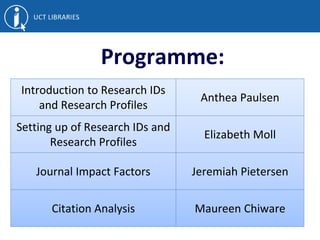
Programme:
Introduction to Research IDs
and Research Profiles
Anthea Paulsen
Setting up of Research IDs and
Research Profiles
Elizabeth Moll
Journal Impact Factors Jeremiah Pietersen
Citation Analysis Maureen Chiware
Introduction to
Researcher IDs &
Researcher Profiles:
Anthea Paulsen
4
http://www.lib.uct.ac.za/
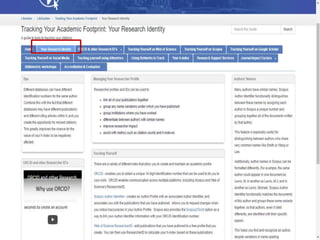
Introduction & Background
Dilshaad Brey, Glynnis Johnson,
Awot Gebregziabher & Dianne
Steele
5
http://libguides.lib.uct.ac.za/tracking_your_academic_footprint
6
Would someone who searches for
you find all your publications?
Is the information complete and
up-to-date?
Does it give an accurate reflection
of your scholarship?
What is a Research ID?
• Unique ID / Number.
• Distinguishes you from other researchers.
What is the Function of a Research ID?
• Differentiates between authors with similar or
same names.
• Groups any name variations under which you
have published.
• Different databases can have different
identification numbers for the same author.
• Groups institutions where you have worked.
• Links all your publications together.
Research ID Function (2)
• Makes your work more discoverable (more
citations!)
– Assists with metrics such as citation counts and h-
indexes.
– Improves researcher impact.
• Get full credit for your work.
• Saves time e.g. ORCID’s “enter once, re-use
often”
Research ID Function (3)
• Funders, Publishers & Institutions require a
unique ID
– See NRF Statement re ORCID ID
13
Title
8 April 2017
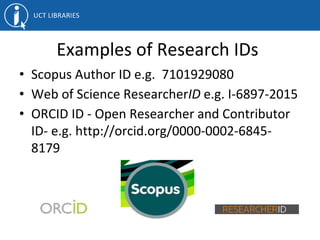
Examples of Research IDs
• Scopus Author ID e.g. 7101929080
• Web of Science ResearcherID e.g. I-6897-2015
• ORCID ID - Open Researcher and Contributor
ID- e.g. http://orcid.org/0000-0002-6845-
8179
Communication Across Platforms
• Link Scopus Author ID to ORCID ID.
• Link to ORCID ID from ResearcherID.
What is a Research Profile? (1)
• Aka scholarly or academic profile.
• Distinguishes you from other researchers.
• Demonstrates the uniqueness and impact
of your research.
16
What is a Research Profile? (2)
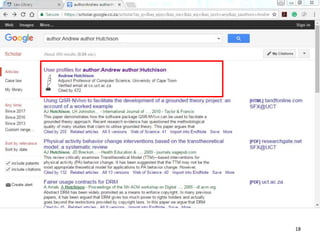
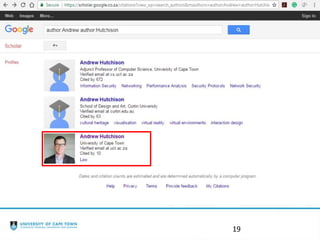
• Create your own research profile in, for
example, Google Scholar.
• Import & add works you have authored.
• GS Profile – NRF requirement.
17
18
19
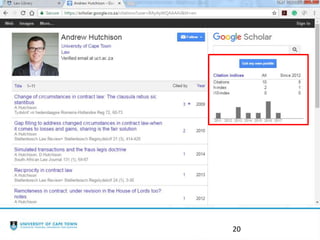
20
Researcher IDs set-up:
ORCID
Web of Science
Scopus
Google Scholar
Elizabeth Moll
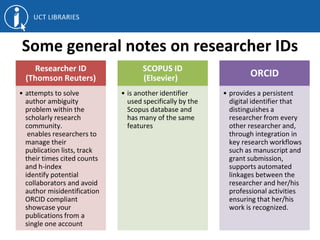
Some general notes on researcher IDs
Researcher ID
(Thomson Reuters)
• attempts to solve
author ambiguity
problem within the
scholarly research
community.
enables researchers to
manage their
publication lists, track
their times cited counts
and h-index
identify potential
collaborators and avoid
author misidentification
ORCID compliant
showcase your
publications from a
single one account
SCOPUS ID
(Elsevier)
• is another identifier
used specifically by the
Scopus database and
has many of the same
features
ORCID
• provides a persistent
digital identifier that
distinguishes a
researcher from every
other researcher and,
through integration in
key research workflows
such as manuscript and
grant submission,
supports automated
linkages between the
researcher and her/his
professional activities
ensuring that her/his
work is recognized.
ORCID
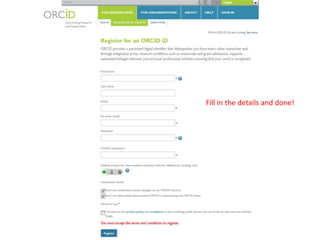
Fill in the details and done!
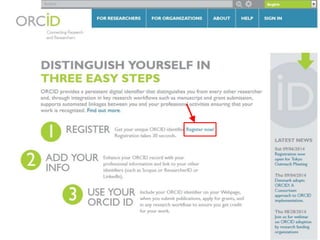
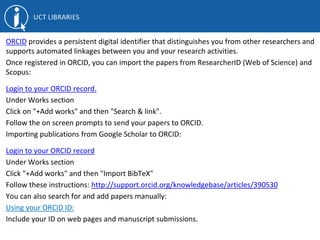
ORCID provides a persistent digital identifier that distinguishes you from other researchers and
supports automated linkages between you and your research activities.
Once registered in ORCID, you can import the papers from ResearcherID (Web of Science) and
Scopus:
Login to your ORCID record.
Under Works section
Click on "+Add works" and then "Search & link".
Follow the on screen prompts to send your papers to ORCID.
Importing publications from Google Scholar to ORCID:
Login to your ORCID record
Under Works section
Click "+Add works" and then "Import BibTeX"
Follow these instructions: http://support.orcid.org/knowledgebase/articles/390530
You can also search for and add papers manually:
Using your ORCID ID:
Include your ID on web pages and manuscript submissions.
Web of Science
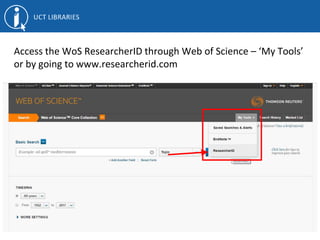
Access the WoS ResearcherID through Web of Science – ‘My Tools’
or by going to www.researcherid.com
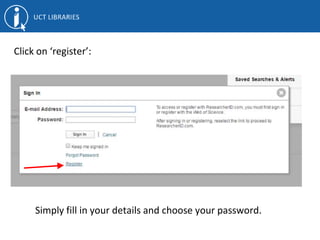
Click on ‘register’:
Simply fill in your details and choose your password.
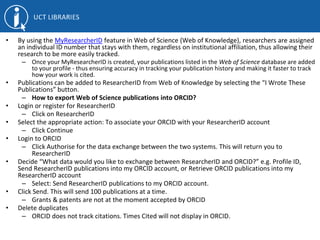
• By using the MyResearcherID feature in Web of Science (Web of Knowledge), researchers are assigned
an individual ID number that stays with them, regardless on institutional affiliation, thus allowing their
research to be more easily tracked.
– Once your MyResearcherID is created, your publications listed in the Web of Science database are added
to your profile - thus ensuring accuracy in tracking your publication history and making it faster to track
how your work is cited.
• Publications can be added to ResearcherID from Web of Knowledge by selecting the “I Wrote These
Publications” button.
– How to export Web of Science publications into ORCID?
• Login or register for ResearcherID
– Click on ResearcherID
• Select the appropriate action: To associate your ORCID with your ResearcherID account
– Click Continue
• Login to ORCID
– Click Authorise for the data exchange between the two systems. This will return you to
ResearcherID
• Decide “What data would you like to exchange between ResearcherID and ORCID?” e.g. Profile ID,
Send ResearcherID publications into my ORCID account, or Retrieve ORCID publications into my
ResearcherID account
– Select: Send ResearcherID publications to my ORCID account.
• Click Send. This will send 100 publications at a time.
– Grants & patents are not at the moment accepted by ORCID
• Delete duplicates
– ORCID does not track citations. Times Cited will not display in ORCID.
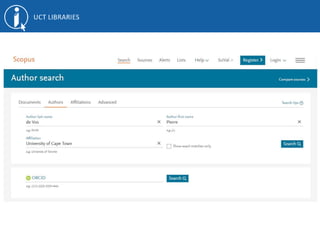
Scopus
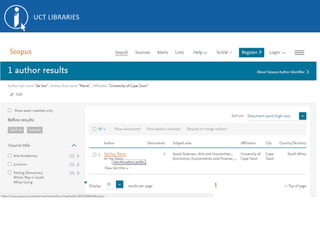
• Scopus Author Identifier distinguishes between similar names by
assigning each author in Scopus a unique number and grouping
together all of the documents written by that author.
• For more information see Scopus Author Identifier.
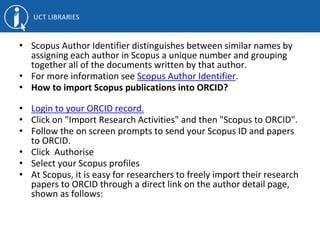
• How to import Scopus publications into ORCID?
• Login to your ORCID record.
• Click on "Import Research Activities" and then "Scopus to ORCID".
• Follow the on screen prompts to send your Scopus ID and papers
to ORCID.
• Click Authorise
• Select your Scopus profiles
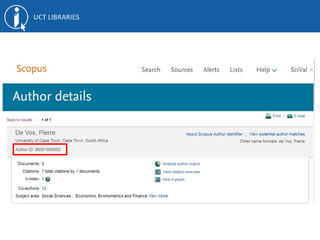
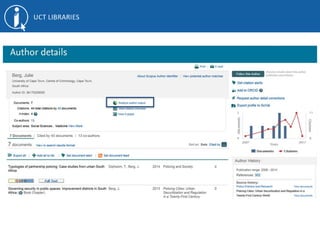
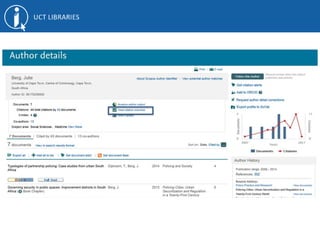
• At Scopus, it is easy for researchers to freely import their research
papers to ORCID through a direct link on the author detail page,
shown as follows:
Google Scholar:
How to set up your profile
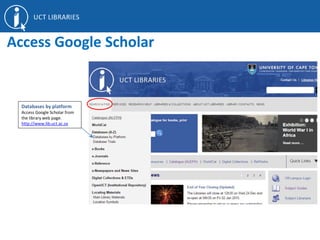
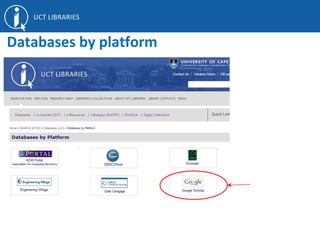
Databases by platform
Access Google Scholar from
the library web page.
http://www.lib.uct.ac.za
Access Google Scholar
Databases by platform
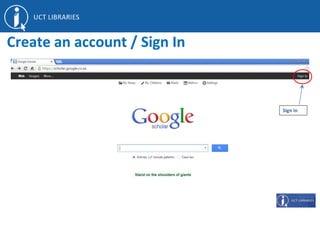
Sign In
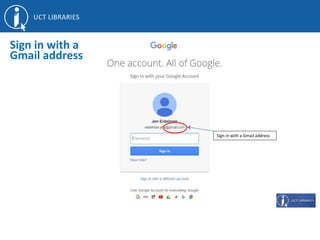
Create an account / Sign In
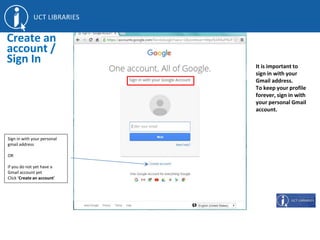
Sign in with your personal
gmail address
OR
if you do not yet have a
Gmail account yet
Click ‘Create an account’
Create an
account /
Sign In It is important to
sign in with your
Gmail address.
To keep your profile
forever, sign in with
your personal Gmail
account.
Sign in with a Gmail address
Sign in with a
Gmail address
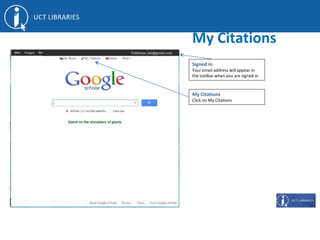
Signed in
Your email address will appear in
the toolbar when you are signed in
My Citations
Click on My Citations
My Citations
Set up a
profile
Step 1
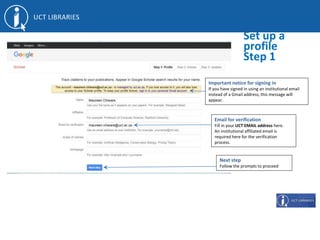
Email for verification
Fill in your UCT EMAIL address here.
An institutional affiliated email is
required here for the verification
process.
Next step
Follow the prompts to proceed
Important notice for signing in
If you have signed in using an institutional email
instead of a Gmail address, this message will
appear.
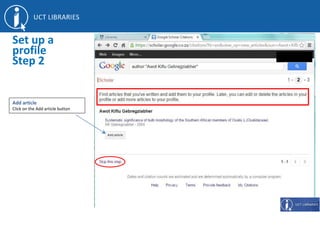
Add article
Click on the Add article button
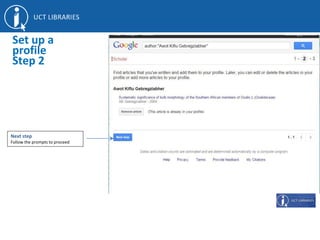
Set up a
profile
Step 2
Next step
Follow the prompts to proceed
Set up a
profile
Step 2
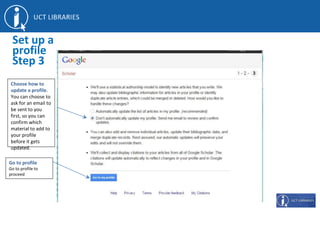
Go to profile
Go to profile to
proceed
Set up a
profile
Step 3
Choose how to
update a profile.
You can choose to
ask for an email to
be sent to you
first, so you can
confirm which
material to add to
your profile
before it gets
updated.
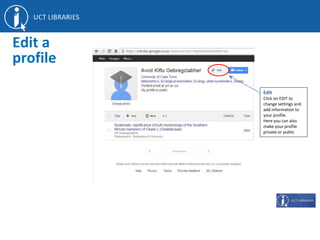
Edit
Click on EDIT to
change settings and
add information to
your profile.
Here you can also
make your profile
private or public
Edit a
profile
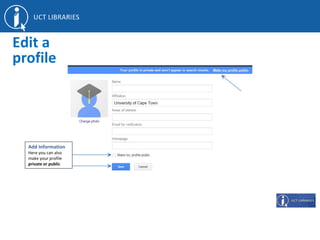
Add Information
Here you can also
make your profile
private or public
Edit a
profile
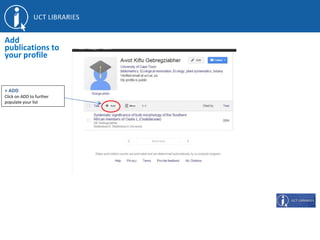
+ ADD
Click on ADD to further
populate your list
Add
publications to
your profile
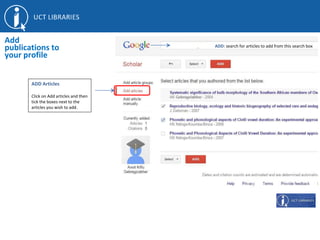
ADD Articles
Click on Add articles and then
tick the boxes next to the
articles you wish to add.
Add
publications to
your profile
Se ADD: search for articles to add from this search box
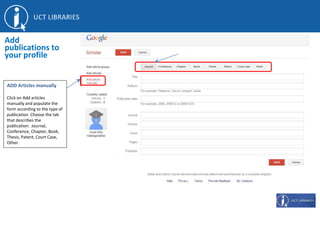
ADD Articles manually
Click on Add articles
manually and populate the
form according to the type of
publication. Choose the tab
that describes the
publication: Journal,
Conference, Chapter, Book,
Thesis, Patent, Court Case,
Other.
Add
publications to
your profile
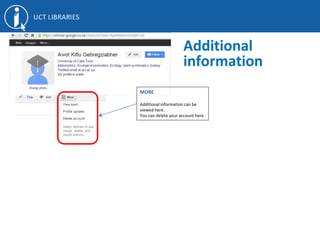
MORE
Additional information can be
viewed here.
You can delete your account here.
Additional
information
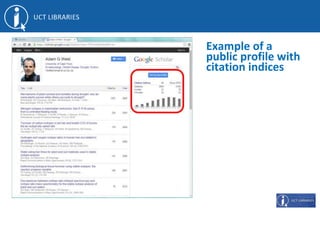
Example of a
public profile with
citation indices
Journal Impact Factor
Jeremiah Pietersen
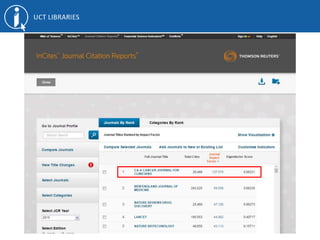
What is the Journal Impact Factor (JIF)
• Developed by Institute for Scientific
Information
• These are metrics that have meaning for the
journal rather than the author
• Purports to speak of the journal’s prestige in
research and impact
• Calculated using the number of citations
divided by number of articles produced by the
journal
Purpose as a metric
• Theoretically, publishing in a high impact
journal gives a researcher better visibility
• High impact journals sometimes tend to be
long established journal titles such as Nature
Its place in research and science
•Serves as an indicator of “good science” based
on the premise that if publications are getting
cited, it must be valuable research
– Provides basis for a good narrative for funding or
promotion
•Articles get impact by association to the
journal
JIF and Open Access
• Open Access publishing is a new disruptor to
the publishing space
• A premise of Open Access is that publically
funded research should be publically available
• Many Open Access journals are not indexed in
Web of Science
JIF and Law
• JIF does not account for context driven
research, that is, research that is only relevant
for its locality
Why we still use JIF
• JIF is a long-standing metric
• No alternative with as much authority
• Article Level Metrics (PLoS)
• Funder requirements
Citation Analysis
Maureen Chiware
What is Citation analysis?
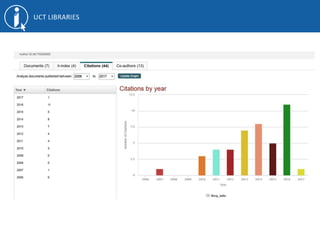
Looks at published works in terms of:
• How many citations have been received?
• Who cited?
• When cited?
• Where cited?
– journals
– countries
Why Citation Analysis?
• Determine research impact
• Identify seminal papers
• Identify journals with the greatest impact
• Analyse topics and identify trends
• Benchmarking
• Analyse personal performance metrics
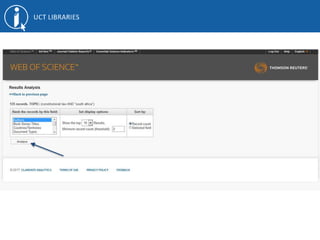
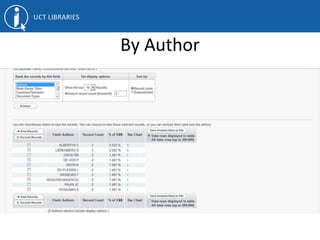
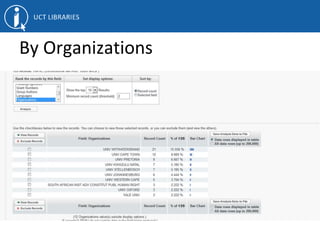
Analysis by:
● Author
● Topic
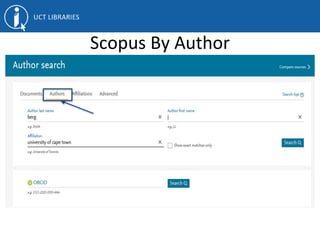
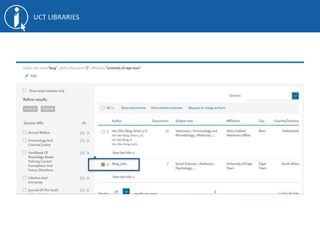
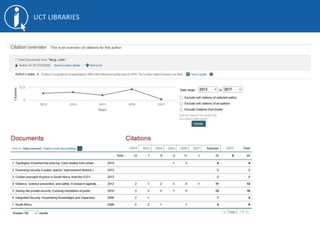
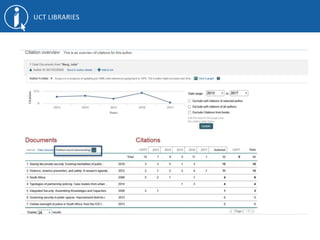
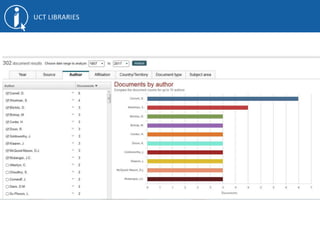
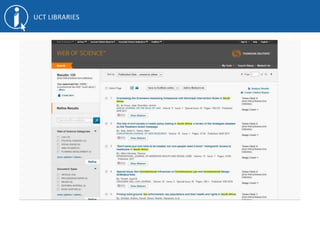
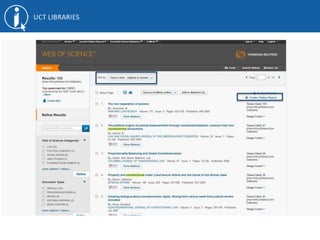
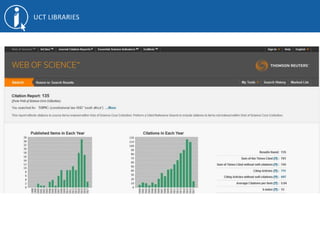
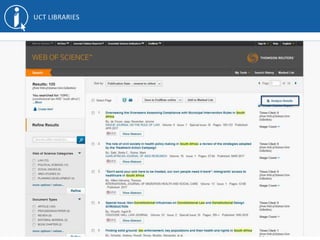
Scopus By Author
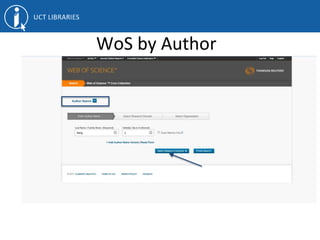
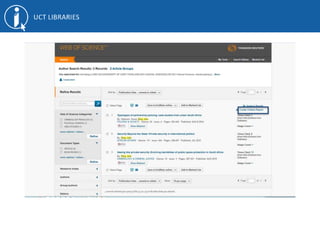
WoS by Author
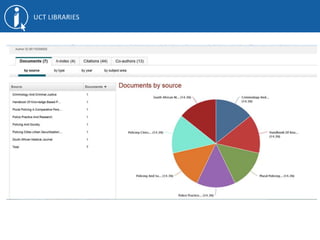
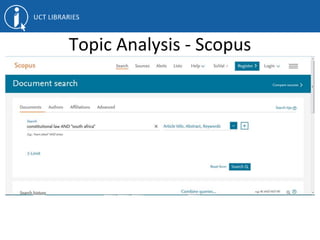
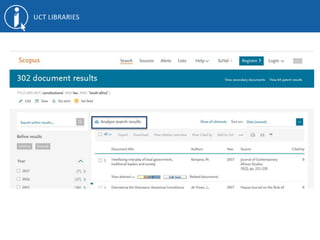
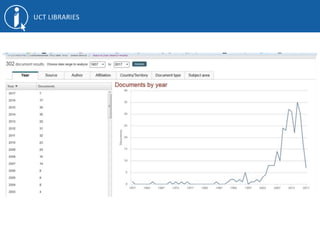
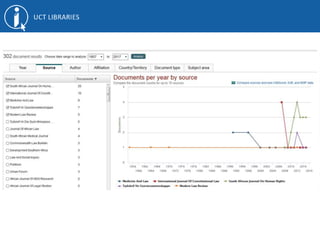
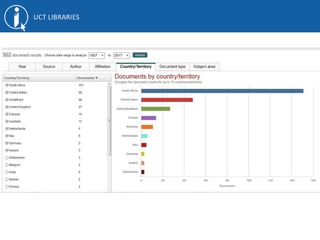
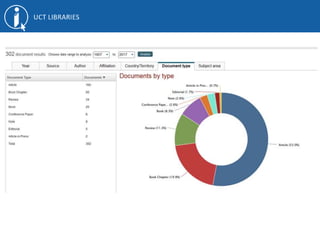
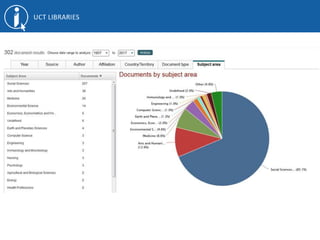
Topic Analysis - Scopus
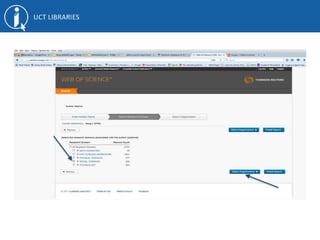
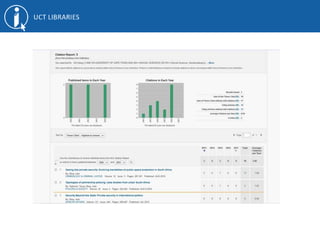
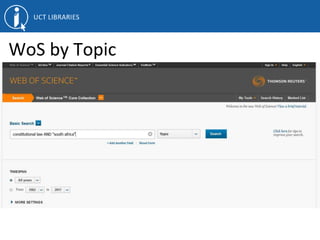
WoS by Topic
By Author
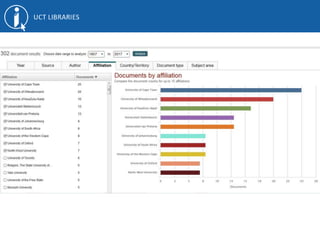
By Organizations
h-index
What is the h-Index?
● indicator of research impact based on citation measurement.
● measures both productivity and the citation impact of a researcher’s
publications
● tries to relate how much a researcher has published to how much the work
has been cited
● h-index is not distorted by one single highly cited paper, nor by a large
number of poorly cited documents
● can be used for an individual author, or any collection of documents, e.g., for
a journal or a research group’s outputs
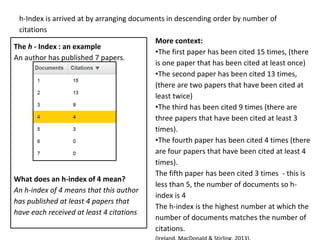
h-Index is arrived at by arranging documents in descending order by number of
citations
The h - Index : an example
An author has published 7 papers.
What does an h-index of 4 mean?
An h-index of 4 means that this author
has published at least 4 papers that
have each received at least 4 citations
More context:
•The first paper has been cited 15 times, (there
is one paper that has been cited at least once)
•The second paper has been cited 13 times,
(there are two papers that have been cited at
least twice)
•The third has been cited 9 times (there are
three papers that have been cited at least 3
times).
•The fourth paper has been cited 4 times (there
are four papers that have been cited at least 4
times).
The fifth paper has been cited 3 times - this is
less than 5, the number of documents so h-
index is 4
The h-index is the highest number at which the
number of documents matches the number of
citations.
Limitations of citation analysis
●It is difficult to compare scores across fields
●Publication and citation patterns vary between disciplines
●Open to manipulation through practices like self-citation
●Does not take into account contributions of authors - lead
versus co-author
Limitations (continued)
●All citations are equal - does not differentiate reasons for citing
eg. negative citation
●h-index is not time sensitive - so researchers with shorter
careers are at a disadvantage
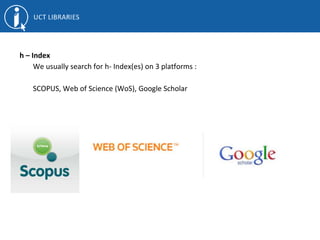
h – Index
We usually search for h- Index(es) on 3 platforms :
SCOPUS, Web of Science (WoS), Google Scholar
Where to find your h-index
Locating your h-index in SCOPUS
https://www.slideshare.net/JenEidelman/locating-ones-h-index-in-scopus-39197755
Locating your h-index in Google Scholar
https://www.slideshare.net/JenEidelman/locating-ones-hndex-in-google-scholar
Locating your h-index in Web of Science
https://www.slideshare.net/JenEidelman/locating-ones-h-index-in-web-of-science-
39196494
Summary
● h-index is only one indicator for assessment
● There are dozens of other indicators available to
measure scholarly impact
● To get a full view of researchers impact need to
look at other indicators
Need more help?
Contact your subject Librarian at:
http://www.lib.uct.ac.za/lib/subject-librarians
Next week:
Altmetrics and
maximising your
research visibility
Thank You

Law research visibility workshop 1

  • 1.
    Law Faculty Research VisibilitySeries: Workshop 1 Anthea Paulsen, Elizabeth Moll, Jeremiah Pietersen, Maureen Chiware, Namhla Madini, Dilshaad Brey UCT Libraries Bibliometrics Working Group 17 May 2017
  • 2.
    Programme: Introduction to ResearchIDs and Research Profiles Anthea Paulsen Setting up of Research IDs and Research Profiles Elizabeth Moll Journal Impact Factors Jeremiah Pietersen Citation Analysis Maureen Chiware
  • 3.
    Introduction to Researcher IDs& Researcher Profiles: Anthea Paulsen
  • 4.
  • 5.
    Introduction & Background DilshaadBrey, Glynnis Johnson, Awot Gebregziabher & Dianne Steele 5 http://libguides.lib.uct.ac.za/tracking_your_academic_footprint
  • 6.
  • 8.
    Would someone whosearches for you find all your publications? Is the information complete and up-to-date? Does it give an accurate reflection of your scholarship?
  • 9.
    What is aResearch ID? • Unique ID / Number. • Distinguishes you from other researchers.
  • 10.
    What is theFunction of a Research ID? • Differentiates between authors with similar or same names. • Groups any name variations under which you have published. • Different databases can have different identification numbers for the same author. • Groups institutions where you have worked. • Links all your publications together.
  • 11.
    Research ID Function(2) • Makes your work more discoverable (more citations!) – Assists with metrics such as citation counts and h- indexes. – Improves researcher impact. • Get full credit for your work. • Saves time e.g. ORCID’s “enter once, re-use often”
  • 12.
    Research ID Function(3) • Funders, Publishers & Institutions require a unique ID – See NRF Statement re ORCID ID
  • 13.
  • 14.
    Examples of ResearchIDs • Scopus Author ID e.g. 7101929080 • Web of Science ResearcherID e.g. I-6897-2015 • ORCID ID - Open Researcher and Contributor ID- e.g. http://orcid.org/0000-0002-6845- 8179
  • 15.
    Communication Across Platforms •Link Scopus Author ID to ORCID ID. • Link to ORCID ID from ResearcherID.
  • 16.
    What is aResearch Profile? (1) • Aka scholarly or academic profile. • Distinguishes you from other researchers. • Demonstrates the uniqueness and impact of your research. 16
  • 17.
    What is aResearch Profile? (2) • Create your own research profile in, for example, Google Scholar. • Import & add works you have authored. • GS Profile – NRF requirement. 17
  • 18.
  • 19.
  • 20.
  • 21.
    Researcher IDs set-up: ORCID Webof Science Scopus Google Scholar Elizabeth Moll
  • 22.
    Some general noteson researcher IDs Researcher ID (Thomson Reuters) • attempts to solve author ambiguity problem within the scholarly research community. enables researchers to manage their publication lists, track their times cited counts and h-index identify potential collaborators and avoid author misidentification ORCID compliant showcase your publications from a single one account SCOPUS ID (Elsevier) • is another identifier used specifically by the Scopus database and has many of the same features ORCID • provides a persistent digital identifier that distinguishes a researcher from every other researcher and, through integration in key research workflows such as manuscript and grant submission, supports automated linkages between the researcher and her/his professional activities ensuring that her/his work is recognized.
  • 23.
  • 25.
    Fill in thedetails and done!
  • 26.
    ORCID provides apersistent digital identifier that distinguishes you from other researchers and supports automated linkages between you and your research activities. Once registered in ORCID, you can import the papers from ResearcherID (Web of Science) and Scopus: Login to your ORCID record. Under Works section Click on "+Add works" and then "Search & link". Follow the on screen prompts to send your papers to ORCID. Importing publications from Google Scholar to ORCID: Login to your ORCID record Under Works section Click "+Add works" and then "Import BibTeX" Follow these instructions: http://support.orcid.org/knowledgebase/articles/390530 You can also search for and add papers manually: Using your ORCID ID: Include your ID on web pages and manuscript submissions.
  • 27.
  • 28.
    Access the WoSResearcherID through Web of Science – ‘My Tools’ or by going to www.researcherid.com
  • 29.
    Click on ‘register’: Simplyfill in your details and choose your password.
  • 30.
    • By usingthe MyResearcherID feature in Web of Science (Web of Knowledge), researchers are assigned an individual ID number that stays with them, regardless on institutional affiliation, thus allowing their research to be more easily tracked. – Once your MyResearcherID is created, your publications listed in the Web of Science database are added to your profile - thus ensuring accuracy in tracking your publication history and making it faster to track how your work is cited. • Publications can be added to ResearcherID from Web of Knowledge by selecting the “I Wrote These Publications” button. – How to export Web of Science publications into ORCID? • Login or register for ResearcherID – Click on ResearcherID • Select the appropriate action: To associate your ORCID with your ResearcherID account – Click Continue • Login to ORCID – Click Authorise for the data exchange between the two systems. This will return you to ResearcherID • Decide “What data would you like to exchange between ResearcherID and ORCID?” e.g. Profile ID, Send ResearcherID publications into my ORCID account, or Retrieve ORCID publications into my ResearcherID account – Select: Send ResearcherID publications to my ORCID account. • Click Send. This will send 100 publications at a time. – Grants & patents are not at the moment accepted by ORCID • Delete duplicates – ORCID does not track citations. Times Cited will not display in ORCID.
  • 31.
  • 35.
    • Scopus AuthorIdentifier distinguishes between similar names by assigning each author in Scopus a unique number and grouping together all of the documents written by that author. • For more information see Scopus Author Identifier. • How to import Scopus publications into ORCID? • Login to your ORCID record. • Click on "Import Research Activities" and then "Scopus to ORCID". • Follow the on screen prompts to send your Scopus ID and papers to ORCID. • Click Authorise • Select your Scopus profiles • At Scopus, it is easy for researchers to freely import their research papers to ORCID through a direct link on the author detail page, shown as follows:
  • 36.
    Google Scholar: How toset up your profile
  • 37.
    Databases by platform AccessGoogle Scholar from the library web page. http://www.lib.uct.ac.za Access Google Scholar
  • 38.
  • 39.
    Sign In Create anaccount / Sign In
  • 40.
    Sign in withyour personal gmail address OR if you do not yet have a Gmail account yet Click ‘Create an account’ Create an account / Sign In It is important to sign in with your Gmail address. To keep your profile forever, sign in with your personal Gmail account.
  • 41.
    Sign in witha Gmail address Sign in with a Gmail address
  • 42.
    Signed in Your emailaddress will appear in the toolbar when you are signed in My Citations Click on My Citations My Citations
  • 43.
    Set up a profile Step1 Email for verification Fill in your UCT EMAIL address here. An institutional affiliated email is required here for the verification process. Next step Follow the prompts to proceed Important notice for signing in If you have signed in using an institutional email instead of a Gmail address, this message will appear.
  • 44.
    Add article Click onthe Add article button Set up a profile Step 2
  • 45.
    Next step Follow theprompts to proceed Set up a profile Step 2
  • 46.
    Go to profile Goto profile to proceed Set up a profile Step 3 Choose how to update a profile. You can choose to ask for an email to be sent to you first, so you can confirm which material to add to your profile before it gets updated.
  • 47.
    Edit Click on EDITto change settings and add information to your profile. Here you can also make your profile private or public Edit a profile
  • 48.
    Add Information Here youcan also make your profile private or public Edit a profile
  • 49.
    + ADD Click onADD to further populate your list Add publications to your profile
  • 50.
    ADD Articles Click onAdd articles and then tick the boxes next to the articles you wish to add. Add publications to your profile Se ADD: search for articles to add from this search box
  • 51.
    ADD Articles manually Clickon Add articles manually and populate the form according to the type of publication. Choose the tab that describes the publication: Journal, Conference, Chapter, Book, Thesis, Patent, Court Case, Other. Add publications to your profile
  • 52.
    MORE Additional information canbe viewed here. You can delete your account here. Additional information
  • 53.
    Example of a publicprofile with citation indices
  • 54.
  • 55.
    What is theJournal Impact Factor (JIF) • Developed by Institute for Scientific Information • These are metrics that have meaning for the journal rather than the author • Purports to speak of the journal’s prestige in research and impact • Calculated using the number of citations divided by number of articles produced by the journal
  • 57.
    Purpose as ametric • Theoretically, publishing in a high impact journal gives a researcher better visibility • High impact journals sometimes tend to be long established journal titles such as Nature
  • 58.
    Its place inresearch and science •Serves as an indicator of “good science” based on the premise that if publications are getting cited, it must be valuable research – Provides basis for a good narrative for funding or promotion •Articles get impact by association to the journal
  • 59.
    JIF and OpenAccess • Open Access publishing is a new disruptor to the publishing space • A premise of Open Access is that publically funded research should be publically available • Many Open Access journals are not indexed in Web of Science
  • 60.
    JIF and Law •JIF does not account for context driven research, that is, research that is only relevant for its locality
  • 61.
    Why we stilluse JIF • JIF is a long-standing metric • No alternative with as much authority • Article Level Metrics (PLoS) • Funder requirements
  • 62.
  • 63.
    What is Citationanalysis? Looks at published works in terms of: • How many citations have been received? • Who cited? • When cited? • Where cited? – journals – countries
  • 64.
    Why Citation Analysis? •Determine research impact • Identify seminal papers • Identify journals with the greatest impact • Analyse topics and identify trends • Benchmarking • Analyse personal performance metrics
  • 65.
  • 66.
  • 74.
  • 78.
  • 87.
  • 93.
  • 94.
  • 95.
  • 96.
    What is theh-Index? ● indicator of research impact based on citation measurement. ● measures both productivity and the citation impact of a researcher’s publications ● tries to relate how much a researcher has published to how much the work has been cited ● h-index is not distorted by one single highly cited paper, nor by a large number of poorly cited documents ● can be used for an individual author, or any collection of documents, e.g., for a journal or a research group’s outputs
  • 97.
    h-Index is arrivedat by arranging documents in descending order by number of citations The h - Index : an example An author has published 7 papers. What does an h-index of 4 mean? An h-index of 4 means that this author has published at least 4 papers that have each received at least 4 citations More context: •The first paper has been cited 15 times, (there is one paper that has been cited at least once) •The second paper has been cited 13 times, (there are two papers that have been cited at least twice) •The third has been cited 9 times (there are three papers that have been cited at least 3 times). •The fourth paper has been cited 4 times (there are four papers that have been cited at least 4 times). The fifth paper has been cited 3 times - this is less than 5, the number of documents so h- index is 4 The h-index is the highest number at which the number of documents matches the number of citations.
  • 98.
    Limitations of citationanalysis ●It is difficult to compare scores across fields ●Publication and citation patterns vary between disciplines ●Open to manipulation through practices like self-citation ●Does not take into account contributions of authors - lead versus co-author
  • 99.
    Limitations (continued) ●All citationsare equal - does not differentiate reasons for citing eg. negative citation ●h-index is not time sensitive - so researchers with shorter careers are at a disadvantage
  • 100.
    h – Index Weusually search for h- Index(es) on 3 platforms : SCOPUS, Web of Science (WoS), Google Scholar
  • 101.
    Where to findyour h-index Locating your h-index in SCOPUS https://www.slideshare.net/JenEidelman/locating-ones-h-index-in-scopus-39197755 Locating your h-index in Google Scholar https://www.slideshare.net/JenEidelman/locating-ones-hndex-in-google-scholar Locating your h-index in Web of Science https://www.slideshare.net/JenEidelman/locating-ones-h-index-in-web-of-science- 39196494
  • 102.
    Summary ● h-index isonly one indicator for assessment ● There are dozens of other indicators available to measure scholarly impact ● To get a full view of researchers impact need to look at other indicators
  • 103.
    Need more help? Contactyour subject Librarian at: http://www.lib.uct.ac.za/lib/subject-librarians
  • 104.
    Next week: Altmetrics and maximisingyour research visibility
  • 105.