Library Training:
Genetics Hons
ElizabethMoll-Willard
FacultyLibrarian:AgriSciences
emw@sun.ac.za
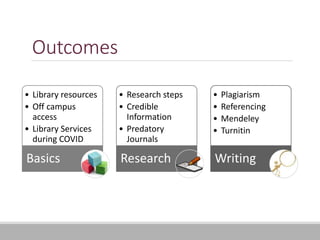
Outcomes
• Library resources
• Off campus
access
• Library Services
during COVID
Basics
• Research steps
• Credible
Information
• Predatory
Journals
Research
• Plagiarism
• Referencing
• Mendeley
• Turnitin
Writing
Begin by filling in this form
https://forms.office.com/r/cnZGi51W1k
3
Get to know the
library resources
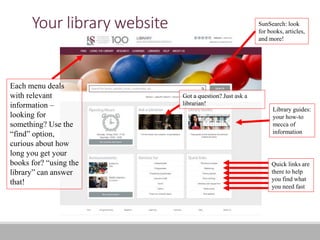
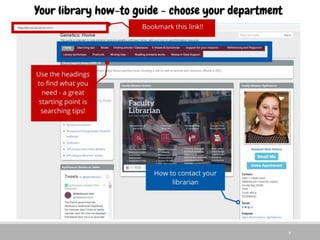
Your library website
Each menu deals
with relevant
information –
looking for
something? Use the
ā€œfindā€ option,
curious about how
long you get your
books for? ā€œusing the
libraryā€ can answer
that!
SunSearch: look
for books, articles,
and more!
Library guides:
your how-to
mecca of
information
Quick links are
there to help
you find what
you need fast
Got a question? Just ask a
librarian!
6
Off campus
access
Library services
during COVID
Getting off campus access to
resources – Library links
8
Because the library purchases a lot of the material, you will need to "prove"
to the database you are a student. Most databases might ask you for a
password.
Do not put in your own credentials unless there's a specific instruction.
The library automatically "fills" in the password through IP authentication. If
your IP address reads that you are on an internet connection that is linked
to Stellenbosch University, then the database will give you access. This
means that when you are off-campus, you need to use a proxy to tell the
database you are from Stellenbosch.
This proxy is automatically contained in all the links on the library's page
and your library how-to guide's page.
So the simplest way to get access, is to simply use the library website
and your library how-to guide.
Getting off campus access to
resources
9
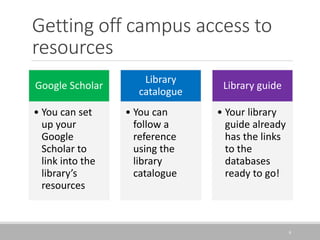
Google Scholar
• You can set
up your
Google
Scholar to
link into the
library’s
resources
Library
catalogue
• You can
follow a
reference
using the
library
catalogue
Library guide
• Your library
guide already
has the links
to the
databases
ready to go!
COVID-19 and the Library
Limited amount of students – so bookings are essential to visit the library.
To get a book, you don’t need to visit the library – you can simply request a
book pick up by emailing the name of the book, the shelf number and your
student number to jsg_uitl@sun.ac.za
Although you can’t drop in at my desk anymore, you can book an appointment
with me online at any time by clicking on the ā€œonline appointmentā€ box on my
library guide.
10
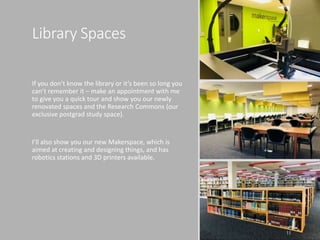
Library Spaces
If you don’t know the library or it’s been so long you
can’t remember it – make an appointment with me
to give you a quick tour and show you our newly
renovated spaces and the Research Commons (our
exclusive postgrad study space).
I’ll also show you our new Makerspace, which is
aimed at creating and designing things, and has
robotics stations and 3D printers available.
11
Getting started
with research
Research: Where do you start?
Identifying search topics, identifying gaps in knowledge and
constructing a search strategy
This allows you to cover all bases and collect relevant information
We will go through an example of the process, and you will fill out your
worksheet at the appropriate section
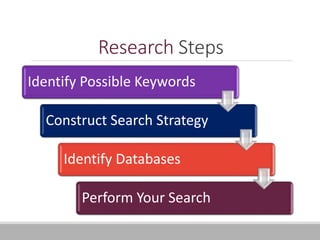
Research Steps
Identify Possible Keywords
Construct Search Strategy
Identify Databases
Perform Your Search
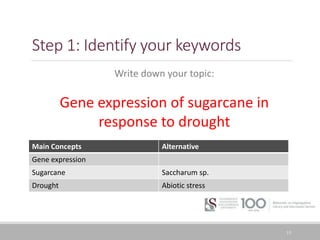
Step 1: Identify your keywords
15
Write down your topic:
Gene expression of sugarcane in
response to drought
Main Concepts Alternative
Gene expression
Sugarcane Saccharum sp.
Drought Abiotic stress
Worksheet time!
Fill out Section 1 only using the following
topic:
The metabolic response of
wheat to drought conditions
Then pass it to the person to
the right of you
16
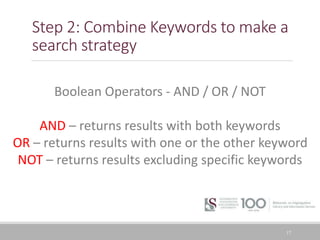
Step 2: Combine Keywords to make a
search strategy
17
Boolean Operators - AND / OR / NOT
AND – returns results with both keywords
OR – returns results with one or the other keyword
NOT – returns results excluding specific keywords
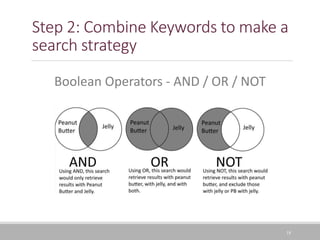
Step 2: Combine Keywords to make a
search strategy
18
Boolean Operators - AND / OR / NOT
Step 2: Combine Keywords to make a
search strategy
19
Boolean Operators - AND / OR / NOT
Quotation Marks ā€œ ā€ – keep keywords together, for exact
phrase searching eg. ā€œabiotic stressā€
Brackets ( ) – keep concepts together, used for synonyms
eg. (sugarcane OR saccharum)
Step 2: Combine Keywords to make a
search strategy
20
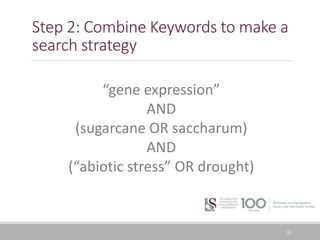
ā€œgene expressionā€
AND
(sugarcane OR saccharum)
AND
(ā€œabiotic stressā€ OR drought)
Worksheet time!
Fill out Section 2 only.
Then pass it to the
person to the right of
you
21
22
Step 3: Identify your database
Databases Basics
A database is an electronic index to journal or
magazine articles, containing citations, abstracts
and often either the full text of the articles, or links
to the full text.
It allows you to search for information using:
Keywords
Titles
Authors
Abstracts
Using search engines (Databases or
Google) effectively
Keep in mind that Google is a good starting point, but that it isn’t able to
access most of our resources!
ā—¦ For example – Scopus results are not are available via Google
Every database has a search engine like Google – but they are not always as
intuitive as Google
ā—¦ Keep in mind that Google saves searches and uses specific algorithms to adapt to
your previous searches – this gives the efficient impression
When using any search engine – be more specific and keep in mind how to
evaluate information
ā—¦ The more specific you are, the more relevant results it will give
Remember you are looking for PEER REVIEWED CREDIBLE ACADEMIC
INFORMATION
23
Worksheet time!
Fill out Section 3 only.
Then pass it to the
person to the right of
you
24
25
Step 4: Perform your search
Here are a couple of databases to use:
Scopus
Web of Science
Google Scholar
CAB Abstracts
Worksheet time!
Fill out Section 4 only.
26
Reflection
27
Search alerts
29
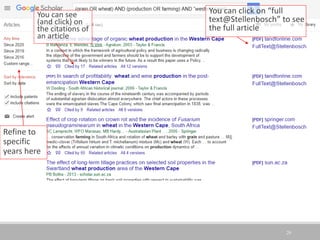
Refine to
specific
years here
You can click on ā€œfull
text@Stellenboschā€ to see
the full article
You can see
(and click) on
the citations of
an article
Search alerts
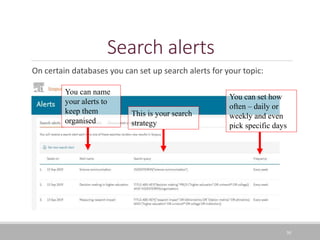
On certain databases you can set up search alerts for your topic:
30
You can set how
often – daily or
weekly and even
pick specific days
This is your search
strategy
You can name
your alerts to
keep them
organised
Evaluating
information for
credibility
32
Evaluating information in general
ļ‚§ Currency:
Published recently, links functioning, if older – updated recently
ļ‚§ Reliability:
From a reputable source/institution- publisher, University, Research Unit,
Company
ļ‚§ Authority:
Creator is an expert in their field, and affiliated with a reputable institution
ļ‚§ Accuracy:
The information can be verified
ļ‚§ Purpose:
The research was conducted in a manner that is commonly accepted in the field,
and is evident in the article
Predatory journals
ā€œPredatory journals and publishers are
entities that prioritize self-interest at the
expense of scholarship and are characterized
by false or misleading information, deviation
from best editorial and publication practices,
a lack of transparency, and/or the use of
aggressive and indiscriminate solicitation
practices.ā€ (Grudniewicz et al, 2019)
(https://www.nature.com/articles/d41586-019-03759-y)
33
Avoiding predatory journals
Easiest way: use ACADEMIC databases for searching
ā—¦ Exception to this is Google Scholar that indexes many predatory journals. You
must evaluate where the information comes from in that case to check if the
journal is legitimate
Some databases offer you a chance to check for predatory journals
ā—¦ Use the ā€œsourceā€ lists on Scopus and Web of Science – make sure the
journals are still being indexed
When checking where a journal is indexed, if it is currently indexed in Scopus
and Web of Science you can proceed safely. There are also many fake indexes
so don’t be fooled!
34
Check the following journals
You’ve got three examples on your guide – have a look at them and tell
me whether they are predatory or not.
Journal names:
International Journal of Research in Agricultural Sciences
International Journal of Agriculture Innovations and Research
35
36
Reliable websites
Any Website ending in:
.org; .gov; .edu; .ac
Official News sites like :
News24, IOL, BBC, CNN
PressReader
37
Plagiarism and
referencing
Turnitin
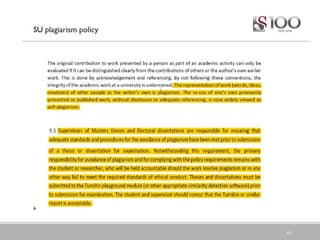
Plagiarism
Plagiarism is the theft and use of the ideas, material and
other intellectual property of others that are passed off as
one’s own
This can take multiple forms
39
OBVIOUS FORMS:
Buying / borrowing a paper and
copying it
Hiring somebody to write for you
Cutting and pasting text
Direct translations
Citing sources you didn’t use
LESS OBVIOUS FORMS:
Not giving proper credit
Not referencing images, etc.
Improper paraphrasing
Failing to give a proper reference
Not acknowledging outsourcing (eg.
Data)
Referencing
40
Know the Referencing Style that you are using
Make sure what you are referencing, different material types
are displayed differently in the bibliography
Makes sure that your in-text citations match your bibliography
Most important, be CONSISTENT
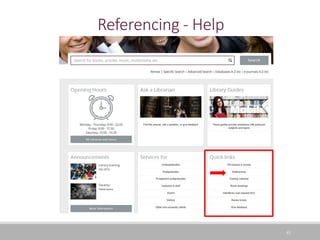
Referencing - Help
41
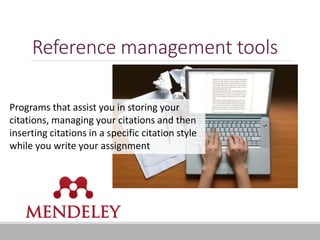
Reference management tools
Programs that assist you in storing your
citations, managing your citations and then
inserting citations in a specific citation style
while you write your assignment
Turnitin
Similarity checker
ā—¦ It does not give a ā€œplagiarism countā€ but rather gives a percentage of
similarity found
ā—¦ NB there is no specific ā€œlevelā€ of plagiarism
Two types:
ā—¦ Sandbox – multiple chances to use
ā—¦ It doesn’t keep a copy
ā—¦ Final submission – only one chance to upload
ā—¦ It keeps a copy
43
44
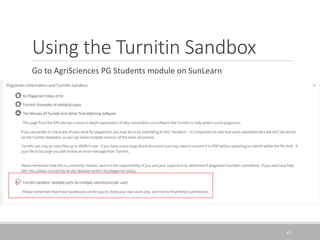
Using the Turnitin Sandbox
Go to AgriSciences PG Students module on SunLearn
45
Contacting me
47
Social Media channels
What you will find on our pages
ā—¦ Relevant scientific research in
the world
ā—¦ Library news: tips, workshops
and more
Published a paper? Doing
something interesting in the lab?
Tag me or email me so I can share
it! Get your research heard!
Thank you
48
Email: emw@sun.ac.za
Library Guides:
http://libguides.sun.ac.za/genetics
Please take a moment to fill out the evaluation form on the
front page of the library guide:
https://forms.office.com/r/8EdbTPz5Pc

Genetics hons training

  • 1.
  • 2.
    Outcomes • Library resources •Off campus access • Library Services during COVID Basics • Research steps • Credible Information • Predatory Journals Research • Plagiarism • Referencing • Mendeley • Turnitin Writing
  • 3.
    Begin by fillingin this form https://forms.office.com/r/cnZGi51W1k 3
  • 4.
    Get to knowthe library resources
  • 5.
    Your library website Eachmenu deals with relevant information – looking for something? Use the ā€œfindā€ option, curious about how long you get your books for? ā€œusing the libraryā€ can answer that! SunSearch: look for books, articles, and more! Library guides: your how-to mecca of information Quick links are there to help you find what you need fast Got a question? Just ask a librarian!
  • 6.
  • 7.
  • 8.
    Getting off campusaccess to resources – Library links 8 Because the library purchases a lot of the material, you will need to "prove" to the database you are a student. Most databases might ask you for a password. Do not put in your own credentials unless there's a specific instruction. The library automatically "fills" in the password through IP authentication. If your IP address reads that you are on an internet connection that is linked to Stellenbosch University, then the database will give you access. This means that when you are off-campus, you need to use a proxy to tell the database you are from Stellenbosch. This proxy is automatically contained in all the links on the library's page and your library how-to guide's page. So the simplest way to get access, is to simply use the library website and your library how-to guide.
  • 9.
    Getting off campusaccess to resources 9 Google Scholar • You can set up your Google Scholar to link into the library’s resources Library catalogue • You can follow a reference using the library catalogue Library guide • Your library guide already has the links to the databases ready to go!
  • 10.
    COVID-19 and theLibrary Limited amount of students – so bookings are essential to visit the library. To get a book, you don’t need to visit the library – you can simply request a book pick up by emailing the name of the book, the shelf number and your student number to jsg_uitl@sun.ac.za Although you can’t drop in at my desk anymore, you can book an appointment with me online at any time by clicking on the ā€œonline appointmentā€ box on my library guide. 10
  • 11.
    Library Spaces If youdon’t know the library or it’s been so long you can’t remember it – make an appointment with me to give you a quick tour and show you our newly renovated spaces and the Research Commons (our exclusive postgrad study space). I’ll also show you our new Makerspace, which is aimed at creating and designing things, and has robotics stations and 3D printers available. 11
  • 12.
  • 13.
    Research: Where doyou start? Identifying search topics, identifying gaps in knowledge and constructing a search strategy This allows you to cover all bases and collect relevant information We will go through an example of the process, and you will fill out your worksheet at the appropriate section
  • 14.
    Research Steps Identify PossibleKeywords Construct Search Strategy Identify Databases Perform Your Search
  • 15.
    Step 1: Identifyyour keywords 15 Write down your topic: Gene expression of sugarcane in response to drought Main Concepts Alternative Gene expression Sugarcane Saccharum sp. Drought Abiotic stress
  • 16.
    Worksheet time! Fill outSection 1 only using the following topic: The metabolic response of wheat to drought conditions Then pass it to the person to the right of you 16
  • 17.
    Step 2: CombineKeywords to make a search strategy 17 Boolean Operators - AND / OR / NOT AND – returns results with both keywords OR – returns results with one or the other keyword NOT – returns results excluding specific keywords
  • 18.
    Step 2: CombineKeywords to make a search strategy 18 Boolean Operators - AND / OR / NOT
  • 19.
    Step 2: CombineKeywords to make a search strategy 19 Boolean Operators - AND / OR / NOT Quotation Marks ā€œ ā€ – keep keywords together, for exact phrase searching eg. ā€œabiotic stressā€ Brackets ( ) – keep concepts together, used for synonyms eg. (sugarcane OR saccharum)
  • 20.
    Step 2: CombineKeywords to make a search strategy 20 ā€œgene expressionā€ AND (sugarcane OR saccharum) AND (ā€œabiotic stressā€ OR drought)
  • 21.
    Worksheet time! Fill outSection 2 only. Then pass it to the person to the right of you 21
  • 22.
    22 Step 3: Identifyyour database Databases Basics A database is an electronic index to journal or magazine articles, containing citations, abstracts and often either the full text of the articles, or links to the full text. It allows you to search for information using: Keywords Titles Authors Abstracts
  • 23.
    Using search engines(Databases or Google) effectively Keep in mind that Google is a good starting point, but that it isn’t able to access most of our resources! ā—¦ For example – Scopus results are not are available via Google Every database has a search engine like Google – but they are not always as intuitive as Google ā—¦ Keep in mind that Google saves searches and uses specific algorithms to adapt to your previous searches – this gives the efficient impression When using any search engine – be more specific and keep in mind how to evaluate information ā—¦ The more specific you are, the more relevant results it will give Remember you are looking for PEER REVIEWED CREDIBLE ACADEMIC INFORMATION 23
  • 24.
    Worksheet time! Fill outSection 3 only. Then pass it to the person to the right of you 24
  • 25.
    25 Step 4: Performyour search Here are a couple of databases to use: Scopus Web of Science Google Scholar CAB Abstracts
  • 26.
    Worksheet time! Fill outSection 4 only. 26
  • 27.
  • 28.
  • 29.
    29 Refine to specific years here Youcan click on ā€œfull text@Stellenboschā€ to see the full article You can see (and click) on the citations of an article
  • 30.
    Search alerts On certaindatabases you can set up search alerts for your topic: 30 You can set how often – daily or weekly and even pick specific days This is your search strategy You can name your alerts to keep them organised
  • 31.
  • 32.
    32 Evaluating information ingeneral ļ‚§ Currency: Published recently, links functioning, if older – updated recently ļ‚§ Reliability: From a reputable source/institution- publisher, University, Research Unit, Company ļ‚§ Authority: Creator is an expert in their field, and affiliated with a reputable institution ļ‚§ Accuracy: The information can be verified ļ‚§ Purpose: The research was conducted in a manner that is commonly accepted in the field, and is evident in the article
  • 33.
    Predatory journals ā€œPredatory journalsand publishers are entities that prioritize self-interest at the expense of scholarship and are characterized by false or misleading information, deviation from best editorial and publication practices, a lack of transparency, and/or the use of aggressive and indiscriminate solicitation practices.ā€ (Grudniewicz et al, 2019) (https://www.nature.com/articles/d41586-019-03759-y) 33
  • 34.
    Avoiding predatory journals Easiestway: use ACADEMIC databases for searching ā—¦ Exception to this is Google Scholar that indexes many predatory journals. You must evaluate where the information comes from in that case to check if the journal is legitimate Some databases offer you a chance to check for predatory journals ā—¦ Use the ā€œsourceā€ lists on Scopus and Web of Science – make sure the journals are still being indexed When checking where a journal is indexed, if it is currently indexed in Scopus and Web of Science you can proceed safely. There are also many fake indexes so don’t be fooled! 34
  • 35.
    Check the followingjournals You’ve got three examples on your guide – have a look at them and tell me whether they are predatory or not. Journal names: International Journal of Research in Agricultural Sciences International Journal of Agriculture Innovations and Research 35
  • 36.
    36 Reliable websites Any Websiteending in: .org; .gov; .edu; .ac Official News sites like : News24, IOL, BBC, CNN
  • 37.
  • 38.
  • 39.
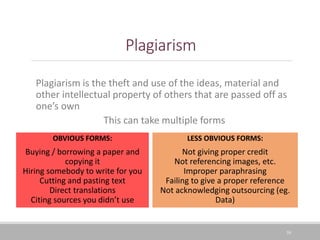
    Plagiarism Plagiarism is thetheft and use of the ideas, material and other intellectual property of others that are passed off as one’s own This can take multiple forms 39 OBVIOUS FORMS: Buying / borrowing a paper and copying it Hiring somebody to write for you Cutting and pasting text Direct translations Citing sources you didn’t use LESS OBVIOUS FORMS: Not giving proper credit Not referencing images, etc. Improper paraphrasing Failing to give a proper reference Not acknowledging outsourcing (eg. Data)
  • 40.
    Referencing 40 Know the ReferencingStyle that you are using Make sure what you are referencing, different material types are displayed differently in the bibliography Makes sure that your in-text citations match your bibliography Most important, be CONSISTENT
  • 41.
  • 42.
    Reference management tools Programsthat assist you in storing your citations, managing your citations and then inserting citations in a specific citation style while you write your assignment
  • 43.
    Turnitin Similarity checker ā—¦ Itdoes not give a ā€œplagiarism countā€ but rather gives a percentage of similarity found ā—¦ NB there is no specific ā€œlevelā€ of plagiarism Two types: ā—¦ Sandbox – multiple chances to use ā—¦ It doesn’t keep a copy ā—¦ Final submission – only one chance to upload ā—¦ It keeps a copy 43
  • 44.
  • 45.
    Using the TurnitinSandbox Go to AgriSciences PG Students module on SunLearn 45
  • 46.
  • 47.
    47 Social Media channels Whatyou will find on our pages ā—¦ Relevant scientific research in the world ā—¦ Library news: tips, workshops and more Published a paper? Doing something interesting in the lab? Tag me or email me so I can share it! Get your research heard!
  • 48.
    Thank you 48 Email: emw@sun.ac.za LibraryGuides: http://libguides.sun.ac.za/genetics Please take a moment to fill out the evaluation form on the front page of the library guide: https://forms.office.com/r/8EdbTPz5Pc

Editor's Notes

  • #12Ā If you haven’t got to know the library space itself and would like a quick tour, also feel welcome to make an appointment with me and I can show you which section on the shelves you’ll find your books, the different study spaces available (including the Research Commons which is exclusive to postgraduate students) and our Makerspace where you can create and 3D print, amongst other places in the library
  • #16Ā When you have a topic, the first thing to do is write down your topic, and pull out the keywords. I always use columns, so that I can put alternatives next to the word, as you can see here. With this topic, we can use the word winemaking but also the word oenology. You need to think of alternative words, because different people use different words to describe the same concept, and by using both words instead of only one in my search then I make sure I am getting all the possible literature.
  • #18Ā We take these keywords and then combine them with what is called a Boolean Operator. These are from the days when machine language started, before algorithms and search engines were made, and they are a way you can force the algorithm to work to your advantage. The operators are AND, OR and NOT. You put the operator in between the two keywords and the operator tells the database what you want it to do with the keywords.
  • #19Ā Here you can see how the three words work. An AND will make sure that the search brings back only those results that have both of your keywords in, while an OR will bring back results that contain all the words. The OR is used for your alternative words, like synonyms or similar concepts. The NOT excludes results, so it disappears results that have got either one.
  • #20Ā We also have some handy punctuation tips which can help. Quotation marks keep phrases (two or more words) together. So if you wanted to search for wine making process, you would write it in quotation marks and it tells the database to bring back those words next to each other. Brackets are used to combine two searches into one – so if you take your alternative terms for something, you would put them both in a bracket with an OR inbetween. For example, wine making OR oenology. The bracket tells the database that you want it to do essentially two searches – with either of your words.
  • #21Ā So to take our topic, we would do the following – we would put the two OR concepts (our alternative concepts) in brackets, and note the quotation marks for ā€œwine makingā€. We would combine this with the AND tannin concept. This is our search strategy – we can now copy and paste it into any database and it will work.
  • #23Ā Before putting it in a database, we would need to understand a bit more about them. You have two kinds of databases – one that always has the actual full text of the article in, and one that doesn’t need to have the full text in. That second one is called an abstract or citation database. An easy example is Google Scholar – it doesn’t have the full text, but it links to it. The important thing to take note of databases is how they do their searches – they don’t always look through the full article, and even if they did, they prioritise words found in the title, keywords and abstracts of the article. If you are looking for a specific author, you can do that too. It is therefore very important to think about those alternative concepts because you are relying on only a few words available to bring back the article.
  • #24Ā I’ve mentioned Google Scholar and I just want to take a moment to speak about it and other databases. Google Scholar is a great starting point, but it doesn’t have access to all the scholarly sources we have. By access – I mean it doesn’t even get to show the results, or it drops the results so far down, you don’t see it. The way that results are structured in Google Scholar still are skewed by things like database clicks, and paid algorithms. So you cannot search only on it – you need to search on multiple databases. Academic databases are not as friendly as the searches in Google Scholar – they don’t pick up spelling errors for you or autocorrect your spelling. So you need to be very specific and careful with your searches. The last warning I will give about Google Scholar is that it has a quantity not quality approach – there is a lot of fake academic articles and even non academic articles in Google Scholar, so anything you find, you need to be able to evaluate. Keep in mind you are looking for peer reviewed, credible academic information – something which academic databases guarantee while Google Scholar does not.
  • #26Ā We spoke about your search strategy, now you get to use it in your databases. I would suggest that at the minimum you search in all four of these databases: Scopus, Web of Science, CAB Abstracts and Google Scholar (if your settings into the library’s subscriptions have been set up).
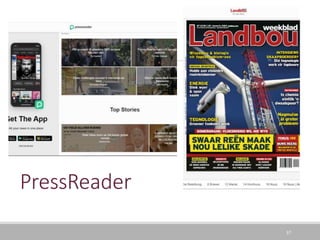
  • #38Ā The second tool is a database called Pressreader, which is available to all Stellenbosch staff and students, and can be downloaded as an app on your phone or tablet for offline reading as well. PressReader lets you keep up to date with news and magazines and even includes some trade magazines like Landbouweekblad.
  • #40Ā Credibility is a combination of Reliability, Authority, Validity and Accuracy