LATEX 
BASIC TUTORIAL.
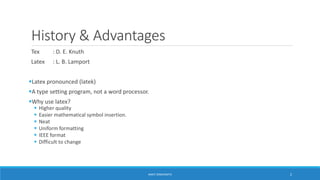
History & Advantages 
Tex : D. E. Knuth 
Latex : L. B. Lamport 
Latex pronounced (latek) 
A type setting program, not a word processor. 
Why use latex? 
 Higher quality 
 Easier mathematical symbol insertion. 
 Neat 
 Uniform formatting 
 IEEE format 
 Difficult to change 
ANKIT SINGHANIYA 2
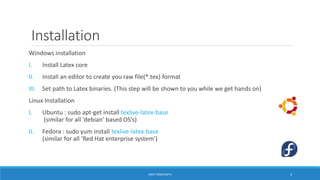
Installation 
Windows installation 
I. Install Latex core 
II. Install an editor to create you raw file(*.tex) format 
III. Set path to Latex binaries. (This step will be shown to you while we get hands on) 
Linux Installation 
I. Ubuntu : sudo apt-get install texlive-latex-base 
(similar for all ‘debian’ based OS’s) 
II. Fedora : sudo yum install texlive-latex-base 
(similar for all ‘Red Hat enterprise system’) 
ANKIT SINGHANIYA 3
Types of Documents 
 Article 
 Report 
 Book 
 Beamer 
 Many more.. 
ANKIT SINGHANIYA 4
General Syntax 
function [optional_parameters]{important_parameters} 
this makes the compiler know that what follow is a fuction. 
function name of the function 
example : documentclass [a4paper,12pt] {article} 
: documentclass {report} 
: begin{document} 
: epsilon 
: title{NBNSSOE} 
: end{document} 
ANKIT SINGHANIYA 5
Things to Remember 
 textit{italicizes your text} 
 textbf{makes your text bold Face} 
 underline{underlines the text} 
 emp{emphasizes your text, if bold uses italic and if italic uses bold} 
  (gets us a new line, like n in our programming language.) 
 A blank line gets us a new paragraph. 
 newpage 
 beginning{alignment}…..... end{alignment} 
$12<13$ (Mathematical expressions/equations to be written between two $ signs) 
ANKIT SINGHANIYA 6
Sample Document Explained 
documentclass[a4paper,12pt]{article} 
title{sample text} 
preamble 
%usepackage{package_name} 
begin{document} 
maketitle 
This is a sample document to demonstrate you the use of textit{latex}. We are here stressing 
on different prospect and different functions of latex like textbf{bold}, $12<13$ i.e. 
mathematical, and symbols like $epsilon$. 
Here we inserted new line. Hope this gives you basic idea about latex. We will see to it in more 
details. All you need is to remember different sequences for different things. 
noindent Thanks.. 
end{document} 
B 
O 
D 
Y 
ANKIT SINGHANIYA 7
Sections 
documentclass{article} 
title{Section tuitorial} 
begin{document} 
maketitle 
section{I am the Section} 
subsection{I am the Sub Section} 
subsubsection{I am the sub sub section} 
paragraph{I am the paragraph} 
subparagraph{I am the sub Paragraph} 
end{document} 
ANKIT SINGHANIYA 8
Bullets and Numbering 
documentclass{article} 
begin{document} 
begin{itemize} 
item Item 1 
item Item 2 
end{itemize} 
begin{enumerate} 
item Item 1 
item Item 2 
end{enumerate} 
end{document} 
ANKIT SINGHANIYA 9
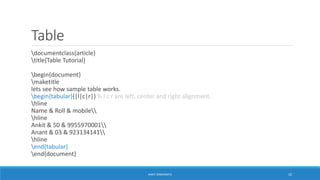
Table 
documentclass{article} 
title{Table Tutorial} 
begin{document} 
maketitle 
lets see how sample table works. 
begin{tabular}{|l|c|r|} % l c r are left, center and right alignment. 
hline 
Name & Roll & mobile 
hline 
Ankit & 50 & 9955970001 
Anant & 03 & 923134141 
hline 
end{tabular} 
end{document} 
ANKIT SINGHANIYA 10
Table continued 
documentclass[12pt]{article} 
title{Experiment No: 1} 
date{} 
begin{document} 
maketitle 
begin{tabular}{|p{2cm}|p{11cm}|} % Size is must for text wrap in table 
hline 
Title & Addition of array % & separates different row. 
hline 
Aim & WAP in Nasm to add array of 10 numbers.newline Accept input from user. 
hline 
Prerequisite & MicroProcessor Architecture 
hline 
end{tabular} 
end{document} 
ANKIT SINGHANIYA 11
Graphicx 
documentclass{article} 
title{Graphics Tutorial} 
usepackage{graphicx} 
begin{document} 
This is what an image looks like.. 
includegraphics[scale=0.6]{img.jpeg} % scale to reduce image size 
caption{Image_name} 
end{document} 
ANKIT SINGHANIYA 12
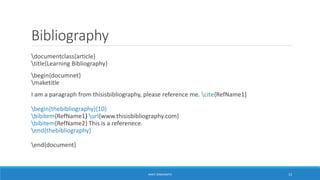
Bibliography 
documentclass{article} 
title{Learning Bibliography} 
begin{documnet} 
maketitle 
I am a paragraph from thisisbibliography, please reference me. cite{RefName1} 
begin{thebibliography}{10} 
bibitem{RefName1} url{www.thisisbibliography.com} 
bibitem{RefName2} This is a referenece. 
end{thebibliography} 
end{document} 
ANKIT SINGHANIYA 13

Latex Tuitorial

  • 1.
  • 2.
    History & Advantages Tex : D. E. Knuth Latex : L. B. Lamport Latex pronounced (latek) A type setting program, not a word processor. Why use latex?  Higher quality  Easier mathematical symbol insertion.  Neat  Uniform formatting  IEEE format  Difficult to change ANKIT SINGHANIYA 2
  • 3.
    Installation Windows installation I. Install Latex core II. Install an editor to create you raw file(*.tex) format III. Set path to Latex binaries. (This step will be shown to you while we get hands on) Linux Installation I. Ubuntu : sudo apt-get install texlive-latex-base (similar for all ‘debian’ based OS’s) II. Fedora : sudo yum install texlive-latex-base (similar for all ‘Red Hat enterprise system’) ANKIT SINGHANIYA 3
  • 4.
    Types of Documents  Article  Report  Book  Beamer  Many more.. ANKIT SINGHANIYA 4
  • 5.
    General Syntax function[optional_parameters]{important_parameters} this makes the compiler know that what follow is a fuction. function name of the function example : documentclass [a4paper,12pt] {article} : documentclass {report} : begin{document} : epsilon : title{NBNSSOE} : end{document} ANKIT SINGHANIYA 5
  • 6.
    Things to Remember  textit{italicizes your text}  textbf{makes your text bold Face}  underline{underlines the text}  emp{emphasizes your text, if bold uses italic and if italic uses bold}  (gets us a new line, like n in our programming language.)  A blank line gets us a new paragraph.  newpage  beginning{alignment}…..... end{alignment} $12<13$ (Mathematical expressions/equations to be written between two $ signs) ANKIT SINGHANIYA 6
  • 7.
    Sample Document Explained documentclass[a4paper,12pt]{article} title{sample text} preamble %usepackage{package_name} begin{document} maketitle This is a sample document to demonstrate you the use of textit{latex}. We are here stressing on different prospect and different functions of latex like textbf{bold}, $12<13$ i.e. mathematical, and symbols like $epsilon$. Here we inserted new line. Hope this gives you basic idea about latex. We will see to it in more details. All you need is to remember different sequences for different things. noindent Thanks.. end{document} B O D Y ANKIT SINGHANIYA 7
  • 8.
    Sections documentclass{article} title{Sectiontuitorial} begin{document} maketitle section{I am the Section} subsection{I am the Sub Section} subsubsection{I am the sub sub section} paragraph{I am the paragraph} subparagraph{I am the sub Paragraph} end{document} ANKIT SINGHANIYA 8
  • 9.
    Bullets and Numbering documentclass{article} begin{document} begin{itemize} item Item 1 item Item 2 end{itemize} begin{enumerate} item Item 1 item Item 2 end{enumerate} end{document} ANKIT SINGHANIYA 9
  • 10.
    Table documentclass{article} title{TableTutorial} begin{document} maketitle lets see how sample table works. begin{tabular}{|l|c|r|} % l c r are left, center and right alignment. hline Name & Roll & mobile hline Ankit & 50 & 9955970001 Anant & 03 & 923134141 hline end{tabular} end{document} ANKIT SINGHANIYA 10
  • 11.
    Table continued documentclass[12pt]{article} title{Experiment No: 1} date{} begin{document} maketitle begin{tabular}{|p{2cm}|p{11cm}|} % Size is must for text wrap in table hline Title & Addition of array % & separates different row. hline Aim & WAP in Nasm to add array of 10 numbers.newline Accept input from user. hline Prerequisite & MicroProcessor Architecture hline end{tabular} end{document} ANKIT SINGHANIYA 11
  • 12.
    Graphicx documentclass{article} title{GraphicsTutorial} usepackage{graphicx} begin{document} This is what an image looks like.. includegraphics[scale=0.6]{img.jpeg} % scale to reduce image size caption{Image_name} end{document} ANKIT SINGHANIYA 12
  • 13.
    Bibliography documentclass{article} title{LearningBibliography} begin{documnet} maketitle I am a paragraph from thisisbibliography, please reference me. cite{RefName1} begin{thebibliography}{10} bibitem{RefName1} url{www.thisisbibliography.com} bibitem{RefName2} This is a referenece. end{thebibliography} end{document} ANKIT SINGHANIYA 13

Editor's Notes

  • #4 General step, type latex on prompt and check.
  • #8 Import packages in preamble. Usepackage{package_name}