Text, not Word Processing
By,
Kaushik K Naik
naikkaushik93@gmail.com
Before we start
Pronunciation
pronounced lay-tech (tech as in
technical)
What is LATEX?
• Latex is a scripting language used for writing
documents.
• The advantages of this are numerous, but are
most beneficial for academic writings.
• Say if you write a scientific paper and wish to
get it published. Each publishing firm will have
its own layout of how it wants things. If you write
it in Latex you only need to change the style file
to set it into their format. There is no need for a
complete rewrite.
Getting Started
• First, assuming that you use windows there are
a few things that need to be installed.
• The first of these is MikTeX. This is the
software used to compile the files into a
presentable format.
• The next software that needs to be installed is
the Texmaker editor.
Starting the report
• Keep all of the associated files in a single directory.
• Latex was probably originally made for linux, so it is
a little picky about path names.
• Path names should have not special symbols or
spaces.
Text, not Word Processing
First steps
Try OUT!
• Open Texmaker
• File New.
• Wizard Quick Start
– Document Class : report
– Other option : oneside
– Typeface Size : 12pt
– Page Size : a4paper
– Author : Your name
– Title : Doc title
– Select: geometry package, AMS, Graphicx.
– Click OK.
Commonly used Document Classes
documentclass for layout and sectioning
• Article: Ideal for a short paper (divided into
sections, subsections, etc). Typeset to be printed
double-sided.
• Book: Class to be used to typeset a book (chapters,
sections, etc). Typeset to be printed double-sided.
• Report: (Almost) identical to the book class but for
single-sided printing.
• Other classes include letter, slides, beamer, etc.
Document Class Options
-Order of options is unimportant
letterpaper legalpaper landscape onecolumn
twocolumn oneside twoside openright
openany titlepage notitlepage leqno
openbib draft final And on and on
Example:
documentclass[12pt, twoside, fleqn}{article}
%Quick comment - anything after % doesn’t show-up in final document
Packages
usepackage{package}
Packages – a set of LaTex commands stored in a file with extension .sty
Two packages and their usage – there are hundreds!! :
a) amsmath
i. Adds a variety of typesetting for math beyond basic LaTex
ii. Added fonts – provides hundreds of symbols
b) graphicsx
i. Allows basic import of graph pictures
usepackage{amscd, amsmath, amsthm, amssymb}
usepackage[dvips]{graphicx}
Text, not Word Processing
Logical Organisation
Organising a Document
• A document is split into logical parts:
– A title
– An abstract
– A number of parts
– A number of chapters in each part
– A number of sections in each chapter
– A number of subsections in each section
– A number of subsubsections in each subsection
• Availability of a logical part depends on the
document class (eg no chapters in a paper).
• Typesetting of the sections may vary depending
on document class.
The Abstract
• Available in article and report class.
• Used to give an overview of the content of
the document.
• Is usually typeset with wider margins than
the main text.
• Specified using the abstract environment:
begin{abstract}
…
end{abstract}
Beginning a new section
• There are up to 7 levels of depth for defining
sections depending on the document class:
-1 part{part}
0 chapter{chapter}
1 section{section}
2 subsection{subsection}
3 subsubsection{subsubsection}
4 paragraph{paragraph}
5 subparagraph{subparagraph}
part and chapter are only available in report and book document classes.
documentclass{report}
begin{document}
chapter{Basics}
section{First of all ldots}
Initially, we think.
subsection{Sit Down}
Find a chair and sit down.
subsection{Think}
Think about the chair.
end{document}
Logical Sections
Text, not Word Processing
Equations, Pictures &
Tables
Equations
• You need an equation by itself. That is
also numbered. You do this with
• begin{equation}
• Equation
• end{equation}
• If you wish to leave it unnumbered simply
put an asterisk at the end of the word
equation. begin{equation*} equation
end{equation}
Simply Math Formulas
$ sum_{n=0}^infty n$∑
∞
=0n
n
$x^2$2
x
2x $x_2$
2+n
x $x^{n+2}$
2+nx $x_{n+2}$
2
2
+
+
n
nx $x_{n+2}^{n+2}$
$frac{x^2}{y}$
y
x2
∫xdx $int xdx$
∫
t
xdx
0
$int^t_0 xdx$
x $sqrt{x}$
6
3+n $sqrt[6]{n+3}$
More Symbols
Some symbols are used to combine other
mathematical expressions:
• Powers:
e^{ipi} = -1
• Subscripts:
a_{n+1} = 2 times a_n
• Fractions:
frac{x^pi}{a_{25}}
• Summation:
sum_{i=0}^{infty} a^i
Some Mathematical Symbols
Binary Operators
Relational Operators
Some Arrows
Big Symbols
Greek Letters
Standard Functions
Inserting Figures
• Most editors will have an image inserter,
but it will not hurt to know how to do it your
self.
begin{figure}[Position]
includegraphics[Scale=1]{Filename.jpg}
caption{ caption} label{figure#}
end{figure}
Inserting Figures
• Position
Parameter Position
h
Place the float here, i.e., approximately at the same point it
occurs in the source text (however, not exactly at the spot)
t Position at the top of the page.
b Position at the bottom of the page.
p Put on a special page for floats only.
!
Override internal parameters LaTeX uses for determining
"good" float positions.
H
Places the float at precisely the location in the LATEX code.
Requires the float package. This is somewhat equivalent
to h!.
Inserting Figures
• Cross references
Example:
As you can see in the figure ref{figure#}, the
buck converter circuit is provided. Also, in
the page pageref{fig:mesh1} ……
Inserting Tables
• usepackage{array}
begin{table}[h!]
centering
begin{tabular}{|c| c| c| c|}
hline
Col1 & Col2 & Col2 & Col3 
hline
1 & 6 & 87837 & 787 
2 & 7 & 78 & 5415 
3 & 545 & 778 & 7507 
4 & 545 & 18744 & 7560 
5 & 88 & 788 & 6344 
hline
end{tabular}
end{table}
Inserting Tables
• cols : Defines the alignment and the borders of each column. It can
have the following values:
l left-justified column
c centred column
r right-justified column
p{'width'}
paragraph column with text vertically aligned at
the top
m{'width'}
paragraph column with text vertically aligned in the
middle (requires array package)
b{'width'}
paragraph column with text vertically aligned at
the bottom (requires array package)
| vertical line
|| double vertical line
Text, not Word Processing
More Typesetting
Unordered Lists
• The itemize environment creates an
unordered list (like this one).
• Items are started using the item
command.
• You can have nested lists.
Ordered Lists
1. The enumerate environment creates an
unordered list (like this one).
2. Items are also started using the item
command.
3. Nested ordered lists can be used.
Centre Alignment
• Anything appearing within a center
environment is centred on the page.
• If you have just one line, such as an
image, you can use:
centerline{centred line}
Text, not Word Processing
Bibliographies
Simple Bibliographies
• To create the bibliography, use the
thebibliography environment.
• Items in the bibliography are added using
the bibitem{label} command. The
label is used to refer to the entry.
• Citing a bibliography item in the main text
can be done using the cite{label}
or cite{label1, label2,…}
command to obtain citations such as [2] or
[7,4].
cite{alur:94,asarin:01} talk about timed-automata, even if
cite{asarin:01} treats a particular case of the general case
appearing in cite{alur:94}.
begin{thebibliography}{99}
bibitem{alur:94} R. Alur and D.L. Dill,
emph{A theory of timed automata,/}
Theoretical Computer Science 126:1(183--235), 1994.
bibitem{asarin:01} E. Asarin, G. Schneider and S. Yovine,
emph{On the Decidability of the Reachability Problem for
Planar Differential Inclusions,/} in Lecture Notes in
Computer Science 2034, 2001.
end{thebibliography}
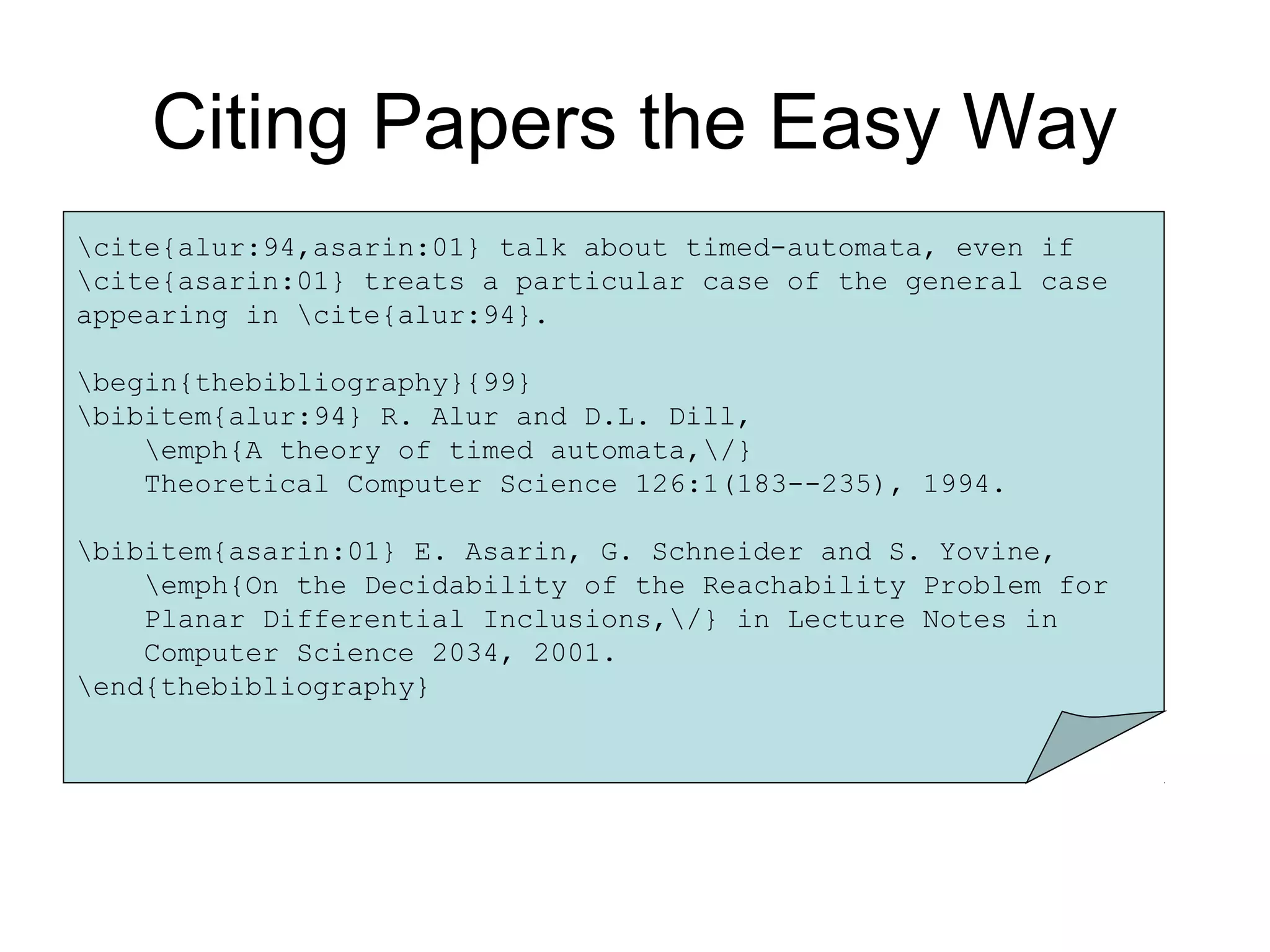
Citing Papers the Easy Way
cite{alur:94,asarin:01} talk about timed-automata, even if
cite{asarin:01} treats a particular case of the general case
appearing in cite{alur:94}.
begin{thebibliography}{99}
bibitem{alur:94} R. Alur and D.L. Dill,
emph{A theory of timed automata,/}
Theoretical Computer Science 126:1(183--235), 1994.
bibitem{asarin:01} E. Asarin, G. Schneider and S. Yovine,
emph{On the Decidability of the Reachability Problem for
Planar Differential Inclusions,/} in Lecture Notes in
Computer Science 2034, 2001.
end{thebibliography}
Citing Papers the Easy Way
cite{alur:94,asarin:01} talk about timed-automata, even if
cite{asarin:01} treats a particular case of the general case
appearing in cite{alur:94}.
begin{thebibliography}{99}
bibitem{alur:94} R. Alur and D.L. Dill,
emph{A theory of timed automata,/}
Theoretical Computer Science 126:1(183--235), 1994.
bibitem{asarin:01} E. Asarin, G. Schneider and S. Yovine,
emph{On the Decidability of the Reachability Problem for
Planar Differential Inclusions,/} in Lecture Notes in
Computer Science 2034, 2001.
end{thebibliography}
Citing Papers the Easy Way
The number here is used to
tell that no more than
99 entries will appear in the
bibliography
cite{alur:94,asarin:01} talk about timed-automata, even if
cite{asarin:01} treats a particular case of the general case
Appearing in cite{alur:94}.
begin{thebibliography}{99}
bibitem{alur:94} R. Alur and D.L. Dill,
emph{A theory of timed automata,/}
Theoretical Computer Science 126:1(183--235), 1994.
bibitem{asarin:01} E. Asarin, G. Schneider and S. Yovine,
emph{On the Decidability of the Reachability Problem for
Planar Differential Inclusions,/} in Lecture Notes in
Computer Science 2034, 2001.
end{thebibliography}
Citing Papers the Easy Way
CAUTION
creates an bibliography
file with all reference
information when run through a
file. Run twice to
ensure that references and
citations match
Final Statements
• Latex can be used even out side of the narrow limits that
I have explored it in.
• A little google, or https://www.sharelatex.com/learn/
search will uncover lots of information for any issue.
• I have provided a sample report format which I have
created for my Mtech Thesis.
Go forth and

Latex for beginners

  • 1.
    Text, not WordProcessing By, Kaushik K Naik naikkaushik93@gmail.com Before we start
  • 2.
  • 3.
    What is LATEX? •Latex is a scripting language used for writing documents. • The advantages of this are numerous, but are most beneficial for academic writings. • Say if you write a scientific paper and wish to get it published. Each publishing firm will have its own layout of how it wants things. If you write it in Latex you only need to change the style file to set it into their format. There is no need for a complete rewrite.
  • 4.
    Getting Started • First,assuming that you use windows there are a few things that need to be installed. • The first of these is MikTeX. This is the software used to compile the files into a presentable format. • The next software that needs to be installed is the Texmaker editor.
  • 5.
    Starting the report •Keep all of the associated files in a single directory. • Latex was probably originally made for linux, so it is a little picky about path names. • Path names should have not special symbols or spaces.
  • 6.
    Text, not WordProcessing First steps
  • 7.
    Try OUT! • OpenTexmaker • File New. • Wizard Quick Start – Document Class : report – Other option : oneside – Typeface Size : 12pt – Page Size : a4paper – Author : Your name – Title : Doc title – Select: geometry package, AMS, Graphicx. – Click OK.
  • 8.
    Commonly used DocumentClasses documentclass for layout and sectioning • Article: Ideal for a short paper (divided into sections, subsections, etc). Typeset to be printed double-sided. • Book: Class to be used to typeset a book (chapters, sections, etc). Typeset to be printed double-sided. • Report: (Almost) identical to the book class but for single-sided printing. • Other classes include letter, slides, beamer, etc.
  • 9.
    Document Class Options -Orderof options is unimportant letterpaper legalpaper landscape onecolumn twocolumn oneside twoside openright openany titlepage notitlepage leqno openbib draft final And on and on Example: documentclass[12pt, twoside, fleqn}{article} %Quick comment - anything after % doesn’t show-up in final document
  • 10.
    Packages usepackage{package} Packages – aset of LaTex commands stored in a file with extension .sty Two packages and their usage – there are hundreds!! : a) amsmath i. Adds a variety of typesetting for math beyond basic LaTex ii. Added fonts – provides hundreds of symbols b) graphicsx i. Allows basic import of graph pictures usepackage{amscd, amsmath, amsthm, amssymb} usepackage[dvips]{graphicx}
  • 11.
    Text, not WordProcessing Logical Organisation
  • 12.
    Organising a Document •A document is split into logical parts: – A title – An abstract – A number of parts – A number of chapters in each part – A number of sections in each chapter – A number of subsections in each section – A number of subsubsections in each subsection • Availability of a logical part depends on the document class (eg no chapters in a paper). • Typesetting of the sections may vary depending on document class.
  • 13.
    The Abstract • Availablein article and report class. • Used to give an overview of the content of the document. • Is usually typeset with wider margins than the main text. • Specified using the abstract environment: begin{abstract} … end{abstract}
  • 14.
    Beginning a newsection • There are up to 7 levels of depth for defining sections depending on the document class: -1 part{part} 0 chapter{chapter} 1 section{section} 2 subsection{subsection} 3 subsubsection{subsubsection} 4 paragraph{paragraph} 5 subparagraph{subparagraph} part and chapter are only available in report and book document classes.
  • 15.
    documentclass{report} begin{document} chapter{Basics} section{First of allldots} Initially, we think. subsection{Sit Down} Find a chair and sit down. subsection{Think} Think about the chair. end{document} Logical Sections
  • 16.
    Text, not WordProcessing Equations, Pictures & Tables
  • 17.
    Equations • You needan equation by itself. That is also numbered. You do this with • begin{equation} • Equation • end{equation} • If you wish to leave it unnumbered simply put an asterisk at the end of the word equation. begin{equation*} equation end{equation}
  • 18.
    Simply Math Formulas $sum_{n=0}^infty n$∑ ∞ =0n n $x^2$2 x 2x $x_2$ 2+n x $x^{n+2}$ 2+nx $x_{n+2}$ 2 2 + + n nx $x_{n+2}^{n+2}$ $frac{x^2}{y}$ y x2 ∫xdx $int xdx$ ∫ t xdx 0 $int^t_0 xdx$ x $sqrt{x}$ 6 3+n $sqrt[6]{n+3}$
  • 19.
    More Symbols Some symbolsare used to combine other mathematical expressions: • Powers: e^{ipi} = -1 • Subscripts: a_{n+1} = 2 times a_n • Fractions: frac{x^pi}{a_{25}} • Summation: sum_{i=0}^{infty} a^i
  • 20.
  • 21.
  • 22.
  • 23.
  • 24.
  • 25.
  • 26.
  • 27.
    Inserting Figures • Mosteditors will have an image inserter, but it will not hurt to know how to do it your self. begin{figure}[Position] includegraphics[Scale=1]{Filename.jpg} caption{ caption} label{figure#} end{figure}
  • 28.
    Inserting Figures • Position ParameterPosition h Place the float here, i.e., approximately at the same point it occurs in the source text (however, not exactly at the spot) t Position at the top of the page. b Position at the bottom of the page. p Put on a special page for floats only. ! Override internal parameters LaTeX uses for determining "good" float positions. H Places the float at precisely the location in the LATEX code. Requires the float package. This is somewhat equivalent to h!.
  • 29.
    Inserting Figures • Crossreferences Example: As you can see in the figure ref{figure#}, the buck converter circuit is provided. Also, in the page pageref{fig:mesh1} ……
  • 30.
    Inserting Tables • usepackage{array} begin{table}[h!] centering begin{tabular}{|c|c| c| c|} hline Col1 & Col2 & Col2 & Col3 hline 1 & 6 & 87837 & 787 2 & 7 & 78 & 5415 3 & 545 & 778 & 7507 4 & 545 & 18744 & 7560 5 & 88 & 788 & 6344 hline end{tabular} end{table}
  • 31.
    Inserting Tables • cols: Defines the alignment and the borders of each column. It can have the following values: l left-justified column c centred column r right-justified column p{'width'} paragraph column with text vertically aligned at the top m{'width'} paragraph column with text vertically aligned in the middle (requires array package) b{'width'} paragraph column with text vertically aligned at the bottom (requires array package) | vertical line || double vertical line
  • 32.
    Text, not WordProcessing More Typesetting
  • 33.
    Unordered Lists • Theitemize environment creates an unordered list (like this one). • Items are started using the item command. • You can have nested lists.
  • 34.
    Ordered Lists 1. Theenumerate environment creates an unordered list (like this one). 2. Items are also started using the item command. 3. Nested ordered lists can be used.
  • 35.
    Centre Alignment • Anythingappearing within a center environment is centred on the page. • If you have just one line, such as an image, you can use: centerline{centred line}
  • 36.
    Text, not WordProcessing Bibliographies
  • 37.
    Simple Bibliographies • Tocreate the bibliography, use the thebibliography environment. • Items in the bibliography are added using the bibitem{label} command. The label is used to refer to the entry. • Citing a bibliography item in the main text can be done using the cite{label} or cite{label1, label2,…} command to obtain citations such as [2] or [7,4].
  • 38.
    cite{alur:94,asarin:01} talk abouttimed-automata, even if cite{asarin:01} treats a particular case of the general case appearing in cite{alur:94}. begin{thebibliography}{99} bibitem{alur:94} R. Alur and D.L. Dill, emph{A theory of timed automata,/} Theoretical Computer Science 126:1(183--235), 1994. bibitem{asarin:01} E. Asarin, G. Schneider and S. Yovine, emph{On the Decidability of the Reachability Problem for Planar Differential Inclusions,/} in Lecture Notes in Computer Science 2034, 2001. end{thebibliography} Citing Papers the Easy Way
  • 39.
    cite{alur:94,asarin:01} talk abouttimed-automata, even if cite{asarin:01} treats a particular case of the general case appearing in cite{alur:94}. begin{thebibliography}{99} bibitem{alur:94} R. Alur and D.L. Dill, emph{A theory of timed automata,/} Theoretical Computer Science 126:1(183--235), 1994. bibitem{asarin:01} E. Asarin, G. Schneider and S. Yovine, emph{On the Decidability of the Reachability Problem for Planar Differential Inclusions,/} in Lecture Notes in Computer Science 2034, 2001. end{thebibliography} Citing Papers the Easy Way
  • 40.
    cite{alur:94,asarin:01} talk abouttimed-automata, even if cite{asarin:01} treats a particular case of the general case appearing in cite{alur:94}. begin{thebibliography}{99} bibitem{alur:94} R. Alur and D.L. Dill, emph{A theory of timed automata,/} Theoretical Computer Science 126:1(183--235), 1994. bibitem{asarin:01} E. Asarin, G. Schneider and S. Yovine, emph{On the Decidability of the Reachability Problem for Planar Differential Inclusions,/} in Lecture Notes in Computer Science 2034, 2001. end{thebibliography} Citing Papers the Easy Way The number here is used to tell that no more than 99 entries will appear in the bibliography
  • 41.
    cite{alur:94,asarin:01} talk abouttimed-automata, even if cite{asarin:01} treats a particular case of the general case Appearing in cite{alur:94}. begin{thebibliography}{99} bibitem{alur:94} R. Alur and D.L. Dill, emph{A theory of timed automata,/} Theoretical Computer Science 126:1(183--235), 1994. bibitem{asarin:01} E. Asarin, G. Schneider and S. Yovine, emph{On the Decidability of the Reachability Problem for Planar Differential Inclusions,/} in Lecture Notes in Computer Science 2034, 2001. end{thebibliography} Citing Papers the Easy Way CAUTION creates an bibliography file with all reference information when run through a file. Run twice to ensure that references and citations match
  • 42.
    Final Statements • Latexcan be used even out side of the narrow limits that I have explored it in. • A little google, or https://www.sharelatex.com/learn/ search will uncover lots of information for any issue. • I have provided a sample report format which I have created for my Mtech Thesis.
  • 43.