CENTRE OF DIPLOMA STUDIES


COMPUTER ADDED DESIGN LABORATORY


   LABORATORY INSTRUCTION SHEET


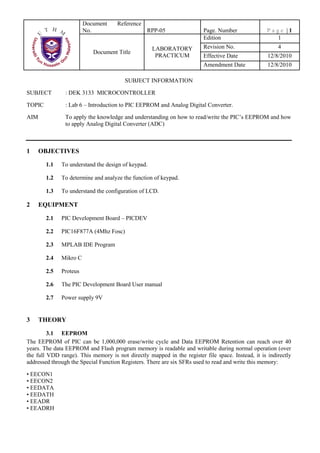
                        DEK 3133
Subject Code and Name
                        MICROCONTROLLER

  Experiment Code       06

   Experiment Title     Introduction to EEPROM & ADC


    Course Code         DET/DEE/DEX
Document     Reference
                        No.                      RPP-05                 Page. Number               Page |1
                                                                        Edition                      1
                                                    LABORATORY          Revision No.                   4
                           Document Title
                                                     PRACTICUM          Effective Date             12/8/2010
                                                                        Amendment Date             12/8/2010

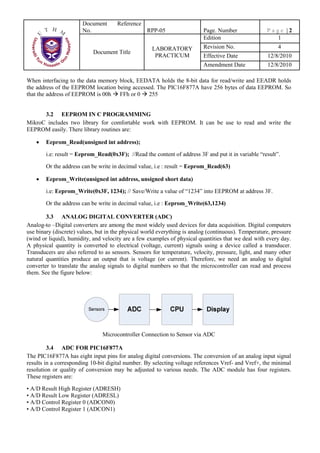
                                        SUBJECT INFORMATION

SUBJECT        : DEK 3133 MICROCONTROLLER

TOPIC          : Lab 6 – Introduction to PIC EEPROM and Analog Digital Converter.

AIM            To apply the knowledge and understanding on how to read/write the PIC’s EEPROM and how
               to apply Analog Digital Converter (ADC)


1     OBJECTIVES

        1.1   To understand the design of keypad.

        1.2   To determine and analyze the function of keypad.

        1.3   To understand the configuration of LCD.

2     EQUIPMENT

        2.1   PIC Development Board – PICDEV

        2.2   PIC16F877A (4Mhz Fosc)

        2.3   MPLAB IDE Program

        2.4   Mikro C

        2.5   Proteus

        2.6   The PIC Development Board User manual

        2.7   Power supply 9V


3     THEORY

         3.1 EEPROM
The EEPROM of PIC can be 1,000,000 erase/write cycle and Data EEPROM Retention can reach over 40
years. The data EEPROM and Flash program memory is readable and writable during normal operation (over
the full VDD range). This memory is not directly mapped in the register file space. Instead, it is indirectly
addressed through the Special Function Registers. There are six SFRs used to read and write this memory:

• EECON1
• EECON2
• EEDATA
• EEDATH
• EEADR
• EEADRH
Document       Reference
                       No.                        RPP-05                  Page. Number               Page |2
                                                                          Edition                      1
                                                     LABORATORY           Revision No.                    4
                            Document Title
                                                      PRACTICUM           Effective Date              12/8/2010
                                                                          Amendment Date              12/8/2010

When interfacing to the data memory block, EEDATA holds the 8-bit data for read/write and EEADR holds
the address of the EEPROM location being accessed. The PIC16F877A have 256 bytes of data EEPROM. So
that the address of EEPROM is 00h FFh or 0 255


      3.2 EEPROM IN C PROGRAMMING
MikroC includes two library for comfortable work with EEPROM. It can be use to read and write the
EEPROM easily. There library routines are:

        Eeprom_Read(unsigned int address);

        i.e: result = Eeprom_Read(0x3F); //Read the content of address 3F and put it in variable “result”.

        Or the address can be write in decimal value, i.e : result = Eeprom_Read(63)

        Eeprom_Write(unsigned int address, unsigned short data)

        i.e: Eeprom_Write(0x3F, 1234); // Save/Write a value of “1234” into EEPROM at address 3F.

        Or the address can be write in decimal value, i.e : Eeprom_Write(63,1234)

        3.3 ANALOG DIGITAL CONVERTER (ADC)
Analog-to –Digital converters are among the most widely used devices for data acquisition. Digital computers
use binary (discrete) values, but in the physical world everything is analog (continuous). Temperature, pressure
(wind or liquid), humidity, and velocity are a few examples of physical quantities that we deal with every day.
A physical quantity is converted to electrical (voltage, current) signals using a device called a transducer.
Transducers are also referred to as sensors. Sensors for temperature, velocity, pressure, light, and many other
natural quantities produce an output that is voltage (or current). Therefore, we need an analog to digital
converter to translate the analog signals to digital numbers so that the microcontroller can read and process
them. See the figure below:


                                Microcontroller Connection to Sensor via ADC

         3.4 ADC FOR PIC16F877A
The PIC16F877A has eight input pins for analog digital conversions. The conversion of an analog input signal
results in a corresponding 10-bit digital number. By selecting voltage references Vref- and Vref+, the minimal
resolution or quality of conversion may be adjusted to various needs. The ADC module has four registers.
These registers are:

• A/D Result High Register (ADRESH)
• A/D Result Low Register (ADRESL)
• A/D Control Register 0 (ADCON0)
• A/D Control Register 1 (ADCON1)
Document    Reference
                          No.                      RPP-05                   Page. Number             Page |3
                                                                            Edition                    1
                                                     LABORATORY             Revision No.                  4
                             Document Title
                                                      PRACTICUM             Effective Date            12/8/2010
                                                                            Amendment Date            12/8/2010


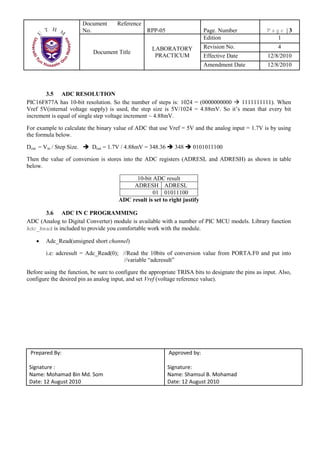
       3.5 ADC RESOLUTION
PIC16F877A has 10-bit resolution. So the number of steps is: 1024 = (0000000000      1111111111). When
Vref 5V(internal voltage supply) is used, the step size is 5V/1024 = 4.88mV. So it’s mean that every bit
increment is equal of single step voltage increment ~ 4.88mV.

For example to calculate the binary value of ADC that use Vref = 5V and the analog input = 1.7V is by using
the formula below.

Dout = Vin / Step Size.      Dout = 1.7V / 4.88mV = 348.36    348     0101011100

Then the value of conversion is stores into the ADC registers (ADRESL and ADRESH) as shown in table
below.

                                             10-bit ADC result
                                            ADRESH ADRESL
                                                    01 01011100
                                       ADC result is set to right justify

      3.6 ADC IN C PROGRAMMING
ADC (Analog to Digital Converter) module is available with a number of PIC MCU models. Library function
Adc_Read is included to provide you comfortable work with the module.

        Adc_Read(unsigned short channel)

        i.e: adcresult = Adc_Read(0); //Read the 10bits of conversion value from PORTA.F0 and put into
                                       //variable “adcresult”

Before using the function, be sure to configure the appropriate TRISA bits to designate the pins as input. Also,
configure the desired pin as analog input, and set Vref (voltage reference value).
Document      Reference
                     No.                       RPP-05                  Page. Number              Page |4
                                                                       Edition                     1
                                                 LABORATORY            Revision No.                   4
                         Document Title
                                                  PRACTICUM            Effective Date            12/8/2010
                                                                       Amendment Date            12/8/2010


4   ATTENTION

     4.1      Do not move any IC or device inside the board without any order from your instructor.


5   EXPERIMENT PROCEDURE


     5.1.1    Before test your source code on the PIC development board, please make sure the jumper
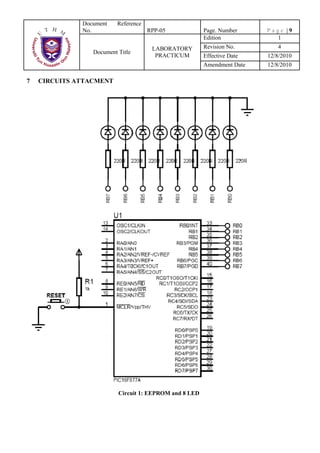
     5.1     EEPROM (Attachment Circuit 1: EEPROM and 8 LEDs)


              connection of LED1 LED8 is                .

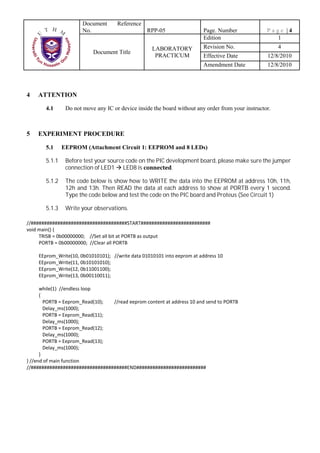
     5.1.2    The code below is show how to WRITE the data into the EEPROM at address 10h, 11h,
              12h and 13h. Then READ the data at each address to show at PORTB every 1 second.
              Type the code below and test the code on the PIC board and Proteus (See Circuit 1)

     5.1.3    Write your observations.
Document     Reference
                No.                      RPP-05               Page. Number                Page |5
                                                              Edition                       1
                                           LABORATORY         Revision No.                    4
                    Document Title
                                            PRACTICUM         Effective Date              12/8/2010
                                                              Amendment Date              12/8/2010

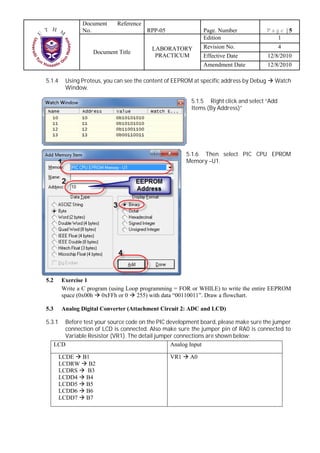
5.1.4     Using Proteus, you can see the content of EEPROM at specific address by Debug     Watch
          Window.

                                                          5.1.5 Right click and select “Add
                                                          Items (By Address)”


                                                        5.1.6 Then select PIC CPU EPROM
                                                        Memory –U1.


5.2     Exercise 1
        Write a C program (using Loop programming = FOR or WHILE) to write the entire EEPROM
        space (0x00h 0xFFh or 0 255) with data “00110011”. Draw a flowchart.


5.3.1    Before test your source code on the PIC development board, please make sure the jumper
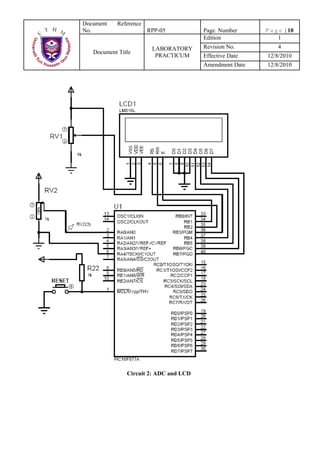
5.3     Analog Digital Converter (Attachment Circuit 2: ADC and LCD)


         connection of LCD is connected. Also make sure the jumper pin of RA0 is connected to
         Variable Resistor (VR1). The detail jumper connections are shown below:
      LCD                                         Analog Input

        LCDE B1                                   VR1    A0
        LCDRW B2
        LCDRS B3
        LCDD4 B4
        LCDD5 B5
        LCDD6 B6
        LCDD7 B7
Document      Reference
                No.                       RPP-05              Page. Number             Page |6
                                                              Edition                    1
                                           LABORATORY         Revision No.                 4
                     Document Title
                                            PRACTICUM         Effective Date           12/8/2010
                                                              Amendment Date           12/8/2010

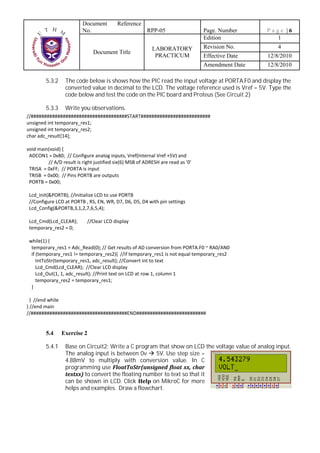
5.3.2    The code below is shows how the PIC read the input voltage at PORTA.F0 and display the
         converted value in decimal to the LCD. The voltage reference used is Vref = 5V. Type the
         code below and test the code on the PIC board and Proteus (See Circuit 2)

5.3.3    Write you observations.


5.4.1    Base on Circuit2; Write a C program that show on LCD the voltage value of analog input.
5.4     Exercise 2


         The analog input is between 0v      5V. Use step size =
         4.88mV to multiply with conversion value. In C
         programming use
                 to convert the floating number to text so that it
         can be shown in LCD. Click         on MikroC for more
         helps and examples. Draw a flowchart.
Document     Reference
              No.                         RPP-05              Page. Number             Page |7
                                                              Edition                    1
                                           LABORATORY         Revision No.                 4
                  Document Title
                                            PRACTICUM         Effective Date           12/8/2010
                                                              Amendment Date           12/8/2010

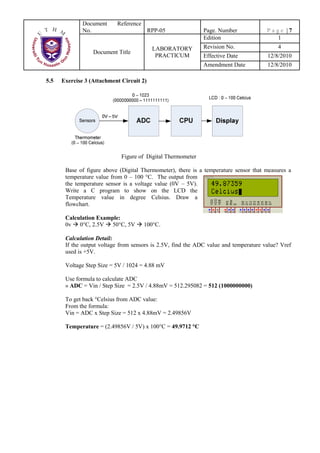
5.5   Exercise 3 (Attachment Circuit 2)


                             Figure of Digital Thermometer

       Base of figure above (Digital Thermometer), there is a temperature sensor that measures a
       temperature value from 0 – 100 °C. The output from
       the temperature sensor is a voltage value (0V – 5V).
       Write a C program to show on the LCD the
       Temperature value in degree Celsius. Draw a
       flowchart.

       Calculation Example:
       0v 0°C, 2.5V 50°C, 5V           100°C.

       Calculation Detail:
       If the output voltage from sensors is 2.5V, find the ADC value and temperature value? Vref
       used is +5V.

       Voltage Step Size = 5V / 1024 = 4.88 mV

       Use formula to calculate ADC
       » ADC = Vin / Step Size = 2.5V / 4.88mV = 512.295082 = 512 (1000000000)

       To get back °Celsius from ADC value:
       From the formula:
       Vin = ADC x Step Size = 512 x 4.88mV = 2.49856V

       Temperature = (2.49856V / 5V) x 100°C = 49.9712 °C
Document     Reference
                           No.                       RPP-05             Page. Number         Page |8
                                                                        Edition                1
                                                       LABORATORY       Revision No.             4
                              Document Title
                                                        PRACTICUM       Effective Date       12/8/2010
                                                                        Amendment Date       12/8/2010

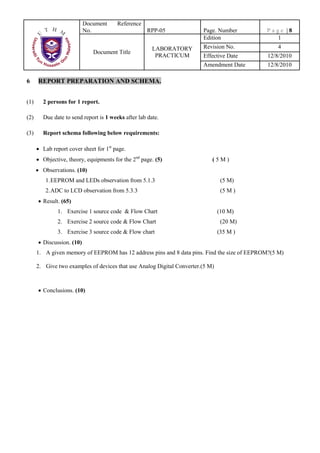
6     REPORT PREPARATION AND SCHEMA.


(1)     2 persons for 1 report.

(2)     Due date to send report is 1 weeks after lab date.

(3)     Report schema following below requirements:

        Lab report cover sheet for 1st page.
        Objective, theory, equipments for the 2nd page. (5)                 (5M)
        Observations. (10)
         1.EEPROM and LEDs observation from 5.1.3                                (5 M)
         2.ADC to LCD observation from 5.3.3                                     (5 M )
        Result. (65)
              1. Exercise 1 source code & Flow Chart                            (10 M)
              2. Exercise 2 source code & Flow Chart                             (20 M)
              3. Exercise 3 source code & Flow chart                            (35 M )
        Discussion. (10)
      1. A given memory of EEPROM has 12 address pins and 8 data pins. Find the size of EEPROM?(5 M)

      2. Give two examples of devices that use Analog Digital Converter.(5 M)


        Conclusions. (10)
Document    Reference
              No.                     RPP-05            Page. Number     Page |9
                                                        Edition            1
                                       LABORATORY       Revision No.        4
                 Document Title
                                        PRACTICUM       Effective Date   12/8/2010
                                                        Amendment Date   12/8/2010

7   CIRCUITS ATTACMENT


                          Circuit 1: EEPROM and 8 LED
Document    Reference
No.                     RPP-05          Page. Number     P a g e | 10
                                        Edition               1
                         LABORATORY     Revision No.          4
   Document Title
                          PRACTICUM     Effective Date   12/8/2010
                                        Amendment Date   12/8/2010


               Circuit 2: ADC and LCD

Lab 6 microcontroller

  • 1.
    CENTRE OF DIPLOMASTUDIES COMPUTER ADDED DESIGN LABORATORY LABORATORY INSTRUCTION SHEET DEK 3133 Subject Code and Name MICROCONTROLLER Experiment Code 06 Experiment Title Introduction to EEPROM & ADC Course Code DET/DEE/DEX
  • 2.
    Document Reference No. RPP-05 Page. Number Page |1 Edition 1 LABORATORY Revision No. 4 Document Title PRACTICUM Effective Date 12/8/2010 Amendment Date 12/8/2010 SUBJECT INFORMATION SUBJECT : DEK 3133 MICROCONTROLLER TOPIC : Lab 6 – Introduction to PIC EEPROM and Analog Digital Converter. AIM To apply the knowledge and understanding on how to read/write the PIC’s EEPROM and how to apply Analog Digital Converter (ADC) 1 OBJECTIVES 1.1 To understand the design of keypad. 1.2 To determine and analyze the function of keypad. 1.3 To understand the configuration of LCD. 2 EQUIPMENT 2.1 PIC Development Board – PICDEV 2.2 PIC16F877A (4Mhz Fosc) 2.3 MPLAB IDE Program 2.4 Mikro C 2.5 Proteus 2.6 The PIC Development Board User manual 2.7 Power supply 9V 3 THEORY 3.1 EEPROM The EEPROM of PIC can be 1,000,000 erase/write cycle and Data EEPROM Retention can reach over 40 years. The data EEPROM and Flash program memory is readable and writable during normal operation (over the full VDD range). This memory is not directly mapped in the register file space. Instead, it is indirectly addressed through the Special Function Registers. There are six SFRs used to read and write this memory: • EECON1 • EECON2 • EEDATA • EEDATH • EEADR • EEADRH
  • 3.
    Document Reference No. RPP-05 Page. Number Page |2 Edition 1 LABORATORY Revision No. 4 Document Title PRACTICUM Effective Date 12/8/2010 Amendment Date 12/8/2010 When interfacing to the data memory block, EEDATA holds the 8-bit data for read/write and EEADR holds the address of the EEPROM location being accessed. The PIC16F877A have 256 bytes of data EEPROM. So that the address of EEPROM is 00h FFh or 0 255 3.2 EEPROM IN C PROGRAMMING MikroC includes two library for comfortable work with EEPROM. It can be use to read and write the EEPROM easily. There library routines are: Eeprom_Read(unsigned int address); i.e: result = Eeprom_Read(0x3F); //Read the content of address 3F and put it in variable “result”. Or the address can be write in decimal value, i.e : result = Eeprom_Read(63) Eeprom_Write(unsigned int address, unsigned short data) i.e: Eeprom_Write(0x3F, 1234); // Save/Write a value of “1234” into EEPROM at address 3F. Or the address can be write in decimal value, i.e : Eeprom_Write(63,1234) 3.3 ANALOG DIGITAL CONVERTER (ADC) Analog-to –Digital converters are among the most widely used devices for data acquisition. Digital computers use binary (discrete) values, but in the physical world everything is analog (continuous). Temperature, pressure (wind or liquid), humidity, and velocity are a few examples of physical quantities that we deal with every day. A physical quantity is converted to electrical (voltage, current) signals using a device called a transducer. Transducers are also referred to as sensors. Sensors for temperature, velocity, pressure, light, and many other natural quantities produce an output that is voltage (or current). Therefore, we need an analog to digital converter to translate the analog signals to digital numbers so that the microcontroller can read and process them. See the figure below: Microcontroller Connection to Sensor via ADC 3.4 ADC FOR PIC16F877A The PIC16F877A has eight input pins for analog digital conversions. The conversion of an analog input signal results in a corresponding 10-bit digital number. By selecting voltage references Vref- and Vref+, the minimal resolution or quality of conversion may be adjusted to various needs. The ADC module has four registers. These registers are: • A/D Result High Register (ADRESH) • A/D Result Low Register (ADRESL) • A/D Control Register 0 (ADCON0) • A/D Control Register 1 (ADCON1)
  • 4.
    Document Reference No. RPP-05 Page. Number Page |3 Edition 1 LABORATORY Revision No. 4 Document Title PRACTICUM Effective Date 12/8/2010 Amendment Date 12/8/2010 3.5 ADC RESOLUTION PIC16F877A has 10-bit resolution. So the number of steps is: 1024 = (0000000000 1111111111). When Vref 5V(internal voltage supply) is used, the step size is 5V/1024 = 4.88mV. So it’s mean that every bit increment is equal of single step voltage increment ~ 4.88mV. For example to calculate the binary value of ADC that use Vref = 5V and the analog input = 1.7V is by using the formula below. Dout = Vin / Step Size. Dout = 1.7V / 4.88mV = 348.36 348 0101011100 Then the value of conversion is stores into the ADC registers (ADRESL and ADRESH) as shown in table below. 10-bit ADC result ADRESH ADRESL 01 01011100 ADC result is set to right justify 3.6 ADC IN C PROGRAMMING ADC (Analog to Digital Converter) module is available with a number of PIC MCU models. Library function Adc_Read is included to provide you comfortable work with the module. Adc_Read(unsigned short channel) i.e: adcresult = Adc_Read(0); //Read the 10bits of conversion value from PORTA.F0 and put into //variable “adcresult” Before using the function, be sure to configure the appropriate TRISA bits to designate the pins as input. Also, configure the desired pin as analog input, and set Vref (voltage reference value).
  • 5.
    Document Reference No. RPP-05 Page. Number Page |4 Edition 1 LABORATORY Revision No. 4 Document Title PRACTICUM Effective Date 12/8/2010 Amendment Date 12/8/2010 4 ATTENTION 4.1 Do not move any IC or device inside the board without any order from your instructor. 5 EXPERIMENT PROCEDURE 5.1.1 Before test your source code on the PIC development board, please make sure the jumper 5.1 EEPROM (Attachment Circuit 1: EEPROM and 8 LEDs) connection of LED1 LED8 is . 5.1.2 The code below is show how to WRITE the data into the EEPROM at address 10h, 11h, 12h and 13h. Then READ the data at each address to show at PORTB every 1 second. Type the code below and test the code on the PIC board and Proteus (See Circuit 1) 5.1.3 Write your observations.
  • 6.
    Document Reference No. RPP-05 Page. Number Page |5 Edition 1 LABORATORY Revision No. 4 Document Title PRACTICUM Effective Date 12/8/2010 Amendment Date 12/8/2010 5.1.4 Using Proteus, you can see the content of EEPROM at specific address by Debug Watch Window. 5.1.5 Right click and select “Add Items (By Address)” 5.1.6 Then select PIC CPU EPROM Memory –U1. 5.2 Exercise 1 Write a C program (using Loop programming = FOR or WHILE) to write the entire EEPROM space (0x00h 0xFFh or 0 255) with data “00110011”. Draw a flowchart. 5.3.1 Before test your source code on the PIC development board, please make sure the jumper 5.3 Analog Digital Converter (Attachment Circuit 2: ADC and LCD) connection of LCD is connected. Also make sure the jumper pin of RA0 is connected to Variable Resistor (VR1). The detail jumper connections are shown below: LCD Analog Input LCDE B1 VR1 A0 LCDRW B2 LCDRS B3 LCDD4 B4 LCDD5 B5 LCDD6 B6 LCDD7 B7
  • 7.
    Document Reference No. RPP-05 Page. Number Page |6 Edition 1 LABORATORY Revision No. 4 Document Title PRACTICUM Effective Date 12/8/2010 Amendment Date 12/8/2010 5.3.2 The code below is shows how the PIC read the input voltage at PORTA.F0 and display the converted value in decimal to the LCD. The voltage reference used is Vref = 5V. Type the code below and test the code on the PIC board and Proteus (See Circuit 2) 5.3.3 Write you observations. 5.4.1 Base on Circuit2; Write a C program that show on LCD the voltage value of analog input. 5.4 Exercise 2 The analog input is between 0v 5V. Use step size = 4.88mV to multiply with conversion value. In C programming use to convert the floating number to text so that it can be shown in LCD. Click on MikroC for more helps and examples. Draw a flowchart.
  • 8.
    Document Reference No. RPP-05 Page. Number Page |7 Edition 1 LABORATORY Revision No. 4 Document Title PRACTICUM Effective Date 12/8/2010 Amendment Date 12/8/2010 5.5 Exercise 3 (Attachment Circuit 2) Figure of Digital Thermometer Base of figure above (Digital Thermometer), there is a temperature sensor that measures a temperature value from 0 – 100 °C. The output from the temperature sensor is a voltage value (0V – 5V). Write a C program to show on the LCD the Temperature value in degree Celsius. Draw a flowchart. Calculation Example: 0v 0°C, 2.5V 50°C, 5V 100°C. Calculation Detail: If the output voltage from sensors is 2.5V, find the ADC value and temperature value? Vref used is +5V. Voltage Step Size = 5V / 1024 = 4.88 mV Use formula to calculate ADC » ADC = Vin / Step Size = 2.5V / 4.88mV = 512.295082 = 512 (1000000000) To get back °Celsius from ADC value: From the formula: Vin = ADC x Step Size = 512 x 4.88mV = 2.49856V Temperature = (2.49856V / 5V) x 100°C = 49.9712 °C
  • 9.
    Document Reference No. RPP-05 Page. Number Page |8 Edition 1 LABORATORY Revision No. 4 Document Title PRACTICUM Effective Date 12/8/2010 Amendment Date 12/8/2010 6 REPORT PREPARATION AND SCHEMA. (1) 2 persons for 1 report. (2) Due date to send report is 1 weeks after lab date. (3) Report schema following below requirements: Lab report cover sheet for 1st page. Objective, theory, equipments for the 2nd page. (5) (5M) Observations. (10) 1.EEPROM and LEDs observation from 5.1.3 (5 M) 2.ADC to LCD observation from 5.3.3 (5 M ) Result. (65) 1. Exercise 1 source code & Flow Chart (10 M) 2. Exercise 2 source code & Flow Chart (20 M) 3. Exercise 3 source code & Flow chart (35 M ) Discussion. (10) 1. A given memory of EEPROM has 12 address pins and 8 data pins. Find the size of EEPROM?(5 M) 2. Give two examples of devices that use Analog Digital Converter.(5 M) Conclusions. (10)
  • 10.
    Document Reference No. RPP-05 Page. Number Page |9 Edition 1 LABORATORY Revision No. 4 Document Title PRACTICUM Effective Date 12/8/2010 Amendment Date 12/8/2010 7 CIRCUITS ATTACMENT Circuit 1: EEPROM and 8 LED
  • 11.
    Document Reference No. RPP-05 Page. Number P a g e | 10 Edition 1 LABORATORY Revision No. 4 Document Title PRACTICUM Effective Date 12/8/2010 Amendment Date 12/8/2010 Circuit 2: ADC and LCD