CENTRE OF DIPLOMA STUDIES


COMPUTER ADDED DESIGN LABORATORY


   LABORATORY INSTRUCTION SHEET


                        DEK 3133
Subject Code and Name
                        MICROCONTROLLER

  Experiment Code       03

                        Introduction to functions, conditions and
   Experiment Title     Hardware Timer using TMR0

    Course Code         DET/DEE/DEX
Document Reference
                         No.                     RPP-05                 Page. Number            Page |1
                                                                        Edition                   1
                                                   LABORATORY           Revision No.               4
                            Document Title
                                                    PRACTICUM           Effective Date          27/7/2010
                                                                        Amendment Date          27/7/2010

                                        SUBJECT INFORMATION

SUBJECT         : DEK 3133 MICROCONTROLLER

TOPIC           : Lab 3 – Introduction to functions, conditions and Hardware Timer using TMR0

AIM             : Learn the further programming technique using C language


1       OBJECTIVES

         1.1   To understand the concept of programming in C using functions and conditions

         1.2   To learn how to use TMR0 as a hardware timer


2       EQUIPMENT


         2.1   PIC Development Board – PICDEV

         2.2   MPLAB IDE Program

         2.3   Mikro C

         2.4   Proteus

         2.5   The PIC Development Board User manual

         2.6   Power supply 9V
Document Reference
                         No.                        RPP-05                  Page. Number               Page |2
                                                                            Edition                      1
                                                      LABORATORY            Revision No.                      4
                              Document Title
                                                       PRACTICUM            Effective Date             27/7/2010
                                                                            Amendment Date             27/7/2010

3       THEORY

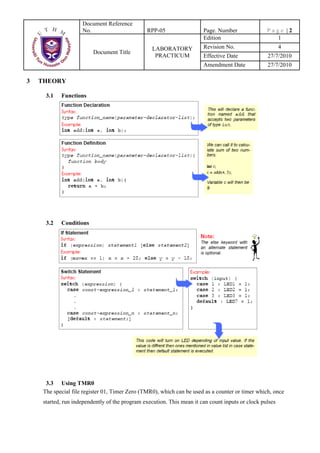
          3.1   Functions


          3.2   Conditions


          3.3 Using TMR0
         The special file register 01, Timer Zero (TMR0), which can be used as a counter or timer which, once
         started, run independently of the program execution. This mean it can count inputs or clock pulses
Document Reference
                          No.                       RPP-05                 Page. Number               Page |3
                                                                           Edition                      1
                                                      LABORATORY           Revision No.                     4
                              Document Title
                                                       PRACTICUM           Effective Date              27/7/2010
                                                                           Amendment Date              27/7/2010

        concurrently with the program. The counter/timer can also be set up to generate an interrupt when it has
        reached its maximum value, so that the main program does not have to keep checking it to see if a
        particular count has been reached.

         3.4       REGISTERS ASSOCIATED WITH TIMER0


    •    TMR0
           o 8 bit TMR0 Module Register
           o Count from 0 to 255 (00h to FFh)

    •    INTCON
               o GIE - Global Interrupt Enable bit - controls all possible interrupt sources
                 simultaneously.
                        1 - Enables all unmasked interrupts.
                        0 - Disables all interrupts.
               o    T0IE - TMR0 Overflow Interrupt Enable bit controls interrupt enabled by TMR0 overflow.
                            1 - Enables the TMR0 interrupt.
                            0 - Disables the TMR0 interrupt.
               o    T0IF - TMR0 Overflow Interrupt Flag bit registers the timer TMR0 register overflow, when
                    counting starts from zero.
                            1 - TMR0 register has overflowed (bit must be cleared in software).
                            0 - TMR0 register has not overflowed.
Document Reference
                      No.                         RPP-05                  Page. Number     Page |4
                                                                          Edition            1
                                                    LABORATORY            Revision No.        4
                           Document Title
                                                     PRACTICUM            Effective Date   27/7/2010
                                                                          Amendment Date   27/7/2010


    •   OPTION
          o TOCS – Clock Select bit (Bit 5)
                  1 – Pulses are brought to TMR0 timer/counter input through the RA4 pin
                  0 – Internal cycle clock (Fosc/4)

           o   TOSE – Source Edge Select bit (Bit 4)
                      1 – Increment on high to low transition on TMR0 pin
                      0 – increment on low to high transition on TMR0 pin
           o   PSA – Prescaler Assignment bit (Bit 3)
                      1 – Prescaler is assigned to the WDT
                      0 – Prescaler is assigned to the TMR0 timer/counter
           o   PS2 (Bit 2), PS1(Bit 1), PS0 (Bit 0) – Prescaler Rate Select bit

               PS2              PS1               PS0            TMR0             WDT
                0                 0                0                1:2             1:1
                0                 0                1                1:4             1:2
                0                 1                0                1:8             1:4
                0                 1                1               1:16             1:8
                1                 0                0               1:32            1:16
                1                 0                1               1:64            1:32
                1                 1                0              1:128            1:64
                1                 1                1              1:256           1:128


 Prepared By:                                               Approved by: 
                                                            
Signature :                                                Signature: 
Name: Mohamad Bin Md. Som                                  Name: Shamsul B. Mohamad 
Date: 27 July 2010                                         Date: 27 July 2010 
Document Reference
                         No.                       RPP-05                  Page. Number              Page |5
                                                                           Edition                     1
                                                      LABORATORY           Revision No.                   4
                             Document Title
                                                       PRACTICUM           Effective Date            27/7/2010
                                                                           Amendment Date            27/7/2010

4       ATTENTION

         4.1      Do not move any IC or device inside the board without any order from your instructor.


5       EXPERIMENT PROCEDURE

         5.1     Functions and Conditions

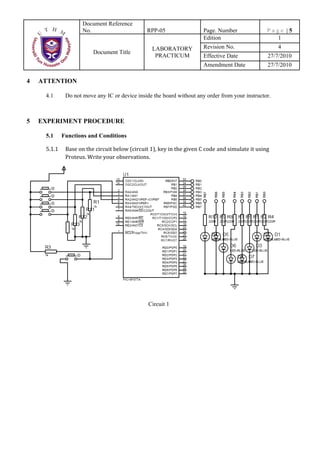
         5.1.1    Base on the circuit below (circuit 1), key in the given C code and simulate it using 
                  Proteus. Write your observations. 


                                                    Circuit 1
Document Reference
                        No.                       RPP-05                  Page. Number              Page |6
                                                                          Edition                     1
                                                    LABORATORY            Revision No.                   4
                           Document Title
                                                     PRACTICUM            Effective Date            27/7/2010
                                                                          Amendment Date            27/7/2010

#define       BUTTON1   PORTA.F0
#define       BUTTON2   PORTA.F1
#define       BUTTON3   PORTA.F2
#define       BUTTON4   PORTA.F3

void pattern1(void)             //function for pattern 1
{
  PORTB = 0b11111111;
}
void pattern2(void)             //function for pattern 2
{
  PORTB = 0b10101010;
}
void pattern3(void)             //function for pattern 3
{
  PORTB = 0b11110000;
}
void pattern4(void)             //function for pattern 4
{
  PORTB = 0b00001111;
}

void main(void)
{
     ADCON1 = 0b00000110; //Set ADCON1 for Port A as a digital input
     TRISA = 0b11111111; //Port A as input port
     TRISB = 0b00000000; //Port B as output port
     PORTB = 0b00000000; //Clear PORTB at start up

     while(1) //endless loop
     {
        if (BUTTON1 == 1) //Test button at PORTA bit 0 if pressed.
             pattern1();   //call function pattern1
        else if (BUTTON2 == 1)
             pattern2();   //call function pattern2
        else if (BUTTON3 == 1)
             pattern3();   //call function pattern3
        else if (BUTTON4 == 1)
             pattern4();   //call function pattern4
        else
             PORTB = 0b00000000; //All LED off if no button pressed
     } //end of while (endless loop)
}//end of main func

        5.2    Assignment 1.


Base on the Circuit 1, Modify the C code so that each button have a different pattern of animated LEDs. Use 1
second delay for each changing pattern. Test your result in Proteus and put your modifying code in the report.
Document Reference
                   No.                       RPP-05                Page. Number             Page |7
                                                                   Edition                    1
                                               LABORATORY          Revision No.                  4
                        Document Title
                                                PRACTICUM          Effective Date            27/7/2010
                                                                   Amendment Date            27/7/2010

    5.3     Using TMR0 as a Hardware Timer


                                             Circuit 2

    5.3.1    Base on the figure above (Circuit 2), the PIC use 4Mhz for its clock speed. Write the 
             program to blink the LED every one second by using TMR0. The code is shown below. 

    #define   LED1 PORTB.F0
    #define   TOCS OPTION_REG.F5
    #define   TOSE OPTION_REG.F4
    #define   PSA OPTION_REG.F3
    #define   PS2 OPTION_REG.F2
    #define   PS1 OPTION_REG.F1
    #define   PS0 OPTION_REG.F0

    #define GIE INTCON.F7
    #define TMR0IE INTCON.F5
    #define TMR0IF INTCON.F2

    //Public Variable
    unsigned int overflow;
    void interrupt(void)   //Interrupt subroutine
    {
      if (TMR0IE == 1 && TMR0IF == 1) //TMR0 made interrupt
Document Reference
                    No.                       RPP-05                Page. Number              Page |8
                                                                    Edition                     1
                                                LABORATORY          Revision No.                   4
                          Document Title
                                                 PRACTICUM          Effective Date            27/7/2010
                                                                    Amendment Date            27/7/2010

        {
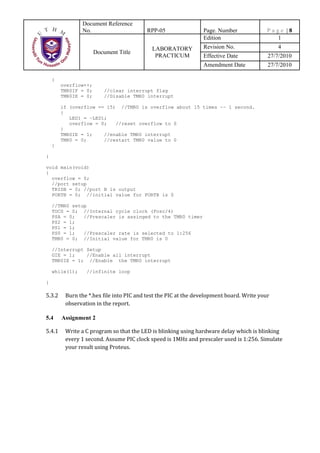
            overflow++;
            TMR0IF = 0;       //clear interrupt flag
            TMR0IE = 0;       //Disable TMR0 interrupt

            if (overflow == 15) //TMR0 is overflow about 15 times ~~ 1 second.
            {
               LED1 = ~LED1;
               overflow = 0;   //reset overflow to 0
            }
            TMR0IE = 1;    //enable TMR0 interrupt
            TMR0 = 0;      //restart TMR0 value to 0
        }

    }

    void main(void)
    {
      overflow = 0;
      //port setup
      TRISB = 0; //port B is output
      PORTB = 0; //initial value for PORTB is 0

        //TMR0 setup
        TOCS = 0; //Internal cycle clock (Fosc/4)
        PSA = 0;   //Prescaler is assinged to the TMR0 timer
        PS2 = 1;
        PS1 = 1;
        PS0 = 1;   //Prescaler rate is selected to 1:256
        TMR0 = 0; //Initial value for TMR0 is 0

        //Interrupt Setup
        GIE = 1;    //Enable all interrupt
        TMR0IE = 1; //Enable the TMR0 interrupt

        while(1);    //infinite loop

    }

    5.3.2    Burn the *.hex file into PIC and test the PIC at the development board. Write your 
             observation in the report. 

    5.4     Assignment 2

    5.4.1    Write a C program so that the LED is blinking using hardware delay which is blinking 
             every 1 second. Assume PIC clock speed is 1MHz and prescaler used is 1:256. Simulate 
             your result using Proteus. 
Document Reference
                             No.                       RPP-05             Page. Number               Page |9
                                                                          Edition                      1
                                                         LABORATORY       Revision No.                  4
                                Document Title
                                                          PRACTICUM       Effective Date             27/7/2010
                                                                          Amendment Date             27/7/2010


6       REPORT PREPARATION AND SCHEMA.


(1)       2 persons for 1 report.

(2)       Due date to send report is 1 weeks after lab date.

(3)       Report schema following below requirements:

        • Lab report cover sheet for 1st page.
        • Objective, theory, equipments for the 2nd page. (5)                              (5M)
        • Observations. (20)
           1. Observations from 5.1.1 (Proteus Simulation)                                 (10 M)
           2. Observations from 5.3.2 (TMR0 run on development board)                      (10 M )
        • Result. (35)
                 1. Assignment 1 source code & Flow Chart                ( 15 M )
                 2. Assignment 2 source code & Proteus Simulation        ( 20 M )
        • Discussion. (25)
            1. List the Registers related to TMR0 and describes the procedure to setup the TMR0 (15M)
            2. If the PIC is supplied with 1 MHz clock speed, calculate time taken for TMR0 to
               overflow. Assume that a prescaler 1:256 is used. Show the calculation in your report
                                                                                           (10 M)


        • Conclusions. (15)

Lab 3 microcontroller

  • 1.
    CENTRE OF DIPLOMASTUDIES COMPUTER ADDED DESIGN LABORATORY LABORATORY INSTRUCTION SHEET DEK 3133 Subject Code and Name MICROCONTROLLER Experiment Code 03 Introduction to functions, conditions and Experiment Title Hardware Timer using TMR0 Course Code DET/DEE/DEX
  • 2.
    Document Reference   No. RPP-05 Page. Number Page |1 Edition 1 LABORATORY Revision No. 4 Document Title PRACTICUM Effective Date 27/7/2010 Amendment Date 27/7/2010 SUBJECT INFORMATION SUBJECT : DEK 3133 MICROCONTROLLER TOPIC : Lab 3 – Introduction to functions, conditions and Hardware Timer using TMR0 AIM : Learn the further programming technique using C language 1 OBJECTIVES 1.1 To understand the concept of programming in C using functions and conditions 1.2 To learn how to use TMR0 as a hardware timer 2 EQUIPMENT 2.1 PIC Development Board – PICDEV 2.2 MPLAB IDE Program 2.3 Mikro C 2.4 Proteus 2.5 The PIC Development Board User manual 2.6 Power supply 9V
  • 3.
    Document Reference   No. RPP-05 Page. Number Page |2 Edition 1 LABORATORY Revision No. 4 Document Title PRACTICUM Effective Date 27/7/2010 Amendment Date 27/7/2010 3 THEORY 3.1 Functions 3.2 Conditions 3.3 Using TMR0 The special file register 01, Timer Zero (TMR0), which can be used as a counter or timer which, once started, run independently of the program execution. This mean it can count inputs or clock pulses
  • 4.
    Document Reference   No. RPP-05 Page. Number Page |3 Edition 1 LABORATORY Revision No. 4 Document Title PRACTICUM Effective Date 27/7/2010 Amendment Date 27/7/2010 concurrently with the program. The counter/timer can also be set up to generate an interrupt when it has reached its maximum value, so that the main program does not have to keep checking it to see if a particular count has been reached. 3.4 REGISTERS ASSOCIATED WITH TIMER0 • TMR0 o 8 bit TMR0 Module Register o Count from 0 to 255 (00h to FFh) • INTCON o GIE - Global Interrupt Enable bit - controls all possible interrupt sources simultaneously. 1 - Enables all unmasked interrupts. 0 - Disables all interrupts. o T0IE - TMR0 Overflow Interrupt Enable bit controls interrupt enabled by TMR0 overflow. 1 - Enables the TMR0 interrupt. 0 - Disables the TMR0 interrupt. o T0IF - TMR0 Overflow Interrupt Flag bit registers the timer TMR0 register overflow, when counting starts from zero. 1 - TMR0 register has overflowed (bit must be cleared in software). 0 - TMR0 register has not overflowed.
  • 5.
    Document Reference   No. RPP-05 Page. Number Page |4 Edition 1 LABORATORY Revision No. 4 Document Title PRACTICUM Effective Date 27/7/2010 Amendment Date 27/7/2010 • OPTION o TOCS – Clock Select bit (Bit 5) 1 – Pulses are brought to TMR0 timer/counter input through the RA4 pin 0 – Internal cycle clock (Fosc/4) o TOSE – Source Edge Select bit (Bit 4) 1 – Increment on high to low transition on TMR0 pin 0 – increment on low to high transition on TMR0 pin o PSA – Prescaler Assignment bit (Bit 3) 1 – Prescaler is assigned to the WDT 0 – Prescaler is assigned to the TMR0 timer/counter o PS2 (Bit 2), PS1(Bit 1), PS0 (Bit 0) – Prescaler Rate Select bit PS2 PS1 PS0 TMR0 WDT 0 0 0 1:2 1:1 0 0 1 1:4 1:2 0 1 0 1:8 1:4 0 1 1 1:16 1:8 1 0 0 1:32 1:16 1 0 1 1:64 1:32 1 1 0 1:128 1:64 1 1 1 1:256 1:128  Prepared By:   Approved by:      Signature :  Signature:  Name: Mohamad Bin Md. Som  Name: Shamsul B. Mohamad  Date: 27 July 2010  Date: 27 July 2010 
  • 6.
    Document Reference   No. RPP-05 Page. Number Page |5 Edition 1 LABORATORY Revision No. 4 Document Title PRACTICUM Effective Date 27/7/2010 Amendment Date 27/7/2010 4 ATTENTION 4.1 Do not move any IC or device inside the board without any order from your instructor. 5 EXPERIMENT PROCEDURE 5.1 Functions and Conditions 5.1.1 Base on the circuit below (circuit 1), key in the given C code and simulate it using  Proteus. Write your observations.  Circuit 1
  • 7.
    Document Reference   No. RPP-05 Page. Number Page |6 Edition 1 LABORATORY Revision No. 4 Document Title PRACTICUM Effective Date 27/7/2010 Amendment Date 27/7/2010 #define BUTTON1 PORTA.F0 #define BUTTON2 PORTA.F1 #define BUTTON3 PORTA.F2 #define BUTTON4 PORTA.F3 void pattern1(void) //function for pattern 1 { PORTB = 0b11111111; } void pattern2(void) //function for pattern 2 { PORTB = 0b10101010; } void pattern3(void) //function for pattern 3 { PORTB = 0b11110000; } void pattern4(void) //function for pattern 4 { PORTB = 0b00001111; } void main(void) { ADCON1 = 0b00000110; //Set ADCON1 for Port A as a digital input TRISA = 0b11111111; //Port A as input port TRISB = 0b00000000; //Port B as output port PORTB = 0b00000000; //Clear PORTB at start up while(1) //endless loop { if (BUTTON1 == 1) //Test button at PORTA bit 0 if pressed. pattern1(); //call function pattern1 else if (BUTTON2 == 1) pattern2(); //call function pattern2 else if (BUTTON3 == 1) pattern3(); //call function pattern3 else if (BUTTON4 == 1) pattern4(); //call function pattern4 else PORTB = 0b00000000; //All LED off if no button pressed } //end of while (endless loop) }//end of main func 5.2 Assignment 1. Base on the Circuit 1, Modify the C code so that each button have a different pattern of animated LEDs. Use 1 second delay for each changing pattern. Test your result in Proteus and put your modifying code in the report.
  • 8.
    Document Reference   No. RPP-05 Page. Number Page |7 Edition 1 LABORATORY Revision No. 4 Document Title PRACTICUM Effective Date 27/7/2010 Amendment Date 27/7/2010 5.3 Using TMR0 as a Hardware Timer Circuit 2 5.3.1 Base on the figure above (Circuit 2), the PIC use 4Mhz for its clock speed. Write the  program to blink the LED every one second by using TMR0. The code is shown below.  #define LED1 PORTB.F0 #define TOCS OPTION_REG.F5 #define TOSE OPTION_REG.F4 #define PSA OPTION_REG.F3 #define PS2 OPTION_REG.F2 #define PS1 OPTION_REG.F1 #define PS0 OPTION_REG.F0 #define GIE INTCON.F7 #define TMR0IE INTCON.F5 #define TMR0IF INTCON.F2 //Public Variable unsigned int overflow; void interrupt(void) //Interrupt subroutine { if (TMR0IE == 1 && TMR0IF == 1) //TMR0 made interrupt
  • 9.
    Document Reference   No. RPP-05 Page. Number Page |8 Edition 1 LABORATORY Revision No. 4 Document Title PRACTICUM Effective Date 27/7/2010 Amendment Date 27/7/2010 { overflow++; TMR0IF = 0; //clear interrupt flag TMR0IE = 0; //Disable TMR0 interrupt if (overflow == 15) //TMR0 is overflow about 15 times ~~ 1 second. { LED1 = ~LED1; overflow = 0; //reset overflow to 0 } TMR0IE = 1; //enable TMR0 interrupt TMR0 = 0; //restart TMR0 value to 0 } } void main(void) { overflow = 0; //port setup TRISB = 0; //port B is output PORTB = 0; //initial value for PORTB is 0 //TMR0 setup TOCS = 0; //Internal cycle clock (Fosc/4) PSA = 0; //Prescaler is assinged to the TMR0 timer PS2 = 1; PS1 = 1; PS0 = 1; //Prescaler rate is selected to 1:256 TMR0 = 0; //Initial value for TMR0 is 0 //Interrupt Setup GIE = 1; //Enable all interrupt TMR0IE = 1; //Enable the TMR0 interrupt while(1); //infinite loop } 5.3.2 Burn the *.hex file into PIC and test the PIC at the development board. Write your  observation in the report.  5.4 Assignment 2 5.4.1 Write a C program so that the LED is blinking using hardware delay which is blinking  every 1 second. Assume PIC clock speed is 1MHz and prescaler used is 1:256. Simulate  your result using Proteus. 
  • 10.
    Document Reference   No. RPP-05 Page. Number Page |9 Edition 1 LABORATORY Revision No. 4 Document Title PRACTICUM Effective Date 27/7/2010 Amendment Date 27/7/2010 6 REPORT PREPARATION AND SCHEMA. (1) 2 persons for 1 report. (2) Due date to send report is 1 weeks after lab date. (3) Report schema following below requirements: • Lab report cover sheet for 1st page. • Objective, theory, equipments for the 2nd page. (5) (5M) • Observations. (20) 1. Observations from 5.1.1 (Proteus Simulation) (10 M) 2. Observations from 5.3.2 (TMR0 run on development board) (10 M ) • Result. (35) 1. Assignment 1 source code & Flow Chart ( 15 M ) 2. Assignment 2 source code & Proteus Simulation ( 20 M ) • Discussion. (25) 1. List the Registers related to TMR0 and describes the procedure to setup the TMR0 (15M) 2. If the PIC is supplied with 1 MHz clock speed, calculate time taken for TMR0 to overflow. Assume that a prescaler 1:256 is used. Show the calculation in your report (10 M) • Conclusions. (15)