UNIVERSITI TUN HUSSEIN ONN MALAYSIA
           FACULTY OF MECHANICAL AND MANUFACTURING ENGINEERING
           BTI 10202: COMPUTER PROGRAMMING


 LAB 5 : Control Statements- Part 1 (Selection)
 NAME : ____ _______________________________________                                         MARKS
 MATRICS NO.: _______________ DATE : _____________


Objective: Introduction to various concepts of selection control structure
           (Be able to choose and use the if, if..else, switch and goto selection
           structures among alternatives action)

Theory:
1.        if single selection structure             Syntax:
     If the condition is TRUE, a set of             if (conditional is true)
     statements are executed.                       {
     If the condition is FALSE, the statement          Statement(s);
     are not executed and the program control       }
     goes to the next statement (after the if          next statement
     block) immediately.
                                                    Statement executes repeatedly as long as the value of
                                                    condition remains TRUE.

2. if double selection structure (if…else)          Syntax:
  If the condition is TRUE, statement A             if (condition is true)
  executes. When FALSE, statement                   {
     executes.                                         statement A;
                                                    }
                                                       else
                                                    {
                                                       statement B;
                                                    }
                                                    Next statement;

3.         if multiple selection structure (if…     Syntax:
     else if)                                       If (condition A)
     The ‘else if’ statement is to check for a      {
     sequence of conditions.                           Statement A;
     If one condition is false, it checks for the   }
     next condition and so on. When all the         else if (condition B)
     conditions are false, the ‘else’ block is      {
     executed.                                         Statement B;
                                                    }
                                                    :
                                                    :
                                                    :else if (condition n)
                                                    {
                                                       Statement set-n;
                                                    }
                                                    else
                                                    {
                                                       Statement set-x;
                                                    }
a. Relational operators                     b. Equality operators


     Symbol     Meaning                         Symbol          Meaning

       >        greater than                       ==           equal to

      >=        greater than or equal to           !=           not equal to


       <        less than

      <=        less than or equal to


                                            Note: If the selection structures have a few statements, then
c. Logical operators                        we need to use the curly bracket { }.
                                            Example:
     Symbol     Meaning                         If (marks>=60)
                                                       printf(“Grade A”);
      &&        AND (Returns true if            else if (marks<60&&marks>=30)
                      both conditions                  printf(“Grade B”);
                      are true)                 else (marks<30)
                                                       {
       ||       OR (Returns true if                    printf(“Failed”);
                       either of its                   printf(“Take a test again!”); }
                       conditions is
                       true

       !        NOT (Reverses the
                      truth/falsity of
                      its condition)


4.    switch is useful when variable or      Syntax:
      condition is tested for multiple
                                             switch (expression) {
      values. It consists of a series of
      case labels and an optional default      case expression 1:
      case.                                           statements1;
      The switch and case statements
                                                             break;
      help control complex conditional
      and branching operations.                  case expression 2:
                                                      statements 2;
                                                             break;
                                                 default:
                                                     expression n;
                                                            break;
                                             }
Note: break is used to terminate loops/ exit from a switch.
                                               Can be used within a for,while, do-while or switch
                                               statement.

5.       goto is a unconditional                         Syntax:
   branching statement used to transfer                       goto name_label;
   control of the program from one                            :
   statement to another. Note: please                         :
   ensure not to use too much goto                        name_label:
   statements in the program because
   its functionality is limited. It is only
   recommended as a last resort if
   structured solutions are much more
   complicated.
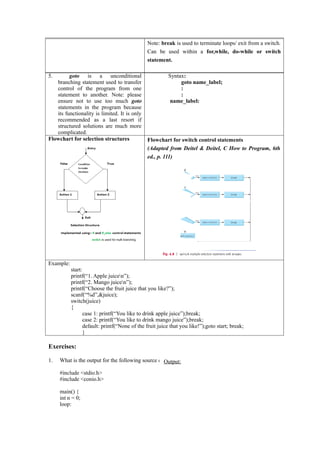
Flowchart for selection structures             Flowchart for switch control statements
                                               (Adapted from Deitel & Deitel, C How to Program, 6th
                                               ed., p. 111)


Example:
           start:
           printf(“1. Apple juicen”);
           printf(“2. Mango juicen”);
           printf(“Choose the fruit juice that you like?”);
           scanf(“%d”,&juice);
           switch(juice)
           {
                  case 1: printf(“You like to drink apple juice”);break;
                  case 2: printf(“You like to drink mango juice”);break;
                  default: printf(“None of the fruit juice that you like!”);goto start; break;
                  }

Exercises:

1.   What is the output for the following source code:
                                                   Output:
     #include <stdio.h>
     #include <conio.h>

     main() {
     int n = 0;
     loop:
printf("n%d", n);
          n++;
          if (n<10)
         { goto loop; }
         getch();

     }


2.       Below is a program to print RED when ‘r’or’R’ is pressed and WHITE when ‘w’ or ‘W’ is
         pressed using a switch control statement. The program loops back to enter ‘r’or’R’ or ‘w’ or ‘W’
         if other keys are pressed. Rewrite the coding using if-else control statements.
          SWITCH program
          #include<stdio.h>
          #include<conio.h>
          main()
          {
          char choice;
          choose:
          printf("nPlease enter 'R' for red and 'W' for whiten");
          scanf("%s",&choice);
          switch(choice)
          { case 'r':
          case 'R':printf(" RED "); break;
          case 'w':
          case 'W':printf(" WHITE"); break;
          IF…ELSE program
          default: printf("Error!!"); goto choose; break;
          }
          getch();
          }
Lab 5 2012/2012

Lab 5 2012/2012

  • 1.
    UNIVERSITI TUN HUSSEINONN MALAYSIA FACULTY OF MECHANICAL AND MANUFACTURING ENGINEERING BTI 10202: COMPUTER PROGRAMMING LAB 5 : Control Statements- Part 1 (Selection) NAME : ____ _______________________________________ MARKS MATRICS NO.: _______________ DATE : _____________ Objective: Introduction to various concepts of selection control structure (Be able to choose and use the if, if..else, switch and goto selection structures among alternatives action) Theory: 1. if single selection structure Syntax: If the condition is TRUE, a set of if (conditional is true) statements are executed. { If the condition is FALSE, the statement Statement(s); are not executed and the program control } goes to the next statement (after the if next statement block) immediately. Statement executes repeatedly as long as the value of condition remains TRUE. 2. if double selection structure (if…else) Syntax: If the condition is TRUE, statement A if (condition is true) executes. When FALSE, statement { executes. statement A; } else { statement B; } Next statement; 3. if multiple selection structure (if… Syntax: else if) If (condition A) The ‘else if’ statement is to check for a { sequence of conditions. Statement A; If one condition is false, it checks for the } next condition and so on. When all the else if (condition B) conditions are false, the ‘else’ block is { executed. Statement B; } : : :else if (condition n) { Statement set-n; } else { Statement set-x; }
  • 2.
    a. Relational operators b. Equality operators Symbol Meaning Symbol Meaning > greater than == equal to >= greater than or equal to != not equal to < less than <= less than or equal to Note: If the selection structures have a few statements, then c. Logical operators we need to use the curly bracket { }. Example: Symbol Meaning If (marks>=60) printf(“Grade A”); && AND (Returns true if else if (marks<60&&marks>=30) both conditions printf(“Grade B”); are true) else (marks<30) { || OR (Returns true if printf(“Failed”); either of its printf(“Take a test again!”); } conditions is true ! NOT (Reverses the truth/falsity of its condition) 4. switch is useful when variable or Syntax: condition is tested for multiple switch (expression) { values. It consists of a series of case labels and an optional default case expression 1: case. statements1; The switch and case statements break; help control complex conditional and branching operations. case expression 2: statements 2; break; default: expression n; break; }
  • 3.
    Note: break isused to terminate loops/ exit from a switch. Can be used within a for,while, do-while or switch statement. 5. goto is a unconditional Syntax: branching statement used to transfer goto name_label; control of the program from one : statement to another. Note: please : ensure not to use too much goto name_label: statements in the program because its functionality is limited. It is only recommended as a last resort if structured solutions are much more complicated. Flowchart for selection structures Flowchart for switch control statements (Adapted from Deitel & Deitel, C How to Program, 6th ed., p. 111) Example: start: printf(“1. Apple juicen”); printf(“2. Mango juicen”); printf(“Choose the fruit juice that you like?”); scanf(“%d”,&juice); switch(juice) { case 1: printf(“You like to drink apple juice”);break; case 2: printf(“You like to drink mango juice”);break; default: printf(“None of the fruit juice that you like!”);goto start; break; } Exercises: 1. What is the output for the following source code: Output: #include <stdio.h> #include <conio.h> main() { int n = 0; loop:
  • 4.
    printf("n%d", n); n++; if (n<10) { goto loop; } getch(); } 2. Below is a program to print RED when ‘r’or’R’ is pressed and WHITE when ‘w’ or ‘W’ is pressed using a switch control statement. The program loops back to enter ‘r’or’R’ or ‘w’ or ‘W’ if other keys are pressed. Rewrite the coding using if-else control statements. SWITCH program #include<stdio.h> #include<conio.h> main() { char choice; choose: printf("nPlease enter 'R' for red and 'W' for whiten"); scanf("%s",&choice); switch(choice) { case 'r': case 'R':printf(" RED "); break; case 'w': case 'W':printf(" WHITE"); break; IF…ELSE program default: printf("Error!!"); goto choose; break; } getch(); }