Subject JAVA
Presentation of “CONTROL STATEMENT”
Submitted To : Satish
Bansal
Submitted By : Bharat
Rathore
Gaurav Shakya
Varsha Rajak
OUTLINES
• Definition
• Flow Diagram
• Selection Statement
• Iteration Statement
• Jump Statement
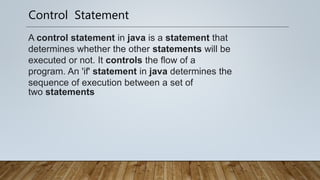
Control Statement
A control statement in java is a statement that
determines whether the other statements will be
executed or not. It controls the flow of a
program. An 'if' statement in java determines the
sequence of execution between a set of
two statements
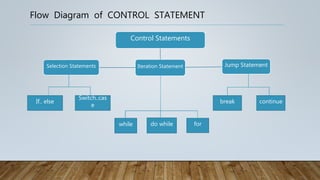
Flow Diagram of CONTROL STATEMENT
Iteration Statement
Control Statements
Jump Statement
Selection Statements
If.. else
Switch..cas
e
while do while for
continue
break
Selection Statement
If-Else Statement
If the condition is true then, it will
execute the If block. Otherwise, it will
execute the Else block.
Switch Statement
Switch statement allows program to select
one action among multiple actions during the
program execution.
Syntax:
Switch(variable/value/expression){
Case :
// statements [];
Case :
// statements [];
…
default:
// statements [];
}
Syntax:
if(condition){
// statements (if Block)
}
else{
// statements (Else block)
}
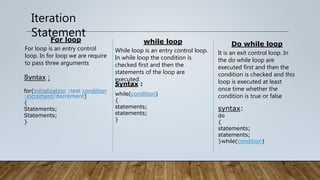
Iteration
Statement
For loop
For loop is an entry control
loop. In for loop we are require
to pass three arguments
while loop
While loop is an entry control loop.
In while loop the condition is
checked first and then the
statements of the loop are
executed.
Do while loop
It is an exit control loop. In
the do while loop are
executed first and then the
condition is checked and this
loop is executed at least
once time whether the
condition is true or false
Syntax :
for(initialization ;test condition
;increment/decrement)
{
Statements;
Statements;
}
Syntax :
while(condition)
{
statements;
statements;
}
syntax:
do
{
statements;
statements;
}while(condition)
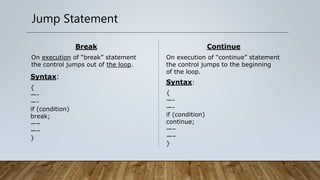
Jump Statement
Break
On execution of “break” statement
the control jumps out of the loop.
Syntax:
{
—-
—-
if (condition)
break;
—–
—–
}
Continue
On execution of “continue” statement
the control jumps to the beginning
of the loop.
Syntax:
{
—-
—-
if (condition)
continue;
—–
—–
}
Presentation of control statement

Presentation of control statement

  • 1.
    Subject JAVA Presentation of“CONTROL STATEMENT” Submitted To : Satish Bansal Submitted By : Bharat Rathore Gaurav Shakya Varsha Rajak
  • 2.
    OUTLINES • Definition • FlowDiagram • Selection Statement • Iteration Statement • Jump Statement
  • 3.
    Control Statement A controlstatement in java is a statement that determines whether the other statements will be executed or not. It controls the flow of a program. An 'if' statement in java determines the sequence of execution between a set of two statements
  • 4.
    Flow Diagram ofCONTROL STATEMENT Iteration Statement Control Statements Jump Statement Selection Statements If.. else Switch..cas e while do while for continue break
  • 5.
    Selection Statement If-Else Statement Ifthe condition is true then, it will execute the If block. Otherwise, it will execute the Else block. Switch Statement Switch statement allows program to select one action among multiple actions during the program execution. Syntax: Switch(variable/value/expression){ Case : // statements []; Case : // statements []; … default: // statements []; } Syntax: if(condition){ // statements (if Block) } else{ // statements (Else block) }
  • 6.
    Iteration Statement For loop For loopis an entry control loop. In for loop we are require to pass three arguments while loop While loop is an entry control loop. In while loop the condition is checked first and then the statements of the loop are executed. Do while loop It is an exit control loop. In the do while loop are executed first and then the condition is checked and this loop is executed at least once time whether the condition is true or false Syntax : for(initialization ;test condition ;increment/decrement) { Statements; Statements; } Syntax : while(condition) { statements; statements; } syntax: do { statements; statements; }while(condition)
  • 7.
    Jump Statement Break On executionof “break” statement the control jumps out of the loop. Syntax: { —- —- if (condition) break; —– —– } Continue On execution of “continue” statement the control jumps to the beginning of the loop. Syntax: { —- —- if (condition) continue; —– —– }