1
 Lecture 3 will introduce conditional statements that allow choices
between different actions to be made within methods. Local
variables in methods will be presented as well to let us differentiate
it from global variables later on.
2
 To learn Boolean types and operators
 To implement conditional statements using if .. else statement
 To learn how to make choices in everyday life, make choices
in Java, and make a choice in the ticket machine
 To know the meaning of scope and lifetime
 To learn about variable types and how can we differentiate
them from local variables that are used in methods
 To learn about arithmetic operator precedence
3
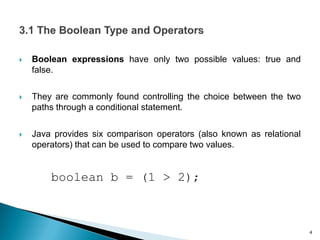
 Boolean expressions have only two possible values: true and
false.
 They are commonly found controlling the choice between the two
paths through a conditional statement.
 Java provides six comparison operators (also known as relational
operators) that can be used to compare two values.
boolean b = (1 > 2);
4
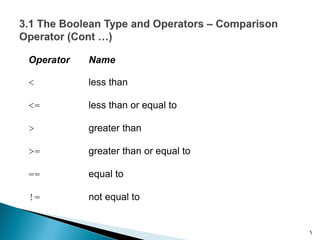
Operator Name
< less than
<= less than or equal to
> greater than
>= greater than or equal to
== equal to
!= not equal to
5
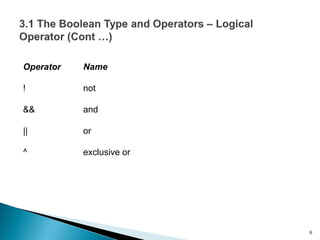
Operator Name
! not
&& and
|| or
^ exclusive or
6
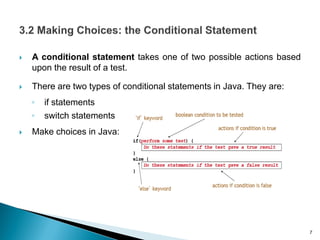
 A conditional statement takes one of two possible actions based
upon the result of a test.
 There are two types of conditional statements in Java. They are:
◦ if statements
◦ switch statements
 Make choices in Java:
7
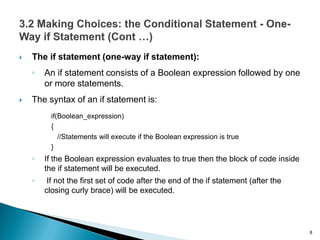
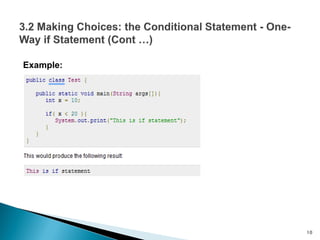
 The if statement (one-way if statement):
◦ An if statement consists of a Boolean expression followed by one
or more statements.
 The syntax of an if statement is:
if(Boolean_expression)
{
//Statements will execute if the Boolean expression is true
}
◦ If the Boolean expression evaluates to true then the block of code inside
the if statement will be executed.
◦ If not the first set of code after the end of the if statement (after the
closing curly brace) will be executed.
8
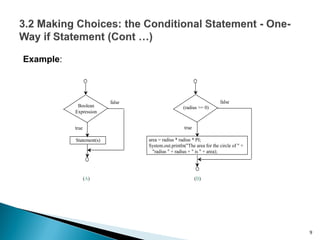
Example:
9
Boolean
Expression
true
Statement(s)
false
(radius >= 0)
true
area = radius * radius * PI;
System.out.println("The area for the circle of " +
"radius " + radius + " is " + area);
false
(A) (B)
Example:
10
Explanation:
 public is the visibility. This can be public, private or default (if you omit
a value).
 static is a special [optional] keyword that indicates that this method can
be called without creating an instance of this class. Without it, you have
to instantiate this class and call this method from the resulting object.
 void is the return type of this method, indicating that this method
doesn't return anything. Methods must have a return type.
 main( ... ) is the name of this method. Methods have to be named. The
parentheses indicate that this is a method.
 String[] args is a single parameter for the method. String[] is the type
of the parameter, indicating an array of Strings. args is the name of the
parameter. Parameters must be named.
11
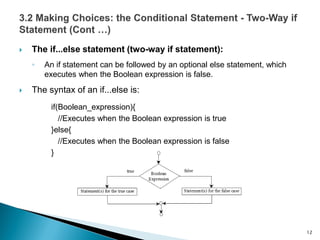
 The if...else statement (two-way if statement):
◦ An if statement can be followed by an optional else statement, which
executes when the Boolean expression is false.
 The syntax of an if...else is:
if(Boolean_expression){
//Executes when the Boolean expression is true
}else{
//Executes when the Boolean expression is false
}
12
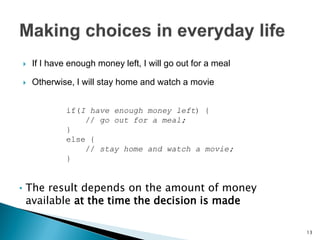
 If I have enough money left, I will go out for a meal
 Otherwise, I will stay home and watch a movie
if(I have enough money left) {
// go out for a meal;
}
else {
// stay home and watch a movie;
}
• The result depends on the amount of money
available at the time the decision is made
13
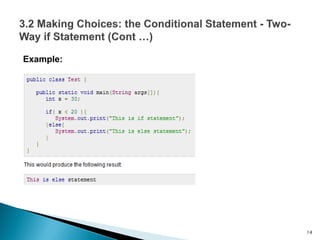
Example:
14
 When the conditional statement is encountered, the Boolean
expression is evaluated
◦ It returns either true or false
 If the result is true, the first statement block is executed, and the
second is skipped
 If the result is false, the first statement block is skipped, and the
second is executed
 In every case, exactly one of the blocks is executed
 In every case, execution continues with the statements following the
conditional (if any)
15
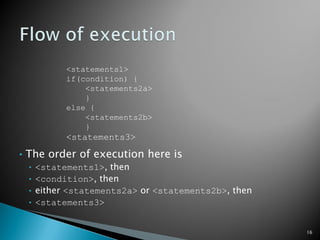
<statements1>
if(condition) {
<statements2a>
}
else {
<statements2b>
}
<statements3>
• The order of execution here is
• <statements1>, then
• <condition>, then
• either <statements2a> or <statements2b>, then
• <statements3>
16
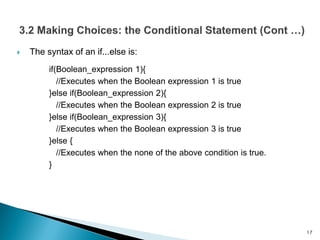
 The syntax of an if...else is:
if(Boolean_expression 1){
//Executes when the Boolean expression 1 is true
}else if(Boolean_expression 2){
//Executes when the Boolean expression 2 is true
}else if(Boolean_expression 3){
//Executes when the Boolean expression 3 is true
}else {
//Executes when the none of the above condition is true.
}
17
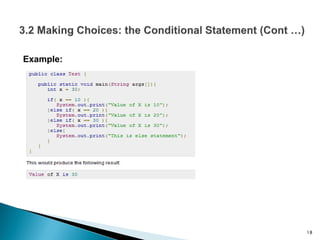
Example:
18
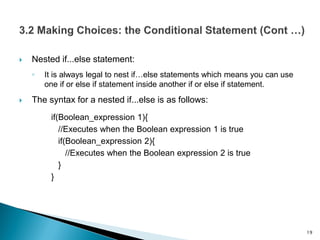
 Nested if...else statement:
◦ It is always legal to nest if…else statements which means you can use
one if or else if statement inside another if or else if statement.
 The syntax for a nested if...else is as follows:
if(Boolean_expression 1){
//Executes when the Boolean expression 1 is true
if(Boolean_expression 2){
//Executes when the Boolean expression 2 is true
}
}
19
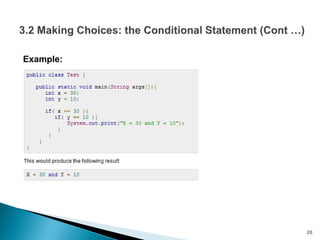
Example:
20
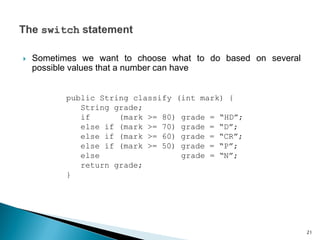
 Sometimes we want to choose what to do based on several
possible values that a number can have
public String classify (int mark) {
String grade;
if (mark >= 80) grade = “HD”;
else if (mark >= 70) grade = “D”;
else if (mark >= 60) grade = “CR”;
else if (mark >= 50) grade = “P”;
else grade = “N”;
return grade;
}
21
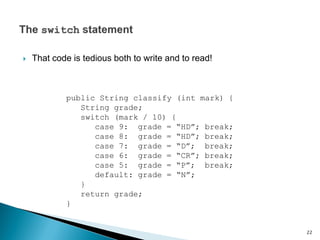
 That code is tedious both to write and to read!
public String classify (int mark) {
String grade;
switch (mark / 10) {
case 9: grade = “HD”; break;
case 8: grade = “HD”; break;
case 7: grade = “D”; break;
case 6: grade = “CR”; break;
case 5: grade = “P”; break;
default: grade = “N”;
}
return grade;
}
22
 The statement evaluates the int expression once
 If the result matches any of the explicit cases listed, execution
resumes at that point
 If it matches none of the explicit cases listed, execution resumes at
the default case
◦ Although the default case is optional
 A break statement causes execution to jump to the statements
following the entire switch statement
◦ If there is no break, execution just continues over multiple cases
23
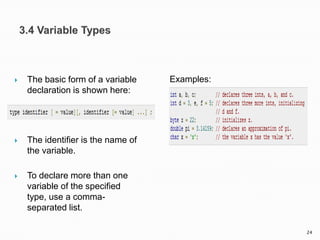
 The basic form of a variable
declaration is shown here:
 The identifier is the name of
the variable.
 To declare more than one
variable of the specified
type, use a comma-
separated list.
Examples:
24
 There are three kinds of variables in Java:
◦ Local variables
◦ Instance variables
◦ Class/static variables
25
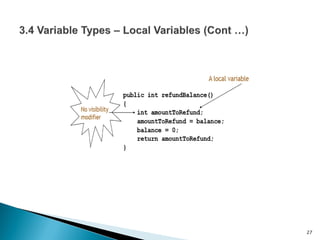
 Local variables are declared in methods or constructors.
 Local variables are created when the method or constructor is entered
and the variable will be destroyed once it exits the method, constructor
or block.
 Access modifiers cannot be used for local variables.
 Local variables are visible only within the declared methods or
constructor.
 There is no default value for local variables so local variables should be
declared and an initial value should be assigned before the first use.
 The scope of a local variable is the block in which it is declared.
26
27
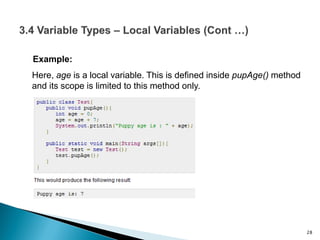
Example:
Here, age is a local variable. This is defined inside pupAge() method
and its scope is limited to this method only.
28
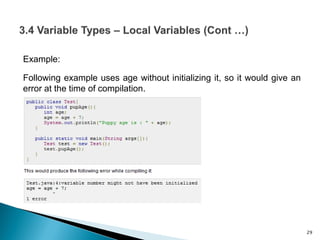
Example:
Following example uses age without initializing it, so it would give an
error at the time of compilation.
29
 Instance variables (fields) are declared in a class, but outside a
method or constructor.
 Instance variables are created when an object is created with the
use of the keyword 'new' and destroyed when the object is
destroyed.
 Instance variables hold values that must be referenced by more
than one method or constructor or essential parts of an object's
state that must be present throughout the class.
30
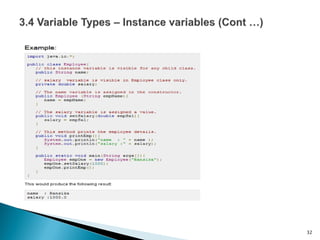
 The instance variables are visible for all methods, constructors and
block in the class.
 It is recommended to make these variables private.
 Instance variables have default values.
 Instance variables can be accessed directly by calling the variable
name inside the class.
ObjectReference.VariableName.
31
32
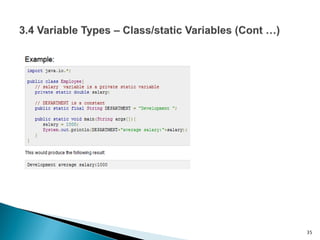
 Class variables also known as static variables are declared with the static
keyword in a class, but outside a method, constructor or a block.
 There would only be one copy of each class variable per class, regardless
of how many objects are created from it.
 Static variables are rarely used other than being declared as constants.
 Constants are variables that are declared as public/private, final and static.
Constant variables never change from their initial value.
 Static variables are stored in static memory. It is rare to use static variables
other than declared final and used as either public or private constants.
33
 Static variables are created when the program starts and destroyed
when the program stops.
 Static variables can be accessed by calling with the class name.
ClassName.VariableName.
 When declaring class variables as public static final, then variables
names (constants) are all in upper case.
 If the static variables are not public and final the naming syntax is
the same as instance and local variables.
34
35
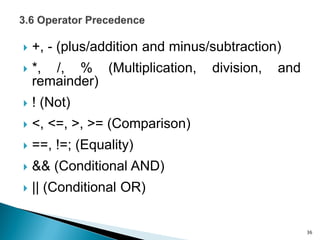
 +, - (plus/addition and minus/subtraction)
 *, /, % (Multiplication, division, and
remainder)
 ! (Not)
 <, <=, >, >= (Comparison)
 ==, !=; (Equality)
 && (Conditional AND)
 || (Conditional OR)
36
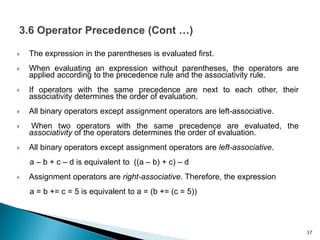
 The expression in the parentheses is evaluated first.
 When evaluating an expression without parentheses, the operators are
applied according to the precedence rule and the associativity rule.
 If operators with the same precedence are next to each other, their
associativity determines the order of evaluation.
 All binary operators except assignment operators are left-associative.
 When two operators with the same precedence are evaluated, the
associativity of the operators determines the order of evaluation.
 All binary operators except assignment operators are left-associative.
a – b + c – d is equivalent to ((a – b) + c) – d
 Assignment operators are right-associative. Therefore, the expression
a = b += c = 5 is equivalent to a = (b += (c = 5))
37
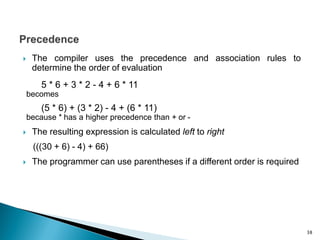
 The compiler uses the precedence and association rules to
determine the order of evaluation
5 * 6 + 3 * 2 - 4 + 6 * 11
becomes
(5 * 6) + (3 * 2) - 4 + (6 * 11)
because * has a higher precedence than + or -
 The resulting expression is calculated left to right
(((30 + 6) - 4) + 66)
 The programmer can use parentheses if a different order is required
38
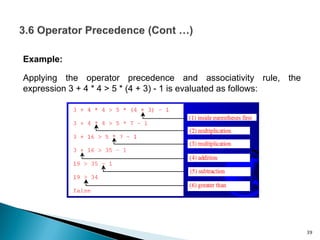
Example:
Applying the operator precedence and associativity rule, the
expression 3 + 4 * 4 > 5 * (4 + 3) - 1 is evaluated as follows:
39
 A conditional statement gives us a means to perform a test and
then, on the basis of the result of that test, perform one or the other
of two distinct actions.
 Local variables allow us to calculate and store temporary values
within a constructor or method. They contribute to the behavior that
their defining method implements, but their values are lost once that
constructor or method finishes its execution
40
 Barnes, David J., and Kölling, Michael. 2012. Objects First with
Java, A practical Introduction Using BlueJ (5th Edition). Boston:
Preston.
 Liang, Y. Daniel. 2011. Introduction to Java Programming,
Comprehensive (8th Ed.) Prentice Hall.
 http://www.tutorialspoint.com/java/java_decision_making.htm
 http://www.homeandlearn.co.uk/java/java.html
41

Lecture 3 Conditionals, expressions and Variables

  • 1.
  • 2.
     Lecture 3will introduce conditional statements that allow choices between different actions to be made within methods. Local variables in methods will be presented as well to let us differentiate it from global variables later on. 2
  • 3.
     To learnBoolean types and operators  To implement conditional statements using if .. else statement  To learn how to make choices in everyday life, make choices in Java, and make a choice in the ticket machine  To know the meaning of scope and lifetime  To learn about variable types and how can we differentiate them from local variables that are used in methods  To learn about arithmetic operator precedence 3
  • 4.
     Boolean expressionshave only two possible values: true and false.  They are commonly found controlling the choice between the two paths through a conditional statement.  Java provides six comparison operators (also known as relational operators) that can be used to compare two values. boolean b = (1 > 2); 4
  • 5.
    Operator Name < lessthan <= less than or equal to > greater than >= greater than or equal to == equal to != not equal to 5
  • 6.
    Operator Name ! not &&and || or ^ exclusive or 6
  • 7.
     A conditionalstatement takes one of two possible actions based upon the result of a test.  There are two types of conditional statements in Java. They are: ◦ if statements ◦ switch statements  Make choices in Java: 7
  • 8.
     The ifstatement (one-way if statement): ◦ An if statement consists of a Boolean expression followed by one or more statements.  The syntax of an if statement is: if(Boolean_expression) { //Statements will execute if the Boolean expression is true } ◦ If the Boolean expression evaluates to true then the block of code inside the if statement will be executed. ◦ If not the first set of code after the end of the if statement (after the closing curly brace) will be executed. 8
  • 9.
    Example: 9 Boolean Expression true Statement(s) false (radius >= 0) true area= radius * radius * PI; System.out.println("The area for the circle of " + "radius " + radius + " is " + area); false (A) (B)
  • 10.
  • 11.
    Explanation:  public isthe visibility. This can be public, private or default (if you omit a value).  static is a special [optional] keyword that indicates that this method can be called without creating an instance of this class. Without it, you have to instantiate this class and call this method from the resulting object.  void is the return type of this method, indicating that this method doesn't return anything. Methods must have a return type.  main( ... ) is the name of this method. Methods have to be named. The parentheses indicate that this is a method.  String[] args is a single parameter for the method. String[] is the type of the parameter, indicating an array of Strings. args is the name of the parameter. Parameters must be named. 11
  • 12.
     The if...elsestatement (two-way if statement): ◦ An if statement can be followed by an optional else statement, which executes when the Boolean expression is false.  The syntax of an if...else is: if(Boolean_expression){ //Executes when the Boolean expression is true }else{ //Executes when the Boolean expression is false } 12
  • 13.
     If Ihave enough money left, I will go out for a meal  Otherwise, I will stay home and watch a movie if(I have enough money left) { // go out for a meal; } else { // stay home and watch a movie; } • The result depends on the amount of money available at the time the decision is made 13
  • 14.
  • 15.
     When theconditional statement is encountered, the Boolean expression is evaluated ◦ It returns either true or false  If the result is true, the first statement block is executed, and the second is skipped  If the result is false, the first statement block is skipped, and the second is executed  In every case, exactly one of the blocks is executed  In every case, execution continues with the statements following the conditional (if any) 15
  • 16.
    <statements1> if(condition) { <statements2a> } else { <statements2b> } <statements3> •The order of execution here is • <statements1>, then • <condition>, then • either <statements2a> or <statements2b>, then • <statements3> 16
  • 17.
     The syntaxof an if...else is: if(Boolean_expression 1){ //Executes when the Boolean expression 1 is true }else if(Boolean_expression 2){ //Executes when the Boolean expression 2 is true }else if(Boolean_expression 3){ //Executes when the Boolean expression 3 is true }else { //Executes when the none of the above condition is true. } 17
  • 18.
  • 19.
     Nested if...elsestatement: ◦ It is always legal to nest if…else statements which means you can use one if or else if statement inside another if or else if statement.  The syntax for a nested if...else is as follows: if(Boolean_expression 1){ //Executes when the Boolean expression 1 is true if(Boolean_expression 2){ //Executes when the Boolean expression 2 is true } } 19
  • 20.
  • 21.
     Sometimes wewant to choose what to do based on several possible values that a number can have public String classify (int mark) { String grade; if (mark >= 80) grade = “HD”; else if (mark >= 70) grade = “D”; else if (mark >= 60) grade = “CR”; else if (mark >= 50) grade = “P”; else grade = “N”; return grade; } 21
  • 22.
     That codeis tedious both to write and to read! public String classify (int mark) { String grade; switch (mark / 10) { case 9: grade = “HD”; break; case 8: grade = “HD”; break; case 7: grade = “D”; break; case 6: grade = “CR”; break; case 5: grade = “P”; break; default: grade = “N”; } return grade; } 22
  • 23.
     The statementevaluates the int expression once  If the result matches any of the explicit cases listed, execution resumes at that point  If it matches none of the explicit cases listed, execution resumes at the default case ◦ Although the default case is optional  A break statement causes execution to jump to the statements following the entire switch statement ◦ If there is no break, execution just continues over multiple cases 23
  • 24.
     The basicform of a variable declaration is shown here:  The identifier is the name of the variable.  To declare more than one variable of the specified type, use a comma- separated list. Examples: 24
  • 25.
     There arethree kinds of variables in Java: ◦ Local variables ◦ Instance variables ◦ Class/static variables 25
  • 26.
     Local variablesare declared in methods or constructors.  Local variables are created when the method or constructor is entered and the variable will be destroyed once it exits the method, constructor or block.  Access modifiers cannot be used for local variables.  Local variables are visible only within the declared methods or constructor.  There is no default value for local variables so local variables should be declared and an initial value should be assigned before the first use.  The scope of a local variable is the block in which it is declared. 26
  • 27.
  • 28.
    Example: Here, age isa local variable. This is defined inside pupAge() method and its scope is limited to this method only. 28
  • 29.
    Example: Following example usesage without initializing it, so it would give an error at the time of compilation. 29
  • 30.
     Instance variables(fields) are declared in a class, but outside a method or constructor.  Instance variables are created when an object is created with the use of the keyword 'new' and destroyed when the object is destroyed.  Instance variables hold values that must be referenced by more than one method or constructor or essential parts of an object's state that must be present throughout the class. 30
  • 31.
     The instancevariables are visible for all methods, constructors and block in the class.  It is recommended to make these variables private.  Instance variables have default values.  Instance variables can be accessed directly by calling the variable name inside the class. ObjectReference.VariableName. 31
  • 32.
  • 33.
     Class variablesalso known as static variables are declared with the static keyword in a class, but outside a method, constructor or a block.  There would only be one copy of each class variable per class, regardless of how many objects are created from it.  Static variables are rarely used other than being declared as constants.  Constants are variables that are declared as public/private, final and static. Constant variables never change from their initial value.  Static variables are stored in static memory. It is rare to use static variables other than declared final and used as either public or private constants. 33
  • 34.
     Static variablesare created when the program starts and destroyed when the program stops.  Static variables can be accessed by calling with the class name. ClassName.VariableName.  When declaring class variables as public static final, then variables names (constants) are all in upper case.  If the static variables are not public and final the naming syntax is the same as instance and local variables. 34
  • 35.
  • 36.
     +, -(plus/addition and minus/subtraction)  *, /, % (Multiplication, division, and remainder)  ! (Not)  <, <=, >, >= (Comparison)  ==, !=; (Equality)  && (Conditional AND)  || (Conditional OR) 36
  • 37.
     The expressionin the parentheses is evaluated first.  When evaluating an expression without parentheses, the operators are applied according to the precedence rule and the associativity rule.  If operators with the same precedence are next to each other, their associativity determines the order of evaluation.  All binary operators except assignment operators are left-associative.  When two operators with the same precedence are evaluated, the associativity of the operators determines the order of evaluation.  All binary operators except assignment operators are left-associative. a – b + c – d is equivalent to ((a – b) + c) – d  Assignment operators are right-associative. Therefore, the expression a = b += c = 5 is equivalent to a = (b += (c = 5)) 37
  • 38.
     The compileruses the precedence and association rules to determine the order of evaluation 5 * 6 + 3 * 2 - 4 + 6 * 11 becomes (5 * 6) + (3 * 2) - 4 + (6 * 11) because * has a higher precedence than + or -  The resulting expression is calculated left to right (((30 + 6) - 4) + 66)  The programmer can use parentheses if a different order is required 38
  • 39.
    Example: Applying the operatorprecedence and associativity rule, the expression 3 + 4 * 4 > 5 * (4 + 3) - 1 is evaluated as follows: 39
  • 40.
     A conditionalstatement gives us a means to perform a test and then, on the basis of the result of that test, perform one or the other of two distinct actions.  Local variables allow us to calculate and store temporary values within a constructor or method. They contribute to the behavior that their defining method implements, but their values are lost once that constructor or method finishes its execution 40
  • 41.
     Barnes, DavidJ., and Kölling, Michael. 2012. Objects First with Java, A practical Introduction Using BlueJ (5th Edition). Boston: Preston.  Liang, Y. Daniel. 2011. Introduction to Java Programming, Comprehensive (8th Ed.) Prentice Hall.  http://www.tutorialspoint.com/java/java_decision_making.htm  http://www.homeandlearn.co.uk/java/java.html 41