Presented By,
SWASTIKA TRIPATHI
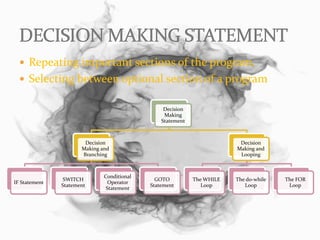
 Repeating important sections of the program.
 Selecting between optional section of a program
Decision
Making
Statement
Decision
Making and
Branching
IF Statement
SWITCH
Statement
Conditional
Operator
Statement
GOTO
Statement
Decision
Making and
Looping
The WHILE
Loop
The do-while
Loop
The FOR
Loop
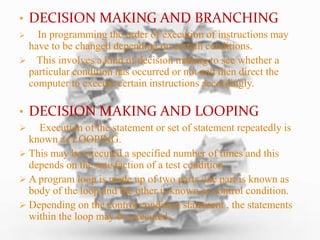
• DECISION MAKING AND BRANCHING
 In programming the order of execution of instructions may
have to be changed depending on certain conditions.
 This involves a kind of decision making to see whether a
particular condition has occurred or not and then direct the
computer to execute certain instructions accordingly.
• DECISION MAKING AND LOOPING
 Execution of the statement or set of statement repeatedly is
known as LOOPING.
 This may be executed a specified number of times and this
depends on the satisfaction of a test condition.
 A program loop is made up of two parts one part is known as
body of the loop and the other is known as control condition.
 Depending on the control condition statement , the statements
within the loop may be executed.
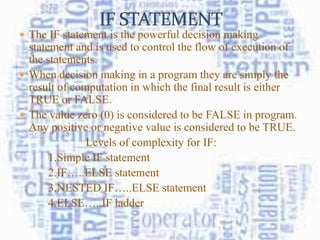
 The IF statement is the powerful decision making
statement and is used to control the flow of execution of
the statements.
 When decision making in a program they are simply the
result of computation in which the final result is either
TRUE or FALSE.
 The value zero (0) is considered to be FALSE in program.
Any positive or negative value is considered to be TRUE.
Levels of complexity for IF:
1.Simple IF statement
2.IF…..ELSE statement
3.NESTED IF…..ELSE statement
4.ELSE…..IF ladder
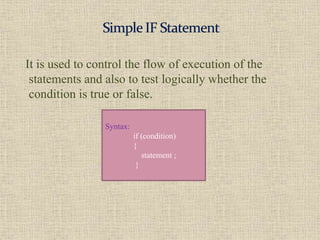
It is used to control the flow of execution of the
statements and also to test logically whether the
condition is true or false.
Syntax:
if (condition)
{
statement ;
}
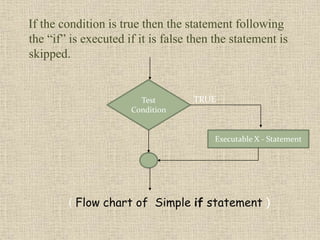
If the condition is true then the statement following
the “if” is executed if it is false then the statement is
skipped.
( Flow chart of Simple if statement )
Test
Condition
Executable X - Statement
TRUE
The if…..else statement is an extension of the simple if
statement.
Syntax:
if (condition)
{
statement 1; (if the condition is TRUE this statement will be executed)
}
else
{
statement 2; (if the condition is FALSE this statement will be executed)
}
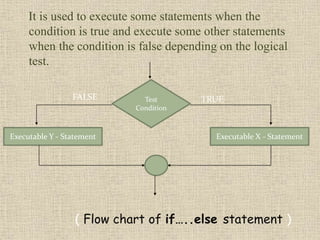
It is used to execute some statements when the
condition is true and execute some other statements
when the condition is false depending on the logical
test.
( Flow chart of if…..else statement )
Test
Condition
Executable X - StatementExecutable Y - Statement
TRUEFALSE
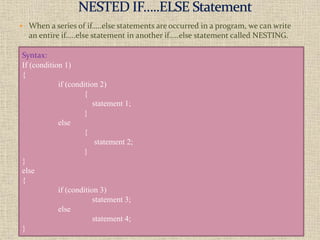
 When a series of if…..else statements are occurred in a program, we can write
an entire if…..else statement in another if…..else statement called NESTING.
Syntax:
If (condition 1)
{
if (condition 2)
{
statement 1;
}
else
{
statement 2;
}
}
else
{
if (condition 3)
statement 3;
else
statement 4;
}
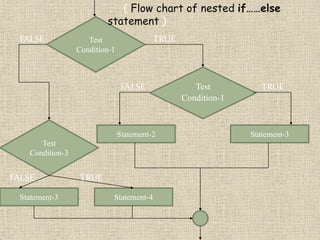
Test
Condition-1
Test
Condition-1
Statement-2 Statement-3
Statement-3 Statement-4
( Flow chart of nested if……else
statement )
TRUE
TRUE
FALSE
FALSE
Test
Condition-3
FALSE TRUE
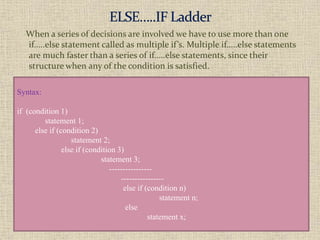
When a series of decisions are involved we have to use more than one
if…..else statement called as multiple if’s. Multiple if…..else statements
are much faster than a series of if…..else statements, since their
structure when any of the condition is satisfied.
Syntax:
if (condition 1)
statement 1;
else if (condition 2)
statement 2;
else if (condition 3)
statement 3;
----------------
----------------
else if (condition n)
statement n;
else
statement x;
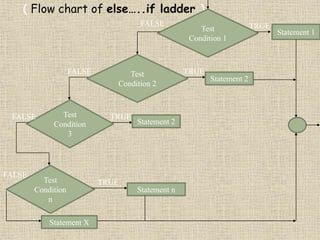
( Flow chart of else…..if ladder )
Test
Condition 1
Statement 1
TRUE
Test
Condition
3
FALSE
Statement 2
TRUETest
Condition 2
TRUE
Statement 2
FALSE
FALSE
Test
Condition
n
Statement n
Statement X
TRUE
FALSE
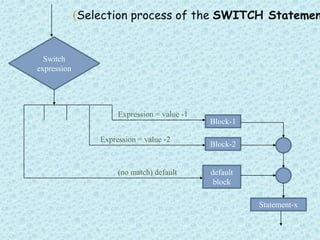
 The control statement which allows us to make decision from
the number of choices is called switch or switch case
statement.
 It is a multi way decision statement, it test the given variable
or expression against a list of case values.
switch (expression)
{
case constant 1:
block 1
break;
case constant 2:
block 2
break;
----------
----------
default:
default block
break;
}
Statement –x;
(Selection process of the SWITCH Statemen
Switch
expression
Block-1
Block-2
default
block
Statement-x
Expression = value -1
Expression = value -2
(no match) default
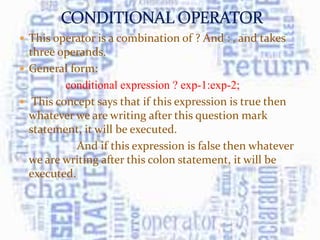
 This operator is a combination of ? And : , and takes
three operands.
 General form:
conditional expression ? exp-1:exp-2;
 This concept says that if this expression is true then
whatever we are writing after this question mark
statement, it will be executed.
And if this expression is false then whatever
we are writing after this colon statement, it will be
executed.
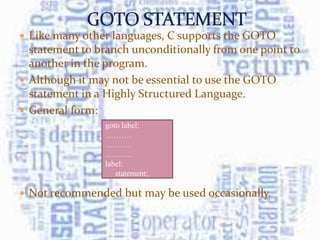
 Like many other languages, C supports the GOTO
statement to branch unconditionally from one point to
another in the program.
 Although it may not be essential to use the GOTO
statement in a Highly Structured Language.
 General form:
 Not recommended but may be used occasionally.
goto label;
……….
……….
……….
label:
statement;
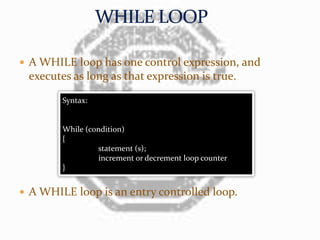
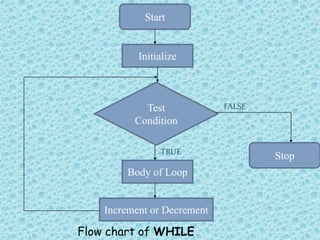
 A WHILE loop has one control expression, and
executes as long as that expression is true.
 A WHILE loop is an entry controlled loop.
Syntax:
While (condition)
{
statement (s);
increment or decrement loop counter
}
Start
Initialize
Test
Condition
Stop
Body of Loop
Increment or Decrement
FALSE
TRUE
Flow chart of WHILE
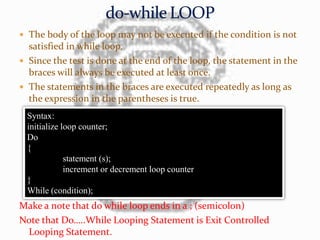
 The body of the loop may not be executed if the condition is not
satisfied in while loop.
 Since the test is done at the end of the loop, the statement in the
braces will always be executed at least once.
 The statements in the braces are executed repeatedly as long as
the expression in the parentheses is true.
Make a note that do while loop ends in a ; (semicolon)
Note that Do…..While Looping Statement is Exit Controlled
Looping Statement.
Syntax:
initialize loop counter;
Do
{
statement (s);
increment or decrement loop counter
}
While (condition);
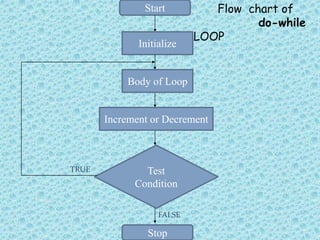
Start
Initialize
Test
Condition
Body of Loop
Increment or Decrement
FALSE
TRUE
Stop
Flow chart of
do-while
LOOP
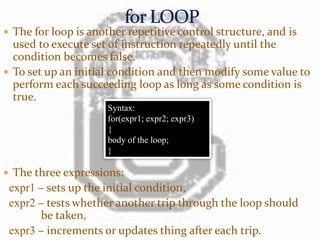
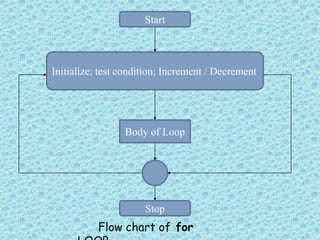
 The for loop is another repetitive control structure, and is
used to execute set of instruction repeatedly until the
condition becomes false.
 To set up an initial condition and then modify some value to
perform each succeeding loop as long as some condition is
true.
 The three expressions:
expr1 – sets up the initial condition,
expr2 – tests whether another trip through the loop should
be taken,
expr3 – increments or updates thing after each trip.
Syntax:
for(expr1; expr2; expr3)
{
body of the loop;
}
Start
Body of Loop
Stop
Initialize; test condition; Increment / Decrement
Flow chart of for
Decision Making Statement in C ppt

Decision Making Statement in C ppt

  • 1.
  • 2.
     Repeating importantsections of the program.  Selecting between optional section of a program Decision Making Statement Decision Making and Branching IF Statement SWITCH Statement Conditional Operator Statement GOTO Statement Decision Making and Looping The WHILE Loop The do-while Loop The FOR Loop
  • 3.
    • DECISION MAKINGAND BRANCHING  In programming the order of execution of instructions may have to be changed depending on certain conditions.  This involves a kind of decision making to see whether a particular condition has occurred or not and then direct the computer to execute certain instructions accordingly. • DECISION MAKING AND LOOPING  Execution of the statement or set of statement repeatedly is known as LOOPING.  This may be executed a specified number of times and this depends on the satisfaction of a test condition.  A program loop is made up of two parts one part is known as body of the loop and the other is known as control condition.  Depending on the control condition statement , the statements within the loop may be executed.
  • 4.
     The IFstatement is the powerful decision making statement and is used to control the flow of execution of the statements.  When decision making in a program they are simply the result of computation in which the final result is either TRUE or FALSE.  The value zero (0) is considered to be FALSE in program. Any positive or negative value is considered to be TRUE. Levels of complexity for IF: 1.Simple IF statement 2.IF…..ELSE statement 3.NESTED IF…..ELSE statement 4.ELSE…..IF ladder
  • 5.
    It is usedto control the flow of execution of the statements and also to test logically whether the condition is true or false. Syntax: if (condition) { statement ; }
  • 6.
    If the conditionis true then the statement following the “if” is executed if it is false then the statement is skipped. ( Flow chart of Simple if statement ) Test Condition Executable X - Statement TRUE
  • 7.
    The if…..else statementis an extension of the simple if statement. Syntax: if (condition) { statement 1; (if the condition is TRUE this statement will be executed) } else { statement 2; (if the condition is FALSE this statement will be executed) }
  • 8.
    It is usedto execute some statements when the condition is true and execute some other statements when the condition is false depending on the logical test. ( Flow chart of if…..else statement ) Test Condition Executable X - StatementExecutable Y - Statement TRUEFALSE
  • 9.
     When aseries of if…..else statements are occurred in a program, we can write an entire if…..else statement in another if…..else statement called NESTING. Syntax: If (condition 1) { if (condition 2) { statement 1; } else { statement 2; } } else { if (condition 3) statement 3; else statement 4; }
  • 10.
    Test Condition-1 Test Condition-1 Statement-2 Statement-3 Statement-3 Statement-4 (Flow chart of nested if……else statement ) TRUE TRUE FALSE FALSE Test Condition-3 FALSE TRUE
  • 11.
    When a seriesof decisions are involved we have to use more than one if…..else statement called as multiple if’s. Multiple if…..else statements are much faster than a series of if…..else statements, since their structure when any of the condition is satisfied. Syntax: if (condition 1) statement 1; else if (condition 2) statement 2; else if (condition 3) statement 3; ---------------- ---------------- else if (condition n) statement n; else statement x;
  • 12.
    ( Flow chartof else…..if ladder ) Test Condition 1 Statement 1 TRUE Test Condition 3 FALSE Statement 2 TRUETest Condition 2 TRUE Statement 2 FALSE FALSE Test Condition n Statement n Statement X TRUE FALSE
  • 13.
     The controlstatement which allows us to make decision from the number of choices is called switch or switch case statement.  It is a multi way decision statement, it test the given variable or expression against a list of case values. switch (expression) { case constant 1: block 1 break; case constant 2: block 2 break; ---------- ---------- default: default block break; } Statement –x;
  • 14.
    (Selection process ofthe SWITCH Statemen Switch expression Block-1 Block-2 default block Statement-x Expression = value -1 Expression = value -2 (no match) default
  • 15.
     This operatoris a combination of ? And : , and takes three operands.  General form: conditional expression ? exp-1:exp-2;  This concept says that if this expression is true then whatever we are writing after this question mark statement, it will be executed. And if this expression is false then whatever we are writing after this colon statement, it will be executed.
  • 16.
     Like manyother languages, C supports the GOTO statement to branch unconditionally from one point to another in the program.  Although it may not be essential to use the GOTO statement in a Highly Structured Language.  General form:  Not recommended but may be used occasionally. goto label; ………. ………. ………. label: statement;
  • 17.
     A WHILEloop has one control expression, and executes as long as that expression is true.  A WHILE loop is an entry controlled loop. Syntax: While (condition) { statement (s); increment or decrement loop counter }
  • 18.
    Start Initialize Test Condition Stop Body of Loop Incrementor Decrement FALSE TRUE Flow chart of WHILE
  • 19.
     The bodyof the loop may not be executed if the condition is not satisfied in while loop.  Since the test is done at the end of the loop, the statement in the braces will always be executed at least once.  The statements in the braces are executed repeatedly as long as the expression in the parentheses is true. Make a note that do while loop ends in a ; (semicolon) Note that Do…..While Looping Statement is Exit Controlled Looping Statement. Syntax: initialize loop counter; Do { statement (s); increment or decrement loop counter } While (condition);
  • 20.
    Start Initialize Test Condition Body of Loop Incrementor Decrement FALSE TRUE Stop Flow chart of do-while LOOP
  • 21.
     The forloop is another repetitive control structure, and is used to execute set of instruction repeatedly until the condition becomes false.  To set up an initial condition and then modify some value to perform each succeeding loop as long as some condition is true.  The three expressions: expr1 – sets up the initial condition, expr2 – tests whether another trip through the loop should be taken, expr3 – increments or updates thing after each trip. Syntax: for(expr1; expr2; expr3) { body of the loop; }
  • 22.
    Start Body of Loop Stop Initialize;test condition; Increment / Decrement Flow chart of for