Living Online
   Module C

   Unit 7: Getting Connected
   Lesson                Topic
         41              Networking Fundamentals
         42              Looking at the Internet
         43              Understanding E-mail
                         Fundamentals
         44              Using Microsoft
                         Outlook 2010


© CCI Learning Solutions Inc.                      1
Lesson 41: Networking Fundamentals
   • basic networking fundamentals
   • how the telephone network works
   • how the computer network works
   • advantages and disadvantages of being on a network
   • how to connect to a network
   • identifying low and high bandwidth connections


© CCI Learning Solutions Inc.                             2
Networking Fundamentals
   • Set up network to share information regardless of data
     type
          – Example of audio: Communication systems developed using
            analog signals carried over long distances and converted by
            dedicated devices to and from sound
          – Example of video: Analog signals transmitted using wireless
            technology
          – Analog signals consumed large amounts of bandwidth
   • True networks now rely on digital technology to carry
     large volumes of data, forming foundation that supports
     network where information shared back and forth instead
     of one direction

© CCI Learning Solutions Inc.                                             3
Looking at the Telephone Network
   • To communicate, you need to know other person’s number, and
     must speak same language
   • Main difference between cellular and landline phones is type of
     devices or equipment needed to connect to network
   • Each country has organization responsible for telephone network that
     ensures conformity to international telephony protocols or standards
          – All devices connected to voice telephone network are analog devices
            and transmit voice, fax, or data using that technology
          – Devices connected via network must speak same language and follow
            same rules or protocol
          – Need to convert digital signals (1s and 0s) to analog signals
   • Telephone trunk lines now digital so telephone companies can offer
     many more computer-related services using lines


© CCI Learning Solutions Inc.                                                     4
Looking at Computer Networks
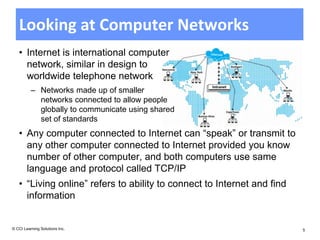
   • Internet is international computer
     network, similar in design to
     worldwide telephone network
          – Networks made up of smaller
            networks connected to allow people
            globally to communicate using shared
            set of standards
   • Any computer connected to Internet can “speak” or transmit to
     any other computer connected to Internet provided you know
     number of other computer, and both computers use same
     language and protocol called TCP/IP
   • “Living online” refers to ability to connect to Internet and find
     information


© CCI Learning Solutions Inc.                                            5
Peer-to-Peer Networks
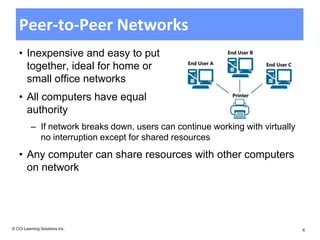
   • Inexpensive and easy to put
     together, ideal for home or
     small office networks
   • All computers have equal
     authority
          – If network breaks down, users can continue working with virtually
            no interruption except for shared resources
   • Any computer can share resources with other computers
     on network


© CCI Learning Solutions Inc.                                                   6
LANs and WANs
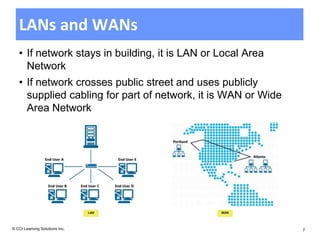
   • If network stays in building, it is LAN or Local Area
     Network
   • If network crosses public street and uses publicly
     supplied cabling for part of network, it is WAN or Wide
     Area Network


                                LAN             WAN


© CCI Learning Solutions Inc.                                  7
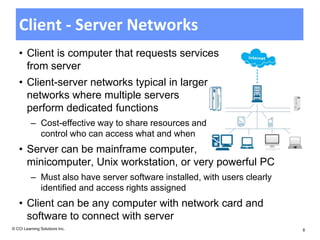
Client - Server Networks
   • Client is computer that requests services
     from server
   • Client-server networks typical in larger
     networks where multiple servers
     perform dedicated functions
          – Cost-effective way to share resources and
            control who can access what and when
   • Server can be mainframe computer,
     minicomputer, Unix workstation, or very powerful PC
          – Must also have server software installed, with users clearly
            identified and access rights assigned
   • Client can be any computer with network card and
     software to connect with server
© CCI Learning Solutions Inc.                                              8
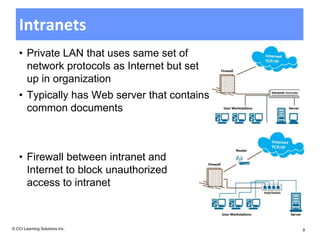
Intranets
   • Private LAN that uses same set of
     network protocols as Internet but set
     up in organization
   • Typically has Web server that contains
     common documents


   • Firewall between intranet and
     Internet to block unauthorized
     access to intranet


© CCI Learning Solutions Inc.                 9
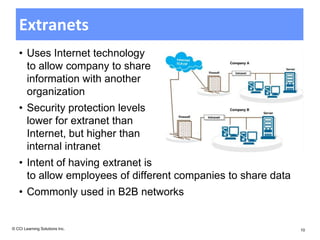
Extranets
   • Uses Internet technology
     to allow company to share
     information with another
     organization
   • Security protection levels
     lower for extranet than
     Internet, but higher than
     internal intranet
   • Intent of having extranet is
     to allow employees of different companies to share data
   • Commonly used in B2B networks


© CCI Learning Solutions Inc.                                  10
Benefits of Networking
   • Communicating
          – Send information directly between each user without typical delays
          – Message can be stored and not lost if recipient not available
          – Instant messaging (IM) allows for “real time interaction” in text
          – Web conferencing enable users in different locations to collaborate on
            projects or meet to share information on all users screens to view
   • Sharing Resources
          – Networks share devices, so company saves costs when purchasing
            devices, technical support or maintenance needed
          – Files or folders can be set to be shared by all users
          – Workgroup can transfer or save files to common area or centralized
            server, or to network administrator for setting up rights or performing
            maintenance for workgroups


© CCI Learning Solutions Inc.                                                         11
Disadvantages of Networking
   • Dependency
          – Organization’s activities and communication lines depend on
            network to work properly
          – If network fails, users lose access to information and ability to
            communicate electronically


© CCI Learning Solutions Inc.                                                   12
Disadvantages of Networking
   • Security Risks
          – Ensure every user entitled to access server is valid with unique login ID
          – Require passwords be changed at set intervals and with restrictions
          – Audit IDs periodically to ensure each user has access to programs and
            files appropriate to position
          – Ensure any requests for network access, including setup of new users,
            are appropriately authorized
          – Delete all IDs and passwords assigned to any user who no longer works
            for the company, and ensure former user’s messages are forwarded to
            someone else
          – Ensure user passwords never given out and especially not network
            administrator’s
          – Occasionally change password


© CCI Learning Solutions Inc.                                                           13
Disadvantages of Networking
          – Assign login IDs and passwords to those working with network
            administrator
          – Set up firewalls and proxy servers to prevent unauthorized users
            accessing internal company networks
          – Take extra care where network has wireless capabilities
          – Ensure users have control over own files and folders
          – Update antivirus program on server to provide protection against
            latest viruses
          – Perform maintenance checks to view reports or logs created by
            security programs
          – Monitor employee activities on Internet to prevent potential
            software threats
          – Encourage users to ensure they have latest updates of Windows
            on computers
© CCI Learning Solutions Inc.                                                  14
Disadvantages of Networking
   • Loss of Autonomy or Privacy
          – Refers to inability to work independently from server
          – Privacy
          – If leave computer logged in when away from desk, anyone can
            access your local drive
          – General business rules dictate that work on company computer
            belongs to company, even if you work on document on your own
            time


© CCI Learning Solutions Inc.                                              15
Disadvantages of Networking
   • Networks vulnerable to virus attacks
          – Virus introduced on one workstation can spread quickly to other
            workstations
          – Crucial to ensure antivirus program on server current and active,
            and all workstations have local copy of antivirus program active at
            all times
   • New viruses created every day and users should read
     screen carefully before opening message or clicking
     highlighted button on screen
   • All antivirus programs provide feature to automatically
     detect viruses in “real time”


© CCI Learning Solutions Inc.                                                     16
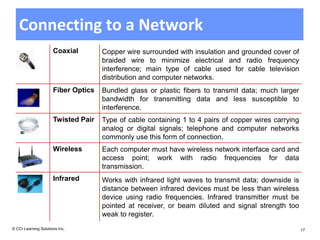
Connecting to a Network
                      Coaxial        Copper wire surrounded with insulation and grounded cover of
                                     braided wire to minimize electrical and radio frequency
                                     interference; main type of cable used for cable television
                                     distribution and computer networks.
                      Fiber Optics   Bundled glass or plastic fibers to transmit data; much larger
                                     bandwidth for transmitting data and less susceptible to
                                     interference.
                      Twisted Pair   Type of cable containing 1 to 4 pairs of copper wires carrying
                                     analog or digital signals; telephone and computer networks
                                     commonly use this form of connection.
                      Wireless       Each computer must have wireless network interface card and
                                     access point; work with radio frequencies for data
                                     transmission.
                      Infrared       Works with infrared light waves to transmit data; downside is
                                     distance between infrared devices must be less than wireless
                                     device using radio frequencies. Infrared transmitter must be
                                     pointed at receiver, or beam diluted and signal strength too
                                     weak to register.
© CCI Learning Solutions Inc.                                                                         17
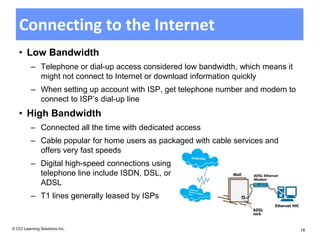
Connecting to the Internet
   • Low Bandwidth
          – Telephone or dial-up access considered low bandwidth, which means it
            might not connect to Internet or download information quickly
          – When setting up account with ISP, get telephone number and modem to
            connect to ISP’s dial-up line
   • High Bandwidth
          – Connected all the time with dedicated access
          – Cable popular for home users as packaged with cable services and
            offers very fast speeds
          – Digital high-speed connections using
            telephone line include ISDN, DSL, or
            ADSL
          – T1 lines generally leased by ISPs


© CCI Learning Solutions Inc.                                                      18
Review Questions
  1. What is the set of protocols used by the Internet called?
          a. DNS                c.   TCP/IP
          b. SMTP               d.   All of the above
  2. A server provides services and a client uses those services.
          a. True               b.   False


© CCI Learning Solutions Inc.                                       19
Review Questions
  3. What are some benefits of networking?
          a. Communicating with others
          b. Sharing devices like printers
          c. Having a server that is dedicated to a specific task, such
             as, mail, database, or network
          d. Sharing of files and other information
          e. Any of the above
          f.       a, b, or d


© CCI Learning Solutions Inc.                                             20
Review Questions
  4. What are some disadvantages of networking?
          a. Cost of setting up and maintaining the network
          b. Potential security risks by outside sources
          c. Dependency on the network always working
          d. Viruses
          e. Any of the above
          f.       a, b, or d
  5. A unique login ID and a password can be set up using
     biometric data.
          a. True               b. False


© CCI Learning Solutions Inc.                                 21

L41 slides

  • 1.
    Living Online Module C Unit 7: Getting Connected Lesson Topic 41 Networking Fundamentals 42 Looking at the Internet 43 Understanding E-mail Fundamentals 44 Using Microsoft Outlook 2010 © CCI Learning Solutions Inc. 1
  • 2.
    Lesson 41: NetworkingFundamentals • basic networking fundamentals • how the telephone network works • how the computer network works • advantages and disadvantages of being on a network • how to connect to a network • identifying low and high bandwidth connections © CCI Learning Solutions Inc. 2
  • 3.
    Networking Fundamentals • Set up network to share information regardless of data type – Example of audio: Communication systems developed using analog signals carried over long distances and converted by dedicated devices to and from sound – Example of video: Analog signals transmitted using wireless technology – Analog signals consumed large amounts of bandwidth • True networks now rely on digital technology to carry large volumes of data, forming foundation that supports network where information shared back and forth instead of one direction © CCI Learning Solutions Inc. 3
  • 4.
    Looking at theTelephone Network • To communicate, you need to know other person’s number, and must speak same language • Main difference between cellular and landline phones is type of devices or equipment needed to connect to network • Each country has organization responsible for telephone network that ensures conformity to international telephony protocols or standards – All devices connected to voice telephone network are analog devices and transmit voice, fax, or data using that technology – Devices connected via network must speak same language and follow same rules or protocol – Need to convert digital signals (1s and 0s) to analog signals • Telephone trunk lines now digital so telephone companies can offer many more computer-related services using lines © CCI Learning Solutions Inc. 4
  • 5.
    Looking at ComputerNetworks • Internet is international computer network, similar in design to worldwide telephone network – Networks made up of smaller networks connected to allow people globally to communicate using shared set of standards • Any computer connected to Internet can “speak” or transmit to any other computer connected to Internet provided you know number of other computer, and both computers use same language and protocol called TCP/IP • “Living online” refers to ability to connect to Internet and find information © CCI Learning Solutions Inc. 5
  • 6.
    Peer-to-Peer Networks • Inexpensive and easy to put together, ideal for home or small office networks • All computers have equal authority – If network breaks down, users can continue working with virtually no interruption except for shared resources • Any computer can share resources with other computers on network © CCI Learning Solutions Inc. 6
  • 7.
    LANs and WANs • If network stays in building, it is LAN or Local Area Network • If network crosses public street and uses publicly supplied cabling for part of network, it is WAN or Wide Area Network LAN WAN © CCI Learning Solutions Inc. 7
  • 8.
    Client - ServerNetworks • Client is computer that requests services from server • Client-server networks typical in larger networks where multiple servers perform dedicated functions – Cost-effective way to share resources and control who can access what and when • Server can be mainframe computer, minicomputer, Unix workstation, or very powerful PC – Must also have server software installed, with users clearly identified and access rights assigned • Client can be any computer with network card and software to connect with server © CCI Learning Solutions Inc. 8
  • 9.
    Intranets • Private LAN that uses same set of network protocols as Internet but set up in organization • Typically has Web server that contains common documents • Firewall between intranet and Internet to block unauthorized access to intranet © CCI Learning Solutions Inc. 9
  • 10.
    Extranets • Uses Internet technology to allow company to share information with another organization • Security protection levels lower for extranet than Internet, but higher than internal intranet • Intent of having extranet is to allow employees of different companies to share data • Commonly used in B2B networks © CCI Learning Solutions Inc. 10
  • 11.
    Benefits of Networking • Communicating – Send information directly between each user without typical delays – Message can be stored and not lost if recipient not available – Instant messaging (IM) allows for “real time interaction” in text – Web conferencing enable users in different locations to collaborate on projects or meet to share information on all users screens to view • Sharing Resources – Networks share devices, so company saves costs when purchasing devices, technical support or maintenance needed – Files or folders can be set to be shared by all users – Workgroup can transfer or save files to common area or centralized server, or to network administrator for setting up rights or performing maintenance for workgroups © CCI Learning Solutions Inc. 11
  • 12.
    Disadvantages of Networking • Dependency – Organization’s activities and communication lines depend on network to work properly – If network fails, users lose access to information and ability to communicate electronically © CCI Learning Solutions Inc. 12
  • 13.
    Disadvantages of Networking • Security Risks – Ensure every user entitled to access server is valid with unique login ID – Require passwords be changed at set intervals and with restrictions – Audit IDs periodically to ensure each user has access to programs and files appropriate to position – Ensure any requests for network access, including setup of new users, are appropriately authorized – Delete all IDs and passwords assigned to any user who no longer works for the company, and ensure former user’s messages are forwarded to someone else – Ensure user passwords never given out and especially not network administrator’s – Occasionally change password © CCI Learning Solutions Inc. 13
  • 14.
    Disadvantages of Networking – Assign login IDs and passwords to those working with network administrator – Set up firewalls and proxy servers to prevent unauthorized users accessing internal company networks – Take extra care where network has wireless capabilities – Ensure users have control over own files and folders – Update antivirus program on server to provide protection against latest viruses – Perform maintenance checks to view reports or logs created by security programs – Monitor employee activities on Internet to prevent potential software threats – Encourage users to ensure they have latest updates of Windows on computers © CCI Learning Solutions Inc. 14
  • 15.
    Disadvantages of Networking • Loss of Autonomy or Privacy – Refers to inability to work independently from server – Privacy – If leave computer logged in when away from desk, anyone can access your local drive – General business rules dictate that work on company computer belongs to company, even if you work on document on your own time © CCI Learning Solutions Inc. 15
  • 16.
    Disadvantages of Networking • Networks vulnerable to virus attacks – Virus introduced on one workstation can spread quickly to other workstations – Crucial to ensure antivirus program on server current and active, and all workstations have local copy of antivirus program active at all times • New viruses created every day and users should read screen carefully before opening message or clicking highlighted button on screen • All antivirus programs provide feature to automatically detect viruses in “real time” © CCI Learning Solutions Inc. 16
  • 17.
    Connecting to aNetwork Coaxial Copper wire surrounded with insulation and grounded cover of braided wire to minimize electrical and radio frequency interference; main type of cable used for cable television distribution and computer networks. Fiber Optics Bundled glass or plastic fibers to transmit data; much larger bandwidth for transmitting data and less susceptible to interference. Twisted Pair Type of cable containing 1 to 4 pairs of copper wires carrying analog or digital signals; telephone and computer networks commonly use this form of connection. Wireless Each computer must have wireless network interface card and access point; work with radio frequencies for data transmission. Infrared Works with infrared light waves to transmit data; downside is distance between infrared devices must be less than wireless device using radio frequencies. Infrared transmitter must be pointed at receiver, or beam diluted and signal strength too weak to register. © CCI Learning Solutions Inc. 17
  • 18.
    Connecting to theInternet • Low Bandwidth – Telephone or dial-up access considered low bandwidth, which means it might not connect to Internet or download information quickly – When setting up account with ISP, get telephone number and modem to connect to ISP’s dial-up line • High Bandwidth – Connected all the time with dedicated access – Cable popular for home users as packaged with cable services and offers very fast speeds – Digital high-speed connections using telephone line include ISDN, DSL, or ADSL – T1 lines generally leased by ISPs © CCI Learning Solutions Inc. 18
  • 19.
    Review Questions 1. What is the set of protocols used by the Internet called? a. DNS c. TCP/IP b. SMTP d. All of the above 2. A server provides services and a client uses those services. a. True b. False © CCI Learning Solutions Inc. 19
  • 20.
    Review Questions 3. What are some benefits of networking? a. Communicating with others b. Sharing devices like printers c. Having a server that is dedicated to a specific task, such as, mail, database, or network d. Sharing of files and other information e. Any of the above f. a, b, or d © CCI Learning Solutions Inc. 20
  • 21.
    Review Questions 4. What are some disadvantages of networking? a. Cost of setting up and maintaining the network b. Potential security risks by outside sources c. Dependency on the network always working d. Viruses e. Any of the above f. a, b, or d 5. A unique login ID and a password can be set up using biometric data. a. True b. False © CCI Learning Solutions Inc. 21

Editor's Notes

  • #6 Pg369Objective 3-1.1.1, 3-1.1.4, 3-1.1.5, 3-1.1.6Relate this discussion to how the telephone system works and the similarities in being able to know who you are “reaching out to” and the standards you need to follow. Most people may already be aware of how to use the Internet although they may not know how it works. Be sure to discuss all the reasons for what living online means and how rapidly this is incorporated into their lives once they get connected to the Internet.
  • #19 Pg375Objectives 3-1.1.3, 3-1.1.6Discuss the different types of connections available to connect to the Internet. It is not necessary to go through these in great detail as much as to introduce the terminology and discuss the most popular methods. Give examples of what would be considered low or high bandwidth as well as where you might find some of these connection types. Discuss the advantages or disadvantages of each type, e.g., someone who doesn’t know how often they will be on the Internet may only need a low bandwidth option whereas a family may need high bandwidth to accommodate multiple users accessing the Internet at the same time.
  • #20 Pg376As time permits, go over these questions with the class to ensure they have a good grasp of the concepts learned in this lesson.Answers are found on the CCI microsite (ic3.ccilearning.com); you must be logged in as an instructor. Alternatively, if you received the instructor resources in electronic form, they will be located in the root folder.On completion of the Review Questions, have students navigate to the CCI microsite to begin the additional review there.
  • #21 Pg376As time permits, go over these questions with the class to ensure they have a good grasp of the concepts learned in this lesson.Answers are found on the CCI microsite (ic3.ccilearning.com); you must be logged in as an instructor. Alternatively, if you received the instructor resources in electronic form, they will be located in the root folder.On completion of the Review Questions, have students navigate to the CCI microsite to begin the additional review there.
  • #22 Pg376As time permits, go over these questions with the class to ensure they have a good grasp of the concepts learned in this lesson.Answers are found on the CCI microsite (ic3.ccilearning.com); you must be logged in as an instructor. Alternatively, if you received the instructor resources in electronic form, they will be located in the root folder.On completion of the Review Questions, have students navigate to the CCI microsite to begin the additional review there.