KEYBOARD INTERRUPTs
8086
3/18/2022
1
The Purpose of Interrupts
 Interrupts are particularly useful when interfacing I/O devices that provide or
require data at relatively low data transfer rates .
 If the person using the keyboard typed one character per second. The software of
the Processors waited an entire second between each key stroke for the person to
type another key .
 This process was such a tremendous waste of time that designers developed
another process, Interrupt processing to handle this situation.
 Interrupt processing allows the microprocessor to execute other software
while the keyboard operator is thinking about what key to type next.
3/18/2022
2
DOS and BIOS Interrupts
3/18/2022
3
 DOS and BIOS interrupts are used to perform
some very useful functions, such as displaying data
to the monitor, reading data from keyboard, etc.
 They are used by identifying the interrupt option
type, which is the value stored in register AH and
providing, whatever extra information that the
specific option requires.
Introduction
SOFTWARE INTERRUPT:
 The 8086 INT instruction can be used to cause the 8086 to do any one of 256 possible
interrupt types.
 The desired type is specified as part of the instruction.
 Software interrupts produced by the INT instructions have many uses.
 For example: INT 3 instruction to insert breakpoints in programs for debugging.
 Another use of Software interrupt INT is to test various interrupts-service procedures.
 For example: INT 0 instruction to send execution to a divide-by-zero interrupt –
service procedure without having to run the actual division program.
3/18/2022
4
INT Instruction
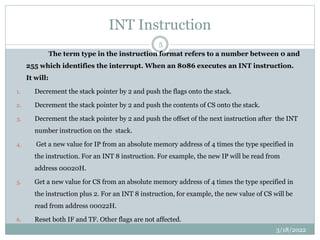
The term type in the instruction format refers to a number between 0 and
255 which identifies the interrupt. When an 8086 executes an INT instruction.
It will:
1. Decrement the stack pointer by 2 and push the flags onto the stack.
2. Decrement the stack pointer by 2 and push the contents of CS onto the stack.
3. Decrement the stack pointer by 2 and push the offset of the next instruction after the INT
number instruction on the stack.
4. Get a new value for IP from an absolute memory address of 4 times the type specified in
the instruction. For an INT 8 instruction. For example, the new IP will be read from
address 00020H.
5. Get a new value for CS from an absolute memory address of 4 times the type specified in
the instruction plus 2. For an INT 8 instruction, for example, the new value of CS will be
read from address 00022H.
6. Reset both IF and TF. Other flags are not affected.
3/18/2022
5
INT 21h Instruction
 Hence in this section we are going to see about INT
instructions used for Keyboard.(INT 21 h-DOS Interrupt)
 The int 21 h instructions are used to interrupt through
the Keyboard, Files, Directives.
 Depending on the value that is moved to the ‘ah’ the
operations will be done.
 The following slides will explain the different operations
performed.
3/18/2022
6
INT 21h Instruction
 INT 21h / AH=1 - read character from standard input, with echo, result is stored in AL.
if there is no character in the keyboard buffer, the function waits until any key is pressed.
example:
mov ah, 1
int 21h
 INT 21h / AH=2 - write character to standard output.
entry: DL = character to write, after execution AL = DL.
example:
mov ah, 2
mov dl, 'a'
int 21h
3/18/2022
7
INT 21h Instruction
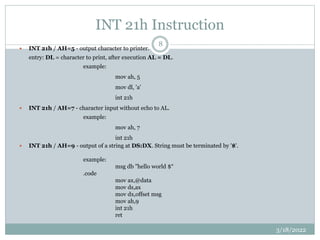
 INT 21h / AH=5 - output character to printer.
entry: DL = character to print, after execution AL = DL.
example:
mov ah, 5
mov dl, 'a'
int 21h
 INT 21h / AH=7 - character input without echo to AL.
example:
mov ah, 7
int 21h
 INT 21h / AH=9 - output of a string at DS:DX. String must be terminated by '$'.
example:
msg db "hello world $“
.code
mov ax,@data
mov ds,ax
mov dx,offset msg
mov ah,9
int 21h
ret
3/18/2022
8
INT 21h Instruction
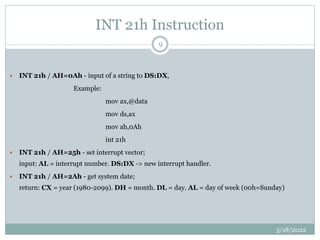
 INT 21h / AH=0Ah - input of a string to DS:DX,
Example:
mov ax,@data
mov ds,ax
mov ah,0Ah
int 21h
 INT 21h / AH=25h - set interrupt vector;
input: AL = interrupt number. DS:DX -> new interrupt handler.
 INT 21h / AH=2Ah - get system date;
return: CX = year (1980-2099). DH = month. DL = day. AL = day of week (00h=Sunday)
3/18/2022
9
Other INT 21h Instruction
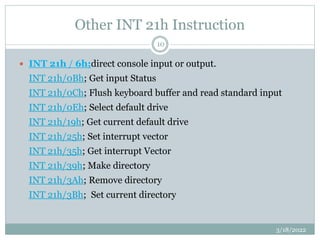
 INT 21h / 6h;direct console input or output.
INT 21h/0Bh; Get input Status
INT 21h/0Ch; Flush keyboard buffer and read standard input
INT 21h/0Eh; Select default drive
INT 21h/19h; Get current default drive
INT 21h/25h; Set interrupt vector
INT 21h/35h; Get interrupt Vector
INT 21h/39h; Make directory
INT 21h/3Ah; Remove directory
INT 21h/3Bh; Set current directory
3/18/2022
10
Other INT 21h instruction
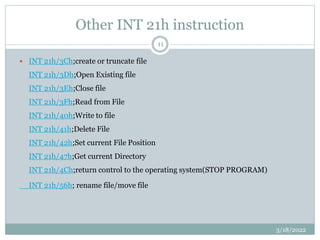
 INT 21h/3Ch;create or truncate file
INT 21h/3Dh;Open Existing file
INT 21h/3Eh;Close file
INT 21h/3Fh;Read from File
INT 21h/40h;Write to file
INT 21h/41h;Delete File
INT 21h/42h;Set current File Position
INT 21h/47h;Get current Directory
INT 21h/4Ch;return control to the operating system(STOP PROGRAM)
INT 21h/56h; rename file/move file
3/18/2022
11
Example Programs
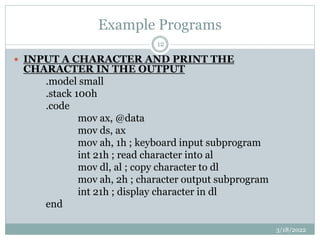
 INPUT A CHARACTER AND PRINT THE
CHARACTER IN THE OUTPUT
.model small
.stack 100h
.code
mov ax, @data
mov ds, ax
mov ah, 1h ; keyboard input subprogram
int 21h ; read character into al
mov dl, al ; copy character to dl
mov ah, 2h ; character output subprogram
int 21h ; display character in dl
end
3/18/2022
12
Example Programs
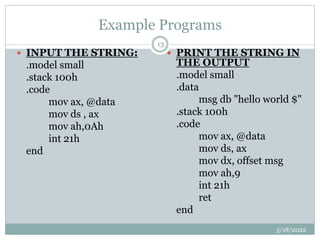
 INPUT THE STRING:
.model small
.stack 100h
.code
mov ax, @data
mov ds , ax
mov ah,0Ah
int 21h
end
 PRINT THE STRING IN
THE OUTPUT
.model small
.data
msg db "hello world $"
.stack 100h
.code
mov ax, @data
mov ds, ax
mov dx, offset msg
mov ah,9
int 21h
ret
end
3/18/2022
13
Example Programs
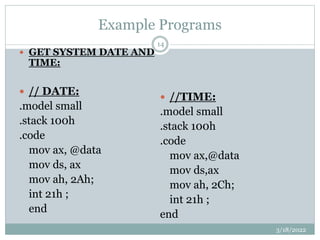
 GET SYSTEM DATE AND
TIME:
 // DATE:
.model small
.stack 100h
.code
mov ax, @data
mov ds, ax
mov ah, 2Ah;
int 21h ;
end
 //TIME:
.model small
.stack 100h
.code
mov ax,@data
mov ds,ax
mov ah, 2Ch;
int 21h ;
end
3/18/2022
14
INT 16h INSTRUCTION
3/18/2022
15
INT 16h is the basic BIOS keyboard operation used
extensively by software developers and provides the following
services according to a function code that you load in AH.
 INT 16h/03h: set typematic Repeat rate
 INT 16h/05h: Keyboard write.
 INT 16h/10h: Read keyboard Character
 INT 16h/11h: Determine whether character is present or not
 INT 16h/12h: Return Keyboard Status.
INT 10h Instructions
 INT 10h instruction is used for the video mode.
 Even this INT instruction has many operations that
works according to the value moved onto the ‘ah’.
 Option 0H – Sets video mode.
 Registers used:
 AH = 0H
 AL = Video Mode.
3/18/2022
16
INT 10h Instructions
3/18/2022
17
The following are some of the services offered by INT 10 H.
 INT 10H/00H; set video mode
 INT 10H/01H; set cursor size
 INT 10H/02H; set cursor position
 INT 10H/03H; return cursor status
 INT 10H/05H; select active page
 INT 10H/06H; scroll up screen
 INT 10H/07H; scroll down screen
 INT 10H/0Ah; display character
 INT 10H/0CH; Write pixel dot
 INT 10H/13H; Return video information
INT 10h Instructions
3/18/2022
18
 INT 10h / AH = 09h - write character and attribute at cursor
position.
input:
AL = character to display.
BH = page number.
BL = attribute.
CX = number of times to write character.
 INT 10h / AH = 0Ah - write character only at cursor position.
input:
AL = character to display.
BH = page number.
CX = number of times to write character.
INT 10h Instructions
3/18/2022
19
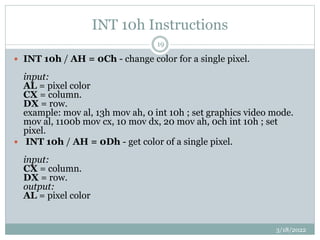
 INT 10h / AH = 0Ch - change color for a single pixel.
input:
AL = pixel color
CX = column.
DX = row.
example: mov al, 13h mov ah, 0 int 10h ; set graphics video mode.
mov al, 1100b mov cx, 10 mov dx, 20 mov ah, 0ch int 10h ; set
pixel.
 INT 10h / AH = 0Dh - get color of a single pixel.
input:
CX = column.
DX = row.
output:
AL = pixel color
INT 10h Instructions
3/18/2022
20
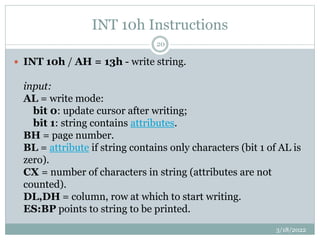
 INT 10h / AH = 13h - write string.
input:
AL = write mode:
bit 0: update cursor after writing;
bit 1: string contains attributes.
BH = page number.
BL = attribute if string contains only characters (bit 1 of AL is
zero).
CX = number of characters in string (attributes are not
counted).
DL,DH = column, row at which to start writing.
ES:BP points to string to be printed.
INT 10h Instructions
3/18/2022
21
example:
mov al, 1
mov bh, 0
mov bl, 0011_1011b
mov cx, msg1end - offset msg1 ; calculate message size.
mov dl, 10
Mov dh, 7
push cs
pop es
mov bp, offset msg1
mov ah, 13h
int 10h
jmp msg1end
msg1 db " hello, world! “
msg1end:
THANK YOU
3/18/2022
22

Keyboard interrupt

  • 1.
  • 2.
    The Purpose ofInterrupts  Interrupts are particularly useful when interfacing I/O devices that provide or require data at relatively low data transfer rates .  If the person using the keyboard typed one character per second. The software of the Processors waited an entire second between each key stroke for the person to type another key .  This process was such a tremendous waste of time that designers developed another process, Interrupt processing to handle this situation.  Interrupt processing allows the microprocessor to execute other software while the keyboard operator is thinking about what key to type next. 3/18/2022 2
  • 3.
    DOS and BIOSInterrupts 3/18/2022 3  DOS and BIOS interrupts are used to perform some very useful functions, such as displaying data to the monitor, reading data from keyboard, etc.  They are used by identifying the interrupt option type, which is the value stored in register AH and providing, whatever extra information that the specific option requires.
  • 4.
    Introduction SOFTWARE INTERRUPT:  The8086 INT instruction can be used to cause the 8086 to do any one of 256 possible interrupt types.  The desired type is specified as part of the instruction.  Software interrupts produced by the INT instructions have many uses.  For example: INT 3 instruction to insert breakpoints in programs for debugging.  Another use of Software interrupt INT is to test various interrupts-service procedures.  For example: INT 0 instruction to send execution to a divide-by-zero interrupt – service procedure without having to run the actual division program. 3/18/2022 4
  • 5.
    INT Instruction The termtype in the instruction format refers to a number between 0 and 255 which identifies the interrupt. When an 8086 executes an INT instruction. It will: 1. Decrement the stack pointer by 2 and push the flags onto the stack. 2. Decrement the stack pointer by 2 and push the contents of CS onto the stack. 3. Decrement the stack pointer by 2 and push the offset of the next instruction after the INT number instruction on the stack. 4. Get a new value for IP from an absolute memory address of 4 times the type specified in the instruction. For an INT 8 instruction. For example, the new IP will be read from address 00020H. 5. Get a new value for CS from an absolute memory address of 4 times the type specified in the instruction plus 2. For an INT 8 instruction, for example, the new value of CS will be read from address 00022H. 6. Reset both IF and TF. Other flags are not affected. 3/18/2022 5
  • 6.
    INT 21h Instruction Hence in this section we are going to see about INT instructions used for Keyboard.(INT 21 h-DOS Interrupt)  The int 21 h instructions are used to interrupt through the Keyboard, Files, Directives.  Depending on the value that is moved to the ‘ah’ the operations will be done.  The following slides will explain the different operations performed. 3/18/2022 6
  • 7.
    INT 21h Instruction INT 21h / AH=1 - read character from standard input, with echo, result is stored in AL. if there is no character in the keyboard buffer, the function waits until any key is pressed. example: mov ah, 1 int 21h  INT 21h / AH=2 - write character to standard output. entry: DL = character to write, after execution AL = DL. example: mov ah, 2 mov dl, 'a' int 21h 3/18/2022 7
  • 8.
    INT 21h Instruction INT 21h / AH=5 - output character to printer. entry: DL = character to print, after execution AL = DL. example: mov ah, 5 mov dl, 'a' int 21h  INT 21h / AH=7 - character input without echo to AL. example: mov ah, 7 int 21h  INT 21h / AH=9 - output of a string at DS:DX. String must be terminated by '$'. example: msg db "hello world $“ .code mov ax,@data mov ds,ax mov dx,offset msg mov ah,9 int 21h ret 3/18/2022 8
  • 9.
    INT 21h Instruction INT 21h / AH=0Ah - input of a string to DS:DX, Example: mov ax,@data mov ds,ax mov ah,0Ah int 21h  INT 21h / AH=25h - set interrupt vector; input: AL = interrupt number. DS:DX -> new interrupt handler.  INT 21h / AH=2Ah - get system date; return: CX = year (1980-2099). DH = month. DL = day. AL = day of week (00h=Sunday) 3/18/2022 9
  • 10.
    Other INT 21hInstruction  INT 21h / 6h;direct console input or output. INT 21h/0Bh; Get input Status INT 21h/0Ch; Flush keyboard buffer and read standard input INT 21h/0Eh; Select default drive INT 21h/19h; Get current default drive INT 21h/25h; Set interrupt vector INT 21h/35h; Get interrupt Vector INT 21h/39h; Make directory INT 21h/3Ah; Remove directory INT 21h/3Bh; Set current directory 3/18/2022 10
  • 11.
    Other INT 21hinstruction  INT 21h/3Ch;create or truncate file INT 21h/3Dh;Open Existing file INT 21h/3Eh;Close file INT 21h/3Fh;Read from File INT 21h/40h;Write to file INT 21h/41h;Delete File INT 21h/42h;Set current File Position INT 21h/47h;Get current Directory INT 21h/4Ch;return control to the operating system(STOP PROGRAM) INT 21h/56h; rename file/move file 3/18/2022 11
  • 12.
    Example Programs  INPUTA CHARACTER AND PRINT THE CHARACTER IN THE OUTPUT .model small .stack 100h .code mov ax, @data mov ds, ax mov ah, 1h ; keyboard input subprogram int 21h ; read character into al mov dl, al ; copy character to dl mov ah, 2h ; character output subprogram int 21h ; display character in dl end 3/18/2022 12
  • 13.
    Example Programs  INPUTTHE STRING: .model small .stack 100h .code mov ax, @data mov ds , ax mov ah,0Ah int 21h end  PRINT THE STRING IN THE OUTPUT .model small .data msg db "hello world $" .stack 100h .code mov ax, @data mov ds, ax mov dx, offset msg mov ah,9 int 21h ret end 3/18/2022 13
  • 14.
    Example Programs  GETSYSTEM DATE AND TIME:  // DATE: .model small .stack 100h .code mov ax, @data mov ds, ax mov ah, 2Ah; int 21h ; end  //TIME: .model small .stack 100h .code mov ax,@data mov ds,ax mov ah, 2Ch; int 21h ; end 3/18/2022 14
  • 15.
    INT 16h INSTRUCTION 3/18/2022 15 INT16h is the basic BIOS keyboard operation used extensively by software developers and provides the following services according to a function code that you load in AH.  INT 16h/03h: set typematic Repeat rate  INT 16h/05h: Keyboard write.  INT 16h/10h: Read keyboard Character  INT 16h/11h: Determine whether character is present or not  INT 16h/12h: Return Keyboard Status.
  • 16.
    INT 10h Instructions INT 10h instruction is used for the video mode.  Even this INT instruction has many operations that works according to the value moved onto the ‘ah’.  Option 0H – Sets video mode.  Registers used:  AH = 0H  AL = Video Mode. 3/18/2022 16
  • 17.
    INT 10h Instructions 3/18/2022 17 Thefollowing are some of the services offered by INT 10 H.  INT 10H/00H; set video mode  INT 10H/01H; set cursor size  INT 10H/02H; set cursor position  INT 10H/03H; return cursor status  INT 10H/05H; select active page  INT 10H/06H; scroll up screen  INT 10H/07H; scroll down screen  INT 10H/0Ah; display character  INT 10H/0CH; Write pixel dot  INT 10H/13H; Return video information
  • 18.
    INT 10h Instructions 3/18/2022 18 INT 10h / AH = 09h - write character and attribute at cursor position. input: AL = character to display. BH = page number. BL = attribute. CX = number of times to write character.  INT 10h / AH = 0Ah - write character only at cursor position. input: AL = character to display. BH = page number. CX = number of times to write character.
  • 19.
    INT 10h Instructions 3/18/2022 19 INT 10h / AH = 0Ch - change color for a single pixel. input: AL = pixel color CX = column. DX = row. example: mov al, 13h mov ah, 0 int 10h ; set graphics video mode. mov al, 1100b mov cx, 10 mov dx, 20 mov ah, 0ch int 10h ; set pixel.  INT 10h / AH = 0Dh - get color of a single pixel. input: CX = column. DX = row. output: AL = pixel color
  • 20.
    INT 10h Instructions 3/18/2022 20 INT 10h / AH = 13h - write string. input: AL = write mode: bit 0: update cursor after writing; bit 1: string contains attributes. BH = page number. BL = attribute if string contains only characters (bit 1 of AL is zero). CX = number of characters in string (attributes are not counted). DL,DH = column, row at which to start writing. ES:BP points to string to be printed.
  • 21.
    INT 10h Instructions 3/18/2022 21 example: moval, 1 mov bh, 0 mov bl, 0011_1011b mov cx, msg1end - offset msg1 ; calculate message size. mov dl, 10 Mov dh, 7 push cs pop es mov bp, offset msg1 mov ah, 13h int 10h jmp msg1end msg1 db " hello, world! “ msg1end:
  • 22.