O r g a n i za t i o n n a m e
Presented by
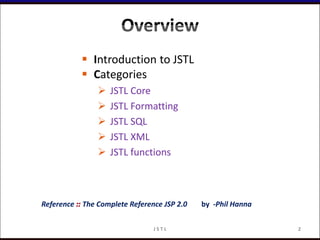
 Introduction to JSTL
 Categories
 JSTL Core
 JSTL Formatting
 JSTL SQL
 JSTL XML
 JSTL functions
Reference The Complete Reference JSP 2.0 by -Phil Hanna
2J S T L
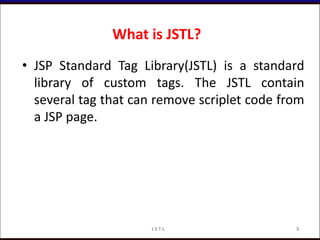
• JSP Standard Tag Library(JSTL) is a standard
library of custom tags. The JSTL contain
several tag that can remove scriplet code from
a JSP page.
What is JSTL?
3J S T L
Conti..
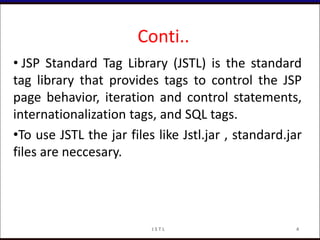
• JSP Standard Tag Library (JSTL) is the standard
tag library that provides tags to control the JSP
page behavior, iteration and control statements,
internationalization tags, and SQL tags.
•To use JSTL the jar files like Jstl.jar , standard.jar
files are neccesary.
4J S T L
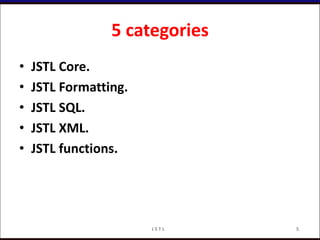
5 categories
• JSTL Core.
• JSTL Formatting.
• JSTL SQL.
• JSTL XML.
• JSTL functions.
5J S T L
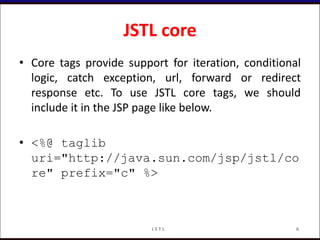
JSTL core
• Core tags provide support for iteration, conditional
logic, catch exception, url, forward or redirect
response etc. To use JSTL core tags, we should
include it in the JSP page like below.
• <%@ taglib
uri="http://java.sun.com/jsp/jstl/co
re" prefix="c" %>
6J S T L
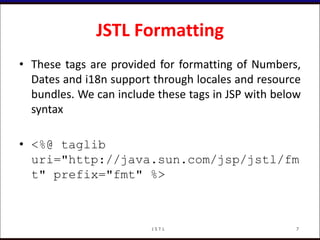
JSTL Formatting
• These tags are provided for formatting of Numbers,
Dates and i18n support through locales and resource
bundles. We can include these tags in JSP with below
syntax
• <%@ taglib
uri="http://java.sun.com/jsp/jstl/fm
t" prefix="fmt" %>
7J S T L
JSTL SQL
• JSTL SQL Tags provide support for interaction with
relational databases such as Oracle, MySQL etc.
Using SQL tags we can run database queries, we
include it in JSP with below syntax
• <%@ taglib
uri="http://java.sun.com/jsp/jstl/sq
l" prefix="sql" %>
8J S T L
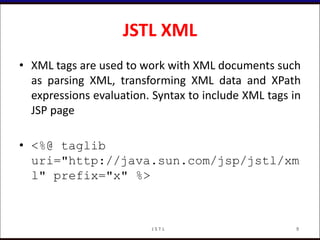
JSTL XML
• XML tags are used to work with XML documents such
as parsing XML, transforming XML data and XPath
expressions evaluation. Syntax to include XML tags in
JSP page
• <%@ taglib
uri="http://java.sun.com/jsp/jstl/xm
l" prefix="x" %>
9J S T L
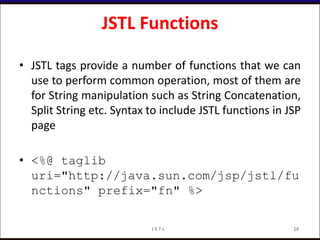
JSTL Functions
• JSTL tags provide a number of functions that we can
use to perform common operation, most of them are
for String manipulation such as String Concatenation,
Split String etc. Syntax to include JSTL functions in JSP
page
• <%@ taglib
uri="http://java.sun.com/jsp/jstl/fu
nctions" prefix="fn" %>
10J S T L
Library URI Prefix
Core http://java.sun.com/jsp/jstl/core c
XML Processing http://java.sun.com/jsp/jstl/xml x
Formatting http://java.sun.com/jsp/jstl/fmt fmt
Database Access http://java.sun.com/jsp/jstl/sql sql
Functions http://java.sun.com/jsp/jstl/functions fn
JSTL URIs and Default Prefixes
11J S T L
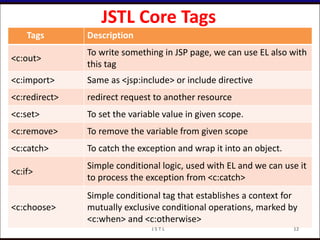
JSTL Core Tags
Tags Description
<c:out>
To write something in JSP page, we can use EL also with
this tag
<c:import> Same as <jsp:include> or include directive
<c:redirect> redirect request to another resource
<c:set> To set the variable value in given scope.
<c:remove> To remove the variable from given scope
<c:catch> To catch the exception and wrap it into an object.
<c:if>
Simple conditional logic, used with EL and we can use it
to process the exception from <c:catch>
<c:choose>
Simple conditional tag that establishes a context for
mutually exclusive conditional operations, marked by
<c:when> and <c:otherwise>
12J S T L
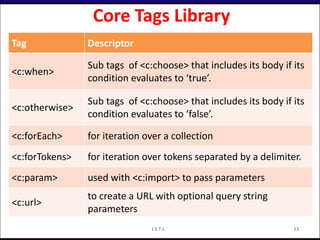
Core Tags Library
Tag Descriptor
<c:when>
Sub tags of <c:choose> that includes its body if its
condition evaluates to ‘true’.
<c:otherwise>
Sub tags of <c:choose> that includes its body if its
condition evaluates to ‘false’.
<c:forEach> for iteration over a collection
<c:forTokens> for iteration over tokens separated by a delimiter.
<c:param> used with <c:import> to pass parameters
<c:url>
to create a URL with optional query string
parameters
13J S T L
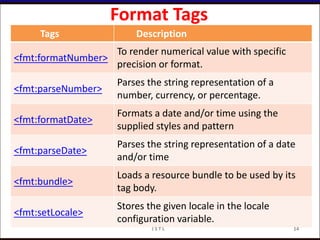
Format Tags
Tags Description
<fmt:formatNumber>
To render numerical value with specific
precision or format.
<fmt:parseNumber>
Parses the string representation of a
number, currency, or percentage.
<fmt:formatDate>
Formats a date and/or time using the
supplied styles and pattern
<fmt:parseDate>
Parses the string representation of a date
and/or time
<fmt:bundle>
Loads a resource bundle to be used by its
tag body.
<fmt:setLocale>
Stores the given locale in the locale
configuration variable.
14J S T L
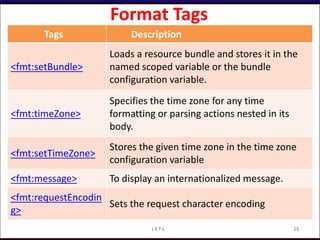
Format Tags
Tags Description
<fmt:setBundle>
Loads a resource bundle and stores it in the
named scoped variable or the bundle
configuration variable.
<fmt:timeZone>
Specifies the time zone for any time
formatting or parsing actions nested in its
body.
<fmt:setTimeZone>
Stores the given time zone in the time zone
configuration variable
<fmt:message> To display an internationalized message.
<fmt:requestEncodin
g>
Sets the request character encoding
15J S T L
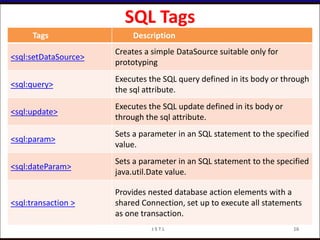
SQL Tags
Tags Description
<sql:setDataSource>
Creates a simple DataSource suitable only for
prototyping
<sql:query>
Executes the SQL query defined in its body or through
the sql attribute.
<sql:update>
Executes the SQL update defined in its body or
through the sql attribute.
<sql:param>
Sets a parameter in an SQL statement to the specified
value.
<sql:dateParam>
Sets a parameter in an SQL statement to the specified
java.util.Date value.
<sql:transaction >
Provides nested database action elements with a
shared Connection, set up to execute all statements
as one transaction.
16J S T L
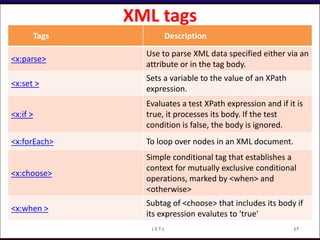
XML tags
Tags Description
<x:parse>
Use to parse XML data specified either via an
attribute or in the tag body.
<x:set >
Sets a variable to the value of an XPath
expression.
<x:if >
Evaluates a test XPath expression and if it is
true, it processes its body. If the test
condition is false, the body is ignored.
<x:forEach> To loop over nodes in an XML document.
<x:choose>
Simple conditional tag that establishes a
context for mutually exclusive conditional
operations, marked by <when> and
<otherwise>
<x:when >
Subtag of <choose> that includes its body if
its expression evalutes to 'true'
17J S T L
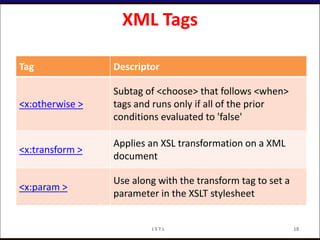
XML Tags
Tag Descriptor
<x:otherwise >
Subtag of <choose> that follows <when>
tags and runs only if all of the prior
conditions evaluated to 'false'
<x:transform >
Applies an XSL transformation on a XML
document
<x:param >
Use along with the transform tag to set a
parameter in the XSLT stylesheet
18J S T L
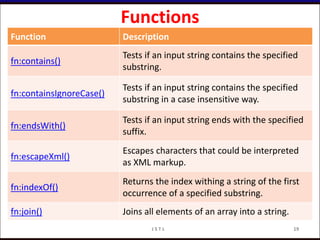
Functions
Function Description
fn:contains()
Tests if an input string contains the specified
substring.
fn:containsIgnoreCase()
Tests if an input string contains the specified
substring in a case insensitive way.
fn:endsWith()
Tests if an input string ends with the specified
suffix.
fn:escapeXml()
Escapes characters that could be interpreted
as XML markup.
fn:indexOf()
Returns the index withing a string of the first
occurrence of a specified substring.
fn:join() Joins all elements of an array into a string.
19J S T L
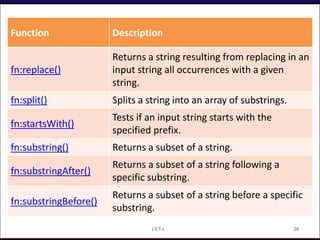
Function Description
fn:replace()
Returns a string resulting from replacing in an
input string all occurrences with a given
string.
fn:split() Splits a string into an array of substrings.
fn:startsWith()
Tests if an input string starts with the
specified prefix.
fn:substring() Returns a subset of a string.
fn:substringAfter()
Returns a subset of a string following a
specific substring.
fn:substringBefore()
Returns a subset of a string before a specific
substring.
20J S T L
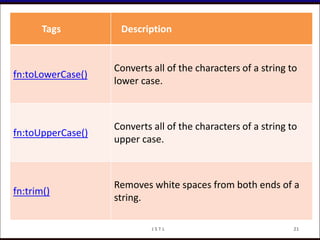
Tags Description
fn:toLowerCase()
Converts all of the characters of a string to
lower case.
fn:toUpperCase()
Converts all of the characters of a string to
upper case.
fn:trim()
Removes white spaces from both ends of a
string.
21J S T L
J S T L 22

jstl ( jsp standard tag library )

  • 1.
    O r ga n i za t i o n n a m e Presented by
  • 2.
     Introduction toJSTL  Categories  JSTL Core  JSTL Formatting  JSTL SQL  JSTL XML  JSTL functions Reference The Complete Reference JSP 2.0 by -Phil Hanna 2J S T L
  • 3.
    • JSP StandardTag Library(JSTL) is a standard library of custom tags. The JSTL contain several tag that can remove scriplet code from a JSP page. What is JSTL? 3J S T L
  • 4.
    Conti.. • JSP StandardTag Library (JSTL) is the standard tag library that provides tags to control the JSP page behavior, iteration and control statements, internationalization tags, and SQL tags. •To use JSTL the jar files like Jstl.jar , standard.jar files are neccesary. 4J S T L
  • 5.
    5 categories • JSTLCore. • JSTL Formatting. • JSTL SQL. • JSTL XML. • JSTL functions. 5J S T L
  • 6.
    JSTL core • Coretags provide support for iteration, conditional logic, catch exception, url, forward or redirect response etc. To use JSTL core tags, we should include it in the JSP page like below. • <%@ taglib uri="http://java.sun.com/jsp/jstl/co re" prefix="c" %> 6J S T L
  • 7.
    JSTL Formatting • Thesetags are provided for formatting of Numbers, Dates and i18n support through locales and resource bundles. We can include these tags in JSP with below syntax • <%@ taglib uri="http://java.sun.com/jsp/jstl/fm t" prefix="fmt" %> 7J S T L
  • 8.
    JSTL SQL • JSTLSQL Tags provide support for interaction with relational databases such as Oracle, MySQL etc. Using SQL tags we can run database queries, we include it in JSP with below syntax • <%@ taglib uri="http://java.sun.com/jsp/jstl/sq l" prefix="sql" %> 8J S T L
  • 9.
    JSTL XML • XMLtags are used to work with XML documents such as parsing XML, transforming XML data and XPath expressions evaluation. Syntax to include XML tags in JSP page • <%@ taglib uri="http://java.sun.com/jsp/jstl/xm l" prefix="x" %> 9J S T L
  • 10.
    JSTL Functions • JSTLtags provide a number of functions that we can use to perform common operation, most of them are for String manipulation such as String Concatenation, Split String etc. Syntax to include JSTL functions in JSP page • <%@ taglib uri="http://java.sun.com/jsp/jstl/fu nctions" prefix="fn" %> 10J S T L
  • 11.
    Library URI Prefix Corehttp://java.sun.com/jsp/jstl/core c XML Processing http://java.sun.com/jsp/jstl/xml x Formatting http://java.sun.com/jsp/jstl/fmt fmt Database Access http://java.sun.com/jsp/jstl/sql sql Functions http://java.sun.com/jsp/jstl/functions fn JSTL URIs and Default Prefixes 11J S T L
  • 12.
    JSTL Core Tags TagsDescription <c:out> To write something in JSP page, we can use EL also with this tag <c:import> Same as <jsp:include> or include directive <c:redirect> redirect request to another resource <c:set> To set the variable value in given scope. <c:remove> To remove the variable from given scope <c:catch> To catch the exception and wrap it into an object. <c:if> Simple conditional logic, used with EL and we can use it to process the exception from <c:catch> <c:choose> Simple conditional tag that establishes a context for mutually exclusive conditional operations, marked by <c:when> and <c:otherwise> 12J S T L
  • 13.
    Core Tags Library TagDescriptor <c:when> Sub tags of <c:choose> that includes its body if its condition evaluates to ‘true’. <c:otherwise> Sub tags of <c:choose> that includes its body if its condition evaluates to ‘false’. <c:forEach> for iteration over a collection <c:forTokens> for iteration over tokens separated by a delimiter. <c:param> used with <c:import> to pass parameters <c:url> to create a URL with optional query string parameters 13J S T L
  • 14.
    Format Tags Tags Description <fmt:formatNumber> Torender numerical value with specific precision or format. <fmt:parseNumber> Parses the string representation of a number, currency, or percentage. <fmt:formatDate> Formats a date and/or time using the supplied styles and pattern <fmt:parseDate> Parses the string representation of a date and/or time <fmt:bundle> Loads a resource bundle to be used by its tag body. <fmt:setLocale> Stores the given locale in the locale configuration variable. 14J S T L
  • 15.
    Format Tags Tags Description <fmt:setBundle> Loadsa resource bundle and stores it in the named scoped variable or the bundle configuration variable. <fmt:timeZone> Specifies the time zone for any time formatting or parsing actions nested in its body. <fmt:setTimeZone> Stores the given time zone in the time zone configuration variable <fmt:message> To display an internationalized message. <fmt:requestEncodin g> Sets the request character encoding 15J S T L
  • 16.
    SQL Tags Tags Description <sql:setDataSource> Createsa simple DataSource suitable only for prototyping <sql:query> Executes the SQL query defined in its body or through the sql attribute. <sql:update> Executes the SQL update defined in its body or through the sql attribute. <sql:param> Sets a parameter in an SQL statement to the specified value. <sql:dateParam> Sets a parameter in an SQL statement to the specified java.util.Date value. <sql:transaction > Provides nested database action elements with a shared Connection, set up to execute all statements as one transaction. 16J S T L
  • 17.
    XML tags Tags Description <x:parse> Useto parse XML data specified either via an attribute or in the tag body. <x:set > Sets a variable to the value of an XPath expression. <x:if > Evaluates a test XPath expression and if it is true, it processes its body. If the test condition is false, the body is ignored. <x:forEach> To loop over nodes in an XML document. <x:choose> Simple conditional tag that establishes a context for mutually exclusive conditional operations, marked by <when> and <otherwise> <x:when > Subtag of <choose> that includes its body if its expression evalutes to 'true' 17J S T L
  • 18.
    XML Tags Tag Descriptor <x:otherwise> Subtag of <choose> that follows <when> tags and runs only if all of the prior conditions evaluated to 'false' <x:transform > Applies an XSL transformation on a XML document <x:param > Use along with the transform tag to set a parameter in the XSLT stylesheet 18J S T L
  • 19.
    Functions Function Description fn:contains() Tests ifan input string contains the specified substring. fn:containsIgnoreCase() Tests if an input string contains the specified substring in a case insensitive way. fn:endsWith() Tests if an input string ends with the specified suffix. fn:escapeXml() Escapes characters that could be interpreted as XML markup. fn:indexOf() Returns the index withing a string of the first occurrence of a specified substring. fn:join() Joins all elements of an array into a string. 19J S T L
  • 20.
    Function Description fn:replace() Returns astring resulting from replacing in an input string all occurrences with a given string. fn:split() Splits a string into an array of substrings. fn:startsWith() Tests if an input string starts with the specified prefix. fn:substring() Returns a subset of a string. fn:substringAfter() Returns a subset of a string following a specific substring. fn:substringBefore() Returns a subset of a string before a specific substring. 20J S T L
  • 21.
    Tags Description fn:toLowerCase() Converts allof the characters of a string to lower case. fn:toUpperCase() Converts all of the characters of a string to upper case. fn:trim() Removes white spaces from both ends of a string. 21J S T L
  • 22.
    J S TL 22