JSTL
WHAT IS JSTL?
 JSTL (JSP Standard Tag Libraries) is a
collection of JSP custom tags developed by Java
Community Process, www.jcp.org. The reference
implementation is developed by the Jakarta
project, jakarta.apache.org.
 Full JSTL
– Contains many common and useful JSP custom tags
 JSTL allows you to program your JSP pages
using tags, rather than the scriptlet code that
most JSP programmers are already accustomed
to. JSTL can do nearly everything that regular
JSP scriptlet code can do.
2
THE JSTL TAG LIBRARIES
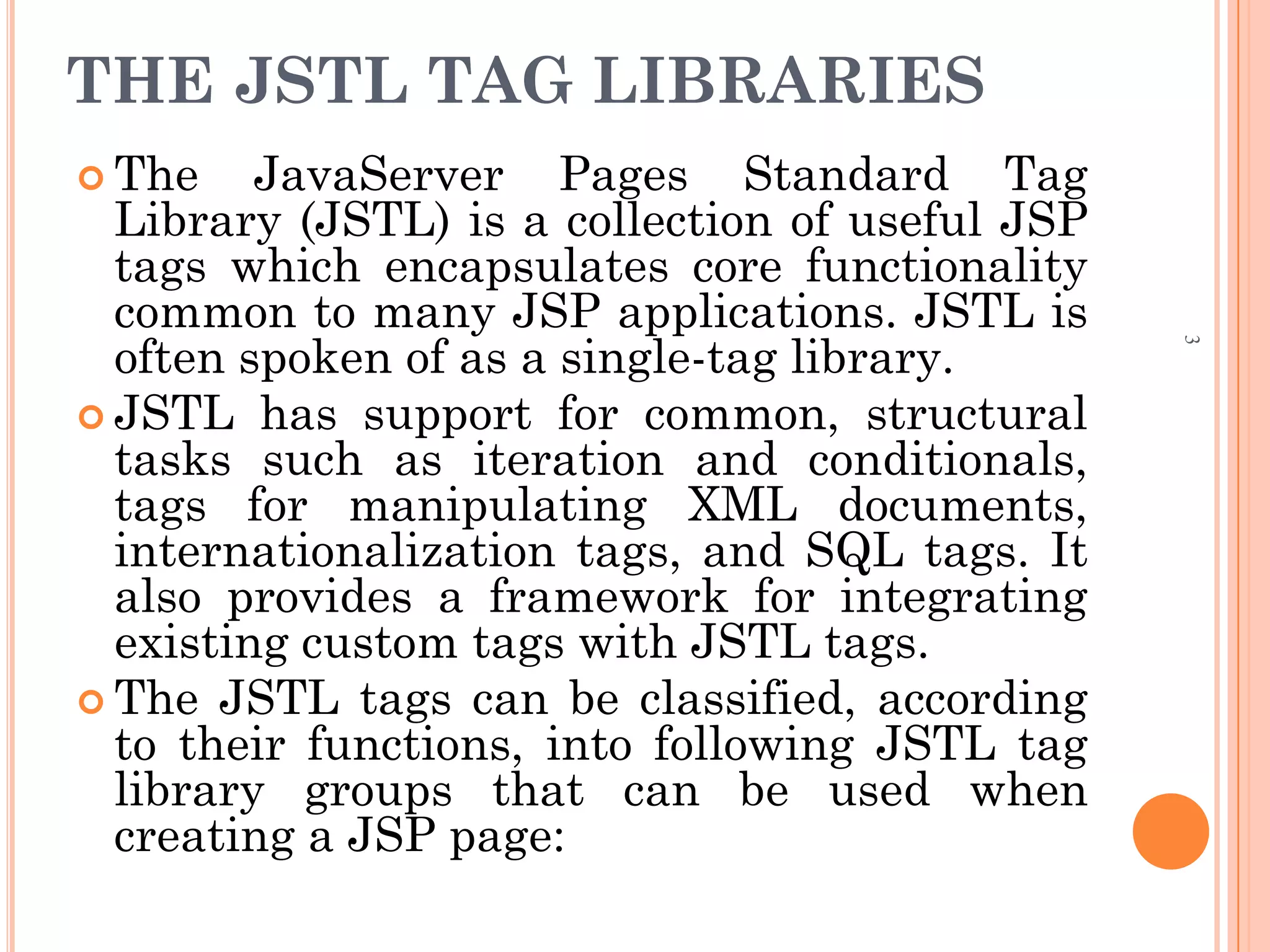
 The JavaServer Pages Standard Tag
Library (JSTL) is a collection of useful JSP
tags which encapsulates core functionality
common to many JSP applications. JSTL is
often spoken of as a single-tag library.
 JSTL has support for common, structural
tasks such as iteration and conditionals,
tags for manipulating XML documents,
internationalization tags, and SQL tags. It
also provides a framework for integrating
existing custom tags with JSTL tags.
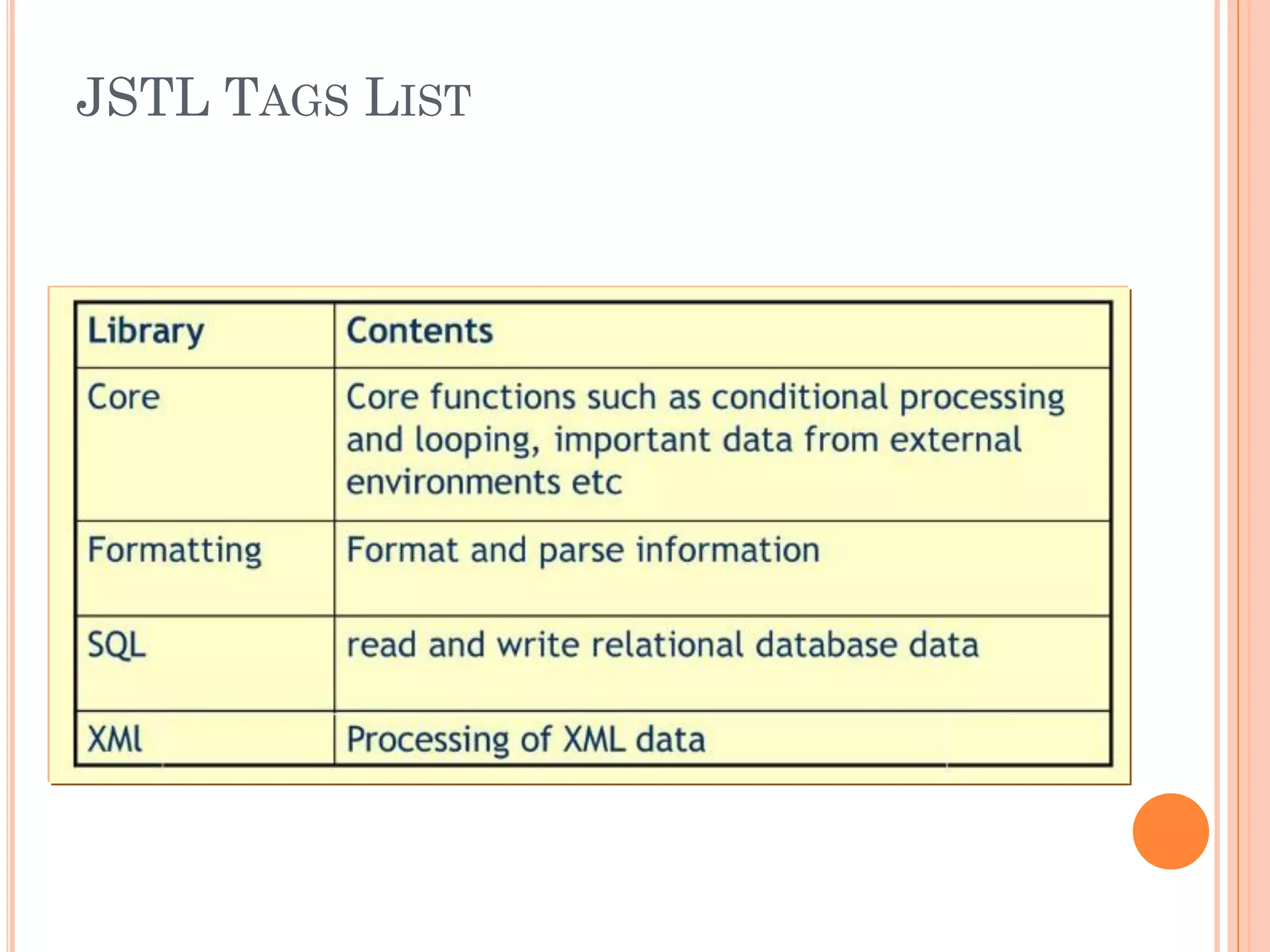
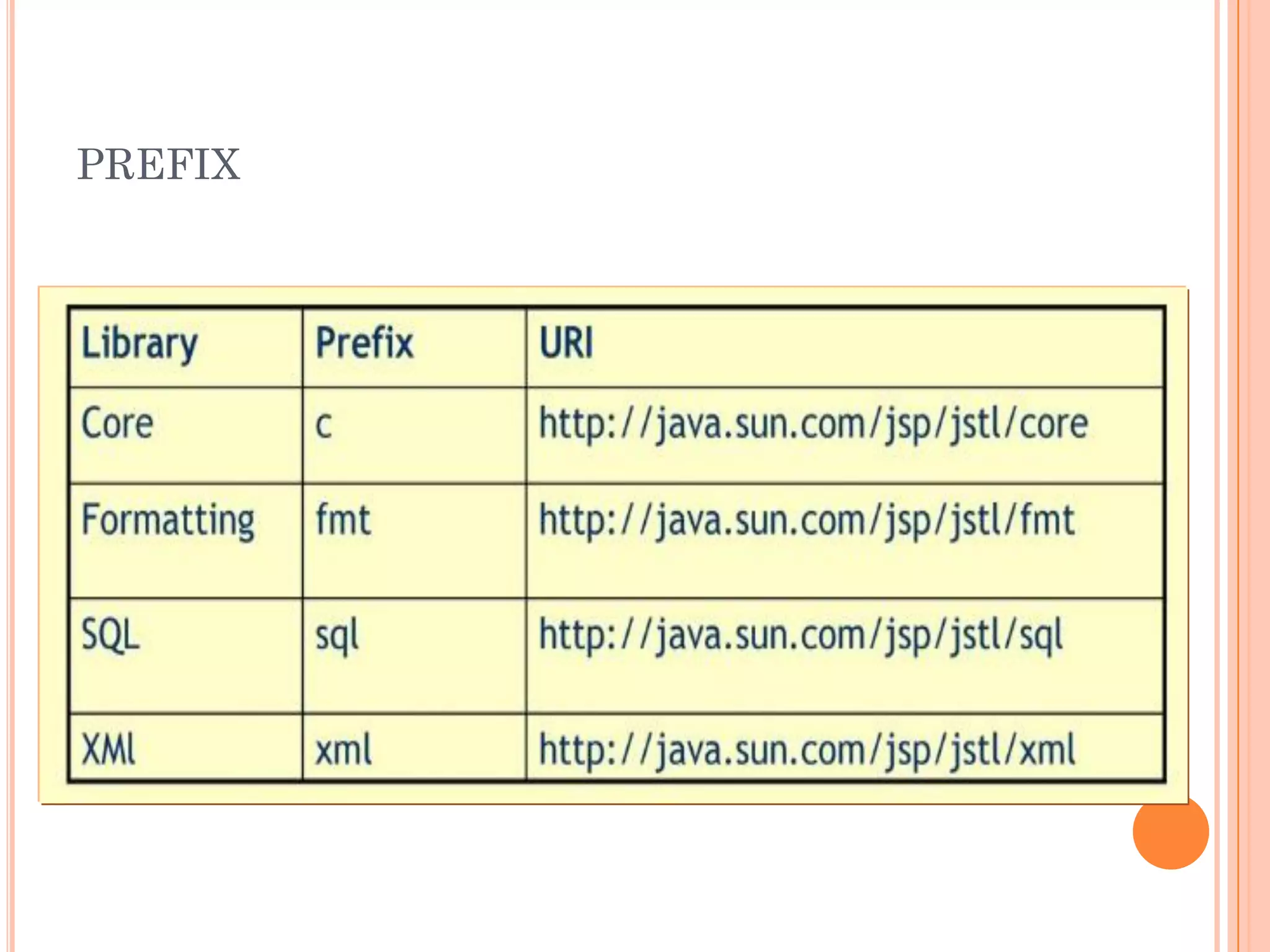
 The JSTL tags can be classified, according
to their functions, into following JSTL tag
library groups that can be used when
creating a JSP page:
3
JSTL TAGS LIST
PREFIX
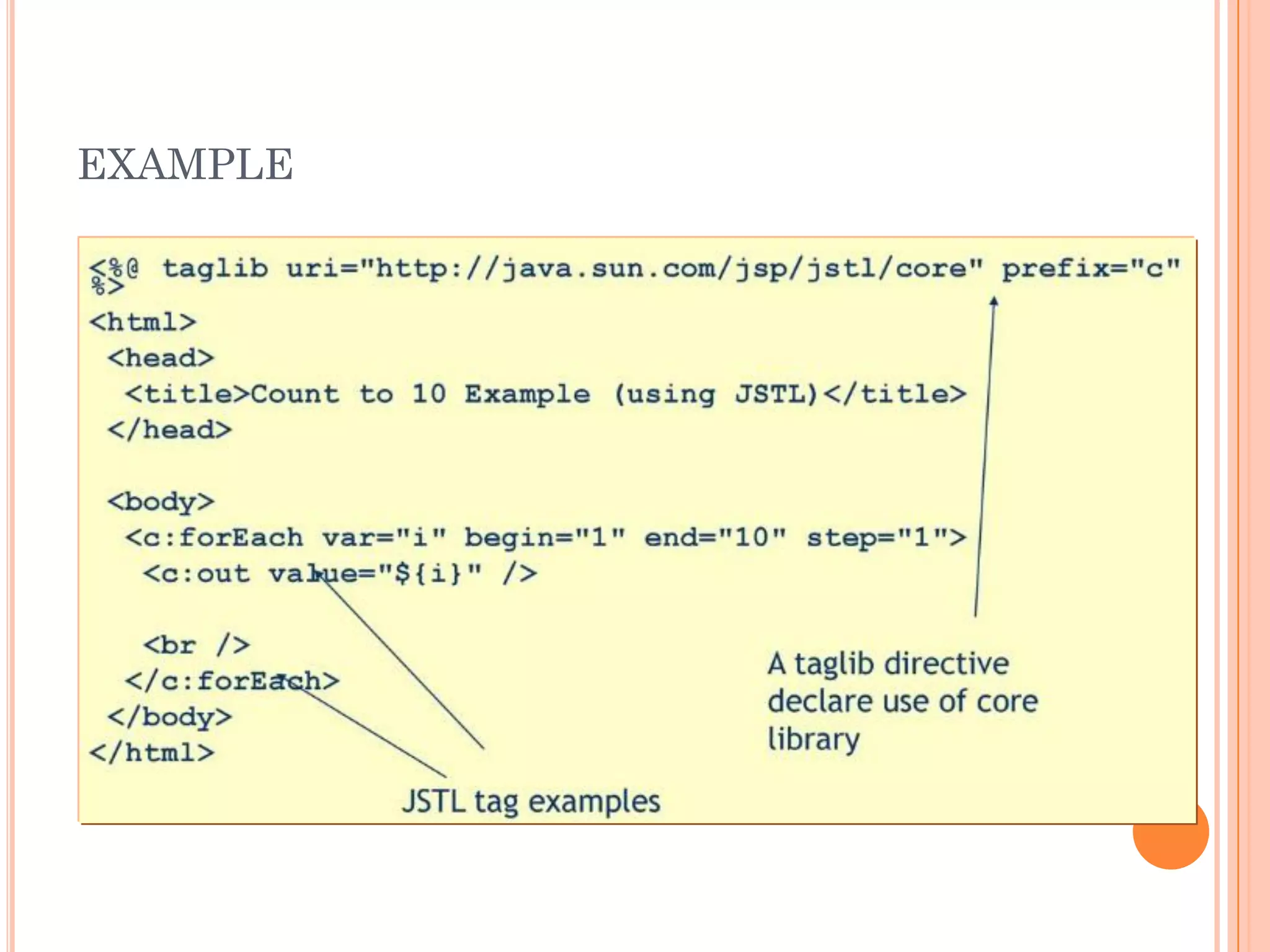
EXAMPLE
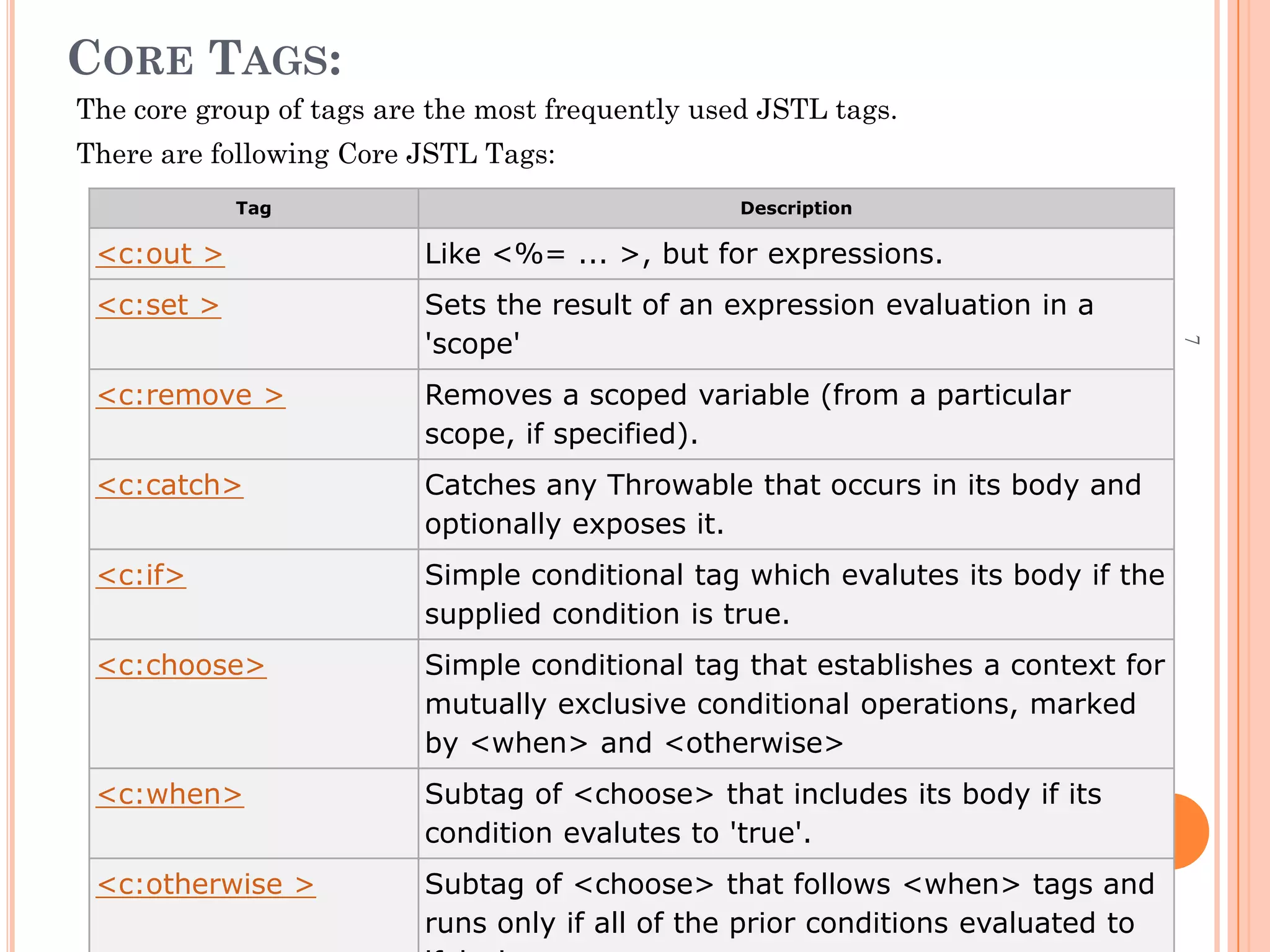
CORE TAGS:
The core group of tags are the most frequently used JSTL tags.
There are following Core JSTL Tags:
Tag Description
<c:out > Like <%= ... >, but for expressions.
<c:set > Sets the result of an expression evaluation in a
'scope'
<c:remove > Removes a scoped variable (from a particular
scope, if specified).
<c:catch> Catches any Throwable that occurs in its body and
optionally exposes it.
<c:if> Simple conditional tag which evalutes its body if the
supplied condition is true.
<c:choose> Simple conditional tag that establishes a context for
mutually exclusive conditional operations, marked
by <when> and <otherwise>
<c:when> Subtag of <choose> that includes its body if its
condition evalutes to 'true'.
<c:otherwise > Subtag of <choose> that follows <when> tags and
runs only if all of the prior conditions evaluated to
7
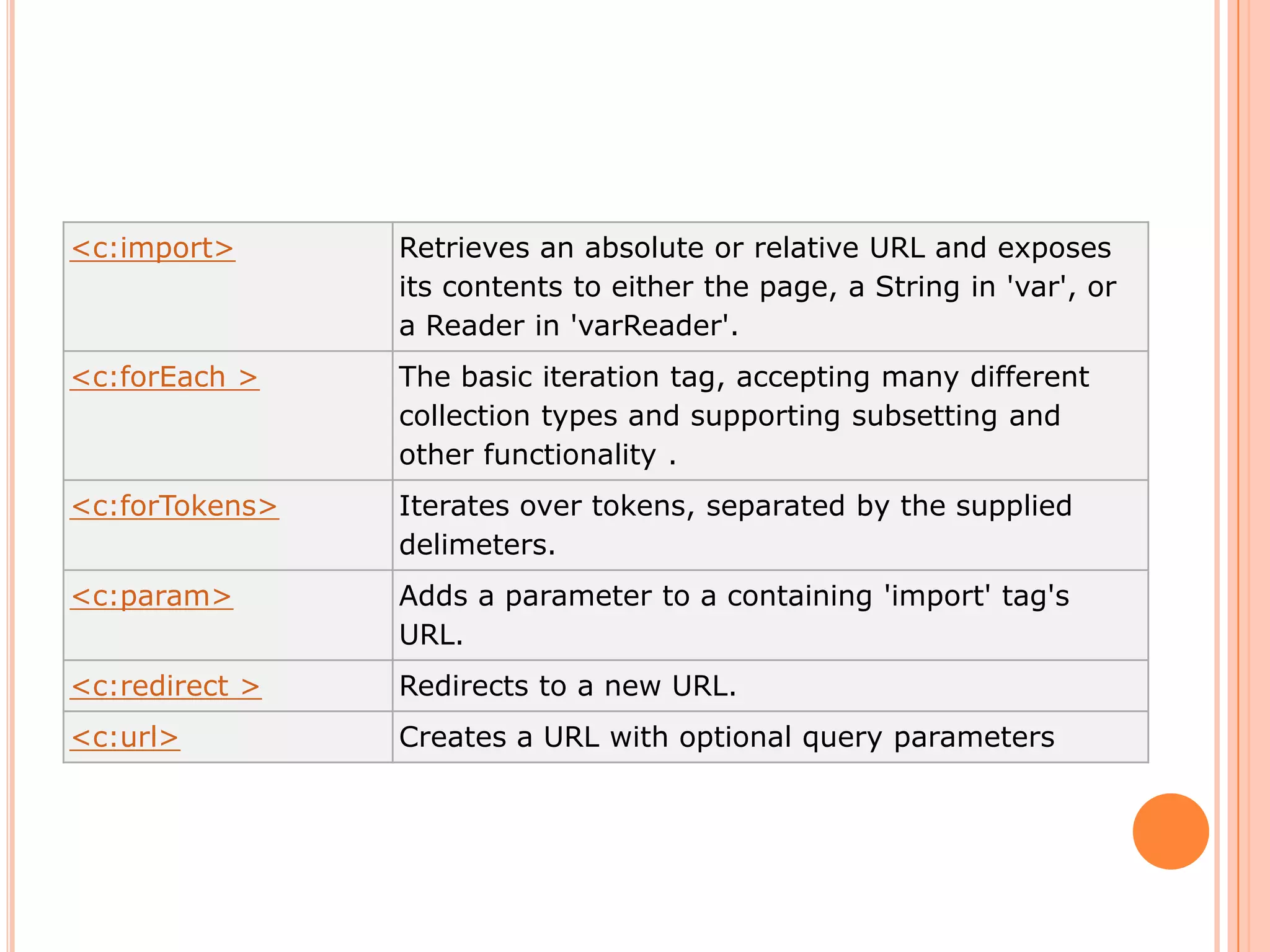
<c:import> Retrieves an absolute or relative URL and exposes
its contents to either the page, a String in 'var', or
a Reader in 'varReader'.
<c:forEach > The basic iteration tag, accepting many different
collection types and supporting subsetting and
other functionality .
<c:forTokens> Iterates over tokens, separated by the supplied
delimeters.
<c:param> Adds a parameter to a containing 'import' tag's
URL.
<c:redirect > Redirects to a new URL.
<c:url> Creates a URL with optional query parameters
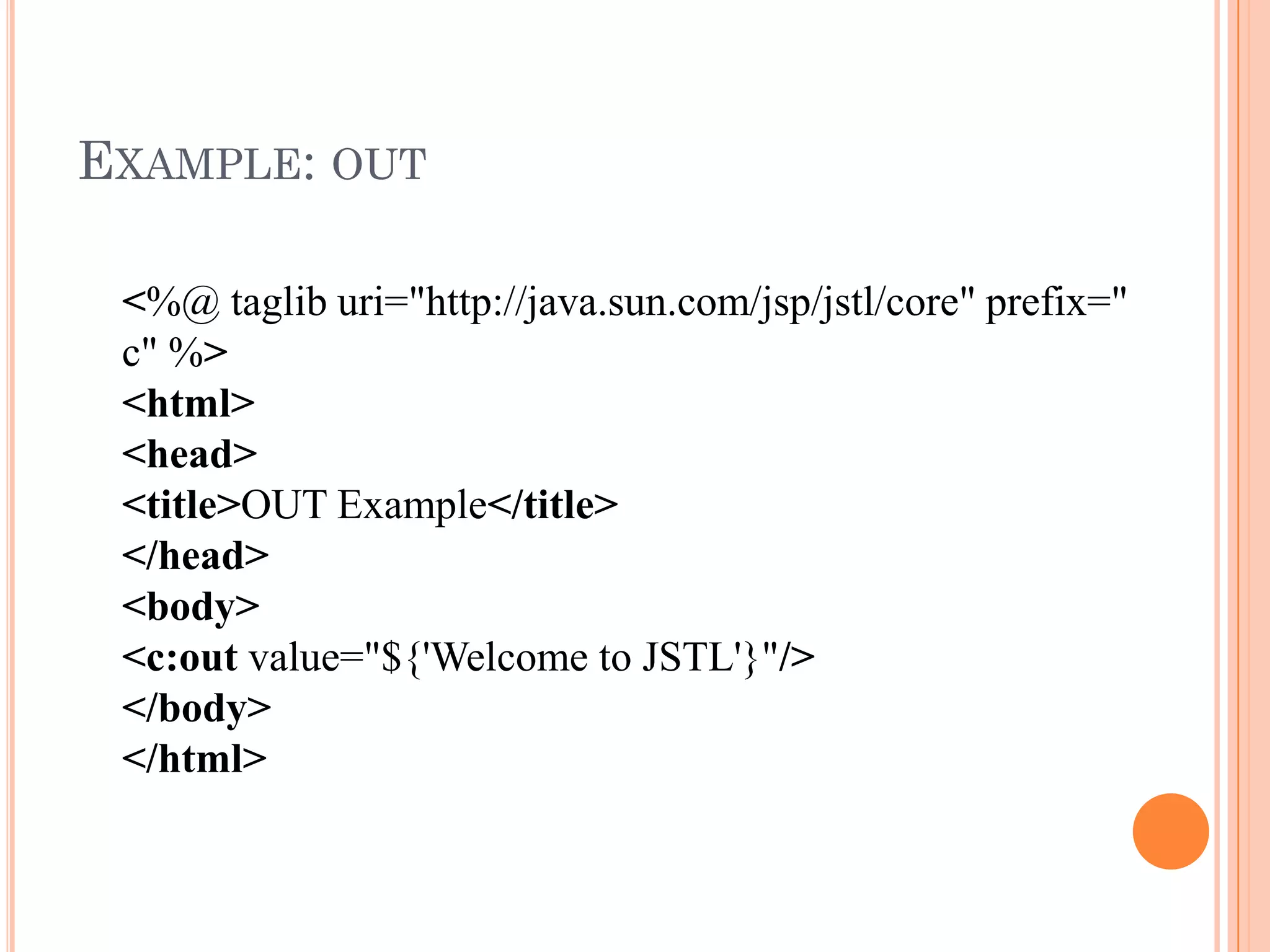
EXAMPLE: OUT
<%@ taglib uri="http://java.sun.com/jsp/jstl/core" prefix="
c" %>
<html>
<head>
<title>OUT Example</title>
</head>
<body>
<c:out value="${'Welcome to JSTL'}"/>
</body>
</html>
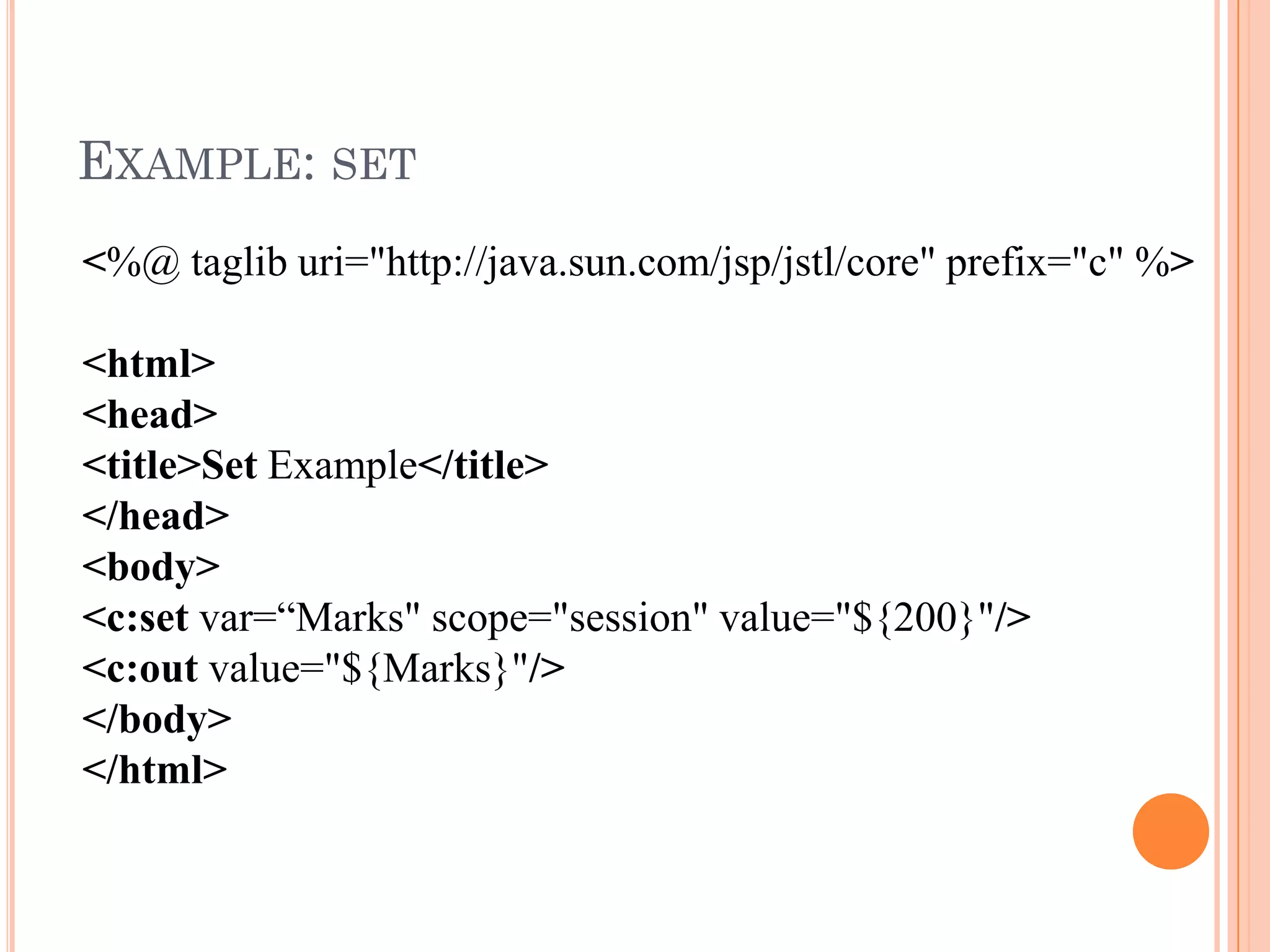
EXAMPLE: SET
<%@ taglib uri="http://java.sun.com/jsp/jstl/core" prefix="c" %>
<html>
<head>
<title>Set Example</title>
</head>
<body>
<c:set var=“Marks" scope="session" value="${200}"/>
<c:out value="${Marks}"/>
</body>
</html>
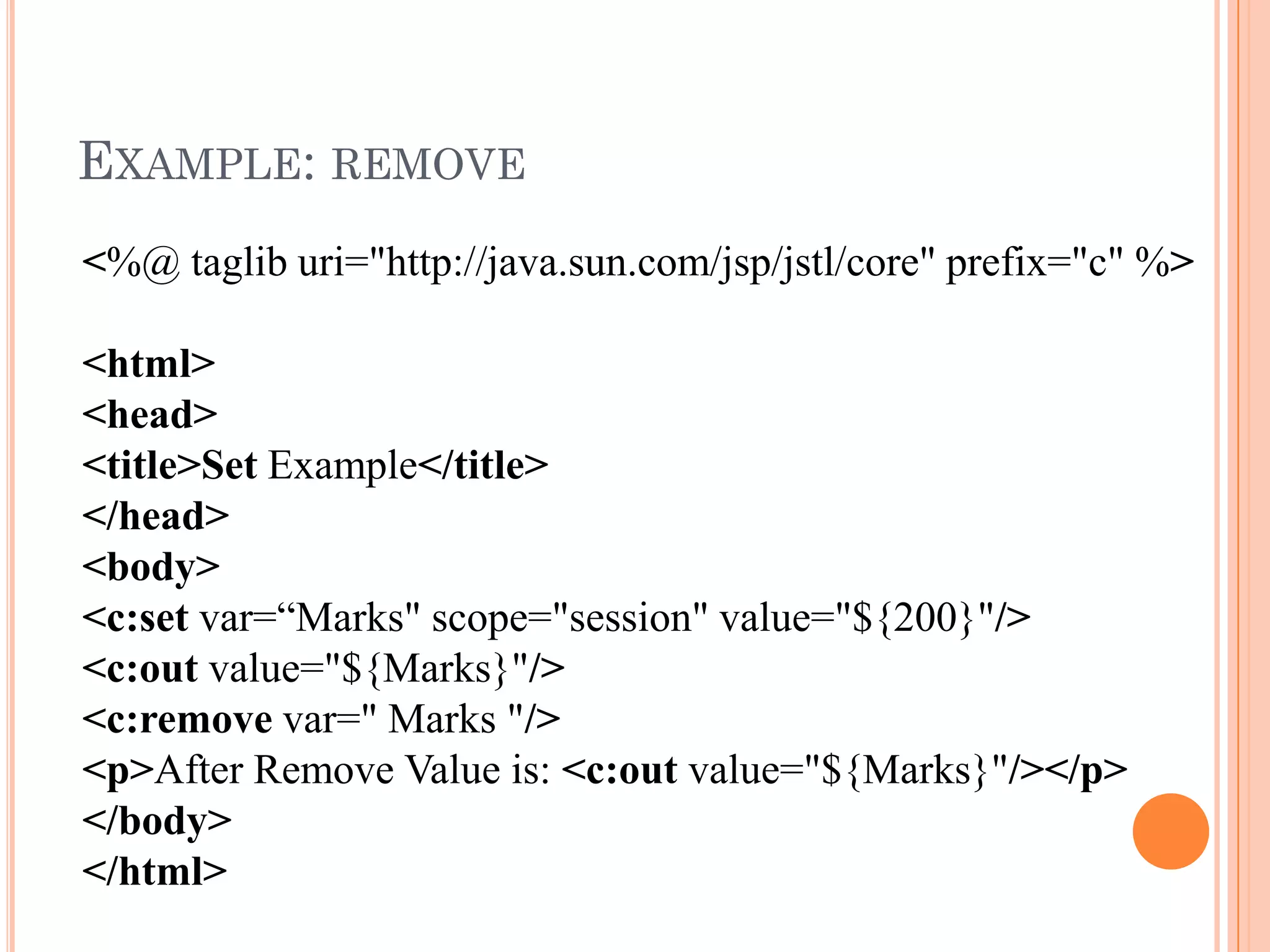
EXAMPLE: REMOVE
<%@ taglib uri="http://java.sun.com/jsp/jstl/core" prefix="c" %>
<html>
<head>
<title>Set Example</title>
</head>
<body>
<c:set var=“Marks" scope="session" value="${200}"/>
<c:out value="${Marks}"/>
<c:remove var=" Marks "/>
<p>After Remove Value is: <c:out value="${Marks}"/></p>
</body>
</html>
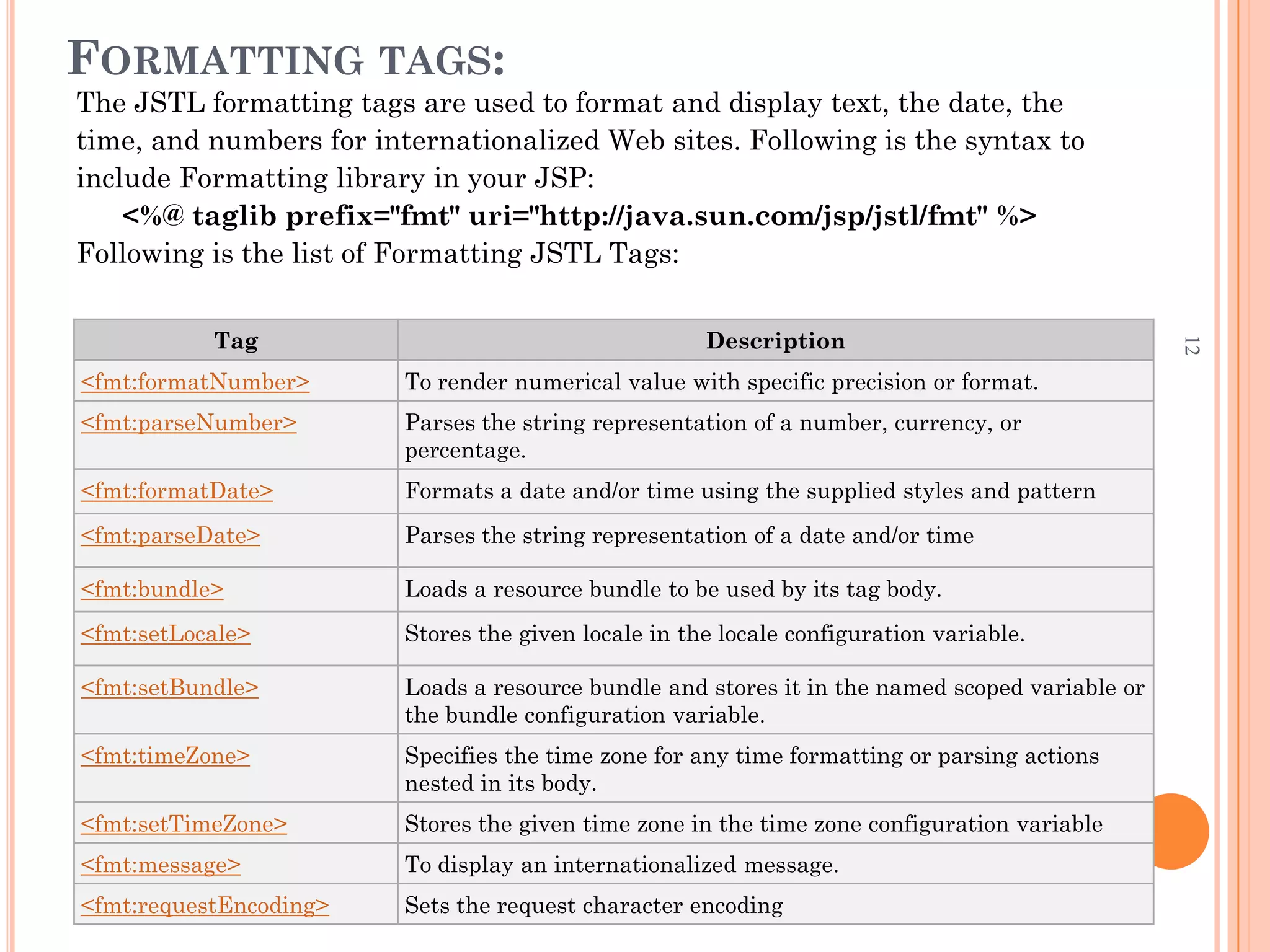
FORMATTING TAGS:
The JSTL formatting tags are used to format and display text, the date, the
time, and numbers for internationalized Web sites. Following is the syntax to
include Formatting library in your JSP:
<%@ taglib prefix="fmt" uri="http://java.sun.com/jsp/jstl/fmt" %>
Following is the list of Formatting JSTL Tags:
Tag Description
<fmt:formatNumber> To render numerical value with specific precision or format.
<fmt:parseNumber> Parses the string representation of a number, currency, or
percentage.
<fmt:formatDate> Formats a date and/or time using the supplied styles and pattern
<fmt:parseDate> Parses the string representation of a date and/or time
<fmt:bundle> Loads a resource bundle to be used by its tag body.
<fmt:setLocale> Stores the given locale in the locale configuration variable.
<fmt:setBundle> Loads a resource bundle and stores it in the named scoped variable or
the bundle configuration variable.
<fmt:timeZone> Specifies the time zone for any time formatting or parsing actions
nested in its body.
<fmt:setTimeZone> Stores the given time zone in the time zone configuration variable
<fmt:message> To display an internationalized message.
<fmt:requestEncoding> Sets the request character encoding
12
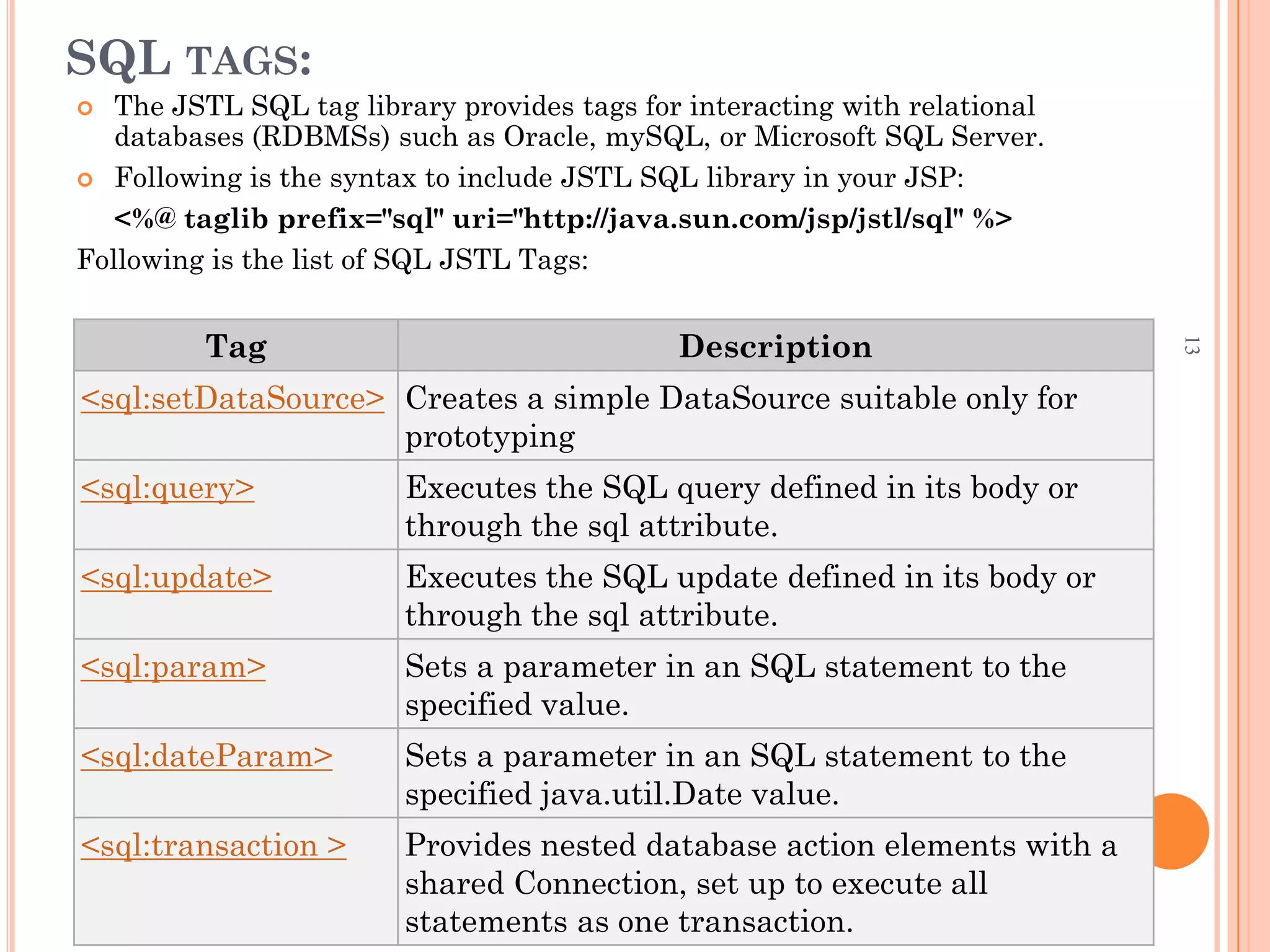
SQL TAGS:
 The JSTL SQL tag library provides tags for interacting with relational
databases (RDBMSs) such as Oracle, mySQL, or Microsoft SQL Server.
 Following is the syntax to include JSTL SQL library in your JSP:
<%@ taglib prefix="sql" uri="http://java.sun.com/jsp/jstl/sql" %>
Following is the list of SQL JSTL Tags:
Tag Description
<sql:setDataSource> Creates a simple DataSource suitable only for
prototyping
<sql:query> Executes the SQL query defined in its body or
through the sql attribute.
<sql:update> Executes the SQL update defined in its body or
through the sql attribute.
<sql:param> Sets a parameter in an SQL statement to the
specified value.
<sql:dateParam> Sets a parameter in an SQL statement to the
specified java.util.Date value.
<sql:transaction > Provides nested database action elements with a
shared Connection, set up to execute all
statements as one transaction.
13
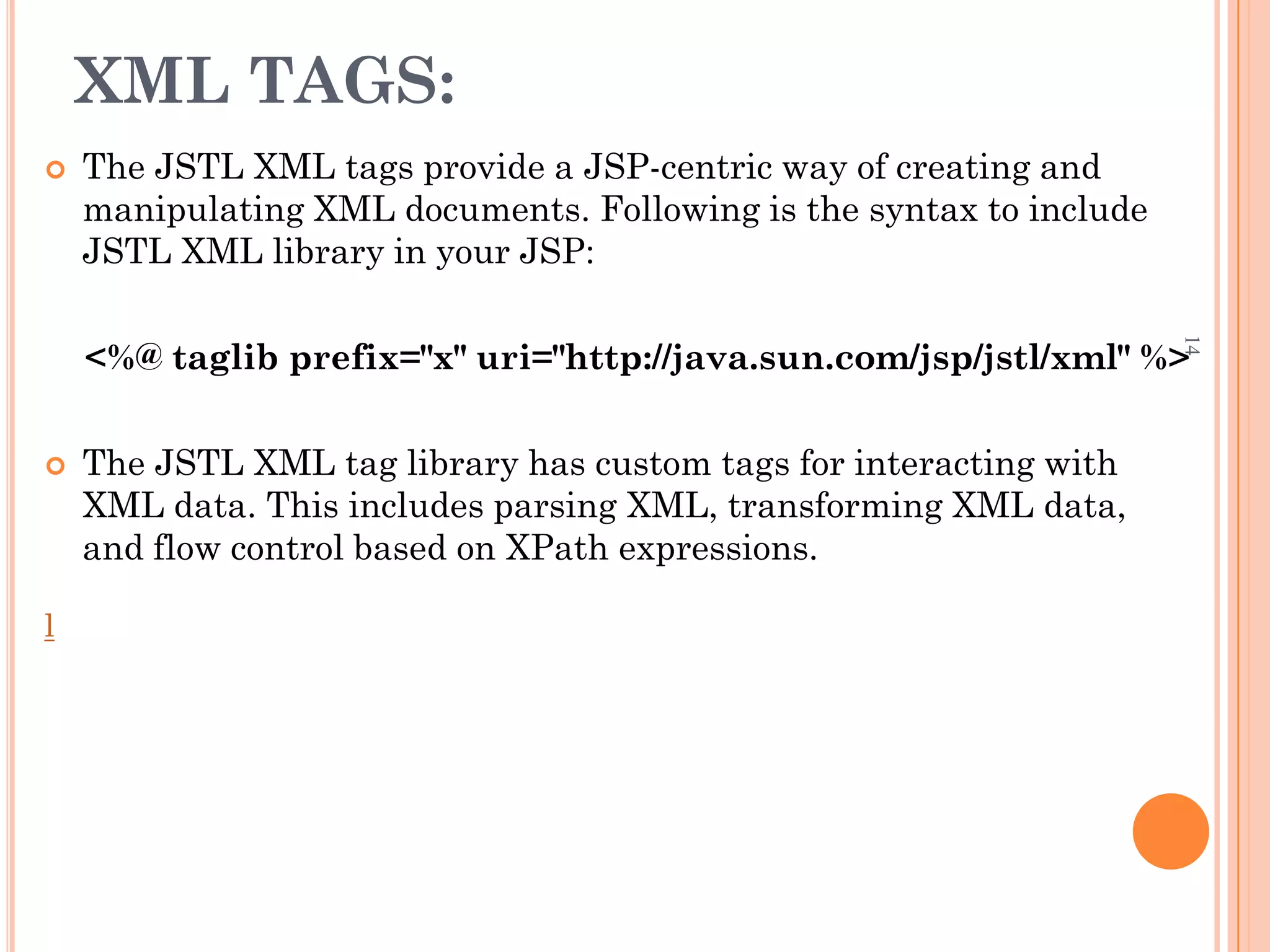
XML TAGS:
 The JSTL XML tags provide a JSP-centric way of creating and
manipulating XML documents. Following is the syntax to include
JSTL XML library in your JSP:
<%@ taglib prefix="x" uri="http://java.sun.com/jsp/jstl/xml" %>
 The JSTL XML tag library has custom tags for interacting with
XML data. This includes parsing XML, transforming XML data,
and flow control based on XPath expressions.
l
14
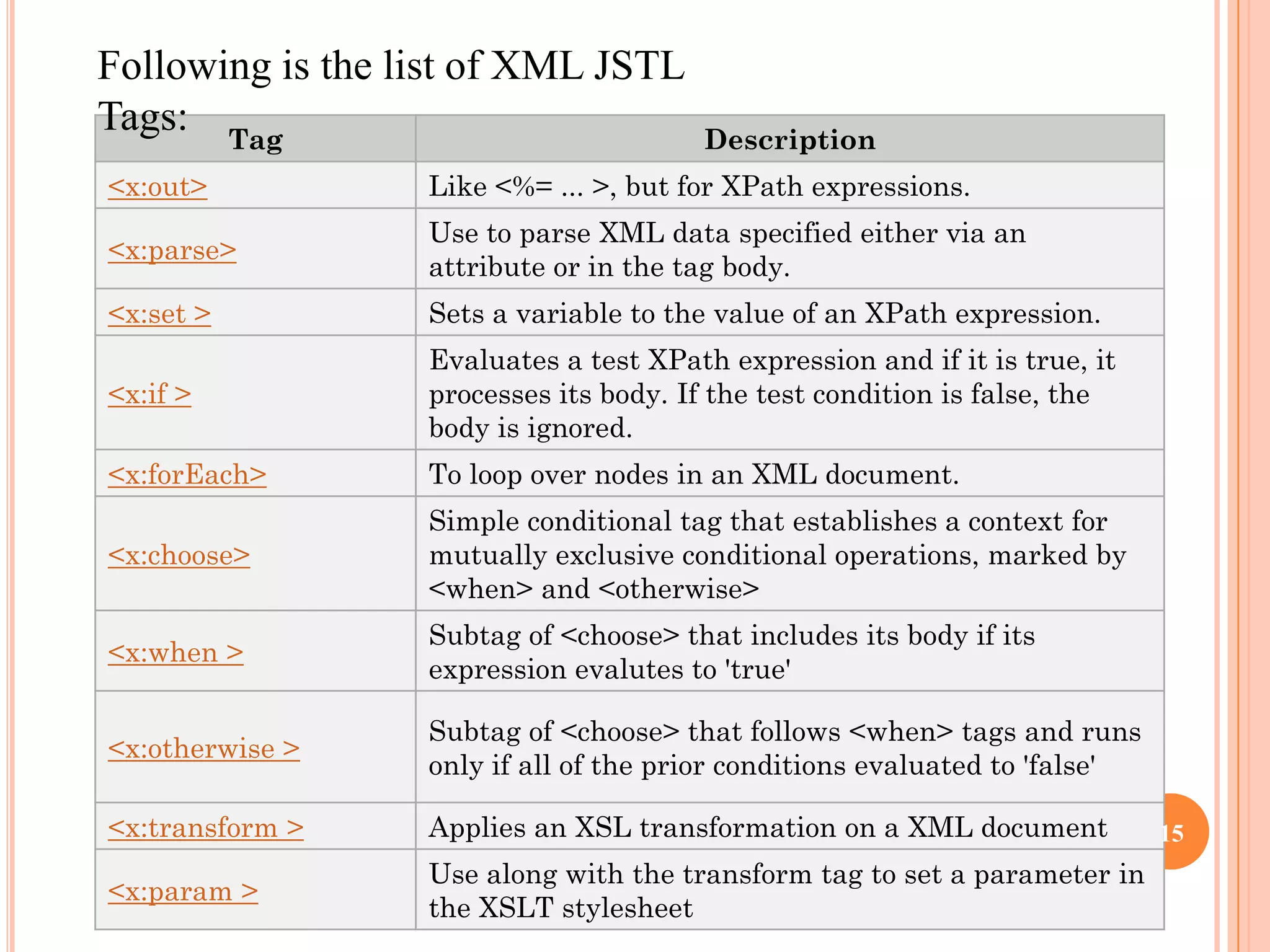
Tag Description
<x:out> Like <%= ... >, but for XPath expressions.
<x:parse>
Use to parse XML data specified either via an
attribute or in the tag body.
<x:set > Sets a variable to the value of an XPath expression.
<x:if >
Evaluates a test XPath expression and if it is true, it
processes its body. If the test condition is false, the
body is ignored.
<x:forEach> To loop over nodes in an XML document.
<x:choose>
Simple conditional tag that establishes a context for
mutually exclusive conditional operations, marked by
<when> and <otherwise>
<x:when >
Subtag of <choose> that includes its body if its
expression evalutes to 'true'
<x:otherwise >
Subtag of <choose> that follows <when> tags and runs
only if all of the prior conditions evaluated to 'false'
<x:transform > Applies an XSL transformation on a XML document
<x:param >
Use along with the transform tag to set a parameter in
the XSLT stylesheet
Following is the list of XML JSTL
Tags:
15
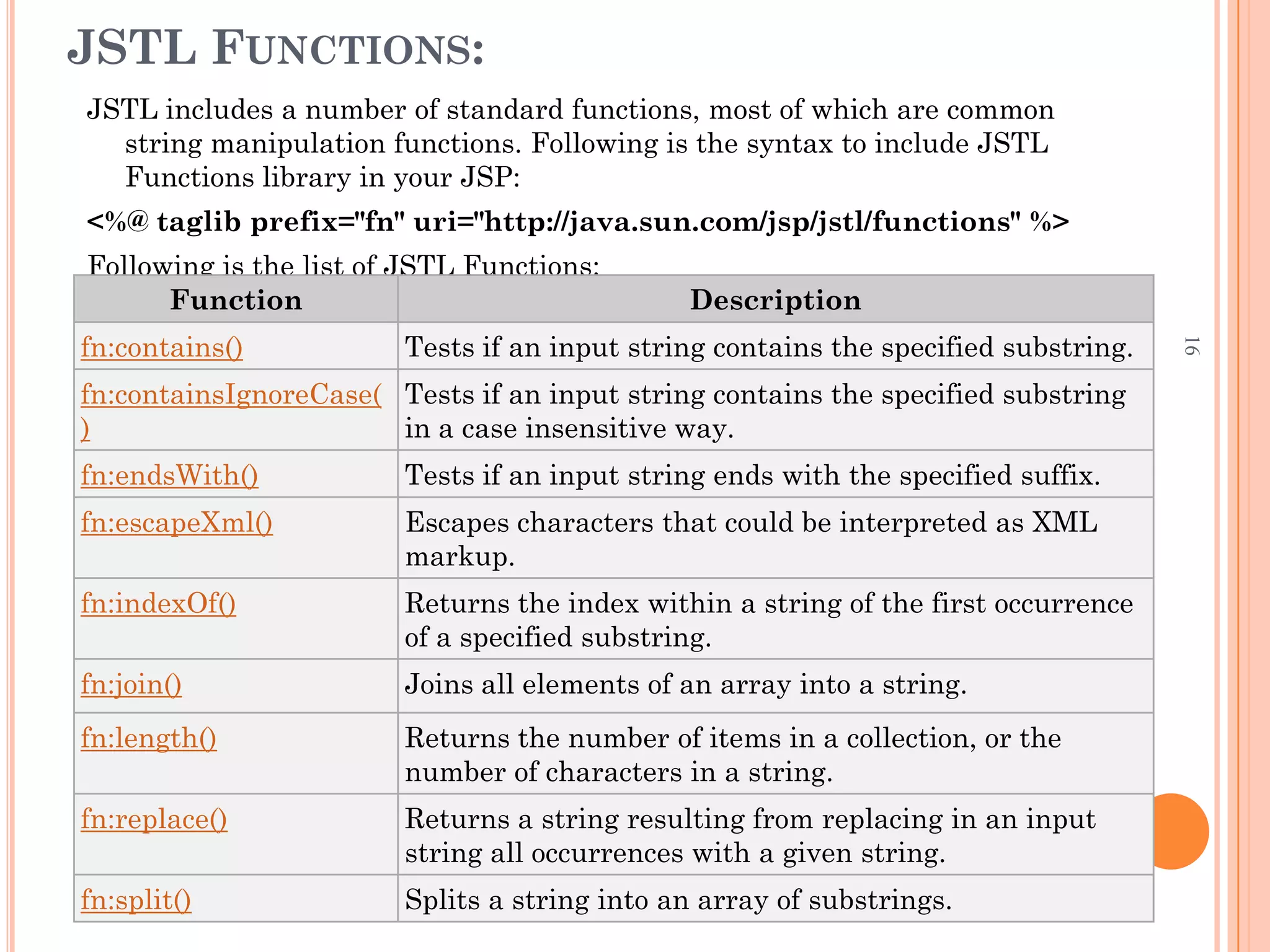
JSTL FUNCTIONS:
JSTL includes a number of standard functions, most of which are common
string manipulation functions. Following is the syntax to include JSTL
Functions library in your JSP:
<%@ taglib prefix="fn" uri="http://java.sun.com/jsp/jstl/functions" %>
Following is the list of JSTL Functions:
Function Description
fn:contains() Tests if an input string contains the specified substring.
fn:containsIgnoreCase(
)
Tests if an input string contains the specified substring
in a case insensitive way.
fn:endsWith() Tests if an input string ends with the specified suffix.
fn:escapeXml() Escapes characters that could be interpreted as XML
markup.
fn:indexOf() Returns the index within a string of the first occurrence
of a specified substring.
fn:join() Joins all elements of an array into a string.
fn:length() Returns the number of items in a collection, or the
number of characters in a string.
fn:replace() Returns a string resulting from replacing in an input
string all occurrences with a given string.
fn:split() Splits a string into an array of substrings.
16

Session_15_JSTL.pdf

  • 1.
  • 2.
    WHAT IS JSTL? JSTL (JSP Standard Tag Libraries) is a collection of JSP custom tags developed by Java Community Process, www.jcp.org. The reference implementation is developed by the Jakarta project, jakarta.apache.org.  Full JSTL – Contains many common and useful JSP custom tags  JSTL allows you to program your JSP pages using tags, rather than the scriptlet code that most JSP programmers are already accustomed to. JSTL can do nearly everything that regular JSP scriptlet code can do. 2
  • 3.
    THE JSTL TAGLIBRARIES  The JavaServer Pages Standard Tag Library (JSTL) is a collection of useful JSP tags which encapsulates core functionality common to many JSP applications. JSTL is often spoken of as a single-tag library.  JSTL has support for common, structural tasks such as iteration and conditionals, tags for manipulating XML documents, internationalization tags, and SQL tags. It also provides a framework for integrating existing custom tags with JSTL tags.  The JSTL tags can be classified, according to their functions, into following JSTL tag library groups that can be used when creating a JSP page: 3
  • 4.
  • 5.
  • 6.
  • 7.
    CORE TAGS: The coregroup of tags are the most frequently used JSTL tags. There are following Core JSTL Tags: Tag Description <c:out > Like <%= ... >, but for expressions. <c:set > Sets the result of an expression evaluation in a 'scope' <c:remove > Removes a scoped variable (from a particular scope, if specified). <c:catch> Catches any Throwable that occurs in its body and optionally exposes it. <c:if> Simple conditional tag which evalutes its body if the supplied condition is true. <c:choose> Simple conditional tag that establishes a context for mutually exclusive conditional operations, marked by <when> and <otherwise> <c:when> Subtag of <choose> that includes its body if its condition evalutes to 'true'. <c:otherwise > Subtag of <choose> that follows <when> tags and runs only if all of the prior conditions evaluated to 7
  • 8.
    <c:import> Retrieves anabsolute or relative URL and exposes its contents to either the page, a String in 'var', or a Reader in 'varReader'. <c:forEach > The basic iteration tag, accepting many different collection types and supporting subsetting and other functionality . <c:forTokens> Iterates over tokens, separated by the supplied delimeters. <c:param> Adds a parameter to a containing 'import' tag's URL. <c:redirect > Redirects to a new URL. <c:url> Creates a URL with optional query parameters
  • 9.
    EXAMPLE: OUT <%@ tagliburi="http://java.sun.com/jsp/jstl/core" prefix=" c" %> <html> <head> <title>OUT Example</title> </head> <body> <c:out value="${'Welcome to JSTL'}"/> </body> </html>
  • 10.
    EXAMPLE: SET <%@ tagliburi="http://java.sun.com/jsp/jstl/core" prefix="c" %> <html> <head> <title>Set Example</title> </head> <body> <c:set var=“Marks" scope="session" value="${200}"/> <c:out value="${Marks}"/> </body> </html>
  • 11.
    EXAMPLE: REMOVE <%@ tagliburi="http://java.sun.com/jsp/jstl/core" prefix="c" %> <html> <head> <title>Set Example</title> </head> <body> <c:set var=“Marks" scope="session" value="${200}"/> <c:out value="${Marks}"/> <c:remove var=" Marks "/> <p>After Remove Value is: <c:out value="${Marks}"/></p> </body> </html>
  • 12.
    FORMATTING TAGS: The JSTLformatting tags are used to format and display text, the date, the time, and numbers for internationalized Web sites. Following is the syntax to include Formatting library in your JSP: <%@ taglib prefix="fmt" uri="http://java.sun.com/jsp/jstl/fmt" %> Following is the list of Formatting JSTL Tags: Tag Description <fmt:formatNumber> To render numerical value with specific precision or format. <fmt:parseNumber> Parses the string representation of a number, currency, or percentage. <fmt:formatDate> Formats a date and/or time using the supplied styles and pattern <fmt:parseDate> Parses the string representation of a date and/or time <fmt:bundle> Loads a resource bundle to be used by its tag body. <fmt:setLocale> Stores the given locale in the locale configuration variable. <fmt:setBundle> Loads a resource bundle and stores it in the named scoped variable or the bundle configuration variable. <fmt:timeZone> Specifies the time zone for any time formatting or parsing actions nested in its body. <fmt:setTimeZone> Stores the given time zone in the time zone configuration variable <fmt:message> To display an internationalized message. <fmt:requestEncoding> Sets the request character encoding 12
  • 13.
    SQL TAGS:  TheJSTL SQL tag library provides tags for interacting with relational databases (RDBMSs) such as Oracle, mySQL, or Microsoft SQL Server.  Following is the syntax to include JSTL SQL library in your JSP: <%@ taglib prefix="sql" uri="http://java.sun.com/jsp/jstl/sql" %> Following is the list of SQL JSTL Tags: Tag Description <sql:setDataSource> Creates a simple DataSource suitable only for prototyping <sql:query> Executes the SQL query defined in its body or through the sql attribute. <sql:update> Executes the SQL update defined in its body or through the sql attribute. <sql:param> Sets a parameter in an SQL statement to the specified value. <sql:dateParam> Sets a parameter in an SQL statement to the specified java.util.Date value. <sql:transaction > Provides nested database action elements with a shared Connection, set up to execute all statements as one transaction. 13
  • 14.
    XML TAGS:  TheJSTL XML tags provide a JSP-centric way of creating and manipulating XML documents. Following is the syntax to include JSTL XML library in your JSP: <%@ taglib prefix="x" uri="http://java.sun.com/jsp/jstl/xml" %>  The JSTL XML tag library has custom tags for interacting with XML data. This includes parsing XML, transforming XML data, and flow control based on XPath expressions. l 14
  • 15.
    Tag Description <x:out> Like<%= ... >, but for XPath expressions. <x:parse> Use to parse XML data specified either via an attribute or in the tag body. <x:set > Sets a variable to the value of an XPath expression. <x:if > Evaluates a test XPath expression and if it is true, it processes its body. If the test condition is false, the body is ignored. <x:forEach> To loop over nodes in an XML document. <x:choose> Simple conditional tag that establishes a context for mutually exclusive conditional operations, marked by <when> and <otherwise> <x:when > Subtag of <choose> that includes its body if its expression evalutes to 'true' <x:otherwise > Subtag of <choose> that follows <when> tags and runs only if all of the prior conditions evaluated to 'false' <x:transform > Applies an XSL transformation on a XML document <x:param > Use along with the transform tag to set a parameter in the XSLT stylesheet Following is the list of XML JSTL Tags: 15
  • 16.
    JSTL FUNCTIONS: JSTL includesa number of standard functions, most of which are common string manipulation functions. Following is the syntax to include JSTL Functions library in your JSP: <%@ taglib prefix="fn" uri="http://java.sun.com/jsp/jstl/functions" %> Following is the list of JSTL Functions: Function Description fn:contains() Tests if an input string contains the specified substring. fn:containsIgnoreCase( ) Tests if an input string contains the specified substring in a case insensitive way. fn:endsWith() Tests if an input string ends with the specified suffix. fn:escapeXml() Escapes characters that could be interpreted as XML markup. fn:indexOf() Returns the index within a string of the first occurrence of a specified substring. fn:join() Joins all elements of an array into a string. fn:length() Returns the number of items in a collection, or the number of characters in a string. fn:replace() Returns a string resulting from replacing in an input string all occurrences with a given string. fn:split() Splits a string into an array of substrings. 16