JSTL
Unit 3 Chap 5
Introduction
• The JSP Standard Tag Library (JSTL) represents
a set of tags to simplify the JSP development.
• JSTL has tags such as iterators and
conditionals for handling flow control, tags for
manipulating XML documents,
internationalization tags, tags for accessing
databases using SQL, and commonly used
functions.
What is wrong in using JSP Scriptlet
tag?
• Java code embedded within scriptlet looks
ugly and obstructive
• Developer who don’t know java cannot
modify the embedded java code.
• No reusability
• Retrieving objects out of HTTP request and
sessions is not manageable(needs to be
casted).
How JSTL fixes Scriptlets shortcomings
• Are XML tags so they cleanly blend into HTML
markup tags.
• Are easier and effective as they do not require
any knowledge of programming or java.
• JSP EL within it makes it easy to call the getter
and setter methods on java objects.
Advantage of JSTL
• Fast Development JSTL provides many tags
that simplify the JSP.
• Code Reusability We can use the JSTL tags on
various pages.
• No need to use scriptlet tag It avoids the use
of scriptlet tag.
Disadvantages of JSTL
• Puts processing burden to server.
• Scriptlets are more powerful than JSTL
tags.JSTL cannot do everything that java code
can do.
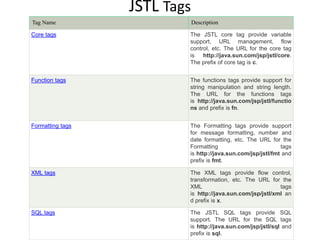
JSTL Tags
Tag Name Description
Core tags The JSTL core tag provide variable
support, URL management, flow
control, etc. The URL for the core tag
is http://java.sun.com/jsp/jstl/core.
The prefix of core tag is c.
Function tags The functions tags provide support for
string manipulation and string length.
The URL for the functions tags
is http://java.sun.com/jsp/jstl/functio
ns and prefix is fn.
Formatting tags The Formatting tags provide support
for message formatting, number and
date formatting, etc. The URL for the
Formatting tags
is http://java.sun.com/jsp/jstl/fmt and
prefix is fmt.
XML tags The XML tags provide flow control,
transformation, etc. The URL for the
XML tags
is http://java.sun.com/jsp/jstl/xml an
d prefix is x.
SQL tags The JSTL SQL tags provide SQL
support. The URL for the SQL tags
is http://java.sun.com/jsp/jstl/sql and
prefix is sql.
JSTL Core Tags
• The JSTL core tag provides variable support,
URL management, flow control etc. The syntax
used for including JSTL core library in your JSP
is:
• <%@ taglib uri="http://java.sun.com/jsp/jstl/c
ore" prefix="c" %>
• Core area consist of four sections-
1. General purpose actions
2. Conditional or flow statements
3. URL related actions
4. Iterator Actions
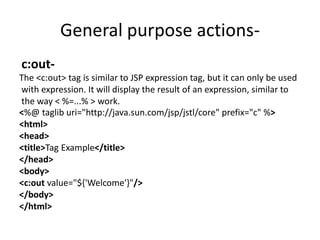
General purpose actions-
c:out-
The <c:out> tag is similar to JSP expression tag, but it can only be used
with expression. It will display the result of an expression, similar to
the way < %=...% > work.
<%@ taglib uri="http://java.sun.com/jsp/jstl/core" prefix="c" %>
<html>
<head>
<title>Tag Example</title>
</head>
<body>
<c:out value="${'Welcome'}"/>
</body>
</html>
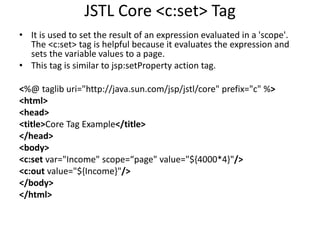
JSTL Core <c:set> Tag
• It is used to set the result of an expression evaluated in a 'scope'.
The <c:set> tag is helpful because it evaluates the expression and
sets the variable values to a page.
• This tag is similar to jsp:setProperty action tag.
<%@ taglib uri="http://java.sun.com/jsp/jstl/core" prefix="c" %>
<html>
<head>
<title>Core Tag Example</title>
</head>
<body>
<c:set var="Income" scope=“page" value="${4000*4}"/>
<c:out value="${Income}"/>
</body>
</html>
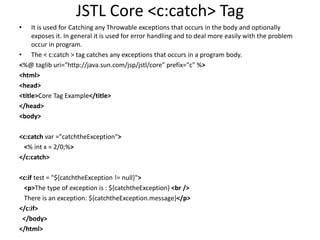
JSTL Core <c:catch> Tag
• It is used for Catching any Throwable exceptions that occurs in the body and optionally
exposes it. In general it is used for error handling and to deal more easily with the problem
occur in program.
• The < c:catch > tag catches any exceptions that occurs in a program body.
<%@ taglib uri="http://java.sun.com/jsp/jstl/core" prefix="c" %>
<html>
<head>
<title>Core Tag Example</title>
</head>
<body>
<c:catch var ="catchtheException">
<% int x = 2/0;%>
</c:catch>
<c:if test = "${catchtheException != null}">
<p>The type of exception is : ${catchtheException} <br />
There is an exception: ${catchtheException.message}</p>
</c:if>
</body>
</html>
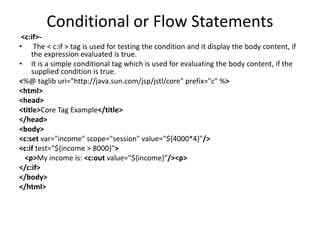
Conditional or Flow Statements
<c:if>-
• The < c:if > tag is used for testing the condition and it display the body content, if
the expression evaluated is true.
• It is a simple conditional tag which is used for evaluating the body content, if the
supplied condition is true.
<%@ taglib uri="http://java.sun.com/jsp/jstl/core" prefix="c" %>
<html>
<head>
<title>Core Tag Example</title>
</head>
<body>
<c:set var="income" scope="session" value="${4000*4}"/>
<c:if test="${income > 8000}">
<p>My income is: <c:out value="${income}"/><p>
</c:if>
</body>
</html>
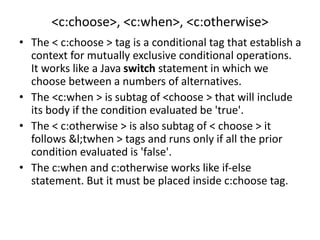
<c:choose>, <c:when>, <c:otherwise>
• The < c:choose > tag is a conditional tag that establish a
context for mutually exclusive conditional operations.
It works like a Java switch statement in which we
choose between a numbers of alternatives.
• The <c:when > is subtag of <choose > that will include
its body if the condition evaluated be 'true'.
• The < c:otherwise > is also subtag of < choose > it
follows &l;twhen > tags and runs only if all the prior
condition evaluated is 'false'.
• The c:when and c:otherwise works like if-else
statement. But it must be placed inside c:choose tag.
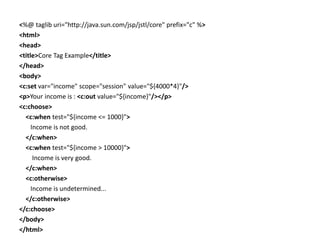
<%@ taglib uri="http://java.sun.com/jsp/jstl/core" prefix="c" %>
<html>
<head>
<title>Core Tag Example</title>
</head>
<body>
<c:set var="income" scope="session" value="${4000*4}"/>
<p>Your income is : <c:out value="${income}"/></p>
<c:choose>
<c:when test="${income <= 1000}">
Income is not good.
</c:when>
<c:when test="${income > 10000}">
Income is very good.
</c:when>
<c:otherwise>
Income is undetermined...
</c:otherwise>
</c:choose>
</body>
</html>
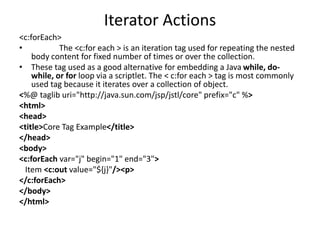
Iterator Actions
<c:forEach>
• The <c:for each > is an iteration tag used for repeating the nested
body content for fixed number of times or over the collection.
• These tag used as a good alternative for embedding a Java while, do-
while, or for loop via a scriptlet. The < c:for each > tag is most commonly
used tag because it iterates over a collection of object.
<%@ taglib uri="http://java.sun.com/jsp/jstl/core" prefix="c" %>
<html>
<head>
<title>Core Tag Example</title>
</head>
<body>
<c:forEach var="j" begin="1" end="3">
Item <c:out value="${j}"/><p>
</c:forEach>
</body>
</html>
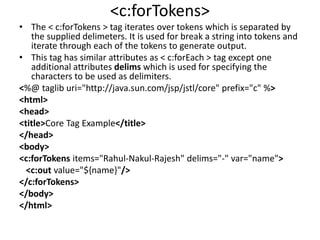
<c:forTokens>
• The < c:forTokens > tag iterates over tokens which is separated by
the supplied delimeters. It is used for break a string into tokens and
iterate through each of the tokens to generate output.
• This tag has similar attributes as < c:forEach > tag except one
additional attributes delims which is used for specifying the
characters to be used as delimiters.
<%@ taglib uri="http://java.sun.com/jsp/jstl/core" prefix="c" %>
<html>
<head>
<title>Core Tag Example</title>
</head>
<body>
<c:forTokens items="Rahul-Nakul-Rajesh" delims="-" var="name">
<c:out value="${name}"/>
</c:forTokens>
</body>
</html>
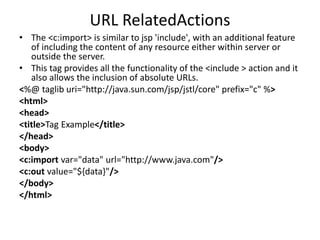
URL RelatedActions
• The <c:import> is similar to jsp 'include', with an additional feature
of including the content of any resource either within server or
outside the server.
• This tag provides all the functionality of the <include > action and it
also allows the inclusion of absolute URLs.
<%@ taglib uri="http://java.sun.com/jsp/jstl/core" prefix="c" %>
<html>
<head>
<title>Tag Example</title>
</head>
<body>
<c:import var="data" url="http://www.java.com"/>
<c:out value="${data}"/>
</body>
</html>
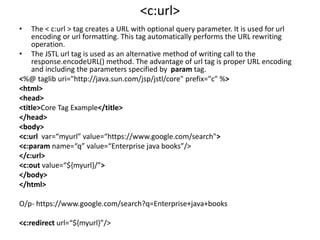
<c:url>
• The < c:url > tag creates a URL with optional query parameter. It is used for url
encoding or url formatting. This tag automatically performs the URL rewriting
operation.
• The JSTL url tag is used as an alternative method of writing call to the
response.encodeURL() method. The advantage of url tag is proper URL encoding
and including the parameters specified by param tag.
<%@ taglib uri="http://java.sun.com/jsp/jstl/core" prefix="c" %>
<html>
<head>
<title>Core Tag Example</title>
</head>
<body>
<c:url var=“myurl” value=“https://www.google.com/search">
<c:param name=“q” value=“Enterprise java books”/>
</c:url>
<c:out value=“${myurl}/”>
</body>
</html>
O/p- https://www.google.com/search?q=Enterprise+java+books
<c:redirect url=“${myurl}”/>
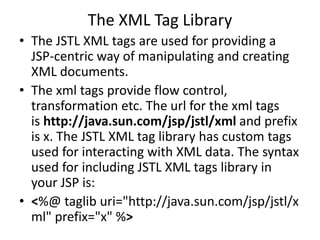
The XML Tag Library
• The JSTL XML tags are used for providing a
JSP-centric way of manipulating and creating
XML documents.
• The xml tags provide flow control,
transformation etc. The url for the xml tags
is http://java.sun.com/jsp/jstl/xml and prefix
is x. The JSTL XML tag library has custom tags
used for interacting with XML data. The syntax
used for including JSTL XML tags library in
your JSP is:
• <%@ taglib uri="http://java.sun.com/jsp/jstl/x
ml" prefix="x" %>
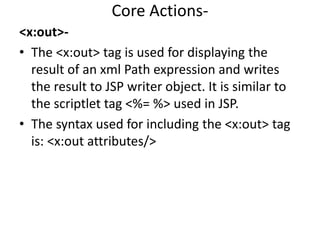
Core Actions-
<x:out>-
• The <x:out> tag is used for displaying the
result of an xml Path expression and writes
the result to JSP writer object. It is similar to
the scriptlet tag <%= %> used in JSP.
• The syntax used for including the <x:out> tag
is: <x:out attributes/>
<%@ taglib prefix="c" uri="http://java.sun.com/jsp/jstl/core" %>
<%@ taglib prefix="x" uri="http://java.sun.com/jsp/jstl/xml" %>
<html>
<head>
<title>XML Tags</title>
</head>
<body>
<h2>Vegetable Information:</h2>
<c:set var="vegetable">
<vegetables>
<vegetable>
<name>onion</name>
<price>40/kg</price>
</vegetable>
<vegetable>
<name>Potato</name>
<price>30/kg</price>
</vegetable>
<vegetable>
<name>Tomato</name>
<price>90/kg</price>
</vegetable>
</vegetables>
</c:set>
<x:parse xml="${vegetable}" var="output"/>
<b>Name of the vegetable is</b>:
<x:out select="$output/vegetables/vegetable[1]/name" /><br>
<b>Price of the Potato is</b>:
<x:out select="$output/vegetables/vegetable[2]/price" />
</body>
</html>
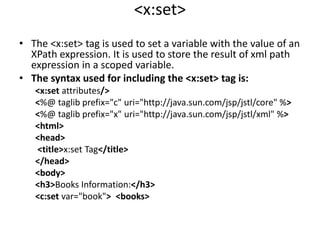
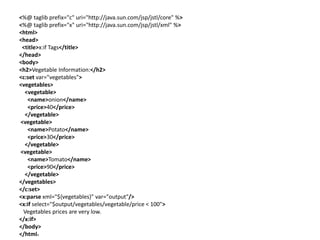
<x:set>
• The <x:set> tag is used to set a variable with the value of an
XPath expression. It is used to store the result of xml path
expression in a scoped variable.
• The syntax used for including the <x:set> tag is:
<x:set attributes/>
<%@ taglib prefix="c" uri="http://java.sun.com/jsp/jstl/core" %>
<%@ taglib prefix="x" uri="http://java.sun.com/jsp/jstl/xml" %>
<html>
<head>
<title>x:set Tag</title>
</head>
<body>
<h3>Books Information:</h3>
<c:set var="book"> <books>
<book>
<name>Three mistakes of my life</name>
<author>Chetan Bhagat</author>
<price>200</price>
</book>
<book>
<name>Tomorrow land</name>
<author>Brad Bird</author>
<price>2000</price>
</book>
</books>
</c:set>
<x:parse xml="${book}" var="output"/>
<x:set var="fragment" select="$output/books/book[2]/price"/>
<b>The price of the Tomorrow land book</b>:
<x:out select="$fragment" />
</body>
</html>
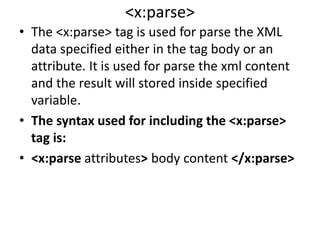
<x:parse>
• The <x:parse> tag is used for parse the XML
data specified either in the tag body or an
attribute. It is used for parse the xml content
and the result will stored inside specified
variable.
• The syntax used for including the <x:parse>
tag is:
• <x:parse attributes> body content </x:parse>
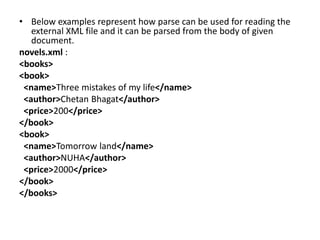
• Below examples represent how parse can be used for reading the
external XML file and it can be parsed from the body of given
document.
novels.xml :
<books>
<book>
<name>Three mistakes of my life</name>
<author>Chetan Bhagat</author>
<price>200</price>
</book>
<book>
<name>Tomorrow land</name>
<author>NUHA</author>
<price>2000</price>
</book>
</books>
Now put the following content in index.jsp, keeping in the same directory:
<%@ taglib prefix="c" uri="http://java.sun.com/jsp/jstl/core" %>
<%@ taglib prefix="x" uri="http://java.sun.com/jsp/jstl/xml" %>
<html>
<head>
<title>x:parse Tag</title>
</head>
<body>
<h2>Books Info:</h2>
<c:import var="bookInfo" url="novels.xml"/>
<x:parse xml="${bookInfo}" var="output"/>
<p>First Book title: <x:out select="$output/books/book[1]/name" /></p>
<p>First Book price: <x:out select="$output/books/book[1]/price" /></p>
<p>Second Book title: <x:out select="$output/books/book[2]/name" /></p>
<p>Second Book price: <x:out select="$output/books/book[2]/price" /></p>
</body>
</html>
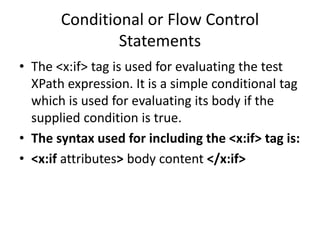
Conditional or Flow Control
Statements
• The <x:if> tag is used for evaluating the test
XPath expression. It is a simple conditional tag
which is used for evaluating its body if the
supplied condition is true.
• The syntax used for including the <x:if> tag is:
• <x:if attributes> body content </x:if>
<%@ taglib prefix="c" uri="http://java.sun.com/jsp/jstl/core" %>
<%@ taglib prefix="x" uri="http://java.sun.com/jsp/jstl/xml" %>
<html>
<head>
<title>x:if Tags</title>
</head>
<body>
<h2>Vegetable Information:</h2>
<c:set var="vegetables">
<vegetables>
<vegetable>
<name>onion</name>
<price>40</price>
</vegetable>
<vegetable>
<name>Potato</name>
<price>30</price>
</vegetable>
<vegetable>
<name>Tomato</name>
<price>90</price>
</vegetable>
</vegetables>
</c:set>
<x:parse xml="${vegetables}" var="output"/>
<x:if select="$output/vegetables/vegetable/price < 100">
Vegetables prices are very low.
</x:if>
</body>
</html>
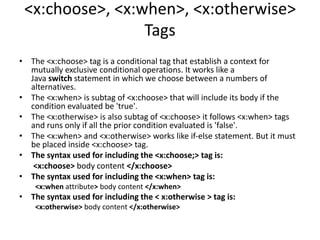
<x:choose>, <x:when>, <x:otherwise>
Tags
• The <x:choose> tag is a conditional tag that establish a context for
mutually exclusive conditional operations. It works like a
Java switch statement in which we choose between a numbers of
alternatives.
• The <x:when> is subtag of <x:choose> that will include its body if the
condition evaluated be 'true'.
• The <x:otherwise> is also subtag of <x:choose> it follows <x:when> tags
and runs only if all the prior condition evaluated is 'false'.
• The <x:when> and <x:otherwise> works like if-else statement. But it must
be placed inside <x:choose> tag.
• The syntax used for including the <x:choose;> tag is:
<x:choose> body content </x:choose>
• The syntax used for including the <x:when> tag is:
<x:when attribute> body content </x:when>
• The syntax used for including the < x:otherwise > tag is:
<x:otherwise> body content </x:otherwise>
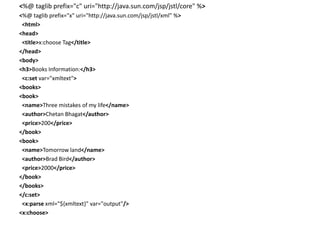
<%@ taglib prefix="c" uri="http://java.sun.com/jsp/jstl/core" %>
<%@ taglib prefix="x" uri="http://java.sun.com/jsp/jstl/xml" %>
<html>
<head>
<title>x:choose Tag</title>
</head>
<body>
<h3>Books Information:</h3>
<c:set var="xmltext">
<books>
<book>
<name>Three mistakes of my life</name>
<author>Chetan Bhagat</author>
<price>200</price>
</book>
<book>
<name>Tomorrow land</name>
<author>Brad Bird</author>
<price>2000</price>
</book>
</books>
</c:set>
<x:parse xml="${xmltext}" var="output"/>
<x:choose>
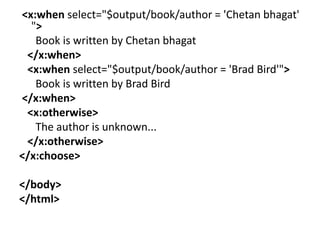
<x:when select="$output/book/author = 'Chetan bhagat'
">
Book is written by Chetan bhagat
</x:when>
<x:when select="$output/book/author = 'Brad Bird'">
Book is written by Brad Bird
</x:when>
<x:otherwise>
The author is unknown...
</x:otherwise>
</x:choose>
</body>
</html>
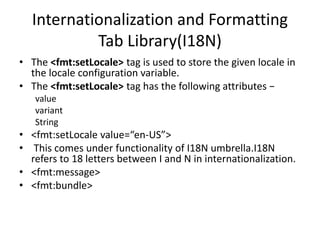
Internationalization and Formatting
Tab Library(I18N)
• The <fmt:setLocale> tag is used to store the given locale in
the locale configuration variable.
• The <fmt:setLocale> tag has the following attributes −
value
variant
String
• <fmt:setLocale value=“en-US”>
• This comes under functionality of I18N umbrella.I18N
refers to 18 letters between I and N in internationalization.
• <fmt:message>
• <fmt:bundle>
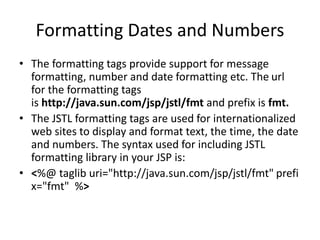
Formatting Dates and Numbers
• The formatting tags provide support for message
formatting, number and date formatting etc. The url
for the formatting tags
is http://java.sun.com/jsp/jstl/fmt and prefix is fmt.
• The JSTL formatting tags are used for internationalized
web sites to display and format text, the time, the date
and numbers. The syntax used for including JSTL
formatting library in your JSP is:
• <%@ taglib uri="http://java.sun.com/jsp/jstl/fmt" prefi
x="fmt" %>
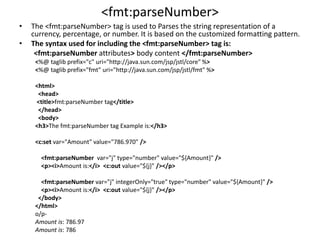
<fmt:parseNumber>
• The <fmt:parseNumber> tag is used to Parses the string representation of a
currency, percentage, or number. It is based on the customized formatting pattern.
• The syntax used for including the <fmt:parseNumber> tag is:
<fmt:parseNumber attributes> body content </fmt:parseNumber>
<%@ taglib prefix="c" uri="http://java.sun.com/jsp/jstl/core" %>
<%@ taglib prefix="fmt" uri="http://java.sun.com/jsp/jstl/fmt" %>
<html>
<head>
<title>fmt:parseNumber tag</title>
</head>
<body>
<h3>The fmt:parseNumber tag Example is:</h3>
<c:set var="Amount" value="786.970" />
<fmt:parseNumber var="j" type="number" value="${Amount}" />
<p><i>Amount is:</i> <c:out value="${j}" /></p>
<fmt:parseNumber var="j" integerOnly="true" type="number" value="${Amount}" />
<p><i>Amount is:</i> <c:out value="${j}" /></p>
</body>
</html>
o/p-
Amount is: 786.97
Amount is: 786
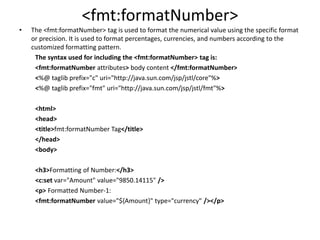
<fmt:formatNumber>
• The <fmt:formatNumber> tag is used to format the numerical value using the specific format
or precision. It is used to format percentages, currencies, and numbers according to the
customized formatting pattern.
The syntax used for including the <fmt:formatNumber> tag is:
<fmt:formatNumber attributes> body content </fmt:formatNumber>
<%@ taglib prefix="c" uri="http://java.sun.com/jsp/jstl/core"%>
<%@ taglib prefix="fmt" uri="http://java.sun.com/jsp/jstl/fmt"%>
<html>
<head>
<title>fmt:formatNumber Tag</title>
</head>
<body>
<h3>Formatting of Number:</h3>
<c:set var="Amount" value="9850.14115" />
<p> Formatted Number-1:
<fmt:formatNumber value="${Amount}" type="currency" /></p>
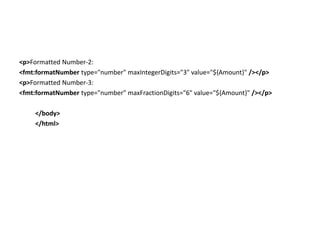
<p>Formatted Number-2:
<fmt:formatNumber type="number" maxIntegerDigits="3" value="${Amount}" /></p>
<p>Formatted Number-3:
<fmt:formatNumber type="number" maxFractionDigits="6" value="${Amount}" /></p>
</body>
</html>
<fmt:formatDate>
• The <fmt:formatDate> tag is used for different
formats of date and time using the supplied
pattern and styles. It is used to format the
time and date according to the customized
formatting pattern.
• The syntax used for including the
<fmt:formatDate> tag is:
<fmt:formatDate attributes/>
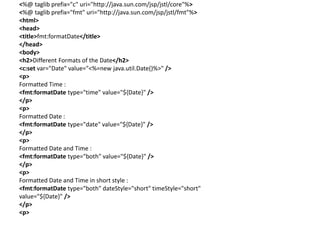
<%@ taglib prefix="c" uri="http://java.sun.com/jsp/jstl/core"%>
<%@ taglib prefix="fmt" uri="http://java.sun.com/jsp/jstl/fmt"%>
<html>
<head>
<title>fmt:formatDate</title>
</head>
<body>
<h2>Different Formats of the Date</h2>
<c:set var="Date" value="<%=new java.util.Date()%>" />
<p>
Formatted Time :
<fmt:formatDate type="time" value="${Date}" />
</p>
<p>
Formatted Date :
<fmt:formatDate type="date" value="${Date}" />
</p>
<p>
Formatted Date and Time :
<fmt:formatDate type="both" value="${Date}" />
</p>
<p>
Formatted Date and Time in short style :
<fmt:formatDate type="both" dateStyle="short" timeStyle="short"
value="${Date}" />
</p>
<p>
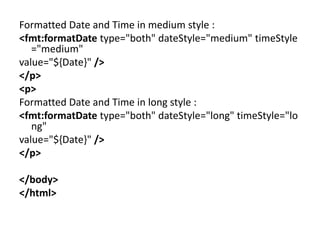
Formatted Date and Time in medium style :
<fmt:formatDate type="both" dateStyle="medium" timeStyle
="medium"
value="${Date}" />
</p>
<p>
Formatted Date and Time in long style :
<fmt:formatDate type="both" dateStyle="long" timeStyle="lo
ng"
value="${Date}" />
</p>
</body>
</html>
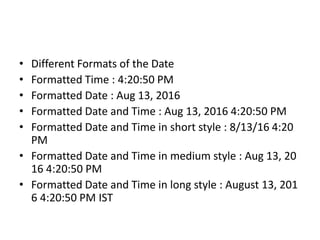
• Different Formats of the Date
• Formatted Time : 4:20:50 PM
• Formatted Date : Aug 13, 2016
• Formatted Date and Time : Aug 13, 2016 4:20:50 PM
• Formatted Date and Time in short style : 8/13/16 4:20
PM
• Formatted Date and Time in medium style : Aug 13, 20
16 4:20:50 PM
• Formatted Date and Time in long style : August 13, 201
6 4:20:50 PM IST
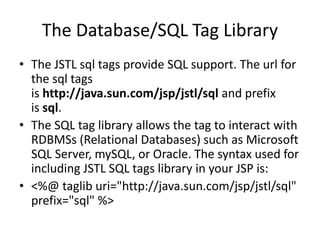
The Database/SQL Tag Library
• The JSTL sql tags provide SQL support. The url for
the sql tags
is http://java.sun.com/jsp/jstl/sql and prefix
is sql.
• The SQL tag library allows the tag to interact with
RDBMSs (Relational Databases) such as Microsoft
SQL Server, mySQL, or Oracle. The syntax used for
including JSTL SQL tags library in your JSP is:
• <%@ taglib uri="http://java.sun.com/jsp/jstl/sql"
prefix="sql" %>
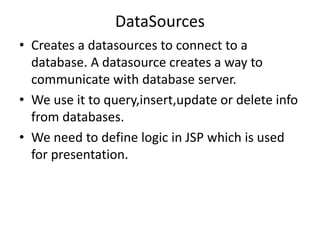
DataSources
• Creates a datasources to connect to a
database. A datasource creates a way to
communicate with database server.
• We use it to query,insert,update or delete info
from databases.
• We need to define logic in JSP which is used
for presentation.
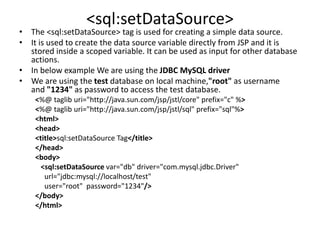
<sql:setDataSource>
• The <sql:setDataSource> tag is used for creating a simple data source.
• It is used to create the data source variable directly from JSP and it is
stored inside a scoped variable. It can be used as input for other database
actions.
• In below example We are using the JDBC MySQL driver
• We are using the test database on local machine,"root" as username
and "1234" as password to access the test database.
<%@ taglib uri="http://java.sun.com/jsp/jstl/core" prefix="c" %>
<%@ taglib uri="http://java.sun.com/jsp/jstl/sql" prefix="sql"%>
<html>
<head>
<title>sql:setDataSource Tag</title>
</head>
<body>
<sql:setDataSource var="db" driver="com.mysql.jdbc.Driver"
url="jdbc:mysql://localhost/test"
user="root" password="1234"/>
</body>
</html>
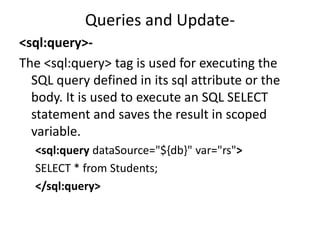
Queries and Update-
<sql:query>-
The <sql:query> tag is used for executing the
SQL query defined in its sql attribute or the
body. It is used to execute an SQL SELECT
statement and saves the result in scoped
variable.
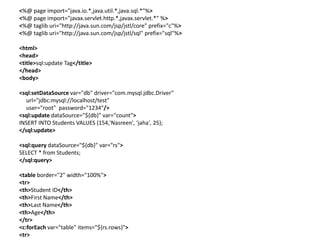
<sql:query dataSource="${db}" var="rs">
SELECT * from Students;
</sql:query>
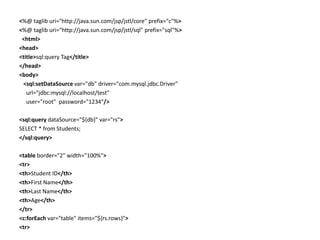
<%@ taglib uri="http://java.sun.com/jsp/jstl/core" prefix="c"%>
<%@ taglib uri="http://java.sun.com/jsp/jstl/sql" prefix="sql"%>
<html>
<head>
<title>sql:query Tag</title>
</head>
<body>
<sql:setDataSource var="db" driver="com.mysql.jdbc.Driver"
url="jdbc:mysql://localhost/test"
user="root" password="1234"/>
<sql:query dataSource="${db}" var="rs">
SELECT * from Students;
</sql:query>
<table border="2" width="100%">
<tr>
<th>Student ID</th>
<th>First Name</th>
<th>Last Name</th>
<th>Age</th>
</tr>
<c:forEach var="table" items="${rs.rows}">
<tr>
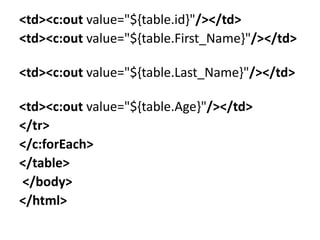
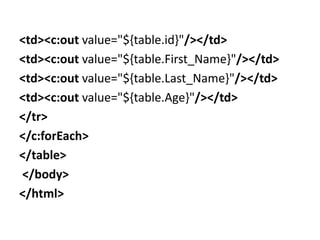
<td><c:out value="${table.id}"/></td>
<td><c:out value="${table.First_Name}"/></td>
<td><c:out value="${table.Last_Name}"/></td>
<td><c:out value="${table.Age}"/></td>
</tr>
</c:forEach>
</table>
</body>
</html>
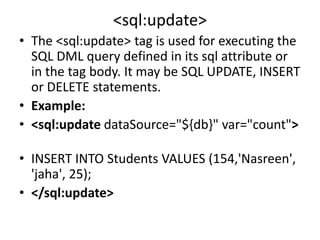
<sql:update>
• The <sql:update> tag is used for executing the
SQL DML query defined in its sql attribute or
in the tag body. It may be SQL UPDATE, INSERT
or DELETE statements.
• Example:
• <sql:update dataSource="${db}" var="count">
• INSERT INTO Students VALUES (154,'Nasreen',
'jaha', 25);
• </sql:update>
<%@ page import="java.io.*,java.util.*,java.sql.*"%>
<%@ page import="javax.servlet.http.*,javax.servlet.*" %>
<%@ taglib uri="http://java.sun.com/jsp/jstl/core" prefix="c"%>
<%@ taglib uri="http://java.sun.com/jsp/jstl/sql" prefix="sql"%>
<html>
<head>
<title>sql:update Tag</title>
</head>
<body>
<sql:setDataSource var="db" driver="com.mysql.jdbc.Driver"
url="jdbc:mysql://localhost/test"
user="root" password="1234"/>
<sql:update dataSource="${db}" var="count">
INSERT INTO Students VALUES (154,'Nasreen', 'jaha', 25);
</sql:update>
<sql:query dataSource="${db}" var="rs">
SELECT * from Students;
</sql:query>
<table border="2" width="100%">
<tr>
<th>Student ID</th>
<th>First Name</th>
<th>Last Name</th>
<th>Age</th>
</tr>
<c:forEach var="table" items="${rs.rows}">
<tr>
<td><c:out value="${table.id}"/></td>
<td><c:out value="${table.First_Name}"/></td>
<td><c:out value="${table.Last_Name}"/></td>
<td><c:out value="${table.Age}"/></td>
</tr>
</c:forEach>
</table>
</body>
</html>
Transaction
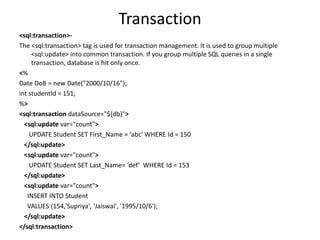
<sql:transaction>-
The <sql:transaction> tag is used for transaction management. It is used to group multiple
<sql:update> into common transaction. If you group multiple SQL queries in a single
transaction, database is hit only once.
<%
Date DoB = new Date("2000/10/16");
int studentId = 151;
%>
<sql:transaction dataSource="${db}">
<sql:update var="count">
UPDATE Student SET First_Name = ‘abc' WHERE Id = 150
</sql:update>
<sql:update var="count">
UPDATE Student SET Last_Name= ‘def‘ WHERE Id = 153
</sql:update>
<sql:update var="count">
INSERT INTO Student
VALUES (154,'Supriya', 'Jaiswal', '1995/10/6');
</sql:update>
</sql:transaction>
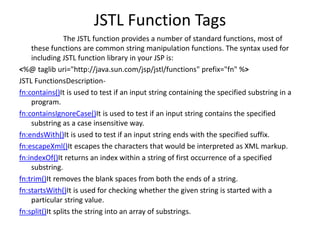
JSTL Function Tags
The JSTL function provides a number of standard functions, most of
these functions are common string manipulation functions. The syntax used for
including JSTL function library in your JSP is:
<%@ taglib uri="http://java.sun.com/jsp/jstl/functions" prefix="fn" %>
JSTL FunctionsDescription-
fn:contains()It is used to test if an input string containing the specified substring in a
program.
fn:containsIgnoreCase()It is used to test if an input string contains the specified
substring as a case insensitive way.
fn:endsWith()It is used to test if an input string ends with the specified suffix.
fn:escapeXml()It escapes the characters that would be interpreted as XML markup.
fn:indexOf()It returns an index within a string of first occurrence of a specified
substring.
fn:trim()It removes the blank spaces from both the ends of a string.
fn:startsWith()It is used for checking whether the given string is started with a
particular string value.
fn:split()It splits the string into an array of substrings.
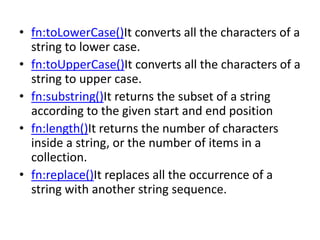
• fn:toLowerCase()It converts all the characters of a
string to lower case.
• fn:toUpperCase()It converts all the characters of a
string to upper case.
• fn:substring()It returns the subset of a string
according to the given start and end position
• fn:length()It returns the number of characters
inside a string, or the number of items in a
collection.
• fn:replace()It replaces all the occurrence of a
string with another string sequence.

JSTL.pptx

  • 1.
  • 2.
    Introduction • The JSPStandard Tag Library (JSTL) represents a set of tags to simplify the JSP development. • JSTL has tags such as iterators and conditionals for handling flow control, tags for manipulating XML documents, internationalization tags, tags for accessing databases using SQL, and commonly used functions.
  • 3.
    What is wrongin using JSP Scriptlet tag? • Java code embedded within scriptlet looks ugly and obstructive • Developer who don’t know java cannot modify the embedded java code. • No reusability • Retrieving objects out of HTTP request and sessions is not manageable(needs to be casted).
  • 4.
    How JSTL fixesScriptlets shortcomings • Are XML tags so they cleanly blend into HTML markup tags. • Are easier and effective as they do not require any knowledge of programming or java. • JSP EL within it makes it easy to call the getter and setter methods on java objects.
  • 5.
    Advantage of JSTL •Fast Development JSTL provides many tags that simplify the JSP. • Code Reusability We can use the JSTL tags on various pages. • No need to use scriptlet tag It avoids the use of scriptlet tag.
  • 6.
    Disadvantages of JSTL •Puts processing burden to server. • Scriptlets are more powerful than JSTL tags.JSTL cannot do everything that java code can do.
  • 7.
    JSTL Tags Tag NameDescription Core tags The JSTL core tag provide variable support, URL management, flow control, etc. The URL for the core tag is http://java.sun.com/jsp/jstl/core. The prefix of core tag is c. Function tags The functions tags provide support for string manipulation and string length. The URL for the functions tags is http://java.sun.com/jsp/jstl/functio ns and prefix is fn. Formatting tags The Formatting tags provide support for message formatting, number and date formatting, etc. The URL for the Formatting tags is http://java.sun.com/jsp/jstl/fmt and prefix is fmt. XML tags The XML tags provide flow control, transformation, etc. The URL for the XML tags is http://java.sun.com/jsp/jstl/xml an d prefix is x. SQL tags The JSTL SQL tags provide SQL support. The URL for the SQL tags is http://java.sun.com/jsp/jstl/sql and prefix is sql.
  • 8.
    JSTL Core Tags •The JSTL core tag provides variable support, URL management, flow control etc. The syntax used for including JSTL core library in your JSP is: • <%@ taglib uri="http://java.sun.com/jsp/jstl/c ore" prefix="c" %> • Core area consist of four sections- 1. General purpose actions 2. Conditional or flow statements 3. URL related actions 4. Iterator Actions
  • 9.
    General purpose actions- c:out- The<c:out> tag is similar to JSP expression tag, but it can only be used with expression. It will display the result of an expression, similar to the way < %=...% > work. <%@ taglib uri="http://java.sun.com/jsp/jstl/core" prefix="c" %> <html> <head> <title>Tag Example</title> </head> <body> <c:out value="${'Welcome'}"/> </body> </html>
  • 10.
    JSTL Core <c:set>Tag • It is used to set the result of an expression evaluated in a 'scope'. The <c:set> tag is helpful because it evaluates the expression and sets the variable values to a page. • This tag is similar to jsp:setProperty action tag. <%@ taglib uri="http://java.sun.com/jsp/jstl/core" prefix="c" %> <html> <head> <title>Core Tag Example</title> </head> <body> <c:set var="Income" scope=“page" value="${4000*4}"/> <c:out value="${Income}"/> </body> </html>
  • 11.
    JSTL Core <c:catch>Tag • It is used for Catching any Throwable exceptions that occurs in the body and optionally exposes it. In general it is used for error handling and to deal more easily with the problem occur in program. • The < c:catch > tag catches any exceptions that occurs in a program body. <%@ taglib uri="http://java.sun.com/jsp/jstl/core" prefix="c" %> <html> <head> <title>Core Tag Example</title> </head> <body> <c:catch var ="catchtheException"> <% int x = 2/0;%> </c:catch> <c:if test = "${catchtheException != null}"> <p>The type of exception is : ${catchtheException} <br /> There is an exception: ${catchtheException.message}</p> </c:if> </body> </html>
  • 12.
    Conditional or FlowStatements <c:if>- • The < c:if > tag is used for testing the condition and it display the body content, if the expression evaluated is true. • It is a simple conditional tag which is used for evaluating the body content, if the supplied condition is true. <%@ taglib uri="http://java.sun.com/jsp/jstl/core" prefix="c" %> <html> <head> <title>Core Tag Example</title> </head> <body> <c:set var="income" scope="session" value="${4000*4}"/> <c:if test="${income > 8000}"> <p>My income is: <c:out value="${income}"/><p> </c:if> </body> </html>
  • 13.
    <c:choose>, <c:when>, <c:otherwise> •The < c:choose > tag is a conditional tag that establish a context for mutually exclusive conditional operations. It works like a Java switch statement in which we choose between a numbers of alternatives. • The <c:when > is subtag of <choose > that will include its body if the condition evaluated be 'true'. • The < c:otherwise > is also subtag of < choose > it follows &l;twhen > tags and runs only if all the prior condition evaluated is 'false'. • The c:when and c:otherwise works like if-else statement. But it must be placed inside c:choose tag.
  • 14.
    <%@ taglib uri="http://java.sun.com/jsp/jstl/core"prefix="c" %> <html> <head> <title>Core Tag Example</title> </head> <body> <c:set var="income" scope="session" value="${4000*4}"/> <p>Your income is : <c:out value="${income}"/></p> <c:choose> <c:when test="${income <= 1000}"> Income is not good. </c:when> <c:when test="${income > 10000}"> Income is very good. </c:when> <c:otherwise> Income is undetermined... </c:otherwise> </c:choose> </body> </html>
  • 15.
    Iterator Actions <c:forEach> • The<c:for each > is an iteration tag used for repeating the nested body content for fixed number of times or over the collection. • These tag used as a good alternative for embedding a Java while, do- while, or for loop via a scriptlet. The < c:for each > tag is most commonly used tag because it iterates over a collection of object. <%@ taglib uri="http://java.sun.com/jsp/jstl/core" prefix="c" %> <html> <head> <title>Core Tag Example</title> </head> <body> <c:forEach var="j" begin="1" end="3"> Item <c:out value="${j}"/><p> </c:forEach> </body> </html>
  • 16.
    <c:forTokens> • The <c:forTokens > tag iterates over tokens which is separated by the supplied delimeters. It is used for break a string into tokens and iterate through each of the tokens to generate output. • This tag has similar attributes as < c:forEach > tag except one additional attributes delims which is used for specifying the characters to be used as delimiters. <%@ taglib uri="http://java.sun.com/jsp/jstl/core" prefix="c" %> <html> <head> <title>Core Tag Example</title> </head> <body> <c:forTokens items="Rahul-Nakul-Rajesh" delims="-" var="name"> <c:out value="${name}"/> </c:forTokens> </body> </html>
  • 17.
    URL RelatedActions • The<c:import> is similar to jsp 'include', with an additional feature of including the content of any resource either within server or outside the server. • This tag provides all the functionality of the <include > action and it also allows the inclusion of absolute URLs. <%@ taglib uri="http://java.sun.com/jsp/jstl/core" prefix="c" %> <html> <head> <title>Tag Example</title> </head> <body> <c:import var="data" url="http://www.java.com"/> <c:out value="${data}"/> </body> </html>
  • 18.
    <c:url> • The <c:url > tag creates a URL with optional query parameter. It is used for url encoding or url formatting. This tag automatically performs the URL rewriting operation. • The JSTL url tag is used as an alternative method of writing call to the response.encodeURL() method. The advantage of url tag is proper URL encoding and including the parameters specified by param tag. <%@ taglib uri="http://java.sun.com/jsp/jstl/core" prefix="c" %> <html> <head> <title>Core Tag Example</title> </head> <body> <c:url var=“myurl” value=“https://www.google.com/search"> <c:param name=“q” value=“Enterprise java books”/> </c:url> <c:out value=“${myurl}/”> </body> </html> O/p- https://www.google.com/search?q=Enterprise+java+books <c:redirect url=“${myurl}”/>
  • 19.
    The XML TagLibrary • The JSTL XML tags are used for providing a JSP-centric way of manipulating and creating XML documents. • The xml tags provide flow control, transformation etc. The url for the xml tags is http://java.sun.com/jsp/jstl/xml and prefix is x. The JSTL XML tag library has custom tags used for interacting with XML data. The syntax used for including JSTL XML tags library in your JSP is: • <%@ taglib uri="http://java.sun.com/jsp/jstl/x ml" prefix="x" %>
  • 20.
    Core Actions- <x:out>- • The<x:out> tag is used for displaying the result of an xml Path expression and writes the result to JSP writer object. It is similar to the scriptlet tag <%= %> used in JSP. • The syntax used for including the <x:out> tag is: <x:out attributes/>
  • 21.
    <%@ taglib prefix="c"uri="http://java.sun.com/jsp/jstl/core" %> <%@ taglib prefix="x" uri="http://java.sun.com/jsp/jstl/xml" %> <html> <head> <title>XML Tags</title> </head> <body> <h2>Vegetable Information:</h2> <c:set var="vegetable"> <vegetables> <vegetable> <name>onion</name> <price>40/kg</price> </vegetable> <vegetable> <name>Potato</name> <price>30/kg</price> </vegetable> <vegetable> <name>Tomato</name> <price>90/kg</price> </vegetable> </vegetables> </c:set> <x:parse xml="${vegetable}" var="output"/> <b>Name of the vegetable is</b>: <x:out select="$output/vegetables/vegetable[1]/name" /><br> <b>Price of the Potato is</b>: <x:out select="$output/vegetables/vegetable[2]/price" /> </body> </html>
  • 22.
    <x:set> • The <x:set>tag is used to set a variable with the value of an XPath expression. It is used to store the result of xml path expression in a scoped variable. • The syntax used for including the <x:set> tag is: <x:set attributes/> <%@ taglib prefix="c" uri="http://java.sun.com/jsp/jstl/core" %> <%@ taglib prefix="x" uri="http://java.sun.com/jsp/jstl/xml" %> <html> <head> <title>x:set Tag</title> </head> <body> <h3>Books Information:</h3> <c:set var="book"> <books>
  • 23.
    <book> <name>Three mistakes ofmy life</name> <author>Chetan Bhagat</author> <price>200</price> </book> <book> <name>Tomorrow land</name> <author>Brad Bird</author> <price>2000</price> </book> </books> </c:set> <x:parse xml="${book}" var="output"/> <x:set var="fragment" select="$output/books/book[2]/price"/> <b>The price of the Tomorrow land book</b>: <x:out select="$fragment" /> </body> </html>
  • 24.
    <x:parse> • The <x:parse>tag is used for parse the XML data specified either in the tag body or an attribute. It is used for parse the xml content and the result will stored inside specified variable. • The syntax used for including the <x:parse> tag is: • <x:parse attributes> body content </x:parse>
  • 25.
    • Below examplesrepresent how parse can be used for reading the external XML file and it can be parsed from the body of given document. novels.xml : <books> <book> <name>Three mistakes of my life</name> <author>Chetan Bhagat</author> <price>200</price> </book> <book> <name>Tomorrow land</name> <author>NUHA</author> <price>2000</price> </book> </books>
  • 26.
    Now put thefollowing content in index.jsp, keeping in the same directory: <%@ taglib prefix="c" uri="http://java.sun.com/jsp/jstl/core" %> <%@ taglib prefix="x" uri="http://java.sun.com/jsp/jstl/xml" %> <html> <head> <title>x:parse Tag</title> </head> <body> <h2>Books Info:</h2> <c:import var="bookInfo" url="novels.xml"/> <x:parse xml="${bookInfo}" var="output"/> <p>First Book title: <x:out select="$output/books/book[1]/name" /></p> <p>First Book price: <x:out select="$output/books/book[1]/price" /></p> <p>Second Book title: <x:out select="$output/books/book[2]/name" /></p> <p>Second Book price: <x:out select="$output/books/book[2]/price" /></p> </body> </html>
  • 27.
    Conditional or FlowControl Statements • The <x:if> tag is used for evaluating the test XPath expression. It is a simple conditional tag which is used for evaluating its body if the supplied condition is true. • The syntax used for including the <x:if> tag is: • <x:if attributes> body content </x:if>
  • 28.
    <%@ taglib prefix="c"uri="http://java.sun.com/jsp/jstl/core" %> <%@ taglib prefix="x" uri="http://java.sun.com/jsp/jstl/xml" %> <html> <head> <title>x:if Tags</title> </head> <body> <h2>Vegetable Information:</h2> <c:set var="vegetables"> <vegetables> <vegetable> <name>onion</name> <price>40</price> </vegetable> <vegetable> <name>Potato</name> <price>30</price> </vegetable> <vegetable> <name>Tomato</name> <price>90</price> </vegetable> </vegetables> </c:set> <x:parse xml="${vegetables}" var="output"/> <x:if select="$output/vegetables/vegetable/price < 100"> Vegetables prices are very low. </x:if> </body> </html>
  • 29.
    <x:choose>, <x:when>, <x:otherwise> Tags •The <x:choose> tag is a conditional tag that establish a context for mutually exclusive conditional operations. It works like a Java switch statement in which we choose between a numbers of alternatives. • The <x:when> is subtag of <x:choose> that will include its body if the condition evaluated be 'true'. • The <x:otherwise> is also subtag of <x:choose> it follows <x:when> tags and runs only if all the prior condition evaluated is 'false'. • The <x:when> and <x:otherwise> works like if-else statement. But it must be placed inside <x:choose> tag. • The syntax used for including the <x:choose;> tag is: <x:choose> body content </x:choose> • The syntax used for including the <x:when> tag is: <x:when attribute> body content </x:when> • The syntax used for including the < x:otherwise > tag is: <x:otherwise> body content </x:otherwise>
  • 30.
    <%@ taglib prefix="c"uri="http://java.sun.com/jsp/jstl/core" %> <%@ taglib prefix="x" uri="http://java.sun.com/jsp/jstl/xml" %> <html> <head> <title>x:choose Tag</title> </head> <body> <h3>Books Information:</h3> <c:set var="xmltext"> <books> <book> <name>Three mistakes of my life</name> <author>Chetan Bhagat</author> <price>200</price> </book> <book> <name>Tomorrow land</name> <author>Brad Bird</author> <price>2000</price> </book> </books> </c:set> <x:parse xml="${xmltext}" var="output"/> <x:choose>
  • 31.
    <x:when select="$output/book/author ='Chetan bhagat' "> Book is written by Chetan bhagat </x:when> <x:when select="$output/book/author = 'Brad Bird'"> Book is written by Brad Bird </x:when> <x:otherwise> The author is unknown... </x:otherwise> </x:choose> </body> </html>
  • 32.
    Internationalization and Formatting TabLibrary(I18N) • The <fmt:setLocale> tag is used to store the given locale in the locale configuration variable. • The <fmt:setLocale> tag has the following attributes − value variant String • <fmt:setLocale value=“en-US”> • This comes under functionality of I18N umbrella.I18N refers to 18 letters between I and N in internationalization. • <fmt:message> • <fmt:bundle>
  • 33.
    Formatting Dates andNumbers • The formatting tags provide support for message formatting, number and date formatting etc. The url for the formatting tags is http://java.sun.com/jsp/jstl/fmt and prefix is fmt. • The JSTL formatting tags are used for internationalized web sites to display and format text, the time, the date and numbers. The syntax used for including JSTL formatting library in your JSP is: • <%@ taglib uri="http://java.sun.com/jsp/jstl/fmt" prefi x="fmt" %>
  • 34.
    <fmt:parseNumber> • The <fmt:parseNumber>tag is used to Parses the string representation of a currency, percentage, or number. It is based on the customized formatting pattern. • The syntax used for including the <fmt:parseNumber> tag is: <fmt:parseNumber attributes> body content </fmt:parseNumber> <%@ taglib prefix="c" uri="http://java.sun.com/jsp/jstl/core" %> <%@ taglib prefix="fmt" uri="http://java.sun.com/jsp/jstl/fmt" %> <html> <head> <title>fmt:parseNumber tag</title> </head> <body> <h3>The fmt:parseNumber tag Example is:</h3> <c:set var="Amount" value="786.970" /> <fmt:parseNumber var="j" type="number" value="${Amount}" /> <p><i>Amount is:</i> <c:out value="${j}" /></p> <fmt:parseNumber var="j" integerOnly="true" type="number" value="${Amount}" /> <p><i>Amount is:</i> <c:out value="${j}" /></p> </body> </html> o/p- Amount is: 786.97 Amount is: 786
  • 35.
    <fmt:formatNumber> • The <fmt:formatNumber>tag is used to format the numerical value using the specific format or precision. It is used to format percentages, currencies, and numbers according to the customized formatting pattern. The syntax used for including the <fmt:formatNumber> tag is: <fmt:formatNumber attributes> body content </fmt:formatNumber> <%@ taglib prefix="c" uri="http://java.sun.com/jsp/jstl/core"%> <%@ taglib prefix="fmt" uri="http://java.sun.com/jsp/jstl/fmt"%> <html> <head> <title>fmt:formatNumber Tag</title> </head> <body> <h3>Formatting of Number:</h3> <c:set var="Amount" value="9850.14115" /> <p> Formatted Number-1: <fmt:formatNumber value="${Amount}" type="currency" /></p>
  • 36.
    <p>Formatted Number-2: <fmt:formatNumber type="number"maxIntegerDigits="3" value="${Amount}" /></p> <p>Formatted Number-3: <fmt:formatNumber type="number" maxFractionDigits="6" value="${Amount}" /></p> </body> </html>
  • 37.
    <fmt:formatDate> • The <fmt:formatDate>tag is used for different formats of date and time using the supplied pattern and styles. It is used to format the time and date according to the customized formatting pattern. • The syntax used for including the <fmt:formatDate> tag is: <fmt:formatDate attributes/>
  • 38.
    <%@ taglib prefix="c"uri="http://java.sun.com/jsp/jstl/core"%> <%@ taglib prefix="fmt" uri="http://java.sun.com/jsp/jstl/fmt"%> <html> <head> <title>fmt:formatDate</title> </head> <body> <h2>Different Formats of the Date</h2> <c:set var="Date" value="<%=new java.util.Date()%>" /> <p> Formatted Time : <fmt:formatDate type="time" value="${Date}" /> </p> <p> Formatted Date : <fmt:formatDate type="date" value="${Date}" /> </p> <p> Formatted Date and Time : <fmt:formatDate type="both" value="${Date}" /> </p> <p> Formatted Date and Time in short style : <fmt:formatDate type="both" dateStyle="short" timeStyle="short" value="${Date}" /> </p> <p>
  • 39.
    Formatted Date andTime in medium style : <fmt:formatDate type="both" dateStyle="medium" timeStyle ="medium" value="${Date}" /> </p> <p> Formatted Date and Time in long style : <fmt:formatDate type="both" dateStyle="long" timeStyle="lo ng" value="${Date}" /> </p> </body> </html>
  • 40.
    • Different Formatsof the Date • Formatted Time : 4:20:50 PM • Formatted Date : Aug 13, 2016 • Formatted Date and Time : Aug 13, 2016 4:20:50 PM • Formatted Date and Time in short style : 8/13/16 4:20 PM • Formatted Date and Time in medium style : Aug 13, 20 16 4:20:50 PM • Formatted Date and Time in long style : August 13, 201 6 4:20:50 PM IST
  • 41.
    The Database/SQL TagLibrary • The JSTL sql tags provide SQL support. The url for the sql tags is http://java.sun.com/jsp/jstl/sql and prefix is sql. • The SQL tag library allows the tag to interact with RDBMSs (Relational Databases) such as Microsoft SQL Server, mySQL, or Oracle. The syntax used for including JSTL SQL tags library in your JSP is: • <%@ taglib uri="http://java.sun.com/jsp/jstl/sql" prefix="sql" %>
  • 42.
    DataSources • Creates adatasources to connect to a database. A datasource creates a way to communicate with database server. • We use it to query,insert,update or delete info from databases. • We need to define logic in JSP which is used for presentation.
  • 43.
    <sql:setDataSource> • The <sql:setDataSource>tag is used for creating a simple data source. • It is used to create the data source variable directly from JSP and it is stored inside a scoped variable. It can be used as input for other database actions. • In below example We are using the JDBC MySQL driver • We are using the test database on local machine,"root" as username and "1234" as password to access the test database. <%@ taglib uri="http://java.sun.com/jsp/jstl/core" prefix="c" %> <%@ taglib uri="http://java.sun.com/jsp/jstl/sql" prefix="sql"%> <html> <head> <title>sql:setDataSource Tag</title> </head> <body> <sql:setDataSource var="db" driver="com.mysql.jdbc.Driver" url="jdbc:mysql://localhost/test" user="root" password="1234"/> </body> </html>
  • 44.
    Queries and Update- <sql:query>- The<sql:query> tag is used for executing the SQL query defined in its sql attribute or the body. It is used to execute an SQL SELECT statement and saves the result in scoped variable. <sql:query dataSource="${db}" var="rs"> SELECT * from Students; </sql:query>
  • 45.
    <%@ taglib uri="http://java.sun.com/jsp/jstl/core"prefix="c"%> <%@ taglib uri="http://java.sun.com/jsp/jstl/sql" prefix="sql"%> <html> <head> <title>sql:query Tag</title> </head> <body> <sql:setDataSource var="db" driver="com.mysql.jdbc.Driver" url="jdbc:mysql://localhost/test" user="root" password="1234"/> <sql:query dataSource="${db}" var="rs"> SELECT * from Students; </sql:query> <table border="2" width="100%"> <tr> <th>Student ID</th> <th>First Name</th> <th>Last Name</th> <th>Age</th> </tr> <c:forEach var="table" items="${rs.rows}"> <tr>
  • 46.
    <td><c:out value="${table.id}"/></td> <td><c:out value="${table.First_Name}"/></td> <td><c:outvalue="${table.Last_Name}"/></td> <td><c:out value="${table.Age}"/></td> </tr> </c:forEach> </table> </body> </html>
  • 47.
    <sql:update> • The <sql:update>tag is used for executing the SQL DML query defined in its sql attribute or in the tag body. It may be SQL UPDATE, INSERT or DELETE statements. • Example: • <sql:update dataSource="${db}" var="count"> • INSERT INTO Students VALUES (154,'Nasreen', 'jaha', 25); • </sql:update>
  • 48.
    <%@ page import="java.io.*,java.util.*,java.sql.*"%> <%@page import="javax.servlet.http.*,javax.servlet.*" %> <%@ taglib uri="http://java.sun.com/jsp/jstl/core" prefix="c"%> <%@ taglib uri="http://java.sun.com/jsp/jstl/sql" prefix="sql"%> <html> <head> <title>sql:update Tag</title> </head> <body> <sql:setDataSource var="db" driver="com.mysql.jdbc.Driver" url="jdbc:mysql://localhost/test" user="root" password="1234"/> <sql:update dataSource="${db}" var="count"> INSERT INTO Students VALUES (154,'Nasreen', 'jaha', 25); </sql:update> <sql:query dataSource="${db}" var="rs"> SELECT * from Students; </sql:query> <table border="2" width="100%"> <tr> <th>Student ID</th> <th>First Name</th> <th>Last Name</th> <th>Age</th> </tr> <c:forEach var="table" items="${rs.rows}"> <tr>
  • 49.
    <td><c:out value="${table.id}"/></td> <td><c:out value="${table.First_Name}"/></td> <td><c:outvalue="${table.Last_Name}"/></td> <td><c:out value="${table.Age}"/></td> </tr> </c:forEach> </table> </body> </html>
  • 50.
    Transaction <sql:transaction>- The <sql:transaction> tagis used for transaction management. It is used to group multiple <sql:update> into common transaction. If you group multiple SQL queries in a single transaction, database is hit only once. <% Date DoB = new Date("2000/10/16"); int studentId = 151; %> <sql:transaction dataSource="${db}"> <sql:update var="count"> UPDATE Student SET First_Name = ‘abc' WHERE Id = 150 </sql:update> <sql:update var="count"> UPDATE Student SET Last_Name= ‘def‘ WHERE Id = 153 </sql:update> <sql:update var="count"> INSERT INTO Student VALUES (154,'Supriya', 'Jaiswal', '1995/10/6'); </sql:update> </sql:transaction>
  • 51.
    JSTL Function Tags TheJSTL function provides a number of standard functions, most of these functions are common string manipulation functions. The syntax used for including JSTL function library in your JSP is: <%@ taglib uri="http://java.sun.com/jsp/jstl/functions" prefix="fn" %> JSTL FunctionsDescription- fn:contains()It is used to test if an input string containing the specified substring in a program. fn:containsIgnoreCase()It is used to test if an input string contains the specified substring as a case insensitive way. fn:endsWith()It is used to test if an input string ends with the specified suffix. fn:escapeXml()It escapes the characters that would be interpreted as XML markup. fn:indexOf()It returns an index within a string of first occurrence of a specified substring. fn:trim()It removes the blank spaces from both the ends of a string. fn:startsWith()It is used for checking whether the given string is started with a particular string value. fn:split()It splits the string into an array of substrings.
  • 52.
    • fn:toLowerCase()It convertsall the characters of a string to lower case. • fn:toUpperCase()It converts all the characters of a string to upper case. • fn:substring()It returns the subset of a string according to the given start and end position • fn:length()It returns the number of characters inside a string, or the number of items in a collection. • fn:replace()It replaces all the occurrence of a string with another string sequence.