JDBC
Nitesh Kumar Pandey
JDBC is the Java API(Application Programming Interface) for accessing relational
database.
• The Java API for developing Java database application is called JDBC. JDBC is the
trademark name of Java API that supports Java programs that access relational
databases.
Do you believe that JDBC is not acronym?
• Yes, JDBC is not an acronym, but it is often thought to stand for Java Database
Connectivity.
• Using the JDBC API, applications written in the Java programming language can
execute SQL statements, retrieve results, present data in a user friendly interface
and propagate changes back to the database.
JDBC
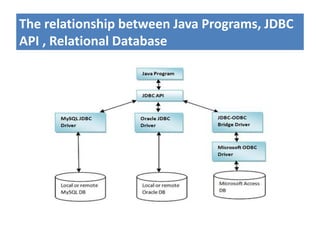
The relationship between Java Programs, JDBC
API , Relational Database
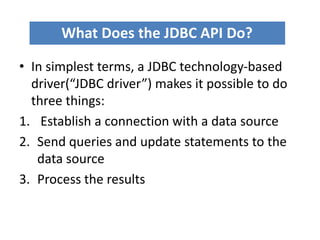
• In simplest terms, a JDBC technology-based
driver(“JDBC driver”) makes it possible to do
three things:
1. Establish a connection with a data source
2. Send queries and update statements to the
data source
3. Process the results
What Does the JDBC API Do?
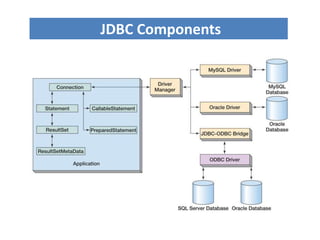
JDBC Components
Developing Database Application Using JDBC
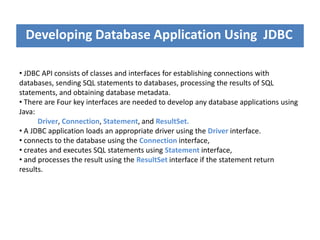
• JDBC API consists of classes and interfaces for establishing connections with
databases, sending SQL statements to databases, processing the results of SQL
statements, and obtaining database metadata.
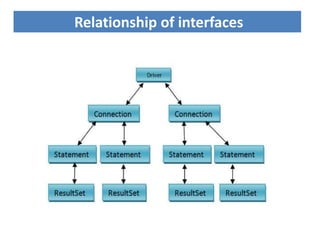
• There are Four key interfaces are needed to develop any database applications using
Java:
Driver, Connection, Statement, and ResultSet.
• A JDBC application loads an appropriate driver using the Driver interface.
• connects to the database using the Connection interface,
• creates and executes SQL statements using Statement interface,
• and processes the result using the ResultSet interface if the statement return
results.
Relationship of interfaces
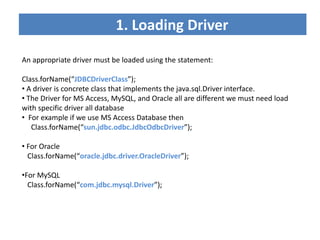
1. Loading Driver
An appropriate driver must be loaded using the statement:
Class.forName(“JDBCDriverClass”);
• A driver is concrete class that implements the java.sql.Driver interface.
• The Driver for MS Access, MySQL, and Oracle all are different we must need load
with specific driver all database
• For example if we use MS Access Database then
Class.forName(“sun.jdbc.odbc.JdbcOdbcDriver”);
• For Oracle
Class.forName(“oracle.jdbc.driver.OracleDriver”);
•For MySQL
Class.forName(“com.jdbc.mysql.Driver”);
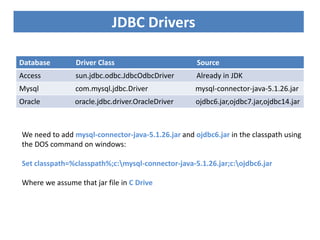
Database Driver Class Source
Access sun.jdbc.odbc.JdbcOdbcDriver Already in JDK
Mysql com.mysql.jdbc.Driver mysql-connector-java-5.1.26.jar
Oracle oracle.jdbc.driver.OracleDriver ojdbc6.jar,ojdbc7.jar,ojdbc14.jar
We need to add mysql-connector-java-5.1.26.jar and ojdbc6.jar in the classpath using
the DOS command on windows:
Set classpath=%classpath%;c:mysql-connector-java-5.1.26.jar;c:ojdbc6.jar
Where we assume that jar file in C Drive
JDBC Drivers
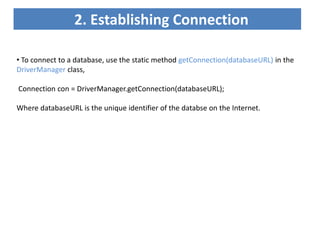
2. Establishing Connection
• To connect to a database, use the static method getConnection(databaseURL) in the
DriverManager class,
Connection con = DriverManager.getConnection(databaseURL);
Where databaseURL is the unique identifier of the databse on the Internet.
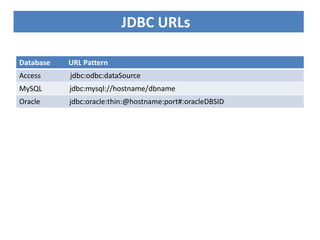
Database URL Pattern
Access jdbc:odbc:dataSource
MySQL jdbc:mysql://hostname/dbname
Oracle jdbc:oracle:thin:@hostname:port#:oracleDBSID
JDBC URLs
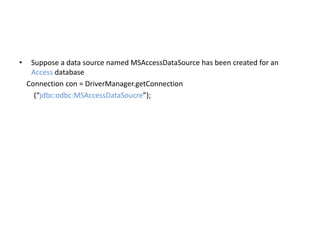
• Suppose a data source named MSAccessDataSource has been created for an
Access database
Connection con = DriverManager.getConnection
(“jdbc:odbc:MSAccessDataSoucre”);
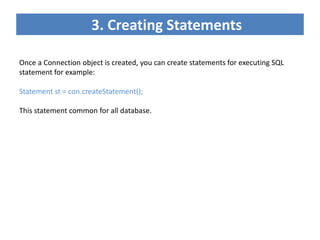
3. Creating Statements
Once a Connection object is created, you can create statements for executing SQL
statement for example:
Statement st = con.createStatement();
This statement common for all database.
4. Executing statement
• SQL Data Definition Language(DDL) and update statements can be executed using
executeUpdate(String sql)
• An SQL query statement can be executed using executeQuery(String sql)
• The result of the query is returned in ResultSet.
• For example, the following code executes the SQL statement create table
Student(RollNo number, Fname varchar(12), Mname varchar(10), Lname varchar(10)):
st.executeUpdate
(“create table Student(RollNo number, Fname varchar(12), Mname varchar(10),
Lname varchar(10))”);
• next code executes the SQL query select * from students
st.executeQuery(“select * from student”);
**Whare st is reference variable for Statement.
5. Processing ResultSet
• The ResultSet maintains a table whose current row can be retrieved. The initial row
position is null. We can use the next method to move to the next row and the various
getter methods to retrieve values from a current row.
while (resultSet.next())
System.out.println(resultSet.getString(1)+” ”+ resultSet.getString(2)+ “ ” +
resultSet.getString(3));
• Suppose a table contain three column fname, mi, lname.
The getString(1), getString(2), and getString(3) methods retrieve the column values
for fname, mi and lname respectively.
• Alternatively, we use getString(“fname”), getString(“mi”), and getString(“lname”) to
retrieve the same three column value.
import java.sql.*;
public class SimpleJDBC{
public static void main(String args[])
throws SQLException, ClassNotFoundException{
Class.forName(“oracle.jdbc.driver.OracleDriver”); //Load driver
Connection con=DriverManager.getConnection
(jdbc:oracle:thin:@localhost:1521:xe, ”root” , ”root”); //Connect to a database
Statement st=con.createStatement(); //Create Statement
ResultSet rs=st.executeQuery(“select * from student”); //Execute a statement
//Iterate through the result and print the student names
While(rs.next())
System.out.print(rs.getString(1));
System.out.println(“t”rs.getString(2));
con.close(); //Close the connection
}
}
SimpleJDBC.java

Jdbc

  • 1.
  • 2.
    JDBC is theJava API(Application Programming Interface) for accessing relational database. • The Java API for developing Java database application is called JDBC. JDBC is the trademark name of Java API that supports Java programs that access relational databases. Do you believe that JDBC is not acronym? • Yes, JDBC is not an acronym, but it is often thought to stand for Java Database Connectivity. • Using the JDBC API, applications written in the Java programming language can execute SQL statements, retrieve results, present data in a user friendly interface and propagate changes back to the database. JDBC
  • 3.
    The relationship betweenJava Programs, JDBC API , Relational Database
  • 4.
    • In simplestterms, a JDBC technology-based driver(“JDBC driver”) makes it possible to do three things: 1. Establish a connection with a data source 2. Send queries and update statements to the data source 3. Process the results What Does the JDBC API Do?
  • 5.
  • 6.
    Developing Database ApplicationUsing JDBC • JDBC API consists of classes and interfaces for establishing connections with databases, sending SQL statements to databases, processing the results of SQL statements, and obtaining database metadata. • There are Four key interfaces are needed to develop any database applications using Java: Driver, Connection, Statement, and ResultSet. • A JDBC application loads an appropriate driver using the Driver interface. • connects to the database using the Connection interface, • creates and executes SQL statements using Statement interface, • and processes the result using the ResultSet interface if the statement return results.
  • 7.
  • 8.
    1. Loading Driver Anappropriate driver must be loaded using the statement: Class.forName(“JDBCDriverClass”); • A driver is concrete class that implements the java.sql.Driver interface. • The Driver for MS Access, MySQL, and Oracle all are different we must need load with specific driver all database • For example if we use MS Access Database then Class.forName(“sun.jdbc.odbc.JdbcOdbcDriver”); • For Oracle Class.forName(“oracle.jdbc.driver.OracleDriver”); •For MySQL Class.forName(“com.jdbc.mysql.Driver”);
  • 9.
    Database Driver ClassSource Access sun.jdbc.odbc.JdbcOdbcDriver Already in JDK Mysql com.mysql.jdbc.Driver mysql-connector-java-5.1.26.jar Oracle oracle.jdbc.driver.OracleDriver ojdbc6.jar,ojdbc7.jar,ojdbc14.jar We need to add mysql-connector-java-5.1.26.jar and ojdbc6.jar in the classpath using the DOS command on windows: Set classpath=%classpath%;c:mysql-connector-java-5.1.26.jar;c:ojdbc6.jar Where we assume that jar file in C Drive JDBC Drivers
  • 10.
    2. Establishing Connection •To connect to a database, use the static method getConnection(databaseURL) in the DriverManager class, Connection con = DriverManager.getConnection(databaseURL); Where databaseURL is the unique identifier of the databse on the Internet.
  • 11.
    Database URL Pattern Accessjdbc:odbc:dataSource MySQL jdbc:mysql://hostname/dbname Oracle jdbc:oracle:thin:@hostname:port#:oracleDBSID JDBC URLs
  • 12.
    • Suppose adata source named MSAccessDataSource has been created for an Access database Connection con = DriverManager.getConnection (“jdbc:odbc:MSAccessDataSoucre”);
  • 13.
    3. Creating Statements Oncea Connection object is created, you can create statements for executing SQL statement for example: Statement st = con.createStatement(); This statement common for all database.
  • 14.
    4. Executing statement •SQL Data Definition Language(DDL) and update statements can be executed using executeUpdate(String sql) • An SQL query statement can be executed using executeQuery(String sql) • The result of the query is returned in ResultSet. • For example, the following code executes the SQL statement create table Student(RollNo number, Fname varchar(12), Mname varchar(10), Lname varchar(10)): st.executeUpdate (“create table Student(RollNo number, Fname varchar(12), Mname varchar(10), Lname varchar(10))”); • next code executes the SQL query select * from students st.executeQuery(“select * from student”); **Whare st is reference variable for Statement.
  • 15.
    5. Processing ResultSet •The ResultSet maintains a table whose current row can be retrieved. The initial row position is null. We can use the next method to move to the next row and the various getter methods to retrieve values from a current row. while (resultSet.next()) System.out.println(resultSet.getString(1)+” ”+ resultSet.getString(2)+ “ ” + resultSet.getString(3)); • Suppose a table contain three column fname, mi, lname. The getString(1), getString(2), and getString(3) methods retrieve the column values for fname, mi and lname respectively. • Alternatively, we use getString(“fname”), getString(“mi”), and getString(“lname”) to retrieve the same three column value.
  • 16.
    import java.sql.*; public classSimpleJDBC{ public static void main(String args[]) throws SQLException, ClassNotFoundException{ Class.forName(“oracle.jdbc.driver.OracleDriver”); //Load driver Connection con=DriverManager.getConnection (jdbc:oracle:thin:@localhost:1521:xe, ”root” , ”root”); //Connect to a database Statement st=con.createStatement(); //Create Statement ResultSet rs=st.executeQuery(“select * from student”); //Execute a statement //Iterate through the result and print the student names While(rs.next()) System.out.print(rs.getString(1)); System.out.println(“t”rs.getString(2)); con.close(); //Close the connection } } SimpleJDBC.java