Slide 1 of 21
JSP Standard Tag Library
Slide 2 of 21
Overview
 JSTL
 Core Tag Library
 Methods using EL
 I18N & Formatting Tag Library
 SQL Tag Library
 XML Tag Library
Slide 3 of 21
JSTL
 Custom tags provide a way to reuse
valuable components
 JSTL has reusable standard set of tags.
 Provides the user with a script-free
environment
 User can write code using tags instead of
Java code and scriptlets
 JSTL tags are easier for non-programmers
and inexperienced programmers
Slide 4 of 21
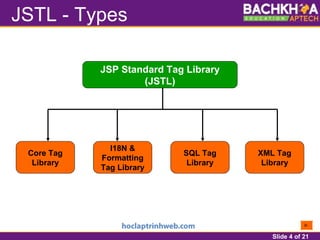
JSTL - Types
JSP Standard Tag Library
(JSTL)
Core Tag
Library
I18N &
Formatting
Tag Library
SQL Tag
Library
XML Tag
Library
Slide 5 of 21
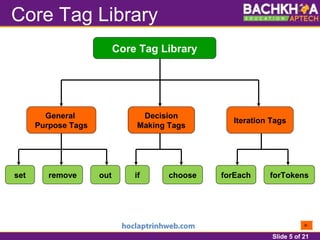
Core Tag Library
Core Tag Library
General
Purpose Tags
Decision
Making Tags
Iteration Tags
set remove out forEach forTokensif choose
Slide 6 of 21
General-purpose tags
 <%@ taglib uri =
"http://java.sun.com/jsp/jstl/core" prefix =
"c" %>
– <c:set var=“varName” value=“value”
scope=“page|request|session|application” />
– <c:remove var=“varName” scope=“page|
request|session|application” />
– <c:out value=“value|expression”
escapeXml=“true|false”
default=“defaultValue” />
Slide 7 of 21
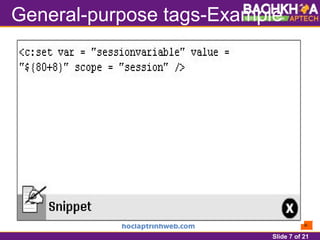
General-purpose tags-Example
Slide 8 of 21
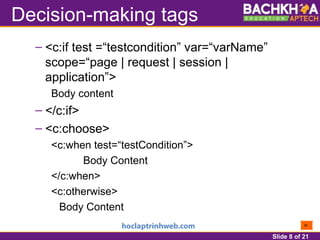
Decision-making tags
– <c:if test =“testcondition” var=“varName”
scope=“page | request | session |
application”>
Body content
– </c:if>
– <c:choose>
<c:when test=“testCondition”>
Body Content
</c:when>
<c:otherwise>
Body Content
Slide 9 of 21
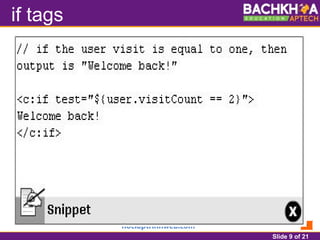
if tags
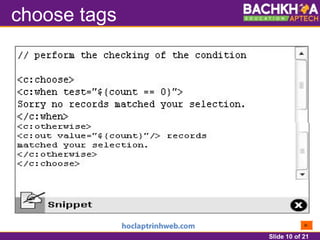
Slide 10 of 21
choose tags
Slide 11 of 21
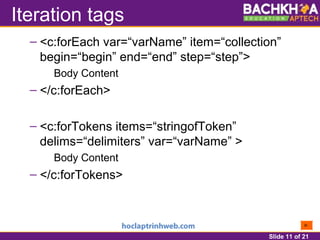
Iteration tags
– <c:forEach var=“varName” item=“collection”
begin=“begin” end=“end” step=“step”>
Body Content
– </c:forEach>
– <c:forTokens items=“stringofToken”
delims=“delimiters” var=“varName” >
Body Content
– </c:forTokens>
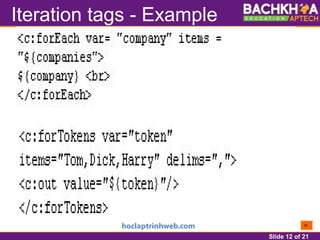
Slide 12 of 21
Iteration tags - Example
Slide 13 of 21
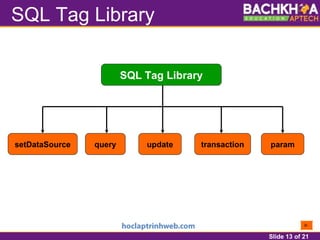
SQL Tag Library
SQL Tag Library
setDataSource query update paramtransaction
Slide 14 of 21
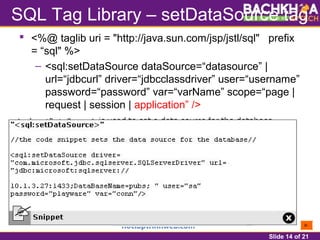
SQL Tag Library – setDataSource tag
 <%@ taglib uri = "http://java.sun.com/jsp/jstl/sql" prefix
= “sql" %>
– <sql:setDataSource dataSource=“datasource” |
url=“jdbcurl” driver=“jdbcclassdriver” user=“username”
password=“password” var=“varName” scope=“page |
request | session | application” />
Slide 15 of 21
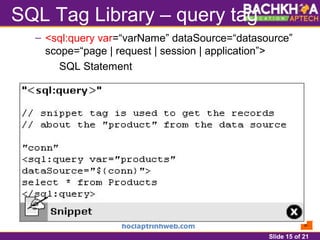
SQL Tag Library – query tag
– <sql:query var=“varName” dataSource=“datasource”
scope=“page | request | session | application”>
SQL Statement
Slide 16 of 21
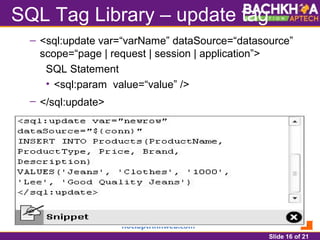
SQL Tag Library – update tag
– <sql:update var=“varName” dataSource=“datasource”
scope=“page | request | session | application”>
SQL Statement
• <sql:param value=“value” />
– </sql:update>
Slide 17 of 21
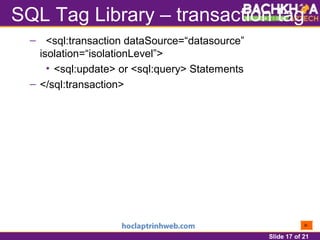
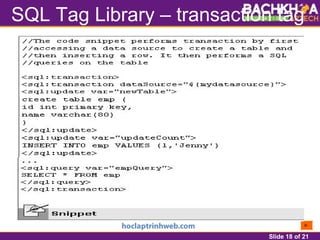
SQL Tag Library – transaction tag
– <sql:transaction dataSource=“datasource”
isolation=“isolationLevel”>
• <sql:update> or <sql:query> Statements
– </sql:transaction>
Slide 18 of 21
SQL Tag Library – transaction tag
Slide 19 of 21
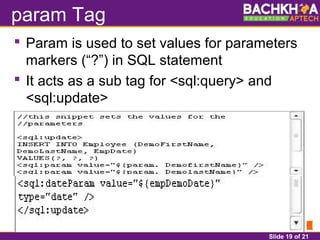
param Tag
 Param is used to set values for parameters
markers (“?”) in SQL statement
 It acts as a sub tag for <sql:query> and
<sql:update>
Slide 20 of 21
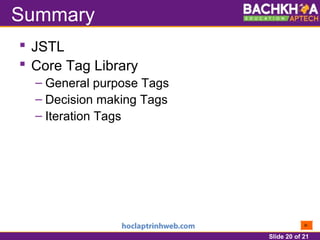
Summary
 JSTL
 Core Tag Library
– General purpose Tags
– Decision making Tags
– Iteration Tags
Slide 21 of 21
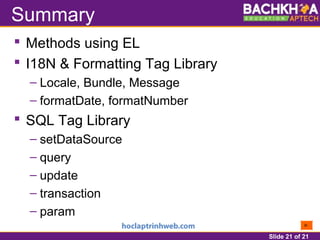
Summary
 Methods using EL
 I18N & Formatting Tag Library
– Locale, Bundle, Message
– formatDate, formatNumber
 SQL Tag Library
– setDataSource
– query
– update
– transaction
– param

Session 7 : jstl - Giáo trình Bách Khoa Aptech

  • 1.
    Slide 1 of21 JSP Standard Tag Library
  • 2.
    Slide 2 of21 Overview  JSTL  Core Tag Library  Methods using EL  I18N & Formatting Tag Library  SQL Tag Library  XML Tag Library
  • 3.
    Slide 3 of21 JSTL  Custom tags provide a way to reuse valuable components  JSTL has reusable standard set of tags.  Provides the user with a script-free environment  User can write code using tags instead of Java code and scriptlets  JSTL tags are easier for non-programmers and inexperienced programmers
  • 4.
    Slide 4 of21 JSTL - Types JSP Standard Tag Library (JSTL) Core Tag Library I18N & Formatting Tag Library SQL Tag Library XML Tag Library
  • 5.
    Slide 5 of21 Core Tag Library Core Tag Library General Purpose Tags Decision Making Tags Iteration Tags set remove out forEach forTokensif choose
  • 6.
    Slide 6 of21 General-purpose tags  <%@ taglib uri = "http://java.sun.com/jsp/jstl/core" prefix = "c" %> – <c:set var=“varName” value=“value” scope=“page|request|session|application” /> – <c:remove var=“varName” scope=“page| request|session|application” /> – <c:out value=“value|expression” escapeXml=“true|false” default=“defaultValue” />
  • 7.
    Slide 7 of21 General-purpose tags-Example
  • 8.
    Slide 8 of21 Decision-making tags – <c:if test =“testcondition” var=“varName” scope=“page | request | session | application”> Body content – </c:if> – <c:choose> <c:when test=“testCondition”> Body Content </c:when> <c:otherwise> Body Content
  • 9.
    Slide 9 of21 if tags
  • 10.
    Slide 10 of21 choose tags
  • 11.
    Slide 11 of21 Iteration tags – <c:forEach var=“varName” item=“collection” begin=“begin” end=“end” step=“step”> Body Content – </c:forEach> – <c:forTokens items=“stringofToken” delims=“delimiters” var=“varName” > Body Content – </c:forTokens>
  • 12.
    Slide 12 of21 Iteration tags - Example
  • 13.
    Slide 13 of21 SQL Tag Library SQL Tag Library setDataSource query update paramtransaction
  • 14.
    Slide 14 of21 SQL Tag Library – setDataSource tag  <%@ taglib uri = "http://java.sun.com/jsp/jstl/sql" prefix = “sql" %> – <sql:setDataSource dataSource=“datasource” | url=“jdbcurl” driver=“jdbcclassdriver” user=“username” password=“password” var=“varName” scope=“page | request | session | application” />
  • 15.
    Slide 15 of21 SQL Tag Library – query tag – <sql:query var=“varName” dataSource=“datasource” scope=“page | request | session | application”> SQL Statement
  • 16.
    Slide 16 of21 SQL Tag Library – update tag – <sql:update var=“varName” dataSource=“datasource” scope=“page | request | session | application”> SQL Statement • <sql:param value=“value” /> – </sql:update>
  • 17.
    Slide 17 of21 SQL Tag Library – transaction tag – <sql:transaction dataSource=“datasource” isolation=“isolationLevel”> • <sql:update> or <sql:query> Statements – </sql:transaction>
  • 18.
    Slide 18 of21 SQL Tag Library – transaction tag
  • 19.
    Slide 19 of21 param Tag  Param is used to set values for parameters markers (“?”) in SQL statement  It acts as a sub tag for <sql:query> and <sql:update>
  • 20.
    Slide 20 of21 Summary  JSTL  Core Tag Library – General purpose Tags – Decision making Tags – Iteration Tags
  • 21.
    Slide 21 of21 Summary  Methods using EL  I18N & Formatting Tag Library – Locale, Bundle, Message – formatDate, formatNumber  SQL Tag Library – setDataSource – query – update – transaction – param