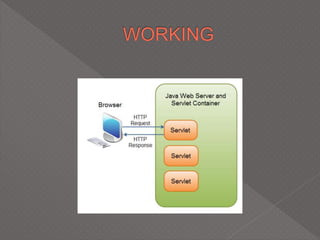
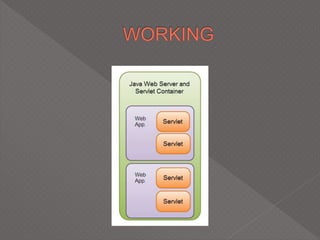
 Basically, a java program that runs on the
server.
 Creates dynamic web pages.
 Servlet technology is used to create web
application (resides at server side and
generates dynamic web page).
 Servet technology is robust and scalable as
it uses the java language. Before Servlet,
CGI (Common Gateway Interface) scripting
language was used as a server-side
programming language. But there were
many disadvantages of this technology.
 There are many interfaces and classes in the
servlet API such as Servlet, GenericServlet,
HttpServlet, ServletRequest,
ServletResponse etc.
Servlet can be described in many ways,
depending on the context.
 Servlet is a technology i.e. used to create
web application.
 Servlet is an API that provides many
interfaces and classes including
documentations.
 Servlet is an interface that must be
implemented for creating any servlet.
 Servlet is a class that extend the capabilities
of the servers and respond to the incoming
request. It can respond to any type of
requests.
 Servlet is a web component that is deployed
on the server to create dynamic web page.
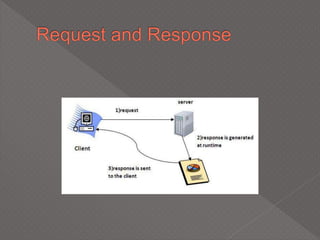
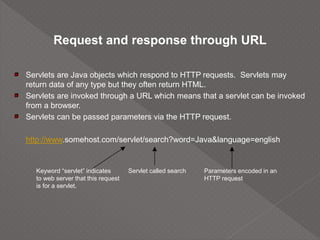
Request and response through URL
Servlets are Java objects which respond to HTTP requests. Servlets may
return data of any type but they often return HTML.
Servlets are invoked through a URL which means that a servlet can be invoked
from a browser.
Servlets can be passed parameters via the HTTP request.
http://www.somehost.com/servlet/search?word=Java&language=english
Servlet called search Parameters encoded in an
HTTP request
Keyword “servlet” indicates
to web server that this request
is for a servlet.
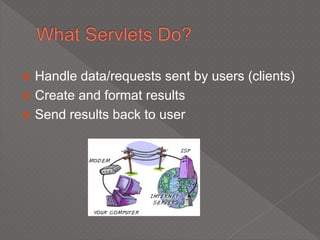
 Handle data/requests sent by users (clients)
 Create and format results
 Send results back to user
 Servlets are useful in many business
oriented websites
 … and MANY others
 Dynamic websites were often created with
CGI
 CGI: Common Gateway Interface
 Poor solution to today’s needs
 A better solution was needed
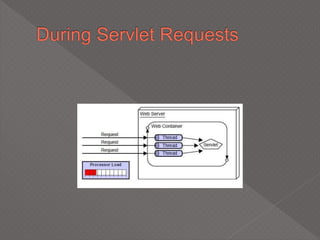
 There are many advantages of Servlet over
CGI. The web container creates threads for
handling the multiple requests to the servlet.
Threads have a lot of benefits over the
Processes such as they share a common
memory area, lighweight, cost of
communication between the threads are low.
 Servlet Advantages
› Efficient
 Single lightweight java thread handles multiple requests
 Optimizations such as computation caching and keeping
connections to databases open
› Convenient
 Many programmers today already know java
› Powerful
 Can talk directly to the web server
 Share data with other servlets
 Maintain data from request to request
› Portable
 Java is supported by every major web browser (through plugins)
› Inexpensive
 Adding servlet support to a server is cheap or free
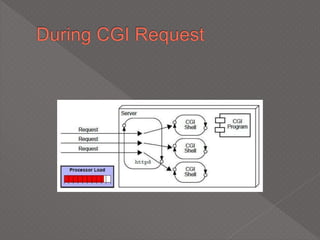
 There are many problems in CGI technology:
 If number of clients increases, it takes more
time for sending response.
 For each request, it starts a process and
Web server is limited to start processes.
 It uses platform dependent language e.g. C,
C++, perl.
 JavaServer Web Development Kit (JSWDK)
 Servlet capable server
 Java Server Pages (JSP)
 Servlet code
All servlets must import the following packages:
› import java.io.*;
› import javax.servlet.*;
› import javax.servlet.http.*;
 The javax.servlet and javax.servlet.http packages represent
interfaces and classes for servlet api.
 The javax.servlet package contains many interfaces and
classes that are used by the servlet or web container. These
are not specific to any protocol.
 The javax.servlet.http package contains interfaces and
classes that are responsible for http requests only.
 Java servlets have been created and compiled just like
any other Java class. After you install the servlet
packages and add them to your computer's Classpath,
you can compile servlets with the JDK's Java compiler
or any other current compile
 Java Servlets are Java classes run by a web server that
has an interpreter that supports the Java Servlet
specification.
 Servlets can be created using
the javax.servlet and javax.servlet.http packages,
which are a standard part of the Java's enterprise
edition, an expanded version of the Java class library
that supports large-scale development projects
doPost and doGet
Under HTTP, there are two methods available for sending parameters from
the browser to the web server. They are POST and GET
POST and GET are virtually the same except in terms of how parameter data
is passed
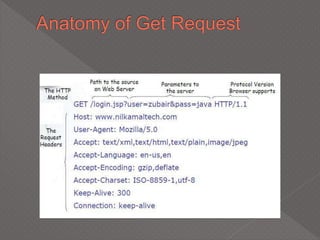
GET: Parameters are encoded within the URL. If data is passed via GET, it is
limited in size to 2K
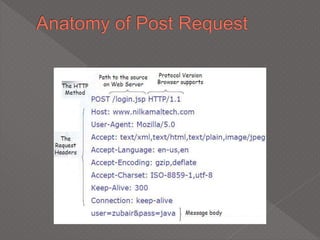
POST: Parameters are sent AFTER the HTTP header in the request. There
is no limit to the size of parameters sent via POST.
The method of parameter passing is defined in the HTML loaded into the
browser. Servlet authors can choose to implement the doGet method,
doPost method or both.
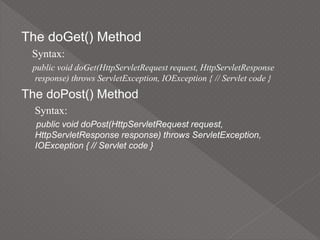
The doGet() Method
Syntax:
public void doGet(HttpServletRequest request, HttpServletResponse
response) throws ServletException, IOException { // Servlet code }
The doPost() Method
Syntax:
public void doPost(HttpServletRequest request,
HttpServletResponse response) throws ServletException,
IOException { // Servlet code }
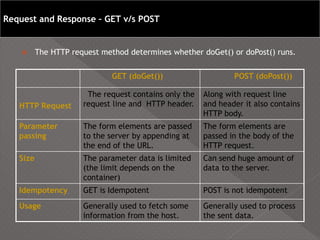
 The HTTP request method determines whether doGet() or doPost() runs.
GET (doGet()) POST (doPost())
HTTP Request
The request contains only the
request line and HTTP header.
Along with request line
and header it also contains
HTTP body.
Parameter
passing
The form elements are passed
to the server by appending at
the end of the URL.
The form elements are
passed in the body of the
HTTP request.
Size The parameter data is limited
(the limit depends on the
container)
Can send huge amount of
data to the server.
Idempotency GET is Idempotent POST is not idempotent
Usage Generally used to fetch some
information from the host.
Generally used to process
the sent data.
Request and Response – GET v/s POST
 Written in standard Java
 Implement the javax.servlet.Servlet interface
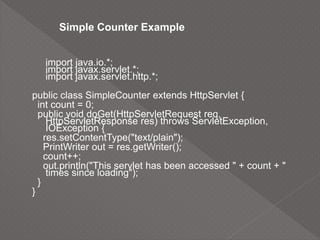
import java.io.*;
import javax.servlet.*;
import javax.servlet.http.*;
public class SimpleCounter extends HttpServlet {
int count = 0;
public void doGet(HttpServletRequest req,
HttpServletResponse res) throws ServletException,
IOException {
res.setContentType("text/plain");
PrintWriter out = res.getWriter();
count++;
out.println("This servlet has been accessed " + count + "
times since loading");
}
}
Simple Counter Example
 Life Cycle
 Client Interaction
 Saving State
 Servlet Communication
 Calling Servlets
 Request Attributes and Resources
 Multithreading
Servlet Life Cycle
The servlet life cycle is the Java servlet
processing event sequence that occurs from
servlet instance creation to destruction. The
servlet life cycle is controlled by the container
that deploys the servlet.
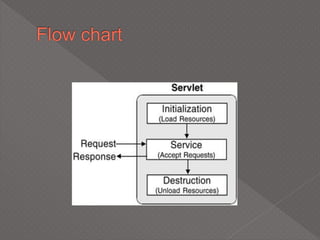
The life cycle of servlet follows three steps:
 Initialize
 Service
 Destroy
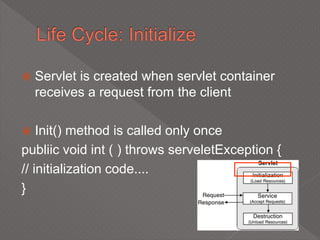
 Servlet is created when servlet container
receives a request from the client
 Init() method is called only once
publiic void int ( ) throws serveletException {
// initialization code....
}
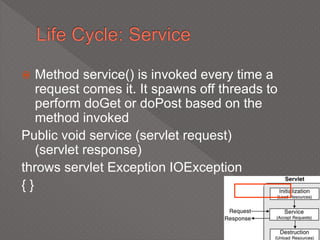
 Method service() is invoked every time a
request comes it. It spawns off threads to
perform doGet or doPost based on the
method invoked
Public void service (servlet request)
(servlet response)
throws servlet Exception IOException
{ }
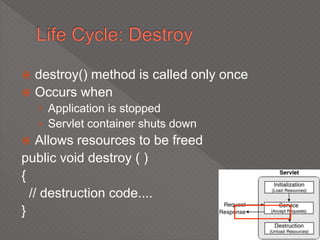
 destroy() method is called only once
 Occurs when
› Application is stopped
› Servlet container shuts down
 Allows resources to be freed
public void destroy ( )
{
// destruction code....
}
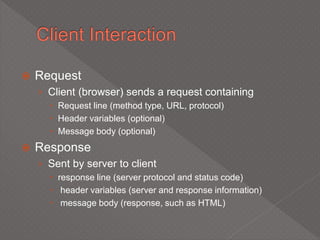
 Request
› Client (browser) sends a request containing
 Request line (method type, URL, protocol)
 Header variables (optional)
 Message body (optional)
 Response
› Sent by server to client
 response line (server protocol and status code)
 header variables (server and response information)
 message body (response, such as HTML)
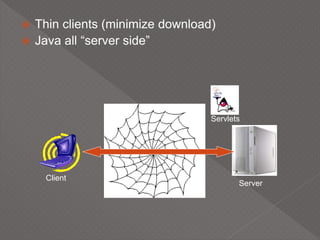
 Thin clients (minimize download)
 Java all “server side”
Client
Server
Servlets
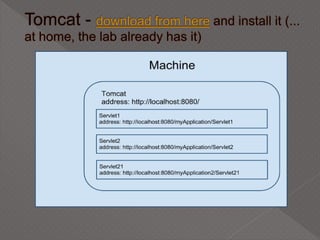
 Web server : Apache(popular open-source
server) Tomcat( A “servlet container” used
with apache)
 Java development kit
 Integrated Runtime Environment : Net
Beans
 Verify that you have the required software.
 You will be writing and compiling Java code throughout.
We recommend you use the JDK, version 1.2 (Java 2 Platform) or
later, and an ordinary text editor such as Visual Slick Edit.
 You will need a Web browser such as I.E 6.0.28 with 128 bit
encryption to see some of your work in action.
 There is quite bit of servlet-specific software you will use as well.
Apache Tomcat: web server
A solid understanding of Java is required before implementing the
workout.
 An understanding of the following is required. How to implement Java
classes, objects and methods
 An understanding of how to organize and manage class hierarchies
and frameworks

How to use Java datatypes, expressions, and control flow
structures

How to code, compile, and test Java applets

How to embed Java applets in Web pages using HTML
In addition, you will be working with SQL.

In addition, prior knowledge of client-server web technologies will
be helpful.

Working with raw HTML quite a bit.
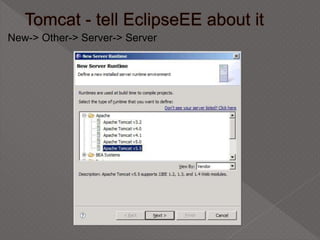
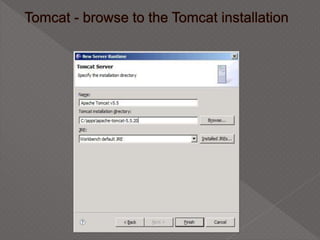
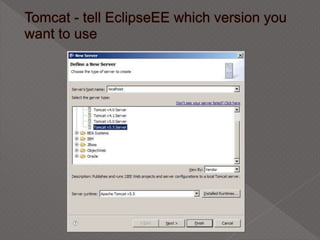
New-> Other-> Server-> Server
Servlets
Servlets
Servlets
Servlets
Servlets

Servlets

  • 2.
     Basically, ajava program that runs on the server.  Creates dynamic web pages.  Servlet technology is used to create web application (resides at server side and generates dynamic web page).
  • 3.
     Servet technologyis robust and scalable as it uses the java language. Before Servlet, CGI (Common Gateway Interface) scripting language was used as a server-side programming language. But there were many disadvantages of this technology.
  • 4.
     There aremany interfaces and classes in the servlet API such as Servlet, GenericServlet, HttpServlet, ServletRequest, ServletResponse etc.
  • 5.
    Servlet can bedescribed in many ways, depending on the context.  Servlet is a technology i.e. used to create web application.  Servlet is an API that provides many interfaces and classes including documentations.  Servlet is an interface that must be implemented for creating any servlet.
  • 6.
     Servlet isa class that extend the capabilities of the servers and respond to the incoming request. It can respond to any type of requests.  Servlet is a web component that is deployed on the server to create dynamic web page.
  • 8.
    Request and responsethrough URL Servlets are Java objects which respond to HTTP requests. Servlets may return data of any type but they often return HTML. Servlets are invoked through a URL which means that a servlet can be invoked from a browser. Servlets can be passed parameters via the HTTP request. http://www.somehost.com/servlet/search?word=Java&language=english Servlet called search Parameters encoded in an HTTP request Keyword “servlet” indicates to web server that this request is for a servlet.
  • 9.
     Handle data/requestssent by users (clients)  Create and format results  Send results back to user
  • 10.
     Servlets areuseful in many business oriented websites  … and MANY others
  • 11.
     Dynamic websiteswere often created with CGI  CGI: Common Gateway Interface  Poor solution to today’s needs  A better solution was needed
  • 13.
     There aremany advantages of Servlet over CGI. The web container creates threads for handling the multiple requests to the servlet. Threads have a lot of benefits over the Processes such as they share a common memory area, lighweight, cost of communication between the threads are low.
  • 14.
     Servlet Advantages ›Efficient  Single lightweight java thread handles multiple requests  Optimizations such as computation caching and keeping connections to databases open › Convenient  Many programmers today already know java › Powerful  Can talk directly to the web server  Share data with other servlets  Maintain data from request to request › Portable  Java is supported by every major web browser (through plugins) › Inexpensive  Adding servlet support to a server is cheap or free
  • 16.
     There aremany problems in CGI technology:  If number of clients increases, it takes more time for sending response.  For each request, it starts a process and Web server is limited to start processes.  It uses platform dependent language e.g. C, C++, perl.
  • 17.
     JavaServer WebDevelopment Kit (JSWDK)  Servlet capable server  Java Server Pages (JSP)  Servlet code
  • 18.
    All servlets mustimport the following packages: › import java.io.*; › import javax.servlet.*; › import javax.servlet.http.*;  The javax.servlet and javax.servlet.http packages represent interfaces and classes for servlet api.  The javax.servlet package contains many interfaces and classes that are used by the servlet or web container. These are not specific to any protocol.  The javax.servlet.http package contains interfaces and classes that are responsible for http requests only.
  • 19.
     Java servletshave been created and compiled just like any other Java class. After you install the servlet packages and add them to your computer's Classpath, you can compile servlets with the JDK's Java compiler or any other current compile  Java Servlets are Java classes run by a web server that has an interpreter that supports the Java Servlet specification.  Servlets can be created using the javax.servlet and javax.servlet.http packages, which are a standard part of the Java's enterprise edition, an expanded version of the Java class library that supports large-scale development projects
  • 20.
    doPost and doGet UnderHTTP, there are two methods available for sending parameters from the browser to the web server. They are POST and GET POST and GET are virtually the same except in terms of how parameter data is passed GET: Parameters are encoded within the URL. If data is passed via GET, it is limited in size to 2K POST: Parameters are sent AFTER the HTTP header in the request. There is no limit to the size of parameters sent via POST. The method of parameter passing is defined in the HTML loaded into the browser. Servlet authors can choose to implement the doGet method, doPost method or both.
  • 21.
    The doGet() Method Syntax: publicvoid doGet(HttpServletRequest request, HttpServletResponse response) throws ServletException, IOException { // Servlet code } The doPost() Method Syntax: public void doPost(HttpServletRequest request, HttpServletResponse response) throws ServletException, IOException { // Servlet code }
  • 24.
     The HTTPrequest method determines whether doGet() or doPost() runs. GET (doGet()) POST (doPost()) HTTP Request The request contains only the request line and HTTP header. Along with request line and header it also contains HTTP body. Parameter passing The form elements are passed to the server by appending at the end of the URL. The form elements are passed in the body of the HTTP request. Size The parameter data is limited (the limit depends on the container) Can send huge amount of data to the server. Idempotency GET is Idempotent POST is not idempotent Usage Generally used to fetch some information from the host. Generally used to process the sent data. Request and Response – GET v/s POST
  • 25.
     Written instandard Java  Implement the javax.servlet.Servlet interface
  • 26.
    import java.io.*; import javax.servlet.*; importjavax.servlet.http.*; public class SimpleCounter extends HttpServlet { int count = 0; public void doGet(HttpServletRequest req, HttpServletResponse res) throws ServletException, IOException { res.setContentType("text/plain"); PrintWriter out = res.getWriter(); count++; out.println("This servlet has been accessed " + count + " times since loading"); } } Simple Counter Example
  • 27.
     Life Cycle Client Interaction  Saving State  Servlet Communication  Calling Servlets  Request Attributes and Resources  Multithreading
  • 28.
    Servlet Life Cycle Theservlet life cycle is the Java servlet processing event sequence that occurs from servlet instance creation to destruction. The servlet life cycle is controlled by the container that deploys the servlet.
  • 29.
    The life cycleof servlet follows three steps:  Initialize  Service  Destroy
  • 31.
     Servlet iscreated when servlet container receives a request from the client  Init() method is called only once publiic void int ( ) throws serveletException { // initialization code.... }
  • 32.
     Method service()is invoked every time a request comes it. It spawns off threads to perform doGet or doPost based on the method invoked Public void service (servlet request) (servlet response) throws servlet Exception IOException { }
  • 33.
     destroy() methodis called only once  Occurs when › Application is stopped › Servlet container shuts down  Allows resources to be freed public void destroy ( ) { // destruction code.... }
  • 34.
     Request › Client(browser) sends a request containing  Request line (method type, URL, protocol)  Header variables (optional)  Message body (optional)  Response › Sent by server to client  response line (server protocol and status code)  header variables (server and response information)  message body (response, such as HTML)
  • 35.
     Thin clients(minimize download)  Java all “server side” Client Server Servlets
  • 36.
     Web server: Apache(popular open-source server) Tomcat( A “servlet container” used with apache)  Java development kit  Integrated Runtime Environment : Net Beans
  • 37.
     Verify thatyou have the required software.  You will be writing and compiling Java code throughout. We recommend you use the JDK, version 1.2 (Java 2 Platform) or later, and an ordinary text editor such as Visual Slick Edit.  You will need a Web browser such as I.E 6.0.28 with 128 bit encryption to see some of your work in action.  There is quite bit of servlet-specific software you will use as well. Apache Tomcat: web server A solid understanding of Java is required before implementing the workout.  An understanding of the following is required. How to implement Java classes, objects and methods
  • 38.
     An understandingof how to organize and manage class hierarchies and frameworks  How to use Java datatypes, expressions, and control flow structures  How to code, compile, and test Java applets  How to embed Java applets in Web pages using HTML In addition, you will be working with SQL.  In addition, prior knowledge of client-server web technologies will be helpful.  Working with raw HTML quite a bit.
  • 40.