

JDE Projects with Work Orders
1/2 Day Course
Month End - OWP
1
Housekeeping
2
Emergency
Exit
Timing and
Breaks
Mobile Phones
and Email
Facilities
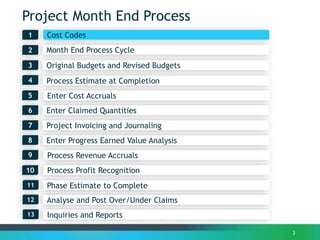
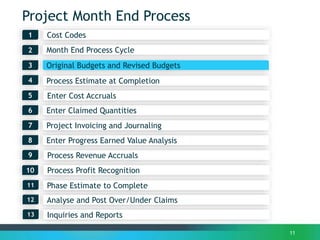
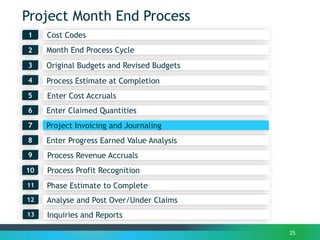
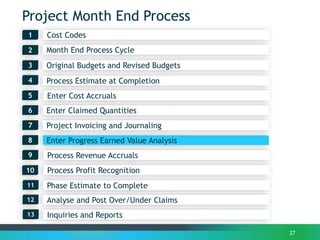
Project Month End Process
Month End Process Cycle2
1
3
3
Process Estimate at Completion4
Enter Claimed Quantities6
Process Revenue Accruals
7
Enter Progress Earned Value Analysis
Process Profit Recognition
8
Project Invoicing and Journaling
9
Cost Codes
10
Original Budgets and Revised Budgets
Phase Estimate to Complete11
Analyse and Post Over/Under Claims12
Enter Cost Accruals5
Inquiries and Reports13
4
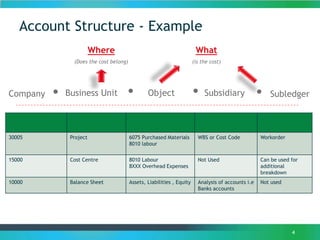
Account Structure - Example
Where
(Does the cost belong)
What
(is the cost)
Business Unit Object. . SubsidiaryCompany . . Subledger
30005 Project 6075 Purchased Materials
8010 labour
WBS or Cost Code Workorder
15000 Cost Centre 8010 Labour
8XXX Overhead Expenses
Not Used Can be used for
additional
breakdown
10000 Balance Sheet Assets, Liabilities , Equity Analysis of accounts i.e
Banks accounts
Not used
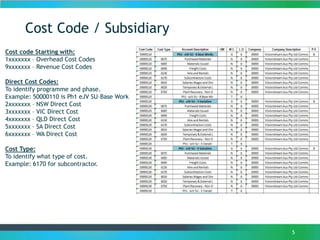
Cost Code / Subsidiary
5
Cost code Starting with:
1xxxxxxx – Overhead Cost Codes
9xxxxxxx – Revenue Cost Codes
Direct Cost Codes:
To identify programme and phase.
Example: 50000110 is Ph1 eJV SU–Base Work
2xxxxxxx – NSW Direct Cost
3xxxxxxx – VIC Direct Cost
4xxxxxxx – QLD Direct Cost
5xxxxxxx – SA Direct Cost
6xxxxxxx – WA Direct Cost
Cost Type:
To identify what type of cost.
Example: 6170 for subcontractor.
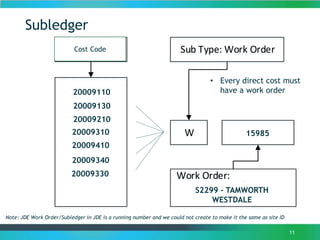
Subledger
11
pe Cost Type
20005000
31005200
20005000
31005200
45008900
Sub Type: Work Order
W 789765
Work Order: Replace Cross
Arm Pole A54, 123 Smith St,
Maryborough
Cost Code
20009110
20009130
20009210
20009310
20009410
20009340
20009330
S2299 - TAMWORTH
WESTDALE
15985
Note: JDE Work Order/Subledger in JDE is a running number and we could not create to make it the same as site ID
• Every direct cost must
have a work order
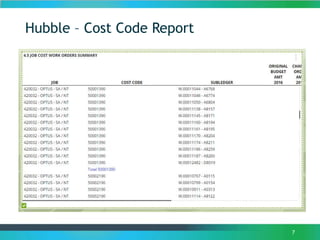
Hubble – Cost Code Report
7
Project Month End Process
Month End Process Cycle2
1
3
8
Process Estimate at Completion4
Enter Claimed Quantities6
Process Revenue Accruals
7
Enter Progress Earned Value Analysis
Process Profit Recognition
8
Project Invoicing and Journaling
9
Cost Codes
10
Original Budgets and Revised Budgets
Phase Estimate to Complete11
Analyse and Post Over/Under Claims12
Enter Cost Accruals5
Inquiries and Reports13
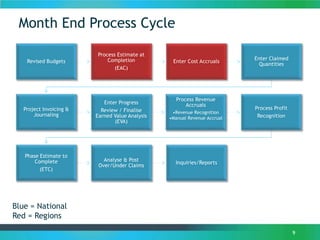
Month End Process Cycle
9
Revised Budgets
Process Estimate at
Completion
(EAC)
Enter Cost Accruals
Enter Claimed
Quantities
Project Invoicing &
Journaling
Enter Progress
Review / Finalise
Earned Value Analysis
(EVA)
Process Revenue
Accruals
•Revenue Recognition
•Manual Revenue Accrual
Process Profit
Recognition
Phase Estimate to
Complete
(ETC)
Analyse & Post
Over/Under Claims
Inquiries/Reports
Blue = National
Red = Regions
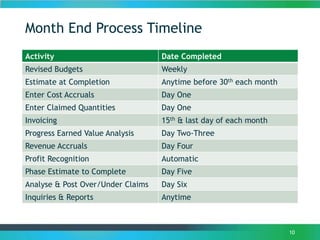
Month End Process Timeline
Activity Date Completed
Revised Budgets Weekly
Estimate at Completion Anytime before 30th each month
Enter Cost Accruals Day One
Enter Claimed Quantities Day One
Invoicing 15th & last day of each month
Progress Earned Value Analysis Day Two-Three
Revenue Accruals Day Four
Profit Recognition Automatic
Phase Estimate to Complete Day Five
Analyse & Post Over/Under Claims Day Six
Inquiries & Reports Anytime
10
Project Month End Process
Month End Process Cycle2
1
3
11
Process Estimate at Completion4
Enter Claimed Quantities6
Process Revenue Accruals
7
Enter Progress Earned Value Analysis
Process Profit Recognition
8
Project Invoicing and Journaling
9
Cost Codes
10
Original Budgets and Revised Budgets
Phase Estimate to Complete11
Analyse and Post Over/Under Claims12
Enter Cost Accruals5
Inquiries and Reports13
Original Budgets and Revised Budgets
• All original budgets are based on PO’s received from Optus and
listed in VISZ as of the 1st of May 2016.
• All revised budgets are based on changes to existing PO’s, new
PO’s received and cancelled PO’s received from Optus since the
1st of May 2016.
• D/C Rate is 70/30 standard across the board no matter the
program or phase.
Note: Forecast Works previously in SMS that have not received PO’s
will be loaded in separate cost codes named “Emerging Works”
12
Variations
• Variation in JDE has a different meaning to OWP:
Variations are the JDE mechanism to increase / decrease Original
Budget, and derive Revised Budget.
These two scenarios apply to new work:
1. New scope: New work is awarded by the client. Revenue and cost
variations are entered, which increases the overall project
budget.
2. Within scope: Work within the original scope is ordered by the
client. Revenue and cost budgets for that work are transferred
from Emerging Works budgets. The overall project budget does
not change.
Variations are also used where there is a decrease in scope.
• OWP’s term Variation is for any variation work listed in the RTC
Note: RTC Submitted to Clients will be loaded into separate cost
codes and named “SPA – Variations”.
13
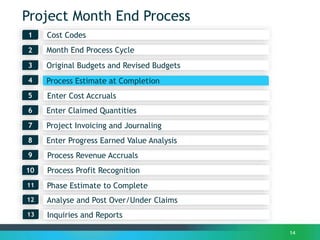
Project Month End Process
Month End Process Cycle2
1
3
14
Process Estimate at Completion4
Enter Claimed Quantities6
Process Revenue Accruals
7
Enter Progress Earned Value Analysis
Process Profit Recognition
8
Project Invoicing and Journaling
9
Cost Codes
10
Original Budgets and Revised Budgets
Phase Estimate to Complete11
Analyse and Post Over/Under Claims12
Enter Cost Accruals5
Inquiries and Reports13
Estimate At Completion
15
Understanding Estimate At Completion
Estimate At Completion is the projected revenues and costs at the completion of the
project.
Purpose of Estimate At Completion
The purpose of Estimate at Completion is to provide a forecast of revenue and costs to
understand the profitability of the project, and to highlight any deviations from budget
Relevance to Profit Recognition
Profit recognition is calculated based on the Estimated at Completion values. Incorrect
values will result in either over / understatement of profit.
Estimate At Completion
16
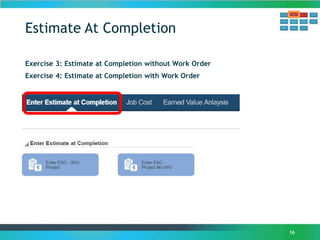
Exercise 3: Estimate at Completion without Work Order
Exercise 4: Estimate at Completion with Work Order
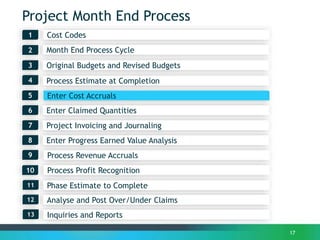
Project Month End Process
Month End Process Cycle2
1
3
17
Process Estimate at Completion4
Enter Claimed Quantities6
Process Revenue Accruals
7
Enter Progress Earned Value Analysis
Process Profit Recognition
8
Project Invoicing and Journaling
9
Cost Codes
10
Original Budgets and Revised Budgets
Phase Estimate to Complete11
Analyse and Post Over/Under Claims12
Enter Cost Accruals5
Inquiries and Reports13
Enter Cost Accruals
18
Demonstration & Discussion:
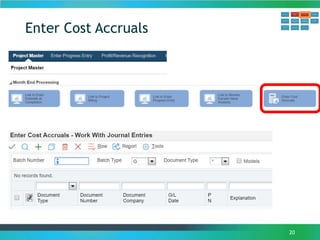
• Cost Accruals
 Review JSI
 Calculate Accrual Entries
 Create Accruals
 Review & Post Accruals
• Journaling – Financials Lite
Enter Cost Accruals
19
Purpose:
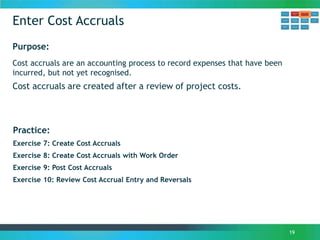
Cost accruals are an accounting process to record expenses that have been
incurred, but not yet recognised.
Cost accruals are created after a review of project costs.
Practice:
Exercise 7: Create Cost Accruals
Exercise 8: Create Cost Accruals with Work Order
Exercise 9: Post Cost Accruals
Exercise 10: Review Cost Accrual Entry and Reversals
Enter Cost Accruals
20
Journal Entry – Standard
21
Discussion:
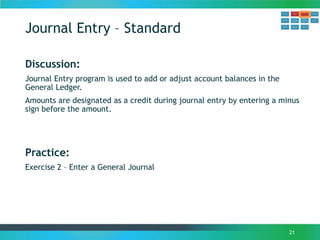
Journal Entry program is used to add or adjust account balances in the
General Ledger.
Amounts are designated as a credit during journal entry by entering a minus
sign before the amount.
Practice:
Exercise 2 – Enter a General Journal
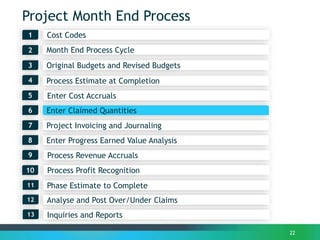
Project Month End Process
Month End Process Cycle2
1
3
22
Process Estimate at Completion4
Enter Claimed Quantities6
Process Revenue Accruals
7
Enter Progress Earned Value Analysis
Process Profit Recognition
8
Project Invoicing and Journaling
9
Cost Codes
10
Original Budgets and Revised Budgets
Phase Estimate to Complete11
Analyse and Post Over/Under Claims12
Enter Cost Accruals5
Inquiries and Reports13
Enter Claimed Quantities
23
Understanding Enter Claimed Quantities
Enter Claimed Quantities is the process of updating the number of units completed for
billing purposes. Typically the date of entry will be determined by the contract.
One line entered per region from the Payment Claims submitted to Optus as a reversing
journal each month
Break
14
Project Month End Process
Month End Process Cycle2
1
3
25
Process Estimate at Completion4
Enter Claimed Quantities6
Process Revenue Accruals
7
Enter Progress Earned Value Analysis
Process Profit Recognition
8
Project Invoicing and Journaling
9
Cost Codes
10
Original Budgets and Revised Budgets
Phase Estimate to Complete11
Analyse and Post Over/Under Claims12
Enter Cost Accruals5
Inquiries and Reports13
Invoicing and Journaling
• All invoices are raised in National as one invoice under
420029.5020.91080050.
• The invoices are then journal out to each region by cost code
and work order.
• All National invoices (bank fee’s, change management etc.) are
raised under 420029.5020.91065050 and are then journal to itself
to add the work order details.
• All sundry invoices raised are done directly into the region but
still need to be journal out to itself so that the work order can
be added.
• Every invoice should be allocated to a work order by journal
entry
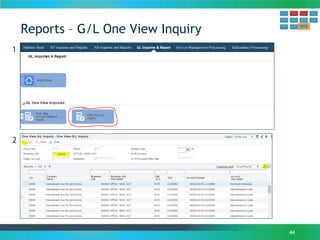
• This data can be reviewed via the One View G/L Inquiry
26
Project Month End Process
Month End Process Cycle2
1
3
27
Process Estimate at Completion4
Enter Claimed Quantities6
Process Revenue Accruals
7
Enter Progress Earned Value Analysis
Process Profit Recognition
8
Project Invoicing and Journaling
9
Cost Codes
10
Original Budgets and Revised Budgets
Phase Estimate to Complete11
Analyse and Post Over/Under Claims12
Enter Cost Accruals5
Inquiries and Reports13
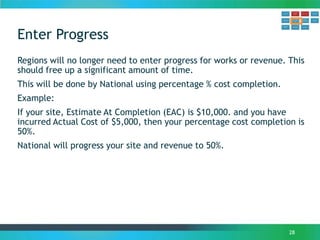
Enter Progress
28
Regions will no longer need to enter progress for works or revenue. This
should free up a significant amount of time.
This will be done by National using percentage % cost completion.
Example:
If your site, Estimate At Completion (EAC) is $10,000. and you have
incurred Actual Cost of $5,000, then your percentage cost completion is
50%.
National will progress your site and revenue to 50%.
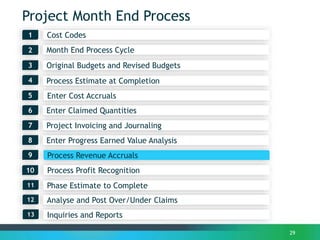
Project Month End Process
Month End Process Cycle2
1
3
29
Process Estimate at Completion4
Enter Claimed Quantities6
Process Revenue Accruals
7
Enter Progress Earned Value Analysis
Process Profit Recognition
8
Project Invoicing and Journaling
9
Cost Codes
10
Original Budgets and Revised Budgets
Phase Estimate to Complete11
Analyse and Post Over/Under Claims12
Enter Cost Accruals5
Inquiries and Reports13
Manual Revenue Accruals
30
Purpose:
The purpose of a manual revenue accrual is to either:
1. Record revenue earned but not yet invoiced
• Claimed not invoiced (Claimed)
• Earned but not claimed (Underclaim)
2. Reduce revenue to reflect items not earned (Overclaim)
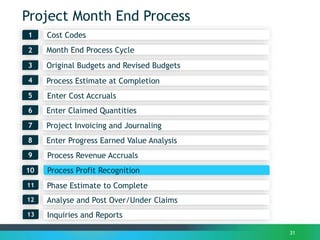
Project Month End Process
Month End Process Cycle2
1
3
31
Process Estimate at Completion4
Enter Claimed Quantities6
Process Revenue Accruals
7
Enter Progress Earned Value Analysis
Process Profit Recognition
8
Project Invoicing and Journaling
9
Cost Codes
10
Original Budgets and Revised Budgets
Phase Estimate to Complete11
Analyse and Post Over/Under Claims12
Enter Cost Accruals5
Inquiries and Reports13
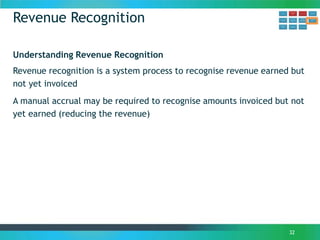
Revenue Recognition
32
Understanding Revenue Recognition
Revenue recognition is a system process to recognise revenue earned but
not yet invoiced
A manual accrual may be required to recognise amounts invoiced but not
yet earned (reducing the revenue)
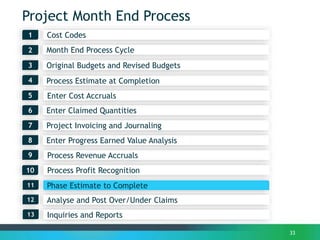
Project Month End Process
Month End Process Cycle2
1
3
33
Process Estimate at Completion4
Enter Claimed Quantities6
Process Revenue Accruals
7
Enter Progress Earned Value Analysis
Process Profit Recognition
8
Project Invoicing and Journaling
9
Cost Codes
10
Original Budgets and Revised Budgets
Phase Estimate to Complete11
Analyse and Post Over/Under Claims12
Enter Cost Accruals5
Inquiries and Reports13
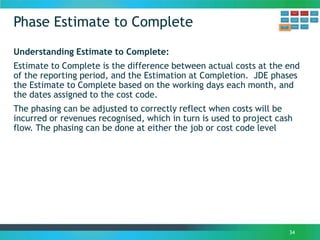
Phase Estimate to Complete
34
Understanding Estimate to Complete:
Estimate to Complete is the difference between actual costs at the end
of the reporting period, and the Estimation at Completion. JDE phases
the Estimate to Complete based on the working days each month, and
the dates assigned to the cost code.
The phasing can be adjusted to correctly reflect when costs will be
incurred or revenues recognised, which in turn is used to project cash
flow. The phasing can be done at either the job or cost code level
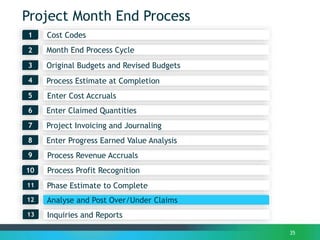
Project Month End Process
Month End Process Cycle2
1
3
35
Process Estimate at Completion4
Enter Claimed Quantities6
Process Revenue Accruals
7
Enter Progress Earned Value Analysis
Process Profit Recognition
8
Project Invoicing and Journaling
9
Cost Codes
10
Original Budgets and Revised Budgets
Phase Estimate to Complete11
Analyse and Post Over/Under Claims12
Enter Cost Accruals5
Inquiries and Reports13
Under / Over claims Analysis
36
Understanding Under/ Over Claims
The Profit Recognition process generates either Costs in Excess, or Billings
in Excess. This is further analysed to report the components:
• Under Claim: the amount claimed is less than the work performed, or
other entitlement under the contract
• Over Claim: the amount claimed exceeds the work performed, or,
although entitled under the contract, can’t be recognised yet
Under / Over claims Analysis
37
Types of Under Claim
• Work Completed Not Claimed
Work completed which can be recognised as revenue however not yet claimed.
• Contractual Claims
Claims for which there is contractual entitlement but not yet claimed
• Insurance Claims
Claims for which there is entitlement under an insurance policy but not settled by the insurer
• Variations Underclaimed
Variations recognised in accordance with the Company's revenue recognition policy but not yet
claimed.
• Performance Incentive
KPI/Gain Share recognised in accordance with the Company's revenue recognition policy but not
yet claimed.
• Earned Value Shortfall
Costs exceed earned budget
• Materials on Site
Materials purchased and on site, however not consumed and contractually can't be claimed
• Effects of Unbalanced Bid
Costs eg Mobilisation which contractually can't be claimed when incurred, but must be claimed
over an extended period of time.
Under / Over claims Analysis
38
Types of Over Claim
• Work Claimed Not Completed
Revenue claimed however can't be recognised, either under contract or based on work
performed.
• Uncomp. Portion of Cont. Claim
Claims for which there is contractual entitlement but the entitlement isn't realised
• Variations Over claimed
Variations claimed but can't be recognised under the Company's revenue recognition policy.
• Earned Value Surplus
Costs less than earned budget (see definition Earned Value).
• Contingency to Date
The amount of contingency that has been claimed for which there is no corresponding
expenditure
• Effect of Unbalanced Bid
Costs which contractually can be claimed before being incurred, however can't be recognised
under the Company's revenue recognition policy.
• Provision for Future Loss
The Company's revenue recognition policy requires that if a project is in a loss position, the
full loss is recognised.
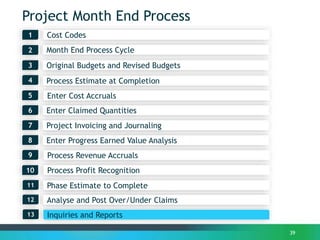
Project Month End Process
Month End Process Cycle2
1
3
39
Process Estimate at Completion4
Enter Claimed Quantities6
Process Revenue Accruals
7
Enter Progress Earned Value Analysis
Process Profit Recognition
8
Project Invoicing and Journaling
9
Cost Codes
10
Original Budgets and Revised Budgets
Phase Estimate to Complete11
Analyse and Post Over/Under Claims12
Enter Cost Accruals5
Inquiries and Reports13
Reports
40
Discussion:
• Reports
 Open Order Report
 Purchase Order Details Inquiry
 Cost Analysis Enquiry – G/L One View Inquiry
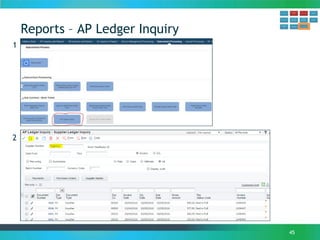
 AP Ledger Inquiry
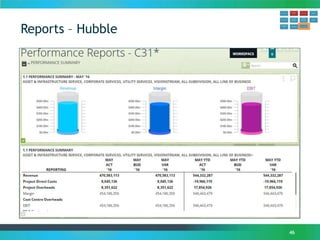
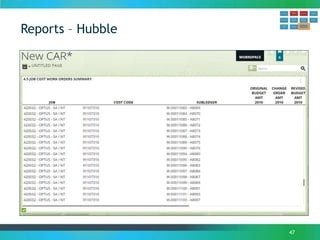
 Hubble
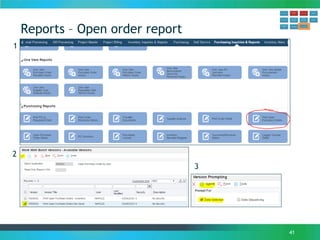
Reports – Open order report
41
1
2
3
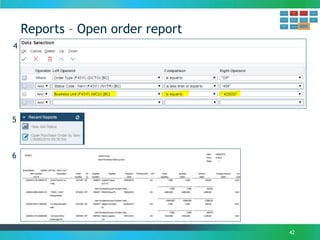
Reports – Open order report
42
4
5
6
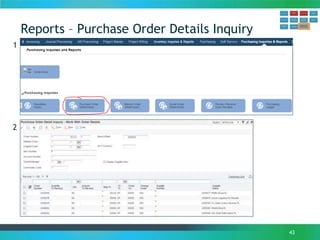
Reports – Purchase Order Details Inquiry
43
1
2
Reports – G/L One View Inquiry
44
1
2
Reports – AP Ledger Inquiry
45
1
2
Reports – Hubble
46
Reports – Hubble
47
Break
14

JDE Projects Month End Course - Work Orders

  • 1.
    JDE Projects withWork Orders 1/2 Day Course Month End - OWP 1
  • 2.
  • 3.
    Project Month EndProcess Month End Process Cycle2 1 3 3 Process Estimate at Completion4 Enter Claimed Quantities6 Process Revenue Accruals 7 Enter Progress Earned Value Analysis Process Profit Recognition 8 Project Invoicing and Journaling 9 Cost Codes 10 Original Budgets and Revised Budgets Phase Estimate to Complete11 Analyse and Post Over/Under Claims12 Enter Cost Accruals5 Inquiries and Reports13
  • 4.
    4 Account Structure -Example Where (Does the cost belong) What (is the cost) Business Unit Object. . SubsidiaryCompany . . Subledger 30005 Project 6075 Purchased Materials 8010 labour WBS or Cost Code Workorder 15000 Cost Centre 8010 Labour 8XXX Overhead Expenses Not Used Can be used for additional breakdown 10000 Balance Sheet Assets, Liabilities , Equity Analysis of accounts i.e Banks accounts Not used
  • 5.
    Cost Code /Subsidiary 5 Cost code Starting with: 1xxxxxxx – Overhead Cost Codes 9xxxxxxx – Revenue Cost Codes Direct Cost Codes: To identify programme and phase. Example: 50000110 is Ph1 eJV SU–Base Work 2xxxxxxx – NSW Direct Cost 3xxxxxxx – VIC Direct Cost 4xxxxxxx – QLD Direct Cost 5xxxxxxx – SA Direct Cost 6xxxxxxx – WA Direct Cost Cost Type: To identify what type of cost. Example: 6170 for subcontractor.
  • 6.
    Subledger 11 pe Cost Type 20005000 31005200 20005000 31005200 45008900 SubType: Work Order W 789765 Work Order: Replace Cross Arm Pole A54, 123 Smith St, Maryborough Cost Code 20009110 20009130 20009210 20009310 20009410 20009340 20009330 S2299 - TAMWORTH WESTDALE 15985 Note: JDE Work Order/Subledger in JDE is a running number and we could not create to make it the same as site ID • Every direct cost must have a work order
  • 7.
    Hubble – CostCode Report 7
  • 8.
    Project Month EndProcess Month End Process Cycle2 1 3 8 Process Estimate at Completion4 Enter Claimed Quantities6 Process Revenue Accruals 7 Enter Progress Earned Value Analysis Process Profit Recognition 8 Project Invoicing and Journaling 9 Cost Codes 10 Original Budgets and Revised Budgets Phase Estimate to Complete11 Analyse and Post Over/Under Claims12 Enter Cost Accruals5 Inquiries and Reports13
  • 9.
    Month End ProcessCycle 9 Revised Budgets Process Estimate at Completion (EAC) Enter Cost Accruals Enter Claimed Quantities Project Invoicing & Journaling Enter Progress Review / Finalise Earned Value Analysis (EVA) Process Revenue Accruals •Revenue Recognition •Manual Revenue Accrual Process Profit Recognition Phase Estimate to Complete (ETC) Analyse & Post Over/Under Claims Inquiries/Reports Blue = National Red = Regions
  • 10.
    Month End ProcessTimeline Activity Date Completed Revised Budgets Weekly Estimate at Completion Anytime before 30th each month Enter Cost Accruals Day One Enter Claimed Quantities Day One Invoicing 15th & last day of each month Progress Earned Value Analysis Day Two-Three Revenue Accruals Day Four Profit Recognition Automatic Phase Estimate to Complete Day Five Analyse & Post Over/Under Claims Day Six Inquiries & Reports Anytime 10
  • 11.
    Project Month EndProcess Month End Process Cycle2 1 3 11 Process Estimate at Completion4 Enter Claimed Quantities6 Process Revenue Accruals 7 Enter Progress Earned Value Analysis Process Profit Recognition 8 Project Invoicing and Journaling 9 Cost Codes 10 Original Budgets and Revised Budgets Phase Estimate to Complete11 Analyse and Post Over/Under Claims12 Enter Cost Accruals5 Inquiries and Reports13
  • 12.
    Original Budgets andRevised Budgets • All original budgets are based on PO’s received from Optus and listed in VISZ as of the 1st of May 2016. • All revised budgets are based on changes to existing PO’s, new PO’s received and cancelled PO’s received from Optus since the 1st of May 2016. • D/C Rate is 70/30 standard across the board no matter the program or phase. Note: Forecast Works previously in SMS that have not received PO’s will be loaded in separate cost codes named “Emerging Works” 12
  • 13.
    Variations • Variation inJDE has a different meaning to OWP: Variations are the JDE mechanism to increase / decrease Original Budget, and derive Revised Budget. These two scenarios apply to new work: 1. New scope: New work is awarded by the client. Revenue and cost variations are entered, which increases the overall project budget. 2. Within scope: Work within the original scope is ordered by the client. Revenue and cost budgets for that work are transferred from Emerging Works budgets. The overall project budget does not change. Variations are also used where there is a decrease in scope. • OWP’s term Variation is for any variation work listed in the RTC Note: RTC Submitted to Clients will be loaded into separate cost codes and named “SPA – Variations”. 13
  • 14.
    Project Month EndProcess Month End Process Cycle2 1 3 14 Process Estimate at Completion4 Enter Claimed Quantities6 Process Revenue Accruals 7 Enter Progress Earned Value Analysis Process Profit Recognition 8 Project Invoicing and Journaling 9 Cost Codes 10 Original Budgets and Revised Budgets Phase Estimate to Complete11 Analyse and Post Over/Under Claims12 Enter Cost Accruals5 Inquiries and Reports13
  • 15.
    Estimate At Completion 15 UnderstandingEstimate At Completion Estimate At Completion is the projected revenues and costs at the completion of the project. Purpose of Estimate At Completion The purpose of Estimate at Completion is to provide a forecast of revenue and costs to understand the profitability of the project, and to highlight any deviations from budget Relevance to Profit Recognition Profit recognition is calculated based on the Estimated at Completion values. Incorrect values will result in either over / understatement of profit.
  • 16.
    Estimate At Completion 16 Exercise3: Estimate at Completion without Work Order Exercise 4: Estimate at Completion with Work Order
  • 17.
    Project Month EndProcess Month End Process Cycle2 1 3 17 Process Estimate at Completion4 Enter Claimed Quantities6 Process Revenue Accruals 7 Enter Progress Earned Value Analysis Process Profit Recognition 8 Project Invoicing and Journaling 9 Cost Codes 10 Original Budgets and Revised Budgets Phase Estimate to Complete11 Analyse and Post Over/Under Claims12 Enter Cost Accruals5 Inquiries and Reports13
  • 18.
    Enter Cost Accruals 18 Demonstration& Discussion: • Cost Accruals  Review JSI  Calculate Accrual Entries  Create Accruals  Review & Post Accruals • Journaling – Financials Lite
  • 19.
    Enter Cost Accruals 19 Purpose: Costaccruals are an accounting process to record expenses that have been incurred, but not yet recognised. Cost accruals are created after a review of project costs. Practice: Exercise 7: Create Cost Accruals Exercise 8: Create Cost Accruals with Work Order Exercise 9: Post Cost Accruals Exercise 10: Review Cost Accrual Entry and Reversals
  • 20.
  • 21.
    Journal Entry –Standard 21 Discussion: Journal Entry program is used to add or adjust account balances in the General Ledger. Amounts are designated as a credit during journal entry by entering a minus sign before the amount. Practice: Exercise 2 – Enter a General Journal
  • 22.
    Project Month EndProcess Month End Process Cycle2 1 3 22 Process Estimate at Completion4 Enter Claimed Quantities6 Process Revenue Accruals 7 Enter Progress Earned Value Analysis Process Profit Recognition 8 Project Invoicing and Journaling 9 Cost Codes 10 Original Budgets and Revised Budgets Phase Estimate to Complete11 Analyse and Post Over/Under Claims12 Enter Cost Accruals5 Inquiries and Reports13
  • 23.
    Enter Claimed Quantities 23 UnderstandingEnter Claimed Quantities Enter Claimed Quantities is the process of updating the number of units completed for billing purposes. Typically the date of entry will be determined by the contract. One line entered per region from the Payment Claims submitted to Optus as a reversing journal each month
  • 24.
  • 25.
    Project Month EndProcess Month End Process Cycle2 1 3 25 Process Estimate at Completion4 Enter Claimed Quantities6 Process Revenue Accruals 7 Enter Progress Earned Value Analysis Process Profit Recognition 8 Project Invoicing and Journaling 9 Cost Codes 10 Original Budgets and Revised Budgets Phase Estimate to Complete11 Analyse and Post Over/Under Claims12 Enter Cost Accruals5 Inquiries and Reports13
  • 26.
    Invoicing and Journaling •All invoices are raised in National as one invoice under 420029.5020.91080050. • The invoices are then journal out to each region by cost code and work order. • All National invoices (bank fee’s, change management etc.) are raised under 420029.5020.91065050 and are then journal to itself to add the work order details. • All sundry invoices raised are done directly into the region but still need to be journal out to itself so that the work order can be added. • Every invoice should be allocated to a work order by journal entry • This data can be reviewed via the One View G/L Inquiry 26
  • 27.
    Project Month EndProcess Month End Process Cycle2 1 3 27 Process Estimate at Completion4 Enter Claimed Quantities6 Process Revenue Accruals 7 Enter Progress Earned Value Analysis Process Profit Recognition 8 Project Invoicing and Journaling 9 Cost Codes 10 Original Budgets and Revised Budgets Phase Estimate to Complete11 Analyse and Post Over/Under Claims12 Enter Cost Accruals5 Inquiries and Reports13
  • 28.
    Enter Progress 28 Regions willno longer need to enter progress for works or revenue. This should free up a significant amount of time. This will be done by National using percentage % cost completion. Example: If your site, Estimate At Completion (EAC) is $10,000. and you have incurred Actual Cost of $5,000, then your percentage cost completion is 50%. National will progress your site and revenue to 50%.
  • 29.
    Project Month EndProcess Month End Process Cycle2 1 3 29 Process Estimate at Completion4 Enter Claimed Quantities6 Process Revenue Accruals 7 Enter Progress Earned Value Analysis Process Profit Recognition 8 Project Invoicing and Journaling 9 Cost Codes 10 Original Budgets and Revised Budgets Phase Estimate to Complete11 Analyse and Post Over/Under Claims12 Enter Cost Accruals5 Inquiries and Reports13
  • 30.
    Manual Revenue Accruals 30 Purpose: Thepurpose of a manual revenue accrual is to either: 1. Record revenue earned but not yet invoiced • Claimed not invoiced (Claimed) • Earned but not claimed (Underclaim) 2. Reduce revenue to reflect items not earned (Overclaim)
  • 31.
    Project Month EndProcess Month End Process Cycle2 1 3 31 Process Estimate at Completion4 Enter Claimed Quantities6 Process Revenue Accruals 7 Enter Progress Earned Value Analysis Process Profit Recognition 8 Project Invoicing and Journaling 9 Cost Codes 10 Original Budgets and Revised Budgets Phase Estimate to Complete11 Analyse and Post Over/Under Claims12 Enter Cost Accruals5 Inquiries and Reports13
  • 32.
    Revenue Recognition 32 Understanding RevenueRecognition Revenue recognition is a system process to recognise revenue earned but not yet invoiced A manual accrual may be required to recognise amounts invoiced but not yet earned (reducing the revenue)
  • 33.
    Project Month EndProcess Month End Process Cycle2 1 3 33 Process Estimate at Completion4 Enter Claimed Quantities6 Process Revenue Accruals 7 Enter Progress Earned Value Analysis Process Profit Recognition 8 Project Invoicing and Journaling 9 Cost Codes 10 Original Budgets and Revised Budgets Phase Estimate to Complete11 Analyse and Post Over/Under Claims12 Enter Cost Accruals5 Inquiries and Reports13
  • 34.
    Phase Estimate toComplete 34 Understanding Estimate to Complete: Estimate to Complete is the difference between actual costs at the end of the reporting period, and the Estimation at Completion. JDE phases the Estimate to Complete based on the working days each month, and the dates assigned to the cost code. The phasing can be adjusted to correctly reflect when costs will be incurred or revenues recognised, which in turn is used to project cash flow. The phasing can be done at either the job or cost code level
  • 35.
    Project Month EndProcess Month End Process Cycle2 1 3 35 Process Estimate at Completion4 Enter Claimed Quantities6 Process Revenue Accruals 7 Enter Progress Earned Value Analysis Process Profit Recognition 8 Project Invoicing and Journaling 9 Cost Codes 10 Original Budgets and Revised Budgets Phase Estimate to Complete11 Analyse and Post Over/Under Claims12 Enter Cost Accruals5 Inquiries and Reports13
  • 36.
    Under / Overclaims Analysis 36 Understanding Under/ Over Claims The Profit Recognition process generates either Costs in Excess, or Billings in Excess. This is further analysed to report the components: • Under Claim: the amount claimed is less than the work performed, or other entitlement under the contract • Over Claim: the amount claimed exceeds the work performed, or, although entitled under the contract, can’t be recognised yet
  • 37.
    Under / Overclaims Analysis 37 Types of Under Claim • Work Completed Not Claimed Work completed which can be recognised as revenue however not yet claimed. • Contractual Claims Claims for which there is contractual entitlement but not yet claimed • Insurance Claims Claims for which there is entitlement under an insurance policy but not settled by the insurer • Variations Underclaimed Variations recognised in accordance with the Company's revenue recognition policy but not yet claimed. • Performance Incentive KPI/Gain Share recognised in accordance with the Company's revenue recognition policy but not yet claimed. • Earned Value Shortfall Costs exceed earned budget • Materials on Site Materials purchased and on site, however not consumed and contractually can't be claimed • Effects of Unbalanced Bid Costs eg Mobilisation which contractually can't be claimed when incurred, but must be claimed over an extended period of time.
  • 38.
    Under / Overclaims Analysis 38 Types of Over Claim • Work Claimed Not Completed Revenue claimed however can't be recognised, either under contract or based on work performed. • Uncomp. Portion of Cont. Claim Claims for which there is contractual entitlement but the entitlement isn't realised • Variations Over claimed Variations claimed but can't be recognised under the Company's revenue recognition policy. • Earned Value Surplus Costs less than earned budget (see definition Earned Value). • Contingency to Date The amount of contingency that has been claimed for which there is no corresponding expenditure • Effect of Unbalanced Bid Costs which contractually can be claimed before being incurred, however can't be recognised under the Company's revenue recognition policy. • Provision for Future Loss The Company's revenue recognition policy requires that if a project is in a loss position, the full loss is recognised.
  • 39.
    Project Month EndProcess Month End Process Cycle2 1 3 39 Process Estimate at Completion4 Enter Claimed Quantities6 Process Revenue Accruals 7 Enter Progress Earned Value Analysis Process Profit Recognition 8 Project Invoicing and Journaling 9 Cost Codes 10 Original Budgets and Revised Budgets Phase Estimate to Complete11 Analyse and Post Over/Under Claims12 Enter Cost Accruals5 Inquiries and Reports13
  • 40.
    Reports 40 Discussion: • Reports  OpenOrder Report  Purchase Order Details Inquiry  Cost Analysis Enquiry – G/L One View Inquiry  AP Ledger Inquiry  Hubble
  • 41.
    Reports – Openorder report 41 1 2 3
  • 42.
    Reports – Openorder report 42 4 5 6
  • 43.
    Reports – PurchaseOrder Details Inquiry 43 1 2
  • 44.
    Reports – G/LOne View Inquiry 44 1 2
  • 45.
    Reports – APLedger Inquiry 45 1 2
  • 46.
  • 47.
  • 48.

Editor's Notes

  • #3 Instructor Notes Take a break about 45 minutes in (5 minutes Stretch) and then after 1 ½ hrs for about 15mins (coffee run) Comfort break Catch up on emails & calls Lunch will be provided for courses that span a full day – not half day courses Check people can plug in laptops & have started them up
  • #4 Instructor Notes
  • #5 Make note that this Structure is a change from Oracle and the terminology has changed – needs to be explained in detail. The project numbers are the same as per the legacy system – except for the old “U” number Visionstream Projects (and maybe others??) Consider including a mapping table (either in pack, or write on Whiteboard) depicting the Oracle to JDE changes – Project to Project, Cost code – Subsidiary. Mention "business unit" = project, job, branch etc Make note that the Object code is new to Oracle people Added: (The Object code was not part of the cost codes, but was a part of the accounting string). This needs to be explained to the trainees who extensively use Oracle. For existing JDE users you need to explain the Company number is now by business unit and it can perform transactions without going through the inter-company accounts.
  • #7 OPTUS project (or any Work Order based Projects) – may need to create a slide with unique information. Simplify this slide to show Work Orders and the one to Many (or vice versa) possibilities for Work Orders.
  • #9 Instructor Notes
  • #10 The Excel Handout should be shown at this point
  • #12 Instructor Notes
  • #15 Instructor Notes
  • #16 Instructor Notes Is this needed if Budget’s are created by Master Data - This is a information only. All Master Data will be set-up by Ventia Master Data
  • #17 JSI is the similar to CAR from SMS JSI is the same as the current JDE How to update the JSI will be undertaken during the month end reporting training Optus is special – they are at level 9
  • #18 Instructor Notes
  • #19 Instructor Notes
  • #20 Instructor Notes For ex Oracle users, this process replaces the PA Cost Accrual
  • #21 JSI is the similar to CAR from SMS JSI is the same as the current JDE How to update the JSI will be undertaken during the month end reporting training Optus is special – they are at level 9
  • #22 Instructor Notes See Exercise 2 and 3 Talk about quick entry by importing / pasting data from an excel spreadsheet in to the Journal Entry program
  • #23 Instructor Notes
  • #24 Instructor Notes Is this needed if Budget’s are created by Master Data - This is a information only. All Master Data will be set-up by Ventia Master Data
  • #26 Instructor Notes
  • #27 Instructor Notes Is this needed if Budget’s are created by Master Data - This is a information only. All Master Data will be set-up by Ventia Master Data
  • #28 Instructor Notes
  • #29 Instructor Notes Is this needed if Budget’s are created by Master Data - This is a information only. All Master Data will be set-up by Ventia Master Data
  • #30 Instructor Notes
  • #31 Instructor Notes For ex Oracle users, this process replaces the PA Cost Accrual
  • #32 Instructor Notes
  • #33 Instructor Notes Is this needed if Budget’s are created by Master Data - This is a information only. All Master Data will be set-up by Ventia Master Data
  • #34 Instructor Notes
  • #35 Instructor Notes Is this needed if Budget’s are created by Master Data - This is a information only. All Master Data will be set-up by Ventia Master Data
  • #36 Instructor Notes
  • #37 Instructor Notes Is this needed if Budget’s are created by Master Data - This is a information only. All Master Data will be set-up by Ventia Master Data
  • #38 Instructor Notes Is this needed if Budget’s are created by Master Data - This is a information only. All Master Data will be set-up by Ventia Master Data
  • #39 Instructor Notes Is this needed if Budget’s are created by Master Data - This is a information only. All Master Data will be set-up by Ventia Master Data
  • #40 Instructor Notes
  • #41 Instructor Notes Is this needed if Budget’s are created by Master Data - This is a information only. All Master Data will be set-up by Ventia Master Data
  • #42 Instructor Notes Is this needed if Budget’s are created by Master Data - This is a information only. All Master Data will be set-up by Ventia Master Data
  • #43 Instructor Notes Is this needed if Budget’s are created by Master Data - This is a information only. All Master Data will be set-up by Ventia Master Data
  • #44 Instructor Notes Is this needed if Budget’s are created by Master Data - This is a information only. All Master Data will be set-up by Ventia Master Data
  • #45 Instructor Notes Is this needed if Budget’s are created by Master Data - This is a information only. All Master Data will be set-up by Ventia Master Data
  • #46 Instructor Notes Is this needed if Budget’s are created by Master Data - This is a information only. All Master Data will be set-up by Ventia Master Data
  • #47 Instructor Notes Is this needed if Budget’s are created by Master Data - This is a information only. All Master Data will be set-up by Ventia Master Data
  • #48 Instructor Notes Is this needed if Budget’s are created by Master Data - This is a information only. All Master Data will be set-up by Ventia Master Data