Oracle Applications White Paper
ORACLE EBS R12 ASSETS CLOSING
PERIOD PROCEDURES
Jan 2010
Author: Saad Asif
Oracle Financials Consultant
sasif.qa@gmail.com
Version 1.0
R12 Assets - Closing Period © 2010
Page 2 of 12
Contents
About the Author...................................................................................3
Introduction.........................................................................................4
Purpose..............................................................................................4
Who Should Read This.............................................................................4
Oracle EBS R12 Assets - Closing Period Procedures ........................................... 5
Overview of the Period Close ........................................................................... 5
Complete Transactions .................................................................................. 5
Run Depreciation ......................................................................................... 5
Create, Transfer, and Post Journals ................................................................... 6
Reconciling Journals Transfer Process................................................................. 7
Reconciling Journals Import Process (GL)............................................................. 7
Reconcile FA to GL ....................................................................................... 8
Reconcile Asset Cost Account ....................................................................................... 9
Reconcile Asset CIP Cost Account................................................................................. 10
Reconcile Reserve Account ........................................................................................ 11
Reconcile Depreciation Expense .................................................................................. 11
Information Sources ............................................................................. 12
R12 Assets - Closing Period © 2010
Page 3 of 12
About the Author
Saad Asif is a Chartered Accountant and an expert functional consultant in
Oracle e-Business Suite with more than 12 years of experience of solutions
design, configuration, testing and documentation.
R12 Assets - Closing Period © 2010
Page 4 of 12
Introduction
Closing the books is a necessary step in the accounting cycle. In order to issue
the financial statement, accounting staff must ensure that subledgers’ balances
are cross checked with relevant General Ledger accounts’ balances.
Doing so in Oracle EBS R12, requires performing actions in order and running
many reports to ascertain that ledgers and accounts are in harmony and no
surprises will be discovered at year end.
Purpose
This paper will help you understand the steps, order, and reports required to
close Oracle Receivables period. Proper closing each month helps minimizing
year end time needed to issue financial statements.
Who Should Read This
This paper is aimed to super users and applications’ auditors, as well as
functional consultants and implementers.
R12 Assets - Closing Period © 2010
Page 5 of 12
Oracle EBS R12 Assets - Closing Period Procedures
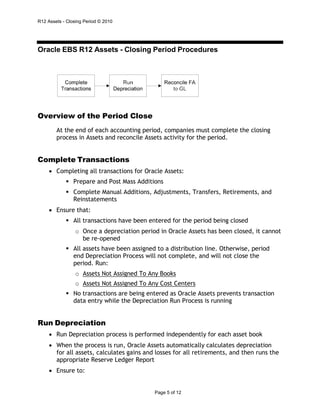
Overview of the Period Close
At the end of each accounting period, companies must complete the closing
process in Assets and reconcile Assets activity for the period.
Complete Transactions
• Completing all transactions for Oracle Assets:
 Prepare and Post Mass Additions
 Complete Manual Additions, Adjustments, Transfers, Retirements, and
Reinstatements
• Ensure that:
 All transactions have been entered for the period being closed
o Once a depreciation period in Oracle Assets has been closed, it cannot
be re-opened
 All assets have been assigned to a distribution line. Otherwise, period
end Depreciation Process will not complete, and will not close the
period. Run:
o Assets Not Assigned To Any Books
o Assets Not Assigned To Any Cost Centers
 No transactions are being entered as Oracle Assets prevents transaction
data entry while the Depreciation Run Process is running
Run Depreciation
• Run Depreciation process is performed independently for each asset book
• When the process is run, Oracle Assets automatically calculates depreciation
for all assets, calculates gains and losses for all retirements, and then runs the
appropriate Reserve Ledger Report
• Ensure to:
R12 Assets - Closing Period © 2010
Page 6 of 12
 Run Depreciation without closing the period
 Review Journal Entry Reserve Ledger Report for Cost, calculated
depreciation expense, and accumulated depreciation
 Make necessary activities
 Re-Run Depreciation without closing the period and review the Reserve
Ledger Report again
 Run Depreciation with closing the period
Create, Transfer, and Post Journals
• Run Accounting after processing all postable records.
• The following approach may be applied After an asset addition:
 Run Create Accounting - Assets for the Addition Process Category to send
Cost and Cost Clearing lines to GL
 Run Depreciation without closing the period
 After depreciation runs, you can run the Create Accounting for the
Depreciation Process Category to get the Depreciation Expense and
Reserve lines sent to GL
 If needed you can later update the asset and enter whatever transaction
is needed. (for example : cost adjustment). For this particular asset, the
depreciation data is automatically rolled back
 And then run Create Accounting to send to GL the adjustment journal
and the reversal journal for Rollback Depreciation (in which the prior
depreciation expense is credited and the reserve is debited):
o Rerunning depreciation will then depreciate again this asset And
Create Accounting will send to GL new Depreciation lines
R12 Assets - Closing Period © 2010
Page 7 of 12
Reconciling Journals Transfer Process
• Subledger Accounting Program report:
 Is produced by Create Accounting program
 Shows subledger journal entries created for successful accounting events
• Journal Entries report (in Posted status mode):
 includes all transactions that should be posted to General Ledger (i.e.
associated transaction type has Post to GL set to Yes)
 displays:
o details of what is or will be posted to each GL account for a specific
period and
o Journals by receivables categories
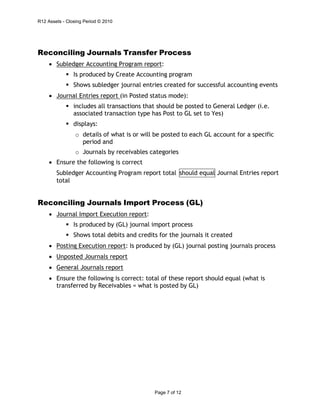
• Ensure the following is correct
Subledger Accounting Program report total
total
Journal Entries report
Reconciling Journals Import Process (GL)
• Journal Import Execution report:
 Is produced by (GL) journal import process
 Shows total debits and credits for the journals it created
• Posting Execution report: Is produced by (GL) journal posting journals process
• Unposted Journals report
• General Journals report
• Ensure the following is correct: total of these report should equal (what is
transferred by Receivables = what is posted by GL)
should equal
R12 Assets - Closing Period © 2010
Page 8 of 12
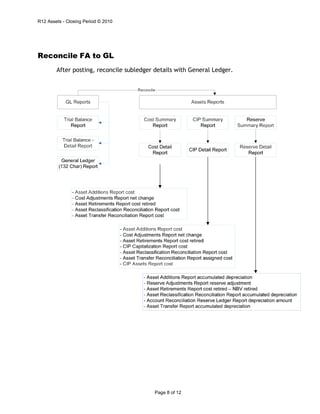
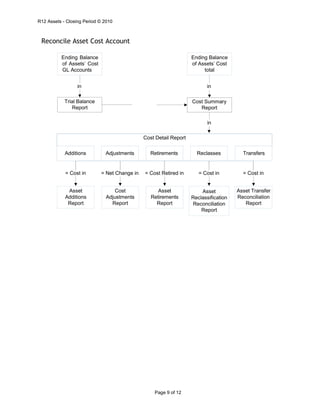
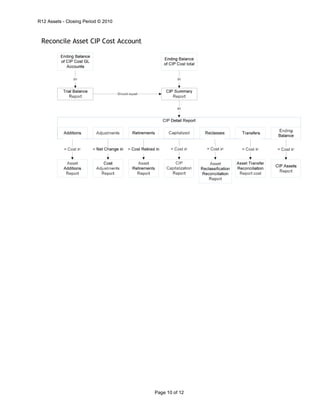
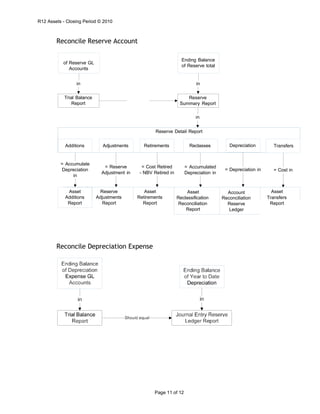
Reconcile FA to GL
After posting, reconcile subledger details with General Ledger.
R12 Assets - Closing Period © 2010
Page 9 of 12
Reconcile Asset Cost Account
in in
in
Cost Detail Report
Additions Adjustments Retirements Reclasses Transfers
= Cost in = Net Change in = Cost Retired in = Cost in = Cost in
Asset Transfer
Reconciliation
Report
Asset
Reclassification
Reconciliation
Report
Asset
Retirements
Report
Cost
Adjustments
Report
Asset
Additions
Report
Cost Summary
Report
Trial Balance
Report
Ending Balance
of Assets’ Cost
total
Ending Balance
of Assets’ Cost
GL Accounts
R12 Assets - Closing Period © 2010
Page 10 of 12
Reconcile Asset CIP Cost Account
R12 Assets - Closing Period © 2010
Page 11 of 12
Trial Balance
Report
Reconcile Reserve Account
in in
Reserve
Summary Report
in
Reserve Detail Report
Additions Adjustments Retirements Reclasses Depreciation Transfers
= Accumulate
Depreciation
in
= Reserve
Adjustment in
= Cost Retired
- NBV Retired in
= Accumulated
Depreciation in
= Depreciation in = Cost in
Asset Reserve Asset Asset Account Asset
Additions Adjustments Retirements Reclassification Reconciliation Transfers
Report Report Report Reconciliation
Report
Reserve
Ledger
Report
Reconcile Depreciation Expense
Ending Balance
of Reserve total
of Reserve GL
Accounts
R12 Assets - Closing Period © 2010
Page 12 of 12
Information Sources
o Metalink Note: 557948.1
o Metalink Note: 961285.1
o Reconciling Oracle Assets . Whitepaper by Brian R. Bouchard,
September 10, 2007 (Oracle Community)
o Oracle Assets User's Guide Release 12.1 Part No. E13586-02

Oracle assets period end procedures

  • 1.
    Oracle Applications WhitePaper ORACLE EBS R12 ASSETS CLOSING PERIOD PROCEDURES Jan 2010 Author: Saad Asif Oracle Financials Consultant sasif.qa@gmail.com Version 1.0
  • 2.
    R12 Assets -Closing Period © 2010 Page 2 of 12 Contents About the Author...................................................................................3 Introduction.........................................................................................4 Purpose..............................................................................................4 Who Should Read This.............................................................................4 Oracle EBS R12 Assets - Closing Period Procedures ........................................... 5 Overview of the Period Close ........................................................................... 5 Complete Transactions .................................................................................. 5 Run Depreciation ......................................................................................... 5 Create, Transfer, and Post Journals ................................................................... 6 Reconciling Journals Transfer Process................................................................. 7 Reconciling Journals Import Process (GL)............................................................. 7 Reconcile FA to GL ....................................................................................... 8 Reconcile Asset Cost Account ....................................................................................... 9 Reconcile Asset CIP Cost Account................................................................................. 10 Reconcile Reserve Account ........................................................................................ 11 Reconcile Depreciation Expense .................................................................................. 11 Information Sources ............................................................................. 12 Information Sources ............................................................................. 12
  • 3.
    R12 Assets -Closing Period © 2010 Page 3 of 12 About the Author Saad Asif is a Chartered Accountant and an expert functional consultant in Oracle e-Business Suite with more than 12 years of experience of solutions design, configuration, testing and documentation.
  • 4.
    R12 Assets -Closing Period © 2010 Page 4 of 12 Introduction Closing the books is a necessary step in the accounting cycle. In order to issue the financial statement, accounting staff must ensure that subledgers’ balances are cross checked with relevant General Ledger accounts’ balances. Doing so in Oracle EBS R12, requires performing actions in order and running many reports to ascertain that ledgers and accounts are in harmony and no surprises will be discovered at year end. Purpose This paper will help you understand the steps, order, and reports required to close Oracle Receivables period. Proper closing each month helps minimizing year end time needed to issue financial statements. Who Should Read This This paper is aimed to super users and applications’ auditors, as well as functional consultants and implementers.
  • 5.
    R12 Assets -Closing Period © 2010 Page 5 of 12 Oracle EBS R12 Assets - Closing Period Procedures Overview of the Period Close At the end of each accounting period, companies must complete the closing process in Assets and reconcile Assets activity for the period. Complete Transactions • Completing all transactions for Oracle Assets:  Prepare and Post Mass Additions  Complete Manual Additions, Adjustments, Transfers, Retirements, and Reinstatements • Ensure that:  All transactions have been entered for the period being closed o Once a depreciation period in Oracle Assets has been closed, it cannot be re-opened  All assets have been assigned to a distribution line. Otherwise, period end Depreciation Process will not complete, and will not close the period. Run: o Assets Not Assigned To Any Books o Assets Not Assigned To Any Cost Centers  No transactions are being entered as Oracle Assets prevents transaction data entry while the Depreciation Run Process is running Run Depreciation • Run Depreciation process is performed independently for each asset book • When the process is run, Oracle Assets automatically calculates depreciation for all assets, calculates gains and losses for all retirements, and then runs the appropriate Reserve Ledger Report • Ensure to:
  • 6.
    R12 Assets -Closing Period © 2010 Page 6 of 12  Run Depreciation without closing the period  Review Journal Entry Reserve Ledger Report for Cost, calculated depreciation expense, and accumulated depreciation  Make necessary activities  Re-Run Depreciation without closing the period and review the Reserve Ledger Report again  Run Depreciation with closing the period Create, Transfer, and Post Journals • Run Accounting after processing all postable records. • The following approach may be applied After an asset addition:  Run Create Accounting - Assets for the Addition Process Category to send Cost and Cost Clearing lines to GL  Run Depreciation without closing the period  After depreciation runs, you can run the Create Accounting for the Depreciation Process Category to get the Depreciation Expense and Reserve lines sent to GL  If needed you can later update the asset and enter whatever transaction is needed. (for example : cost adjustment). For this particular asset, the depreciation data is automatically rolled back  And then run Create Accounting to send to GL the adjustment journal and the reversal journal for Rollback Depreciation (in which the prior depreciation expense is credited and the reserve is debited): o Rerunning depreciation will then depreciate again this asset And Create Accounting will send to GL new Depreciation lines
  • 7.
    R12 Assets -Closing Period © 2010 Page 7 of 12 Reconciling Journals Transfer Process • Subledger Accounting Program report:  Is produced by Create Accounting program  Shows subledger journal entries created for successful accounting events • Journal Entries report (in Posted status mode):  includes all transactions that should be posted to General Ledger (i.e. associated transaction type has Post to GL set to Yes)  displays: o details of what is or will be posted to each GL account for a specific period and o Journals by receivables categories • Ensure the following is correct Subledger Accounting Program report total total Journal Entries report Reconciling Journals Import Process (GL) • Journal Import Execution report:  Is produced by (GL) journal import process  Shows total debits and credits for the journals it created • Posting Execution report: Is produced by (GL) journal posting journals process • Unposted Journals report • General Journals report • Ensure the following is correct: total of these report should equal (what is transferred by Receivables = what is posted by GL) should equal
  • 8.
    R12 Assets -Closing Period © 2010 Page 8 of 12 Reconcile FA to GL After posting, reconcile subledger details with General Ledger.
  • 9.
    R12 Assets -Closing Period © 2010 Page 9 of 12 Reconcile Asset Cost Account in in in Cost Detail Report Additions Adjustments Retirements Reclasses Transfers = Cost in = Net Change in = Cost Retired in = Cost in = Cost in Asset Transfer Reconciliation Report Asset Reclassification Reconciliation Report Asset Retirements Report Cost Adjustments Report Asset Additions Report Cost Summary Report Trial Balance Report Ending Balance of Assets’ Cost total Ending Balance of Assets’ Cost GL Accounts
  • 10.
    R12 Assets -Closing Period © 2010 Page 10 of 12 Reconcile Asset CIP Cost Account
  • 11.
    R12 Assets -Closing Period © 2010 Page 11 of 12 Trial Balance Report Reconcile Reserve Account in in Reserve Summary Report in Reserve Detail Report Additions Adjustments Retirements Reclasses Depreciation Transfers = Accumulate Depreciation in = Reserve Adjustment in = Cost Retired - NBV Retired in = Accumulated Depreciation in = Depreciation in = Cost in Asset Reserve Asset Asset Account Asset Additions Adjustments Retirements Reclassification Reconciliation Transfers Report Report Report Reconciliation Report Reserve Ledger Report Reconcile Depreciation Expense Ending Balance of Reserve total of Reserve GL Accounts
  • 12.
    R12 Assets -Closing Period © 2010 Page 12 of 12 Information Sources o Metalink Note: 557948.1 o Metalink Note: 961285.1 o Reconciling Oracle Assets . Whitepaper by Brian R. Bouchard, September 10, 2007 (Oracle Community) o Oracle Assets User's Guide Release 12.1 Part No. E13586-02