Java™Platform, Micro EditionPart 5 – Game API1Andreas Jakl, 2009v3.0a – 19 April 2009
ContentsPerformanceGame APIGameCanvasBitmapsSpriteLayer andTiledLayerLayerManagerAndreas Jakl, 20092
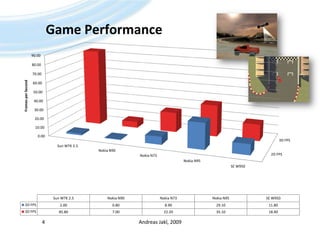
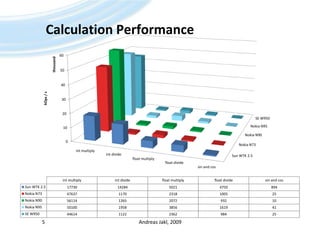
BenchmarksTake care of performanceMultiply a lot faster than divideNo hardware floating point support (mostly SW-emulated, available since CLDC 1.1)PC-Emulator no reference for phone performancePerformance of different phones can differ a LOTBenchmark resultsBased on SPMark Java06 Basic Editionhttp://www.futuremark.com/benchmarks/mobilebenchmarks/Andreas Jakl, 20093
Game PerformanceAndreas Jakl, 20094
Calculation PerformanceAndreas Jakl, 20095
GameCanvasOptimized for game loopsAndreas Jakl, 20096
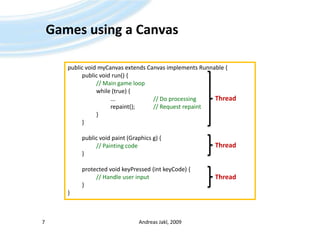
Games using a CanvasAndreas Jakl, 20097public void myCanvas extends Canvas implements Runnable {	public void run() {// Main game loop		while (true) {			... 			// Do processing			repaint();		// Request repaint		}	}	public void paint (Graphics g) {// Painting code	}	protected void keyPressed (intkeyCode) {// Handle user input	}}ThreadThreadThread
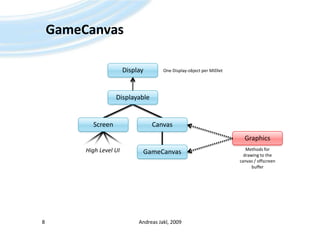
GameCanvasAndreas Jakl, 20098DisplayOne Display-object per MIDletDisplayableCanvasScreenGraphicsMethodsfordrawingtothecanvas / offscreenbufferGameCanvasHigh Level UI
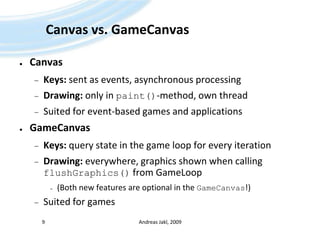
Canvas vs. GameCanvasCanvasKeys: sent as events, asynchronous processingDrawing: only in paint()-method, own threadSuited for event-based games and applicationsGameCanvasKeys: query state in the game loop for every iterationDrawing: everywhere, graphics shown when calling flushGraphics() from GameLoop(Both new features are optional in the GameCanvas!)Suited for gamesAndreas Jakl, 20099
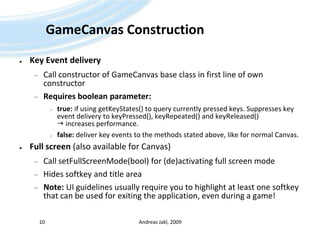
GameCanvas ConstructionKey Event deliveryCall constructor of GameCanvas base class in first line of own constructorRequires boolean parameter:true: if using getKeyStates() to query currently pressed keys. Suppresses key event delivery to keyPressed(), keyRepeated() and keyReleased()  increases performance.false: deliver key events to the methods stated above, like for normal Canvas.Full screen (also available for Canvas)Call setFullScreenMode(bool) for (de)activating full screen modeHides softkey and title areaNote: UI guidelines usually require you to highlight at least one softkey that can be used for exiting the application, even during a game!Andreas Jakl, 200910
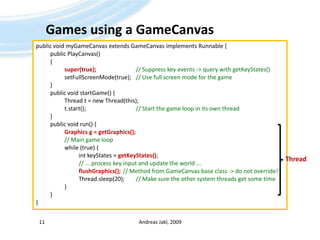
Games using a GameCanvasAndreas Jakl, 200911public void myGameCanvas extends GameCanvas implements Runnable {	public PlayCanvas()	{super(true);// Suppress key events -> query with getKeyStates()setFullScreenMode(true);	// Use full screen mode for the game	}	public void startGame() {		Thread t = new Thread(this);t.start();				// Start the game loop in its own thread	}	public void run() {		Graphics g = getGraphics(); 		// Main game loop		while (true) {intkeyStates = getKeyStates();// ... process key input and update the world ...flushGraphics();	// Method from GameCanvas base class -> do not override!Thread.sleep(20);	// Make sure the other system threads get some time		}	}}Thread
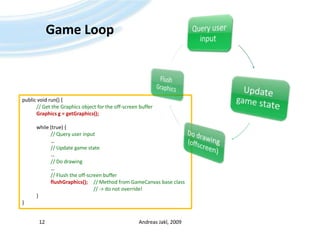
Game LoopAndreas Jakl, 200912public void run() {// Get the Graphics object for the off-screen bufferGraphics g = getGraphics();	while (true) {// Query user input		…// Update game state		…// Do drawing		…// Flush the off-screen bufferflushGraphics();	// Method from GameCanvas base class					// -> do not override!	}}
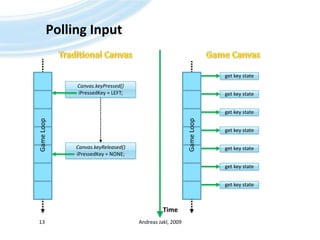
Polling InputAndreas Jakl, 200913Traditional CanvasGame Canvasget key stateCanvas.keyPressed()iPressedKey = LEFT;get key stateget key stateGame LoopGame Loopget key stateCanvas.keyReleased()iPressedKey = NONE;get key stateget key stateget key stateTime
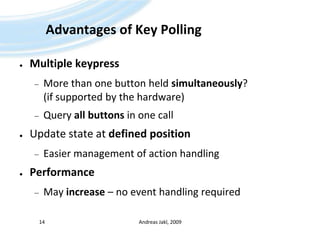
Advantages of Key PollingMultiple keypressMore than one button held simultaneously? (if supported by the hardware)Query all buttons in one callUpdate state at defined positionEasier management of action handlingPerformanceMay increase – no event handling requiredAndreas Jakl, 200914
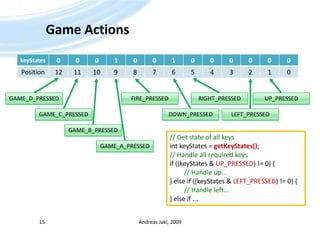
Game ActionsAndreas Jakl, 2009150123456789101112GAME_D_PRESSEDUP_PRESSEDRIGHT_PRESSEDFIRE_PRESSEDGAME_C_PRESSEDDOWN_PRESSEDLEFT_PRESSEDGAME_B_PRESSED// Get state of all keysintkeyStates = getKeyStates();// Handle all required keysif ((keyStates & UP_PRESSED) != 0) { // Handle up...} else if ((keyStates & LEFT_PRESSED) != 0) {// Handle left...} else if ...GAME_A_PRESSED
Game GraphicsUsingAndreas Jakl, 200916
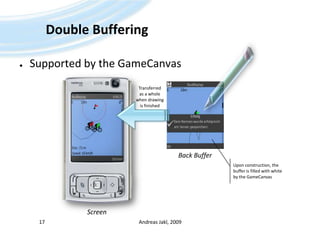
Double BufferingSupportedbytheGameCanvasAndreas Jakl, 200917Transferredas a wholewhen drawingis finishedBack BufferUpon construction, the buffer is filled with white by the GameCanvasScreen
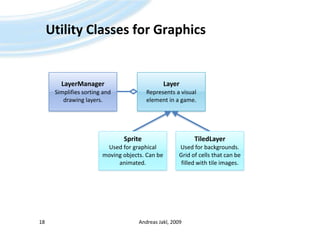
Utility Classes for GraphicsAndreas Jakl, 200918LayerRepresents a visual element in a game.LayerManagerSimplifies sorting and drawing layers.SpriteUsed for graphical moving objects. Can be animated.TiledLayerUsed for backgrounds. Grid of cells that can be filled with tile images.
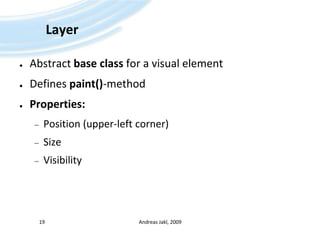
LayerAbstract base class for a visual elementDefines paint()-methodProperties:Position (upper-left corner)SizeVisibilityAndreas Jakl, 200919
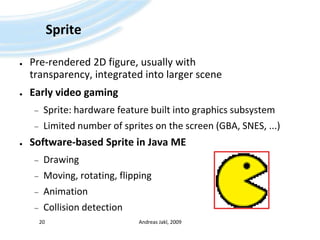
SpritePre-rendered 2D figure, usually with transparency, integrated into larger sceneEarly video gamingSprite: hardware feature built into graphics subsystemLimited number of sprites on the screen (GBA, SNES, ...)Software-based Sprite in Java MEDrawingMoving, rotating, flippingAnimationCollision detectionAndreas Jakl, 200920
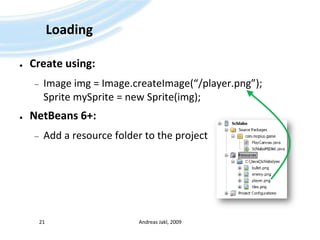
LoadingCreate using:Image img = Image.createImage(“/player.png”);Sprite mySprite = new Sprite(img);NetBeans 6+:Add a resource folder to the project Andreas Jakl, 200921
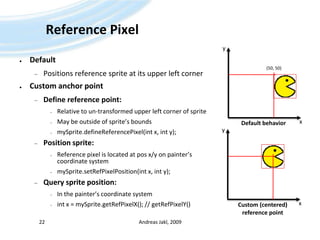
Reference PixelAndreas Jakl, 200922yDefaultPositions reference sprite at its upper left cornerCustom anchor pointDefine reference point:Relative to un-transformed upper left corner of spriteMay be outside of sprite’s boundsmySprite.defineReferencePixel(int x, int y);Position sprite:Reference pixel is located at pos x/y on painter’s coordinate systemmySprite.setRefPixelPosition(intx, int y);Query sprite position:In the painter’s coordinate systemint x = mySprite.getRefPixelX(); // getRefPixelY()(50, 50)xDefault behavioryxCustom (centered)reference point
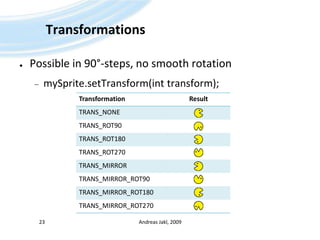
TransformationsPossible in 90°-steps, no smooth rotationmySprite.setTransform(int transform);Andreas Jakl, 200923
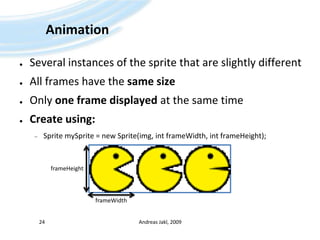
AnimationSeveral instances of the sprite that are slightly differentAll frames have the same sizeOnly one frame displayed at the same timeCreate using:Sprite mySprite = new Sprite(img, intframeWidth, intframeHeight);Andreas Jakl, 200924frameHeightframeWidth
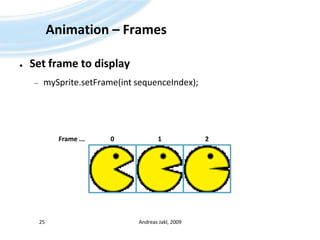
Animation – FramesSet frame to displaymySprite.setFrame(intsequenceIndex);Andreas Jakl, 200925Frame ...012
Animation – Frame SequenceFor continuous animations:int[] frameSequence = {0, 1, 2, 1};mySprite.setFrameSequence (frameSequence);...mySprite.nextFrame();Wraps automaticallyAndreas Jakl, 200926Frame ...012
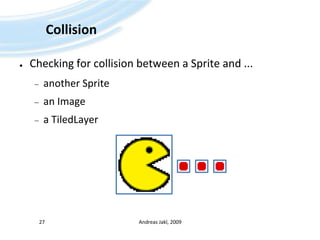
CollisionChecking for collision between a Sprite and ...another Spritean Imagea TiledLayerAndreas Jakl, 200927
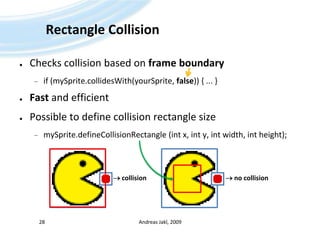
Rectangle CollisionChecks collision based on frame boundaryif (mySprite.collidesWith(yourSprite, false)) { ... }Fast and efficientPossible to define collision rectangle sizemySprite.defineCollisionRectangle (int x, int y, int width, int height);Andreas Jakl, 200928 collision no collision
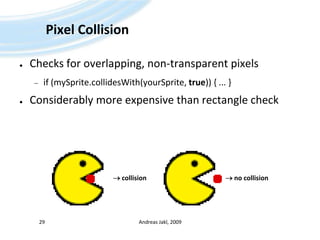
Pixel CollisionChecks for overlapping, non-transparent pixelsif (mySprite.collidesWith(yourSprite, true)) { ... }Considerably more expensive than rectangle checkAndreas Jakl, 200929 collision no collision
TiledLayerCreate beautiful backgroundsAndreas Jakl, 200930
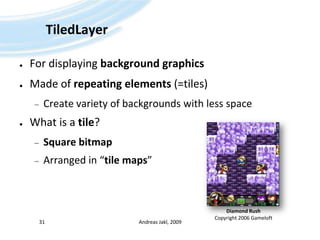
TiledLayerFor displaying background graphicsMade of repeating elements (=tiles)Create variety of backgrounds with less spaceWhat is a tile?Square bitmapArranged in “tile maps”Andreas Jakl, 200931Diamond RushCopyright 2006 Gameloft
How does it work?Original image (contains all tiles):Tile Map:Andreas Jakl, 200932private static final char bg_map [] = {4, 14, 1, 3, 5,10, 8, 4, 7, 5,3, 2, 2, 9, 11,12, 6, 6, 11, 1,1, 1, 1, 1, 1};
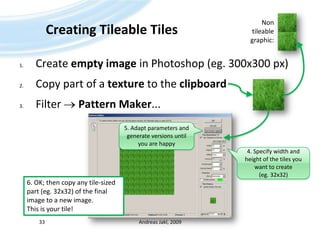
Creating Tileable TilesCreate empty image in Photoshop (eg. 300x300 px)Copy part of a texture to the clipboardFilter  Pattern Maker...Andreas Jakl, 200933Non tileable graphic:5. Adapt parameters and generate versions until you are happy4. Specify width and height of the tiles you want to create (eg. 32x32)6. OK; then copy any tile-sized part (eg. 32x32) of the final image to a new image. This is your tile!
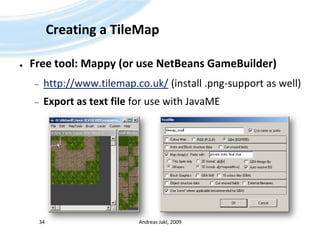
Creating a TileMapFree tool: Mappy (or use NetBeansGameBuilder)http://www.tilemap.co.uk/ (install .png-support as well)Export as text file for use with JavaMEAndreas Jakl, 200934
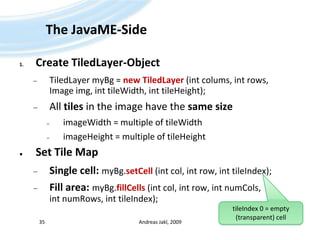
The JavaME-SideCreate TiledLayer-ObjectTiledLayermyBg = new TiledLayer(intcolums, int rows, Image img, inttileWidth, inttileHeight);All tiles in the image have the same sizeimageWidth = multiple of tileWidthimageHeight = multiple of tileHeightSet Tile MapSingle cell: myBg.setCell (intcol, int row, inttileIndex);Fill area: myBg.fillCells (intcol, int row, intnumCols, intnumRows, inttileIndex);Andreas Jakl, 200935tileIndex 0 = empty (transparent) cell
Assign Tile-ArrayAssign 1D Tile-array to tile map:Andreas Jakl, 200936final inttileCols = 5;		// Columns (width) of the tile mapfinal inttileRows = 5;		// Rows (height) of the tile mapfinal inttileSizePixelsW = 32;		// Width (pixels) of the individual tilesfinal inttileSizePixelsH = 32;	// Height (pixels) of the individual tilesTiledLayerbgLayer = new TiledLayer(tileCols, tileRows, Image.createImage ("/res/tiles.png"),tileSizePixelsW, tileSizePixelsH);for (inti = 0; i < bg_map.length; i++)		// Go through 1D array{int column = i % tileRows;// Current columnint row = (i - column) / tileCols;// Current rowbgLayer.setCell (column, row, bg_map[i]);	// Assign cell}
DrawingManually drawing the TileMap (without LayerManager)bgLayer.paint(Graphics g);Move layer (scrolling, ...)bgLayer.move(intxOffset, intyOffset);eg. calling move(-3, 0); moves layer 3 pixels to the rightAndreas Jakl, 200937
Animating TilesFor effects like water, wind brushing through trees, etc.Generate animated tile indexintanimTileIndex = bgLayer.createAnimatedTile(1);Parameter: Initial static tile index that will be displayedReturns negative index, this can be assigned to cells that should be animatedSwitch to different tilebgLayer.setAnimatedTile(animTileIndex, 2);Causes static tile 2 to be displayed instead of 1 for all cells that have the animTileIndex as contentAndreas Jakl, 200938
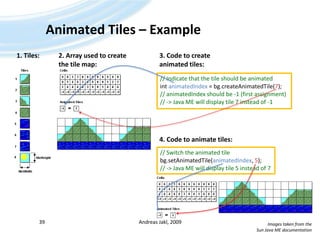
Animated Tiles – Example Andreas Jakl, 2009391. Tiles:2. Array used to createthe tile map:3. Code to create animated tiles:// Indicate that the tile should be animatedintanimatedIndex = bg.createAnimatedTile(7);// animatedIndex should be -1 (first assignment)// -> Java ME will display tile 7 instead of -14. Code to animate tiles:// Switch the animated tilebg.setAnimatedTile(animatedIndex, 5);// -> Java ME will display tile 5 instead of 7Images taken from theSun Java ME documentation
LayerManagerDon’t want to do all the work yourself?Andreas Jakl, 200940
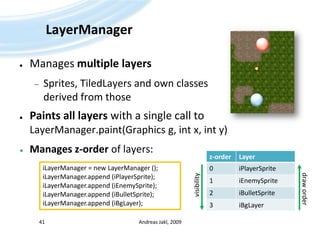
LayerManagerManages multiple layersSprites, TiledLayers and own classes derived from thosePaints all layers with a single call to LayerManager.paint(Graphics g, int x, int y)Manages z-order of layers:Andreas Jakl, 200941iLayerManager = new LayerManager ();iLayerManager.append (iPlayerSprite);iLayerManager.append (iEnemySprite);iLayerManager.append (iBulletSprite);iLayerManager.append (iBgLayer);visibilitydraw order
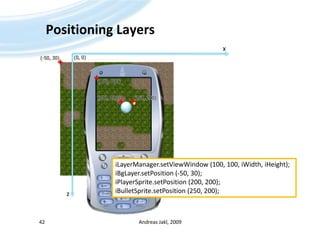
Positioning LayersAndreas Jakl, 200942x(0, 0)(-50, 30)(100, 100)(200, 200)(250, 200)iLayerManager.setViewWindow (100, 100, iWidth, iHeight);iBgLayer.setPosition (-50, 30);iPlayerSprite.setPosition (200, 200);iBulletSprite.setPosition (250, 200);z
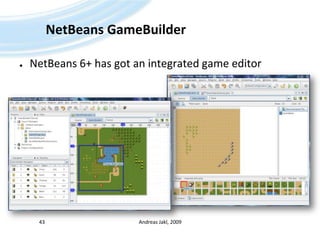
NetBeansGameBuilderNetBeans 6+ has got an integrated game editorAndreas Jakl, 200943
Thanks for your attentionThat’s it!Andreas Jakl, 200944

Java ME - 05 - Game API

  • 1.
    Java™Platform, Micro EditionPart5 – Game API1Andreas Jakl, 2009v3.0a – 19 April 2009
  • 2.
  • 3.
    BenchmarksTake care ofperformanceMultiply a lot faster than divideNo hardware floating point support (mostly SW-emulated, available since CLDC 1.1)PC-Emulator no reference for phone performancePerformance of different phones can differ a LOTBenchmark resultsBased on SPMark Java06 Basic Editionhttp://www.futuremark.com/benchmarks/mobilebenchmarks/Andreas Jakl, 20093
  • 4.
  • 5.
  • 6.
    GameCanvasOptimized for gameloopsAndreas Jakl, 20096
  • 7.
    Games using aCanvasAndreas Jakl, 20097public void myCanvas extends Canvas implements Runnable { public void run() {// Main game loop while (true) { ... // Do processing repaint(); // Request repaint } } public void paint (Graphics g) {// Painting code } protected void keyPressed (intkeyCode) {// Handle user input }}ThreadThreadThread
  • 8.
    GameCanvasAndreas Jakl, 20098DisplayOneDisplay-object per MIDletDisplayableCanvasScreenGraphicsMethodsfordrawingtothecanvas / offscreenbufferGameCanvasHigh Level UI
  • 9.
    Canvas vs. GameCanvasCanvasKeys:sent as events, asynchronous processingDrawing: only in paint()-method, own threadSuited for event-based games and applicationsGameCanvasKeys: query state in the game loop for every iterationDrawing: everywhere, graphics shown when calling flushGraphics() from GameLoop(Both new features are optional in the GameCanvas!)Suited for gamesAndreas Jakl, 20099
  • 10.
    GameCanvas ConstructionKey EventdeliveryCall constructor of GameCanvas base class in first line of own constructorRequires boolean parameter:true: if using getKeyStates() to query currently pressed keys. Suppresses key event delivery to keyPressed(), keyRepeated() and keyReleased()  increases performance.false: deliver key events to the methods stated above, like for normal Canvas.Full screen (also available for Canvas)Call setFullScreenMode(bool) for (de)activating full screen modeHides softkey and title areaNote: UI guidelines usually require you to highlight at least one softkey that can be used for exiting the application, even during a game!Andreas Jakl, 200910
  • 11.
    Games using aGameCanvasAndreas Jakl, 200911public void myGameCanvas extends GameCanvas implements Runnable { public PlayCanvas() {super(true);// Suppress key events -> query with getKeyStates()setFullScreenMode(true); // Use full screen mode for the game } public void startGame() { Thread t = new Thread(this);t.start(); // Start the game loop in its own thread } public void run() { Graphics g = getGraphics(); // Main game loop while (true) {intkeyStates = getKeyStates();// ... process key input and update the world ...flushGraphics(); // Method from GameCanvas base class -> do not override!Thread.sleep(20); // Make sure the other system threads get some time } }}Thread
  • 12.
    Game LoopAndreas Jakl,200912public void run() {// Get the Graphics object for the off-screen bufferGraphics g = getGraphics(); while (true) {// Query user input …// Update game state …// Do drawing …// Flush the off-screen bufferflushGraphics(); // Method from GameCanvas base class // -> do not override! }}
  • 13.
    Polling InputAndreas Jakl,200913Traditional CanvasGame Canvasget key stateCanvas.keyPressed()iPressedKey = LEFT;get key stateget key stateGame LoopGame Loopget key stateCanvas.keyReleased()iPressedKey = NONE;get key stateget key stateget key stateTime
  • 14.
    Advantages of KeyPollingMultiple keypressMore than one button held simultaneously? (if supported by the hardware)Query all buttons in one callUpdate state at defined positionEasier management of action handlingPerformanceMay increase – no event handling requiredAndreas Jakl, 200914
  • 15.
    Game ActionsAndreas Jakl,2009150123456789101112GAME_D_PRESSEDUP_PRESSEDRIGHT_PRESSEDFIRE_PRESSEDGAME_C_PRESSEDDOWN_PRESSEDLEFT_PRESSEDGAME_B_PRESSED// Get state of all keysintkeyStates = getKeyStates();// Handle all required keysif ((keyStates & UP_PRESSED) != 0) { // Handle up...} else if ((keyStates & LEFT_PRESSED) != 0) {// Handle left...} else if ...GAME_A_PRESSED
  • 16.
  • 17.
    Double BufferingSupportedbytheGameCanvasAndreas Jakl,200917Transferredas a wholewhen drawingis finishedBack BufferUpon construction, the buffer is filled with white by the GameCanvasScreen
  • 18.
    Utility Classes forGraphicsAndreas Jakl, 200918LayerRepresents a visual element in a game.LayerManagerSimplifies sorting and drawing layers.SpriteUsed for graphical moving objects. Can be animated.TiledLayerUsed for backgrounds. Grid of cells that can be filled with tile images.
  • 19.
    LayerAbstract base classfor a visual elementDefines paint()-methodProperties:Position (upper-left corner)SizeVisibilityAndreas Jakl, 200919
  • 20.
    SpritePre-rendered 2D figure,usually with transparency, integrated into larger sceneEarly video gamingSprite: hardware feature built into graphics subsystemLimited number of sprites on the screen (GBA, SNES, ...)Software-based Sprite in Java MEDrawingMoving, rotating, flippingAnimationCollision detectionAndreas Jakl, 200920
  • 21.
    LoadingCreate using:Image img= Image.createImage(“/player.png”);Sprite mySprite = new Sprite(img);NetBeans 6+:Add a resource folder to the project Andreas Jakl, 200921
  • 22.
    Reference PixelAndreas Jakl,200922yDefaultPositions reference sprite at its upper left cornerCustom anchor pointDefine reference point:Relative to un-transformed upper left corner of spriteMay be outside of sprite’s boundsmySprite.defineReferencePixel(int x, int y);Position sprite:Reference pixel is located at pos x/y on painter’s coordinate systemmySprite.setRefPixelPosition(intx, int y);Query sprite position:In the painter’s coordinate systemint x = mySprite.getRefPixelX(); // getRefPixelY()(50, 50)xDefault behavioryxCustom (centered)reference point
  • 23.
    TransformationsPossible in 90°-steps,no smooth rotationmySprite.setTransform(int transform);Andreas Jakl, 200923
  • 24.
    AnimationSeveral instances ofthe sprite that are slightly differentAll frames have the same sizeOnly one frame displayed at the same timeCreate using:Sprite mySprite = new Sprite(img, intframeWidth, intframeHeight);Andreas Jakl, 200924frameHeightframeWidth
  • 25.
    Animation – FramesSetframe to displaymySprite.setFrame(intsequenceIndex);Andreas Jakl, 200925Frame ...012
  • 26.
    Animation – FrameSequenceFor continuous animations:int[] frameSequence = {0, 1, 2, 1};mySprite.setFrameSequence (frameSequence);...mySprite.nextFrame();Wraps automaticallyAndreas Jakl, 200926Frame ...012
  • 27.
    CollisionChecking for collisionbetween a Sprite and ...another Spritean Imagea TiledLayerAndreas Jakl, 200927
  • 28.
    Rectangle CollisionChecks collisionbased on frame boundaryif (mySprite.collidesWith(yourSprite, false)) { ... }Fast and efficientPossible to define collision rectangle sizemySprite.defineCollisionRectangle (int x, int y, int width, int height);Andreas Jakl, 200928 collision no collision
  • 29.
    Pixel CollisionChecks foroverlapping, non-transparent pixelsif (mySprite.collidesWith(yourSprite, true)) { ... }Considerably more expensive than rectangle checkAndreas Jakl, 200929 collision no collision
  • 30.
  • 31.
    TiledLayerFor displaying backgroundgraphicsMade of repeating elements (=tiles)Create variety of backgrounds with less spaceWhat is a tile?Square bitmapArranged in “tile maps”Andreas Jakl, 200931Diamond RushCopyright 2006 Gameloft
  • 32.
    How does itwork?Original image (contains all tiles):Tile Map:Andreas Jakl, 200932private static final char bg_map [] = {4, 14, 1, 3, 5,10, 8, 4, 7, 5,3, 2, 2, 9, 11,12, 6, 6, 11, 1,1, 1, 1, 1, 1};
  • 33.
    Creating Tileable TilesCreateempty image in Photoshop (eg. 300x300 px)Copy part of a texture to the clipboardFilter  Pattern Maker...Andreas Jakl, 200933Non tileable graphic:5. Adapt parameters and generate versions until you are happy4. Specify width and height of the tiles you want to create (eg. 32x32)6. OK; then copy any tile-sized part (eg. 32x32) of the final image to a new image. This is your tile!
  • 34.
    Creating a TileMapFreetool: Mappy (or use NetBeansGameBuilder)http://www.tilemap.co.uk/ (install .png-support as well)Export as text file for use with JavaMEAndreas Jakl, 200934
  • 35.
    The JavaME-SideCreate TiledLayer-ObjectTiledLayermyBg= new TiledLayer(intcolums, int rows, Image img, inttileWidth, inttileHeight);All tiles in the image have the same sizeimageWidth = multiple of tileWidthimageHeight = multiple of tileHeightSet Tile MapSingle cell: myBg.setCell (intcol, int row, inttileIndex);Fill area: myBg.fillCells (intcol, int row, intnumCols, intnumRows, inttileIndex);Andreas Jakl, 200935tileIndex 0 = empty (transparent) cell
  • 36.
    Assign Tile-ArrayAssign 1DTile-array to tile map:Andreas Jakl, 200936final inttileCols = 5; // Columns (width) of the tile mapfinal inttileRows = 5; // Rows (height) of the tile mapfinal inttileSizePixelsW = 32; // Width (pixels) of the individual tilesfinal inttileSizePixelsH = 32; // Height (pixels) of the individual tilesTiledLayerbgLayer = new TiledLayer(tileCols, tileRows, Image.createImage ("/res/tiles.png"),tileSizePixelsW, tileSizePixelsH);for (inti = 0; i < bg_map.length; i++) // Go through 1D array{int column = i % tileRows;// Current columnint row = (i - column) / tileCols;// Current rowbgLayer.setCell (column, row, bg_map[i]); // Assign cell}
  • 37.
    DrawingManually drawing theTileMap (without LayerManager)bgLayer.paint(Graphics g);Move layer (scrolling, ...)bgLayer.move(intxOffset, intyOffset);eg. calling move(-3, 0); moves layer 3 pixels to the rightAndreas Jakl, 200937
  • 38.
    Animating TilesFor effectslike water, wind brushing through trees, etc.Generate animated tile indexintanimTileIndex = bgLayer.createAnimatedTile(1);Parameter: Initial static tile index that will be displayedReturns negative index, this can be assigned to cells that should be animatedSwitch to different tilebgLayer.setAnimatedTile(animTileIndex, 2);Causes static tile 2 to be displayed instead of 1 for all cells that have the animTileIndex as contentAndreas Jakl, 200938
  • 39.
    Animated Tiles –Example Andreas Jakl, 2009391. Tiles:2. Array used to createthe tile map:3. Code to create animated tiles:// Indicate that the tile should be animatedintanimatedIndex = bg.createAnimatedTile(7);// animatedIndex should be -1 (first assignment)// -> Java ME will display tile 7 instead of -14. Code to animate tiles:// Switch the animated tilebg.setAnimatedTile(animatedIndex, 5);// -> Java ME will display tile 5 instead of 7Images taken from theSun Java ME documentation
  • 40.
    LayerManagerDon’t want todo all the work yourself?Andreas Jakl, 200940
  • 41.
    LayerManagerManages multiple layersSprites,TiledLayers and own classes derived from thosePaints all layers with a single call to LayerManager.paint(Graphics g, int x, int y)Manages z-order of layers:Andreas Jakl, 200941iLayerManager = new LayerManager ();iLayerManager.append (iPlayerSprite);iLayerManager.append (iEnemySprite);iLayerManager.append (iBulletSprite);iLayerManager.append (iBgLayer);visibilitydraw order
  • 42.
    Positioning LayersAndreas Jakl,200942x(0, 0)(-50, 30)(100, 100)(200, 200)(250, 200)iLayerManager.setViewWindow (100, 100, iWidth, iHeight);iBgLayer.setPosition (-50, 30);iPlayerSprite.setPosition (200, 200);iBulletSprite.setPosition (250, 200);z
  • 43.
    NetBeansGameBuilderNetBeans 6+ hasgot an integrated game editorAndreas Jakl, 200943
  • 44.
    Thanks for yourattentionThat’s it!Andreas Jakl, 200944