Qt Communication


Andreas Jakl
Senior Technical Consultant
Forum Nokia

                              20 September, 2010
                                          v3.0.0
Contents
  – Devices and streams
  – Files
  – Sockets and HTTP
  – XML
  – Internationalization
Device Abstraction
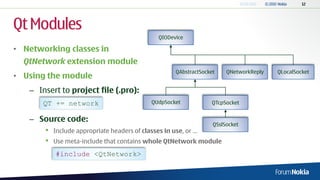
• QIODevice is base class for all “devices” capable of reading and writing
  blocks of bytes
                                       QIODevice


     QBuffer       QFile        QProcess     QAbstractSocket    QNetworkReply   QLocalSocket


               QTemporaryFile        QUdpSocket           QTcpSocket


                                                           QSslSocket
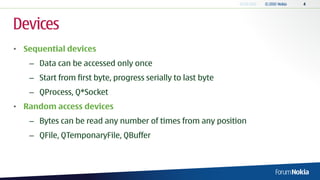
Devices
• Sequential devices
   – Data can be accessed only once
   – Start from first byte, progress serially to last byte
   – QProcess, Q*Socket
• Random access devices
   – Bytes can be read any number of times from any position
   – QFile, QTemponaryFile, QBuffer
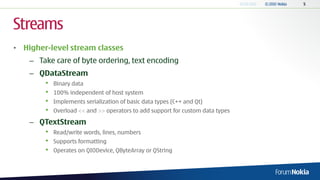
Streams
• Higher-level stream classes
    – Take care of byte ordering, text encoding
    – QDataStream
        •   Binary data
        •   100% independent of host system
        •   Implements serialization of basic data types (C++ and Qt)
        •   Overload << and >> operators to add support for custom data types

    – QTextStream
        •   Read/write words, lines, numbers
        •   Supports formatting
        •   Operates on QIODevice, QByteArray or QString
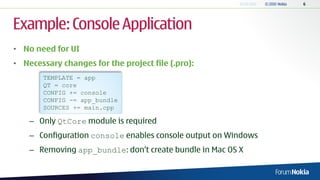
Example: Console Application
• No need for UI
• Necessary changes for the project file (.pro):
       TEMPLATE = app
       QT = core
       CONFIG += console
       CONFIG -= app_bundle
       SOURCES += main.cpp

    – Only QtCore module is required
    – Configuration console enables console output on Windows
    – Removing app_bundle: don„t create bundle in Mac OS X
Opening Files
                                       main.cpp
•   No event loop required             #include   <QtCore>
                                       #include   <QDebug>
     → no QCoreApplication             #include   <iostream>
                                       #include   <stdio.h>
•   Error Handling
                                       int main(int argc, char* argv[])
     – Through standard error stream   {
                                         QFile outFile("data.dat");
        (std:cerr) → defaults to         if (!outFile.open(QIODevice::WriteOnly)) {
                                           std::cerr << "Cannot open file for writing: " <<
        console                               outFile.errorString().toStdString() << std::endl;
                                           return 1;
     – <iostream> has overload           }
       for std::string → convert
       QString with
       .toStdString()
Writing Data
                             main.cpp
• Data representation        QDataStream out(&outFile);
                              // Serialization format of data stream changes with
                              // new version of Qt to accommodate new
   – Specify data format      // functionality.
                              out.setVersion(QDataStream::Qt_4_5);
      version to maintain
                              // Use specific Qt datatypes to make sure integers
      forward and backward    // are the same on all platforms!
                              quint32 outValue = 12345678;
      compatibility           QTime outTime = QTime::currentTime();
                              QVariant outVar("Some text");
                              out << outValue << outTime << outVar;
   – Platform independent
                              outFile.close();
      (default: big endian
                                        Recommended: extend the example
      encoding)                                 with brief file header.
                                         1. Magic String: check if file is really
                                                   from your app.
                                        2. Version number: correctly import
                                        from old versions of your settings file.
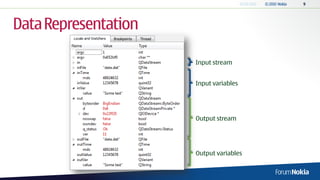
Data Representation

                      Input stream


                      Input variables


                      Output stream


                      Output variables
main.cpp
Reading Files                            QFile inFile("data.dat");
                                          if (!inFile.open(QIODevice::ReadOnly)) {
                                            std::cerr << "Cannot open file for reading: " <<
                                              inFile.errorString().toStdString() << std::endl;
•   Reading similar to writing              return 1;
                                          }
     – Use same order and data
                                             QDataStream in(&inFile);
       stream version                        in.setVersion(QDataStream::Qt_4_5);
     – Streams don‟t save variable           quint32 inValue;
       type                                  QTime inTime;
                                             QVariant inVar;
•   QVariant recognizes type
                                             // Read values in same order as they were written
     – Here: output using qDebug()           in >> inValue >> inTime >> inVar;
       instead of standard streams           qDebug() << "Variant type:" << inVar.typeName() <<
                                                         ", contents:" << inVar.toString();
     – Advantage: direct serialization
       of Qt data types                      inFile.close();
                                             return 0;
                                         }
Communication


                Image Credit: NASA
Qt Modules
                                                QIODevice

• Networking classes in
  QtNetwork extension module
                                                      QAbstractSocket    QNetworkReply   QLocalSocket
• Using the module
   – Insert to project file (.pro):
       QT += network                         QUdpSocket            QTcpSocket


   – Source code:
                                                                    QSslSocket
       •   Include appropriate headers of classes in use, or …
       •   Use meta-include that contains whole QtNetwork module

           #include <QtNetwork>
Sockets
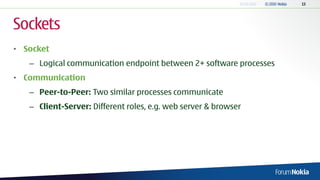
• Socket
   – Logical communication endpoint between 2+ software processes
• Communication
   – Peer-to-Peer: Two similar processes communicate
   – Client-Server: Different roles, e.g. web server & browser
Connection
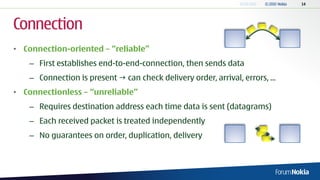
• Connection-oriented – “reliable”
   – First establishes end-to-end-connection, then sends data
   – Connection is present  can check delivery order, arrival, errors, ...
• Connectionless – “unreliable”
   – Requires destination address each time data is sent (datagrams)
   – Each received packet is treated independently
   – No guarantees on order, duplication, delivery
TCP
• Stream-oriented protocol (“reliable”)
    – Often preferable to HTTP in the mobile context:
      less overhead
• Implementation provided by: QTcpSocket
    – Either use instance directly or derive from it
    – Operations performed asynchronously
    – Status changes and errors: emitted via signals
    – Indirectly derived from QIODevice: allows QDataStream and
      QTextStream
Servers and UDP
• TCP Server: QTcpServer
   – Single- or multi-threaded
   – See Fortune Server example from Qt SDK
• UDP (“unreliable”)
   – Connectionless
   – No extra server class required
   – Instead: use bind() of QUdpSocket
   – Data transfer: smaller datagrams
High Level Network Operations
•   For communicating with services:
     – Use high level classes for common protocols
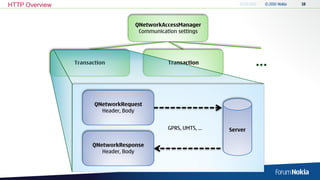
     – QNetworkAccessManager
          •   Coordinates multiple network requests
          •   Creates and monitors the requests
          •   Currently supports: HTTP, FTP and file access
     – QNetworkRequest                                              The dedicated QHttp
          •   Represents individual request                         and QFtp classes are
                                                                        deprecated.
          •   Contains request header, URL, etc.
     – QNetworkReply
          •   Created by manager
          •   Contains response header, URL, reply contents, etc.
HTTP Overview


                                   QNetworkAccessManager
                                    Communication settings


                Transaction                   Transaction              …

                       QNetworkRequest
                         Header, Body


                                              GPRS, UMTS, …   Server

                      QNetworkResponse
                         Header, Body
HTTP Protocol
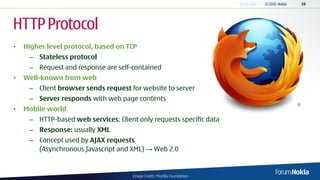
•   Higher level protocol, based on TCP
     – Stateless protocol
     – Request and response are self-contained
•   Well-known from web
     – Client browser sends request for website to server
     – Server responds with web page contents
•   Mobile world
     – HTTP-based web services: Client only requests specific data
     – Response: usually XML
     – Concept used by AJAX requests
       (Asynchronous Javascript and XML) → Web 2.0


                                      Image Credit: Mozilla Foundation
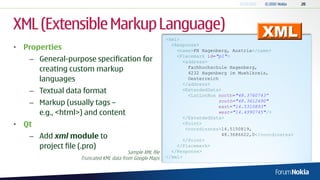
XML (Extensible Markup Language)
                                                         <kml>
• Properties                                               <Response>
                                                             <name>FH Hagenberg, Austria</name>
                                                             <Placemark id="p1">
   – General-purpose specification for                          <address>
     creating custom markup                                       Fachhochschule Hagenberg,
                                                                  4232 Hagenberg im Muehlkreis,
     languages                                                    Oesterreich
                                                                </address>
   – Textual data format                                        <ExtendedData>
                                                                  <LatLonBox north="48.3760743“
   – Markup (usually tags –                                                  south="48.3612490"
                                                                             east="14.5310893"
     e.g., <html>) and content                                               west="14.4990745"/>
                                                                </ExtendedData>
• Qt                                                            <Point>
                                                                 <coordinates>14.5150819,
   – Add xml module to                                          </Point>
                                                                              48.3686622,0</coordinates>

     project file (.pro)                                     </Placemark>
                                       Sample XML file     </Response>
                 Truncated KML data from Google Maps     </kml>
Parsing XML
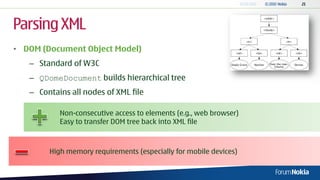
• DOM (Document Object Model)
   – Standard of W3C
   – QDomeDocument builds hierarchical tree
   – Contains all nodes of XML file

           Non-consecutive access to elements (e.g., web browser)
           Easy to transfer DOM tree back into XML file


        High memory requirements (especially for mobile devices)
Parsing XML
• SAX (Simple API for XML)
   – Event-driven API: QXmlSimpleReader
       •    Triggers events; e.g., when encountering opening / closing tag
       •    Override virtual event handler methods


              More lightweight than DOM


           More difficult to manipulate structure of data
               (already handled data is discarded)
           Parsing logic distributed over various functions, based
               on tag type, not on currently parsed contents
Parsing XML
• Pull Parsing
    – Iterator over XML elements (QXmlStreamReader)
    – Application controls process of parsing the file
    – Methods pull tokens from reader one after another

            Lightweight
            More straightforward to understand and maintain


         More difficult to manipulate structure of data
Parsing XML
• XQuery / XPath (W3C)
   – Language to query XML data structure
   – Doesn‟t require manual procedural programming
   – Implementation: QtXmlPatterns


           Easy access to specific information within XML


        No support for updating XML documents
        Lacks full text search
Internationalization
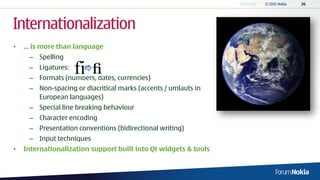
•   ... is more than language
     – Spelling
     – Ligatures:
     – Formats (numbers, dates, currencies)
     – Non-spacing or diacritical marks (accents / umlauts in
       European languages)
     – Special line breaking behaviour
     – Character encoding
     – Presentation conventions (bidirectional writing)
     – Input techniques
•   Internationalization support built into Qt widgets & tools
Qt Linguist
• Tool to translate your application
    – Translation files
      (.ts, xml-based) extracted from
      your source code
    – Qt Linguist only needs xml file 
      simple for external translators
• Provides validation and preview
  (for Qt Designer-generated UIs)
Preparing your Application
• Mark user-visible strings for translation with tr()
    – Inside functions in QObject subclasses that use the Q_OBJECT macro:
                      label = new QLabel("Hello World"), this);


                    label = new QLabel(tr("Hello World"), this);

    – Other text-positions within your source code:
        •   Use tr() from other QObject-derived class
        •   QCoreApplication::translate()
        •   Completely outside functions: QT_TR_NOOP() / QT_TRANSLATE_NOOP() macros
Translation Context
• Translation might be different according to context
    – “Open” for file in German: “Öffnen”
    – “Open” for Internet connection in German: “Aufbauen”
• Additional Information for the Translator
    – Class name automatically provided by Qt Linguist
    – Custom comments through 2nd parameter of tr():
        •   Add explanation for context or usage area
                   setWindowTitle(tr("Welcome", "Window title"));

    – Provide even more through TRANSLATOR comments
Plural, Keyboard Accelerators
• Plural: provide extra translations depending on a value
       int nrHellos = 1;
       label2 = new QLabel(tr("Said hello %n time(s)", "", nrHellos));


    – More information:
      http://qt.nokia.com/doc/qq/qq19-plurals.html
• Also translate keyboard accelerators
       exitAct = new QAction(tr("E&xit"), this);
       exitAct->setShortcut(tr("Ctrl+Q", "Quit"));
Add Languages
•   Edit the .pro file and add desired translation(s):
                  TARGET = translator1
                  TEMPLATE = app
                  SOURCES += main.cpp 
                      mywidget.cpp
                  HEADERS += mywidget.h
                  FORMS +=
                  TRANSLATIONS = translator1_de.ts 
                                 translator1_fr.ts

•   Run lupdate <.pro-filename>
     – Finds translatable strings in source code, headers and Qt Designer files
     – Generates/updates XML file for each language
     – Translate these files with Qt Linguist
Finished Translations?
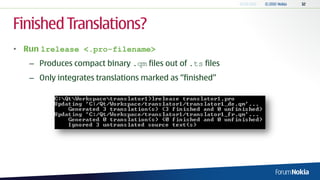
• Run lrelease <.pro-filename>
   – Produces compact binary .qm files out of .ts files
   – Only integrates translations marked as “finished”
Loading Translations
• To use translations: QTranslator
    – Usually initialized at beginning of main()

 // Get locale of the system
 QString locale = QLocale::system().name();
 // Load the correct translation file (if available)
 QTranslator translator;
 translator.load(QString("translator1_") + locale, qApp->applicationDirPath());
 // Adds the loaded file to list of active translation files
 app.installTranslator(&translator);
Loading Translations II                                        Locale: de_AT (Austrian dialect of German language)
                                                                   translator1_de_at.qm
                                                                       translator1_de_at
• Locale:                                                                  translator1_de.qm
                                                                               translator1_de
    – e.g., de_AT                                                                  translator1.qm
                                                                                       translator1
• QTranslator::load()
    – Second parameter: directory of .qm file(s)
    – Automatically tries to load more generic translations
 // Get locale of the system
 QString locale = QLocale::system().name();
 // Load the correct translation file (if available)
 QTranslator translator;
 translator.load(QString("translator1_") + locale, qApp->applicationDirPath());
 // Adds the loaded file to list of active translation files
 app.installTranslator(&translator);
Troubleshooting?
• Not loading the translations?
    – Make sure the translation files are found
    – Copy *.qm to directory of executable if in doubt!
Thank You.

06 - Qt Communication

  • 1.
    Qt Communication Andreas Jakl SeniorTechnical Consultant Forum Nokia 20 September, 2010 v3.0.0
  • 2.
    Contents –Devices and streams – Files – Sockets and HTTP – XML – Internationalization
  • 3.
    Device Abstraction • QIODeviceis base class for all “devices” capable of reading and writing blocks of bytes QIODevice QBuffer QFile QProcess QAbstractSocket QNetworkReply QLocalSocket QTemporaryFile QUdpSocket QTcpSocket QSslSocket
  • 4.
    Devices • Sequential devices – Data can be accessed only once – Start from first byte, progress serially to last byte – QProcess, Q*Socket • Random access devices – Bytes can be read any number of times from any position – QFile, QTemponaryFile, QBuffer
  • 5.
    Streams • Higher-level streamclasses – Take care of byte ordering, text encoding – QDataStream • Binary data • 100% independent of host system • Implements serialization of basic data types (C++ and Qt) • Overload << and >> operators to add support for custom data types – QTextStream • Read/write words, lines, numbers • Supports formatting • Operates on QIODevice, QByteArray or QString
  • 6.
    Example: Console Application •No need for UI • Necessary changes for the project file (.pro): TEMPLATE = app QT = core CONFIG += console CONFIG -= app_bundle SOURCES += main.cpp – Only QtCore module is required – Configuration console enables console output on Windows – Removing app_bundle: don„t create bundle in Mac OS X
  • 7.
    Opening Files main.cpp • No event loop required #include <QtCore> #include <QDebug> → no QCoreApplication #include <iostream> #include <stdio.h> • Error Handling int main(int argc, char* argv[]) – Through standard error stream { QFile outFile("data.dat"); (std:cerr) → defaults to if (!outFile.open(QIODevice::WriteOnly)) { std::cerr << "Cannot open file for writing: " << console outFile.errorString().toStdString() << std::endl; return 1; – <iostream> has overload } for std::string → convert QString with .toStdString()
  • 8.
    Writing Data main.cpp • Data representation QDataStream out(&outFile); // Serialization format of data stream changes with // new version of Qt to accommodate new – Specify data format // functionality. out.setVersion(QDataStream::Qt_4_5); version to maintain // Use specific Qt datatypes to make sure integers forward and backward // are the same on all platforms! quint32 outValue = 12345678; compatibility QTime outTime = QTime::currentTime(); QVariant outVar("Some text"); out << outValue << outTime << outVar; – Platform independent outFile.close(); (default: big endian Recommended: extend the example encoding) with brief file header. 1. Magic String: check if file is really from your app. 2. Version number: correctly import from old versions of your settings file.
  • 9.
    Data Representation Input stream Input variables Output stream Output variables
  • 10.
    main.cpp Reading Files QFile inFile("data.dat"); if (!inFile.open(QIODevice::ReadOnly)) { std::cerr << "Cannot open file for reading: " << inFile.errorString().toStdString() << std::endl; • Reading similar to writing return 1; } – Use same order and data QDataStream in(&inFile); stream version in.setVersion(QDataStream::Qt_4_5); – Streams don‟t save variable quint32 inValue; type QTime inTime; QVariant inVar; • QVariant recognizes type // Read values in same order as they were written – Here: output using qDebug() in >> inValue >> inTime >> inVar; instead of standard streams qDebug() << "Variant type:" << inVar.typeName() << ", contents:" << inVar.toString(); – Advantage: direct serialization of Qt data types inFile.close(); return 0; }
  • 11.
    Communication Image Credit: NASA
  • 12.
    Qt Modules QIODevice • Networking classes in QtNetwork extension module QAbstractSocket QNetworkReply QLocalSocket • Using the module – Insert to project file (.pro): QT += network QUdpSocket QTcpSocket – Source code: QSslSocket • Include appropriate headers of classes in use, or … • Use meta-include that contains whole QtNetwork module #include <QtNetwork>
  • 13.
    Sockets • Socket – Logical communication endpoint between 2+ software processes • Communication – Peer-to-Peer: Two similar processes communicate – Client-Server: Different roles, e.g. web server & browser
  • 14.
    Connection • Connection-oriented –“reliable” – First establishes end-to-end-connection, then sends data – Connection is present  can check delivery order, arrival, errors, ... • Connectionless – “unreliable” – Requires destination address each time data is sent (datagrams) – Each received packet is treated independently – No guarantees on order, duplication, delivery
  • 15.
    TCP • Stream-oriented protocol(“reliable”) – Often preferable to HTTP in the mobile context: less overhead • Implementation provided by: QTcpSocket – Either use instance directly or derive from it – Operations performed asynchronously – Status changes and errors: emitted via signals – Indirectly derived from QIODevice: allows QDataStream and QTextStream
  • 16.
    Servers and UDP •TCP Server: QTcpServer – Single- or multi-threaded – See Fortune Server example from Qt SDK • UDP (“unreliable”) – Connectionless – No extra server class required – Instead: use bind() of QUdpSocket – Data transfer: smaller datagrams
  • 17.
    High Level NetworkOperations • For communicating with services: – Use high level classes for common protocols – QNetworkAccessManager • Coordinates multiple network requests • Creates and monitors the requests • Currently supports: HTTP, FTP and file access – QNetworkRequest The dedicated QHttp • Represents individual request and QFtp classes are deprecated. • Contains request header, URL, etc. – QNetworkReply • Created by manager • Contains response header, URL, reply contents, etc.
  • 18.
    HTTP Overview QNetworkAccessManager Communication settings Transaction Transaction … QNetworkRequest Header, Body GPRS, UMTS, … Server QNetworkResponse Header, Body
  • 19.
    HTTP Protocol • Higher level protocol, based on TCP – Stateless protocol – Request and response are self-contained • Well-known from web – Client browser sends request for website to server – Server responds with web page contents • Mobile world – HTTP-based web services: Client only requests specific data – Response: usually XML – Concept used by AJAX requests (Asynchronous Javascript and XML) → Web 2.0 Image Credit: Mozilla Foundation
  • 20.
    XML (Extensible MarkupLanguage) <kml> • Properties <Response> <name>FH Hagenberg, Austria</name> <Placemark id="p1"> – General-purpose specification for <address> creating custom markup Fachhochschule Hagenberg, 4232 Hagenberg im Muehlkreis, languages Oesterreich </address> – Textual data format <ExtendedData> <LatLonBox north="48.3760743“ – Markup (usually tags – south="48.3612490" east="14.5310893" e.g., <html>) and content west="14.4990745"/> </ExtendedData> • Qt <Point> <coordinates>14.5150819, – Add xml module to </Point> 48.3686622,0</coordinates> project file (.pro) </Placemark> Sample XML file </Response> Truncated KML data from Google Maps </kml>
  • 21.
    Parsing XML • DOM(Document Object Model) – Standard of W3C – QDomeDocument builds hierarchical tree – Contains all nodes of XML file Non-consecutive access to elements (e.g., web browser) Easy to transfer DOM tree back into XML file High memory requirements (especially for mobile devices)
  • 22.
    Parsing XML • SAX(Simple API for XML) – Event-driven API: QXmlSimpleReader • Triggers events; e.g., when encountering opening / closing tag • Override virtual event handler methods More lightweight than DOM More difficult to manipulate structure of data (already handled data is discarded) Parsing logic distributed over various functions, based on tag type, not on currently parsed contents
  • 23.
    Parsing XML • PullParsing – Iterator over XML elements (QXmlStreamReader) – Application controls process of parsing the file – Methods pull tokens from reader one after another Lightweight More straightforward to understand and maintain More difficult to manipulate structure of data
  • 24.
    Parsing XML • XQuery/ XPath (W3C) – Language to query XML data structure – Doesn‟t require manual procedural programming – Implementation: QtXmlPatterns Easy access to specific information within XML No support for updating XML documents Lacks full text search
  • 25.
  • 26.
    Internationalization • ... is more than language – Spelling – Ligatures: – Formats (numbers, dates, currencies) – Non-spacing or diacritical marks (accents / umlauts in European languages) – Special line breaking behaviour – Character encoding – Presentation conventions (bidirectional writing) – Input techniques • Internationalization support built into Qt widgets & tools
  • 27.
    Qt Linguist • Toolto translate your application – Translation files (.ts, xml-based) extracted from your source code – Qt Linguist only needs xml file  simple for external translators • Provides validation and preview (for Qt Designer-generated UIs)
  • 28.
    Preparing your Application •Mark user-visible strings for translation with tr() – Inside functions in QObject subclasses that use the Q_OBJECT macro: label = new QLabel("Hello World"), this); label = new QLabel(tr("Hello World"), this); – Other text-positions within your source code: • Use tr() from other QObject-derived class • QCoreApplication::translate() • Completely outside functions: QT_TR_NOOP() / QT_TRANSLATE_NOOP() macros
  • 29.
    Translation Context • Translationmight be different according to context – “Open” for file in German: “Öffnen” – “Open” for Internet connection in German: “Aufbauen” • Additional Information for the Translator – Class name automatically provided by Qt Linguist – Custom comments through 2nd parameter of tr(): • Add explanation for context or usage area setWindowTitle(tr("Welcome", "Window title")); – Provide even more through TRANSLATOR comments
  • 30.
    Plural, Keyboard Accelerators •Plural: provide extra translations depending on a value int nrHellos = 1; label2 = new QLabel(tr("Said hello %n time(s)", "", nrHellos)); – More information: http://qt.nokia.com/doc/qq/qq19-plurals.html • Also translate keyboard accelerators exitAct = new QAction(tr("E&xit"), this); exitAct->setShortcut(tr("Ctrl+Q", "Quit"));
  • 31.
    Add Languages • Edit the .pro file and add desired translation(s): TARGET = translator1 TEMPLATE = app SOURCES += main.cpp mywidget.cpp HEADERS += mywidget.h FORMS += TRANSLATIONS = translator1_de.ts translator1_fr.ts • Run lupdate <.pro-filename> – Finds translatable strings in source code, headers and Qt Designer files – Generates/updates XML file for each language – Translate these files with Qt Linguist
  • 32.
    Finished Translations? • Runlrelease <.pro-filename> – Produces compact binary .qm files out of .ts files – Only integrates translations marked as “finished”
  • 33.
    Loading Translations • Touse translations: QTranslator – Usually initialized at beginning of main() // Get locale of the system QString locale = QLocale::system().name(); // Load the correct translation file (if available) QTranslator translator; translator.load(QString("translator1_") + locale, qApp->applicationDirPath()); // Adds the loaded file to list of active translation files app.installTranslator(&translator);
  • 34.
    Loading Translations II Locale: de_AT (Austrian dialect of German language) translator1_de_at.qm translator1_de_at • Locale: translator1_de.qm translator1_de – e.g., de_AT translator1.qm translator1 • QTranslator::load() – Second parameter: directory of .qm file(s) – Automatically tries to load more generic translations // Get locale of the system QString locale = QLocale::system().name(); // Load the correct translation file (if available) QTranslator translator; translator.load(QString("translator1_") + locale, qApp->applicationDirPath()); // Adds the loaded file to list of active translation files app.installTranslator(&translator);
  • 35.
    Troubleshooting? • Not loadingthe translations? – Make sure the translation files are found – Copy *.qm to directory of executable if in doubt!
  • 36.